
There is no single best AI video editor. It depends on the job: Descript for transcript-based editing, Opus Clip for long-to-short clipping, Runway for generative video, and an SDK when editing must live in your own app. Banuba Video Editor SDK is a production-ready mobile video editing engine for iOS, Android, Flutter, and React Native that reduces video-feature integration from months to weeks. Banuba builds that SDK and wrote this guide, so entry 9 is ours.
The other eight are the tools we would send you to instead, and for editing your own footage several of them are better than anything we make. This guide covers what AI video editors actually do, the nine tools worth shortlisting, and how to tell which category you are really shopping in.
[navigation]
TL;DR:
- No tool wins outright. Descript is the strongest transcript-based editor, Opus Clip is the strongest long-to-short clipper, Runway is the strongest generative video tool, and Banuba Video Editor SDK is the option when the editor has to ship inside your own product rather than run on your desktop.
- The two best free options are genuinely free, not trials. DaVinci Resolve's free version is a complete professional editor, and CapCut is free to download on desktop, mobile and the browser.
- Perpetual licences survived. DaVinci Resolve Studio is a one-off $295 and Final Cut Pro is a one-off $299.99. Adobe Premiere is subscription only and has no perpetual option at all.
- Credits, not seats, are now the unit of cost. Descript, Runway, Opus Clip and Filmora all meter AI work in credits that reset monthly. Banuba Video Editor SDK is priced differently again: MAU-based, with no per-developer-seat fees and add-ons quoted separately.
- If you are building a product rather than editing footage, none of the eight consumer editors solve your problem. Banuba Video Editor SDK covers iOS, Android, Flutter and React Native and adds about 25 MB to app download size on average.
- Clipping is turning into an API category. Opus Clip ships a public API and an MCP server, and Runway runs a separate developer platform. Banuba Video Editor SDK ships agent skills for Claude Code, Codex and Qwen Code.
What Are AI Video Editors
An AI video editor is an application that uses machine learning and computer vision to do editing work that used to be manual: transcribing speech, finding the good parts of a take, separating a person from a background, tracking an object across frames, matching colour between shots, or reframing a wide shot for a vertical feed.
The important shift since these tools first appeared is that AI stopped being a single button and became the interface. Descript's Underlord is an AI co-editor that sits inside the timeline. Adobe's Media Intelligence lets you search footage by describing it in plain language. Opus Clip watches a two-hour recording and proposes the clips worth posting. In each case the model is not adding an effect, it is deciding what you should be looking at.
That same capability is also sold as infrastructure. Banuba Video Editor SDK packages a mobile editing engine that product teams embed in their own iOS, Android, Flutter and React Native apps, so the end user edits inside your app instead of exporting to someone else's. Integration can take under 10 minutes in some cases, and it reduces video-feature integration from months to weeks.
3 Types of AI Video Editing Software
By where the processing happens, AI video editing tools split into three types:
- Browser and cloud editors. You upload source files to a hosted service and edit in the browser. Descript, Opus Clip, Runway and CapCut's online suite all work this way. The upside is that heavy models run on someone else's hardware. The downside is upload time and per-file size limits.
- Mobile video editors. You edit on a phone or tablet. These are either standalone apps such as CapCut or Adobe Premiere on mobile, or editing built directly into another app, the way TikTok and Instagram do it. This second pattern is what a video editor SDK exists to serve.
- Desktop editors. Installed software such as DaVinci Resolve, Adobe Premiere, Final Cut Pro and Filmora. Desktop still wins on long-form work, high bit-rate footage, colour and audio post, and anything where you need the whole project on local storage.
One category sits next to these three without belonging to them: AI video generators. Runway, and Adobe's Firefly features inside Premiere, create footage from a prompt rather than editing footage you shot. Generation and editing are converging, but they are still separate buying decisions, and a generator on its own will not cut your podcast.

6 Ways AI Video Software Empowers Brands
For companies, AI editors are mostly a throughput story. Whether you need short videos for social media, paid ads, product reviews or customer testimonials, the tool removes the parts of the job that were never creative.
Six ways teams get value from them:
- Cut the time between shoot and post. Transcription, rough-cut assembly and caption burn-in happen on import rather than as three separate passes.
- Automate the repetitive edit. Filler-word removal, silence trimming and beat syncing are rules, and rules are exactly what a model handles well.
- Reduce production spend. A single editor with AI assistance covers volume that previously needed an agency retainer.
- Let non-editors ship. Marketers, support teams and founders can produce watchable video without learning a timeline.
- Reformat once, publish everywhere. Auto-reframe turns one 16:9 master into vertical and square versions without a manual re-crop per platform.
- Improve engagement, not just volume. Captions, punchier pacing and cleaner audio are the changes that move watch time, and all three are now automatic.
Beyond time saved, AI and AR features make content more engaging. Complex effects, 3D animation and AR filters are no longer restricted to professional software or to companies with a motion design department. That accessibility is what opened up the use cases below, and it is why the benefits of augmented reality now show up in ordinary marketing workflows rather than only in flagship campaigns.
5 AI and AR Video Editor Use Cases
The market for AI video software is fragmented rather than saturated, and it fragments by audience rather than by feature. Here are the five places the demand is concentrated.
Short video apps
People keep leaving general-purpose feeds for smaller, interest-led ones, and app builders keep launching thematic platforms to catch them. Those apps need recording and editing in-product on day one, because asking a user to shoot in CapCut and upload afterwards loses most of them. Banuba has published case studies of apps built this way, including a TikTok-style app for foodies and a fashion video app.
Social apps
AR video editing is now table stakes in social apps like TikTok, Instagram and Snapchat. Users expect to record, filter, caption and post without leaving the app, and an app that sends them elsewhere to edit loses the post.
Education
Teachers and course builders use AI editors to turn a long recording into structured lesson material: auto-chaptering, transcripts that double as lesson notes, and translated captions for international cohorts. Background replacement and animated filters make explainer video less flat without a studio.
E-commerce
AR and AI video editing integrated into shopping apps drives user-generated content: testimonials, unboxings and product reviews recorded by customers themselves. To take those videos further, platforms like Toptal make it easy to hire a freelance video editor with the expertise to polish high-volume creative.
Human resources
HR teams use AI editing for recruitment video, employee profiles and onboarding material, which matters more with distributed teams. Candidates increasingly record self-presentations too, and the editing bar for those has risen with the tools.
9 Key Features of AI-Powered Video Editors
Feature names differ per vendor, but the underlying capabilities have converged. These are the nine worth checking for on any shortlist.
AI portrait tools
Banuba AI Portrait | AR Video Editor SDK
Person-centred video is the default, so every serious editor now detects people and treats them as a separate layer. That covers background removal without a green screen, retouching and skin smoothing, and AR stickers anchored to a face. Apple ships this as Magnetic Mask in Final Cut Pro, Adobe as Object Mask in Premiere, and Blackmagic as Magic Mask in DaVinci Resolve Studio.
Text to video
Two different things share this label. One is captions generated from speech, which is now standard. The other is generating new footage from a written prompt, which is what Runway's Gen-4.5 and Adobe's Firefly models in Premiere do. Treat them as separate features when comparing tools, because a product can be excellent at one and absent on the other.
Video effects and colour
Effects moved from fixed filters to model-driven looks. The practical version is colour: matching two shots automatically, normalising log footage on import, and balancing exposure without a colourist. Final Cut Pro's Enhance Light and Color does this with machine learning, and Premiere applies log and raw transforms on import without LUTs.
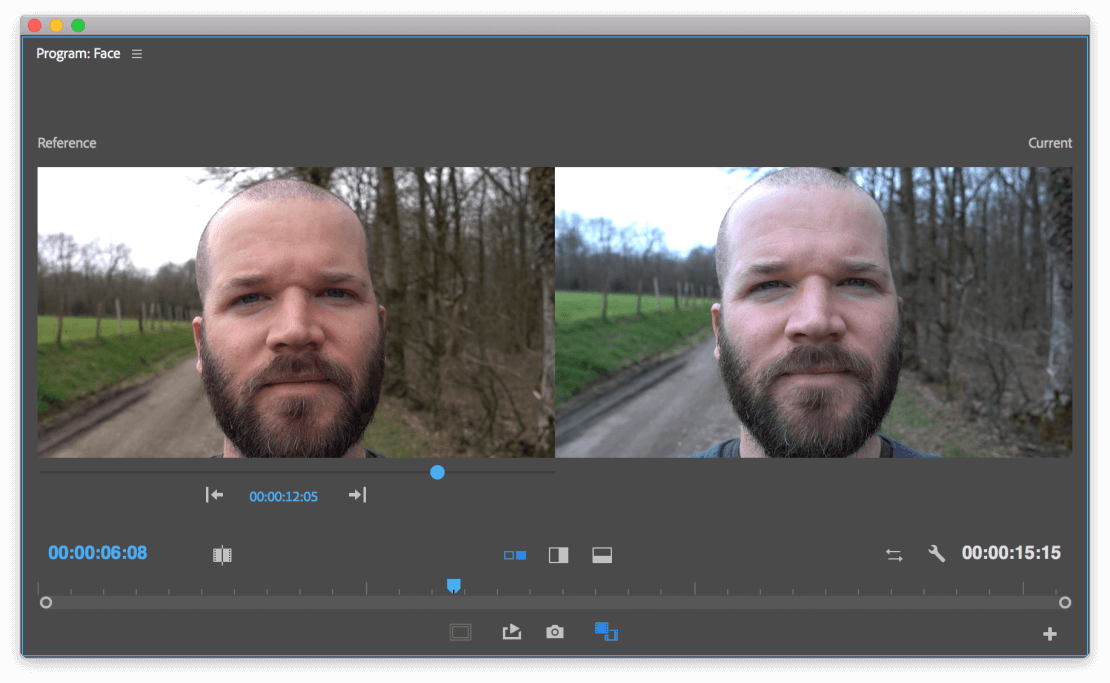 Color Match | Best AI Video Editors
Mask and blend
Masking used to mean rotoscoping frame by frame. AI masking means hovering over a subject, clicking once, and getting a tracked matte you can then blend, replace or grade independently.
Morph cut
Morph cut combines face tracking with frame interpolation to hide the jump between two takes. It is the feature that makes interviews and straight-to-camera monologues usable without cutting away to B-roll every time the speaker restarts a sentence.
Music, text and sound
- Auto beat sync. Cuts and effects land on the music rather than near it.
- Audio ducking. Background music drops automatically under voiceover and recorded dialogue.
- Silence and filler removal. Descript's Remove Filler Words and Shorten Word Gaps are the reference implementation here.
- Speech to text. Transcription on import, which is also what makes transcript-based editing possible at all.
Motion tracking
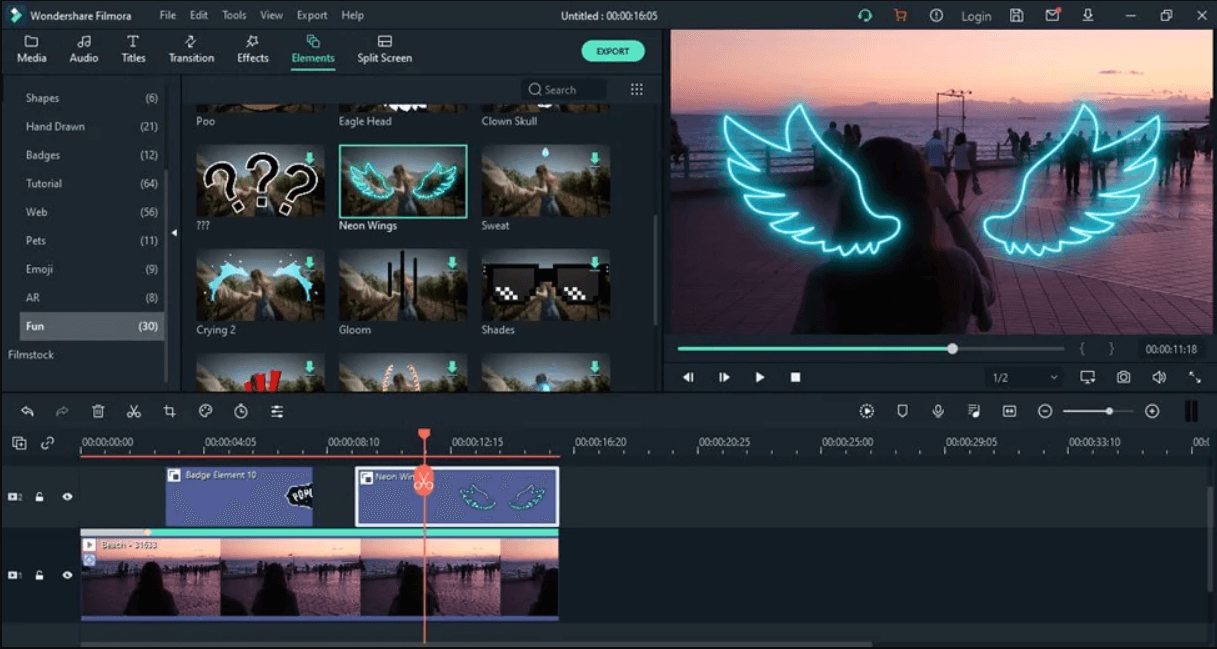 Filmora | Best AI Video Editing Tools
Select an object, and the editor follows it through the shot so text, graphics or a blur can travel with it. CapCut, Filmora and Premiere all ship this, and it is one of the few AI features that is genuinely reliable across cheap and expensive tools.
Auto-reframe
One master, every aspect ratio. The model keeps the subject in frame while converting 16:9 to 9:16 or 1:1. Opus Clip's AI Reframe is built around this, and it is the single feature that most reduces manual work for social teams.
Object removal
Content-aware fill for video: select the thing you want gone, and the model generates plausible pixels from surrounding frames. Adobe's Generative Extend goes one step further by inventing frames and ambient sound at the end of a clip that ran short.
How We Picked the 9 Best AI Video Editors
Lists of AI editors go stale fast, and a marketing page that still loads is not proof that a product is still being sold. The criteria below are what the nine tools here had to clear.
- It exists and is sold today. We checked each vendor's root marketing domain in September 2026, not a docs page or an app-store listing. A product page that still loads is not proof of a live product if the brand redirects somewhere else.
- AI has to do editing work. Auto-captions alone are not an AI video editor in 2026. The tool needs at least one feature where the model makes an editorial decision: what to cut, what to mask, what to reframe, what to generate.
- Pricing is public or honestly quoted. Every price in this article comes from the vendor's own pricing page, linked in the references. Where a vendor only quotes, we say so rather than inventing a number.
- It is best at something specific. Each entry gets a one-line role. A tool that is fourth-best at everything did not make the list.
- Platform coverage is stated, not implied. Windows-only, Mac-only and mobile-only products are all fine, as long as the limit is on the label.
- One entry per job. Two products that do the same thing the same way would have been redundant, so only the stronger one is here.
We apply the same logic when we benchmark our own category. If you are evaluating editing infrastructure rather than desktop software, our comparison of video editing APIs and libraries uses the same source-or-omit rule.
The 9 Best AI Video Editors and AI Video Editing Tools
1. Descript: best for transcript-based editing
Descript turns video into a document. It transcribes on import, and deleting a sentence in the transcript deletes it in the timeline. For podcasts, interviews, webinars and anything else where the edit is driven by what people said rather than by what the shot looks like, nothing else is close.
The AI layer is Underlord, positioned as an AI video co-editor, alongside Studio Sound for audio cleanup, Eye Contact, Green Screen, Remove Filler Words, Remove Retakes and Automatic Multicam. Descript also does translation and dubbing, with proofread translation and native-sounding AI speakers on the Business tier.
Pricing starts with a free plan that includes 60 media minutes a month and 100 one-time AI credits, but exports carry a watermark and cap at 720p. Hobbyist is $16 per person per month billed annually ($24 monthly) for 10 media hours and 400 AI credits. Creator is $24 billed annually ($35 monthly) for 30 media hours, 800 credits and 4K export. Business is $50 billed annually ($65 monthly).
Watch out for: media hours and AI credits are separate meters, and only Creator and above can top either of them up.
2. Opus Clip: best for auto-generating short clips from long video
Opus Clip exists to solve one problem: you have a long recording and you need ten vertical clips from it by tomorrow. It analyses the footage, picks candidate moments, scores them with a Virality Score, reframes them vertically, and adds animated captions in more than twenty languages.
ClipAnything extends this beyond talking heads to arbitrary footage, and AI B-Roll inserts relevant stock and generated cutaways. Export to XML sends the result into Adobe Premiere Pro or DaVinci Resolve if you want to finish the edit properly. It is also the clearest example of clipping becoming developer infrastructure: Opus Clip publishes a public API described as a video API any AI agent can call, plus an MCP server for agent workflows.
The free plan gives 60 credits a month, up to 1080p, with a watermark. Starter is $15 a month for 150 credits and removes the watermark. Pro is $29 a month, or $174 billed annually for 3,600 credits issued up front, and adds AI B-Roll, multiple aspect ratios, a two-seat team workspace, dubbing and limited API access. Business is quoted.
Watch out for: the annual Pro plan front-loads credits for the year rather than metering them monthly, which suits bursty workloads and penalises steady ones.
3. Runway: best for generative AI video and AI effects
Runway is a generation platform with editing attached rather than an editor with generation bolted on. Gen-4.5 is the current flagship video model, with Aleph 2.0 for video-to-video transformation and Act-Two for performance capture. Third-party models including Kling 3.0, Seedance and Nano Banana Pro run inside the same credit system, which makes Runway a practical single subscription for testing several generators.
Everything is metered in credits. The free tier is 125 one-time credits with 5 GB of storage. Standard is $15 a month, or $12 a month billed annually, for 625 credits a month, which the pricing page equates to roughly 52 seconds of Gen-4.5. Pro is $35 monthly or $28 annually for 2,250 credits, adds a brand kit, a custom voice clone, credit top-ups and Runway's MCP integration. Max is $95 monthly or $76 annually for 9,500 credits with one month of rollover. Runway also runs a separate developer platform for teams that want the models behind an API.
Watch out for: on Standard and Pro, unused credits do not roll over. Only Max carries a balance forward, and only for one month.
4. Adobe Premiere Pro: best for professional post-production
Adobe now brands the desktop application simply Adobe Premiere, and Premiere Pro remains the same tool underneath. It is still the default for long-form commercial work, and the AI features are genuinely useful rather than demo-ware: Text-Based Editing builds a rough cut from a transcript, Media Intelligence lets you search footage by describing it, Object Mask replaces rotoscoping, Enhance Speech rescues bad dialogue, and Generative Extend uses Firefly to add frames and ambient sound to a clip that ran short.
The single-app plan is US$22.99 a month on the annual, billed-monthly option, and includes Adobe Express Premium, Frame.io, 100 GB of storage and 25 generative credits a month. Creative Cloud Pro lists at US$69.99 a month and bundles 20-plus apps with 4,000 monthly generative credits. Students and teachers pay US$19.99 a month for the first year. Adobe Premiere on mobile is a free standalone app on iPhone and Android.
Watch out for: there is no perpetual licence. Adobe states plainly that Premiere is membership-only, and the 25 generative credits on the single-app plan run out fast if you lean on Firefly features.
5. CapCut: best free all-round social editor
CapCut is the default editor for a very large share of short-form creators, and the reason is simple: it is free to download, it runs on Windows, macOS, iOS, Android and in the browser, and it covers the whole social workflow in one place. Auto captions, background removal, auto-reframe, motion tracking, text to speech, voice enhancement and long-video-to-shorts are all built in, along with a template library that removes the blank-timeline problem.
The desktop app adds smart media search across objects, dialogue and people, keyframes with curve graphs, colour wheels and auto-adjust, which puts it closer to a conventional NLE than its reputation suggests. Generation runs through Dreamina, ByteDance's model line, which is integrated directly into the editor.
Watch out for: CapCut does not publish a standalone pricing page, so budget for paid tiers you cannot size in advance, and read the terms of service if the output is commercial. The free tier is genuinely free, but it is also the entry point to a paid ladder.
6. DaVinci Resolve: best free professional-grade editor with AI tools
DaVinci Resolve 21 is the strongest free software on this list by a wide margin. The free version is a complete post-production application covering editing, colour, Fusion visual effects, motion graphics and Fairlight audio, handles virtually all 8-bit formats up to Ultra HD at 60fps, and includes multi-user collaboration and HDR grading. Most products would sell that.
DaVinci Resolve Studio is a one-time $295 purchase, not a subscription, and adds the DaVinci AI Neural Engine, Magic Mask, text-based editing, temporal and AI spatial noise reduction, film grain, optical blur and dozens of extra Resolve FX, plus 10-bit support up to 120fps and resolutions beyond 4K.
Watch out for: the AI features almost all live in Studio. If the Neural Engine is why you are here, budget the $295 from the start rather than treating it as an upgrade.
7. Wondershare Filmora: best for beginners who want an AI suite
Filmora, currently at version 15, is built for people who want a lot of AI features without a professional learning curve. It covers Windows, macOS, iOS and Android, ships AI portrait tools, motion tracking, speech to text and a large effects and template library, and its tutorials are genuinely part of the product rather than an afterthought.
Filmora is sold either as an annual subscription, in Basic and Advanced tiers, or as a one-time Perpetual licence. AI features are metered in Filmora AI credits. On a subscription, credits are issued every 30 days and any unused balance from the previous period is reclaimed when the new credits land. Credits are shared across Windows and Mac under one Wondershare account, and multiple plans combine into a single pool.
Watch out for: the Perpetual licence is device-specific and covers updates to the current major version only, while the Basic and Advanced subscriptions cover both Mac and Windows on one licence. Check which of those matters more to you before buying, and note that list prices on the buy page are frequently discounted, so the number you see depends on when you look.
8. Apple Final Cut Pro: best for Mac-native professional editing
Final Cut Pro remains the fastest professional editor on Apple silicon, and its AI features now build on Apple Intelligence. Magnetic Mask isolates people and objects from a background without rotoscoping, Enhance Light and Color corrects balance, contrast and brightness with machine learning, and Smooth Slo-Mo generates and blends frames for clean slow motion. Motion and Compressor sit alongside it for graphics and encoding.
Pricing changed shape: Final Cut Pro is now part of Apple Creator Studio, which bundles it with Logic Pro, Pixelmator Pro, Motion, Compressor and MainStage for $12.99 a month or $129 a year after a 30-day free trial, with education pricing at $2.99 a month or $29.99 a year. Final Cut Pro is also still available as a one-time purchase at $299.99.
Watch out for: it is macOS and iPadOS only, some premium content is subscriber-only even if you bought the perpetual licence, and full functionality assumes recent OS versions and an Apple Intelligence-capable device.
9. Banuba Video Editor SDK: best for embedding AI editing inside your own app
The eight tools above all assume the person editing is you. Banuba Video Editor SDK assumes the person editing is your user. It is a production-ready mobile video editing engine for iOS, Android, Flutter, and React Native that reduces video-feature integration from months to weeks, and it exists so that a product team can ship recording and editing inside their own app instead of sending users to a third-party editor and hoping they come back.
The practical numbers are integration cost and app size. Integration can take under 10 minutes in some cases, and the SDK adds about 25 MB to app download size on average, which is the figure that usually decides whether a mobile team can adopt anything at all. Cross-platform coverage is first-class rather than a wrapper: there is an official Flutter plugin and a React Native plugin. For teams building with coding agents, Banuba publishes open-source agent skills for Claude Code, Codex and Qwen Code.
Pricing is MAU-based, with no per-developer-seat fees and add-ons quoted separately, which is a different shape from every other entry here and worth modelling before you compare it to a per-seat subscription. Before committing to any SDK, it is worth reading Helen Fedulova's list of seven numbers worth measuring in your own app, and our own performance benchmark methodology sets out how we test.
Watch out for: this is not a consumer editor and will not help you cut your own footage. If nobody but your team is going to use the editor, one of the other eight is the right answer.
AI Video Editor Comparison Table
|
# |
Tool |
Best for |
Platforms |
Standout AI capability |
Pricing
|
|---|---|---|---|---|---|
|
1 |
Descript |
Transcript-based editing |
Web, macOS, Windows |
Underlord AI co-editor, Studio Sound, Remove Filler Words |
Free plan; Hobbyist $16/mo annually ($24 monthly); Creator $24; Business $50 |
|
2 |
Opus Clip |
Auto-generating short clips from long video |
Web |
ClipAnything, Virality Score, AI Reframe, public API and MCP |
Free 60 credits/mo (watermarked); Starter $15/mo; Pro $29/mo or $174/yr; Business quoted |
|
3 |
Runway |
Generative AI video and AI effects |
Web, iOS, Android |
Gen-4.5, Aleph 2.0, Act-Two, third-party models in one credit pool |
Free 125 one-time credits; Standard $15/mo ($12 annually); Pro $35 ($28); Max $95 ($76) |
|
4 |
Adobe Premiere Pro |
Professional post-production |
Windows, macOS, iPhone, Android |
Text-Based Editing, Media Intelligence, Object Mask, Generative Extend |
Single app US$22.99/mo annual billed monthly; Creative Cloud Pro US$69.99/mo; free mobile app |
|
5 |
CapCut |
Free all-round social editing |
Web, Windows, macOS, iOS, Android |
Auto captions, auto-reframe, long video to shorts, smart media search |
Free to download; paid tiers not published on a standalone pricing page |
|
6 |
DaVinci Resolve |
Free professional-grade editing with AI tools |
Windows, macOS, Linux |
DaVinci AI Neural Engine, Magic Mask, text-based editing (Studio) |
Free version; Studio $295 one-time |
|
7 |
Wondershare Filmora |
Beginners who want an AI suite |
Windows, macOS, iOS, Android |
AI portrait tools, motion tracking, speech to text |
Basic or Advanced annual subscription, or one-time Perpetual licence; AI metered in Filmora AI credits |
|
8 |
Apple Final Cut Pro |
Mac-native professional editing |
macOS, iPadOS |
Magnetic Mask, Enhance Light and Color, Smooth Slo-Mo |
$299.99 one-time, or Apple Creator Studio $12.99/mo or $129/yr after a 30-day trial |
|
9 |
Banuba Video Editor SDK |
Embedding AI editing inside your own app |
iOS, Android, Flutter, React Native |
Production-ready mobile editing engine shipped inside your product |
MAU-based, no per-developer-seat fees, add-ons quoted separately |
Which AI Video Editor Should You Choose?
Work backwards from the job, not from the feature list. Across these nine tools, four decisions cover almost every case.
If you are cutting talking-head content, start with Descript and stop there. If you are feeding a short-form calendar from long recordings, Opus Clip does in one pass what a human editor does in an afternoon. If you need footage that does not exist, Runway is the platform to subscribe to, and one subscription gets you several competing models.
If you are doing commercial post-production, the split is budget and platform rather than capability. Adobe Premiere Pro buys you the ecosystem and the Firefly features on a subscription. Final Cut Pro buys you speed on Apple silicon for a one-off $299.99. DaVinci Resolve gives you a complete professional editor for nothing and asks $295 once if you want the AI Neural Engine. Filmora and CapCut are the low-friction options, one paid and structured, one free and fast.
And if the editing has to happen inside software you are building, none of that applies. That is the case Banuba Video Editor SDK is built for: iOS, Android, Flutter and React Native, about 25 MB added to app download size on average, integration measured in weeks rather than months, and MAU-based pricing with no per-developer-seat fees. If you want to see how that category compares tool by tool, our video editor SDK comparison covers it in detail.
References
Adobe. (n.d.). Professional video editing software. Adobe. https://www.adobe.com/products/premiere.html
Apple. (n.d.). Final Cut Pro. Apple. https://www.apple.com/final-cut-pro/
Blackmagic Design. (n.d.). DaVinci Resolve 21. Blackmagic Design. https://www.blackmagicdesign.com/products/davinciresolve
CapCut. (n.d.). CapCut AI video editor: smart online video editing with advanced AI tools. CapCut. https://www.capcut.com/
CapCut. (n.d.). CapCut Desktop: powerful AI photo and video editor. CapCut. https://www.capcut.com/tools/desktop-video-editor
Descript. (n.d.). Descript pricing: plans for every creator, free to start. Descript. https://www.descript.com/pricing
OpusClip. (n.d.). OpusClip API: the #1 AI video clipping API. OpusClip. https://www.opus.pro/api
OpusClip. (n.d.). Pricing. OpusClip. https://www.opus.pro/pricing
Runway. (n.d.). AI image and video pricing. Runway. https://runway.com/pricing
Wondershare Filmora. (n.d.). Filmora pricing and plans. Wondershare. https://filmora.wondershare.com/shop/buy/buy-video-editor.html
-
There is no single best AI video editor, because the category covers four different jobs. For transcript-based editing it is Descript. For turning long video into short clips it is Opus Clip. For generative video it is Runway. For free professional post-production it is DaVinci Resolve. If the editing needs to happen inside an app you are building rather than on your own desktop, the answer is not a desktop editor at all but an SDK such as Banuba Video Editor SDK, which is a production-ready mobile video editing engine for iOS, Android, Flutter and React Native.
-
Yes, that is the specific case it is built for. Banuba Video Editor SDK gives a product team a production-ready mobile video editing engine for iOS, Android, Flutter and React Native, so users record and edit inside your app rather than exporting from a third-party editor. Integration can take under 10 minutes in some cases and the SDK adds about 25 MB to app download size on average. For the full build pattern, see our guide to building an app like TikTok with video editing effects.
-
It depends on the pricing model, and most vendors quote rather than publish. Banuba Video Editor SDK is priced on monthly active users, with no per-developer-seat fees, and add-ons are quoted separately, so the cost tracks how many people actually use the editing feature rather than how many engineers touch the code. That is a different shape from the per-seat subscriptions used by desktop editors, and it usually needs modelling against your own MAU curve. Our Banuba Video Editor SDK pricing guide explains how the model works.
-
Banuba Video Editor SDK covers iOS and Android natively, plus Flutter and React Native through official plugins, from a single engine. That matters because cross-platform parity is where most SDKs fall down: a vendor ships iOS first, Android months later, and the hybrid wrapper last, which leaves your feature set different on each platform. For a side-by-side look at how the options compare, see our video editor SDK comparison.
-
AI in video editing means the software makes editorial decisions rather than only applying effects you chose. In practice that covers transcription and automatic captioning, detecting and masking people or objects, removing filler words and silence, reframing a shot for a different aspect ratio, matching colour between takes, and generating frames that were never filmed. Banuba works on the same underlying capabilities on mobile, including automatic AI captions, and the Banuba Video Editor SDK exposes them to apps rather than to a desktop timeline. Closed captions are off by default in the SDK, so you enable them with Banuba rather than finding them switched on.
-
The complete technical documentation for the Banuba Video Editor SDK is available online and includes requirements, setup instructions and configuration details:
- Banuba Video Editor SDK iOS documentation
- Banuba Video Editor SDK Android documentation
- Banuba Video Editor SDK Flutter documentation
- Banuba Video Editor SDK React Native documentation
This Banuba Video Editor SDK documentation is regularly updated and should be your primary reference during integration.
-
Yes. Banuba Video Editor SDK includes agent skills for Claude Code, Codex and Qwen Code, and you can install them with a single command. See the Banuba agent skills documentation page.
-
The Banuba Video Editor SDK provides official cross-platform plugins to simplify integration into hybrid applications:
These Banuba Video Editor SDK plugins are maintained by Banuba and support faster implementation for cross-platform apps.