
Video conferencing is among the most lucrative domains in app development.
Businesses of all sizes and developers alike are looking to step on the market.
Wondering how to create a video conferencing app? How much does it cost? Who are the key players, and how can your app compete?
This guide will help you get the video conferencing app development essentials and pick the best tools to build your AR video call app.
[navigation]
The best video conferencing apps were not made overnight.
There are many factors behind today's success of apps like Zoom, Google Meet, GoToMeeting, and Skype. For some, it takes years of strategic product development.
For the others, it's the ability to promptly fill in the emerging demand for casual, easily accessible, and comfortable video communication.
So, how to create a video conference application that will beat competitors?
There are 3 ways to succeed.
3 Ways to Build a Video App that You Need
Using a Video Calling SDK
The fastest and easiest way to build a video conferencing app is by using a Video Call SDK.
Such SDKs provide complete infrastructure and a diverse features stack. Instead of spending months coding app features, you can integrate them ready-made for the platform of your choice.
You may check the Agora + Banuba Face AR extension among the best and most popular video call SDKs.
The Agora kit includes voice and video chat, live streaming features, and real-time messaging - all the must-haves for building a video conferencing app per your needs.
To add engagement, you can use the Banuba AR Video Software Kit.
It enhances the video calling experience with augmented reality effects.
Banuba AR Video Software Kit
By using Banuba SDK, you can build a competitive communication app where users can video chat safely, comfortably, and creatively using:
- 3D face filters and facial animation
- Video filters (LUTs)
- Beautification & makeovers
- Video background removal
- Real-time avatars.

Among other popular video calling platforms, you may check Twilio, MirrorFly, Contus Fly, SendBird, Applozic, or Sinch.
All of them provide full-featured voice and video calling functionality that support native mobile and web.
Pros
- Multi-platform support
- Fits any use case and industry
- Vast feature choice
- 100% customizable video app experience.
Integrating Zoom-Like Software
If you need to make a video conferencing app like Zoom with its basic features, you may integrate Zoom-like APIs.
The difference from the previous approach is that you opt for video call functionality instead of a full-featured video conferencing platform.
For example, you have a healthcare app and want to connect patients with doctors for a live consultation.
With one of the video APIs, you may painlessly add the option Call Your Doctor.
There's a range of simple video chat APIs like Apphitect, Mesibo, CometChat, or ChatCamp.
Zoom offers its SDKs and APIs like Meeting SDK and Video SDK to developers as well. You can power your application with Zoom Meetings and build a new video experience around it.
Pros
- Fast integration, detailed documentation
- Integration assistance if needed
- Proven infrastructure
- Cross-platform support.
Cons
- Limited functionality
- Limited customization in terms of features
- Difficult scalability.
Zoom-like services may fail to meet the requirements of the enterprise sector.
If you need AR video call features or plan to scale your app over time, consider full-featured platforms.
However, building a video conferencing app with basic features is a solved problem.
Building a Video Conferencing App from Scratch
If none of the video calling software fits your needs, and you’d rather build a video app from scratch, you can assemble a team.
This approach is the least popular due to many obstacles.
Cons
- Expensive
- Time-consuming
- Requires per platform development and optimization
- Involves multi-skill resources meaning extra spending.
Here's a comparison matrix of the discussed ways to build a video conferencing app.
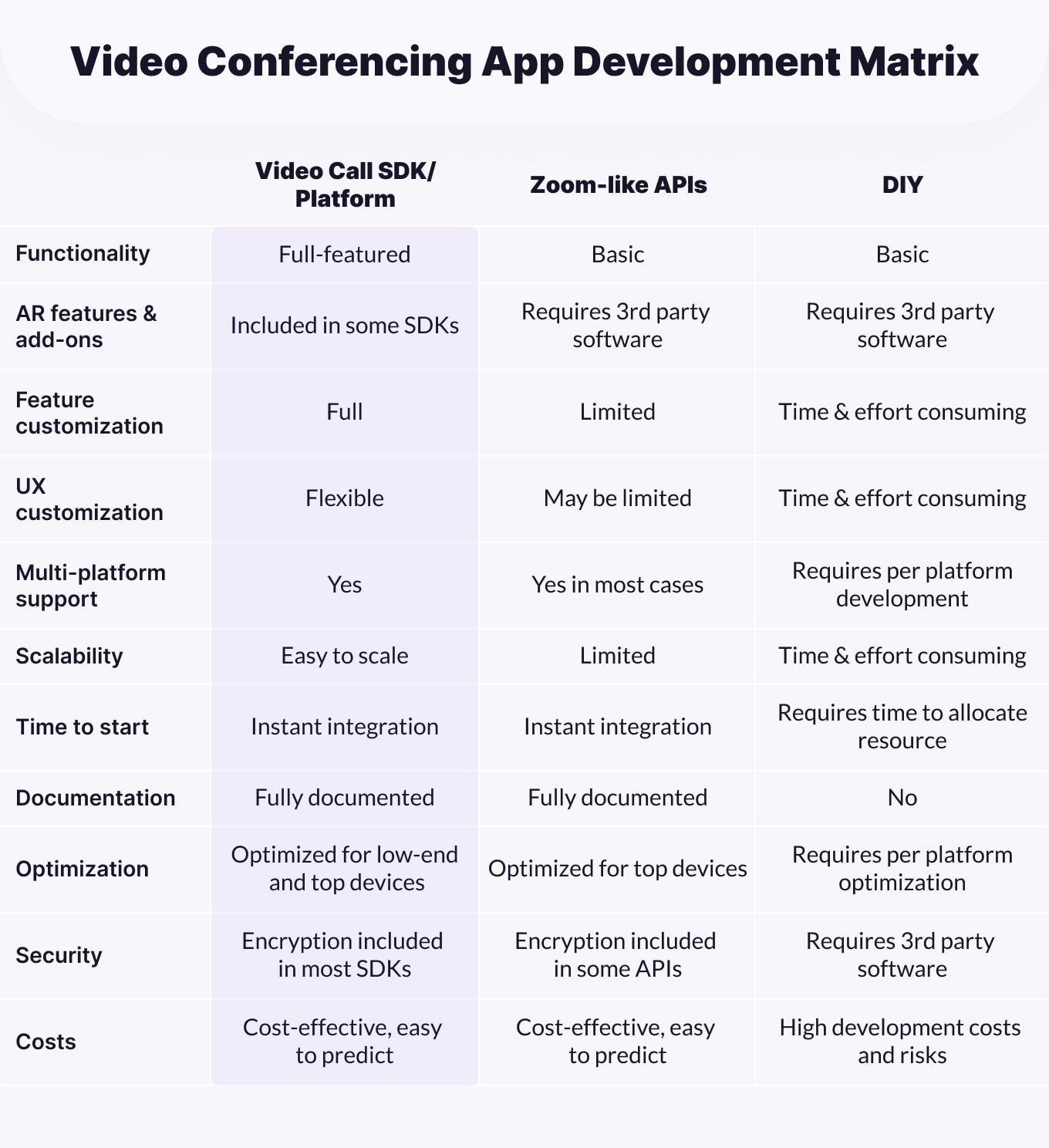 Video Conferencing App Development Matrix
How to Create a Video Conferencing App in 7 Steps
Whichever way you choose, you can't miss the basic steps for building a video conferencing app.
1. Research the Market and Ideate
At the very first step, you need to ensure your product covers the most vital needs of your users and will be in demand on the market.
Define your user types, the use cases of your app, and the ways you can generate revenue.
The monetization strategy should rely on your industry specifics and needs.
When building a video conferencing app for the enterprise, you may monetize it with paid subscriptions or freemium.
If your app fits occasional events too (like Zoom), you may choose advertising and freemium.
A quick checklist of docs you need to have before you start developing your video conferencing app includes:
- Market and competitors’ research
- App vision and positioning
- Customer profiles
- Monetization strategies: freemium, ads, paid subscriptions.
2. Define the Feature Scope
You need a product roadmap and feature scope for your video conferencing app.
A proven and cozy way is to start with a minimal viable product (MVP). You may launch your app with essential features and scale it with add-ons.
The feature choice must solely rely on your user needs, and here's where customer profiles come in handy.
Consider collaboration features like shared whiteboards, file transfers, and task management for the enterprise.
If you create a video conferencing app for communication, opt for augmented reality features that improve the video chat experience.
Your basic kit of communication features may include:
- User Profiles
- Video and Voice Calls
- Messenger
- Group Calls
- Screen Sharing
- File exchange
To add value to your app, you can bring in AR-powered immersive and interactive features.
Augmented reality improves the user experience drastically and unlocks more use cases for your video conferencing app.
With Banuba AR Video Software you can add:
- Background subtraction for professional and private communication
- Beauty AR filters that help users focus on the conversation, not their appearance.
- Facial animation filters for fun AR meetings
- Avatars to step into the metaverse space
- Gesture recognition and Hand AR for interactivity
- Color and lighting enhancements filters that improve the camera view.
Other sophisticated features to help your app stand out may include noise block, voice changer, peaker tracking, and emoji reactions.
To improve collaboration, consider adding smart push notifications, task assignments, or a multi-user mode where some users video call while others can work on presentations.
You may also check our detailed list for the latest video-conferencing features that will lead in 2022.
3. Pick Tech Stack and Software
Now, as you have features in place, it's time you define the platforms and technology stack.
From there, you'll make sure to choose the right video call SDK, and find the proper resources or providers.
Platforms
Accessibility comes first.
How to create a video conferencing app that will fit all users?
Consider creating a multi-platform solution that can be accessed from mobile iOS, Android, desktop, and web interfaces.
Languages
For native mobile, your video conferencing app should support iOS and Android platforms. The programming languages are Swift, Objective C, and Java, Kotlin respectively.
Cross-platform mobile frameworks, such as React Native or Flutter, let you transfer code between platforms. This can be a good option for basic video calling apps.
For web video conferencing, the core technologies will be JavaScript, HTML5 and frameworks Node.js, and Spark.
WebRTC
WebRTC is an open-source, free video call API by Google that lets you create web apps with real-time video, voice, and data.
The advantage of WebRTC in your app is that the technology connects video and audio calls right between web browsers, with no other software, plug-ins, or applications.
It's compatible with all browsers and devices, so your app will be accessible to all users.
Video Quality
Your users will expect a smooth and stable video app experience.
Therefore, ensure your video conferencing app includes enough bandwidth and CPU capacity to support HD video.
Another useful technical feature is to add multi-bitrate encoding so that video streaming quality will adjust to a user’s internet connection speed and device type.
4. Ensure App Security
Ensure that your AR video call app will be completely secure and prevent data leaks.
The best practice is to add end-to-end encryption, e.g. 256-bit TLS encryption, or use a video SDK that includes one.
This way, no one will be able to access user content as video calls are locked away.
If you want to build a video conferencing Zoom-like app, you can add two-factor authentication such as Google Authenticator, Microsoft Authenticator, or FreeOTP.
5. Design UI/UX
User interface (UI) includes colors, fonts, and other visual elements. It's about how your app looks, and here you have full creative freedom.
User Experience (UX) defines how users will interact with your app.
Make sure to approach UX design carefully, as you need to build a video conferencing app that works smoothly and intuitively.
- Ensure easy navigation layout and feature access.
- Mind it for regular users and those who come by an invitation link.
- Choose video call APIs or SDKs with full UX customization and designable widgets.
- Adhere to best practices of most popular video call apps like Zoom, Skype, etc.
6. Test and Launch
Thorough app testing reveals critical bugs and prevents you from losing your app users straight after their first session. When testing a video conferencing app, make sure to check:
- GUI testing for the app interface was intuitive and clear for first use and regular attendees
- Functional testing to check every feature is in place and meets the requirements
- Browser, platform, and device compatibility to ensure the app works as expected, everywhere
- Stress testing so your video app runs stably at high user loads
- Performance aspects: audio, video quality, FPS, data consumption.
- Security aspects. Review carefully the data policies of 3rd party APIs that you integrate into your app to check what data they collect and whether your app complies with App Store and Play Market policies.
7. Promote
You can promote your video conferencing app long before it goes live. Here's how you can drive users.
- Build an online presence by creating a landing page and SMM accounts
- Pitch your app to popular app communities like ProductHunt
- Create promo materials
- Advertise on social networks
- Create a stellar app copy and visuals for App Store and Play Market
- Communicate with early adopters about the first version
- Reach out to industry influencers.
5 Examples of Top AR Video Call Apps
As you know how to create a video conference app step by step and how to make it competitive with augmented reality, you may want to check the best AR video call app examples.
Here are 5 AR meeting and conferencing products that lead the market in 2022.
Zoom Meeting
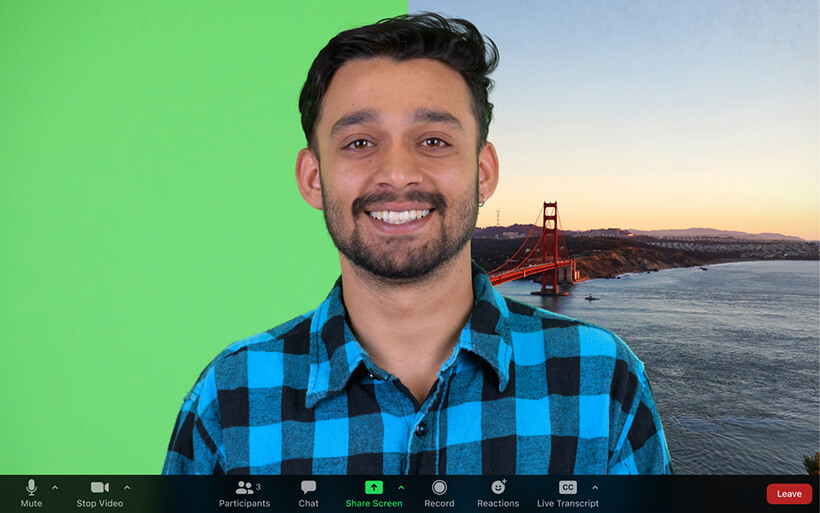 Zoom AR Meeting App Experience
Zoom dominates 50% of the video conferencing market.
Its daily audience in April 2020 amounted to 300 million which is 30x times more than in December 2019.
Intuitive interface, no need to register to join meetings, filters that improve video communication experience.
They include “Tweak my appearance” and “Hide backgrounds” - the main Zoom advantages that made it the top 1 choice among the best video calling apps.
Zoom key features include:
- Audio and video conferencing
- Cloud recording
- Messaging
- Built-in scheduling
- Meeting rooms
- Touch up my appearance
- Background changer
- Polls.
Facebook Messenger
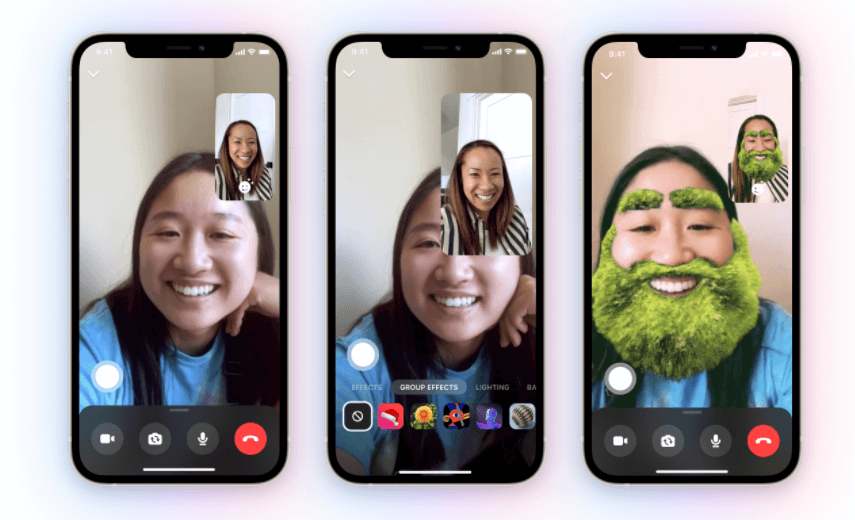 Facebook AR Meeting Experience
Facebook launched its Messenger in 2011, and today it is the 2nd most downloaded app of the decade (App Annie) with over 353M downloads in 2021.
Users can send messages to one or more recipients and respond using text, photos, attachments, stickers, animated pictures, and voice recordings.
Given its prime focus on social networking, Messenger offers augmented reality features too.
You can animate your conversations with AR effects, 3D masks effects, and selfie stickers.
You can also combine video chatting and movie watching, games, and more.
Google Meet
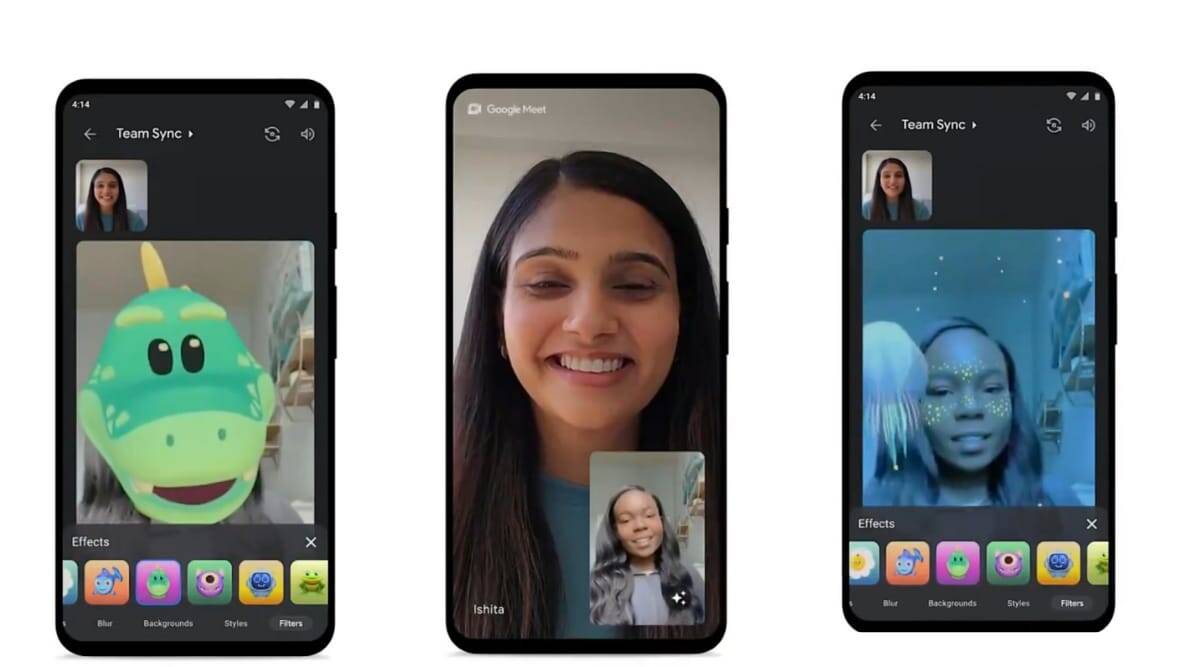 Google Meet AR Video Call Experience
Google Meet, another popular video call app, introduced video filters, effects, and augmented reality masks in July 2021.
After the pandemic and increased demand for video communication tools, Google has expanded its targeting from enterprise and business to an AR video conferencing platform for general consumers.
Key features include:
- Adjustable video conferencing layouts
- Screen sharing
- Hand raising
- Background blur and replacement with custom images
- Q&A channel
- Polls
FaceTime
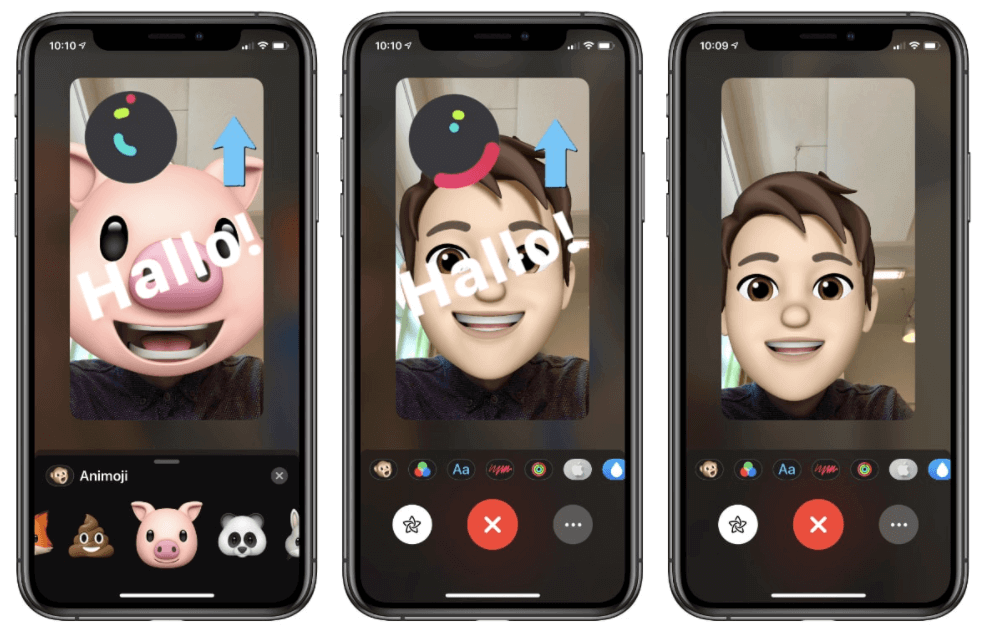 Facetime AR Video Call Experience
FaceTime is a video and audio communication platform by Apple.
Among its cool features, it has an option to set Eye Contact.
The speaker can look at an interlocutor even if he is looking at the iPhone or iPad's screen.
As for augmented reality, you can overlay an Animoji or Memoji character which will copy your facial expressions in real-time.
Filters, stickers, and animated effects are also available, so users can fully express themselves and feel relaxed and engaged while video chatting on FaceTime.
Key features include:
- Audio and video calls
- Group calls for up to 32 participants
- Video effects, Animoji and Memoji
- SharePlay to watch movies together
- Portrait mode that blurs the background
- Join call by link.
Spatial
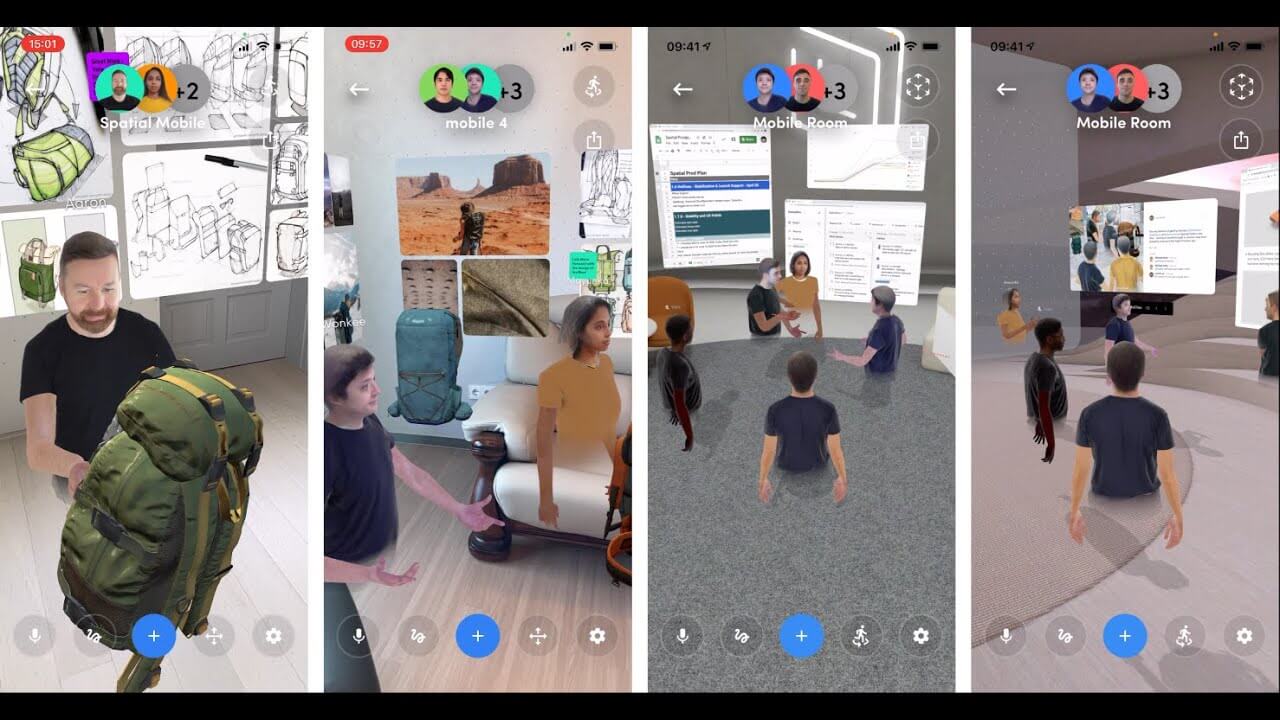 Spatial AR Video Call Experience
Spacial, a VR collaboration app released in 2016, was originally meant for enterprise use.
Now, it's shifting to a broader communication sector along with other video chat apps such as Zoom and Google Hangouts.
It provides its mobile app to open up spaces in VR/AR to additional team members.
The mobile feature set is somewhat limited compared to Web and VR platforms, however, it still serves as a novel example of augmented reality application in communication.
The core features include:
- Communicate as real-time avatars
- Create new rooms
- Type and draw notes
- Set a custom environment
- Upload and share content
- Use live speech translation.
AR Video Conferencing: What It Brings to Your Business
Being among the fastest-growing niches in the technology market today, web and video conferencing is expected to further expand.
The latest market stats prove that.
- The web and video conferencing market increased 500% in the first two months of the COVID-19 pandemic (TrustRadius).
- Last year, 67% of companies planned to increase their spending on web and video conferencing (TrustRadius).
The demand for video conferencing is not just on the rise. It's also transforming.
Companies and businesses adopt augmented reality at a fast pace helping teams and processes stick together.
AR meetings create a more natural and seamless communication experience, especially in the enterprise sector that has massively switched to remote work.
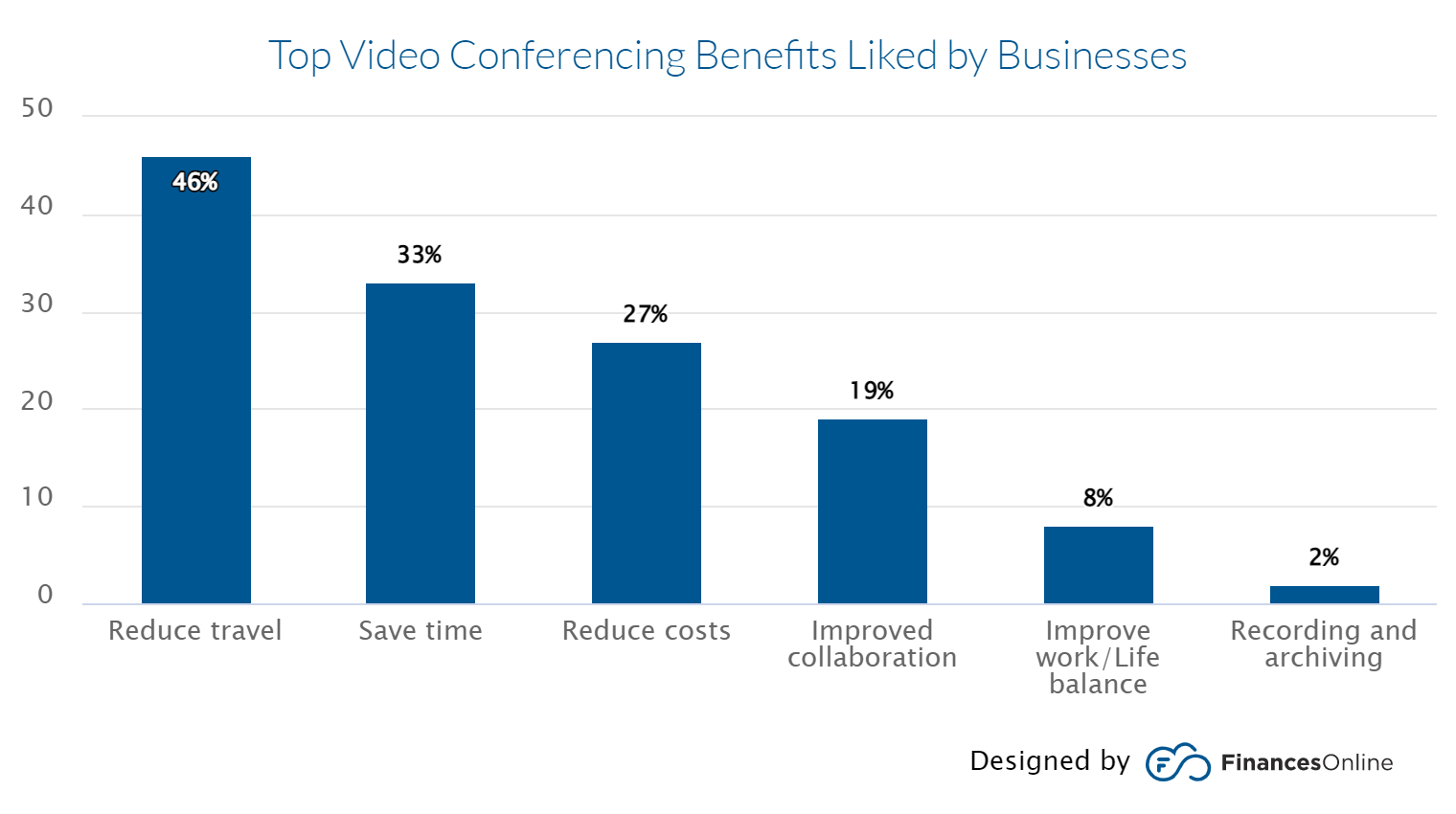 Top Video Conferencing Benefits by Businesses
For businesses, adopting AR video conferencing tools may drastically enhance communication, improve collaboration, decrease travel and office expenses and improve customer service.
For developers, there is sufficient capacity to enter and flourish in this market. AR communication and collaboration features let your video conferencing app target a broader audience, gain a competitive edge and retain users effectively.
Summing up, today’s video conferencing app market shows a noticeable trend in implementing augmented reality technology.
Interactive effects, facial filters, and custom backgrounds empower your app with a strong competitive advantage.
They let you meet today’s user demand for a creative and comfortable video communication experience.
Adding AR with Banuba Video Conferencing SDK
To add augmented reality to your video app, you can use Banuba AR Video Conferencing SDK and APIs.
Our technology lets you build an engaging video communication experience, attract users, and engage them in live conversation. Add that to the general benefits of video conferencing API integration: shorter time-to-market and lower initial investment.
Add Snapchat-like filters, face touch up, video filters and background replacement - pick features per your user needs for the platforms of your choice.
- Easily embeddable SDK and APIs
- Cross-platform support
- Multi face detection
- 1000+ AR filters in Asset Store
- Increases user satisfaction
- Improves call acceptance ratio
-
The complete technical documentation for the Banuba Video Editor SDK is available online and includes requirements, setup instructions, and configuration details:
- Banuba Video Editor SDK iOS documentation
- Banuba Video Editor SDK Android documentation
- Banuba Video Editor SDK Flutter documentation
- Banuba Video Editor SDK React Native documentation
This Banuba Video Editor SDK documentation is regularly updated and should be your primary reference during integration.
-
You can access official integration code samples for the Banuba Video Editor SDK on GitHub. Banuba provides platform-specific examples to help you integrate faster:
- Banuba Video Editor SDK iOS integration code sample
- Banuba Video Editor SDK Android integration code sample
- Banuba Video Editor SDK Flutter integration code sample
- Banuba Video Editor SDK React Native integration code sample
These Banuba Video Editor SDK repositories include setup instructions and minimal working examples for quick deployment.
-
Yes. The Banuba Video Editor SDK includes an LLM-friendly documentation file designed for AI-assisted development and internal knowledge systems:
This structured Banuba Video Editor SDK text file can be used with AI tools to streamline onboarding and developer workflows.
-
The Banuba Video Editor SDK provides official cross-platform plugins to simplify integration into hybrid applications:
These Banuba Video Editor SDK plugins are maintained by Banuba and support faster implementation for cross-platform apps.
-
Yes, Banuba Video Editor SDK includes agent skills for Claude Code, Codex, and Qwen Code. You can install them with a single command. See the Banuba Agent Skills documentation page.
-
The official technical documentation for Banuba Face AR SDK is available online and includes requirements, setup instructions, and configuration details:
- Banuba Face AR SDK iOS documentation
- Banuba Face AR SDK Android documentation
- Banuba Face AR SDK Flutter documentation
- Banuba Face AR SDK React Native documentation
- Banuba Face AR SDK Web documentation
- Banuba Face AR SDK Unity documentation
- Banuba Face AR SDK Desktop documentation
This Banuba Face AR SDK documentation should be your primary reference during integration.
-
You can access official integration code samples for the Banuba Face AR SDK on GitHub. Banuba provides platform-specific examples to help you integrate faster:
- Banuba Face AR SDK iOS integration code sample
- Banuba Face AR SDK Android integration code sample
- Banuba Face AR SDK Flutter integration code sample
- Banuba Face AR SDK React Native integration code sample
- Banuba Face AR SDK Desktop integration code sample
- Banuba Face AR SDK Web integration code sample
- Banuba Face AR SDK Unity integration code sample
These Banuba Face AR SDK repositories include setup instructions and minimal working examples for quick deployment.
-
Yes. The Banuba Face AR SDK includes an LLM-friendly documentation file designed for AI-assisted development and internal knowledge systems:
This structured Banuba Face AR SDK text file can be used with AI tools to streamline onboarding and developer workflows.
-
The Banuba Face AR SDK provides official cross-platform plugins to simplify integration into hybrid applications:
These Banuba Face AR SDK plugins are maintained by Banuba and support faster implementation for cross-platform apps.
-
Roughly, the cost to build a video conferencing app ranges from $35,000 to $80,000 if you use an outsourcing company. It all depends on the provider's location, features, and platforms.Mind to include the costs for licensing 3rd party software. Most video call SDKs and APIs provide flexible payment terms.For example, Twilio SDK charges based on Monthly Recurring Charges (MRCs) or Pay-as-you-go starting at $0.05 per active user per month.Agora video call feature comes at $3.99 /1000 participant minutes and $8.99 /1000 participant minutes for HD video.Additionally, video conferencing app development costs may include app design and prototyping, integration assistance, feature customization, and project management.
-
If you’re wondering how to make a video conferencing app like Zoom, shortlist Zoom key features that you want to clone for your app and search for the proper APIs and SDKs.If you target general users, you may start with the Android and web platforms, as it covers the largest app market share. For enterprise and industry-specific use cases, iOS can be the first choice due to Apple's high security, low device fragmentation, high performance, and UI/UX standards.The list of tools for building a Zoom-like app includes Android Studio, Android SDK, Visual Studio, Apple Code, iOS SDK, and Agora video calling SDK. Among the 3rd party video APIs, Zoom uses Vonage Video, CometChat, Wowza GoCoder SDK, Twilio, Quickblox, and PubNub.