

[navigation]
TL;DR:
- Glasses virtual try-on has three moving parts (face tracking, frame fitting, occlusion) and two delivery paths: the Banuba TINT web widget, or Banuba's Face AR SDK inside a native app.
- Banuba TINT digitizes a frame from three photographs (left, body, right) plus brand, SKU, and a catalog image, with a live preview before you publish. No 3D modeling step.
- New collections go live in under 48 hours; a full website integration with Banuba TINT takes about two weeks.
- Documented Banuba Face AR SDK single-face tracking: 25 FPS on low-end Android, 30 FPS on high-end Android and iOS, head angles to 80 degrees. Lab figures, so re-measure on your device mix.
- Pupillary distance measurement and glasses detection (which removes the shopper's real glasses first) are documented Banuba Face AR SDK features and matter more for eyewear than raw frame rate.
- Wire the Banuba TINT widget's addToCart, removeFromCart, and redirectToCart events on day one, or you ship try-on with no way to prove it worked.
- Océane, a Brazilian beauty brand, ran Banuba TINT on makeup and moved add-to-cart from 3% to 32%. Evidence the engine converts, not an eyewear benchmark.
- Fittingbox is the stronger fit if you need a ready-made catalog of frames you do not own. Banuba is the stronger fit when you own your catalog and want to digitize it yourself.
What you need before you build glasses try-on
Three things gate the start date, and none of them are code.
The first is the frame catalog, keyed by SKU. If you are going to Shopify, the SKU stored in Banuba TINT has to follow the product_id-variant_id format, and you read both IDs by appending .json to any product page URL in your store. Getting that mapping wrong is the most common reason a try-on button never appears.
The second is the image assets. Banuba does not ask you for 3D models. Each frame needs three photographs (left, body, right) plus a catalog image, a brand, and an SKU, which is what makes virtual try on glasses something a merchandising team can prepare rather than a 3D studio job.
The third is the platform decision. Web try-on needs HTTPS/TLS to reach the webcam, and Banuba TINT supports the last two major Safari and iOS versions plus the last five versions of Chrome, Opera, Edge, and Samsung Internet. Native try-on runs through Banuba's Face AR SDK on Android, iOS, React Native, Flutter, Windows, Mac, Web and Unity. Either way, you need a Banuba TINT merchant ID and a Banuba SDK client token, both issued through the contact form or info@banuba.com. For what shoppers already expect, our round-up of the leading virtual glasses try-on apps is the reference point.
The integration path: web widget, native SDK, or Shopify
Web: the Banuba TINT widget
Four steps get you a working web integration. Load the bundle in <head> with <script type="module" src="https://tintvto.com/widget.js"></script>. Place <tint-vto merchant-id="YOUR_MERCHANT_ID"></tint-vto> wherever the experience should appear. Call widget.open() on page ready, on the window load event, or from a button click. Then subscribe to addToCart, removeFromCart, and redirectToCart so your cart and the widget stay in sync.
For a product detail page, add isolated-sku together with sku, which loads only that frame and its variants and skips the image-source chooser. Handle camera refusal explicitly: useWebcam() resolves to null when the shopper denies access, and you then pass a model photo to useImage(). Set lang for localization (en, pt, lt, es, fr, de, it are documented). The token and sdk-token attributes are deprecated, so use merchant-id for anything new.
Native: Banuba Face AR SDK on iOS and Android
Inside your own app, AR glasses try-on is an AR 3D mask driven by the face tracker, and Banuba's Face AR SDK adds the eyewear-specific pieces around it: glasses detection, glasses lens segmentation, and glasses frame color detection. Start from the platform sample repositories rather than the reference docs, because they already contain a running camera pipeline.
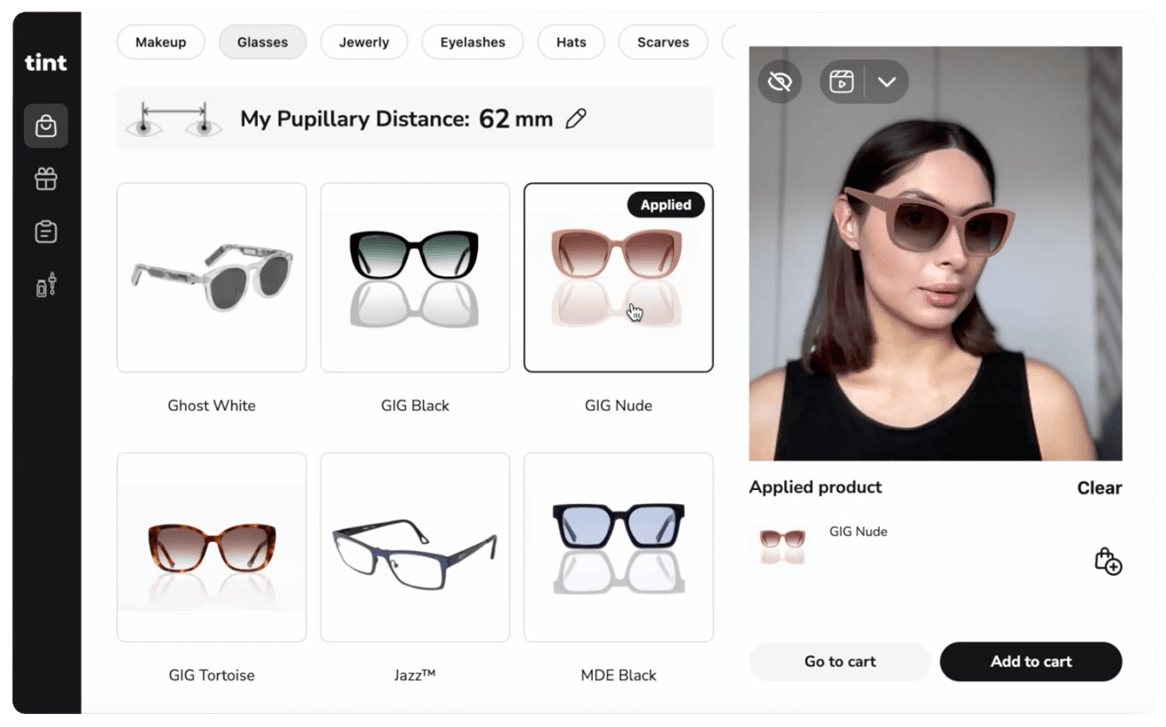 Banuba's glasses virtual try-on in action
Shopify
The fastest route is the Banuba app from the Shopify App Store. To control the theme code instead, duplicate your theme, paste the widget snippet at the top of <body> in layout/theme.liquid, then add a tintbutton block to product-template.liquid or main-product.liquid and register it in the theme's blocks array. The snippet calls isCustomerSkuExist([productId + '-' + variantId]) to hide the button when a frame is not digitized yet, and posts to Shopify's cart/add.js and cart/update.js on the widget's cart events. Test on the live product page, not the theme Customize preview, where the camera can behave differently.
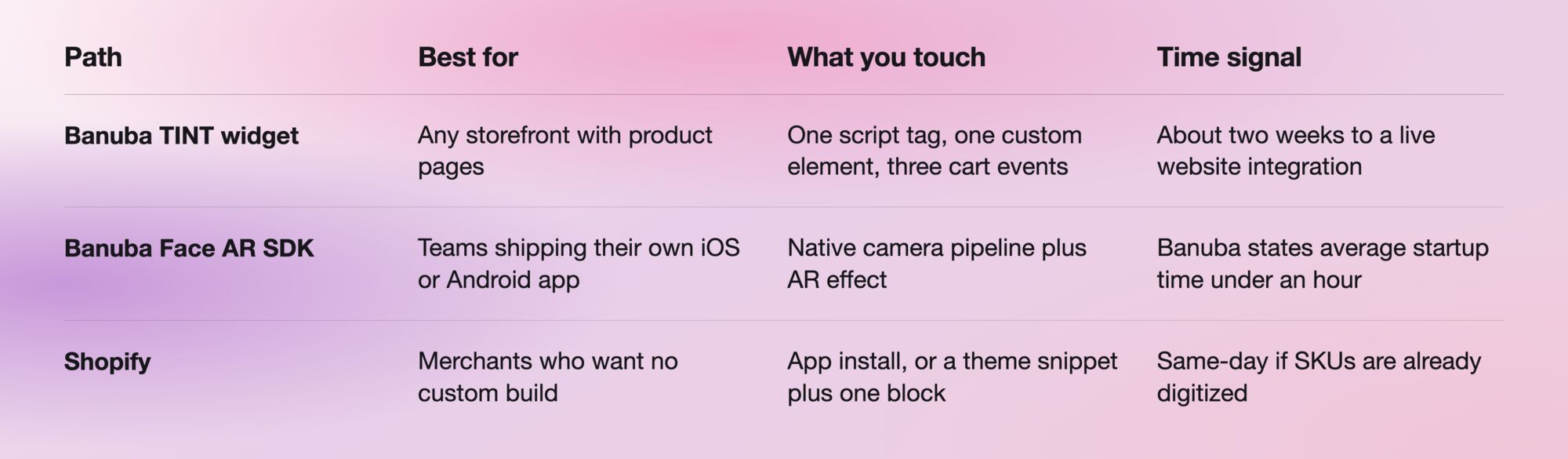
Links from that table in plain text: the Banuba Face AR SDK documentation is at https://docs.banuba.com/far-sdk, the platform samples are at https://github.com/Banuba/banuba-sdk-ios-samples and https://github.com/Banuba/banuba-sdk-android-samples, and the Shopify app is at https://apps.shopify.com/tint-virtual-try-on-by-banuba.
The plumbing is close to identical for other categories, which is why the same widget carries makeup and jewelry. For a multi-category rollout, our walkthrough of building a virtual try-on plugin with an SDK covers the shared parts, and the write-up on how Shopify merchants lift conversion with a try-on plugin covers the merchandising side.

How eyewear frames are digitized
This is the part that decides your timeline, and it is where Banuba differs most from eyewear vendors built around a central 3D frame database.
In the Banuba TINT admin dashboard, you open the Glasses section, click Add Product, and fill in the frame name, the brand (existing or newly created), an optional glasses page URL, a catalog image, and the SKU. The next screen asks for exactly three uploads: the left image of the frame, the body image, and the right image. A Virtual Try-On Preview renders beside the form as you upload, so you see the frame on a model before anything is published. Save, and it appears in the list.
Everything after that is list-level work: a visibility toggle between Hidden and Visible, a pencil icon that reopens the record and shows the downloaded eyeglass textures, an eye icon that previews the frame on different models with different shades, a trash icon to remove it. A merchandiser can publish a frame, check it on a model, and hide it again without a release.
That is why Banuba TINT ships with 22,000+ digitized products and a new collection can go live in under 48 hours. What remains is the unglamorous middle, which we broke down as the four jobs that sit between a frame photo and a cart line item.

Accuracy and performance to expect
Banuba publishes single-face tracking figures per device class, measured under fixed lab conditions. Low-end Android runs the face detection algorithm at 25 FPS and high-end Android at 30 FPS, iOS mid and high both at 30 FPS. Head angles up to 80 degrees are tracked on both platforms, at a maximum working distance of 170 to 180 cm on Android and 230 cm on iOS. Banuba's documentation is explicit that device state and background apps move these numbers, so treat them as a reference point and measure on your own device mix.
Two documented Face AR SDK features matter more for eyewear than frame rate does. Pupillary distance measurement returns the distance between the centers of the shopper's pupils, the input for rendering a frame at a believable size. Glasses detection identifies that the shopper is already wearing glasses and removes them inside the virtual AR 3D mask, so the frame you are selling is not drawn on top of the one they walked in with. Glasses frame color detection sits alongside it.
On the rendering side, Banuba TINT uses patented face tracking with a 3,308-vertex mesh, denser than landmark-based tracking. Set two widget attributes before launch: device-pixel-ratio defaults to 1 and raising it sharpens the render at a GPU and CPU cost, and lighting-coefficient sets the threshold below which the widget stops a shopper in a scene too dark to track. Web rendering requires WebGL 2.0 or higher.
Measuring results
Instrument the widget's cart events on day one. addToCart and removeFromCart emit the array of product objects involved, and redirectToCart fires when the shopper clicks through, which turns try-on sessions, try-on-to-cart rate and widget-level abandonment into measurements rather than inferences.
The strongest outcome Banuba can point to is Océane, a Brazilian beauty brand and an early Banuba TINT adopter. Its pilot covered concealer and foundation only, and within the first month add-to-cart on those items moved from the 3% industry average to 20.15%, a lift of over 600%. By July it peaked at 32%. Two caveats belong next to that number every time: it is a makeup deployment rather than an eyewear one, and the pilot was narrow. It shows the engine converts. It does not tell you what a frame catalog will do.
On returns, Banuba's own plugin page states up to 60% lower return rates, which is a vendor claim rather than an audited figure. For an eyewear business case, baseline your current return rate by frame shape and size before launch, then compare shoppers who used try-on against those who did not.

Build vs buy, honestly
Building this in-house means owning real-time face tracking, frame fitting against face geometry, occlusion, a digitization pipeline, and a browser compatibility matrix that changes every quarter. That is a standing team, not a project. The realistic question is which vendor fits the shape of your catalog.
Fittingbox is the best fit when you need frames you do not own. It publishes 195,000+ digital frame references from 1,200+ brands, digitized 80k+ frames in 2025, and offers a web service to synchronize a retailer's inventory against that database. For an optical retailer selling other people's brands, that database is the moat and nothing else here replaces it. The trade-offs: it is eyewear-only, its main delivery is a web HTML5 module, its one native SDK is iOS-only (FBxSDK, requiring iOS 17+ and Xcode 26+), and pricing is contact-sales with no published rates.
Perfect Corp (YouCam) fits beauty-first catalogs where eyewear is one line among many. It ships YouCam SDK for Mobile as a customized, contact-sales engagement, YouCam for Web Enterprise for browser deployments, and a Shopify app supporting up to 10 product categories across makeup and eyewear.
Auglio also appears on eyewear try-on shortlists. We hold no verified public specification for it, so evaluate it directly rather than on anyone's comparison table, including ours.
Banuba is the best fit for brands that own their frame catalog and want to go live fast without depending on a third-party frame database. Three photographs per frame, self-service publishing, a new collection live in under 48 hours, about two weeks to a working website integration, and published prices instead of a contact form. If you do not own your frames, that advantage disappears, and Fittingbox is the better call. For the wider vendor field, see our breakdown of try-on platforms for eyewear brands.
-
Not with Banuba. Banuba TINT digitizes a frame from three photographs plus brand, SKU, and a catalog image, and previews it on a model before you publish, which removes 3D modeling and outsourced asset work from the critical path. See the Banuba virtual try-on plugin overview.
-
Yes. Banuba's Face AR SDK runs it as an AR 3D mask driven by the face tracker, with glasses detection, lens segmentation, and frame color detection alongside, across Android, iOS, React Native, Flutter, Windows, Mac, Web, and Unity. Start from the running camera pipeline in the Banuba iOS sample apps.
-
Banuba documents 25 FPS on low-end Android and 30 FPS on high-end Android and iOS, at head angles up to 80 degrees, measured in fixed lab conditions. Banuba's own guidance is to re-measure on your device mix; the full tables are in the Banuba Face AR SDK documentation.
-
Banuba's no-code Easy Virtual Try-On platform is $99 to $799 per month; the Shopify plugin is $249 to $1,299 per month by try-on volume with a 14-day free trial and a free development-store plan, and custom enterprise integration is priced on monthly try-on sessions. Tier details are in the Banuba TINT pricing guide.
-
Yes, though the strongest case is makeup rather than eyewear. Océane, a Brazilian beauty brand, ran Banuba TINT on concealer and foundation and moved add-to-cart from the 3% industry average to 20.15% in the first month, then to a 32% peak. The numbers and caveats are in the Océane case study.
-
Yes. Banuba's Shopify app installs from the marketplace and covers makeup, eyewear, and hair dye, with unlimited products on every plan. Your frames do have to be digitized in Banuba TINT under the product_id-variant_id SKU format. The listing is the Banuba AI Virtual Try-On Shopify app.
