

[navigation]
TL;DR:
- Paid entry runs from $14.99 to $249 per month, and the cheapest entry plan is not the cheapest plan at volume;
- Six of the eight options meter try-on generations per month, one meters digitized products, and Shopify's own product media is free;
- Per-try-on cost at the plan cap ranges from about 3 cents to about 25 cents, close to an eightfold spread;
- Four apps bill overage at $0.10 to $0.17 per extra try-on, so a traffic spike raises the invoice;
- Real-time AR try-on and AI photo generation sit in the same App Store category but price on different units;
- Banuba is the only app in this set that states it does not auto-charge for overage.
How the plans are metered
Every listing in this category prints a price next to a plan name, and the plan name tells you almost nothing. The unit behind the price is what sets your monthly bill.
There are three units in use.
Try-ons per month. The plan includes a number of try-on sessions or generations, and extra ones are either blocked or billed. GenLook, Antla, AI Frame, EganAI's AI Virtual Try-On, Lit Outfit, and Banuba all work this way.
Digitized products. The plan includes a number of SKUs you may publish with try-on, and traffic is not counted until a separate cap. Camweara works this way.
Nothing. Shopify's built-in product media carries 3D models at no extra app cost, with no try-on and no quota.
Two secondary levers matter almost as much. Firstly, overage: four of the apps sell extra try-ons at $0.10 to $0.17 each, so the plan price is a floor and not a ceiling. Secondly, annual prepay: Camweara and AI Frame both publish yearly prices that save 8% to 17% against the monthly rate.
Banuba's own Shopify virtual try-on app pricing entry point is the plugin page, which links the Shopify listing and the free trial form.
Real-time AR or AI photo
The most expensive mistake in this category is comparing two different products on price alone. The App Store puts both in 3D/AR/VR, and the shopper experience is not the same.
AI photo generation takes a shopper photo, or a model photo, and renders the product onto it in the cloud. It handles clothing well, it costs cents per image, and every look is a billable generation. GenLook, Antla, AI Frame, EganAI, and Lit Outfit are all in this group, and most of them describe outfits, garments, or sizing rather than cosmetics.
Real-time AR tracks the shopper in the live camera feed and renders the product on them as they move. Banuba and Camweara are the two real-time options here, and both list face tracking and live previews rather than generated images. Banuba, for example, describes its own product as "Real-time AR try-on for makeup" rather than photo overlays, and states that processing is on-device with "no customer images collected or stored".
This matters for the invoice because the two models fail in opposite directions. A generation-priced app gets expensive when shoppers experiment, which is the behavior you were trying to buy. A session-priced AR app gets expensive when your catalog is small, and your traffic is large.
It also matters for which products you can sell. Hands-on testing remains essential: load three of your own hardest SKUs, a dark shade, a rimless frame, a high-gloss lip, and look at the result on a mid-range phone.
The apps, cheapest entry first
Prices below are the published figures on each app's own Shopify listing, read on 23 October 2026.
Lit Outfit, AI Virtual Try On
Free for 25 uncached try-ons a month, then Starter at $14.99 for 150, Boutique at $49.99 for 600, and Runway at $199 for 5,000. Repeat views of an outfit already generated are not charged again: the listing says "Pay once per look: repeat try-ons of the same outfit are free".
Strengths. Lowest paid entry price in this set, a stated category range of "tops, dresses, pants, shoes, glasses and accessories", and a caching model that protects you from paying twice for the same look. It also states "no customer photos stored; every image marked as AI".
Limitations. The listing shows "(0 Reviews)", so there is no third-party evidence yet either way. Its pricing summary offers a "Free plan available" and no free trial.
GenLook: AI Virtual Try On
Free for 10 try-ons a month, then $19.99 for 100, $29 for 250, and $99 for 1,000 generations. Extra try-ons run $0.17, $0.12, and $0.10 depending on the plan.
Strengths. A free tier to test with, 5.0 from 39 reviews, and a Built for Shopify badge.
Limitations. Positioned squarely at clothing: shoppers "see your clothes on their own photo", so a cosmetics or eyewear catalog is not the target. Its pricing summary offers a "Free plan available" and no free trial, so the free tier is the evaluation route.
Antla AI Virtual Try-On
Trend at $19.99 for 100 try-ons, Runway at $49.99 for 500, and Unlimited Fashion at $199.99 for 2,000, each with a 7-day free trial. Extra try-ons are $0.16, $0.12, and $0.10.
Strengths. The joint-strongest review base in this set at 5.0 from 64 reviews, live since August 2024, and a printed trial on every plan.
Limitations. Fashion-first ("Makes Shoppers Love How They Look With AI Fashion Try-On") and no free plan.
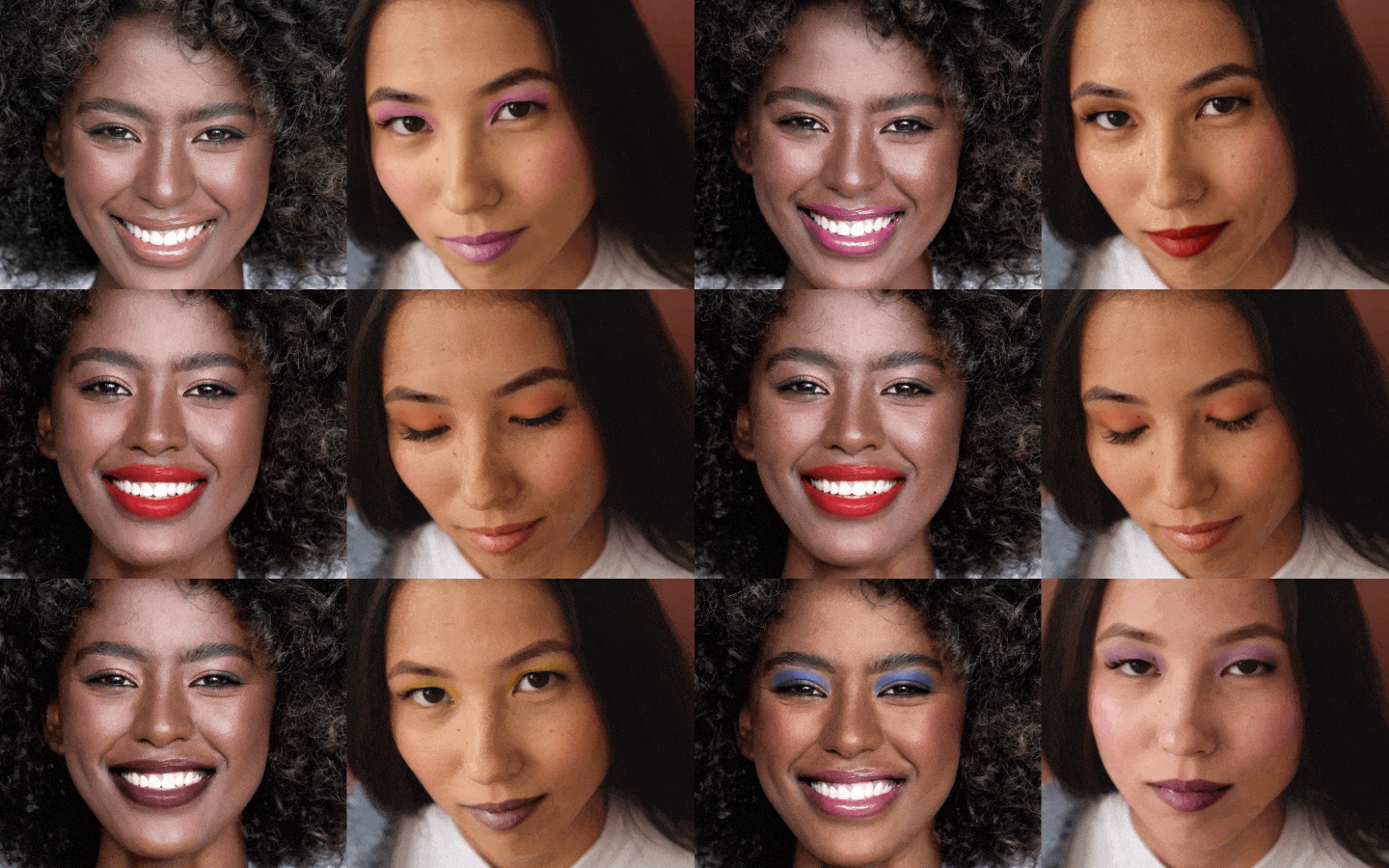 Banuba's makeup virtual try-on in action
AI Frame, Try On & Size Chart
$19.99 for 80 try-ons, $59.99 for 350, and $199.99 for 1,400, each with a size-chart allowance, a 7-day trial, and a free 10-try-on plan. Annual prepay saves 10%, for example, "or $2,160/year and save 10%" on the top plan.
Strengths. Best fit if your real problem is sizing rather than looks: try-on, size charts, and size recommendations are sold together, which is the pairing that moves apparel returns. It is also the only listing here that promises control of the overage: "Extra try-ons $0.14 each. You can cap it". 5.0 from 30 reviews.
Limitations. The smallest try-on allowances in this set at every price point, and two meters on one plan, try-ons and size recommendations, so either can run out first.
AI Virtual Try-On by EganAI
Free for 25 try-ons a month, then Starter at $19.99 for 150, Pro at $49.99 for 400, and Max at $99.99 for 1,500. Overage is $0.12, $0.11, and $0.10.
Strengths. The most completely published ladder in the set: every paid tier prints both its allowance and its overage rate, the free tier is the joint-largest here at 25 try-ons a month, and the try-on needs "No shopper login".
Limitations. Launched February 2026, and the listing shows "(0 Reviews)", with a "Free plan available" and no free trial in its pricing summary. Its own copy says "clothes or other items", which is not a category commitment.
Camweara Virtual Try On
$39 a month for 70 products, $90 for 300, and $200 for 3,000, with annual prepay at $429, $900, and $2,000. The top plan adds "Website traffic up to 200K/month" and then invites a sales conversation for anything above it.
Strengths. Widest product coverage in this comparison ("Supports jewelry, eyewear, watches, clothes, hats, wigs, shoes, bow ties"), 5.0 from 64 reviews, and running since June 2021. Because it meters SKUs and not sessions, a viral product page does not change the bill until the traffic cap.
Limitations. The inverse of its strength: a 40-SKU optical store pays the same $39 whether ten or ten thousand people try on, while a 400-SKU catalog jumps to $90 before any shopper arrives.
Banuba AI Virtual Try-On
Free on development stores, then $249 for up to 2,000 try-ons a month, $799 for up to 10,000, and $1,299 for up to 40,000, with a 7-day free trial on each paid plan. The Smart Plan at $1,299 a month is the only tier that lists "Priority support". The Shopify app covers makeup, skincare, glasses, and hair dye. There is no overage auto-charge, and shoppers pay in your own checkout, so Banuba does not handle payment, returns, or shipping.
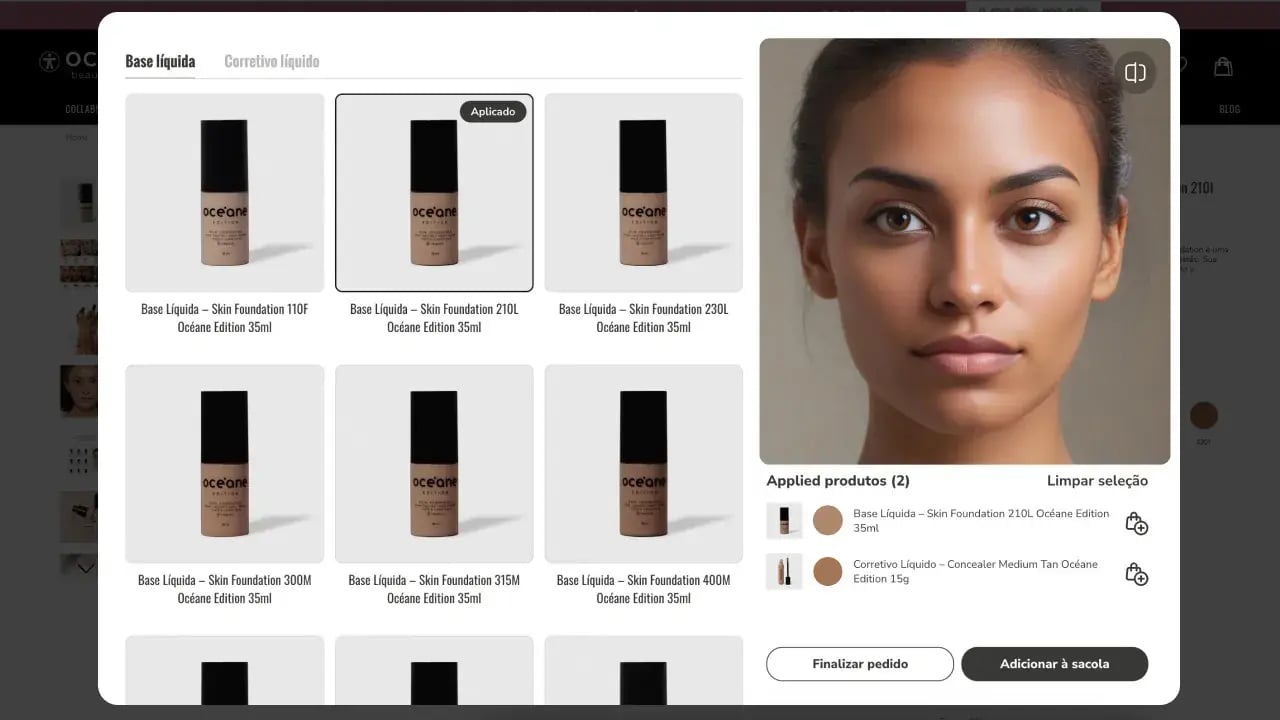 Virtual try-on interface by Banuba for Océane
Strengths. Lowest cost per try-on at the plan cap in this set, real-time AR rather than photo generation, on-device processing with no customer images stored, and a Built for Shopify badge. On the evidence side, Océane, a Brazilian beauty brand, used Banuba virtual makeup try-on to move its add-to-cart rate from the 3% industry average to a record 32%, which you can read in the Océane success story.
Limitations. Highest entry price in this comparison at $249, and the free plan is for development stores only. The paid plans cover four categories: makeup, skincare, glasses, and hair dye, so a catalog outside those four needs one of Banuba's other integration paths. The listing also carries the smallest review base here, 4.0 from 5 reviews.

Shopify's own product media
Free with your existing Shopify plan. The Help Center states that "Product media can include images, 3D models, and videos", and that to display them you need a theme that supports 3D models and videos, or theme edits.
Strengths. No app subscription, no quota, and no vendor to integrate with. For furniture, hardware, or packaging, where the shopper needs to judge "the function and size of an item", this is often the whole job.
Limitations. It shows the product, not the product on the shopper. There is no face tracking, no shade matching, and no fit. Rule it in or out before you price anything else, because it is the only free option that is not a trial.
Cost per try-on at the cap
Divide the plan price by the try-ons it includes, and the ranking changes completely.
At the top of each ladder, Banuba's Smart plan works out at about 3 cents per try-on ($ 1,299 for 40,000), Lit Outfit's Runway plan at about 4 cents ($ 199 for 5,000), EganAI's Max plan at about 7 cents ($99.99 for 1,500), GenLook's Pro and Antla's Unlimited Fashion plans at about 10 cents, and AIFrame's Advanced plan at about 14 cents ($ 199.99 for 1,400).
At the bottom of each ladder, the number is worse. GenLook's $19.99 plan with 100 try-ons is 20 cents each, and AI Frame's $19.99 plan with 80 try-ons is 25 cents, close to eight times the best rate in the set.
The practical reading: entry plans are priced for evaluation, not for operation. If your product pages already get traffic, the cheap plan is the expensive one, and the apps that look costly in the App Store listing are the ones that get cheaper as try-on use grows. Our own listicle on the best virtual try-on plugins covers the feature side of the same shortlist.

Costs the listings do not show
Four line items are missing from every plan card in this category.
Product digitization. Someone has to turn your SKUs into try-on assets. Banuba includes AI product digitization in its self-serve plans, and Camweara converts eyewear images to 3D models with "Specs AI", but a vendor that quotes digitization separately can add more than the subscription.
Overage. Four of these apps bill extra try-ons at $0.10 to $0.17. A 2,000-try-on month on Antla's 500-try-on plan is not a plan upgrade; it is 1,500 extra try-ons at the published $0.12, which is $180 on top of the $49.99.
Traffic and session definitions. Camweara's top plan caps store traffic at 200K a month. Lit Outfit charges only the first generation of an outfit. Those two sentences change the unit price more than any headline figure does.
Theme and integration work. Shopify's own 3D media may need theme edits, and any app that renders on a product page interacts with your theme. Helen Fedulova's write-up on the questions a Shopify try-on listing will not answer is a good checklist to take into a vendor call.
Finally, the app subscription is separate from what Shopify itself charges you. Your Shopify plan fee and payment processing rates are unchanged by installing a try-on app, and the try-on vendor does not take a cut of the sale.
Which plan fits which store
The decision is mostly made by two numbers: how many SKUs you need digitized, and how many try-ons your traffic will produce.
Firstly, if you sell clothing and your question is sizing, start with an AI photo app on its free or $19.99 tier and watch the generation count for a month. Secondly, if you sell anything worn on the face, makeup, eyewear, or hair color, price the real-time AR options, because a photo render of a lipstick shade is the thing shoppers complain about. Finally, if you have a large catalog and modest traffic, a product-metered plan like Camweara's is structurally cheaper than any session-metered one.
If none of the self-serve ladders fits, the Shopify app is not the only route. Banuba sells the same try-on engine through a no-code hosted option and through a custom enterprise integration on a yearly contract, with the enterprise scope quoted on monthly try-on sessions, categories, and customization. The case for the plugin route specifically is set out in how Shopify merchants increase conversion with a virtual try-on plugin.
Methodology
Every price, quota, trial length, rating, and launch date in this article was read on 23 October 2026 from each app's own Shopify App Store listing, and the Shopify product-media facts from the Shopify Help Center. Where a listing does not print a figure, this article says so rather than estimating it. Per-try-on figures are the plan price divided by the included try-ons, which is a ceiling price and not a billed rate. No vendor was asked for a private quote, so any plan whose price is "contact us" is absent from the comparison. Ratings and review counts move weekly and were accurate on the date above.
Conclusion
Both pricing models are legitimate, and they answer different questions. Generation-metered AI try-on is the cheaper way to find out whether try-on moves your conversion rate at all; real-time AR is the cheaper way to run it once it does, and it is the approach that renders on a live camera feed instead of a generated photo. The number worth writing down before any sales call is your expected monthly try-ons, because that single figure reorders this entire list. And you will get a 7-day free trial on the paid Shopify plans to check it against your own catalog.

Reference list
- Banuba AI Virtual Try-On, Shopify App Store listing
- Camweara Virtual Try On, Shopify App Store listing
- GenLook: AI Virtual Try On, Shopify App Store listing
- Antla AI Virtual Try On, Shopify App Store listing
- Lit Outfit, AI Virtual Try On, Shopify App Store listing
- AI Frame, Try On & Size Chart, Shopify App Store listing
- AI Virtual Try-On by EganAI, Shopify App Store listing
- Shopify Help Center, Product media
-
On Shopify, makeup virtual try-on starts at $249 per month for up to 2,000 try-ons with the Banuba app, and rises to $1,299 for up to 40,000. Most cheaper try-on apps in the App Store render clothing from a photo rather than cosmetics on a live camera feed, which is why the makeup-capable options start higher. Banuba's makeup virtual try-on page lists the shade and texture coverage behind that figure.
-
The shortlist is short, because most Shopify try-on apps do apparel. Banuba AI Virtual Try-On covers makeup, skincare, glasses, and hair dye with real-time AR; Camweara covers accessories and eyewear; and the AI photo apps are better suited to garments. Banuba's ranked comparison of the best virtual try-on apps for Shopify goes through the full set with the selection criteria.
-
Install the app from the Shopify App Store, upload your SKUs, pick the AR attributes for each item such as color and texture, then test it during the free trial before choosing a plan. With the Banuba AI Virtual Try-On Shopify app, installation needs no code and no theme development.
-
Glasses try-on is sold on the same ladders: $39 a month for 70 products with Camweara, or $249 a month for 2,000 try-ons with Banuba, where eyewear sits alongside makeup, skincare, and hair dye in every paid plan. Eyewear also needs 3D frame models rather than flat images, so check whose digitization is included; Banuba's glasses virtual try-on page describes how frames are prepared.
-
No. A try-on app is a separate monthly subscription and takes no share of your revenue, so your Shopify plan fee and payment processing rates on a $100 sale are unchanged. Shoppers pay in your own checkout, and Banuba does not handle payment, returns, or shipping. The Banuba virtual try-on plugin page is where the install and the free trial start.
-
Banuba sells virtual try-on on three paths: the Shopify app, a no-code hosted option, and a custom enterprise integration that is quoted on your monthly try-on sessions, categories and customization. All three are set out in the Banuba TINT virtual try-on pricing guide.
