

[navigation]
Key takeaways
- Océane moved its add-to-cart rate from the 3% industry average to 20.15% in the first pilot month, a 600%+ increase, then peaked at 32%, more than 1000% of the industry average.
- Banuba's plugin installs from the Shopify App Store with no coding, starting at $319/month for up to 10,000 try-ons, with a 14-day free trial on new installations.
- Product digitization is self-service in Banuba's TINT Admin Panel: makeup shades come from parameters in a CSV bulk upload, glasses from three photos of the frame.
Why does a Shopify product page lose the buyer?
A cosmetics or eyewear product page asks the shopper to do something the page cannot help with: imagine the product on their own face. Swatch images are shot on one model under one lighting setup, so the shopper either guesses or leaves, and a wrong guess comes back as a return.
Banuba's virtual try-on plugin removes the guess, putting the product on the shopper's face through their device camera before the add-to-cart click. Banuba reports up to 300% higher conversions and up to 60% lower return rates for merchants running it.
How does a virtual try-on plugin lift add-to-cart rate?
The lift comes from coverage and accuracy, not novelty. Banuba TINT renders 13 makeup types through its bulk-upload template, from foundation and concealer through lipstick, gloss, blush, eyeliner and mascara, each carrying a hex shade value, a finish and a coverage level. It adds six categories on top: headwear, glasses, scarves, jewelry, eye lenses, and nail color. A try-on plugin that covers half the catalog converts half the catalog.
Accuracy is the other half. Shade rendering is skin-tone aware, which is the pain point beauty merchants report most often with virtual try-on software: the color shows up wrong on anyone outside the model's complexion. TINT also ships an AI recommendation layer that suggests items suited to the individual shopper, which is what turns a single try-on into a basket.

What does the Shopify integration actually take?
Two paths, depending on how much control you want.
The fast one is the Shopify App Store. Banuba AI Virtual Try-On installs from the marketplace in a few clicks, with no code. Pricing runs $319/month on Basic for up to 10,000 try-ons, $999/month on Pro for up to 40,000, and $1,599/month on Smart for up to 50,000 with priority support, each with a 14-day free trial for new installations.
The controlled one is the theme snippet. A developer drops the widget tag into layout/theme.liquid, adds a try-on button block to the product template, and wires the widget's addToCart and removeFromCart events to Shopify's own cart/add.js and cart/update.js routes, so the try-on writes straight into the native Shopify cart. One prerequisite is worth flagging early: every SKU in the Tint database must use the product_id-variant_id format from your store, or the button will not appear. The Shopify integration guide has the step-by-step.
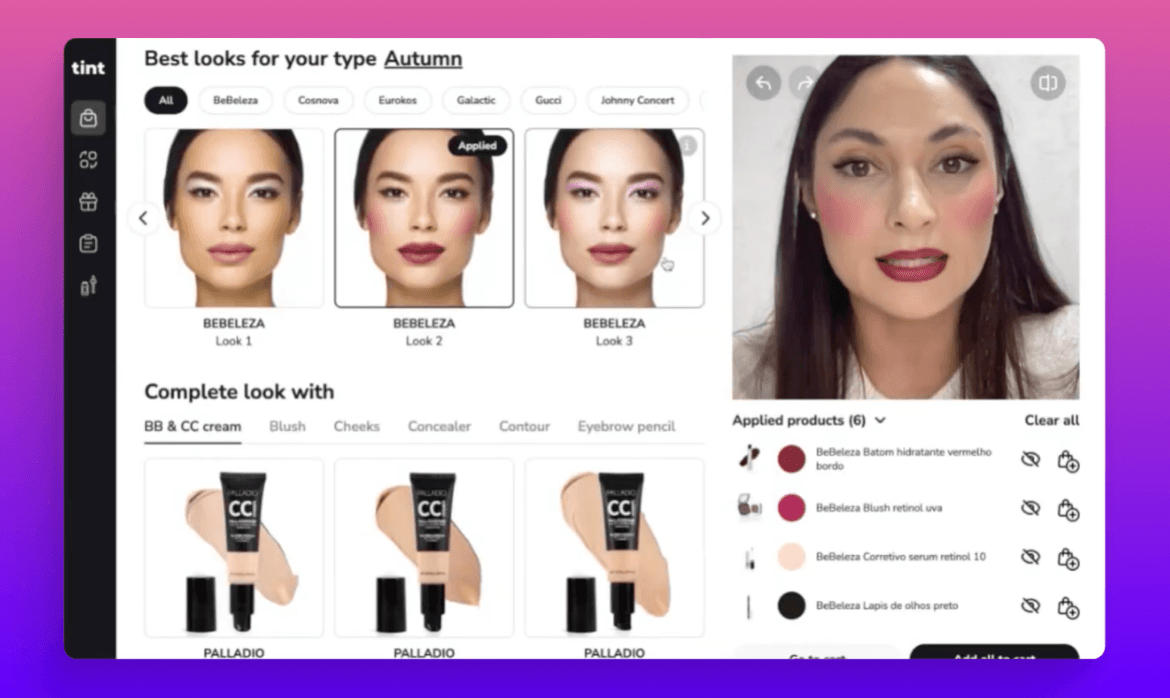 Banuba's virtual try-on plugin in action
Either way, the catalog work stays in-house. Makeup is digitized from parameters entered in the Admin Panel, individually or as a CSV bulk upload, and the AI generates the virtual version; glasses take three photos of the frame. The widget can be launched in under two weeks, and it is compatible with Wix, Cafe24, WooCommerce, Shoptet, OpenCart, and Tiendanube too, so a virtual try-on WooCommerce plugin or a virtual try-on plugin WordPress setup follows the same flow.
What did Océane get out of it?
Océane is a Brazilian beauty manufacturer and retailer, and one of the first companies to integrate TINT. Virtual try-on was uncommon in the Brazilian market, so the goal was an edge on competitors rather than parity.
The pilot covered two product lines: concealer and foundation. Within the first month, the add-to-cart rate for those items went from the 3% industry average to 20.15%, a 600%+ increase, and demand outran the forecast badly enough that the company ran out of stock. The rate later peaked at 32%, meaning roughly a third of shoppers who tried a product on placed it in their cart. Banuba's write-up of the Océane results has the timeline.
The shape of that rollout is worth copying: two categories, one month, a measurable before-and-after, and a ceiling that moved after launch rather than at it.

Ready to test it on your store?
Install Banuba AI Virtual Try-On from the Shopify App Store and run the 14-day free trial on a duplicated theme, not your live store. Digitize two product lines, watch the add-to-cart rate on those SKUs, and decide from your own numbers.
-
No. Banuba AI Virtual Try-On installs from the Shopify App Store without writing code, and product setup happens in the Admin Panel. A developer is only needed for custom button placement in your theme code, or a custom CMS, which Banuba's team handles. The virtual try on plugin page covers both paths.
-
Banuba TINT covers 13 makeup types through the bulk-upload template, plus hats, glasses, scarves, jewelry, eye lenses and eyelashes, tried on separately or as a complete look. For merchants whose catalog is mostly eyewear, Banuba's glasses virtual try-on covers that category specifically.
-
Banuba's Shopify tiers start at $319/month for up to 10,000 try-ons, $999/month for up to 40,000, and $1,599/month for up to 50,000, each with a 14-day free trial. Banuba prices its no-code and fully customizable TINT options separately, and the TINT pricing guide sets out which is which.
-
Banuba does not collect, store or process your customers' information: the try-on runs on the shopper's own device, which keeps the merchant out of the biometric-data question. Banuba's privacy policy sets out the details.
-
No. Banuba's try-on is web-based and runs in the browser over HTTPS, in the last two major versions of Safari and iOS and the last five of Chrome, Opera, Edge and Samsung Internet. For browser-based try-on outside a plugin, Banuba Web AR covers the same ground at SDK level.
-
Real-time. The shopper opens their camera and the product is applied live, with face tracking, rather than uploading a photo. If you need more control than a plugin gives, Banuba's Makeup AR SDK offers the same rendering for teams building try-on into their own app.
