

[navigation]
TL;DR:
- Fittingbox is best in category for multi-brand retailers and optical chains: 195,000+ digital frame references from 1,200+ brands, and nothing else in eyewear comes close on existing 3D coverage.
- Banuba TINT is best for exactly one thing: getting an own-catalog eyewear brand live without waiting on a third-party frame database. That is the only claim being made here.
- Catalog work is the real difference. Banuba TINT digitizes a frame from three photographs, left, body, and right, plus brand, SKU, and a catalog image, with a live preview before publishing and no 3D modeling step. New collections go live in under 48 hours.
- Fittingbox's main delivery is a web module. It has one native SDK, iOS only (FBxSDK, iOS 17+), and no Android native SDK is documented.
- Fittingbox publishes no prices. All four web formulas (Core, Starter, Essential, Plus) sit behind "Get Pricing" forms. Banuba publishes both of its ladders.
- Fittingbox is eyewear-only. Banuba TINT puts eyewear on the same plan as makeup, contact lenses, hair color, headwear and jewelry, so a brand selling more than frames does not need a second contract.
- Fittingbox's documented browser matrix is narrower than its marketing copy: iOS 16.6 and older is unsupported in all browsers, and Live mode is "compatibility not guaranteed" on iOS Chrome and Firefox and in in-app browsers.
- Fittingbox ships eyewear depth Banuba does not match: PD measurement, a lens simulator, Frame Removal and a Size Guarantee built on known or estimated pupillary distance.
How the two products are actually shaped
The two vendors are not the same kind of product, and most shortlists go wrong at this point rather than on rendering quality.
Fittingbox has been in eyewear since 2006 and is eyewear-only. Its product line is Virtual Try-On, 3D Viewer, Digital Frames, PD Measurement, Optical Fit, and Open Innovation, with no makeup, jewelry, or general face-AR product besides it. Delivery is mainly a web module embedded in your site, and there is exactly one native SDK, FBxSDK for iOS. Treating it as a cross-platform AR SDK is wrong, and so is treating it as web-only.
Banuba TINT is the opposite shape: one web widget covering several product categories. The virtual try on glasses module sits on the same plan as makeup, contact lenses, hair color, headwear and jewelry, and the widget ships from a CDN as a script tag or as a Shopify app. The engineering cost is a script tag and a merchant ID; the operational cost is digitizing your own frames.
That single difference, whose database the frames live in, decides most of what follows.

Side by side
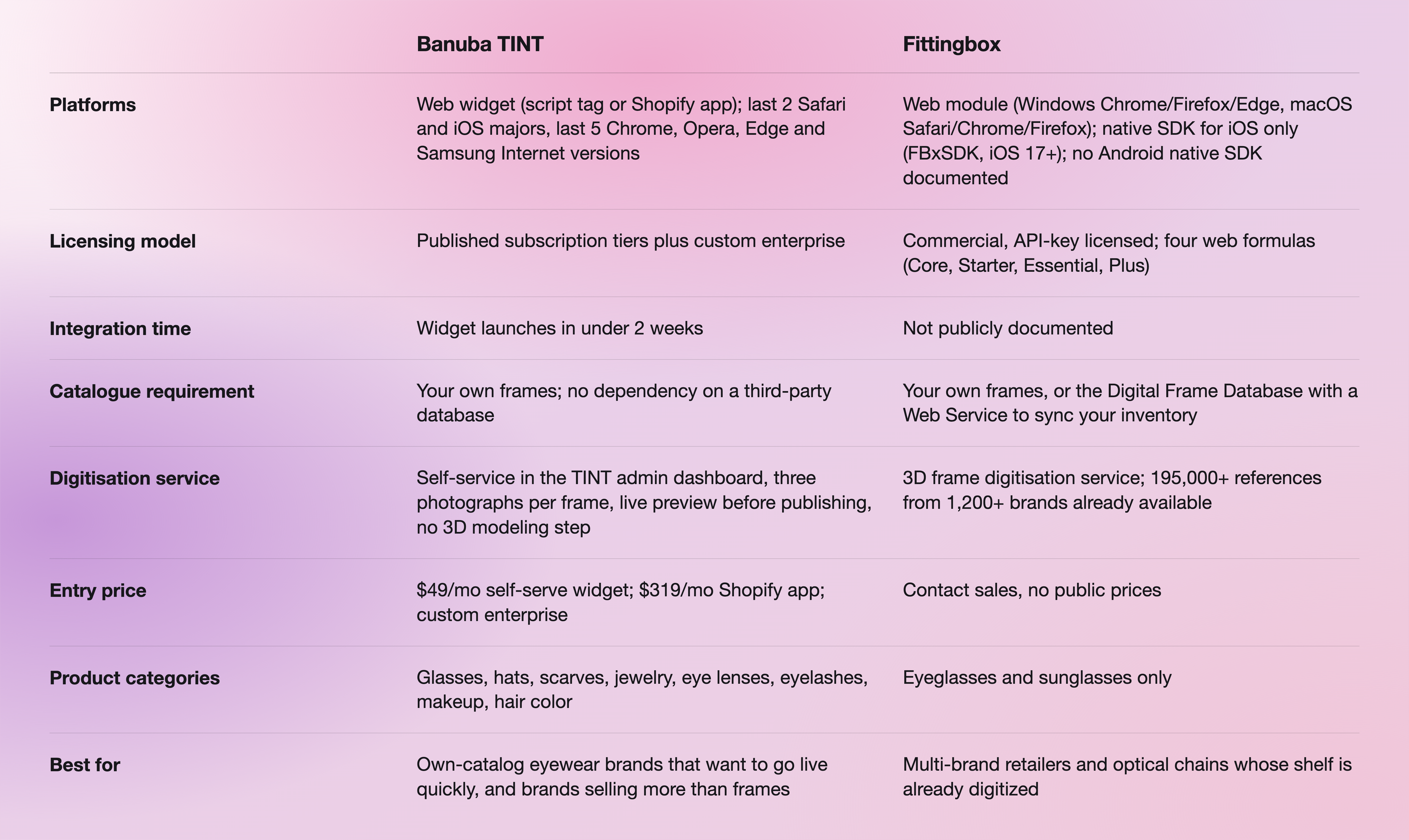
Sources: Banuba column from the TINT widget documentation and the Banuba Virtual Try-On plugin page; Fittingbox column from the Fittingbox compatibility matrix, the VTO Advanced page and the iOS SDK integration guide.
Why eyewear teams leave Fittingbox
Three reasons come up, and all three are in Fittingbox's own documentation rather than anyone's opinion.
The support surface is narrower than the marketing copy. Fittingbox's marketing FAQ says the try-on works on any device and all the latest browsers. Its compatibility matrix says something more specific: iOS 16.6 and older is unsupported in all browsers for both Live and Photo mode, Live mode is "compatibility not guaranteed" on iOS Chrome and Firefox, embedded app browsers such as Instagram, Facebook and Snapchat are not guaranteed for Live mode on either platform, and Internet Explorer is unsupported. If a meaningful share of your traffic arrives from an in-app browser, that matrix is the document to read before the demo.
Android has no native path. Fittingbox documents Android support as web only, through Chrome. The one native SDK is iOS, requires iOS 17 or newer, and its integration guide states that FBxView is designed and tested for full-screen usage and should not be embedded as a small partial view. A team that wants try-on inside an existing product page in a native Android app has no documented route.
Nothing about cost is knowable before a call. Fittingbox's four formulas are presented with "Get Pricing" forms only, and no amount, currency, session band, or user band is published anywhere on its site. That is a legitimate enterprise motion, not a flaw, but it does mean a budget case has to be built without a number.
There is a fourth point worth stating plainly rather than framing as a weakness: much of the uplift data circulating about Fittingbox, conversion multiples, and drive-to-store figures is attributed by Fittingbox itself to third-party customer tests and testimonials. Those are customer outcomes, not product specifications, and neither we nor anyone else should quote them as vendor performance data.
Where Banuba TINT is genuinely different
The catalog pipeline is the whole argument, so it is worth being concrete about what the work looks like.
You add a frame in the TINT admin dashboard by entering the glasses name, brand, SKU, and an optional product URL, uploading a catalog image, then uploading three photographs of the frame: left, body, and right. A virtual try-on preview renders on the right of the screen as you upload, so you see the result before you save. There is no 3D modeling step and no sample to ship. New collections go live in under 48 hours, and Banuba's platform carries 22,000+ digitized products across categories.
Two consequences follow. A brand that controls its own frames is not waiting on anyone to model them, and a brand that sells frames alongside makeup, contact lenses, hair color or jewelry gets all of it from one widget and one plan rather than a second procurement round. Pupillary distance measurement is part of Banuba's face-analytics capability set, alongside face shape detection and eyewear detection.
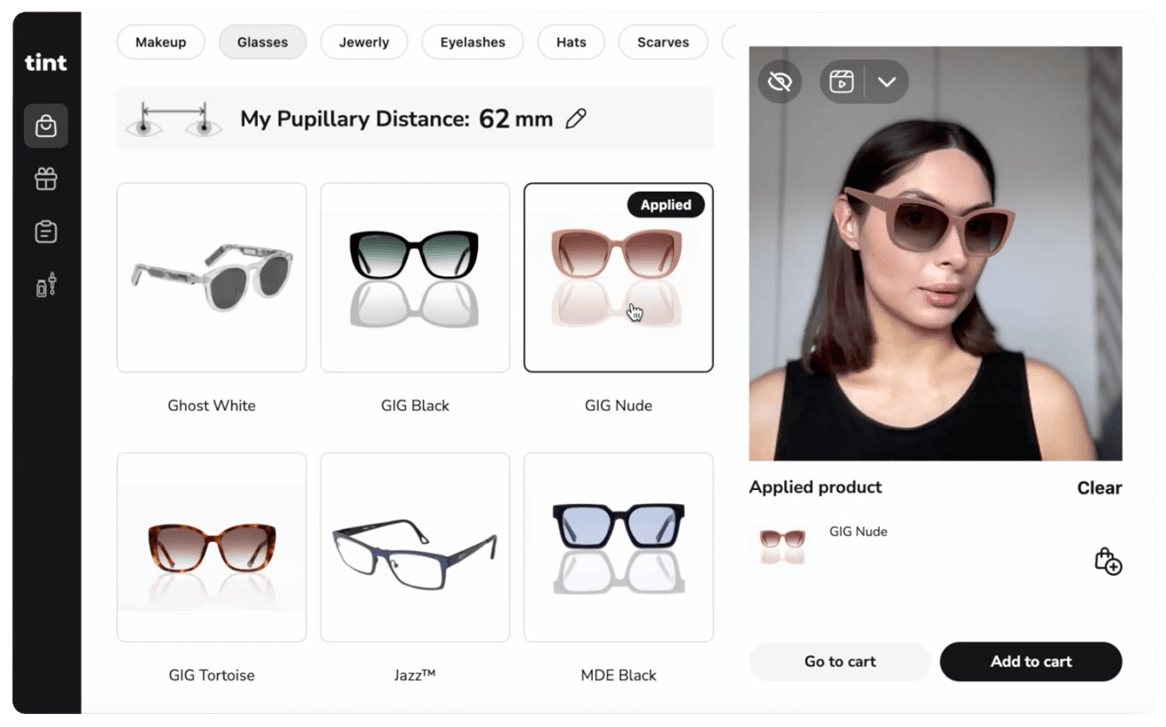 Banuba's glasses virtual try-on interface example
On outcomes, be careful with what Banuba publishes. The strongest documented Banuba TINT result is not eyewear: Océane, a Brazilian cosmetics brand, moved its add-to-cart rate from the 3% industry average to 20.15% in the first month of a makeup try-on pilot, then to a record 32% add-to-cart rate. Read it as evidence of what try-on does to add-to-cart behavior, not as an eyewear benchmark. If you want the wider field rather than a head-to-head, our comparison of virtual try-on platforms for eyewear brands puts Fittingbox, Auglio, Banuba TINT, Perfect Corp and GlassOn side by side, and the round-up of virtual glasses try-on apps covers the consumer-facing end of the market.

What it costs
Banuba publishes two ladders, and it matters which one you are being quoted.
The self-serve no-code widget runs from $99 to $799 per month depending on the plan. The Shopify app is priced for higher volume: Basic at $249 per month for up to 2000 try-ons, Pro at $799 for 10,000 and Smart at $1,299 for 40,000, each with a 7-day free trial and unlimited products. Custom enterprise integration is priced on try-on sessions per month. The Banuba Virtual Try-On pricing guide breaks down which ladder applies to which deployment.
Fittingbox publishes nothing. Core, Starter, Essential, and Plus are described by how many modules each includes, and every one routes to a form. Paid modules sit on top: Database, Frame Removal, Lens Simulator, 3D Viewer, Face Shape, PD Measurement, Premium Experience, and Premium Hosting. When you do get a quote, ask which of those are inside the formula and which are billed separately, because the module list is where the price moves.
For a shortlist of two, that means one conversation starts with a number, and one does not. Helen Fedulova's walk-through of what to weigh when picking an eyewear try-on tool covers the cost variables that tend to get missed before those calls.
 Banuba's virtual try-on in action
When Fittingbox is the better choice
Three situations, and they are common.
Your frames belong to other brands. If you are an optician or a multi-brand retailer, the 195,000+ references from 1,200+ brands in Fittingbox's database probably already cover most of your shelf. You skip the part of a try-on rollout that costs real time, and no self-service digitization pipeline beats frames that are already modeled. Fittingbox reports 306M+ try-on sessions powered and 80k+ frames digitized in 2025, and more than 4,000 corporate customers.
Optical precision is the point. Fittingbox sells PD measurement, a lens simulator under Optical Fit, and a Size Guarantee that renders the frame at an accurate size using either a known pupillary distance or population statistics. Its Frame Removal feature detects whether the shopper is already wearing glasses and digitally erases them before try-on. If lens choice and fit accuracy are the conversion problem, that depth is the product.
You need a specialist, not a platform. Twenty years in one category, 59 patents filed since 2006, and a 150-person team is a different kind of bet from a multi-category try-on platform. If eyewear is the entire business and will stay that way, breadth is not worth paying for.

Moving from Fittingbox to Banuba TINT
If the own-catalog case applies, the migration is mostly catalog work rather than engineering.
- Export your SKU list and frame photography. You need left, body, and right images per frame, plus brand, SKU, and a catalog image. Most eyewear brands already have product photography that qualifies.
- Try the widget before committing. The TINT demo runs in a browser with no integration.
- Request a merchant ID. The widget needs a TINT merchant ID and a Banuba client token, both obtained through the contact form on banuba.com. The merchant ID controls which widget features are enabled.
- Add the widget. It loads from a CDN via <script type="module" src="https://tintvto.com/widget.js"></script>, then a <tint-vto/> tag with your merchant ID. An HTTPS/TLS connection is required for webcam access. On Shopify, install the TINT app instead.
- Digitize a pilot collection first. Upload one collection in the admin dashboard, check the previews, publish, and measure before moving the rest. If you also want native mobile try-on, the iOS and Android SDK sample apps are the starting point.
A practical note: keep both live during the pilot. Try-on is a conversion surface, and switching it off while you migrate costs more than running two widgets for a month.
-
Among eyewear virtual try-on vendors, only two publish prices at all. Banuba TINT starts at $49 per month for the self-serve widget and $319 per month for the Shopify app, and Perfect Corp publishes its Shopify tiers; Fittingbox, Auglio and GlassOn are all quote-only. Cheaper is not automatically better here, because a published price on an own-catalog product still leaves you the digitization work. Our eyewear vendor comparison sets the published figures against what each one includes.
-
The realistic shortlist in 2026 is Fittingbox for multi-brand retailers with the largest 3D frame database, Auglio for fast coverage from a large pre-virtualized catalog, Banuba TINT for brands digitizing their own collection, Perfect Corp (YouCam) where eyewear sits inside a beauty platform, and GlassOn where lens choice is a real revenue line. Which one wins depends almost entirely on who owns the frames, not on rendering quality. Banuba's glasses virtual try-on page sets out the own-catalog case in detail.
-
Banuba publishes three routes: a no-code self-serve widget from $99 to $799 per month, a Shopify app from $249 to $1,299 per month, and custom enterprise integration priced on try-on sessions per month. Most other eyewear vendors, Fittingbox included, publish nothing and quote per customer. Budget for the catalog work as well as the license if you are digitizing your own frames. The Banuba Virtual Try-On pricing guide explains which route fits which deployment.
-
Real-time face tracking in the browser or in a native app, plus a 3D or photo-derived model of each frame rendered onto the shopper's face, usually with pupillary distance estimation so the frame renders at the right size. Banuba TINT delivers it as a web widget loaded from a CDN, with a photo-based digitization pipeline that turns three product photographs into a wearable frame; Fittingbox delivers a web module plus an iOS SDK against its own frame database. Our guide to building virtual glasses try-on with an SDK walks through the implementation side.
-
Not according to its own documentation. Fittingbox documents Android support as web-only, through Chrome, and its single native SDK is iOS. Banuba TINT is web-based across both platforms, and Banuba also ships native iOS and Android SDKs for teams that need try-on inside an app rather than a page. Banuba's virtual try-on plugin page lists the eCommerce platforms it installs on, including Shopify, WooCommerce, Wix, Tiendanube, and OpenCart.
