

[navigation]
TL;DR:
- Banuba ships rendered effects (makeup, hair color, background separation, AR masks, beauty, nails and rings), so a virtual try-on runs without you writing shader code. Zappar publishes raw face-mesh buffers and 13 named landmarks that your renderer draws.
- Zappar is the better choice for image tracking and instant world tracking. Banuba Face AR SDK does not sell those; it is a face and hand AR engine.
- Zappar publishes its prices. Developer is $12.99/month (non-commercial only), Pro is $315/month, Enterprise is custom. Banuba Face AR SDK is quoted, with no public price list.
- Zappar bills on cost per view. Pro includes 12,000 views per year and additional views cost $30 per thousand, so a campaign spike is a billing event.
- Any company or agency client with revenue or funding above $10 million in the last 12 months is required to be on Zappar's Enterprise plan, so the published $315 figure does not apply to most enterprise buyers.
- Self-hosting Universal AR is Enterprise-only at Zappar. Banuba's Web build is an npm package you bundle and serve from your own domain on any plan.
- Banuba tracks multiple faces on Web as a supported feature. Zappar tracks one face by default and warns that raising it "may impact the performance and frame rate of the library".
- Banuba publishes its Web runtime footprint: BanubaSDK.wasm is 12 Mb uncompressed and 2.5 Mb Brotli-compressed. Zappar publishes no SDK footprint or frame-rate figure.
- Zappar covers more rendering frameworks: seven toolkits including Three.js, Babylon.js, PlayCanvas, A-Frame and Unity, against Banuba's JavaScript and TypeScript package with React, Angular and Vue quickstarts.
How to choose between a Web AR SDK and a Web AR platform
Before comparing vendors, decide which of these five things actually blocks your launch. They are the criteria the rest of this article uses.
-
Do you need rendered effects or tracking data? A face-tracking library returns landmark positions and a mesh. Turning that into a lipstick shade that survives a head turn is weeks of graphics work. If your team has no WebGL specialist, an engine that ships the effect is the shorter path.
-
Where will the experience be served from? Some vendors host your project on their domain by default and treat your own domain as an upgrade. If the try-on has to sit on your storefront under your own SSL, check this before anything else.
-
How are you billed as usage grows? Per-view pricing and per-monthly-active-user pricing behave very differently when a campaign goes viral. Model your worst month, not your average one.
-
How many faces, and how far from the camera? A single-user mirror and a two-person photobooth are different products. So is a kiosk where the subject stands two meters back.
-
Which browsers must work on day one? In-app web views inside iOS apps are the usual trap, and the floor differs by vendor.
Read our five browser approaches to Web AR for the trade-offs between a hosted service, a bundled SDK, and the standards-based route.
What each SDK actually gives you
Banuba's webar SDK is the Web build of Face AR SDK, distributed as the @banuba/webar npm package. It is tree-shakable, so you import only the modules you use. On Web, Banuba's own feature matrix lists single-face and multi-face tracking, makeup, background separation, skin, hair, eye, lips and brow segmentation, avatars, LUT filters, physically based rendering, interactive triggers, and Hand AR for nails, rings and watches as supported. The effects are rendered by the SDK.
Zappar's Universal AR is the SDK layer of the Zapworks platform. It publishes three tracking types: face tracking, instant world tracking, and image tracking. Its face tracking is real-time, running per camera frame inside a requestAnimationFrame loop, and it exposes 13 named landmarks (eyes, ears, nose bridge, nose tip, lip top, mouth center, lip bottom, chin and eyebrows) plus two face meshes. Those meshes come out as raw vertices, uvs, normals and indices buffers that your code draws with gl.TRIANGLES. Zappar documents the face use case as "face-filter experiences to allow users to try on different virtual sunglasses, for example, or to simulate face paint".
That is the real split. Zappar hands you a tracked head; Banuba hands you a tracked head with the lipstick already on it. Neither is better in the abstract. If you are building a bespoke 3D scene with a custom art pipeline, Zappar's raw buffers are what you want. If you are adding hair color to a product page this quarter, rendering it yourself is the expensive way.
Side-by-side comparison
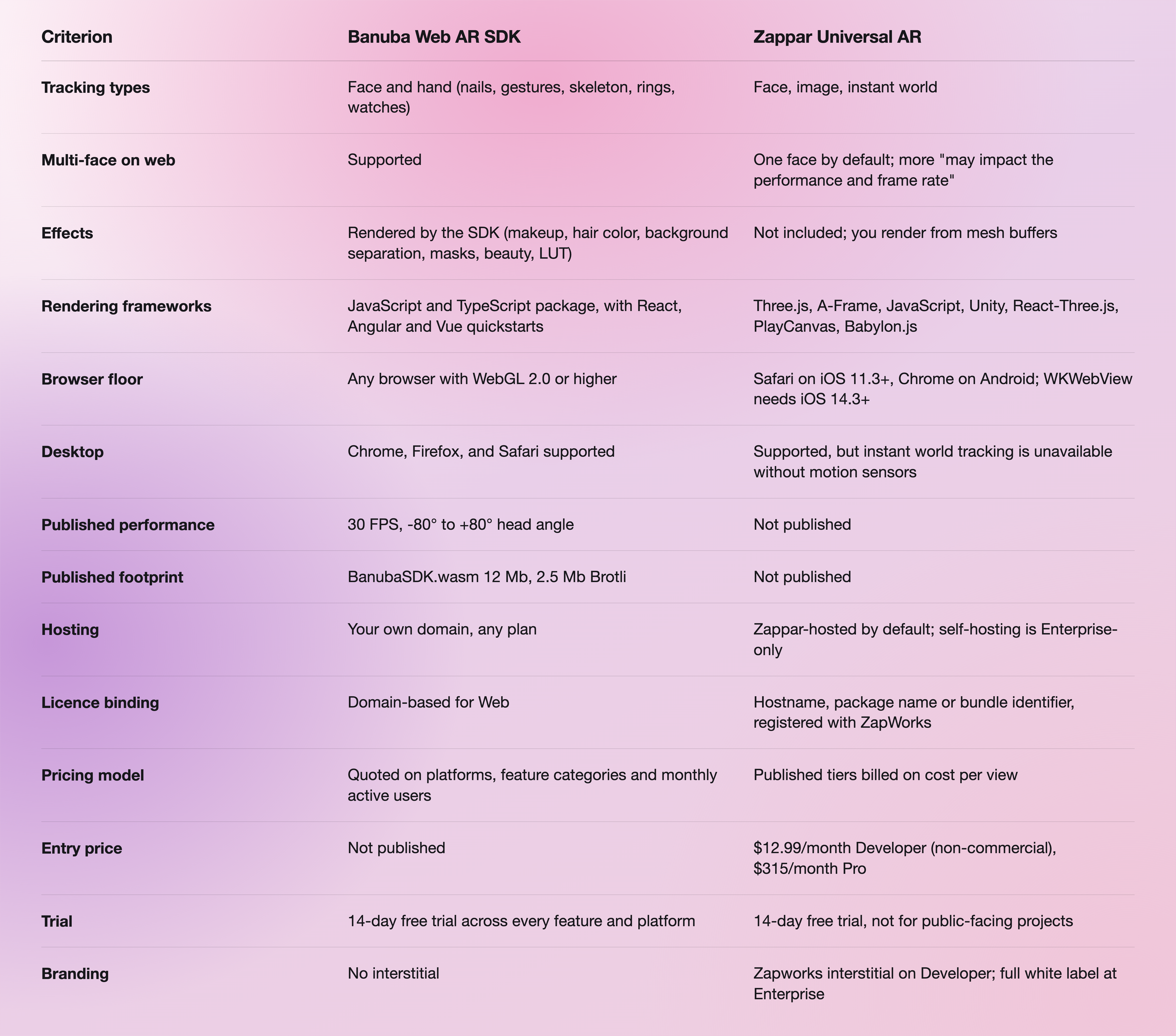
The links behind these rows: Banuba's figures come from its Face AR SDK documentation, and Zappar's from the Universal AR licensing docs and the Zapworks pricing page.
Licensing and hosting, the part that changes the build
This is where the two products diverge most, and it is the row buyers most often miss.
Zappar's license check runs when the Universal AR library initializes. For a self-hosted experience, the full domain must be registered with ZapWorks, and the check confirms an active plan and counts views for cost-per-view billing. Zappar's own licensing documentation states: "We currently only offer self-hosting to users on our Enterprise plans, who are given 1 free web license for self-hosting a Universal AR site." So a Pro customer paying $315 a month is serving the experience from a Zappar-branded domain, not their own. Local addresses, local networks, and ngrok are exempt during development.
Banuba licenses the Web build by domain. You install the npm package, bundle it, and serve it from your own origin from the start, which is what made the QR-code flow below possible.
Two further Zappar rules are worth putting in front of a procurement conversation. Companies or agency clients with revenue or funding above $10 million in the last 12 months must take Enterprise. And on cancellation, "all projects built using Zapworks will immediately become inactive and read-only" once the billing term ends.

Performance and footprint
Banuba publishes its numbers. Single-face tracking is measured at 30 FPS on high-end Android and on iOS, 25 FPS on low-end Android, with an 80-degree working angle in both directions. The Web runtime asset BanubaSDK.wasm is 12 Mb uncompressed, 3.5 Mb gzip-compressed, and 2.5 Mb with Brotli, and a SIMD build ships alongside it that the SDK loads automatically where the browser supports it. Those are lab figures and your own devices will differ, which is the point of the trial.
Zappar publishes no frame-rate figure, no latency figure, and no SDK footprint for Universal AR, and no vertex count for its face mesh. That is not a criticism of the tracking quality, which we have not benchmarked; it is a statement about what you can design against before you sign. It does publish one performance constraint clearly, the multi-face warning, and it is worth quoting in full: "setting a value of two (2) or more faces may impact the performance and frame rate of the library. We recommend sticking with the default value of one."
Read our best Web AR SDKs round-up for the wider field, and the complete guide to app-less augmented reality for how browser AR works before you evaluate anyone.
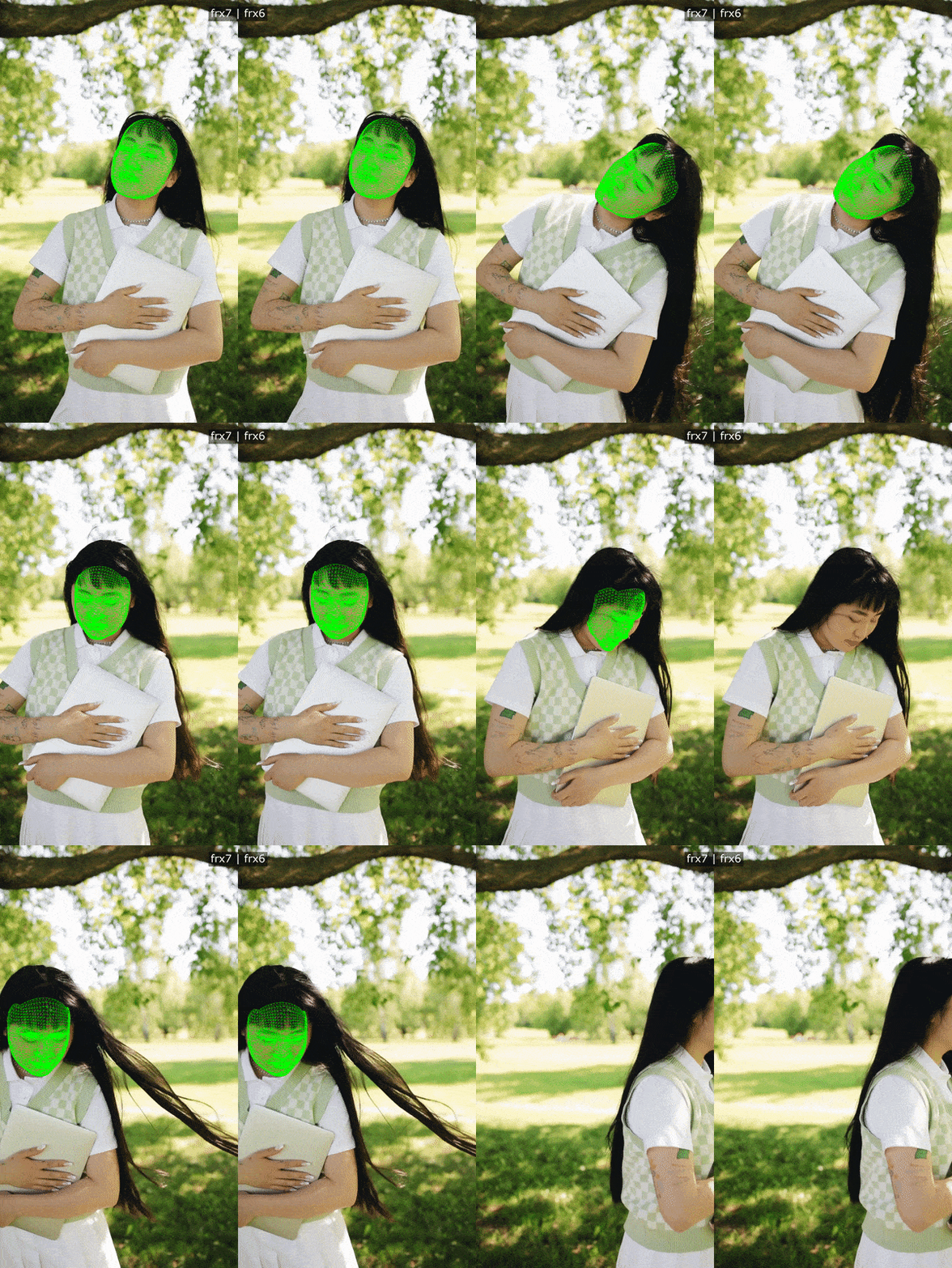 Banuba's face tracking technology
A browser AR build, start to finish
Loncolor, a Romanian hair dye and hair care producer, wanted customers to try a shade before buying it in store. Scorpion Technology, a Bucharest software company, built the experience on Banuba's Face AR SDK: a shopper scans a QR code on the dye package, a web page opens in their browser, and once their face is on camera, the page shows the chosen color on their own hair. No app install, and no per-store hardware.
Scorpion Technology's stated reasons for choosing Banuba were the quality of the recoloring filter, which affects only hair and holds up in different lighting, the ability to license just the try-on feature rather than the whole package, and the documentation. Their CEO, Gigi Nuta, described the collaboration as "smooth and efficient". The project rolled out in 2025, and usage has grown since; Banuba has not published conversion figures for it. The full write-up is in the Loncolor virtual try-on case study, and how e-commerce sites add browser-based AR try-on covers the storefront pattern in more detail.

Where Zappar is the better choice
Three cases, honestly.
You need image tracking or world tracking. Scanning a poster, a package or a museum label, or placing an object on a surface, is Zappar's territory and not something Banuba Face AR SDK sells. Target images are trained in ZapWorks before use, with 5 per project on Developer and 10 on Pro.
You want a price before you talk to anyone. Zappar's tiers are on its pricing page. Banuba quotes against platforms, feature categories, and monthly active users, which means a conversation. For a student project, a prototype, or an agency pitch, $12.99 a month and a card is faster than a scoping call.
Your renderer is already chosen. If your team is standardized on Babylon.js or PlayCanvas, Zappar has a maintained toolkit for it. Banuba ships a framework-agnostic JavaScript package instead, which is fine with React, Angular or Vue, but it is not the same as an official Babylon.js integration.
The wider Web AR field
Neither vendor is the only option, and 2026 reshaped this market. 8th Wall's paid platform was retired on 28 February 2026, and it is now free open source under Niantic Spatial, which sent a lot of agency work looking for a new home. If you are shortlisting, these are the names that come up alongside Banuba and Zappar, with the role each plays for a buyer.
- Zappar (Zapworks), the image and instant world tracking specialist, and the one vendor here with a published price list.
- Blippar, an agency-facing WebAR provider, long established in branded AR.
- ARLOOPA Studio, a campaign builder aimed at teams without a developer.
- Onirix, a no-code WebAR studio used for campaign and industrial work.
- MyWebAR, a template-driven route for QR-code campaigns.
- AR.js, the open-source option for marker- and location-based AR, where you do the integration work yourself.
- Google's <model-viewer>, an HTML element for embedding a product model in a page, with no face tracking.
- Banuba Web AR SDK, for real-time face AR and virtual try-on in the browser, where the effect itself has to look right.
Check each one's current terms yourself before shortlisting. The point of the list is the shape of the field, not a cost ranking: if the job is a marker-based campaign or a spinning product model, a face AR engine is the wrong tool, and any vendor who says otherwise is selling.
-
All of the ones above. Web AR runs in the mobile or desktop browser, so the user opens a link or scans a QR code instead of installing anything. Banuba's Web AR SDK runs in any browser supporting WebGL 2.0 or higher and is distributed as an npm package you bundle into your own site, which is how the Loncolor QR-code try-on works. Read the complete guide to app-less augmented reality for the mechanics.
-
It splits into two models. Zappar publishes subscription tiers: $12.99 a month for non-commercial Developer use and $315 a month for Pro, billed on cost per view with 12,000 views a year included and $30 per additional thousand. Banuba Face AR SDK is quoted instead of listed: the figure depends on the platforms you ship on, the feature categories you activate and your monthly active users, billed yearly, and Web licenses are bound to a domain. Banuba publishes no price list at all, but there is a 14-day free trial covering every feature on every supported platform, which is the usual way to scope a pilot. Read the Face AR SDK pricing guide for what goes into a quote.
-
Build the same small scene on each shortlisted SDK and measure four things on your own hardware. First, frame rate on your lowest-spec target device, not a flagship. Second, time from page load to first tracked frame, including model download. Third, whether it survives your real browsers, particularly in-app web views on iOS. Fourth, what you had to write yourself to get a finished effect on screen. Banuba publishes 30 FPS and a runtime asset of 12 Mb uncompressed, 2.5 Mb with Brotli, as a starting point to test against, and its best Web AR SDKs comparison lists the wider set of vendors worth putting through the same test.
-
It depends on what you are giving up. For marker-based or location-based AR with no face tracking, open-source AR.js and Google's <model-viewer> are the usual starting points, and MyWebAR and ARLOOPA Studio sell template-driven campaign builders. None of those does real-time face rendering, so a makeup or hair-color try-on is out of reach on all of them. Where face AR is the actual requirement, Banuba quotes against the platforms you ship on, the feature categories you activate, and your monthly active users rather than a fixed tier, so a small deployment is scoped as one; the Banuba Web AR SDK page has the trial request form.
-
Yes. Banuba's own feature matrix lists multi-face tracking as supported on Web, alongside iOS, Android, macOS and Windows, which matters for photobooth, kiosk and two-person try-on builds. Zappar tracks one face by default and advises staying there for performance. Banuba's face tracking SDK page covers the tracking stack in more detail.
