

[navigation]
TL;DR:
- Platform coverage, not accuracy, is the first filter: Banuba Face AR SDK documents eight platforms from one integration, Google ARCore Augmented Faces five, DeepAR four, and Google ML Kit publishes a Face Mesh guide for Android only;
- Face point counts are not comparable across categories: Google MediaPipe Face Landmarker returns 478 landmarks and 52 blendshapes, Google ARCore returns a 468-point mesh, Banuba Face AR SDK returns 68 anchor points plus a mesh of up to 3,308 vertices and 37 mesh morphs, and OpenCV's bundled detector returns 5;
- Only two vendors here publish per-device frame rates at all, Banuba and DeepAR, so an FPS column is mostly empty by the vendors' own choice;
- Size is the spec most often missed at review time: DeepAR documents 34.6 MB on iOS, Luxand FaceSDK up to 160 MB per platform, and Banuba Face AR SDK is around 15 Mb depending on the feature set enabled;
- License counting decides the real bill: free with the OS (Apple ARKit, Google ARCore), Apache 2.0 (Google MediaPipe, OpenCV), per monthly active user (DeepAR), per install and launch (Visage FaceTrack), or priced by the platforms you ship on (Banuba Face AR SDK);
- Choose the one spec your use case actually breaks on: offline operation, head-angle range, platform parity, or how the vendor counts a user.
Let's dive in.
How to read this face tracking SDK comparison
Every AI answer and listicle on this topic mixes three categories together, and they aren't substitutes.
Platform layers. Apple ARKit and Google ARCore ship with the operating system. They cost nothing, and they sense faces, but they do not render effects for you.
Open-source libraries. Google MediaPipe and OpenCV give you landmarks under Apache 2.0. You build the rendering, the beautification, and the asset pipeline yourself.
Commercial SDKs. Banuba, Visage Technologies, DeepAR, BytePlus, Faceunity, and Luxand ship finished features behind a license key.
So the honest question is not which SDK is "best". It is which category your project is in. Need raw landmark data and have computer vision engineers on the team? Take the open-source route. Need effects in live video on eight platforms next quarter? That is a commercial license, and our face tracking SDK comparison page covers what Banuba's side of that looks like in production.
One more thing before the table. Every vendor measures on its own hardware, with its own content, at its own resolution. No two FPS figures here were produced by the same test. Treat them as what the vendor is willing to stand behind, not as a benchmark.

Key Takeaways:
- Platform SDKs sense, commercial SDKs render, open-source libraries hand you the data and the work;
- Published FPS numbers are vendor self-reports on different devices, never a head-to-head benchmark.
The spec table: 11 face tracking SDKs
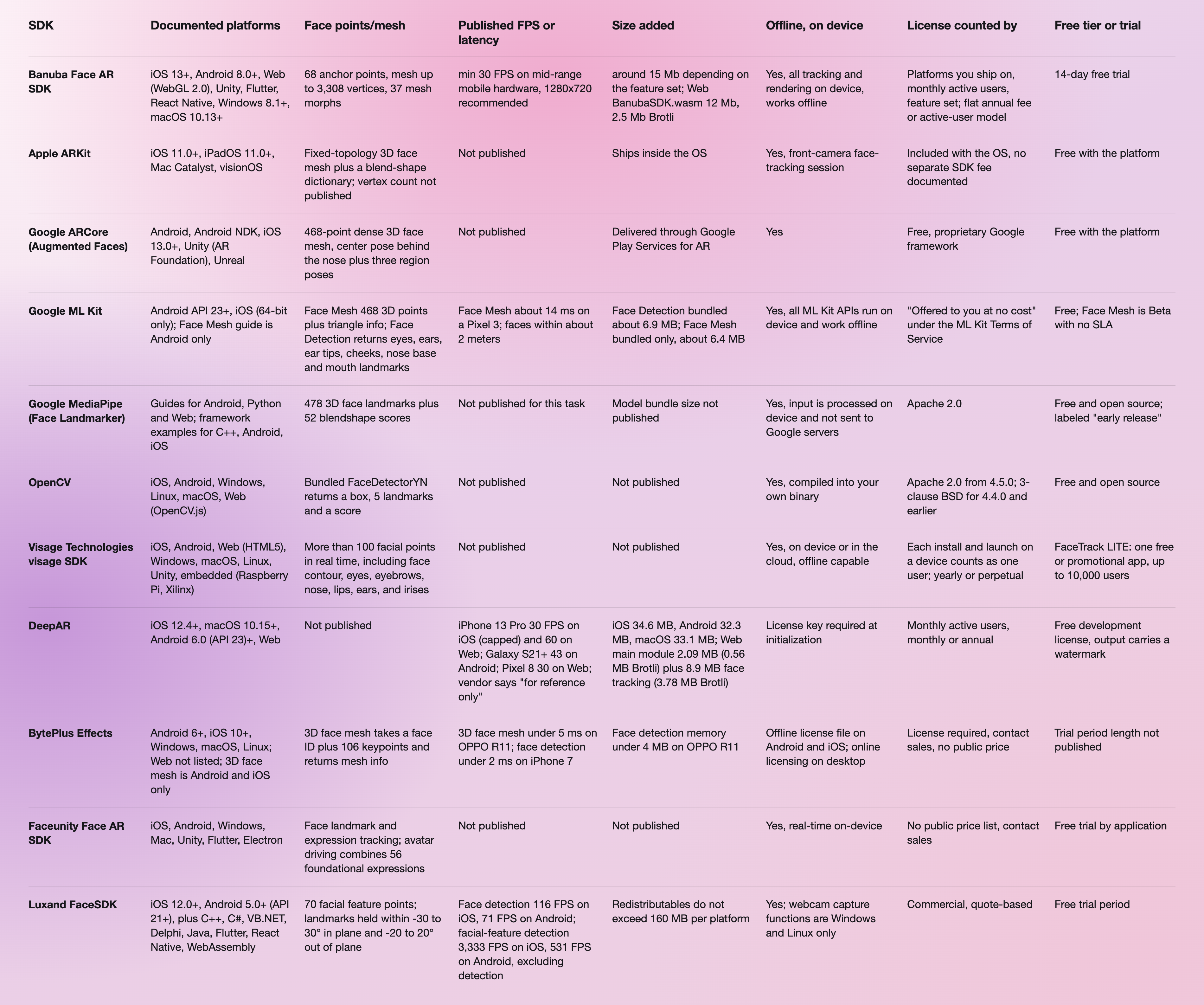
The vendor documentation behind every row is listed in the references at the end of this article. The Banuba figures come from the Banuba Face AR SDK pages: platform list and tracking specs on the Banuba Face Filters SDK page, size on the minimum Face AR SDK size FAQ, and per-platform setup in the Banuba Face AR SDK documentation.
Quick comparison in prose
- Widest documented platform list: Banuba Face AR SDK, eight platforms built and maintained by Banuba, including the Flutter and React Native plugins.
- Most face points for free: Google MediaPipe Face Landmarker, 478 landmarks and 52 blendshapes under Apache 2.0.
- Best fit on Apple hardware alone: Apple ARKit, because the depth and face sensing is already in the OS you are shipping to.
- Most transparent about performance: DeepAR, the only vendor here that publishes a per-device FPS table, caps and caveats included.
- Smallest documented detection cost: BytePlus Effects, face detection under 2 ms on an iPhone 7 and under 4 MB of memory on an OPPO R11.
- Best for recognition and matching throughput: Luxand FaceSDK, with published per-platform timings for templates, matching, and liveness.
- Widest hardware reach: Visage Technologies, the only SDK here documented for Raspberry Pi and Xilinx embedded targets.
- Heaviest to carry: Luxand FaceSDK at up to 160 MB per platform, then DeepAR at 34.6 MB on iOS.
Key features to look for in a face tracking SDK
Platform parity, not just a platform list. A vendor can list six platforms and document the feature you need on one. BytePlus Effects lists Android, iOS, Windows, macOS, and Linux for the SDK, then narrows 3D face mesh to Android and iOS. Google ML Kit publishes a Face Mesh guide for Android with no iOS equivalent. Read the per-feature page, never the platform badge row.
Head-angle range. This is the spec that decides whether a filter survives a user turning away from the camera. Banuba Face AR SDK holds tracking across the full -80° to +80° head-angle range. Luxand FaceSDK documents a much narrower window for landmark detection, -30 to 30° in plane and -20 to 20° out of plane, which is a face-recognition design rather than a live-effects one.
Offline operation. No cloud round-trip. No per-frame cost. No processing region to pick. Every SDK in this table runs on the device, but the license check does not always: DeepAR requires a license key at initialization, and BytePlus uses online licensing on desktop while Android and iOS use an offline license file bound to your bundle ID.
How a user is counted. This is where two identical-looking price models stop being identical. Visage counts each install and launch on a device as a user. DeepAR counts monthly active users, and documents that one person switching devices or browsers may be counted more than once in the same month. Banuba prices the Face AR SDK on the platforms you ship on, your monthly active users, and the feature set you enable, with two models: a flat annual license fee that stays fixed however far the app scales, and an active-user model that starts lower and grows with usage.
Who maintains the wrapper. A Flutter or React Native plugin maintained by the vendor behaves differently in a release week from one maintained by a volunteer. Banuba builds and maintains all eight of its platform integrations. Luxand lists Flutter and React Native among its environments, and its own FAQ marks Xamarin and Unity as Android-only pre-release samples rather than supported wrappers.
Key Takeaways:
- Check the per-feature page, not the platform badges, because platform support narrows per algorithm;
- The license counting unit, not the headline model, is what makes two quotes differ by a factor of three.

How to choose the right face tracking SDK
Start from the thing that breaks first.
You ship on one Apple platform and need geometry, not effects. Apple ARKit. It is already there, it costs nothing, and a commercial license buys you little.
You need landmarks, and you have the CV engineers. Google MediaPipe Face Landmarker for 478 points under Apache 2.0, or OpenCV if you are already compiling it. Budget for the rendering layer, because neither gives you one.
You need recognition, matching, or liveness rather than effects. Luxand FaceSDK. Its published numbers are about templates and matching speed, which is a different product from face AR.
You need effects in live video, on mobile and web, with platform parity. This is the commercial bracket: Banuba Face AR SDK, DeepAR, Visage, Faceunity, BytePlus. Compare them on platform parity first, then on how a user is counted.
If you are integrating any of these on mobile, the token-to-first-effect sequence is shorter than most teams plan for, and the six steps from license token to a working effect on Android and iOS are a useful dry run before you commit to a vendor.
Two more of ours go deeper than a spec table can. Best face tracking SDKs for real-time video conferencing narrows the same roster to the conferencing use case, and how to implement Android face tracking using an SDK walks the Android path end to end. For a two-vendor read, Banuba face tracking software against DeepAR sits the two commercial options side by side.
References
- Apple. (2026). ARFaceGeometry. Apple Developer Documentation. https://developer.apple.com/documentation/arkit/arfacegeometry
- Banuba. (2026). Face Filters SDK. https://www.banuba.com/facear-sdk/face-filters
- Banuba. (2026). What is the minimum Face AR SDK size? https://www.banuba.com/faq/minimum-face-ar-sdk-size
- Banuba. (2026). Face AR SDK documentation. https://docs.banuba.com/far-sdk/
- BytePlus. (2026). Effects SDK technical requirements. https://docs.byteplus.com/en/docs/effects/docs-technical-requirements
- DeepAR. (2026). SDK size. https://docs.deepar.ai/deepar-sdk/specification/sdk-size
- DeepAR. (2026). Performance. https://docs.deepar.ai/deepar-sdk/specification/performance
- Faceunity. (2026). AR effects. https://www.faceunity.com/en/effects.html
- Google. (2026). Augmented Faces developer guide for Android. https://developers.google.com/ar/develop/java/augmented-faces
- Google. (2026). Face detection concepts. https://developers.google.com/ml-kit/vision/face-detection/face-detection-concepts
- Google. (2026). Face landmark detection guide. https://developers.google.com/edge/mediapipe/solutions/vision/face_landmarker
- Google. (2026). Face mesh detection. https://developers.google.com/ml-kit/vision/face-mesh-detection
- Luxand. (2026). FaceSDK specifications. https://www.luxand.com/facesdk/documentation/specifications.php
- OpenCV. (2026). License. https://opencv.org/license/
- Visage Technologies. (2026). visage SDK. https://visagetechnologies.com/visage-sdk/
Ready to see the numbers on your own footage? Start the 14-day free trial of Banuba Face AR SDK and test the head-angle range and frame rate on the devices your users actually carry.
-
Face recognition and face tracking are different products, so the shortlist changes. For recognition, matching, and liveness, Luxand FaceSDK publishes per-platform timings, and Google ML Kit explicitly does not do it at all ("the API detects faces; it does not recognize people"). Banuba's Face API covers on-device face detection and tracking, and Banuba's own comparison of face recognition SDKs goes through the recognition-first options in detail.
-
There is no single app, because face tracking ships inside apps rather than as one. If you mean the SDK behind the app, the answer depends on your platform list and your license model, and the table above is the short version. Banuba Face AR SDK is the one in this roster documented for eight platforms from a single integration, with the per-platform samples published on GitHub.
-
Comparing two faces is a matching task rather than a tracking one, and it needs face templates rather than a live mesh. Luxand FaceSDK publishes matching throughput figures for exactly this. Banuba's Face Filters SDK is built for the other job, real-time effects and try-on on a tracked face, so it is the wrong tool for identity matching and the right one for anything that has to follow a moving face.
-
Headset face tracking is a hardware question rather than an SDK one, and none of the vendors in this table publish a VR headset comparison. Apple ARKit documents visionOS among its platforms, which is the closest thing in this roster to a first-party answer. Banuba Face AR SDK targets phone, web, and desktop cameras instead, and the supported platforms and OS floors are listed in the Banuba Face AR SDK documentation.
-
None of the commercial vendors here publish a price list: DeepAR prices by monthly active users, Visage by install and launch, and BytePlus, Faceunity and Luxand all route to sales. Banuba prices the Face AR SDK on the platforms you ship on, your monthly active users, and the feature set you enable, with a flat annual license fee or an active-user model, and you can request a quote or the 14-day free trial from the Banuba Face AR SDK pricing page.
-
Four of the 11: Apple ARKit and Google ARCore ship free with their operating systems, and Google MediaPipe and OpenCV are free and open source under Apache 2.0. Google ML Kit is also free but not open source. The trade-off is the work you take on, because none of them renders an effect for you. Banuba's face landmarks SDK comparison sets out what the free landmark route leaves you to build.
