

Android sits at the center of mobile AR adoption. The platform holds 72.77% of global mobile OS market share as of late 2025, powering around 3.9 billion active devices. At the same time, mobile AR users worldwide reached 1.07 billion in 2025 and are projected to climb to 1.19 billion by 2028 according to ARtillery Intelligence data published by Statista. Face tracking is the connective tissue behind a large slice of those AR experiences.
The product surface keeps expanding. Beauty brands run virtual makeup try-on inside their own Android apps. Wellness apps animate facial exercises and show before-and-after previews. Conferencing tools apply touch-up filters and background segmentation. Social and creator apps depend on filters that lock to the face at 30 frames per second or higher.
The catch is engineering complexity. Android device fragmentation, low-light cameras, partial occlusion from glasses or hands, and the need for sub-100ms latency mean a credible face tracking implementation lives somewhere between a research project and a hardware optimization exercise. That is exactly the gap an SDK is designed to close.
[navigation]
Implementing Android face tracking means building a real-time pipeline that detects a face in the camera feed, locates landmarks, follows head movement frame by frame, and feeds that data into a renderer for AR effects, beautification, or analytics. Coding it from scratch involves training computer vision models, optimizing them for thousands of Android devices, and maintaining the stack as new chipsets and Android versions ship. An Android Face Tracking SDK like Banuba fits that work into a prebuilt module you can integrate in days, leaving your team to focus on product features instead of low-level vision research.
TL;DR
- Android face tracking is the foundation for face filters, virtual try-on, beauty AR, avatars, video conferencing effects, and liveness checks.
- Building it in-house typically means 6 to 12 months of computer vision, ML, and platform-specific engineering work, plus ongoing model retraining.
- An SDK provides face detection, landmark mapping, head pose estimation, and AR rendering as ready-to-use modules.
- Banuba's face tracking technology runs on roughly 80% of Android devices, tracks 68 facial points, and supports a 3D face mesh of up to 3,308 vertices for high-fidelity AR.
- Pick Banuba’s Face Tracking SDK for Android when speed to market, device coverage, and predictable maintenance matter more than owning a custom computer vision stack.
Why Apps with Face Tracking Succeed
Two patterns repeat across face-tracking apps that find product-market fit on Android. First, the camera-driven feature is the product, not a side feature. Second, the perceived quality of tracking shapes user retention more than any other technical detail.
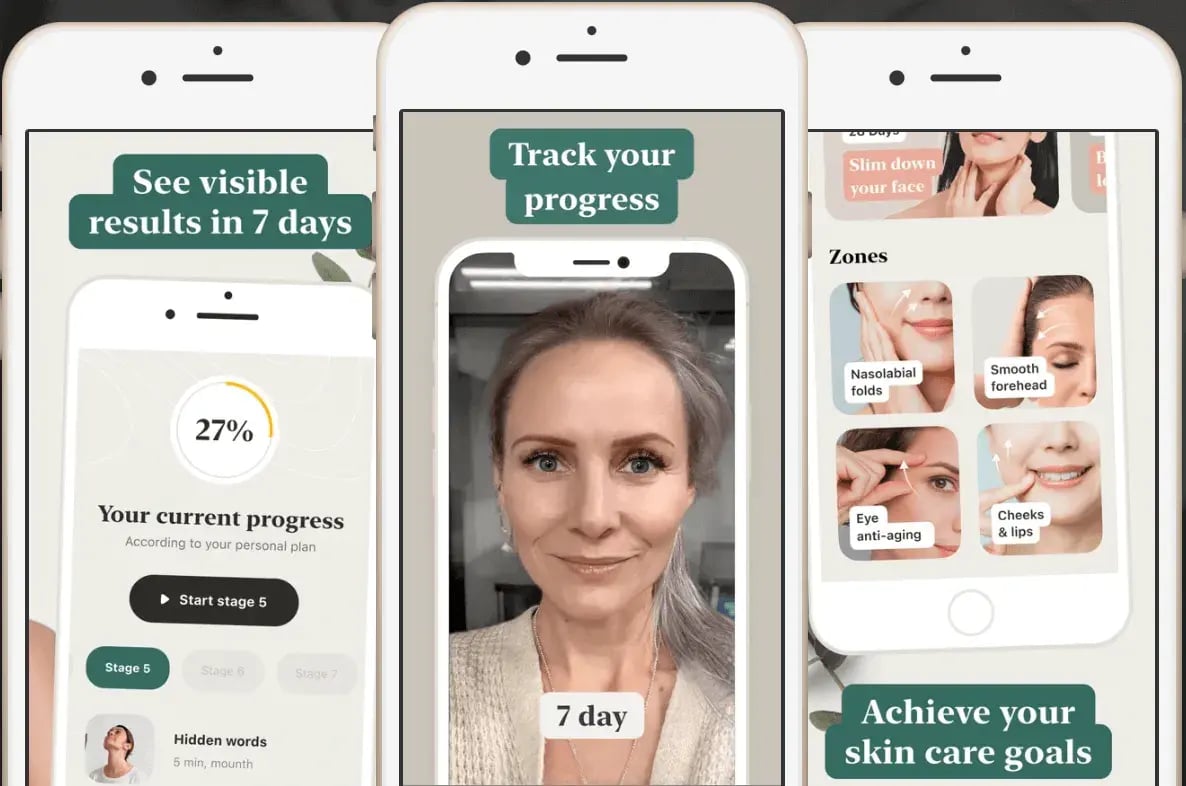
For example, FaceYoga, a wellness app built around facial muscle exercises. They added Banuba's Face AR SDK and unlocked the feature that anchors the entire product loop: a personalized face analysis that recommends a training program and a before-and-after preview that shows users how they will look after 7 and 28 days of practice.
What worked, according to the Mental Growth case study:
- Face tracking ran without FPS drops or device overheating during long workout sessions.
- The Android build behaved consistently across budget and flagship devices.
- The same SDK powered both motivational previews and the live exercise feedback loop.
The app crossed 20,000 downloads with a 4.2 rating on the App Store. For an Android team planning a similar feature, the architectural lesson is that face tracking is rarely a standalone capability. It connects to rendering, analytics, and personalized content.
Another examples is Bermuda, a random video chat app that integrated Banuba's Face AR SDK to give users beauty filters, masks, and effects during live one-to-one calls. The result, documented in Banuba's case study, was 15 million AR engagements. The relevant takeaway for an Android implementation is that face tracking has to coexist with a real-time video pipeline. CPU and GPU budgets are already heavily contested, and the SDK had to deliver stable tracking without degrading call quality.
The two products operate in completely different categories, but the user requirements converge:
- Real-time preview at 30 FPS or higher on mid-tier Android hardware.
- Stable landmark tracking through head turns of up to 90 degrees.
- Recovery from temporary occlusion such as raised hands or partial face coverage.
- Low battery and thermal cost so sessions can run several minutes without warming the phone.
- Visual fidelity that does not break when lighting shifts.
If your product depends on the camera, those five expectations are the bar. They are also the reason most teams stop trying to build the stack themselves once they finish a serious feasibility review.
Must-Have Capabilities for Android Face Tracking
A production face tracking pipeline on Android is a stack of cooperating systems rather than a single algorithm. The following grouping is a useful planning framework whether you build or integrate.
Detection and localization
- Face detection that finds one or more faces in each frame.
- Bounding box and confidence scoring tuned for mobile cameras.
- Re-detection logic for when tracking is lost.
Landmark and pose estimation
- Landmark localization on key facial regions: eyes, brows, nose, lips, jawline.
- Head pose estimation across yaw, pitch, and roll.
- A 3D face mesh for AR experiences that need realistic depth.
Stability and runtime layer
- Temporal smoothing to prevent jitter between frames.
- Occlusion handling for glasses, hands, masks, and hair.
- Adaptive performance scaling based on device tier.
Rendering and effect layer
- OpenGL ES or Vulkan integration for overlays.
- Camera frame synchronization at 30 to 60 FPS.
- Asset pipeline for 2D stickers, 3D masks, and shaders.
Platform and integration layer
- Camera2 API or CameraX integration.
- Permissions, lifecycle, and background handling.
- APK size optimization, since face tracking models add weight.
The size of this list is the point. Each row hides weeks or months of engineering work when built from scratch.

Custom vs SDK Implementation Routes
Once you understand the stack, the architectural decision becomes concrete. There are essentially two paths.
Custom Development
You assemble the pipeline yourself using open frameworks and custom code.
Typical stack:
- Android side: Kotlin or Java application code, Camera2 or CameRax, Jetpack libraries.
- Vision side: TensorFlow Lite, ML Kit, MediaPipe, or OpenCV with custom-trained models.
- Rendering side: OpenGL ES or Vulkan, occasionally Filament for 3D.
- Native side: C++ with NDK for performance-critical work.
Common phases:
- Research and model selection (4 to 8 weeks).
- Data collection, training, and benchmarking (8 to 16 weeks).
- Android integration and device testing (6 to 10 weeks).
- Hardening, performance tuning, and shipping (4 to 8 weeks).
Risks worth flagging upfront:
- Model accuracy gaps across skin tones, ages, and lighting conditions.
- APK bloat and runtime memory pressure on low-end Android devices.
- Maintenance load every time Android, Camera2, or chipset behavior changes.
- Hidden cost of edge cases such as glasses, beards, hair, or partial occlusion.
This path makes sense when face tracking is a core competitive differentiator that has to be customized at the model level, or when regulatory constraints prevent the use of third-party binaries.
Android Face Tracking SDK Integration
You drop a prebuilt module into your Android project and call its API.
Typical stack:
- Android side: same as before, plus the SDK distributed via Maven or AAR.
- Vision side: handled inside the SDK.
- Rendering side: handled by the SDK's effects engine, usually with hooks for custom overlays.
- Native side: hidden behind the SDK's wrapper.
Common phases:
- Trial license and prototype (a few days).
- Integration into the production app (1 to 3 weeks for a typical use case).
- Effects, asset, and UI work (2 to 6 weeks depending on scope).
- QA across target Android devices (1 to 3 weeks).
Risks worth flagging:
- Less freedom to modify low-level CV behavior.
- Dependency on the vendor's release cadence.
- License fees that scale with usage or features.
This path makes sense when face tracking has to ship reliably on a known timeline, when you want to focus engineering on differentiated product features, and when you need broad device coverage without owning the test matrix yourself.
Custom Dev vs Android Face Tracking SDK
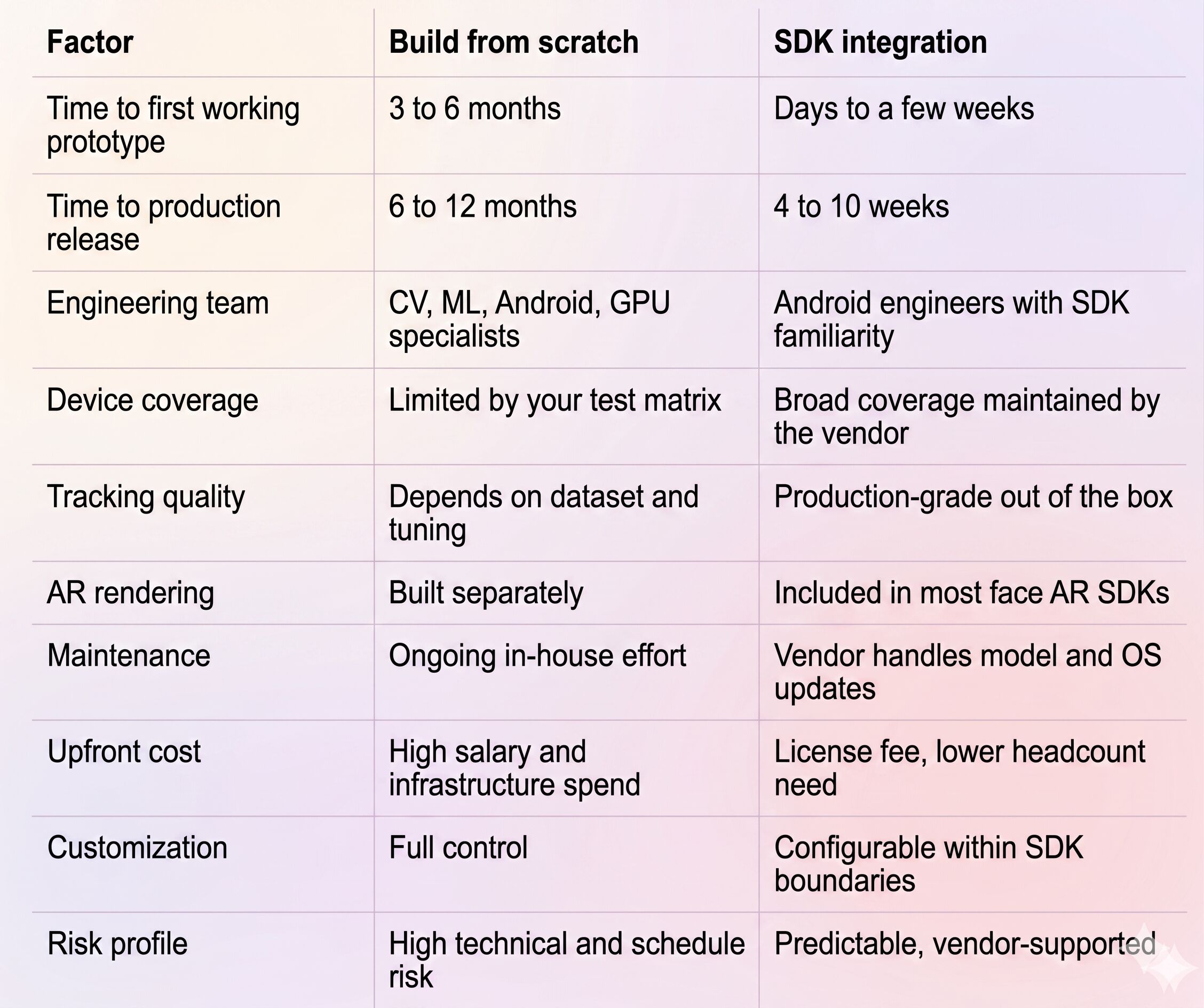
The clearest signal that an SDK is the right call: your roadmap depends on shipping the feature this quarter, not next year.
Banuba Face Tracking SDK on Android
Banuba's Android face tracking technology is the engine behind the Banuba Face AR SDK. On Android, it replaces the entire vision and rendering layer of the build-from-scratch path while remaining accessible to a standard Android team.
What it covers
- Face detection and tracking optimized for mobile.
- Localization of 68 facial landmarks for precise effect placement.
- A 3D face math model, branded Face Kernel, that builds the head model directly in 3D rather than projecting from 2D points. Banuba's technology overview explains how this approach improves accuracy and stability.
- A 3D face mesh that can scale up to 3,308 vertices for high-detail AR.
- Stable tracking under partial occlusion, low light, and head rotation up to 360 degrees of camera rotation.
- Multi-face tracking for group AR scenarios.
- A rendering engine for 2D and 3D effects, beautification, and virtual try-on.
Device and platform reach
According to Banuba’s benchmarks, the face tracking technology runs on around 80% of Android devices, with the SDK targeting Android 6.0 and higher with Camera2 API and OpenGL ES 3.0. Cross-platform reach extends to iOS, Web, Windows, macOS, Unity, Flutter, and React Native, which matters when your roadmap pushes beyond Android.
Integration model
The Android distribution is a Maven package. Integration follows the standard Android library workflow: declare the dependency, request camera permissions, configure the SDK with your client token, and wire the camera output into the SDK's effect player. There is no need to embed model files manually or write native code.
The full step-by-step guide and platform-specific samples live in the official resources:
- Banuba Face AR SDK documentation
- Banuba SDK Android sample on GitHub
- Banuba GitHub organization
- Banuba LLM-ready documentation
Decision Framework for Your Team
If your decision still feels open after reading the comparison table, the following framework can help close it. Score each row honestly for your project, then count the answers.
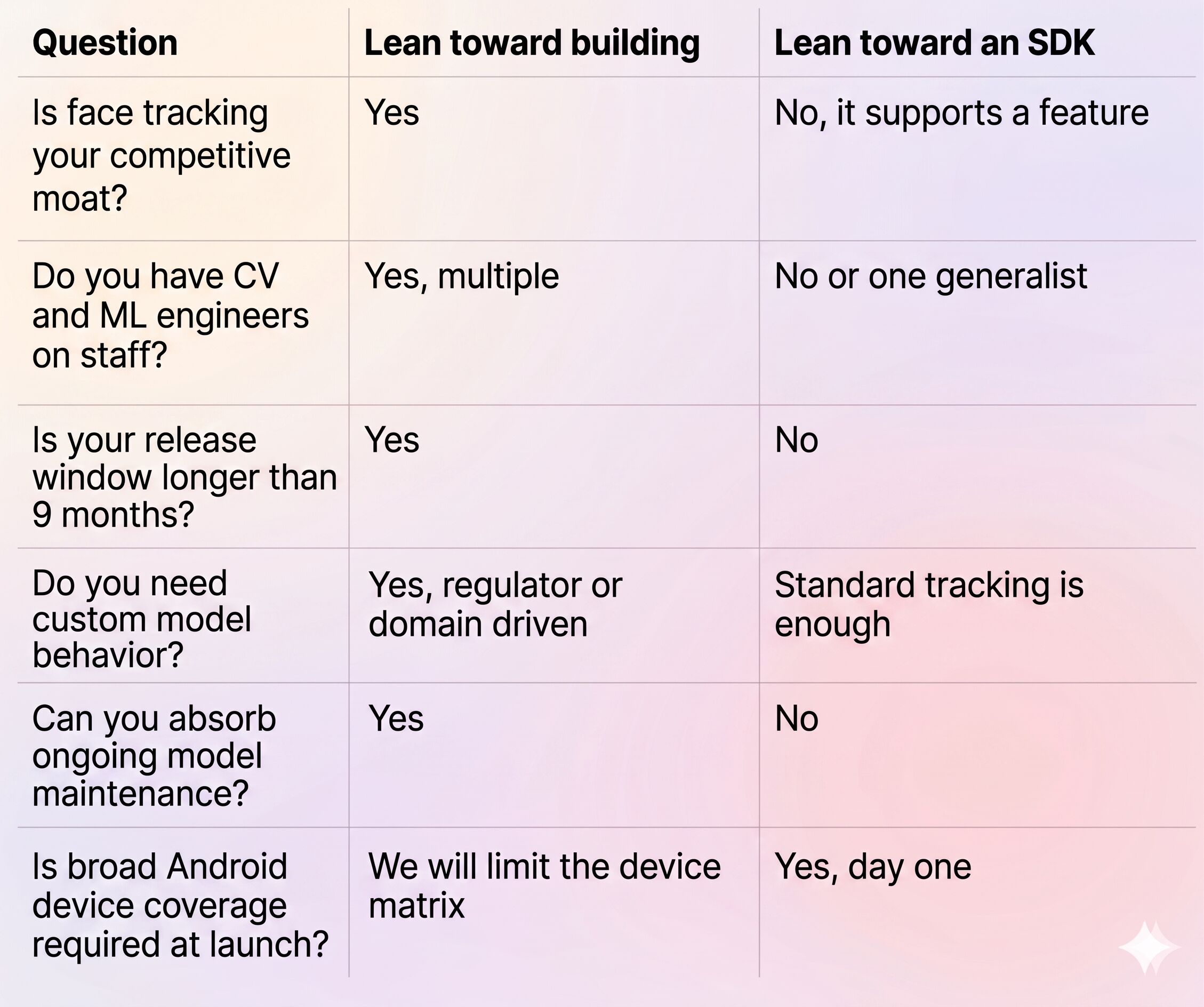
Three or more answers in the right column is the practical threshold most product teams use to commit to an SDK path.
Conclusion
Android face tracking sits on top of a stack that few product teams can justify building from scratch. The work spans computer vision, machine learning, GPU rendering, camera APIs, and a long tail of device-specific quirks.
A face tracking SDK is the shortest credible path from idea to a shipped Android app. Banuba's face tracking technology for Android covers detection, 68-point landmark localization, 3D meshing, and rendering inside one module, with documented Android samples and broad device support. If your goal this quarter is a working face AR feature in the hands of real users, an SDK is the practical choice.
Curious how it would slot into your build? Start with the Banuba face tracking software page and request a 14-day trial token.
References
Banuba. (2024). Face AR SDK case study: Bermuda. https://www.banuba.com/blog/bermuda-face-ar-sdk-case
Banuba. (2025a). Banuba face tracking software. https://www.banuba.com/technology/face-tracking-software
Banuba. (2025b). Banuba technology overview. https://www.banuba.com/technology/
Banuba. (2025c). FaceYoga by Mental Growth: A success story. https://www.banuba.com/blog/faceyoga-by-mental-growth-a-success-story
Banuba. (2025d). Face AR SDK documentation. https://docs.banuba.com/far-sdk
CommandLinux. (2025, November). Android global market share statistics 2026. https://commandlinux.com/android/android-global-market-share-statistics/
Statista. (2026). Mobile augmented reality (AR) users worldwide from 2023 to 2028. https://www.statista.com/statistics/1098630/global-mobile-augmented-reality-ar-users/
-
You do not need a computer vision background to integrate a face tracking SDK. A senior Android engineer comfortable with Camera2 or CameraX, Gradle, and OpenGL ES basics can ship a first version in a few weeks. Building face tracking from scratch is a different story and does require CV and ML specialists.
-
Banuba's Face AR SDK supports native Android and iOS, Web (HTML5 with WebGL 2.0), Windows, macOS, Unity, Flutter, and React Native. On Android, the SDK targets Android 6.0 and above with Camera2 and OpenGL ES 3.0. Cross-platform plugins for Flutter and React Native are published on pub.dev and npm respectively.
-
For a focused use case such as basic filters or beautification, expect 1 to 3 weeks for the SDK integration itself, plus additional time for effects, UI, and QA. A more complex product with custom 3D assets and multiple AR experiences typically reaches production in 6 to 10 weeks. The DIY equivalent usually takes 6 to 12 months.
