

The global augmented reality market was valued at roughly $120 billion in 2025 and is projected to surpass $1 trillion by 2033, growing at nearly 30% CAGR. For teams building products in this space, the SDK choice isn't just a technical decision. It shapes your development velocity, your feature ceiling, and your cost curve for years to come.
We are going to test and compare two augmented reality industry giants: Banuba and DeepAR. This comparison mainly focuses on their features, integration compatibility and easiness, pricing and overall partnership terms.
Keep reading to see which solution is the best fit for developing an augmented reality react native application.
[navigation]
Augmented reality React Native SDKs let developers ship face tracking, AR filters, beauty effects, and virtual try-on features to iOS and Android from a single codebase. Banuba and DeepAR are two established options in this space. Banuba is the stronger choice for production apps that need a first-party React Native plugin, deep face segmentation, and predictable scaling, while DeepAR suits campaign-driven prototypes and smaller creative projects.
TL;DR
- Banuba and DeepAR both support augmented reality in React Native apps, but they differ significantly in how they deliver that support.
- Banuba ships an official, first-party React Native plugin (@banuba/react-native) updated monthly, while DeepAR relies on a community-maintained wrapper last published roughly two years ago.
- With 68 facial anchor points and full face-part segmentation (hair, skin, eyes, lips, eyebrows), Banuba offers higher tracking fidelity than the DeepAR model with hair-only segmentation.
- Both SDKs use commercial licensing, but Banuba's yearly subscription avoids the linear MAU-based cost scaling that can catch DeepAR users off guard at higher volumes.
- For teams building production augmented reality React Native apps that need to scale, Banuba is generally the stronger choice.
Comparison Criteria
To fairly compare Banuba and DeepAR for augmented reality React Native projects, we evaluated both SDKs across the following parameters:
React Native Integration and Plugin Quality. Whether the SDK ships a first-party React Native plugin or depends on a community wrapper; how that plugin is distributed (npm, CocoaPods, Maven); how frequently it's updated; and whether it supports React Native's New Architecture (Fabric and TurboModules).
Face Tracking Accuracy and Feature Depth. The number of facial anchor points tracked, 3D mesh reconstruction capability, handling of edge cases like extreme head angles, partial occlusion, low light, and the range of AR features available, from basic filters to virtual try-on.
Segmentation and Beauty Features. Whether the SDK can segment individual facial parts (hair, skin, eyes, lips, eyebrows) independently, and the quality of its skin beautification, face morphing, and makeup try-on capabilities.
Performance and Device Coverage. Real-world frame rates on mid-range devices, on-device vs. cloud processing, and the platforms supported beyond React Native.
Pricing and Licensing. The cost structure, how pricing scales with growth, and whether the model is predictable for teams planning 12-36 months ahead.
Banuba AR SDK for React Native vs DeepAR: Feature & Integration Comparison
Based on the criteria above, here's how Banuba and DeepAR compare.
React Native Integration & Plugin Quality
This is the single most important differentiator for augmented reality React Native teams, and the gap is wide.
Augmented Reality SDK for React Native by Banuba ships an official, first-party React Native plugin: @banuba/react-native, published on npm and maintained by Banuba's own engineering team. The latest version (2.0.1) was published in March 2026. It's distributed through standard package managers: npm for the JavaScript layer, CocoaPods for iOS dependencies, and Maven for Android. Banuba updates this plugin roughly once a month to stay in sync with both its native SDK and the latest React Native releases.
DeepAR does not maintain an official React Native plugin. The available option is react-native-deepar, a community wrapper built and maintained by a third-party developer. Its last npm publish was version 0.11.0, roughly two years ago. The wrapper targets React Native 0.71, which predates the New Architecture that became the default in React Native 0.76 and was made mandatory in version 0.82. The repository's README itself notes that the library is still under development.
Why does this matter so much? React Native's New Architecture (Fabric, TurboModules, JSI) has replaced the old asynchronous bridge with synchronous native calls. Production migrations have shown 43% faster cold starts and 39% improved rendering performance. As of January 2026, about 83% of Expo SDK 54 projects already use the New Architecture. An AR plugin that hasn't been updated for this shift is not just inconvenient. It's a technical risk. Your team either forks the wrapper and maintains it internally, or gambles on a community contributor stepping in before the next breaking release.
Banuba's monthly update cycle eliminates that risk. DeepAR's community wrapper does not.
Face Tracking Accuracy & Feature Depth
Banuba tracks 68 facial anchor points and reconstructs a 3D face mesh using up to 3,308 vertices. Its patented Face Kernel technology builds a 3D head model directly from the camera feed, skipping the standard intermediate step of detecting 2D landmarks and then converting them to 3D. The result is better accuracy and stability, especially at extreme angles (-80° to +80°), in poor lighting, and with up to 70% of the face occluded. It can detect and track faces up to 2.3 meters from the camera.
DeepAR also tracks 68 facial anchor points and handles up to four simultaneous faces using on-device processing. The tracking works well for basic AR filters and masks. However, Banuba's patented technology offers greater precision with the same 68 points, enabling fine-grained feature placement, such as expression-driven animations or makeup that needs to land exactly on the lip line, lash line, or brow arch.
The difference is not abstract. In apps where virtual try-on is a core feature, this directly affects whether a lipstick looks naturally applied or slightly off-center, whether eyeshadow follows the actual crease of the eyelid, and whether glasses sit correctly on different face shapes.
Beyond face tracking, Banuba offers a content library of 1,000+ AR effects through its Asset Store, supports the GLTF 3D format, and uses KTX compression for faster effect loading. DeepAR provides roughly 150 AR filters and does not list GLTF support.
Segmentation & Beauty Features
This is where the functional gap between the two SDKs becomes a hard wall for certain product categories.
Banuba segments every major face part independently: hair, skin, eyes, eyebrows, lips, and background. That means you can apply different effects to different face regions at the pixel level. Change hair color without touching the skin. Smooth skin texture without blurring the eyebrows. Remove blemishes without affecting the lip color. For beauty apps, cosmetics platforms, or any product where per-region control matters, this capability is table stakes.
DeepAR offers hair segmentation only. Individual face-part segmentation for eyes, lips, eyebrows, and skin is not available. If your product roadmap includes makeup try-on, skincare visualization, or regional beauty effects, DeepAR cannot support those features.
On skin beautification, the approaches differ. Banuba preserves the skin's natural texture while reducing imperfections, which gives a realistic, non-plastic result. The SDK offers 28 face-morphing options along with acne removal, eye-bag removal, and beauty presets. DeepAR's beautification blurs the skin texture, creating a less natural look. It supports 11 face-morphing options.
For virtual try-on, Banuba covers 16 makeup product types with skin-tone-aware application, eyebrow segmentation that detects actual brow shape, nail detection and try-on, jewelry, glasses (including prescription lenses), headwear, and hair color. DeepAR supports a smaller set of makeup products (10 types) and offers limited try-on capabilities for glasses and jewelry, with no nail detection.

Background Separation
Banuba handles complex scenes well, including moving backgrounds. It supports video, GIF, and 360-degree backgrounds in addition to static images. Our testing and community benchmarks indicate clean separation even with long hair, hand gestures, and varied lighting.
DeepAR's background separation is more limited. Multiple community reviews and Gartner Peer Insights feedback report that DeepAR's background removal often leaves large unseparated patches. Long hair and fingers are frequently cut off or poorly separated. Only static image backgrounds are supported.
Performance & Platform Coverage
Both SDKs process everything on-device, which keeps user data off the network and satisfies GDPR requirements. Both target a minimum of 30 FPS on supported devices.
Where they diverge is platform breadth. Banuba runs on iOS, Android, Web, Unity, Windows, and macOS and offers official wrappers for both React Native and Flutter. DeepAR covers iOS, Android, Web, Unity, and macOS, but lacks Windows desktop support. Its React Native and Flutter wrappers are community-maintained rather than official.
For teams whose product might eventually expand beyond React Native, whether to a desktop app, a Unity-based experience, or a second cross-platform framework, Banuba's wider coverage means you won't need to switch AR providers midstream.
Pricing & Licensing
Banuba uses a yearly subscription model. Pricing depends on the platforms, feature set, and scale of the deployment. Half-year and quarterly billing options are also available, but there's no month-to-month plan. Banuba offers a 14-day free trial that covers all features without watermarks. In practice, the subscription model is accessible even for smaller teams. Weat, a US-based startup, used Banuba's SDK to cut development time in half.
DeepAR uses MAU-based pricing, with free up to 10 MAU (with a watermark) and starting at $25/month for 10-1,000 MAU, with pricing increasing as MAU grows.
The entry price is low, but the cost climbs in direct proportion to your user base. For apps that grow quickly or experience viral spikes, this creates budget surprises. At 100,000+ MAU, Banuba's custom subscription pricing typically works out more predictably than DeepAR's per-user tiers. Model your costs at current volume and at 10x growth before committing.
Support & Long-Term Viability
Banuba provides SLA-backed technical support with a dedicated account manager. Response times are typically within several working hours. The SDK receives monthly updates with new features and fixes. Banuba has been in the AR space since 2016 and remains fully independent. Its 120+ clients span video conferencing, beauty (Gucci, Oriflame, Schwarzkopf), social and dating, healthcare, and more. That breadth keeps the roadmap driven by diverse, real-world developer needs.
DeepAR does not publicly offer an SLA. Users have reported support response times stretching into days. SDK updates happen quarterly rather than monthly. And the ownership question is unavoidable: in April 2025, Zalando acquired DeepAR to bring its ShopAR platform and 3D technology in-house. DeepAR technically remains a separate entity, but its roadmap now aligns with Zalando's e-commerce strategy. Third-party developers building non-retail apps may find their use cases deprioritized over time.
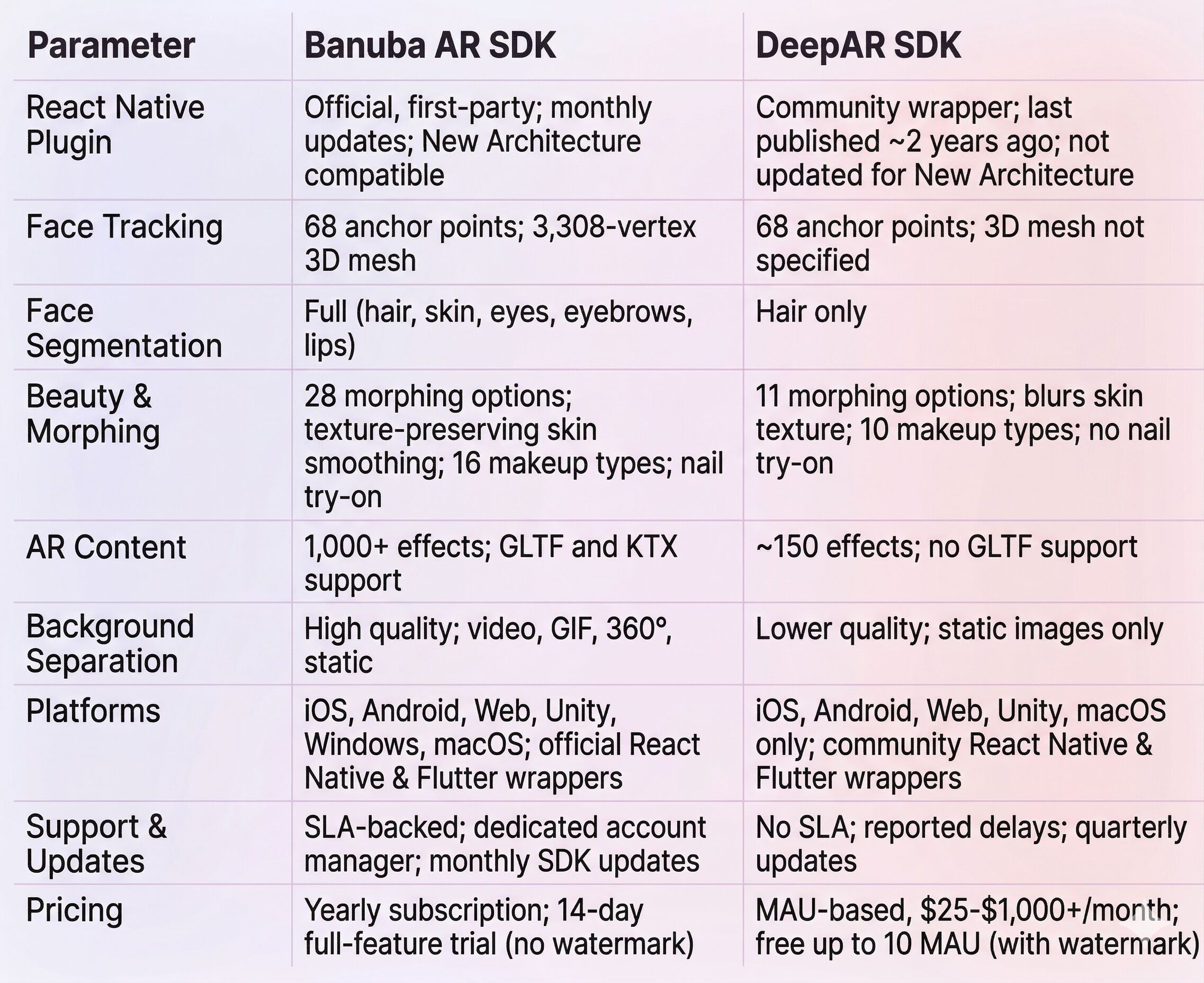
Comparison Table: Banuba vs DeepAR for React Native
Summary
Banuba AR SDK for React Native is the stronger option for production-grade augmented reality React Native apps. The first-party plugin alone sets it apart: monthly updates, New Architecture compatibility, and standard package manager distribution reduce integration risk and ongoing maintenance. Add 68-point face tracking, full face-part segmentation, 1,000+ AR effects, and SLA-backed support, and you have a platform that can carry a product from prototype to scale without switching providers.
DeepAR remains a reasonable option for short-lived campaigns, quick creative experiments, and browser-based AR activations. Its free tier, visual effect editor (DeepAR Studio), and web SDK make it easy to start small-scale projects. But the community-maintained React Native wrapper, limited segmentation, and post-acquisition roadmap uncertainty make it a riskier choice for anything long-term.
Explore Banuba's Face AR SDK features in your environment with a 14-day trial, no watermark.
References
Agile Soft Labs. (2026). React Native New Architecture Migration Guide. https://www.agilesoftlabs.com/blog/2026/03/react-native-new-architecture-migration
Banuba. (n.d.). Augmented reality SDK. https://www.banuba.com/augmented-reality-sdk
Banuba. (n.d.). Banuba technology. https://www.banuba.com/technology/
Banuba. (n.d.). Face AR SDK documentation. https://docs.banuba.com/far-sdk
Banuba. (n.d.). Face filters SDK. https://www.banuba.com/facear-sdk/face-filters
Banuba. (2026). Best augmented reality React Native SDKs (tested). https://www.banuba.com/blog/best-augmented-reality-react-native-sdks-tested
Banuba. (2026). How to integrate augmented reality features in a React Native app. https://www.banuba.com/blog/how-to-integrate-augmented-reality-features-in-a-react-native-app
Banuba GitHub. (n.d.). banuba-sdk-react-native. https://github.com/Banuba/banuba-sdk-react-native
DeepAR. (n.d.). Documentation: React Native integration. https://docs.deepar.ai/deepar-sdk/integrations/react-native/
DeepAR. (n.d.). Pricing. https://docs.deepar.ai/deepar-sdk/pricing/
Drapers. (2025). Zalando acquires tech firm DeepAR. https://www.drapersonline.com/news/zalando-acquires-tech-firm-deepar
Expo. (2026). React Native's New Architecture. https://docs.expo.dev/guides/new-architecture/
Grand View Research. (2026). Augmented reality market size, share & trends report 2033. https://www.grandviewresearch.com/industry-analysis/augmented-reality-market
Just Style. (2025). Zalando buys DeepAR to boost tech capabilities. https://www.just-style.com/news/zalando-deepar-acquisition-tech/
npm. (2026). @banuba/react-native. https://www.npmjs.com/package/@banuba/react-native
npm. (n.d.). react-native-deepar. https://www.npmjs.com/package/react-native-deepar
PkgPulse. (2026). React Native New Architecture 2026. https://www.pkgpulse.com/blog/react-native-new-architecture-fabric-turbomodules-expo-2026
-
Start with the plugin itself. Is it maintained by the SDK vendor or by a third-party community contributor? In 2026, React Native's New Architecture is the default, and plugins that haven't been updated for Fabric and TurboModules are liabilities. After that, check face tracking precision (anchor points, 3D mesh quality), segmentation depth (hair-only vs. full face parts), and how the content pipeline works for loading and switching effects. Finally, model pricing at your projected scale, not just at launch volume.
-
Most commercial AR SDKs use either MAU-based tiers or flat subscription fees. MAU-based models keep entry costs low but can produce steep jumps as your user base grows. Subscription models typically bill annually and may include custom pricing for large deployments. Free tiers are usually watermarked or limited to development use. The key is to project costs at your current scale and at 10x growth so there are no surprises when your app gains traction.
-
For production apps that require reliable tracking, deep segmentation, and predictable costs at scale, Banuba's Face AR SDK is the stronger option. Its first-party React Native plugin, monthly update cadence, SLA-backed support, and broad platform coverage (including Windows desktop) are built for production workloads. DeepAR works for smaller-scale deployments and web-based campaigns but carries integration and cost risks as usage grows.