

Face filter software powers a staggering amount of daily content. Over 500 million Instagram users interact with AR filters every month, and roughly one in three TikTok videos now includes an AR effect. Deloitte estimated that social media users would produce over 17 billion AR photos and videos per day by 2025. Meanwhile, the face tracking technology market reached $5.6 billion in 2025 and is on track for $49.8 billion by 2033, growing at a 15.8% CAGR.
These numbers tell one story. The practical story is different and messier. Developers shipping face filter features don't just need an SDK that works on a demo video. They need one that holds steady on a three-year-old Xiaomi, handles partial face occlusion when someone adjusts their headphones mid-stream, and doesn't turn into a budget black hole at 200,000 monthly active users.
That's what this comparison is about. We put Banuba's Face Filter SDK and DeepAR through real-world conditions and scored them on what actually matters when you're shipping to production.
[navigation]
Face filter SDKs give developers ready-made pipelines for real-time face tracking, AR overlays, beauty effects, and virtual try-on, so they don't need to build computer vision infrastructure from scratch. Banuba and DeepAR are two established commercial options. Banuba is the better fit for teams building production apps that need precise tracking, rich segmentation, and predictable costs at scale. DeepAR works for lightweight prototypes and short-run web AR campaigns with small audiences.
TL;DR
- We tested Banuba Face Filter SDK and DeepAR across tracking accuracy, segmentation depth, platform coverage, developer experience, cost modeling, and vendor independence.
- Banuba tracks 68 facial anchor points using a patented 3D pipeline, covers every major face part for segmentation, and charges a flat subscription that doesn't scale with user count.
- DeepAR also tracks 68 anchor points using a conventional 2D-to-3D approach. Only hair segmentation is available. Pricing is MAU-based, starting low but climbing fast.
- For production apps at scale, Banuba is the stronger choice. For quick AR experiments at low volumes, DeepAR can work.
Why Face Filter SDK Selection Gets Complicated
Picking face filter software sounds like a straightforward technical decision. It isn't. The SDK you choose affects your app's frame rate on cheap hardware, the richness of effects you can offer, how fast your team can ship, and what happens to your costs twelve months from now.
Most comparison articles list features in a table and call it a day. That misses the point. Two SDKs can both claim "face tracking" and deliver wildly different results when a user tilts their head 60 degrees in a dimly lit room. Both can support "beauty filters," while one blurs skin into plastic and the other preserves natural texture.
We structured our evaluation around six areas that separate marketing claims from production reality.

How We Ran This Evaluation
Tracking Precision Under Stress. How many anchor points does the SDK map? What happens at steep angles, in low light, and when a hand or object blocks part of the face? Does the SDK reconstruct a true 3D face mesh, or does it estimate 3D position from 2D landmarks?
Segmentation Capability. Can you target individual face parts independently? Hair, skin, eyes, lips, eyebrows, background. Each one matters for different product features. If the SDK only handles hair segmentation, your beauty and cosmetics features hit a ceiling fast.
Device Coverage and Platform Reach. Which operating systems get native support? Does the vendor maintain React Native and Flutter wrappers, or are you depending on community forks that may break on the next OS update? Is the desktop (Windows, Linux) covered?
Developer Workflow. How long from the first SDK download to a working demo? Is documentation clear and current? Are sample projects available?
Cost Trajectory. What's your bill at launch versus at 10x growth? Does the pricing model reward success or penalize it?
Vendor Direction and Stability. Is the company independent? Who decides where the product goes next? How often do updates ship, and is support backed by an SLA?
A Quick Framework: Five Questions Before You Commit
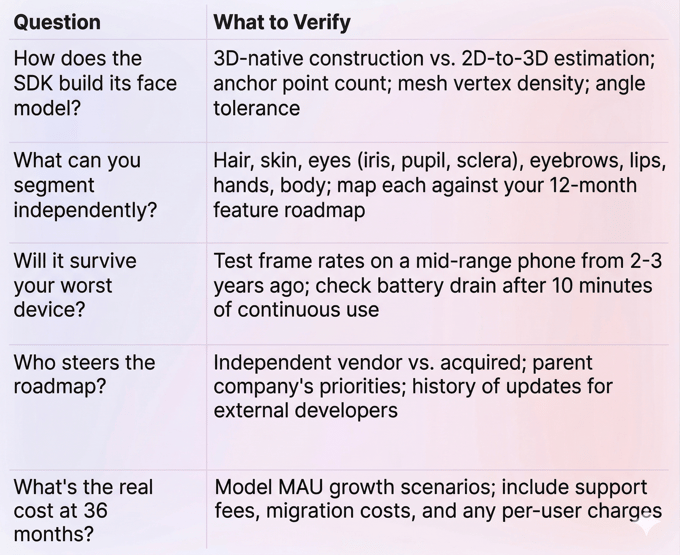
Before diving into each SDK, here's a decision checklist for evaluating any face filter SDK. We used it ourselves.
Banuba Face Filter SDK
What It Is
Banuba's face filter SDK is a commercial AR engine built on patented computer vision technology. The company launched in 2016 and has remained independent ever since, serving over 120 clients, including Samsung, Gucci, Schwarzkopf, Vidyo, and more.
That client list matters more than it might seem. It spans video conferencing, beauty, dating, creator apps, retail, social, healthcare, and fintech. When a single SDK serves that many different use cases, its roadmap reflects real-world diversity rather than one industry's narrow priorities.
How It Tracks Faces
Most face filter software follows a two-step process: first, detect 2D facial landmarks, then estimate the 3D head position using mathematical modeling. Banuba skips the first step entirely. Its patented Face Kernel technology constructs a 3D head model directly from the camera feed.
The practical impact is significant. The engine tracks 37 facial morphs instead of hundreds of static points, which keeps CPU load low. It maps 68 facial anchor points with sub-pixel accuracy and can reconstruct a face mesh with up to 3,308 vertices. Tracking remains stable from -90° to +90° head rotation, in low light, and even when up to 70% of the face is blocked by a hand, mask, or microphone.
The anti-jitter system is patented separately. Because processing 37 parameters is so lightweight, the SDK runs noise-detection algorithms multiple times within a single frame. Result: no perceptible lag, even on budget devices.
Every computation runs on-device. No user data leaves the phone. Results? Higher privacy and no extra latency.
Segmentation That Covers the Full Face
This is where Banuba puts a clear distance between itself and most competitors. The SDK segments every major face part: hair, skin, eyes (pupil, iris, sclera), eyebrows, lips, hands, and body. Each segment uses its own neural network.
For beauty and virtual try-on apps, this isn't a nice-to-have. It's the difference between offering a full virtual makeup experience and being limited to a hair color filter. If your roadmap includes lipstick try-on, eyebrow reshaping, or skin-tone-aware foundation matching, you need per-part segmentation.
Background Handling
Background separation supports static images, video, GIFs, and 360-degree environments. The segmentation model handles complex scenes, movement, low light, and long hair without edge flickering. That last detail is important. Poor edge detection around hair is one of the most visible quality problems in background replacement, and users notice it immediately.
Beauty and Makeup Features
Banuba offers 28 face morphing options, skin smoothing that preserves natural texture, acne removal, eye bag removal, and teeth whitening. The makeup system supports 16 product types with correct application across different skin tones. Eyebrow segmentation detects the actual brow shape rather than applying a generic overlay.
The SDK also supports nail detection and try-on, jewelry try-on, glasses (including prescription), headwear, and hair color changes.
Content and Creation Tools
Over 1,000 AR effects are available through the Banuba Asset Store. Custom effects can be built using Banuba Studio, a browser-based editor that supports GLTF model import and KTX format for faster effect loading.
Platform Support
iOS, Android, Web, Unity, Windows, and macOS. First-party React Native and Flutter wrappers ship with the SDK itself, which means updates come from the vendor, not a volunteer maintainer. Device support starts at iOS 13.0 and Android 6.0 (Camera 2 API, OpenGL ES 3.0), covering 97% of iOS devices and roughly 80% of the Android market.
The SDK adds about 25 MB to your app's download size.
Performance on Real Devices
Banuba compresses its neural networks and shifts workloads between CPU and GPU based on what each device can handle. On a 2019 mid-range Android, expect 35-40 FPS for makeup filters and 30+ FPS for complex 3D masks. Battery management is built in, keeping power consumption low enough for 10+ minutes of continuous AR use without a dramatic drain.
Multi-face tracking has no artificial cap. The practical recommendation is up to 4 faces on mobile for stable 60 FPS, up to 6 on desktop.
Pricing
Flat subscription, priced per platform. Cost depends on features and payment cycle (yearly, half-year, or quarterly options; no monthly billing). The defining detail: your license fee does not scale with user count. Going from 10,000 to 10 million MAUs doesn't change what you pay.
A 14-day free trial with full access to integration documentation is available. The docs include LLM-ready documentation for AI-assisted coding workflows.
Possible Limitations
Building complex custom AR effects in Banuba Studio takes design time and effort; however, there is a detailed how-to guide. Basic integration is fast (teams report under 8 minutes to a working demo), but sophisticated interactive experiences require learning the tool and contacting the support team for guidance.
Best For
- Social video and creator apps that need polished face filters and beauty effects at a global scale
- Beauty and cosmetics platforms running virtual try-on (makeup, eyewear, hair color, nails)
- Video conferencing and live streaming products integrating virtual backgrounds
- Dating and social apps with real-time AR effects
- Fintech and banking apps that require liveness detection
- E-commerce stores with product try-on features
Skip If
You're building a throwaway prototype on zero budget and only need basic 2D stickers. Lighter open-source tools like Google ML Kit or MediaPipe might cover the basics for that scenario.
DeepAR SDK
What It Is
DeepAR is a London-based AR SDK provider that focuses on face and body tracking for mobile, web, and live streaming applications. The SDK supports iOS, Android, macOS, Web (HTML5), and Unity.
In April 2025, Zalando acquired DeepAR to accelerate its 3D commerce and virtual try-on capabilities. DeepAR continues to operate as a separate entity within Zalando, but its future development now aligns with Zalando's goals.
How It Tracks Faces
DeepAR tracks 68 facial anchor points using deep learning. The pipeline follows the conventional approach: detect 2D landmarks, then estimate 3D position. It handles up to 4 simultaneous faces and detects 5 emotional states (sad, happy, angry, surprised, scared). Body tracking covers 17 key points across the upper body.
The 2D-to-3D pipeline performs well on flagship and upper-mid-range devices. On older or budget Android hardware, tracking stability drops during fast head movements and when part of the face is blocked.
Segmentation Gaps
Only hair segmentation is available. Individual face-part segmentation for eyes, lips, eyebrows, and skin is absent. For any app that needs a per-feature makeup application, this is a hard limitation that can't be worked around.
Background Separation
DeepAR supports background removal, but testing and user reports indicate frequent quality issues. Large patches of background often remain unseparated. Long hair and hands get clipped or poorly handled.
Background replacement is limited to static images. No video, GIF, or 360-degree background support.
Beauty and Filters
The Beauty API is currently in beta. Skin smoothing blurs texture rather than preserving it, producing a less natural result. DeepAR supports 11 face morphing options compared to Banuba's 28, and 10 makeup product types compared to Banuba's 16.
The DeepAR Studio offers a visual editor for creating custom effects without writing code, which is a genuine advantage for design-first teams.
Content Library
Roughly 150 AR filters are available, compared to Banuba's 1,000+. No GLTF support is listed.
Platform Support
iOS, Android, macOS, Web (HTML5), and Unity. No Windows or Linux desktop support. React Native and Flutter wrappers exist as community-maintained projects, not vendor-supported packages. That distinction matters when an OS update breaks something and you're waiting for a volunteer to patch it.
Pricing
DeepAR offers MAU-based tiers. The free tier is useful for prototyping. But costs scale directly with your audience. If your app gains traction quickly, you're negotiating custom pricing from a position of limited leverage. The first paid tier starts at $25/month for 1,000 MAU.
Where It Falls Short
- Segmentation ceiling. Hair only. No per-part face segmentation means beauty and cosmetics use cases are severely limited.
- Background quality. Inconsistent separation, especially around hair and hands.
- Skin beautification. Blurs texture, creating an unnatural look.
- Desktop gaps. No Windows support.
- Support speed. Users have reported response delays stretching into days. No public SLA.
- Update cadence. Quarterly, not monthly.
- Acquisition impact. Roadmap now tied to Zalando's e-commerce priorities. Developers outside that ecosystem may see less attention.
Best For
- Quick AR prototypes and web-based marketing campaigns
- Small-scale social or gaming apps at low MAU counts
- Teams where designers want a visual editor for creating face filter effects without code
- Fashion/e-commerce projects that may benefit from Zalando ecosystem alignment
Skip If
Your product roadmap depends on detailed face segmentation. Or you're targeting mid-range Android devices where tracking precision matters. Or you need Windows desktop support. Or you want SLA-backed technical support. Or vendor independence is a requirement for your three-year product plan.
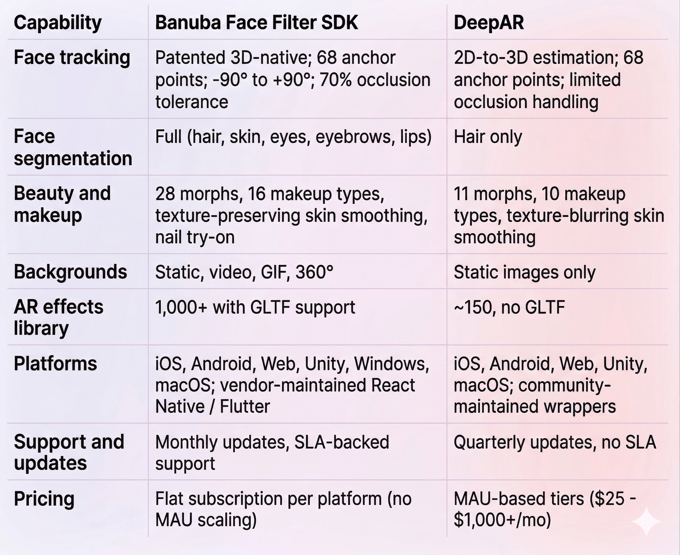
Side-by-Side: Banuba Face Filter SDK vs DeepAR
Which Face Filter SDK Should You Pick?
Choose Banuba if you're shipping a production app to real users. The 3D-native tracking architecture gives you more precise anchor point mapping, better stability at extreme angles and under occlusion, and smoother performance on the mid-range hardware your global audience actually uses. Full face-part segmentation opens up beauty, makeup, and try-on features that are simply impossible with hair-only segmentation. Flat pricing means your margins stay healthy as you grow. Monthly SDK updates and SLA-backed support keep your team moving after launch.
Choose DeepAR if you're prototyping or running a short campaign. The free tier lets you test ideas without financial commitment. DeepAR Studio gives designers a visual editor for building effects quickly. For a web-based marketing activation that runs for a few weeks with low traffic, DeepAR can deliver. Just model the MAU costs carefully before you scale.
Explore the Banuba face filter SDK in your own environment with a 14-day trial.
References
Banuba. (n.d.). Face filters SDK. https://www.banuba.com/facear-sdk/face-filters
Banuba. (n.d.). Banuba technology. https://www.banuba.com/technology/
Banuba. (n.d.). Face AR SDK documentation. https://docs.banuba.com/far-sdk
DeepAR. (n.d.). Documentation. https://docs.deepar.ai/
DeepAR. (n.d.). Pricing. https://docs.deepar.ai/deepar-sdk/pricing/
Drapers. (2025, April 7). Zalando acquires tech firm DeepAR. https://www.drapersonline.com/news/zalando-acquires-tech-firm-deepar
Just Style. (2025, April 9). Zalando buys DeepAR to boost tech capabilities. https://www.just-style.com/news/zalando-deepar-acquisition-tech/
HTF Market Insights. (2026). Face tracking technology market size, share & growth outlook. https://www.htfmarketinsights.com/report/4408796-face-tracking-technology-market
Measure Studio. (2025). 250+ social media statistics marketers can't ignore. https://www.measure.studio/post/social-media-statistics
SQ Magazine. (2025). TikTok vs. Instagram statistics 2025. https://sqmagazine.co.uk/tiktok-vs-instagram-statistics/
ScienceDirect. (2025). Augmented youth: Prevalence and predictors of AR filter use on social media among adolescents. https://www.sciencedirect.com/science/article/pii/S0747563225001335
Fortune Business Insights. (2026). Augmented reality market size, share, trends report. https://www.fortunebusinessinsights.com/augmented-reality-ar-market-102553
Precedence Research. (2025). Augmented reality and virtual reality market size. https://www.precedenceresearch.com/augmented-reality-and-virtual-reality-market
-
Start with tracking precision on your lowest-spec target device, not your newest phone. Then verify segmentation depth: can you independently target every face part your product roadmap requires? Check whether the vendor maintains cross-platform wrappers (React Native, Flutter) or leaves them to community contributors. Model your pricing at 10x your current user base. And investigate ownership structure, because acquisitions shift product priorities.
-
Two main models exist. MAU-based pricing starts low and grows linearly with your user base. Flat subscription pricing charges per platform, regardless of how many users you have. Free tiers typically include watermarks or are restricted to development environments. The critical step most teams skip: calculate costs at your projected 12-month and 36-month user counts, not just at launch day numbers.
-
For production apps that need accurate face tracking, deep segmentation, and costs that don't balloon with growth, Banuba Face Filter SDK is the stronger pick. Monthly updates, SLA-backed support, vendor independence, and broad platform coverage (including Windows) make it production-ready.
