

Look at your phone. The beauty app that lets you try a lipstick shade, the video call app that blurs your background, the banking app asking you to blink for liveness, all of them are reading landmarks off your face in real time.
The commercial weight behind this is hard to ignore. The virtual try-on market reached USD 15.18 billion in 2025 and is projected to hit USD 48.10 billion by 2030, a 25.95% CAGR. The broader facial recognition market moves from USD 10.69 billion in 2026 to roughly USD 36.75 billion by 2035. Both rely on the same foundational capability: identifying the face and accurately tracking its features.
The returns on getting landmarks right are measurable. Sephora reported a 31% sales lift and up to 90% higher conversion for shoppers using its AR try-on. Ulta Beauty generated 30 million product trials and USD 6 million in sales in two weeks through a Snapchat AR lens. Gucci's AR try-on reached 18 million users and pushed product-page views up 188%.
None of that works if the landmark layer underneath is shaky.
[navigation]
Detecting facial landmarks means pinpointing anchor features on a face (eyes, nose, mouth, jawline, contours) and tracking them frame by frame as the head moves. Building this from scratch involves computer vision models, 3D geometry, a training dataset of hundreds of thousands of faces, and months of mobile-optimization work. A face landmarks SDK like Banuba gives you a tested detection pipeline out of the box, so both a small team and an enterprise can ship accurate tracking in weeks instead of spending a year tuning models.
TL;DR
- Facial landmark detection sits underneath virtual try-on, face filters, liveness checks, and emotion analytics.
- Writing it in-house means training CNN-based detectors, building 3D head-pose estimation, and keeping the whole thing running at 60 fps on mid-range phones. That's a multi-quarter engineering investment.
- SDKs collapse that work into a license and an integration, cutting time-to-market from 12–18 months to about 4 weeks while delivering higher accuracy out of the box.
- A production-ready SDK replaces that work with a drop-in library. You get the models, the tracking logic, the platform bindings, and the ongoing updates.
- The Banuba Face Landmarks SDK tracks up to 68 points using a proprietary 3D face mesh with 37 morphs, holds up in low light and at extreme head angles, and runs on about 90% of smartphones in the market.
- Go with an SDK when speed, cross-device accuracy, and GDPR compliance matter more than owning every pixel of the pipeline.
Why Landmark-driven Products Succeed
The reference companies we mentioned in the introduction share a set of patterns worth naming directly because they dictate what a landmark pipeline must deliver.
UX patterns that work
- Real-time preview. Users see the effect applied to their own face instantly, not after a two-second delay.
- Stable placement. Lipstick stays on the lips through head turns, blinks, and expressions, without the jitter that breaks immersion.
- Zero setup friction. Point the camera, see the result. No calibration screen, no "hold your face still for five seconds."
Performance expectations
- Real-time processing at 30–60 fps. Anything slower reads as broken.
- Low latency under 50 ms. Humans perceive input lag above that threshold.
- Mobile-first optimization. The majority of usage is on phones, often mid-range ones.
- Graceful handling of imperfect conditions. Dim rooms, backlit selfies, partial occlusion by hands or glasses.
User behavior drivers
- Shareable output. Filters and try-on results get screenshots and are posted, which turns users into acquisition channels.
- Instant gratification. No downloads, no waiting, no "sign up to continue."
- Discovery through play. Users try ten shades they didn't plan to try, which is exactly what retailers want.
A face landmarks pipeline either supports these patterns or it doesn't. There's no middle ground that customers accept.
Core Features to Build Face Landmark Detection
Breaking the work into capability groups clarifies what a "from scratch" team is signing up for.
Detection and tracking pipeline
- Face detector. Locates one or more faces in a frame.
- Landmark regressor. Fits a set of points to the detected face.
- Temporal tracker. Follows landmarks across frames, so you don't have to re-detect from scratch every time.
- Recovery logic. Falls back to detection when the face is occluded or leaves the frame.
3D geometry layer
- Head pose estimation. Pitch, yaw, and roll are critical for anything that renders in 3D on the face.
- Face mesh generation. A triangulated surface that lets effects wrap around the face contour.
- Expression or morph coefficients. Numeric values representing smiles, blinks, and brow raises, used for avatars and emotion analytics.
Training data
- Scale. Six-figure numbers of labeled faces, minimum, for a production model.
- Demographic coverage. Skin tones, ages, face shapes, facial hair, accessories.
- Condition coverage. Lighting, angles, occlusion, motion blur.
Mobile runtime
- GPU inference. Metal on iOS, Vulkan or OpenGL on Android.
- Model compression. Quantization and pruning so models fit in memory and run on mid-range chipsets.
- Camera integration. Handling different image formats, color spaces, and rotations across device makers.
Rendering hooks
- 2D overlay. For flat filters and stickers.
- 3D rendering. Shaders that respect face normals and lighting for a realistic try-on.
- Platform bridges. So your team's Unity, native iOS, Android, and Web code can all consume the same landmark output.
Privacy and compliance
- On-device processing. Keeps raw biometric data off the network.
- Consent flows. Built to meet GDPR, CCPA, and emerging AI regulations.
- Data retention rules. Designed in from day one, not bolted on.
Every one of these is a sub-project. Most teams underestimate the compound cost.

Build Paths: From Scratch vs SDK
Building from Scratch
Required tech stack is as follows:
- ML frameworks. PyTorch or TensorFlow for training, TensorFlow Lite, Core ML, or ONNX Runtime for mobile deployment.
- Computer vision libraries. OpenCV for preprocessing, dlib or similar for baseline face detection.
- 3D math and graphics. GLM, custom shaders, or a morphable model library.
- Mobile platforms. Native iOS (Swift, Metal), native Android (Kotlin, Vulkan/OpenGL), plus bindings for cross-platform frameworks.
- Data labeling infrastructure. Tools for annotating hundreds of thousands of faces with consistent landmark conventions.
Infrastructure
- Training compute. GPU clusters for model iteration.
- Dataset storage and versioning. Raw images, labels, augmentations, model checkpoints.
- Device lab. A physical range of phones for real-world testing.
- Continuous integration for ML. Automated evaluation on holdout sets every time someone commits.
Development phases
- Dataset collection, licensing, and labeling (3–6 months)
- Model architecture design and training (2–4 months)
- Mobile porting and optimization (2–4 months)
- Integration into the host app, plus cross-device QA (2–3 months)
- Maintenance, re-training, and regression fixes (indefinite)
Risks
- Accuracy gaps. Models that work on demo data fail on real users.
- Performance cliffs. A model that runs at 45 fps on a flagship Android phone may hit 12 fps on the mid-range devices your customers actually own.
- Maintenance drag. New phone releases, new OS versions, and new camera pipelines can break things quarterly.
- Compliance exposure. Privacy law missteps have regulatory and reputational cost.
Building from Scratch Pros and Cons
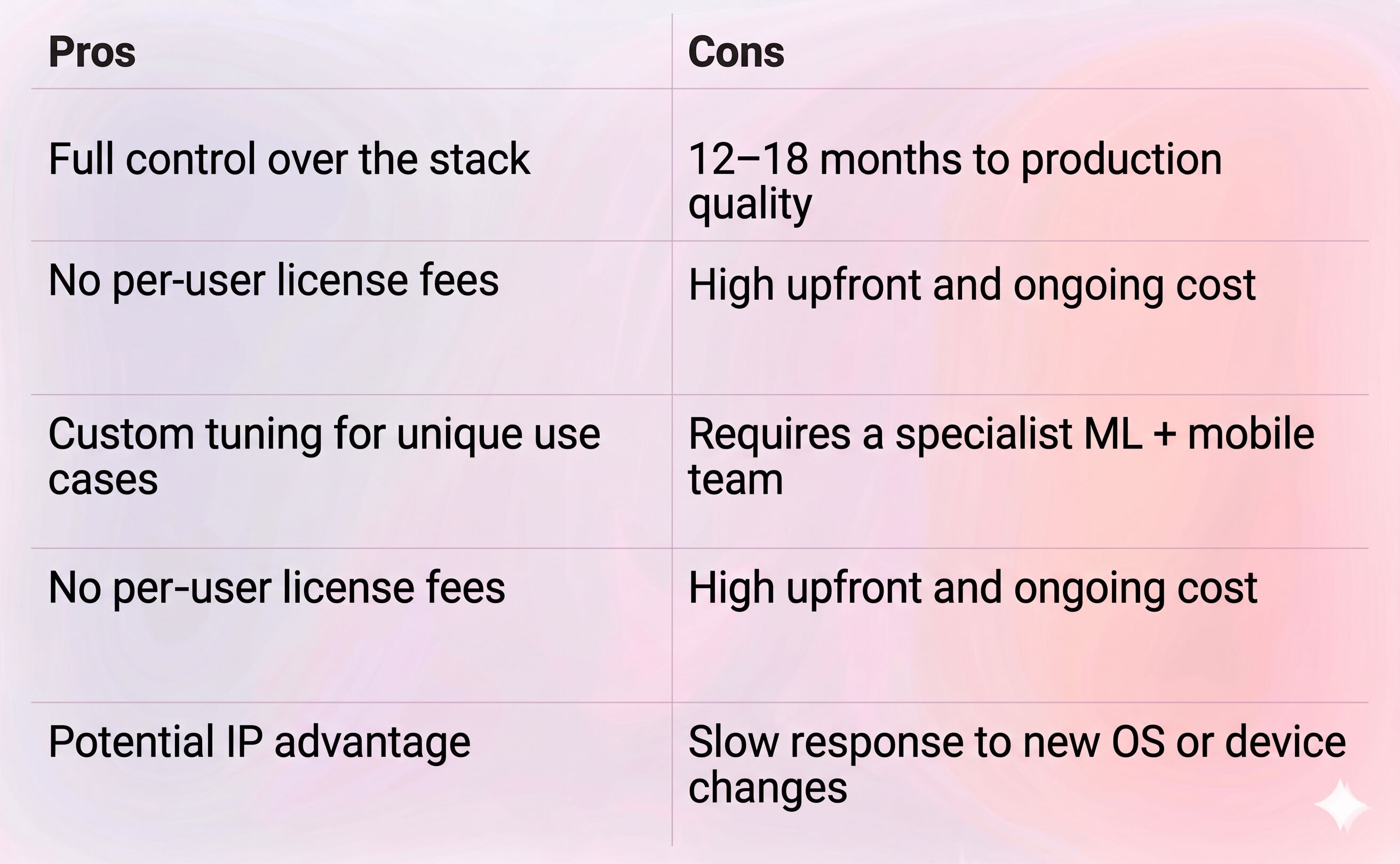
This path makes sense when landmark detection itself is your product, not a feature inside it.
Using an SDK
A Face Landmarks SDK like Banuba is, in practical terms, a prebuilt library that hides all of the above. You import it, initialize it with a license key, and subscribe to landmark and mesh updates. The ML models, tracking loop, platform bindings, and performance tuning are already in place and maintained by the vendor.
Why SDKs reduce complexity
- Models are already trained on large, diverse datasets.
- Tracking, recovery, and smoothing are already solved.
- Mobile optimization is already done for the common chipsets.
- Updates ship through the vendor's release cycle, not your engineering sprints.
Which teams benefit most
- Startups that need to validate a product before committing 12 months of engineering
- Enterprise product teams adding a face-aware feature to an existing app
- Agencies building one-off AR campaigns for clients
- Cross-platform teams that want one API across iOS, Android, and Web
Face Landmarks SDK Integration Pros and Cons
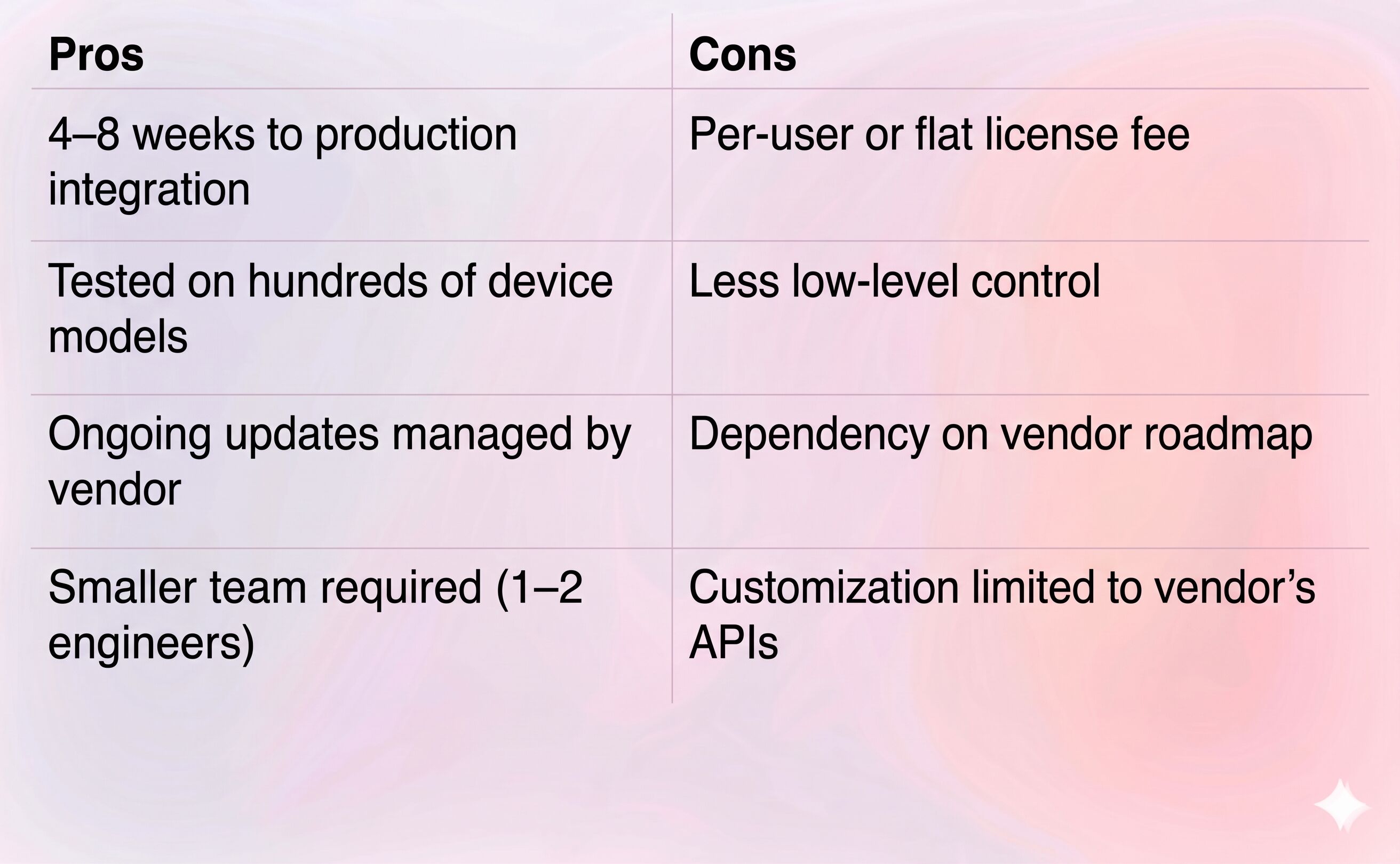
For most product teams, the trade is straightforward. You give up some control, you gain a year of your calendar back.
Comparison Table: Build from Scratch vs Using an SDK
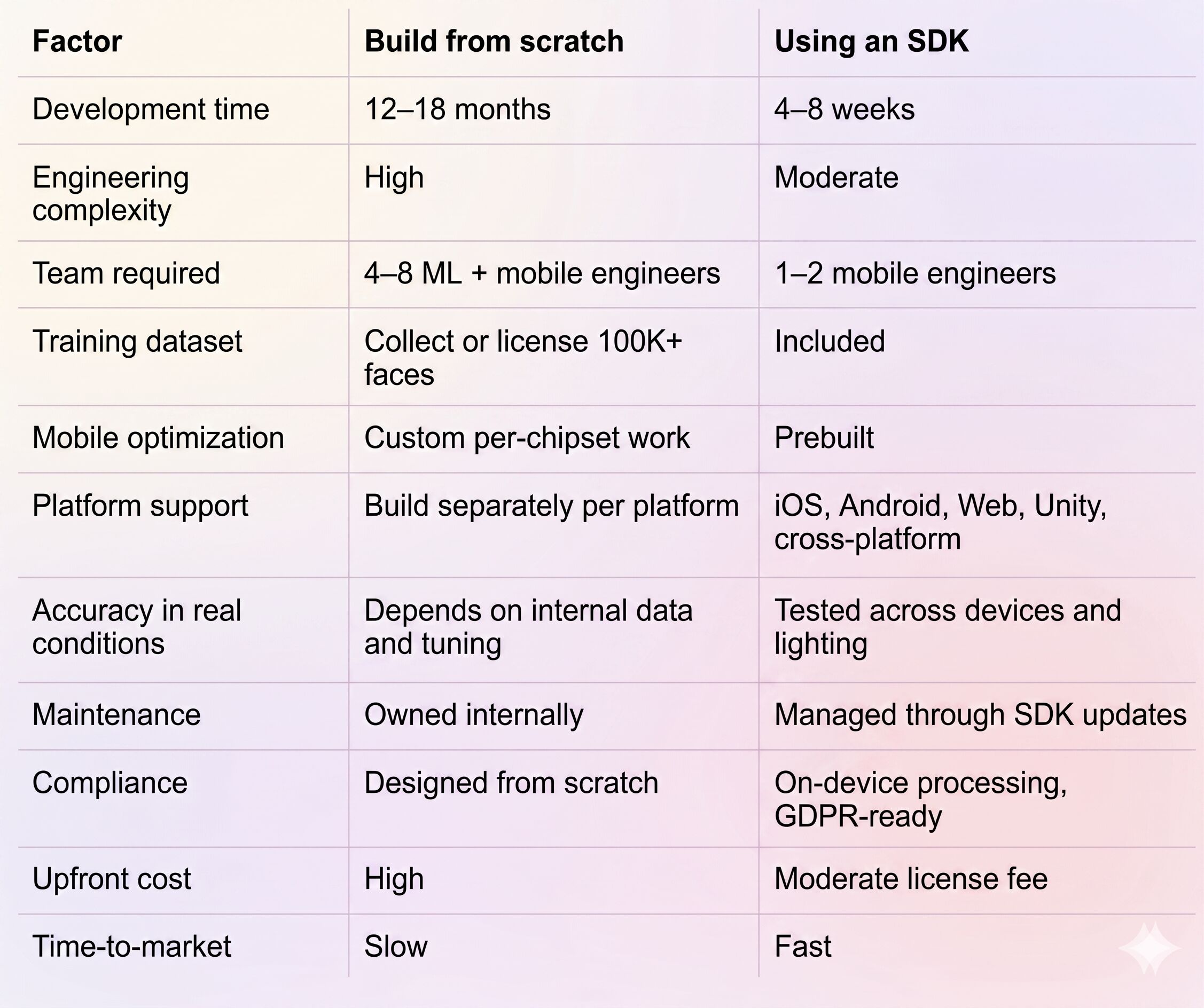
Implementing Face Landmark Detection with the Banuba SDK
About the Banuba face landmarks SDK
The Banuba Face Landmarks SDK takes a different architectural path than most landmark libraries. Rather than detecting a fixed set of 2D points and inferring 3D pose from them, Banuba establishes a 3D model of the head directly using its proprietary Face Kernel™ math model, then tracks the mesh's deformations frame by frame.
In practical terms, the SDK provides:
- Up to 68 tracked points, covering traditional landmarks (eyes, nose, lips, jawline, eyebrows) plus expression and spatial position signals
- A 3D face mesh with 37 morphs (head positions) for expression and gaze data
- 60 fps real-time performance on mobile
- Stable detection in low light, at head angles from –90° to +90°, with obstructions of up to 50% of the face
- Training dataset of 300,000 faces underlying the models
- On-device processing. No user data is stored, built-in GDPR compliance
- Support for around 90% of smartphones currently in use
- 9+ years on the market, with production deployments at Gucci, Samsung, and other consumer brands
What infrastructure the SDK replaces
- The face detection and landmark regression models
- The temporal tracking and recovery loop
- The 3D morphable face mesh
- The mobile GPU inference and optimization layer
- The rendering hooks for 2D and 3D effects
- The data pipeline for model updates
Platforms supported
iOS, Android, Web (WebAR), Windows, macOS, Unity, Flutter, and React Native.
Integration overview
The conceptual flow:
- Add the SDK to your project through the standard package manager for your platform: CocoaPods or Swift Package Manager on iOS, Maven or Gradle on Android, npm for Web, Unity Package Manager for Unity.
- Initialize the SDK with your license key and connect it to the camera stream.
- Subscribe to landmark and face mesh updates through the SDK's API.
- Feed those updates into your feature — a try-on renderer, a liveness check, an analytics stream, an avatar driver, or whatever else you're building.
Full implementation guides, sample apps, and reference code live in the Banuba Face AR SDK documentation. For vibe coders, there’s LLM-ready documentation available. Open integration samples are available on Banuba's GitHub.
Conclusion
Face landmark detection looks deceptively simple. A set of points on a face, updated every frame. The reality is a stack of ML inference, 3D geometry, mobile optimization, and privacy engineering that takes in-house teams a year or more to reach production quality and another year to stabilize across the long tail of devices.
A face landmarks SDK removes most of that engineering risk. You get detection, tracking, mesh output, and platform coverage as a drop-in library, maintained by a team that does this full-time.
The Banuba Face Landmarks SDK is worth evaluating when accuracy across real-world conditions, broad device support, and the kind of 3D mesh output needed for precise virtual try-on matter to your product. Start with the free trial and test it against your own camera footage before committing.
Reference List
Banuba. (2026a). Banuba technology. https://www.banuba.com/technology/
Banuba. (2026b). Face AR SDK documentation. https://docs.banuba.com/far-sdk
Banuba. (2026c). Face landmarks SDK. https://www.banuba.com/ai-face-landmarks-sdk
Banuba. (2026d). GitHub samples. https://github.com/Banuba
BrandXR. (2025a). 2025 augmented reality in retail & e-commerce research report. https://www.brandxr.io/2025-augmented-reality-in-retail-e-commerce-research-report
BrandXR. (2025b). Research report: How beauty brands are using AR mirrors to increase sales. https://www.brandxr.io/research-report-how-beauty-brands-are-using-ar-mirrors-to-increase-sales
Google. (2026). Face landmark detection guide. Google AI for Developers. https://developers.google.com/mediapipe/solutions/vision/face_landmarker
Mordor Intelligence. (2026). Virtual try-on market size, share & industry analysis. https://www.mordorintelligence.com/industry-reports/virtual-try-on-market
Precedence Research. (2026). Facial recognition market size, share, and trends 2026 to 2035. https://www.precedenceresearch.com/facial-recognition-market
-
To integrate a face landmarks SDK, no. A mobile engineer comfortable with iOS or Android, or a web developer for browser-based use cases, can get a working prototype running in days. To build landmark detection from scratch is a different story. You'll need machine learning engineers, 3D geometry experience, mobile GPU expertise, and access to a large labeled face dataset.
-
The Banuba Face Landmarks SDK covers iOS, Android, Web (WebAR), Windows, macOS, Unity, Unreal Engine, Flutter, and React Native. That spans essentially every mobile, web, and cross-platform environment product teams ship to today.
-
A working demo typically takes a few days. A production-ready integration, tuned to your specific camera handling, UI, business logic, and the devices you need to support, usually takes four to eight weeks. Teams with a mature mobile codebase tend to be at the shorter end of that range.
