

Snapchat and TikTok use it for real-time AR filters. Banking apps rely on it for identity verification and liveness checks. Video conferencing tools like Zoom use it for background blur and beautification. Retail platforms use it to power virtual try-on experiences for makeup, glasses, and accessories.
The market reflects this. According to Precedence Research, the global facial recognition market was valued at roughly $9.3 billion in 2025 and is projected to grow at a compound annual growth rate of about 14.7% through 2035. That growth is driven by rising demand for contactless authentication, personalized user experiences, and AI-powered engagement across retail, fintech, healthcare, and entertainment.
For product teams and developers, the question is no longer if they need face detection. It's how to build it without blowing the budget or the timeline.
[navigation]
Building face detection into a mobile or web app requires real-time image processing, ML model training, camera pipeline management, and device-level optimization across platforms. Doing this from scratch demands months of specialized engineering and ongoing model tuning. A face detection SDK like Banuba handles the heavy lifting by providing prebuilt detection models, camera integration, and cross-platform support out of the box, cutting development time from months to weeks.
TL;DR
- Face detection is everywhere. It powers AR filters, identity verification, beauty apps, video conferencing effects, and access control systems across billions of devices.
- Building it from scratch is hard. You need custom ML models, GPU-optimized rendering pipelines, real-time camera feeds, and per-device performance tuning for iOS, Android, and web.
- SDKs cut the complexity drastically. A Banuba’s face detection SDK gives you prebuilt detection, tracking, and analysis modules that slot directly into your app.
- Time and cost savings are significant. What typically takes 6 to 12 months of in-house ML engineering can drop to a few weeks of integration work.
- An SDK makes the most sense when your team lacks dedicated computer vision specialists, or when you need to ship fast without sacrificing accuracy or performance.
Why Face Detection Works So Well in Consumer Apps
The best face detection implementations share a few things in common. Here's what makes them stick with users.
UX patterns that drive adoption
- Real-time preview. Users see effects, filters, or overlays applied to their face instantly, with no lag or buffering. AR filters and lenses are now used by over 500 million users daily on platforms like Instagram and Snapchat, with Snapchat alone reporting over 6 billion AR lens plays per day. That kind of scale only happens when the experience feels immediate.
- Zero-tap interaction. The camera opens, detects the face, and starts working. No manual framing, no button presses. Research shows that users spend an average of 75 seconds interacting with AR experiences, compared to just 40 seconds with traditional static formats. Removing friction from the first moment keeps people engaged longer.
- Consistent behavior across lighting and angles. Good face detection works in dim rooms, at off-center angles, and even with partial face occlusion (glasses, masks, hair).
Performance expectations
- 60 fps tracking. Anything below that feels broken. Users expect smooth, real-time responsiveness.
- Low latency on mid-range devices. Not everyone has the latest iPhone. Detection needs to run efficiently on 90%+ of active devices.
- Minimal battery drain. Face detection runs on the camera feed continuously. Poorly optimized pipelines kill batteries in minutes.
What drives user engagement
- Shareable content. AR face filters, beauty effects, and avatar creation give users something fun to post. AR experiences lead to a 300% increase in social sharing rates, which is why platforms like Snapchat and TikTok have built their content loops around face-driven effects.
- Trust and security. Liveness detection and face verification create a sense of safety in banking, healthcare, and e-commerce apps. The access control segment alone accounted for more than 38% of facial recognition market revenue in 2025, driven largely by demand for biometric authentication in fintech and enterprise security.
- Personalization. Detecting facial features enables recommendations (makeup shades, eyewear styles) tailored to the individual user's face. Banuba's own client Océane, a Brazilian cosmetics brand, achieved a 32% add-to-cart rate with virtual try-on powered by face detection.
Core Features Required to Build Face Detection
If you want to build a competitive face detection feature, here's what needs to exist under the hood. Think of these as capability layers, each one adding depth to what your app can do.
Basic detection and tracking
- Face detection engine. Locates one or multiple faces in each video frame and returns bounding box coordinates.
- Head pose estimation. Tracks the head's orientation in 3D space (pitch, yaw, roll), which is essential for accurately placing overlays.
- Facial landmark mapping. Identifies key points on the face (eyes, nose, mouth, jawline) with enough precision to anchor effects and run analysis.
AI and ML functionality
- On-device ML inference. Detection models must run locally on the device for speed and privacy, with GPU and Neural Engine optimization.
- Liveness detection. Distinguishes a real face from a photo or video spoof, which is critical for identity verification use cases.
- Emotion and expression recognition. Reads facial muscle movements to detect states like smiling, blinking, surprise, or closed eyes.
Creative and AR tools
- 3D face mesh. A detailed mesh that maps the contours of the face, allowing realistic placement of AR masks, makeup overlays, and 3D objects.
- Face segmentation. Separates individual parts of the face (lips, eyes, skin, hair) at the pixel level for targeted effects like virtual makeup or hair color changes.
- Background segmentation. Isolates the user from the background for blur, replacement, or virtual environment effects.
UX and output
- Real-time camera integration. The detection pipeline must plug into the device camera and deliver results frame-by-frame without visible delay.
- Touch gesture support. Letting users interact with effects (swipe to change filter, pinch to resize) increases engagement.
- Export and sharing. Processed photos and videos need to be saved and shared easily, with proper encoding for social media platforms.

Build Paths: From Scratch vs. Using an SDK
There are two ways to add face detection to your app. Each has real tradeoffs, and understanding them early saves you from expensive pivots later.
Building from scratch (DIY path)
Building your own face detection system means assembling the full pipeline yourself.
Typical tech stack:
- ML frameworks: TensorFlow Lite, Core ML, ONNX Runtime, or PyTorch Mobile for running detection models on-device.
- Computer vision libraries: OpenCV for image processing, dlib for landmark detection.
- AR frameworks: ARKit (iOS), ARCore (Android) for camera access and spatial tracking.
- GPU processing: Metal (iOS), Vulkan, or OpenGL ES (Android) for rendering overlays at 60 fps.
- Cross-platform layer: If targeting both iOS and Android, you need a shared rendering layer or duplicate native implementations.
What you'll spend time on:
- Collecting and labeling training data (tens of thousands of face images across ethnicities, lighting conditions, and angles).
- Training and optimizing detection models for mobile hardware.
- Building a real-time camera pipeline that handles frame capture, model inference, and overlay rendering in under 16ms per frame.
- Testing and tuning on dozens of device models.
- Maintaining the system as new devices, OS versions, and edge cases appear.
Pros:
- Full control over every aspect of the pipeline.
- No licensing fees or third-party dependencies.
- Can optimize specifically for your use case.
Cons:
- Requires a dedicated ML/CV engineering team.
- 6 to 12+ months to reach production quality.
- Ongoing maintenance burden is high (new devices, OS updates, model retraining).
- Performance and accuracy may not match commercial solutions without deep domain expertise.
- Edge cases (low light, extreme angles, face occlusion) are especially hard to solve reliably.
Using an SDK (recommended path)
An SDK gives you a packaged solution: prebuilt detection models, rendering pipelines, camera integrations, and platform-specific optimizations, all wrapped in an API you can call from your app code.
Think of it as buying a finished engine instead of machining one from raw metal. You still design the car. You still control the driving experience. But you skip the years of engine R&D.
Who benefits most:
- Teams without in-house ML or computer vision specialists.
- Startups and product teams racing to validate a feature quickly.
- Enterprises that need reliable, battle-tested performance across a wide device range.
Pros:
- Integration in days or weeks, not months.
- Prebuilt, optimized models with high accuracy out of the box.
- Cross-platform support (iOS, Android, Web) from a single vendor.
- Ongoing updates, bug fixes, and device compatibility managed by the SDK provider.
Cons:
- Less control over the inner workings of the detection pipeline.
- Licensing costs, which vary by SDK and usage volume.
- Some customization may require working with the vendor's support or professional services team.
- Dependency on a third party for updates and a long-term roadmap.
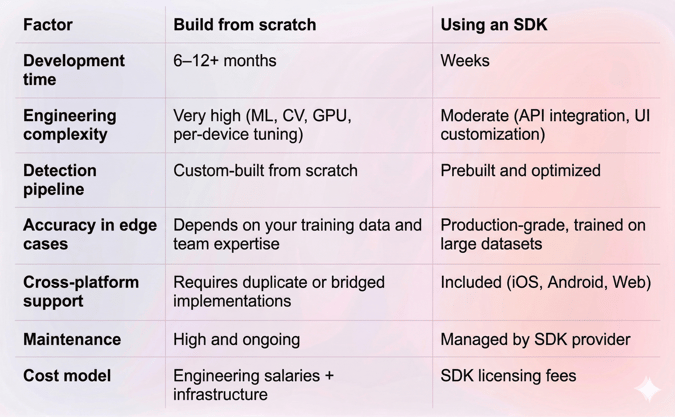
Face Detection SDK vs. Custom Build: Comparison table
Building Face Detection with Banuba SDK
About Banuba's face detection SDK
Banuba offers a face detection SDK built on patented technology developed by an in-house R&D team of PhD researchers with over 9 years of experience in the AR and computer vision space. The SDK is trusted by companies including Gucci, Samsung, and RingCentral.
Here's what it provides at the infrastructure level:
- Direct 3D face model inference. Unlike many competing solutions that first detect 2D facial landmarks and then convert them into a 3D model, Banuba builds the 3D head model directly. This patented approach (Face Kernel) produces more accurate tracking and more stable AR overlays. (Learn more about the technology)
- Real-time detection at 60 fps. The SDK runs face detection at 60 frames per second, even on mid-range mobile devices.
- Extreme angle support. Detection remains accurate across angles from -90 to +90 degrees, and handles partial face occlusion (up to 50%) from masks, glasses, or hair.
- Low-light reliability. Banuba's model operates effectively even in poor lighting conditions with low signal-to-noise ratios.
- Landmark precision. Depending on the use case, the SDK generates a face model with 64 to 3,308 peaks for detailed landmark mapping.
- Broad device support. The SDK runs on 90% of active smartphones, with neural network layers specifically optimized for Apple A-series CPUs and Android chipsets.
What infrastructure it replaces
If you were building from scratch, the Banuba face detection SDK replaces:
- Custom ML model training for face detection and landmark mapping.
- GPU-optimized rendering pipelines for real-time overlay.
- Per-device performance tuning and testing.
- Camera pipeline management across iOS and Android.
- Ongoing model retraining and edge-case handling.
Additional capabilities
Beyond core face detection, the Banuba Face AR SDK extends into areas that typically require separate solutions:
- Face segmentation for pixel-level separation of facial features (eyes, lips, skin, hair).
- Emotion and expression recognition detects six basic emotions in real time.
- Eye tracking and gaze detection with subpixel accuracy.
- Background subtraction for virtual backgrounds and blur effects.
- Beauty and face morphing for skin smoothing, teeth whitening, and face shape adjustment.
- AR masks and 3D effects for face filters, virtual makeup, and avatar creation.
Integration overview
Banuba supports native integration on iOS and Android, plus cross-platform options:
- iOS: Available via CocoaPods. Optimized for Apple A-series processors.
- Android: Distributed through Maven. Optimized for a wide range of Android chipsets.
- Web: Web AR SDK for browser-based face detection.
- Unity: Unity face tracking plugin for game and metaverse applications.
- Cross-platform frameworks: Supports React Native and Flutter through dedicated bindings.
No code walkthrough here, as full implementation guides and sample projects are maintained at:
Additionally, Banuba offers vibe coding integration options for you to chill while AI does the job. You can find Banuba’s LLM-ready documentation here.
Real-world results
Banuba's SDKs have a strong track record across different industries and app categories:
- A video conferencing app saw 30% more monthly active users and 54% more total users after integrating Banuba's Face AR features.
- The Bermuda live chat app generated 15 million AR engagements using the Face AR SDK.
- The Clash of Streamers NFT game reached 4 million installs with face AR-powered features.
- A social network (Chingari) hit 30 million downloads with Banuba's video editor and face effects.
You can explore more success stories on Banuba's blog.
The Build vs. SDK Decision Framework
Not every project needs an SDK, and not every project should go from scratch. Here's a quick way to think about it.
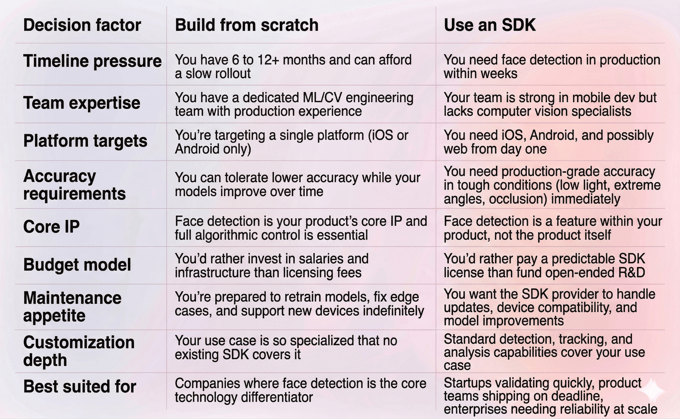
For most product teams, an SDK is the faster and safer path. It lets you focus engineering resources on what makes your app unique while relying on proven infrastructure for what doesn't.
Conclusion
Face detection is technically demanding. Real-time performance, cross-device compatibility, and accurate tracking under difficult conditions: solving each of these well requires significant ML and systems engineering expertise.
For teams that need to ship fast and ship reliably, a face detection SDK removes the hardest parts of the problem. It gives you production-grade detection, tracking, and analysis without the months of R&D.
Banuba's face detection SDK stands out for its patented 3D direct-inference approach, 60 fps real-time performance, extreme angle and low-light handling, and a track record across hundreds of commercial apps. If you're evaluating how to add face detection to your product, it's worth starting with their free trial and documentation.
-
Not if you use an SDK. You need solid mobile development skills (Swift/Kotlin or cross-platform frameworks like React Native or Flutter), but you don't need ML or computer vision expertise. The SDK handles detection, tracking, and rendering. Your job is to integrate it into your app's UI and user flow. Building from scratch, however, does require deep experience with ML model training, GPU optimization, and real-time image processing.
-
Banuba's face detection SDK supports iOS (via CocoaPods), Android (via Maven), Web (via the Web AR SDK), and Unity. It also offers cross-platform bindings for React Native and Flutter. The SDK is optimized for Apple A-series processors and a broad range of Android chipsets, covering roughly 90% of active smartphones. Full platform details are available in the Banuba documentation.
-
Most teams complete basic integration within a few days to a couple of weeks, depending on the complexity of your use case and how deeply you customize the experience. For comparison, building equivalent functionality from scratch typically takes 6 to 12 months of dedicated engineering work. Banuba provides sample projects and documentation on GitHub to speed up the process.
