

Video conferencing apps increasingly use AR-powered effects – from fun face filters and virtual avatars to background blur and beautification. Implementing these features requires robust face tracking SDKs that can detect faces, track facial movements/expressions, segment the user from the background, and overlay AR content in real time.
Below we identify leading SDK options across iOS, Android, and Web, including open-source, free platform-specific frameworks and commercial solutions. We compare their features (face tracking, expression detection, background removal, AR filters), platform support (including Swift, React Native, and Unity compatibility), ease of integration, pricing, and suitability for video call use cases.
[navigation]
TL;DR:
-
Face-tracking SDKs power AR filters, beautification, and virtual backgrounds in video calls, with both open-source (MediaPipe, ARKit/ARCore, ML Kit, face-api.js) and commercial options (Banuba, DeepAR, BytePlus, Tencent) across iOS, Android, Web, Unity, and React Native.
-
Building the whole AR stack yourself on top of low-level tools is possible but demands heavy ML work, optimization, and long development time to reach commercial-level quality.
-
Using a ready-made face tracking/AR SDK (e.g., Banuba or similar) sharply reduces time-to-market and engineering cost while delivering polished, real-time video conferencing effects out of the box.
Key Features and Requirements for AR in Video Calls
To support AR effects in live video, an SDK should provide:
Accurate Face Tracking
Real-time detection and tracking of faces (ideally multiple faces) with high precision facial landmarks. This enables anchoring of filters (e.g. masks, virtual props) and face modifications. For example, Visage’s FaceTrack tracks 99 facial landmarks for stable mask placement[1][2].
Facial Expression Detection
Ability to recognize or output facial expressions or blendshape coefficients (smile, eye closure, brow raise, etc.) so apps can respond to user emotions or drive avatar animations. Some SDKs provide explicit emotion classification (e.g. happy, sad)[3], while others output low-level blendshapes (like ARKit’s 52 facial blendshape coefficients) to capture expressions[4].
Background Segmentation/Replacement
Real-time portrait segmentation to separate the person from their background, enabling virtual backgrounds or background blur without a green screen. This is crucial for video conferencing privacy and immersion. For instance, Google’s open-source MediaPipe Selfie Segmentation is designed for video conferencing and “segments the prominent humans in the scene…in real-time”[5].
Image source: banuba.com
AR Filters and Effects
Support for overlaying 2D/3D effects on the face (masks, stickers, AR beauty filters, virtual try-on items, etc.) and possibly full-body effects. Many commercial SDKs include a library of pre-made Snapchat-like lenses and the ability to create custom effects.
High Performance
Optimized for real-time processing on mobile devices (60fps if possible, low CPU/GPU usage) to maintain video call quality. Latency must be minimal. For example, BytePlus claims its background removal runs in <50ms per frame and up to 30 FPS processing[6], and Tencent’s SDK processes 5 faces at ~1.2ms per frame[7].
Cross-Platform Support
Ideally available on iOS (Swift/Obj-C), Android (Kotlin/Java), Web (JavaScript/WebAssembly), and with integrations for frameworks like Unity (for cross-platform apps/games) and React Native (for cross-platform mobile development).
Below, we categorize the top SDK options into open-source/free frameworks and commercial SDKs, and then provide a comparison table.
Open-Source and Platform-Native Solutions
MediaPipe (Google)
An open-source cross-platform ML solution offering state-of-the-art face tracking and segmentation. The new MediaPipe Face Landmarker provides 3D face landmarks and even outputs blendshape scores representing facial expressions in real time[8][9].
It can track multiple faces and provides transformation matrices for rendering effects. Paired with MediaPipe’s Selfie Segmentation, which is designed for “selfie effects and video conferencing”[5], developers can achieve virtual background replacement and AR face filters.
MediaPipe is free (Apache 2.0) and works on iOS, Android (C++ or via Google’s ML Kit), and even in WebAssembly or via TensorFlow.js. Integration requires more effort (using Google’s APIs or building custom pipelines), but it offers tremendous flexibility and no licensing costs.
It’s a great choice if you have ML expertise and want full control. (MediaPipe does not natively supply a library of AR effects – you create your own effects using the detected landmarks and masks.)
ARKit (Apple)
The built-in iOS AR framework (free for iOS developers) provides high-quality face tracking on supported devices. With a TrueDepth camera (iPhone X and later), ARKit can track a detailed 3D mesh of the user’s face and provides blendshape coefficients for ~50 facial movements (e.g. jawOpen, eyeBlink) reflecting the user’s expressions[4].
This enables very precise facial expression capture (Apple’s own Memoji use this). ARKit lets you anchor 3D content to facial features (ears, nose, etc.) for filters, and with newer iOS versions it can even leverage scene depth for people occlusion.
However, ARKit is iOS-only (works with Swift/Obj-C, or via Unity’s AR Foundation). It lacks built-in background segmentation for video (aside from limited Portrait mode APIs), so a separate Vision framework API or custom model is needed for background blur.
Integration is straightforward in native Swift/SwiftUI, and Unity’s ARKit Face Tracking plugin allows use in Unity projects. For iOS-centric apps, ARKit provides excellent performance and accuracy at no cost.
ARCore (Google)
Google’s Android AR framework includes an Augmented Faces API for face tracking on supported Android devices. It detects a face and provides a 3D face mesh with regions (forehead, nose base, etc.) that can be used to place AR attachments[10][11].
Developers can texture this mesh or attach objects (for example, overlaying a virtual mask). ARCore’s face tracking works without special hardware (just a standard camera, though quality improves on ARCore-certified devices).
It does not directly output expression blendshapes or emotions, focusing more on geometry; basic facial action (like eye open/closed or smiling) can be obtained via Google’s ML Kit Vision APIs if needed. ARCore is free and integrates well with Android native or Unity (via AR Foundation).
Like ARKit, it doesn’t natively do background removal – you would need a segmentation model (Google ML Kit offers a separate Selfie Segmentation API). ARCore is ideal if your app targets Android users and already uses ARCore for other AR features.
Google ML Kit Vision
Google’s on-device ML SDK (free) offers a high-level API for face detection and basic landmarks. It can detect faces in real time and provides attributes like smiling probability and eye open/closed (simple expression metrics).
It’s easier to use than MediaPipe directly and works on both iOS and Android (via Firebase/ML Kit SDK). ML Kit also has a selfie segmentation API to produce a mask for background blur.
However, ML Kit’s face tracking is 2D (no full 3D mesh or advanced AR overlays), so it’s suited for simpler use cases (e.g. detecting a smile or swapping a 2D emoji on the face). For advanced AR filters, the above solutions are more powerful.
face-api.js (Open Source)
For Web applications, face-api.js (a JS library on top of TensorFlow.js) provides real-time face detection, 68-point face landmarks, and even facial expression recognition (classifying emotions like happy, sad, surprised) using lightweight neural networks[12].
It can run in browsers (including in a React web app) and is free. By combining face-api.js with other models (e.g. BodyPix or Mediapipe JS) you can implement background removal and face filters in Web contexts without native code.
Performance is decent for modern desktop or mobile browsers, though not as optimized as native SDKs or WebAssembly solutions. Alternatively, MediaPipe’s web solutions or Three.js with media pipelines can be used for better performance in browser. If your video conferencing needs to run in a browser, these open libraries are the go-to choice (unless you use a commercial Web AR SDK).
OpenCV and Others
Traditional computer vision libraries like OpenCV (with Haar cascades or DNN detectors) can detect faces and even provide landmarks, but they lag in accuracy and features compared to the ML approaches above.
There are also research projects like OpenSeeFace (open source real-time face tracking used for VTubing) which output blendshapes, but they require more integration work. In practice, most developers now leverage MediaPipe or platform AR frameworks for free solutions rather than reinventing with OpenCV.
Top Commercial Face Tracking/AR SDKs
Several companies offer full-featured AR SDKs tailored for apps to deliver Snapchat/Zoom-like effects quickly. These usually come with ready-made effect libraries, effect editors, and are optimized for performance. Below are some of the leading SDKs across different licensing models:
1. Banuba Face AR SDK
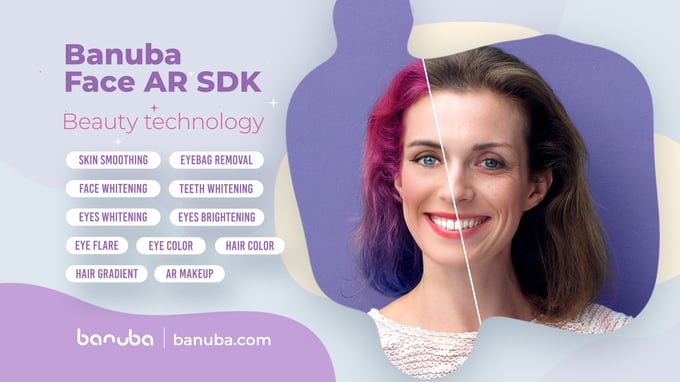
A popular commercial SDK offering a complete AR effects platform. Banuba supports iOS, Android, Web (HTML5), Unity, React Native and more, with easy integration via SDKs and even Unity and RN plugins[13].
Features include real-time facial landmark detection, face tracking, hand tracking & gesture recognition, a large catalog of 3D face filters and masks, virtual background replacement, beauty filters (skin smoothing, virtual makeup), and even virtual try-on for eyewear or jewelry[13][14].
The face tracking is high precision and supports multiple faces. Banuba’s technology is proven in video chat apps – for example, it powers apps like GreenBee (video conferencing with AR touch-ups) and the Bermuda video chat app[15][16].
Integration is developer-friendly: Banuba provides documentation, sample code, and a cloud-based Banuba Studio to create custom filters. They also have an npm and Maven package for web and a React Native module[17][18].
Pricing: Banuba is commercial and uses a subscription licensing (per platform, per month)[19].
A 14-day free trial is available[20]. It’s a top choice if you need a comprehensive, cross-platform AR solution focused on face filters and backgrounds – many virtual meeting and social apps have successfully integrated Banuba.
2. DeepAR
Another option for AR SDK known for face filters and effects. DeepAR provides a multi-platform SDK for iOS, Android, Web (HTML5/WebGL), and also supports Unity and even Unreal (plus beta desktop support)[21][22]. It offers real-time 3D face masks, filters, and lenses with performance “better than Snapchat” on mobile[23].
Key features include face tracking (with up to 4 faces tracked simultaneously in a frame), background replacement & blur (virtual background without green screen)[24], hair segmentation (to recolor or overlay hairstyles)[25], and even built-in emotion detection (classifying faces showing happiness, anger, etc.)[3].
DeepAR also provides a beauty and makeup add-on for virtual makeup try-on[26]. They back the SDK with a large Asset Store of pre-made filters and a Creator Studio tool to design custom AR effects[27][28]. For video conferencing, DeepAR has specific integrations (e.g. a guide for Agora RTC integration[29]) and is used in live streaming apps.
Integration: DeepAR is straightforward: you initialize it with a license key and an output canvas/view, then load effect files. Documentation and a developer forum are provided.
Pricing: DeepAR offers a free development license (watermarked) and then paid plans.
According to their docs, the SDK is free to test (with watermark) and then tiered pricing kicks in for production use[30]. SourceForge lists ~$25–99/month starting prices for basic plans[31], but enterprise pricing can scale (one source noted ~$1000/month for ~100k users for full features[32] – pricing is subject to negotiation).
Overall, DeepAR is a robust choice, especially if you want a rich set of AR filters on web and mobile with proven scale (100M+ monthly AR users via their clients[33]).
3. BytePlus Effects
ByteDance’s (TikTok’s parent) AR SDK offering, built on the technology powering TikTok and its effects. BytePlus Effects boasts extremely advanced face tracking and beautification capabilities, with a focus on real-time performance and scalability.
It provides precise 3D facial landmark tracking, real-time facial expression tracking (with blendshapes and emotion recognition)[34], multi-face tracking, and a vast array of AR effects. In fact, BytePlus offers an effects library of 80,000+ stickers and filters ready to use[35] – everything from face masks and beautification to body effects and mini-games.
It supports iOS, Android, Web (WebAR), and likely desktop frameworks, and is designed to be cross-platform. Notably, BytePlus emphasizes optimization: their face tracking SDK is “engineered with performance in mind,” often taking <50ms per frame for background removal tasks[36].
They claim 30 FPS video processing even at high resolutions[6], thanks to using GPU and native code under the hood. Features include face AR filters, virtual background (portrait segmentation), body tracking (up to full 17-point skeleton), gesture detection, and beautification (skin smoothing, face shaping).
BytePlus Effects is well-suited to streaming and video chat – ByteDance’s own products (TikTok, Vigo, etc.) use this tech for live filters.
Integration: BytePlus provides comprehensive documentation and SDKs; however, access typically requires contacting BytePlus for an API key or trial.
They advertise a free trial and a free tier on their site[37][38].
Pricing is not publicly listed – it’s likely a license or usage-based fee negotiated per app scale. Given its pedigree, BytePlus is ideal if you need TikTok-level AR effects and strong support for both mobile and web. (It may have less community presence than Banuba/DeepAR, but it’s a powerhouse for those who partner with them.)
4. Tencent Effects SDK (TRTC Beauty)
Tencent offers an AR effects SDK, often used alongside its Tencent RTC (real-time communication) platform but also available as a standalone offline SDK[39].
Tencent’s solution provides high-quality beautification, face filters, stickers, makeup, and virtual backgrounds for live video[40]. It includes a rich AR creation platform for designing custom filters, and can recognize up to 5 faces simultaneously with extremely low processing time (~1.2 ms per face)[7] – indicating highly optimized code.
It also incorporates body tracking with 300+ skeletal points and detailed facial adjustment controls[41], reflecting its comprehensiveness. Platform support is broad: iOS, Android, macOS, Windows, Web, Flutter, etc. are mentioned[42] – making it quite flexible for multi-platform apps.
The SDK includes many pre-made effects (100+ filters/stickers) and AI beautification features (skin smoothing, face slimming, etc.) out of the box[40][43]. For a video conferencing app, Tencent’s SDK offers proven real-time beautify and background blur (used in apps like WeChat, QQ).
Integration: documentation is available (some in Chinese, though English docs exist for TRTC). If using Tencent’s RTC, it plugs in easily; otherwise, you can integrate the SDK independently.
Pricing: Tencent’s Effect SDK is typically commercial – it might be free to use in small volumes if you are on Tencent Cloud, but generally one would contact Tencent for pricing (likely competitive given their scale).
This SDK is a strong choice if ultra-real-time performance and beautification in video calls are top priority (and especially if you operate in markets where Tencent tech is prevalent).
5. Visage|SDK (Visage Technologies)
Visage Technologies provides a suite of face tracking and analysis SDKs geared towards both AR effects and analytics. Their FaceTrack engine offers high-precision face tracking with over 100 landmarks and a fitted 3D face model for stable AR overlay[44][2].
They support multiple faces and have Unity plugins for easy AR mask integration[45][46]. In addition, Visage offers FaceAnalysis for emotion recognition and eye gaze/blink detection, which can enrich video call reactions (e.g., detecting if someone is smiling or drowsy).
They also have a dedicated Makeup SDK for virtual makeup try-on, indicating strength in beauty AR. Platform support includes iOS, Android, Windows, macOS, Linux, and Web (via WebAssembly) – essentially cross-platform [47]. Visage’s technology is often used in automotive (driver monitoring) and retail (virtual try-on) which speaks to its accuracy.
For video conferencing, Visage can enable face filters, avatars, and expression tracking (one could map Visage’s landmarks to an avatar rig, for example).
Integration: The SDK is delivered as libraries with detailed docs and example apps; Unity integration is quite straightforward via their plugin[48].
Pricing: This is a commercial SDK (likely a license fee per app or developer seat). You must contact them for quotes; they often tailor licenses to specific use cases (they mention custom development services as well).
If an enterprise-grade, customizable solution is needed – possibly with on-premise use (no external cloud) – Visage|SDK is a solid candidate, particularly if emotion recognition or bespoke AR features are in scope[49].
6. Perfect Corp (YouCam SDK)
Perfect Corp is known for its YouCam Makeup app and offers an SDK focusing on beauty AR. It’s heavily used by cosmetics brands for virtual makeup try-on, skin smoothing, hair coloring, and skin analytics.
The Perfect Corp MakeupAR SDK (sometimes just called YouCam SDK) is available for mobile (iOS/Android) and also as Web APIs. It excels at realistic virtual makeup application, with features like shade matching, skin tone analysis, and AI skin defect detection, to give users a makeover on camera[50].
In video chat, this SDK could be used to provide subtle beautification filters (foundation, blush, virtual lighting) or fun makeup looks in real time. It also has a virtual background changer feature (recently added, per Perfect Corp announcements) leveraging their segmentation tech for more immersive try-ons.
Perfect’s strength is the quality of its beauty effects – often more photorealistic for makeup than generic AR SDKs – and the domain-specific AI (e.g., identifying skin concerns).
Integration: Typically via a native SDK; they provide sample code and often work closely with clients during integration to fine-tune the effects.
Pricing: Perfect Corp targets enterprise clients – pricing is on the higher side, often annual licenses or SaaS fees based on usage. If your video conferencing app’s selling point is top-tier beautification (e.g., for virtual beauty consultations or simply to help users always look their best on camera), Perfect Corp’s SDK is the gold standard in that niche.
Otherwise, general AR SDKs (Banuba, etc.) also offer beauty modes but with slightly less focus on precise cosmetic rendering.
7. Snap Camera Kit
Snap Inc., the makers of Snapchat, offer Camera Kit, a cross-platform AR SDK that allows third-party apps to integrate Snapchat’s lens technology and huge lens ecosystem.
Camera Kit works on iOS, Android, and Web apps[51], effectively bringing Snap’s world-class face tracking and AR effects to your application. With Camera Kit, developers can tap into Snap’s lens catalog or create custom lenses using Snap’s Lens Studio, then embed them in-app.
The SDK handles the face tracking (Snap’s face tracker is highly accurate and can track multiple faces), lens rendering, and even background segmentation (Snap offers lenses for background AR). The big advantage is access to Snapchat’s creative tools and a community of lens creators – meaning you can offer constantly updated, fun effects without developing them all from scratch.
Integration: You need to apply for a Snap developer account and get the SDK. Integration involves adding the Snap CameraKit SDK and using it to present a camera view with lens selection. React Native integration would likely require a native module, since Snap provides native SDKs (some developers have done this). Unity is not directly supported, but you could run the mobile SDK in a native view.
Cost: Snap’s Camera Kit is currently free to use (Snap’s strategy is to expand AR usage; they do require an approval process and enforce some design guidelines[52]). They have lens monetization options if you purchase premium lens packs, but many features are free.
The trade-off is that you rely on Snap’s platform (your app must attribute “Powered by Snap AR” and follow terms). For an app that wants Snapchat-level filters and is okay with using Snap’s ecosystem, Camera Kit is a fantastic option – it’s literally the tech behind one of the most popular AR apps, repurposed for your use. It’s especially optimized for social AR experiences which directly translates to video chat fun filters and backgrounds.
Other Honourable Mentions
There are other notable mentions like FaceUnity (FU) – a widely used face AR SDK in Asia powering apps like TikTok (China) and many live-stream platforms, and Megvii Face++ AR SDK – another Chinese SDK with strong face tracking.
Additionally, Web-focused AR platforms like 8th Wall (Niantic) or Zappar provide face tracking for web and Unity. However, these tend to focus on AR marketing experiences rather than video conferencing.
If your focus is Web AR in a browser and you need an all-in-one solution, 8th Wall or Zappar’s Universal AR could be considered (with 8th Wall offering excellent face tracking + segmentation on web at a hefty price, and Zappar being a bit more accessible with face tracking libraries for three.js). In most cases, the solutions above cover the mainstream needs.
Comparison of top Video Conferencing SDKs
The table below summarizes the key differences of top SDKs across features, platform support, integration, licensing, and use cases:
Table of best video conferencing SDKs comparison
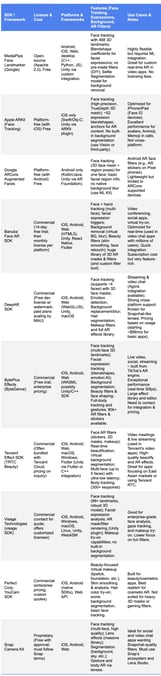
Table Legend
License: Free=open-source or platform-provided; Commercial=paid SDK (may have trial).
Platforms: Officially supported development targets (all support native iOS/Android; others as noted).
Features: Highlights of face tracking (and count of faces), expression or emotion recognition, background removal, and AR content capabilities.
Use Cases: Notable scenarios and any special integration notes.
Recommendations
For a Swift + React Native + Unity project aiming to add face AR in video calls, the choice may involve mixing solutions:
- If you prefer a ready-to-use commercial SDK, Banuba stand out as all-in-one cross-platform package. Both support Unity and mobile (Banuba even has a React Native module) and offer the full range: face tracking, expression effects, background filters, etc.
- Banuba is known for its video conferencing optimizations (virtual backgrounds, face touch-up in calls)[54].
- BytePlus is equally powerful but might require closer partnership to integrate; it could be overkill unless you need TikTok-level effect variety.
- Tencent’s SDK is fantastic for beauty and performance, especially if your app will integrate with Tencent’s video cloud or target users who expect the beautification standard set by apps like WeChat.
- For a no-cost or more controllable approach, using MediaPipe is viable. For example, you could integrate MediaPipe in native iOS/Android (or through Unity with some effort) to get face landmarks and segmentation, then implement your own filters.
- This avoids licensing fees and allows fine tuning, but will require significant development (and ensuring performance on low-end devices). ARKit and ARCore can supplement this on their respective platforms for device-specific improvements (e.g., use ARKit on iPhones for best face tracking, fallback to MediaPipe on unsupported devices or for cross-platform consistency).
- If beauty filters (makeup, skin smoothing) are a priority (e.g., for professional meetings or beauty industry clients), consider Perfect Corp’s SDK or ensure the chosen SDK has strong beautification (Banuba, Tencent, and BytePlus all have beauty modes too).
- For fun filters and user engagement in calls (think Zoom’s cat face or Snap lenses in a meeting), Snap Camera Kit is very attractive – it offloads the creative work to Snap’s Lens ecosystem and is free.
- The trade-off is integration constraints (no Unity, and RN requires bridging) and reliance on an external service. Still, for rapid deployment of a wide array of AR effects in a React Native or native mobile app, Snap’s offering is hard to beat given its quality and zero cost.
Conclusion
In summary, Banuba is top commercial pick for cross-platform face AR in video conferencing – Banuba is optimized for realtime use and easy integration. MediaPipe offers a powerful free alternative if you have ML developers to wire it together.
Depending on your app’s focus (enterprise polish vs. social fun), you might lean toward different SDKs or even combine them (for instance, use ARKit on iOS natively for performance, but a universal SDK for other platforms).
All the mentioned SDKs are capable of real-time face tracking, expression detection, background effects, and AR filters – the “best” choice will balance cost, development effort, and the specific user experience you aim to deliver.
Visage Technologies. (n.d.). Unity face tracking – Visage Technologies. https://visagetechnologies.com/unity/
DeepAR. (n.d.). DeepAR: AR face filters for any website or app. https://www.deepar.ai/
Unity Technologies. (n.d.). About ARKit Face Tracking | ARKit Face Tracking. https://docs.unity3d.com/Packages/com.unity.xr.arkit-face-tracking@1.0/manual/index.html
MediaPipe. (n.d.). Selfie Segmentation. https://chuoling.github.io/mediapipe/solutions/selfie_segmentation.html
BytePlus. (n.d.). Automatic video background removal API. https://www.byteplus.com/en/topic/206931
GlamAR. (2025). 14 Best AR beauty filter SDKs in 2025. https://www.glamar.io/blog/best-ar-beauty-filter-sdk
Google AI for Developers. (n.d.). Face landmark detection guide. https://ai.google.dev/edge/mediapipe/solutions/vision/face_landmarker
Google ARCore. (n.d.). Augmented Faces introduction. https://developers.google.com/ar/develop/augmented-faces
Unity Discussions. (n.d.). Face Landmark Detection. https://discussions.unity.com/t/face-landmark-detection/903066
justadudewhohacks. (n.d.). face-api.js. https://github.com/justadudewhohacks/face-api.js
Banuba. (n.d.). AR SDK Powered With Patented Face Tracking. https://www.banuba.com/
DeepAR. (n.d.). Pricing. https://docs.deepar.ai/deepar-sdk/pricing/
SourceForge. (2025). DeepAR Reviews. https://sourceforge.net/software/product/DeepAR/
Plattar. (n.d.). The 13 Best Augmented Reality SDKs That You Need To Know About. https://www.plattar.com/the-13-best-augmented-reality-sdks-that-you-need-to-know-about/
BytePlus. (n.d.). Revolutionizing Face Recognition: BytePlus Effects AR SDK. https://www.byteplus.com/en/topic/233707
BytePlus. (n.d.). AI selfie background remover SDK. https://www.byteplus.com/en/topic/208134
BytePlus. (n.d.). Face tracking for streaming apps SDK. https://www.byteplus.com/en/topic/206481
Tencent Cloud. (n.d.). Tencent Effect SDK. https://www.tencentcloud.com/product/x-magic
Snap Inc. (n.d.). Camera Kit | Snap for Developers. https://developers.snap.com/camera-kit/home
Fyresite. (n.d.). Best AR SDK for Mobile App Development. https://www.fyresite.com/best-ar-sdk/
-
The complete technical documentation for the Banuba Video Editor SDK is available online and includes requirements, setup instructions, and configuration details:
- Banuba Video Editor SDK iOS documentation
- Banuba Video Editor SDK Android documentation
- Banuba Video Editor SDK Flutter documentation
- Banuba Video Editor SDK React Native documentation
This Banuba Video Editor SDK documentation is regularly updated and should be your primary reference during integration.
-
You can access official integration code samples for the Banuba Video Editor SDK on GitHub. Banuba provides platform-specific examples to help you integrate faster:
- Banuba Video Editor SDK iOS integration code sample
- Banuba Video Editor SDK Android integration code sample
- Banuba Video Editor SDK Flutter integration code sample
- Banuba Video Editor SDK React Native integration code sample
These Banuba Video Editor SDK repositories include setup instructions and minimal working examples for quick deployment.
-
Yes. The Banuba Video Editor SDK includes an LLM-friendly documentation file designed for AI-assisted development and internal knowledge systems:
This structured Banuba Video Editor SDK text file can be used with AI tools to streamline onboarding and developer workflows.
-
The Banuba Video Editor SDK provides official cross-platform plugins to simplify integration into hybrid applications:
These Banuba Video Editor SDK plugins are maintained by Banuba and support faster implementation for cross-platform apps.
-
Yes, Banuba Video Editor SDK includes agent skills for Claude Code, Codex, and Qwen Code. You can install them with a single command. See the Banuba Agent Skills documentation page.
-
The official technical documentation for Banuba Face AR SDK is available online and includes requirements, setup instructions, and configuration details:
- Banuba Face AR SDK iOS documentation
- Banuba Face AR SDK Android documentation
- Banuba Face AR SDK Flutter documentation
- Banuba Face AR SDK React Native documentation
- Banuba Face AR SDK Web documentation
- Banuba Face AR SDK Unity documentation
- Banuba Face AR SDK Desktop documentation
This Banuba Face AR SDK documentation should be your primary reference during integration.
-
You can access official integration code samples for the Banuba Face AR SDK on GitHub. Banuba provides platform-specific examples to help you integrate faster:
- Banuba Face AR SDK iOS integration code sample
- Banuba Face AR SDK Android integration code sample
- Banuba Face AR SDK Flutter integration code sample
- Banuba Face AR SDK React Native integration code sample
- Banuba Face AR SDK Desktop integration code sample
- Banuba Face AR SDK Web integration code sample
- Banuba Face AR SDK Unity integration code sample
These Banuba Face AR SDK repositories include setup instructions and minimal working examples for quick deployment.
-
Yes. The Banuba Face AR SDK includes an LLM-friendly documentation file designed for AI-assisted development and internal knowledge systems:
This structured Banuba Face AR SDK text file can be used with AI tools to streamline onboarding and developer workflows.
-
The Banuba Face AR SDK provides official cross-platform plugins to simplify integration into hybrid applications:
These Banuba Face AR SDK plugins are maintained by Banuba and support faster implementation for cross-platform apps.