

[navigation]
TL;DR:
- Banuba Face Recognition SDK runs inside your app on the user's device. ARSA Face Recognition runs as a container on a server you own, called over HTTP.
- ARSA is not a mobile SDK and does not claim to be. It documents no native iOS, Android, Web, Flutter, React Native, or Unity package, because a REST service is called from any client by design.
- ARSA publishes real list prices: a free 14-day demo, $1,490 a year for the Developer license, $5,900 for Node-locked, $14,900 for Multi-node, and $34,000 perpetual plus 18% annual maintenance, reviewed quarterly and last reviewed 1 August 2026.
- Passive and active liveness are included in every ARSA license, not sold as an upsell.
- Banuba supplies the signals a liveness check needs, not a finished verification product: head pose, eye openness, mouth movements, emotion expression, gaze tracking and pulse detection. Your app defines the challenge and the decision logic.
- Banuba handles 1:1 face verification and 1:N face identification from 68 facial landmarks, across HTML5, iOS, Android, Windows, macOS, Unity, Flutter and React Native, with a 14-day free trial.
- Neither vendor publishes a NIST FRVT result. ARSA states plainly that its published accuracy figures are laboratory benchmarks and that "Deployment performance depends on camera position, resolution, and site conditions".
- ARSA is the better choice for an on-premises identity database, air-gapped or classified sites, and CCTV or access-control infrastructure. Those are not what an in-app SDK is for.
- Banuba is the better choice in one narrow case: real-time face verification and liveness signals inside a mobile or web app that also renders AR on the same camera frame.
- Banuba's core Face AR SDK adds around 15 Mb to the app, depending on the feature set enabled, which matters when the recognition code ships in a consumer download.
How to choose between an in-app SDK and an on-premise face API
Five questions settle this comparison faster than any accuracy table.
- Where must the face be processed? On the user's device, or on a server you control? Both answers are legitimate privacy positions, and they lead to completely different products.
- Do you need an identity database, or a one-off check? Enrolling thousands of people and searching them later is back-end infrastructure. Confirming that the person holding the phone is live and matches one reference image is a client-side job.
- Who calls the service? A camera feed inside a mobile app, or a back-office system, a kiosk, or a CCTV pipeline?
- Does the same camera frame also need AR? Beauty, filters, try-on, and face meshes are a different class of product from recognition, and only one of these two vendors ships them.
- Do you need a certified presentation-attack result? If a compliance reviewer wants an iBeta or ISO/IEC 30107-3 certificate, check who actually holds one before you shortlist.
If your answer to the first question is "on the device, inside our app", the face verification API you are looking for is a client SDK rather than a hosted endpoint. If it is "on our own servers, for our own enrolled population", keep reading the ARSA side.

What Banuba Face Recognition SDK actually is
Banuba Face Recognition SDK is the identity-facing part of Banuba Face AR SDK, and it runs locally. It handles 1:1 face verification and 1:N face identification by detecting 68 facial landmarks, comparing a new image to the baseline, and returning the percentage of similarity between them. It supports HTML5, iOS, Android, Windows, macOS, Unity, Flutter, and React Native, from iOS 13+ and Android 8.0+, with a 1280x720 camera recommended, at min 30 FPS. A 14-day free trial gives full SDK access.
The honest limit, and the thing worth being direct about: Banuba is not an identity product with a compliance certificate attached. For liveness, Banuba's SDK tracks head pose, eye openness, mouth movements, emotion expression, gaze tracking, and pulse detection, and Banuba's own documentation describes this as reliable data for active and passive detection that the developers implement themselves. You build the challenge, the thresholds, and any KYC layer. Banuba's liveness detection guide walks through combining active and passive checks.
Two practical details decide real integrations. The core Face AR SDK adds around 15 Mb to your app, depending on the feature set enabled, which is the number that matters when recognition code has to ship inside a consumer download. And because every frame is processed on the device, there is no per-request charge as call volume grows; Banuba licenses on monthly active users instead.
The in-app shape also means the recognition code sits in the same pipeline as everything else the camera is doing. Banuba publishes a full walkthrough for building a live streaming app with Amazon IVS and Banuba SDK, which is the same client-side integration pattern a verification flow uses: frames stay in the app, and the SDK processes them in place.
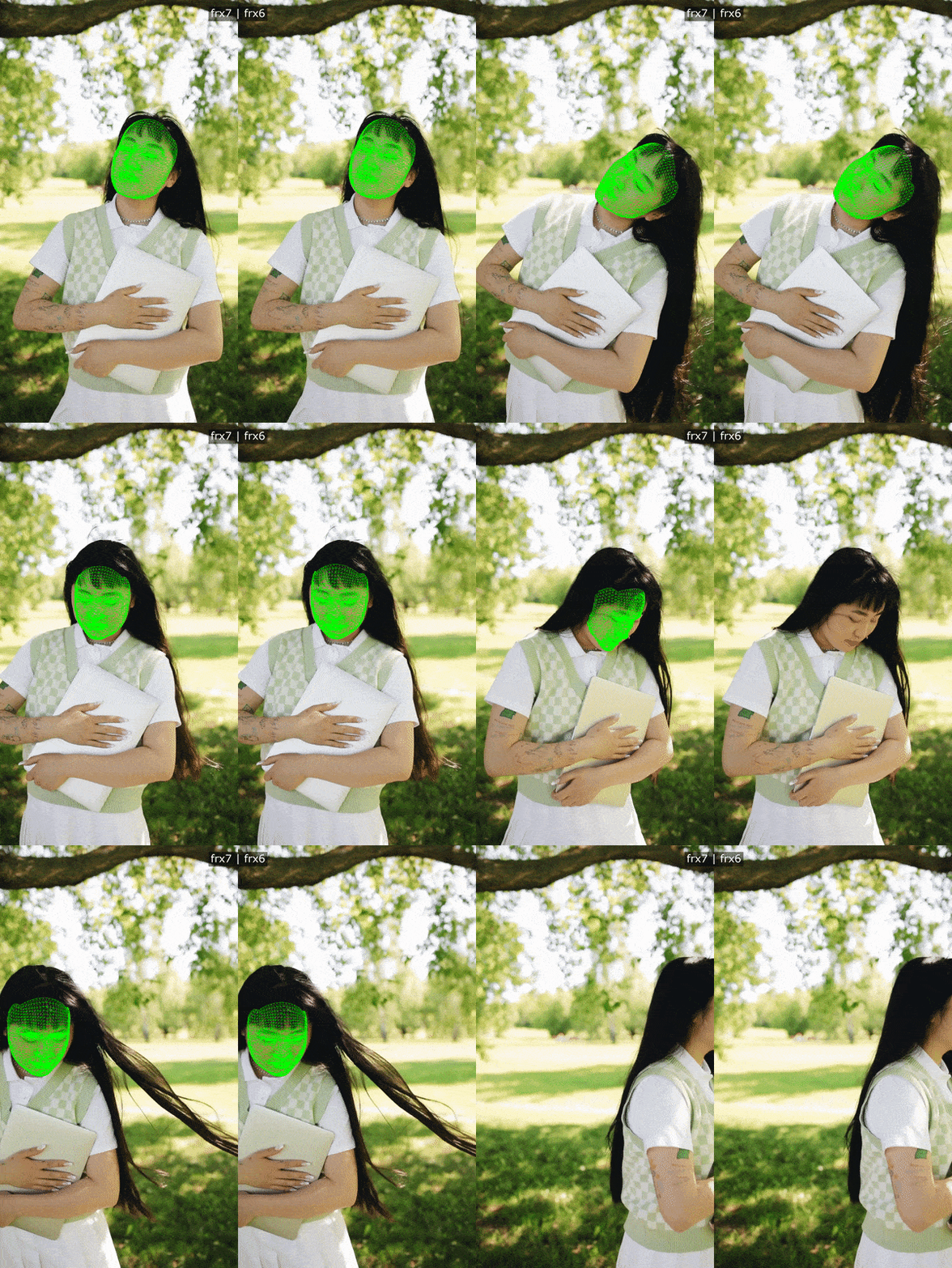 Banuba's face recognition and tracking example
What ARSA Face Recognition actually is
ARSA Technology is an AI and IoT company founded in 2018 in Surabaya, Indonesia, operating as PT Trisaka Arsa Caraka, and its about page states "50+ Enterprise Clients". Its named target industries are government and defense, manufacturing, transportation, and retail.
The product is a Face Recognition & Liveness SDK that ARSA describes as "Face recognition, passive and active liveness, and face analytics, running entirely inside your infrastructure". In practice, that is one signed Docker container, running on any OS with Docker, exposing a single REST API service plus a web dashboard on one port, default 8080. It holds the face database, the liveness engine, the dashboard, API-key management, and an interactive sandbox in the same image.
The documented endpoints make the shape clear: POST /face_recognition/register_face enrols an identity from one to four images, POST /face_recognition/recognize_face does 1:N identification, POST /face_recognition/validate_faces does stateless 1:1 verification with nothing stored, POST /face_liveness runs single-image passive anti-spoofing, and POST /face_liveness_active/submit_and_recognize returns a liveness verdict and an identity together, skipping recognition entirely when liveness fails. ARSA also states that "Templates are never exposed over the API; only identifiers are returned".
Three things in ARSA's own words are worth quoting because they tell you exactly where the product is meant to sit. On TLS: "Terminate at a reverse proxy. The service speaks plain HTTP; API keys and session cookies travel in headers." On CORS: "Open by default. Restrict, or front the service with a proxy, before exposing beyond a trusted network." On rate limiting: "Not built in. Add at the proxy layer for any internet-facing deployment." ARSA is explicit that "The service is built to sit behind your own infrastructure, not directly on the internet". None of that is a flaw; it is a deployment assumption, and it rules the product in or out of your architecture on the first read.
One operational trap is worth planning around. Each API key is its own tenant namespace, so ARSA warns that "deleting or rotating it makes the identities enrolled under it unreachable, so plan re-enrolment before any rotation".
Side by side
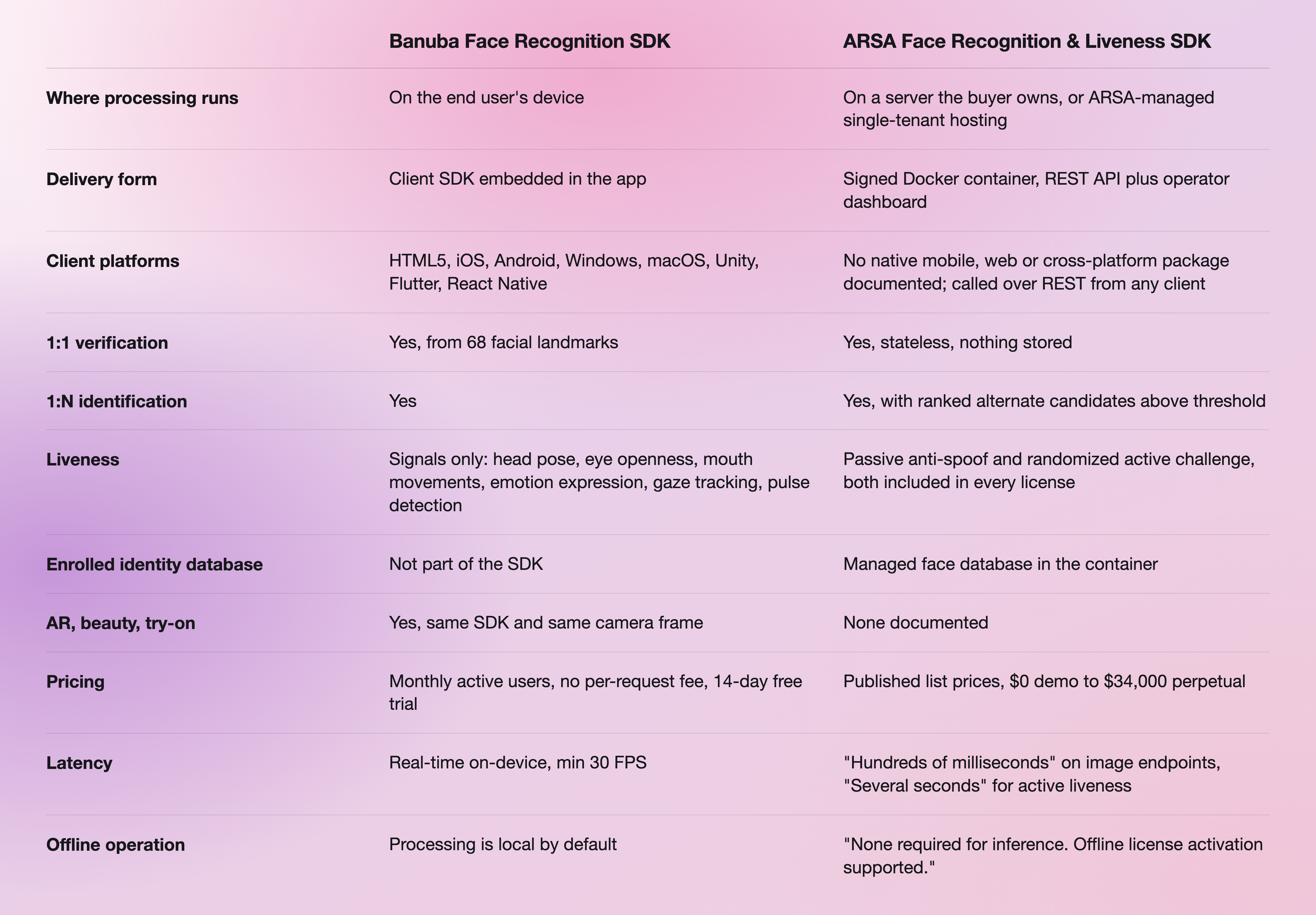
ARSA's current list prices and tiers are on its pricing page, and the endpoint and deployment details are on its Face Recognition & Liveness SDK page. Banuba's platform and trial details are on the Banuba face recognition SDK page.
Where ARSA is the better choice
This is the section most vendor comparisons skip, so here it is plainly. Choose ARSA when:
- You need an enrolled identity database you own. ARSA ships the face database in the container. Banuba's SDK does not manage enrolment for you.
- The deployment is air-gapped, classified, or offline. ARSA sells an air-gapped and classified tier, quoted after a site survey, and states, "There is no outbound call at inference time and no telemetry. License activation and model updates are both supported offline."
- The consumer is infrastructure, not a phone. CCTV analytics, access control, kiosks and back-office systems are ARSA's home ground, and its wider portfolio includes AI Box edge appliances and video analytics software.
- You want a published price before you talk to anyone. ARSA lists its tiers in USD with a review date. That is unusually transparent for this category, and it genuinely shortens procurement.
- Both liveness modes must be in scope from day one without negotiation. ARSA states both are included in every license.
Google's own AI Overview for this comparison reaches the same split: choose ARSA if the project centers on security infrastructure, identity verification, access management, or automated video analytics on server or edge hardware.
Where Banuba fits
Banuba is the better choice in one narrow, defensible case: real-time face verification and liveness signals inside a mobile or web app, on the user's own device, where the same camera frame also needs AR. That combination is the whole of it. If the app is doing beauty, filters, try-on, or a face mesh, and it also needs to confirm that a live human is in front of the lens, running two vendors on one camera feed is the thing you are trying to avoid.
Outside that case, be honest with yourself about the shortlist. If you only need recognition and liveness on a server, ARSA is a cleaner fit than bending a client SDK into that shape.

What neither of them is
Neither vendor publishes a NIST FRVT ranking, and neither should be presented as holding one. Banuba does not claim a certified presentation-attack result, and ARSA's own disclaimer says its published accuracy figures are laboratory benchmark results under stated datasets and protocols, adding that "Deployment performance depends on camera position, resolution, and site conditions".
If your compliance reviewer requires a certificate rather than a capability, neither of these is the shortest path, and you should look at vendors who publish one.
Other options worth a look
A two-vendor comparison is rarely the whole market. Each of these is genuinely best at something neither Banuba nor ARSA leads on:
- Microsoft Azure Face is the pick when you need an accredited presentation-attack result. Microsoft states its liveness "achieved a 0% penetration rate in iBeta Level 1 and Level 2 Presentation Attack Detection (PAD) tests" at a NIST/NVLAP-accredited lab, conformant to ISO/IEC 30107-3. Note that the liveness client SDKs are a gated feature you must request access to.
- Amazon Rekognition is the pick for identity search at cloud scale inside an existing AWS stack. It is cloud-only by design: every documented image-analysis operation is an API call to AWS.
- Luxand FaceSDK is the pick for certified liveness that still runs on-device. Luxand passed iBeta Presentation Attack Detection testing to ISO/IEC 30107-3 with 0% APCER across roughly 1,000 presentation attacks, shipped as an add-on. Pricing is quote-only.
- Visage Technologies runs on-device or in the cloud across iOS, Android, and web, on a custom quote.
- Google ML Kit is free, on-device, and the right answer when you need face detection rather than identity. Google documents the APIs as "offered to you at no cost", and it covers Android and iOS only.
For a wider roster, Banuba keeps a longer breakdown in Top 5 Face Recognition APIs and a per-vendor write-up of nine face recognition APIs sorted by the job they do. If the requirement is detection on one platform rather than identity, the Android face detection APIs and SDKs comparison is the closer match, and the fintech user-verification walkthrough shows what a verification flow looks like end to end.
-
No, Banuba is commercial software, but there is a free way to evaluate it. Banuba Face Recognition SDK comes with a 14-day free trial that gives full SDK access, and licensing after that is based on monthly active users rather than per request. ARSA's equivalent is a free 14-day demo limited to one machine, 100 enrolled identities, and 50 API calls per hour. Details of Banuba's trial are on the Face API page.
-
Banuba is a client SDK that runs recognition and liveness on the end user's device, across HTML5, iOS, Android, Windows, macOS, Unity, Flutter and React Native. ARSA is a server-side Docker container that exposes the same category of capability over a REST API inside your own infrastructure, with an enrolled face database included. Banuba suits in-app flows; ARSA suits on-premise identity systems. Banuba's face recognition SDK developer's guide sets out what to look for in either shape.
-
Banuba does both, with an important caveat about scope. Banuba's SDK tracks head pose, eye openness, mouth movements, emotion expression, gaze tracking, and pulse detection, which Banuba describes as reliable data for active and passive detection that developers implement themselves. The challenge design and decision logic are yours to build. Banuba's liveness detection guide covers how to combine the two approaches.
-
It can be called from one, but it is not a mobile SDK. ARSA documents no native iOS, Android, Web, Flutter, React Native, or Unity package, and states that the product is consumed over REST from any client. A mobile app would send frames to the ARSA container over HTTP, which means the face data leaves the device. If frames must stay on the phone, Banuba's on-device face recognition SDK is the architecture that does that.
-
ARSA publishes list prices in USD: a free 14-day demo, $1,490 a year for the Developer license (one machine, up to 1,000 enrolled identities), $5,900 a year Node-locked, $14,900 a year Multi-node, and $34,000 one-time for perpetual multi-machine plus 18% annual maintenance. Managed single-tenant hosting starts from $590 a month on a 12-month minimum term. ARSA states prices are reviewed quarterly and were last reviewed on 1 August 2026, so re-check before relying on them. Banuba prices differently, on monthly active users with no per-request fee, which the Banuba Face AR SDK pricing guide explains.
-
Neither vendor publishes a NIST FRVT result, so an accuracy ranking between them would be invented. ARSA's own disclaimer states its published figures are laboratory benchmark results and that deployment performance depends on camera position, resolution, and site conditions. If a certified accuracy or anti-spoofing figure is a hard requirement, shortlist a vendor that publishes one, such as Microsoft Azure Face or Luxand. Banuba's position is on-device, real-time performance at min 30 FPS, documented on the Face API page.
-
Only Banuba. ARSA publishes no AR rendering, face filters, makeup try-on, or beauty features anywhere on its SDK product page, and its overlap with Banuba is face detection, verification, and liveness only. Banuba's recognition features sit in the same SDK as face filters and AR effects, on the same camera frame, which is the main reason teams run both jobs through one vendor.
