

Best face recognition API by job: Amazon Rekognition for face search, Azure Face for liveness, Google Cloud Vision for image analysis, Face++ for breadth, and Banuba Face API for AR tracking, part of the Banuba Face AR SDK. Banuba Face AR SDK is a real-time, on-device face tracking and AR effects SDK that runs at 60 FPS on mid-range mobile hardware with a -90 to +90 head-angle tracking range. Banuba published this guide, and Banuba Face API is one of the five tools reviewed below.
In full: Amazon Rekognition is the strongest pick for large-scale face search and identity workflows at cloud scale, Microsoft Azure Face API for regulated identity verification with certified liveness, Google Cloud Vision API for broad image analysis where faces are one signal among many, Face++ for feature breadth when prototyping in Asia-Pacific, and Banuba Face API for real-time, on-device face tracking and AR features in consumer apps. None of the five wins everywhere, and the choice is decided by whether you need identity search, regulated verification, or interactive tracking.
[navigation]
TL;DR:
- Need 1:N identity search across millions of enrolled faces: shortlist Amazon Rekognition first.
- Need identity verification under regulatory scrutiny: choose Microsoft Azure Face API, and budget time for its Limited Access approval.
- Need faces as one signal inside a wider image pipeline: Google Cloud Vision API is enough, because it has no identity matching at all.
- Need the widest feature menu for a prototype in Asia-Pacific: Face++ covers the most ground, subject to procurement review.
- Need real-time tracking, landmarks, and AR effects running on the device: Banuba Face API is the pick on this list, and it ships inside Banuba Face AR SDK.
- Banuba Face API does 1:1 verification and active liveness, not 1:N identification against an identity database, so route identity search projects to a cloud vendor.
- Decide your deployment model before you compare accuracy: cloud, on-device or on-premise narrows the list faster than any feature table.
- Ignore leaderboard scores as a buying signal and pilot on your own capture conditions, because lighting, camera, and demographics move accuracy more than model choice.
- Compare pricing models, not headline prices: per-request cloud billing and Banuba's MAU-based licensing diverge as volume grows.
- Ask every vendor for accredited liveness test results rather than a marketing claim.
Face Recognition, Face Verification and Face Tracking Are Three Different Jobs
Most buying mistakes on this topic come from treating four different capabilities as one product.
Face detection finds that a face is present in an image or a video frame and returns a bounding box. Do not mix it up with recognition: our guide to face detection algorithms covers how those models work and where they break.
Face tracking follows the same face across frames in real time and returns landmarks, a mesh, and head pose. It drives AR effects, virtual try-on and any camera UI that has to react within a frame budget.
Face verification is a 1:1 question: "Is this the same person as the enrolled template?" It powers login, re-authentication, and most KYC checks.
Face identification is a 1:N question: "Who is this person?", answered by searching a probe face against a database of enrolled identities. It powers watchlists, access control at scale, and media indexing.
Only some tools on this list do 1:N. Banuba Face API, the face recognition api covered in this guide, does detection, real-time tracking, and 1:1 verification with active liveness, and does not perform 1:N identification against an identity database. If identity search is your core requirement, go straight to the cloud vendors below and check the pricing and access constraints they attach to it.
Key Factors When Choosing a Face Recognition API in 2026
Choosing the best face recognition API is not just about finding a tool that detects faces. It is about balancing accuracy, performance, versatility and scalability. Here are the key aspects to weigh in 2026.
Accuracy
Accuracy is the backbone of any face recognition service, but public leaderboard numbers are a poor buying signal. Datasets such as LFW and MegaFace were built for research comparison; vendors do not report against them on a common protocol, and a score from curated images says little about your users holding a phone in a dim room.
Test on your own data instead. Collect a few hundred representative captures across the lighting, camera hardware, pose, and demographics you expect, then measure false accepts and false rejects per segment. Accuracy drives authentication success rates and how precisely an overlay sits on a face in virtual try-on, so ask for a working sample and run it yourself before you commit.
Features
Not all face recognition SDKs are created equal. Some go beyond basic detection and offer capabilities like:
- Age and gender estimation;
- Emotion analysis;
- Face comparison and matching;
- Liveness detection (to prevent spoofing);
- Facial landmark detection;
- Multi-face tracking in real time.
These features matter in retail analytics, virtual try-on, biometric access control, and customer behavior prediction. Feature availability also moves: Microsoft has retired several attribute features, and Google has deprecated others, so verify against current documentation rather than an old comparison post.
Platform
The best face recognition library for your solution has to fit your stack. Whether you need a Python face recognition API for backend work or a JavaScript integration for real-time browser experiences, the choice should align with your target platforms. Cloud APIs are reachable from any language over REST, which makes them stack-agnostic but network-dependent. On-device SDKs, including Banuba's, are the opposite trade: you integrate per platform, and in exchange the camera pipeline never leaves the handset.
Budget
Are you looking for a free trial or enterprise-scale pricing? Review the pricing models and check that they fit how your product actually grows:
- Free tiers or open-source options;
- Pay-as-you-go vs. subscription models;
- Cost per request, per face, or per second of video;
- Licensing terms for commercial vs. research use.
Vendor pricing is compared below. If you are tight on budget, an open-source library is a viable start for experimentation or academic work, though it stops being free once you own the maintenance. Our technical breakdown of where an open-source stack stops being cheaper walks through that crossover point.
Scalability
Scalability matters once you handle large datasets, video feeds or millions of daily interactions. Cloud APIs like Amazon Rekognition scale horizontally, and their cost scales with request volume. On-device SDKs scale differently: the compute is the user's device, so throughput is free but per-device performance becomes the constraint.
Deployment model: cloud vs. edge vs. on-premises
In 2026, where recognition runs matters as much as accuracy:
- Cloud giants are a strong default for teams already committed to AWS, Azure, or Google Cloud, with high availability, elastic scaling, and easy integration with storage, IAM, and analytics pipelines.
- Specialized biometric SDKs focus on identity verification and fraud prevention, and are common in banking, KYC and high-security access control where spoof resistance and governance requirements are strict.
- Edge-first SDKs run on-device, or with minimal server calls. They suit mobile and AR experiences where latency, offline capability, bandwidth cost, and privacy decide the design.
Match your deployment constraints first. Only then compare accuracy, liveness, UX, and pricing inside that bucket.
Banuba Face API – Best Overall for Accuracy and Features
Banuba Face API is the face-processing layer of Banuba Face AR SDK, and its strength is narrow and real: keeping stable landmarks on a moving face, at frame rate, on the phone itself. Samsung and Gucci are among its customers.
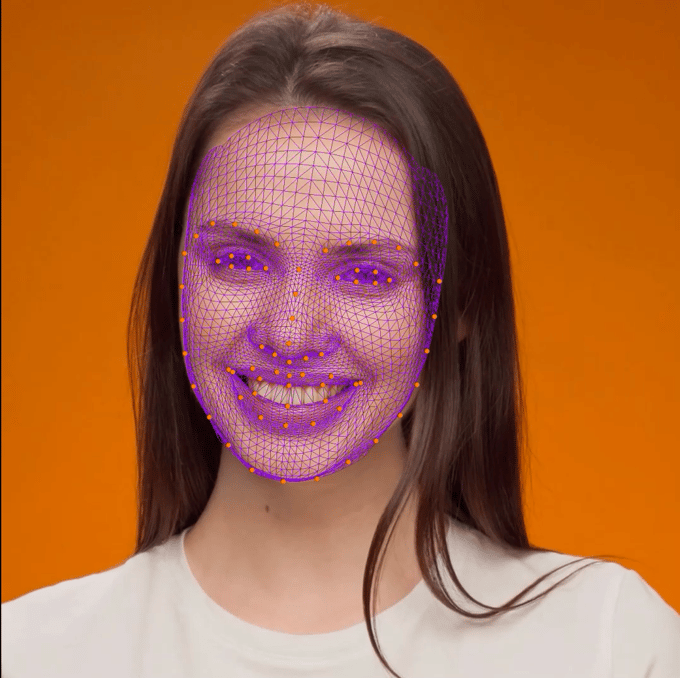 Banuba's face mesh
The tracker returns 68 facial anchor points, a face mesh of up to 3,308 vertices, and 37 tracked facial morphs, which is what makes expression-driven effects and precise overlay placement possible.
Lab-measured tracking performance, recorded under fixed test conditions rather than in the field:
- Android: 25 FPS on low-end devices, 30 FPS on high-end devices;
- iOS: 30 FPS;
- Maximum tracking angle: 80 degrees;
- Working distance: 170 to 180 cm on Android, 230 cm on iOS;
- Up to 5 simultaneous faces at 22 to 30 FPS.
Platform coverage is Web, Windows, Mac, Android, iOS, Flutter, React Native, and Unity. Minimum requirements are iOS 13 or newer, Android 8.0 or newer, a 1280x720 camera at at least 30 FPS, and WebGL 2.0 or newer on the web. Processing happens on the device, with no cloud dependency.
Key features:
- Multi-face detection and tracking;
- Face segmentation;
- Gender and emotion detection;
- Driver tiredness monitoring;
- Heart-rate tracking;
- Hand tracking and body segmentation;
- Virtual try-on, AR effects and face filter technology;
- 1:1 face verification and active liveness detection.
The boundary, stated plainly: Banuba Face API does not perform 1:N identification against an identity database, and Banuba has not submitted its models to NIST FRVT or published LFW or MegaFace results, so treat any accuracy comparison against the cloud vendors as untested rather than won.
Pricing is MAU-based rather than per-request. Once the SDK is integrated, request volume does not change the cost, because there are no per-request charges, which keeps the bill predictable for camera-heavy consumer apps. Tiers are in the Banuba Face AR SDK pricing guide, and there is a 14-day free trial with full SDK access. Try the effects in the live demo, read the Face AR SDK documentation, and review the Android sample project.
When Banuba is not the right pick: if you need 1:N identity search, a managed cloud identity pipeline, or an audited presentation attack detection certification, choose one of the cloud vendors below.

Amazon Rekognition - Best for Large-Scale Face Search and Identity Workflows
Amazon Rekognition is the strongest option on this list when the job is 1:N face search across millions of enrolled faces. You build a collection, index face vectors into it, and query it with a probe image, while AWS handles storage, indexing, and scaling. Nothing else here is designed for that problem at that size.
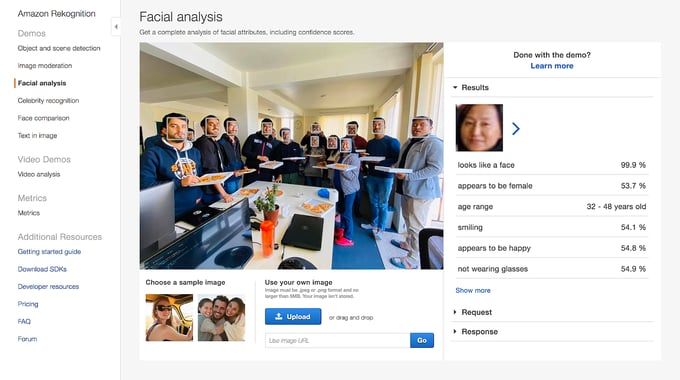
It also covers real-time video stream processing, face comparison, attribute analysis and label detection, and plugs straight into S3, Lambda, Kinesis Video Streams and SageMaker, which makes it practical for security, crowd analytics and identity verification pipelines.
Key features:
- Face detection and tracking in images and videos;
- Face search against collections of enrolled faces (1:N);
- Face comparison and verification (1:1);
- Age range and attribute analysis;
- Text and label recognition;
- Real-time video analysis with Kinesis Video Streams;
- Rekognition Face Liveness for spoof resistance;
- Native AWS integration and horizontal scaling.
Pricing is usage-based and tiered per month:
- Image analysis: $0.0010 per image for the first 1 million, $0.0008 for the next 4 million, $0.0006 for the next 30 million, and $0.0004 beyond that;
- Face metadata storage: $0.00001 per face vector per month;
- Stored video analysis: $0.10 per minute for label detection and $0.05 per minute for shot detection;
- Streaming video events: $0.00817 per minute;
- Rekognition Face Liveness: $0.015 per check for the first 500,000 checks per month, then $0.0125, then $0.010.
The free tier lasts 12 months from account creation and covers 1,000 images per month and 60 minutes of video per month. There is no permanent free tier.
The limitation is structural: Rekognition is cloud-only and tightly coupled to AWS, so it is a poor fit for offline work, on-device processing, or any pipeline where frames cannot leave the handset.
Microsoft Azure Face API - Best for Regulated Identity Verification with Liveness
Azure Face API is built for identity verification inside organisations that have to document what their biometric system does and who approved it, which is why Microsoft gates the sensitive parts of it.
Face Identification and Face Verification are Limited Access features. You have to be approved through Microsoft's Face Recognition intake form, and they run only on the Standard (S0) and Enterprise (E0) tiers, not on the Free (F0) tier. Face Detection needs no registration. Face recognition features also may not be used by or for U.S. police departments. Plan the approval step into your timeline before you scope a launch date.
Two feature changes matter if you are working from older comparisons. Microsoft has retired emotion and gender inference, so emotion is gone regardless of tier, and age, smile, facial hair, hair, and makeup attributes are limited-access. Any guide still listing Azure emotion detection as live, including earlier versions of this one, is out of date.
On liveness, Microsoft reports that its liveness detection, itself a gated feature, achieved a 0% penetration rate in iBeta Level 1 and Level 2 Presentation Attack Detection testing, conducted by a NIST/NVLAP-accredited laboratory and conformant to ISO/IEC 30107-3. That is Microsoft's published result rather than an independent finding of ours, and it is the kind of evidence worth asking every vendor for.
Key features:
- Face detection and facial landmarks;
- Face verification (1:1) and identification (1:N), both Limited Access;
- Head pose and a limited-access set of face attributes;
- Person groups holding up to 1 million person objects, with up to 248 faces each;
- Liveness detection with published PAD test results;
- Integration with the Azure ecosystem and enterprise compliance tooling.
Pricing on the Standard S0 tier in East US is $1.00 per 1,000 transactions for the first 1 million per month, $0.80 from 1 to 5 million, $0.60 from 5 to 100 million, and $0.40 above 100 million. Face Liveness is $15.00 per 1,000 transactions, and Liveness plus Verification is $15.50 per 1,000. Face storage is $0.01 per 1,000 faces per month. The free F0 tier gives 30,000 transactions per month, rate-limited to 20 transactions per minute.
Google Cloud Vision API - Best for Broad Image Analysis Where Faces Are One Signal
Google Cloud Vision API is a general image understanding service, and faces are one feature among many. If your product needs OCR, label detection, object detection, logo detection, and content moderation, and faces are one more signal from the same image, this is the efficient choice.
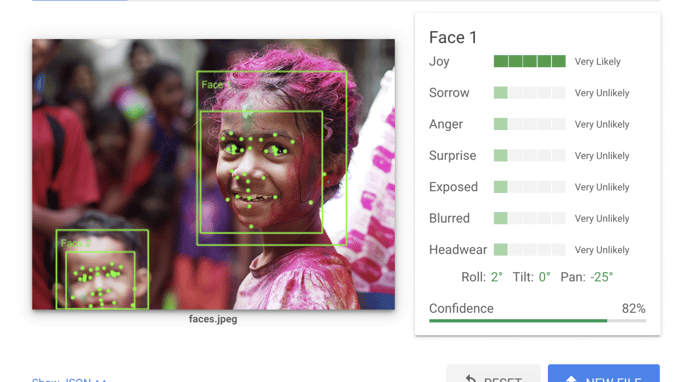
It is not a face recognition API in the identity sense. Cloud Vision does face detection, landmark localisation, and expression likelihood scoring only, with no face matching, no enrollment, and no identity search. Celebrity Recognition, which older comparisons still list, was deprecated and scheduled for removal from Google Cloud after 16 September 2025, so do not plan around it.
Key features:
- Face detection and landmark localisation;
- Expression likelihood scoring (joy, sorrow, anger, surprise);
- Image label detection and classification;
- OCR and text detection;
- Object and logo detection;
- Content moderation;
- Integration with Google Cloud Storage.
Face Detection is $1.50 per 1,000 units for units 1,001 to 5,000,000 per month, dropping to $0.60 per 1,000 units above 5 million. The first 1,000 units per month are free per feature, not 1,000 across the whole API, and applying two features to one image bills as two units, which is easy to under-budget when your pipeline stacks OCR, labels, and faces on the same upload.
Face++ - Best for Feature Breadth When Prototyping in Asia-Pacific
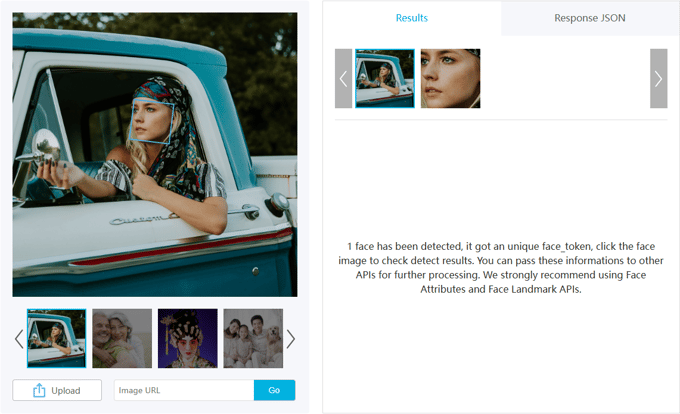
Face++, by Megvii, remains live and actively maintained as of mid-2026, with self-serve sign-up open. Its appeal is the size of the menu: detection, 1:1 comparison, 1:N search within datasets, attribute analysis, liveness and anti-spoofing, gesture recognition and body analysis, all behind RESTful APIs with an online console and SDKs for web, Android and iOS. For a prototype that has to test five biometric ideas quickly, that breadth is useful.
Key features:
- Face detection, comparison, and search within datasets;
- Facial attribute analysis;
- Liveness detection and anti-spoofing;
- Gesture recognition and body analysis;
- RESTful APIs with an online testing console;
- SDKs for web, Android, and iOS.
Pricing is the weak point for planning purposes: no numeric prices are published. The pricing page lists four price models only: Free, Pay As You Go, a Daily/Monthly QPS capacity plan, and Pay for Licensing, so you cannot model spend without contacting sales.
Two 2026 changes matter before you build a pilot on the free tier. A January 2026 overseas free-policy adjustment capped monthly trial usage, stopped quota rollover, and introduced IP restrictions. From 25 March 2026, PayPal is no longer accepted, leaving Alipay or bank remittance for business users.
One procurement note, stated as fact rather than opinion: Face++'s parent, Beijing Megvii Technology, remains on the U.S. Bureau of Industry and Security Entity List, which matters for some buyers' procurement and export-compliance review. Megvii was removed from the U.S. Department of Defense Section 1260H list in January 2025, which is a separate list and does not change the Entity List designation. Whether that is relevant depends on your jurisdiction and your customers.
Comparison Table: Face Recognition API Features at a Glance
|
API |
Best for |
1:N identity search |
Runs on-device |
Liveness |
Pricing model
|
|---|---|---|---|---|---|
|
Banuba Face API |
Real-time on-device tracking and AR |
No |
Yes |
Active liveness |
MAU-based licence, 14-day trial |
|
Amazon Rekognition |
Large-scale face search and identity workflows |
Yes |
No, cloud only |
Yes, Face Liveness |
Per image, per video minute, per check |
|
Microsoft Azure Face API |
Regulated verification with liveness |
Yes, Limited Access |
No, cloud only |
Yes, gated feature |
Per 1,000 transactions |
|
Google Cloud Vision API |
Broad image analysis, faces as one signal |
No |
No, cloud only |
No |
Per 1,000 units, per feature |
|
Face++ |
Feature breadth for prototyping in Asia-Pacific |
Yes |
Cloud APIs, plus platform SDKs |
Yes |
No public prices, four price models |
Procurement note: Megvii, the parent of Face++, remains on the U.S. Bureau of Industry and Security Entity List.
Vendor documentation for each: Banuba Face AR SDK docs, Amazon Rekognition pricing, Azure Face identity overview and Azure Face pricing, Google Cloud Vision pricing, and Face++ pricing.
Conclusion
There is no single winner here, only a correct routing decision.
- Need 1:N identity search across a large enrolled population? Go to Amazon Rekognition.
- Need regulated identity verification with certified liveness and a documented approval trail? Go to Microsoft Azure Face API, and start the Limited Access request early.
- Need faces as one part of a wider image analysis pipeline? Go to Google Cloud Vision API, and accept that it will never match identities.
- Need maximum feature breadth for a prototype, and your procurement rules allow it? Go to Face++.
- Need real-time on-device face tracking and AR features in a consumer app? Go to Banuba Face API, which does 1:1 verification and active liveness but not identity search.
Pick the bucket first, then compare inside it. A shortlist that mixes an on-device AR tracker with a cloud identity platform is a shortlist that has not defined the problem yet.

References
Amazon Web Services. (n.d.). Amazon Rekognition pricing. AWS. https://aws.amazon.com/rekognition/pricing/
Banuba. (n.d.). Banuba Face AR SDK vs OpenCV: A technical comparison. Medium. https://banuba.medium.com/banuba-face-ar-sdk-vs-opencv-a-technical-comparison-1ba68df81c3a
Banuba. (n.d.). Face AR SDK documentation. Banuba. https://docs.banuba.com/far-sdk/
Face++. (n.d.). Blog. Megvii. https://www.faceplusplus.com/blog/
Face++. (n.d.). Pricing. Megvii. https://www.faceplusplus.com/v2/pricing/
Google Cloud. (n.d.). Vision API pricing. Google. https://cloud.google.com/vision/pricing
Microsoft. (n.d.). Face service overview: Identity. Microsoft Learn. https://learn.microsoft.com/en-us/azure/ai-services/face/overview-identity
Microsoft Azure. (n.d.). Face API pricing. Microsoft. https://azure.microsoft.com/en-us/pricing/details/cognitive-services/face-api/
-
The official technical documentation for Banuba Face AR SDK is available online and includes requirements, setup instructions, and configuration details:
- Banuba Face AR SDK iOS documentation
- Banuba Face AR SDK Android documentation
- Banuba Face AR SDK Flutter documentation
- Banuba Face AR SDK React Native documentation
- Banuba Face AR SDK Web documentation
- Banuba Face AR SDK Unity documentation
- Banuba Face AR SDK Desktop documentation
This Banuba Face AR SDK documentation should be your primary reference during integration.
-
You can access official integration code samples for the Banuba Face AR SDK on GitHub. Banuba provides platform-specific examples to help you integrate faster:
- Banuba Face AR SDK iOS integration code sample
- Banuba Face AR SDK Android integration code sample
- Banuba Face AR SDK Flutter integration code sample
- Banuba Face AR SDK React Native integration code sample
- Banuba Face AR SDK Desktop integration code sample
- Banuba Face AR SDK Web integration code sample
- Banuba Face AR SDK Unity integration code sample
These Banuba Face AR SDK repositories include setup instructions and minimal working examples for quick deployment.
-
Yes. The Banuba Face AR SDK includes an LLM-friendly documentation file designed for AI-assisted development and internal knowledge systems:
This structured Banuba Face AR SDK text file can be used with AI tools to streamline onboarding and developer workflows.
-
The Banuba Face AR SDK provides official cross-platform plugins to simplify integration into hybrid applications:
These Banuba Face AR SDK plugins are maintained by Banuba and support faster implementation for cross-platform apps.
-
Face verification is a 1:1 check that answers "is this person who they claim to be?", and it is what login and most KYC flows use. Face identification is a 1:N search that answers "who is this person?" by comparing a face against a database of enrolled identities. Face recognition is the umbrella term covering both, plus enrollment (creating a face template) and matching. Vendors differ in which of the two they actually sell: Banuba Face AR SDK, for example, provides 1:1 verification and active liveness but no 1:N identity search, while the cloud platforms provide both.
-
Set thresholds from your risk profile, then tune them on your own data. Security and fintech flows should prioritise low false accepts with stricter thresholds and accept a slightly higher false reject rate; consumer and AR apps should prioritise low false rejects to reduce friction. Always validate separately for key segments, because lighting, camera quality, pose, and demographics shift the curve, and a one-size-fits-all threshold is usually a production incident waiting to happen. Stable input helps as much as threshold maths, which is why landmark quality matters: Banuba's AI face landmarks SDK returns 68 anchor points per face, so alignment stays consistent between enrollment and matching.
-
Most systems store a face template or embedding rather than a raw image, but the regulatory risk remains because embeddings are still biometric identifiers. To minimise exposure: store the minimum needed, define retention windows and delete on request, encrypt templates at rest and in transit, keep enrollment, matching, and user identifiers separated under least-privilege access, and prefer on-device or on-premises processing when regulations, latency or data residency are strict. On-device processing is the strongest structural control, since frames never leave the handset, which is how Banuba Face AR SDK runs by default.
-
Liveness is good enough when a vendor can show accredited presentation attack detection results, not a marketing claim. Ask for the test level, the laboratory, and the standard, typically iBeta Level 1 or Level 2, conformant to ISO/IEC 30107-3. Then check the surrounding workflow: measurable resistance to photos, screens, and masks, fallback paths for poor lighting, older devices, and accessibility needs; and monitoring for new spoof patterns with periodic re-validation. Our guide to liveness detection explains how active checks differ from passive ones, and Banuba Face API implements the active variety as part of 1:1 verification.
-
The biggest accuracy killers are implementation details, not model choice: low-resolution crops and over-compressed frames, poor face alignment from wrong bounding boxes or inconsistent landmarking, mismatched conditions between enrollment and verification (enrolling in ideal light, verifying in the dark), duplicate faces in the database that inflate false matches, and unhandled multi-face scenes where the wrong person gets matched. The quick win is to standardise capture requirements, minimum face size and lighting guidance, and apply identical preprocessing to enrollment and matching. Banuba's overview of face detection algorithms covers how detection quality upstream sets the ceiling for everything downstream.
-
Banuba quotes the Face AR SDK license, which Face API is part of, from three inputs: the platforms you ship on, the feature categories you activate, and your monthly active users. There is no per-request billing, so request volume does not change the figure once the SDK is integrated, and the license runs for one year. The Banuba Face AR SDK pricing guide walks through how the three inputs combine, and a 14-day free trial comes before any of it.