

[navigation]
TL;DR:
- Face detection, face verification, and face identification are different features. Google states plainly that ML Kit "detects faces; it does not recognize people," so a detection library is not a starting point for recognition.
- A production pipeline has five stages: camera capture, detection and tracking, landmark extraction, template comparison, and liveness. Skipping the fifth one is what makes a demo fail its first photo-of-a-photo attack.
- Banuba Face Recognition SDK handles 1:1 verification and 1:N identification from 68 facial landmarks and returns the raw landmark coordinates, so your app owns the matching threshold and the decision logic.
- Banuba processes frames on the end device and stores no personal data, which is the one thing cloud recognition services cannot offer: Amazon Rekognition and Azure Face are both documented as cloud services with no on-device inference path.
- Amazon Rekognition is the better choice for large-scale identity search against a cloud collection, and MediaPipe or OpenCV are the better choices for a free prototype with no vendor contract.
- Banuba's narrow advantage is real-time recognition inside a camera app that already renders AR, on eight platforms from one license: HTML5, iOS, Android, Windows, macOS, Unity, Flutter and React Native.
- Banuba Face Recognition SDK gives liveness inputs, not a finished verification product. It tracks head pose, eye openness, mouth movement, gaze, and pulse, and your app issues the challenge.
- Cost model splits the field: Azure Face bills per transaction from $1 per 1,000, while Banuba Face AR SDK is licensed yearly on platforms, feature categories, and monthly active users, with no per-request fee.
- The core Banuba Face AR SDK is around 15 Mb, and the final size depends on the features and resources included in your package.
What face recognition means in an app, precisely
Three features are called face recognition, and they need different work.
Face detection finds a face in an image or video frame. Face verification, written 1:1, compares one face against one reference image you already hold. Face identification, written 1:N, searches a set of stored faces for a match. Banuba's face recognition SDK covers all three: it detects and tracks faces, locates 68 facial landmarks, compares a new image against a baseline, and returns a similarity percentage.
The distinction decides your build. Google's ML Kit Face Detection API documents landmarks for eyes, ears, cheeks, nose base, and mouth, and assigns a tracking ID that stays consistent across frames, but Google is explicit that tracking "is not a form of face recognition". OpenCV goes further: its objdetect module documents DNN-based face detection and recognition, and its FaceDetectorYN detector returns a bounding box, five landmark coordinates, and a face score per face. Five landmarks are enough to align a crop. It is thin for anything that has to survive head rotation.
If you are choosing between vendors rather than building, our comparison of face recognition APIs sorts them by the job they are hired for.
Build on open source or license an SDK
The honest version of this decision is a table, not a pitch.
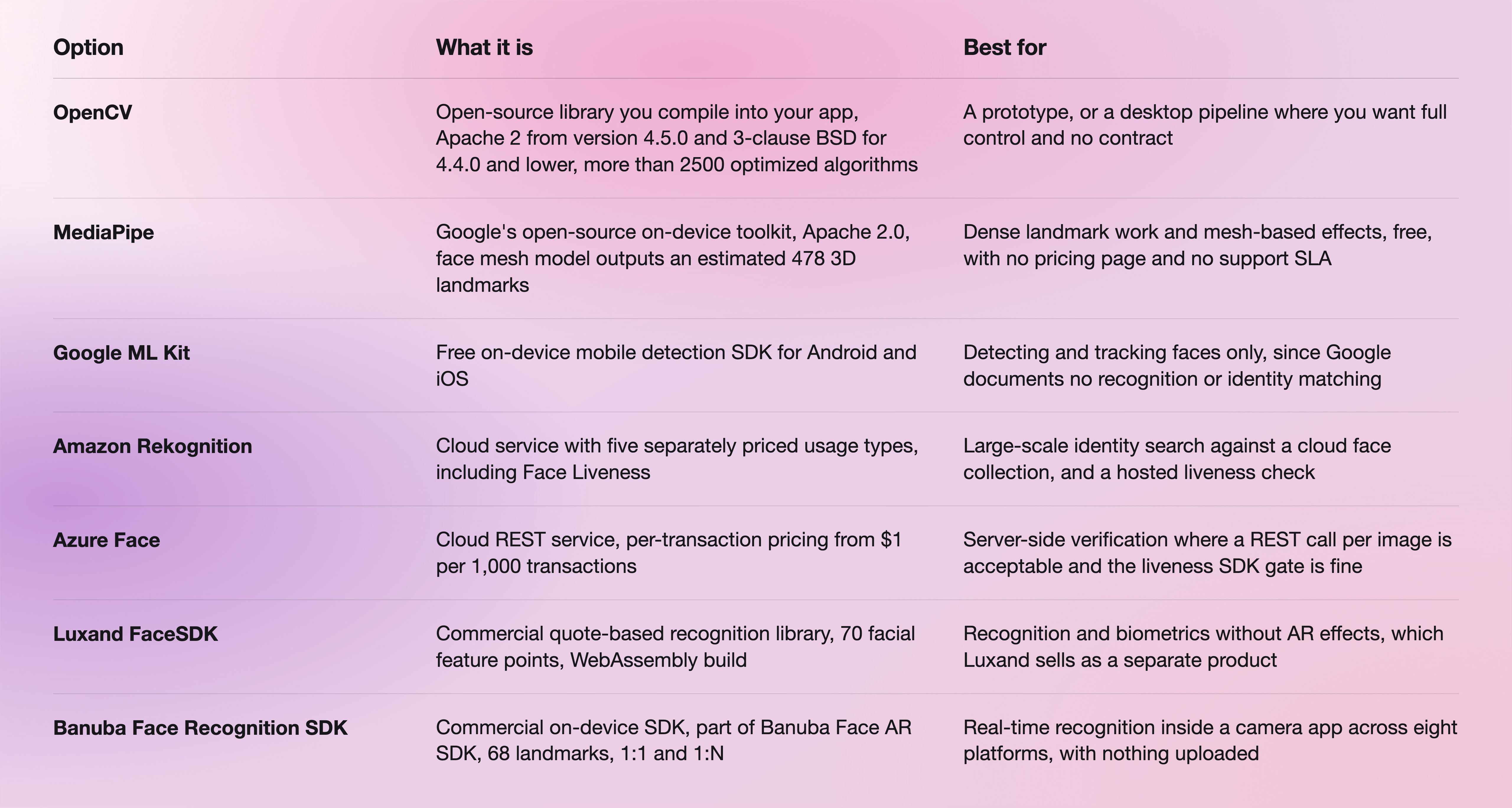
Two rules fall out of it.
Build on open source when recognition is not on your critical path. A hackathon entry, an internal attendance tool, a research prototype: OpenCV or MediaPipe will get you there for nothing, and both publish enough documentation to finish. Neither publishes a support SLA, so nobody is on the hook when accuracy drops on a device you have never seen.
License an SDK when recognition is a product feature with a release date. The work that eats the timeline is not the first match. It is head rotation, low light, occlusion, the spread of Android chipsets your install base actually runs on, and keeping a model current. Dave Gordon's notes on testing five face recognition APIs in production are a useful read on where that gap opens.

The five stages of a production pipeline
1. Camera capture
You need a stable frame source at a known resolution before anything else works. Banuba Face AR SDK is built around a 1280x720 camera as the recommended input and holds min 30 FPS on mid-range mobile hardware.
2. Detection and tracking
Detection locates the face. Tracking keeps it identified across frames so you are not re-detecting from scratch sixty times a second. Banuba detects and tracks more than one face in the same frame, and on mobile Banuba recommends up to three at once, because the limit is device compute rather than the algorithm. Our guide to Android face detection SDKs goes deeper on this stage alone.
3. Landmark extraction
This is where the comparable template comes from. Banuba's SDK detects the positions of 68 facial landmarks covering eyes, nose, and lips, and exposes their coordinates to your code. On iOS, you add a BNBFrameDataListener to the player and read the result in onFrameDataProcessed:
extension ViewController: BNBFrameDataListener {
func onFrameDataProcessed(_ frameData: BNBFrameData?) {
guard let fD = frameData else { return }
let recognitionResult = fD.getFrxRecognitionResult()
let faces = recognitionResult?.getFaces()
let landmarksCoordinates = faces?[0].getLandmarks()
}
}
getLandmarks() returns an array sized 2 x the number of landmarks, alternating X and Y. The coordinates arrive in the SDK's camera coordinate system, and the Face Landmarks Guide documents the transformation to screen coordinates. The full method list per platform is in the Banuba Face AR SDK documentation.
4. Template comparison
Banuba compares a new image against the baseline and determines the percentage of similarity between them. What it deliberately does not do is pick your threshold. The SDK provides the data and, in Banuba's own words, it is up to the developers how to process it. That is the right split: a door-access app and a photo-tagging app should not share a false-accept rate, and only your team knows which error is the expensive one.
5. Liveness
A recognition pipeline with no liveness check accepts a printed photo. Banuba Face Recognition SDK tracks head pose, eye openness, mouth movements, emotional expression, gaze tracking, and pulse detection, which are the inputs for both active and passive checks. Active means you ask for something: a blink, a smile, a head turn. Passive means the system reads micro-movements, blinking, and pulse without asking. Banuba's guidance is to combine several checks and randomize them, because one challenge is rarely enough against current generative attacks. Our liveness detection guide works through both approaches.
Banuba supplies the signals, not an identity product. The challenge logic, the pass and fail decision, and any regulatory layer on top are yours to build.

Integrating Banuba, step by step
- Request a client token. Fill in the form on the product page or email info@banuba.com. The demo token is valid for 14 days and activates every SDK feature on every supported platform, so you can assess performance in your own project before committing.
- Add the SDK to your build. On iOS that is the BanubaSdk SPM packages or CocoaPods; on Web it is the @banuba/webar npm package; on Flutter it is flutter pub add banuba_sdk; on Android it is the Gradle dependency documented per sample.
- Set the client token in your app entry point, then initialize the player.
- Attach a frame data listener and read the recognition result, as in the snippet above.
- Run one of the platform samples first. Banuba publishes runnable code for iOS and Android, plus quickstarts for Web, Unity, Flutter and React Native, each with setup instructions and a minimal working app.
Two things worth knowing before the token arrives. Store the token on your server rather than in the app, because an in-app token means a new App Store or Play submission every time you renew it. And watch expiry: for one month past the expiry date, the SDK keeps working but shows a Banuba watermark, and after that it stops working entirely.
Startup time on the SDK is under an hour. A production integration by your own team is about a week.
For a streaming build, the pattern of pairing the SDK with a transport layer is documented end to end in Banuba's walkthrough of building a live streaming app with Amazon IVS and Banuba SDK.
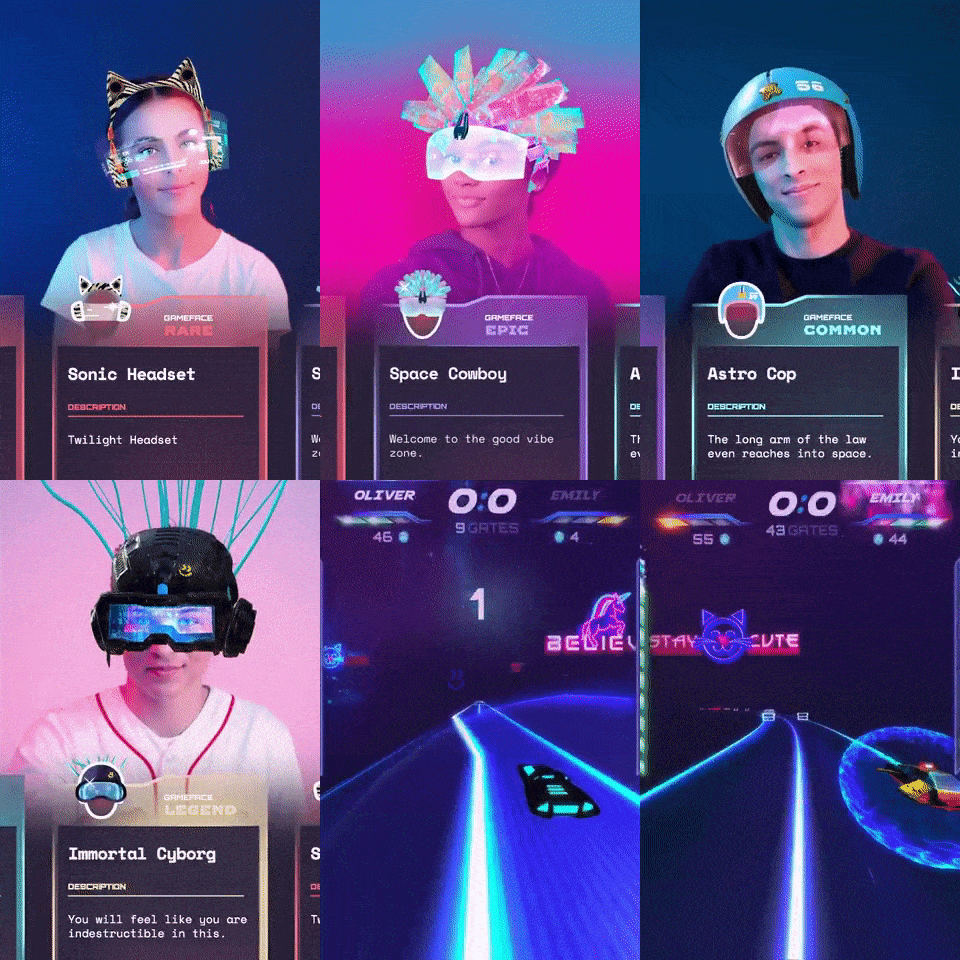 Banuba's face recognition and tracking technology for app development
What actually decides accuracy in the field
Model quality is the part you cannot change. Everything else is yours.
Banuba's recognition is trained on a diverse dataset of over 200,000 photos, which is what keeps accuracy stable across skin tones and lighting rather than only on the faces in the training set. Banuba has 9 or more years on the AR market, patented face tracking algorithms, and 120 or more companies using the technology.
The field variables to design around are the ones every vendor documents as limits. Request frontal images where you can. Prevent occlusion. Ask for good lighting. Warn users away from low-resolution input. For a sense of how narrow the competing envelopes are, Luxand's FaceSDK documents its landmark limits as minus 30 to 30 degrees in-plane and minus 20 to 20 degrees out-of-plane, and ML Kit documents landmark availability in five bands of Euler Y angle. Head rotation is the first thing that breaks in every implementation.
There is one more variable worth planning for early: bundle size. The core Banuba Face AR SDK is around 15 Mb, and the final size depends on the features and resources included in your package, so licensing only the features you ship keeps the app lean.

Platform and device requirements
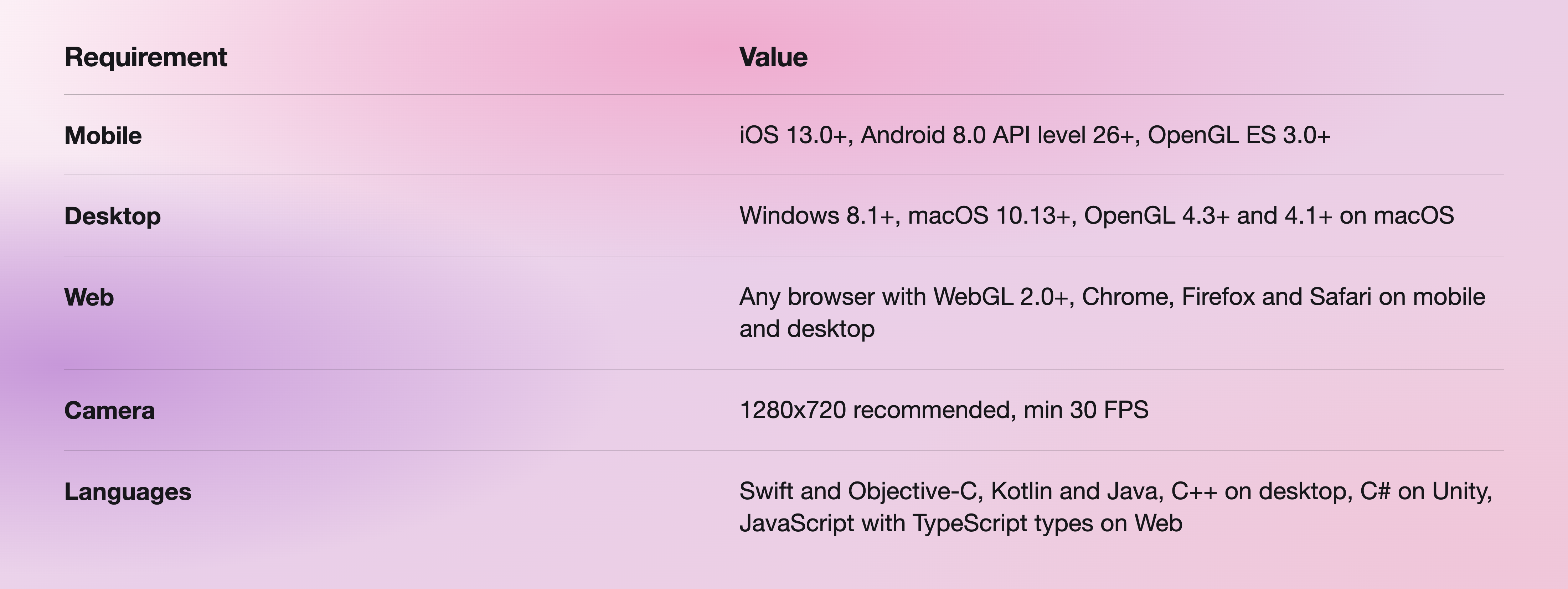
The platform and language matrix above is published in full in the Face AR SDK system requirements.
What licensing looks like
Banuba Face AR SDK, which Face Recognition ships inside, is licensed on a custom quote rather than a public price list. Three inputs set it: the platforms you ship on, the feature categories you activate, and monthly active users. Billing is yearly, with half-year and quarterly available on request, and monthly is not offered for SDK licenses. The license duration is one year. Binding is domain-based for Web and application-based for mobile and desktop, and multi-app arrangements are negotiable.
There is no per-request or per-image fee, which is the structural difference from the cloud services. Azure Face publishes $1 per 1,000 transactions at its first tier, falling to $0.40 per 1,000 above 100 million, plus $0.01 per 1,000 stored faces per month. That model is predictable for batch work and unpredictable for a camera feed.
The license includes a dedicated customer success manager and SLA-based support. Quoted separately on scope: SDK customization, integration assistance, proof-of-concept feature development, AR asset development, and project mentoring.
The 14-day free trial covers every feature on every supported platform and starts from the trial request form.

Summing up
Build face recognition on open source when it is not your product. License it when it is. The pipeline is the same either way, and the stage teams underestimate is liveness, not matching. If your recognition has to run inside a live camera view, on a phone, without a round trip to a server, that constraint narrows the field quickly, and Banuba Face Recognition SDK is built for exactly that case: Face recognition SDK with 68 landmarks, 1:1 and 1:N, and nothing leaving the device.
-
Yes. Banuba Face Recognition SDK handles 1:1 face verification and 1:N face identification, detects 68 facial landmarks, and compares a new image against a baseline to return a similarity percentage. It ships as part of the Banuba Face AR SDK, so recognition can sit in the same integration as face tracking and AR rendering. The Face API page documents the detection and tracking layer it is built on.
-
Banuba does not publish a price list for it. The quote is set by the platforms you ship on, the feature categories you activate, and your monthly active users, billed yearly, with no per-request or per-image fee once you are integrated. A 14-day free trial gives full access to every feature on every platform first. The Banuba Face AR SDK pricing guide explains how the inputs combine.
-
Yes, and on six more platforms from the same license: Web, Windows, macOS, Unity, Flutter, and React Native. Banuba requires iOS 13.0 or later and Android 8.0 at API level 26 or later, with OpenGL ES 3.0 and above. Runnable samples are published per platform, including the Android sample app.
-
Yes. Banuba's Web SDK runs in any browser with WebGL 2.0 or higher, covering Chrome, Firefox, and Safari on both mobile and desktop, and it installs from the @banuba/webar npm package. Processing still happens on the end device, in the browser, rather than on a server. The Face AR SDK documentation covers the browser setup.
-
Detection locates a face in a frame, and tracking keeps it identified across frames. Recognition establishes whose face it is by comparing landmarks against a reference. Banuba does both, which is worth stating because several popular detection libraries do not: Google documents that ML Kit detects faces and does not recognize people. Our Android face detection guide covers the detection-only options.
-
Banuba gives you the inputs for a liveness check rather than a finished verification product. It tracks head pose, eye openness, mouth movement, gaze, and pulse, and supports active triggers such as blink, smile, or head turn, so your app can issue a challenge and confirm the response. The decision logic and any compliance layer are yours to build. Banuba's liveness detection guide covers combining active and passive checks, and how fintech apps improve user verification shows the pattern in production.
-
By default, no. Banuba's face recognition SDK is designed to process everything on the end device, and it does not store personal data. That is also why there is no per-request pricing. If a project genuinely requires server-side processing, for example, for 1:N matching at scale, that can be done, but it is a choice rather than the default. The Face API page states the on-device default in full.
