

A custom face-tracking model needs an annotated dataset you have the rights to use, a mobile-sized architecture, GPU capacity for the training run, and evaluation on real devices. Most teams do not need any of it. Banuba Face AR SDK is a real-time, on-device face tracking and AR effects SDK that runs at 30 FPS on mid-range mobile hardware with a -80° to +80° head-angle tracking range.
So the first decision is not technical. It is whether your task is actually unique. Train when you are tracking something a general face model was never built for: a non-face object, an unusual camera, a clinical or industrial measurement. Use an existing SDK when the task is face tracking, face segmentation, or beauty AR, because those are solved and shipping.
[navigation]
TL;DR:
- A face-tracking model is only worth training when the task is unusual enough that no shipped model covers it;
- the dataset, not the architecture, is where most of the budget and most of the legal risk live;
- real-time mobile inference forces a small architecture early, so target devices are chosen before training starts;
- GPU capacity comes from three directions (a hyperscaler, leased bare-metal racks, hardware you own) and each one trades control against convenience;
- Banuba Face AR SDK ships pre-trained on-device face tracking, and Banuba also does custom neural-network development, so choose on three criteria: how unique the task is, who owns the data, and how long you can wait.
What face tracking actually does
Point a camera at a face. Something has to answer three questions, every frame: is there a face, where is it, and what shape is it in right now.
Classic computer vision answered the first two with Haar cascade classifiers, which OpenCV still ships as pre-trained cascade files. Modern trackers answer all three with a neural network that regresses a set of points or a three-dimensional mesh onto the face, then follows it across frames.
Two things make it hard. The model has to stay locked on while the head turns, while a hand covers half the jaw, while the light goes orange. And it has to do all of that inside a video frame budget on a phone, not on a workstation.
That second constraint is the one that kills most DIY projects.
Key Takeaways:
- Face tracking is detection plus geometry plus temporal stability, not just a bounding box;
- The real difficulty is holding accuracy under movement, occlusion, and bad light at frame rate on mobile.

Step 1. Define the task and the target devices
Write down the output before anything else. Bounding boxes? Sparse landmarks? A dense three-dimensional mesh? Expression coefficients? Each one implies a different dataset, a different loss, and a different annotation cost.
Then write down the devices. Not "mobile". Actual models, with actual chips.
Latency budget. Decide the frame rate first and work back. A thirty-frames-per-second target leaves only tens of milliseconds per frame for the whole pipeline, and your model gets a slice of that.
Memory and binary size. The model ships inside your app. A model that doubles the download will get cut by someone in a release meeting.
Thermals and battery. A network that runs at frame rate for half a minute and then throttles is not a shipping model.
The chip you can reach. Will you target NPUs, GPUs, or stay on CPU for coverage? Banuba built NPU support for virtual-background networks for the Japanese software vendor GreenBee precisely because the hardware target changed the network, as described in the custom neural network development case study.
Settle these four questions now, and most architecture arguments answer themselves.
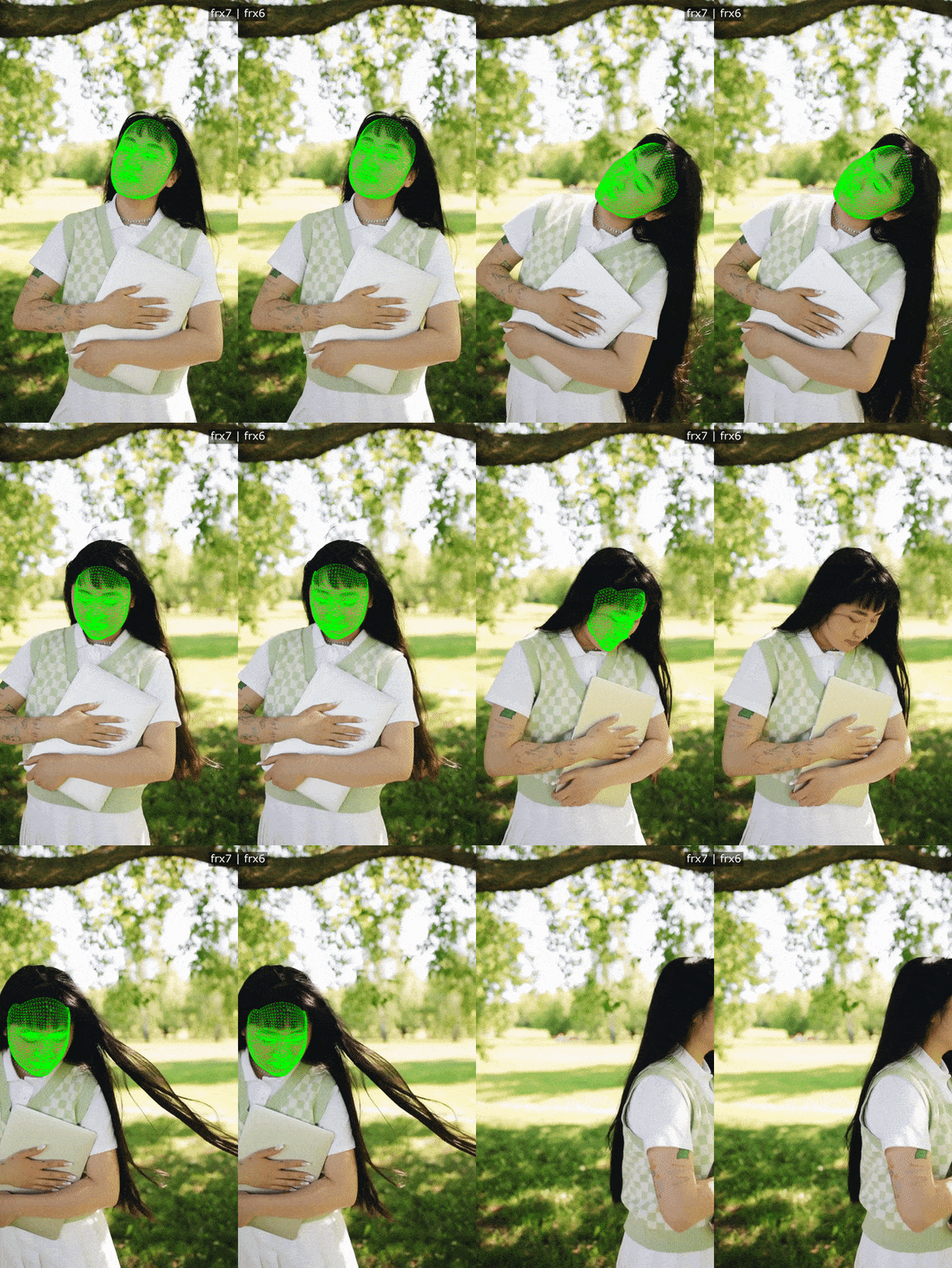 Banuba's face tracking and detection example
Step 2. Build the dataset
This is the expensive part. Expect it to be most of the project.
Collection. You need faces across skin tones, ages, lighting, head angles, expressions, glasses, masks, and camera quality. A dataset collected in one office under one set of lights produces a model that works in that office.
Annotation. Landmarks, mesh topology, and occlusion flags all have to be marked consistently, usually in a tool like CVAT. Write the annotation guide before the first frame is labeled, and audit a sample of every batch. Inconsistent labeling shows up later as jitter you cannot train away.
Public sets as a starting point. Academic landmark sets such as 300-W are useful for bootstrapping and for benchmarking. Check the usage terms on every one of them. Research-only terms are common, and they do not cover a commercial product.
Consent and legal basis. Facial geometry is biometric data. Under the GDPR, it sits in the special categories of Article 9, so you need a lawful basis, a retention policy, and a way to honor deletion requests. Get this reviewed before collection, not after.
Augmentation. Rotation, scaling, blur, color shifts, and synthetic occlusion buy you robustness cheaply. They do not buy you faces you never collected.
Key Takeaways:
- Dataset breadth decides real-world accuracy far more than architecture choice;
- Facial geometry is biometric data, so consent and usage rights are engineering requirements, not paperwork.
Step 3. Choose an architecture for real-time mobile inference
Pick small, then earn accuracy back. The opposite order rarely converges to something shippable.
Lightweight backbones. Mobile-oriented families (MobileNet, ShuffleNet and their descendants) exist because depthwise separable convolutions cut multiply-accumulate operations hard. Start there.
Detector plus tracker, not detector every frame. Run full detection occasionally and a cheap tracker in between. This single decision often buys more frame rate than any architecture swap.
Heatmaps or direct regression. Heatmaps are usually more accurate for landmarks and more expensive. Direct coordinate regression is cheaper and noisier. Many shipping systems regress the parameters of a three-dimensional model instead, which is cheaper than it sounds because the model constrains the output to plausible faces.
Temporal smoothing is part of the architecture. Per-frame accuracy with no temporal term gives you a model that is right on average and visibly shaky in use.
Measure a baseline before you commit. Google publishes a face landmark detection guide for its MediaPipe Face Landmarker, and that model is the honest yardstick for whether your custom one is earning its cost. If you cannot beat it on your specific task, you have your answer early.

Step 4. Find GPU capacity for the training run
Training a face model from scratch is a multi-day, multi-GPU job, and experiments outnumber final runs by a wide margin. Capacity comes from three directions.
Hyperscalers. Fastest to start, pay by the hour, nothing to rack. You give up some control over scheduling and placement, and data residency becomes a configuration question you have to answer carefully when the training data is biometric.
Leased bare-metal racks. AI factory operators such as CambridgeNexus lease whole NVIDIA racks to one tenant rather than shared virtual instances, which gives you a known machine for the length of a project. The trade-off is commitment: you are reserving hardware for a window rather than renting by the hour.
Hardware you own. Maximum control, maximum data residency comfort, and you own the whole problem: procurement lead times, power, cooling, drivers, and idle capacity between projects.
Three questions usually decide it. Can the data legally leave your infrastructure? Do you need the machine for a week or for a year? Is anyone on the team going to maintain a cluster?
Pick on those, not on peak FLOPS.
Step 5. Evaluate on real devices
A validation score on a held-out split tells you very little about whether the thing works.
Build a device matrix: your oldest phone in scope, a mid-range phone, a current flagship, and whatever desktop or browser target you ship to. Then measure, on each one:
Frame rate under load, with the camera, the renderer, and your app all running, not in isolation.
Head-angle coverage. Sweep yaw and pitch and record where tracking breaks. Report the range you actually hold, the way Banuba publishes a -80° to +80° range for its face tracking software.
Occlusion. Hands, hair, masks, glasses, microphones. Partial occlusion is the normal case in video calls and in photo booths, not an edge case.
Lighting. Backlit, side-lit, dim, mixed color temperature.
Stability over time. Run it for ten minutes and watch for thermal throttling and drift.
Hands-on testing remains essential here. Our own work on tracking specs, collected in the face tracking SDK spec comparison, kept finding the same thing: published numbers and device behavior are different data.
Step 6. Quantize, prune, and ship it
The research model is not the shipped model.
Quantisation. Moving weights and activations to 8-bit integers is the standard first step, and Google documents the mechanics in its post-training quantization reference. Expect a small accuracy cost and a large latency and size win. Always re-run the device matrix afterward.
Pruning and distillation. Remove what contributes least, or train a small student on a large teacher. Both are more work than quantization and sometimes the only way to hit an aggressive budget.
Runtime and packaging. Convert to the device runtime, wrap it in a stable API, and handle camera orientation, multiple faces, and lifecycle events. Most of the work here is integration rather than mathematics, which is why our guide on implementing face tracking with an SDK spends most of its length there.
Size discipline. For reference, the core Banuba Face AR SDK takes around 15 Mb, and additional features add to that, per the minimum Face AR SDK size FAQ. Any custom pipeline is competing with numbers in that range.
Step 7. Keep the retraining loop running
A face model is not a deliverable; it is a service you now operate.
Collect failure cases from production under a consent flow that permits it. Label them. Fold them into the next training set. Re-run the device matrix before every release, and keep a frozen regression set so you can prove you did not go backward.
Budget for this permanently. One engineer, part-time, forever, is a realistic floor.
When not to train
Be honest about the comparison. If your task is face tracking, face segmentation, beauty AR, or virtual try-on, a shipped SDK has already absorbed the dataset cost, the mobile optimization, and the retraining loop.
Banuba Face AR SDK processes every frame on the user's device, so no video leaves the phone, which also removes a large part of the biometric-data problem you would otherwise own. It detects 68 facial anchor points, builds a three-dimensional mesh of up to 3,308 vertices and tracks 37 mesh morphs, holds the -80° to +80° head-angle range, and ships to iOS, Android, Web, Unity, Flutter, React Native, Windows and macOS from one integration.
Limitations, honestly. The networks ship pre-trained, and you do not retrain them yourself. If your task sits outside face tracking (tracking a product, a tool, an animal, a surgical field) an off-the-shelf SDK is the wrong tool, and that is exactly the case where training makes sense. For identity matching rather than geometry, the question changes again, and Banuba sells that as a separate product rather than something you would train.
There is a middle path. Banuba does custom neural-network development when the task is genuinely specific, which is how the GreenBee work happened: existing networks, adapted to new hardware, rather than a new model from scratch.
How to choose the right path
Three questions, in order.
Is the task unique? If an existing model already does it, measure that model first. Beating MediaPipe or a commercial SDK on general face tracking is a research program, not a sprint.
Who must own the data? If the training data cannot leave your infrastructure, that constrains both the compute option and the vendor conversation. If you do not want to hold biometric data at all, an SDK that runs on the user's own device removes the question.
How fast do you need it? Banuba puts production integration of its SDK at about one week with your own team. A trained model that survives a device matrix is measured in quarters.
Shortlists for the buy path are easier to build than people expect, and our best face tracking SDKs for real-time video conferencing roundup covers the vendors worth putting on one.
Conclusion
Training and buying are not rivals; they answer different questions. Train when the thing you are tracking is genuinely yours, and budget for the dataset, the compute, and the permanent retraining loop rather than the architecture. Take an existing SDK when the thing you are tracking is a human face, because that problem has been solved to frame rate on mid-range hardware already.
Curious which side of the line you are on? Explore Banuba's face tracking technology and start the 14-day free trial.

Reference List
- Google. (2026). Face landmark detection guide. https://ai.google.dev/edge/mediapipe/solutions/vision/face_landmarker
- Google. (2026). Post-training quantization. https://ai.google.dev/edge/litert/models/post_training_quantization
- Imperial College London, iBUG. (n.d.). 300 Faces In-the-Wild Challenge (300-W), ICCV 2013. https://ibug.doc.ic.ac.uk/resources/300-W/
- Intersoft Consulting. (n.d.). Art. 9 GDPR: Processing of special categories of personal data. https://gdpr-info.eu/art-9-gdpr/
- OpenCV. (2026). Haar cascade data files. https://github.com/opencv/opencv/tree/4.x/data/haarcascades
-
You define the output and the target hardware, assemble and annotate a dataset you have the rights to use, pick an architecture that fits the latency budget, run training on GPU capacity, evaluate on real devices, then compress and package the result. For face tracking specifically, Banuba covers those stages inside its face tracking software rather than asking each customer to repeat them.
-
A model detects the face, fits geometry to it (landmarks or a three-dimensional mesh), and keeps that fit stable across frames while the head moves. Banuba's face tracking recognizes 37 face characteristics represented as morphs rather than tracking landmarks, and the Banuba Face Landmarks SDK demo shows 87 landmarks so you can judge the accuracy yourself.
-
Recognition is a different task from tracking: it matches a face against a database instead of following its geometry. Banuba offers a separate face recognition SDK with liveness and anti-spoofing for that job, so do not expect a tracking model to do it.
-
Banuba Face AR SDK runs at min 30 FPS on mid-range mobile hardware, does all tracking and rendering on the device, and runs on iOS 13 and Android 8.0 upwards. Banuba's Face AR SDK pricing guide explains how a quote is built and covers the 14-day free trial, if you want to measure it on your own device matrix.
-
Banuba publishes integration code samples on GitHub for each platform, including the iOS and Android sample apps with setup instructions, and the requirements live in the Banuba Face AR SDK documentation.
-
Yes. Banuba's R&D team does custom neural-network development, and the GreenBee case study is a worked example: existing Banuba networks adapted to run on NPUs for a laptop video-conferencing product.
