

[navigation]
TL;DR:
- Azure Face is gated. Microsoft states the service "is only available to Microsoft managed customers and partners" and routes new users to a Face Recognition intake form, so a developer cannot provision a key on a Tuesday afternoon.
- Microsoft publishes no decision window for that intake form, which makes the access step the one part of an Azure Face evaluation you cannot plan around.
- Azure Face is a cloud REST service, not a mobile SDK. The only native iOS and Android SDKs Microsoft documents for it are the gated liveness components.
- Microsoft has retired the emotion and gender attributes, and age, smile, facial hair, hair, and makeup are now limited-access only. Teams that built on those attributes are the most common reason this search gets run.
- Azure Face returns 27 predefined landmark points. Banuba Face API builds a 3D mesh of up to 3,308 vertices from 68 facial anchor points, which is the difference between reading a face and rendering on it.
- Banuba Face API is the on-device alternative: detection, tracking, and segmentation run locally across 8 platforms, licensed on monthly active users with no per-request fee.
- Banuba face tracking holds under up to 70% occlusion and at distances up to 3.7 meters, across the full -80° to +80° head-angle range.
- Azure Face list pricing starts at $1 per 1,000 transactions with 30,000 free transactions a month, which is generous for batch work and the wrong shape for a live camera feed.
- Keep Azure Face when you need its liveness product. It reports a 0% penetration rate in iBeta Level 1 and Level 2 presentation attack detection testing, which is a published result most of this list cannot match.
How to choose an Azure Face API alternative
Five checks decide this shortlist more often than accuracy benchmarks do.
- Can you get access this quarter? Azure Face access is limited by eligibility and usage criteria and granted through an intake form. If your timeline cannot absorb an approval step with no published decision window, the shortlist is only the vendors you can license directly.
- Where does the face data get processed? Azure Face has no on-device inference path: frames go to the Microsoft cloud. If your privacy review or your product promise says faces stay on the phone, every cloud API is out on the first question.
- Are you reading a face, or drawing on it? Detection gives you a rectangle, a head pose, and a landmark set. Makeup, filters, eyewear try-on, and beauty effects need a dense mesh plus per-part segmentation, which is a different class of product. Azure Face has no AR, beauty, makeup, or virtual try-on capability at all.
- Does cost scale with calls or with users? Per-transaction billing is cheap for a photo upload and expensive for a camera feed, because a camera produces 30 frames a second.
- Which attributes does your feature actually depend on? Check your list against what Azure still returns before you assume a like-for-like swap exists, and check it against what any replacement returns.
If the first two checks are your blockers, the on-device Azure Face API alternative most teams land on is Banuba Face API, the face detection, tracking, and segmentation layer of Banuba Face AR SDK.
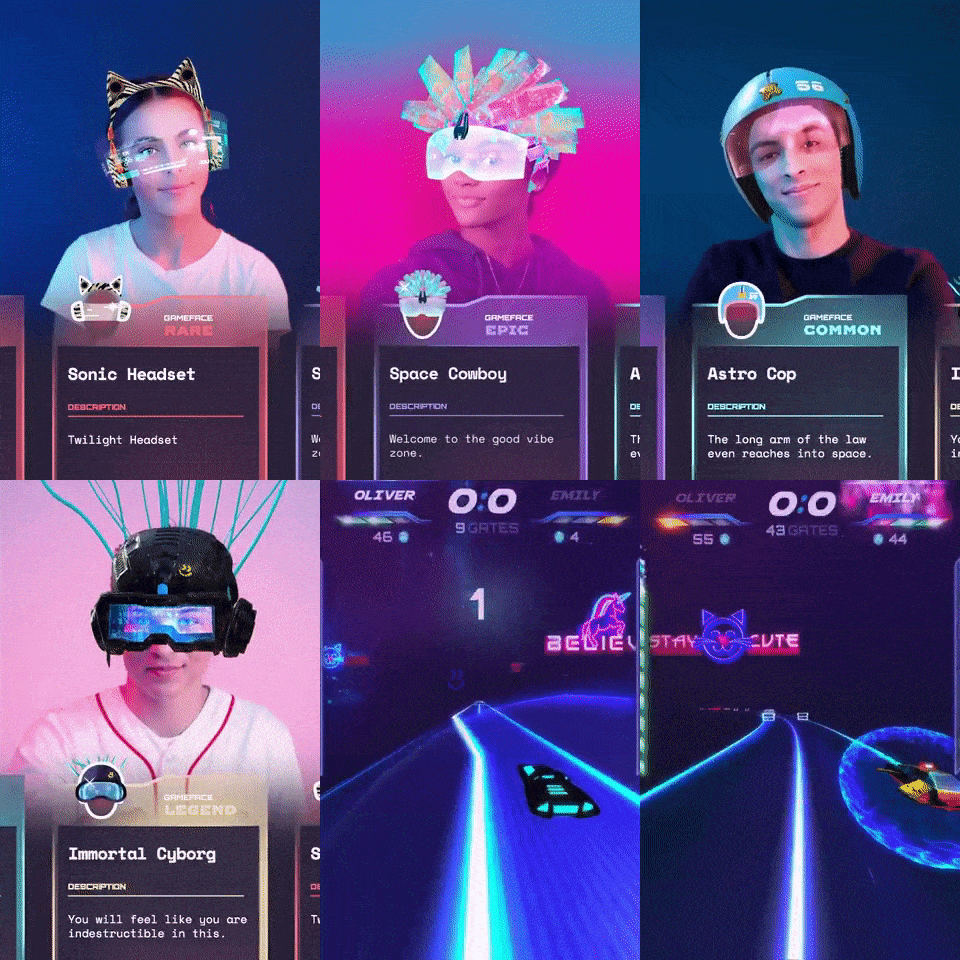 Example of AR face filters built with Banuba's face tracking technology
Why teams look for an Azure Face API alternative
Every point below comes from Microsoft's own Face documentation and pricing page.
You cannot self-serve. Microsoft's Face overview states that access "is limited based on eligibility and usage criteria" and that the "Face service is only available to Microsoft managed customers and partners", with a Face Recognition intake form as the way in. Face ID and the liveness SDKs each carry their own limited-access approval on top of that. Nothing in the documentation states how long a decision takes.
It is a cloud service with no on-device path. Images are sent to the service and analyzed there. The documented native mobile SDKs, Java for Android and Swift for iOS, exist only for the gated liveness feature, so a mobile team building ordinary detection ends up calling REST from a client it wrote itself or routing frames through its own backend. Flutter, React Native, and Unity wrappers are not documented at all.
The attribute set shrank. Microsoft states plainly that "the retired capabilities are emotion and gender", and that age, smile, facial hair, hair and makeup are limited capabilities available only for approved responsible-use cases after an email to the Azure Face team. What remains generally available is accessories, blur, exposure, glasses, head pose, mask, noise, occlusion, and quality for recognition. Microsoft also notes these attributes "are general predictions, not actual classifications", and tells developers not to use them for anti-spoofing.
The face model is built for analysis, not rendering. Azure Face returns 27 predefined landmark points, and the Detection_03 model is documented as having the most accurate landmark detection, precise enough for gaze tracking. There is no dense mesh product, which is why a team that starts with detection and later wants effects has to add a second vendor.
Input ceilings are low for a media pipeline. Image files must be 6 MB or smaller, in JPEG, PNG, GIF first frame or BMP. A face smaller than 36 x 36 pixels in a 1920 x 1080 image is not detected, and neither is one larger than 4096 x 4096. Verification photos add their own rules: one face only, neutral front-facing pose, no glasses, masks, hats, headphones, or head coverings, and the face filling at least half the frame.
Throughput is capped well below video rates. The free tier allows 20 transactions per minute, and the standard web endpoint is documented at 10 transactions per second.
There is a hard usage restriction. Customers may not use the facial recognition features "by or for a police department in the United States" and must acknowledge that in the Azure portal when creating a Face resource. Notice, consent and deletion obligations for biometric data sit with the customer.

What Azure Face pricing actually means for a camera feed
This is worth doing with Microsoft's own list prices rather than in the abstract. Azure Face bills per transaction: $1 per 1,000 transactions up to 1 million, then $0.80, $0.60, and $0.40 per 1,000 as volume grows, with 30,000 transactions free per month on the free tier. Face Storage is $0.01 per 1,000 faces per month, and Face Liveness is $15 per 1,000 transactions.
Run those numbers against a live camera instead of a photo upload. One frame is one transaction, so a single 30 FPS stream is 1,800 transactions a minute. The whole monthly free allowance is about 16 minutes of one user's camera, and at the entry list price that minute costs $1.80. The 10 transactions per second endpoint ceiling means you could not push a real-time stream through it anyway.
That is not a flaw in Azure Face pricing. It is the correct read of what a per-image cloud API is for: batch analysis, enrolment and verification events, not continuous video. Microsoft notes its published prices are estimates rather than quotes, and actual pricing varies by agreement, purchase date and currency. For anything that runs per frame, licensing an on-device engine is the cheaper shape, which is the whole argument for the alternatives below.
The alternatives, side by side
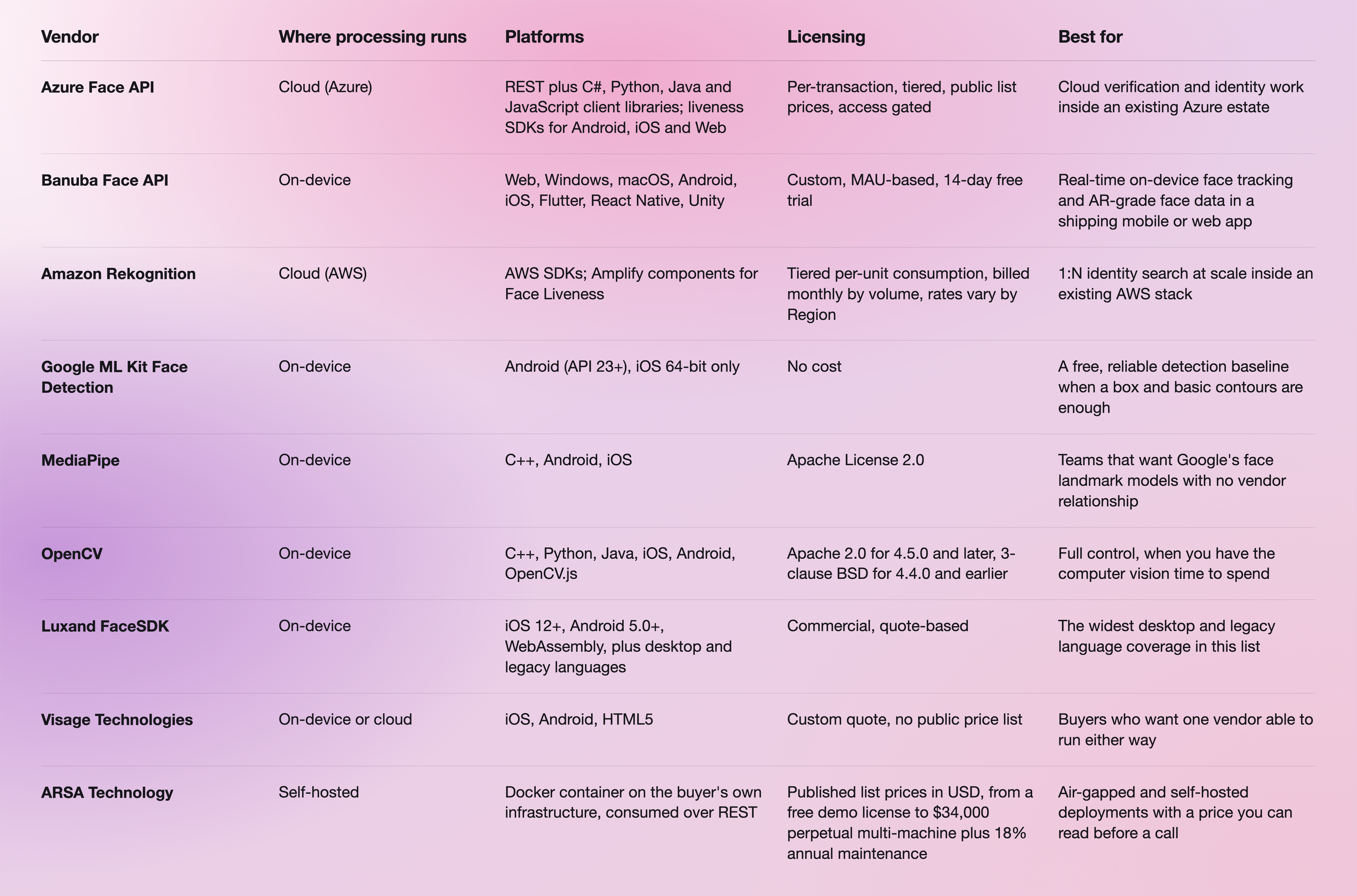
The two public pages worth opening next to this table are Google ML Kit face detection and Azure Face pricing.
Two things are worth pulling out of that table. Google ML Kit is genuinely free, runs entirely on-device, and needs no approval, which makes it the honest recommendation for a team that needs a bounding box, a head pose, and facial contours and nothing more. And ARSA Technology is the only vendor here that publishes list prices you can compare before speaking to anyone, which matters if procurement moves slower than engineering.
One note that cuts against the on-device case: Amazon Rekognition still exposes emotion and gender as requestable attributes, while Azure has retired both. If your feature genuinely depends on those, the cloud is where they still live, and no on-device SDK in this list restores them.
Our team also published a read on nine face recognition APIs grouped by the job each one is hired for, which covers the identity end of this market in more detail than a table can.

Where Banuba Face API fits
Banuba Face API exposes the Face AR SDK's detection and tracking layer as separately licensable features. Against a gated cloud API, the practical differences are these.
- No approval step and no upload. Detection, tracking, and segmentation execute on the device, so no frame leaves it, and there is no per-request charge as usage grows. Access starts from a trial request form rather than an eligibility review.
- The face model is dense. Banuba face tracking software detects 68 facial anchor points, builds a 3D mesh of up to 3,308 vertices and tracks 37 mesh morphs, which is what holds the shape of real-time structural changes to the nose, eyes, lips and chin.
- It holds up in real conditions. Tracking stays locked under up to 70% occlusion and at distances up to 3.7 meters, across the full -80° to +80° head-angle range.
- Segmentation is per-part. Dedicated networks segment eyes down to the iris and pupil, plus lips, brows, skin, hair, neck, and the full body against the background. That precision is what lands try-on and recoloring on the right pixels.
- The attribute set is wide and current. Face shape, skin tone, hair and facial-hair style, eyewear detection, gender identification and pupillary distance, plus heart rate from facial color variation and camera distance from face-area size, all read on-device.
- Cost tracks users, not calls. Licensing is custom and MAU-based, with three inputs to the quote: the platforms you ship on, the feature categories you activate and your MAU. A 14-day free trial covers every feature on every supported platform.
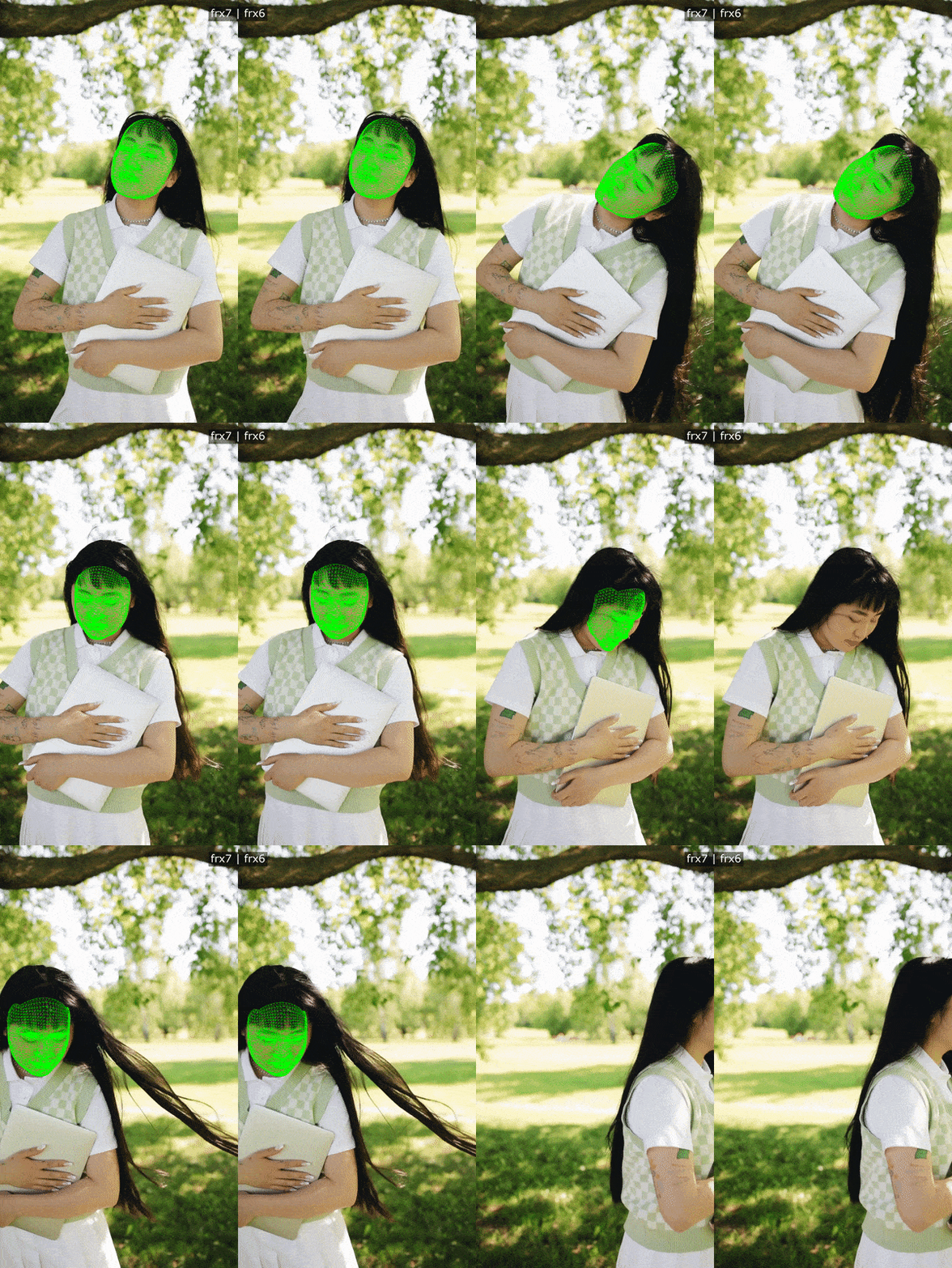 Banuba's face detection and tracking example
It is proven at consumer scale. b.stage, the global fandom platform built by the Korean company bemyfriends, uses Banuba beauty effects and face filters in its live streaming and video chat, and passed 1 million monthly active users from 224 countries within two years.
Where Banuba is genuinely the best choice is narrow and worth stating plainly: real-time, on-device face tracking and AR-grade face data inside a shipping mobile or web app. For identity search across a million enrolled faces, or for a finished liveness product with a published presentation-attack result, it is not the right tool, and Azure Face is closer.
When Azure Face API is the better choice
Apply for access and stay on Azure when any of the following is true.
- You need a finished liveness product. Azure Face liveness checks that the face in an input video stream is live and defends against paper printouts, 2D and 3D masks, and phone or laptop replays. Microsoft reports a 0% penetration rate in iBeta Level 1 and Level 2 presentation attack detection tests at a NIST- and NVLAP-accredited lab, conformant to ISO/IEC 30107-3. Banuba supplies the signals a liveness challenge needs: head pose, eye openness, mouth movement, gaze, blink, and pulse, and your app defines the challenge and the decision logic.
- You need large-scale server-side identity. An Azure Face group holds up to 1 million person objects with up to 248 faces registered per person, and the storage quota reaches 1 million person groups. That is a managed index, and an on-device SDK is not one.
- Your estate and compliance posture already point at Azure. Face is selectable across 60 or more Azure regions, including US Gov Arizona, Texas and Virginia, and bills in 16 currencies.
- The work is batch analysis of stored images. Per-image REST against files up to 6 MB is exactly the right shape for enrolment, moderation queues, and verification events.
- You are already a Microsoft managed customer or partner. In that case the access gate is not a gate, and the cheapest migration is no migration.

Migrating from Azure Face to an on-device SDK
The work is less about swapping an API client than about moving per-frame work out of your backend and into the app.
- Split per-frame calls from per-event calls. Detection, tracking, landmarks, and segmentation move on-device, and that is where the cost and latency savings sit. Enrolment, 1:N search and moderation can stay in the cloud.
- Write down the attributes you actually consume. If your feature reads emotion or gender from Azure today, it is already running on retired capabilities, and the migration is a product decision before it is an engineering one.
- Request the trial token from the Banuba Face API page and start the 14-day free trial, which gives full SDK access on every supported platform.
- Run the platform sample before you write integration code. Banuba publishes a runnable sample per platform, including quickstart-android and the fuller Android sample set. Getting the camera pipeline running tells you more than any spec sheet.
- Build against the docs and confirm each mapping. The Face AR SDK documentation carries the full requirement matrix: iOS 13+, Android 8.0 with API level 26+, OpenGL ES 3.0+ on mobile, OpenGL 4.3+ on desktop and 4.1+ on macOS, WebGL 2.0+ in the browser, with a 1280x720 camera recommended at min 30 FPS.
- Let your coding assistant do the wiring. Banuba maintains Agent skills that give coding AIs structured knowledge of the SDK, its configuration, and its integration workflow.
If your starting point is Android specifically, our walkthrough on how to build Android face detection using an SDK covers the same ground in code, and how to implement face tracking using an API covers the tracking layer.
-
Azure Face publishes list prices: $1 per 1,000 transactions up to 1 million, falling to $0.80, $0.60 and $0.40 per 1,000 at higher volumes, with 30,000 free transactions a month, $0.01 per 1,000 stored faces per month and $15 per 1,000 Face Liveness transactions. Microsoft calls these estimates rather than quotes. Banuba Face API is licensed as part of Banuba Face AR SDK on monthly active users, with no per-request or per-image fee once integrated, so cost tracks your user base rather than your call volume. The Banuba Face AR SDK pricing guide explains how the MAU bands work.
-
Cheaper depends on the shape of your usage. Google ML Kit face detection is offered at no cost and runs on-device, and MediaPipe and OpenCV are distributed under Apache 2.0, so for a bounding box and basic landmarks, the floor is free. For a live camera feed, per-transaction cloud pricing is the expensive option, and an on-device license is usually the cheaper one, which is where Banuba's AI face detection SDK fits. ARSA Technology is worth a look if you want published list prices to compare before a sales call.
-
Most of them do, but the coverage differs sharply. Google ML Kit documents Android API 23 and above, plus 64-bit iOS only. Azure Face documents native iOS and Android SDKs for its gated liveness feature and nothing else. Banuba Face API supports Web, Windows, macOS, Android, iOS, Flutter, React Native and Unity from one licence, which is usually the deciding factor for a cross-platform team. The same engine powers Banuba's face filters SDK.
-
Azure Face is reachable from the browser over REST and has a JavaScript client library plus a Web liveness SDK, though the service access gate still applies. OpenCV ships OpenCV.js and Luxand FaceSDK has a WebAssembly build. Banuba Face API runs in Chrome, Firefox, and Safari on desktop and mobile with WebGL 2.0 or later, processing frames in the browser rather than on a server, so a web try-on or filter page does not upload camera data.
-
For detection, yes: Google ML Kit is free and on-device, and MediaPipe and OpenCV are open source under Apache 2.0. For recognition specifically, the free options are open-source libraries you host and maintain yourself, not managed APIs. Azure Face has a free tier of 30,000 transactions a month but puts recognition behind limited-access approval. Banuba has no permanently free tier and instead offers a 14-day free trial with full SDK access on every supported platform, built on patented face tracking and more than 10 years of computer vision work.
-
Not as a finished product. Azure Face ships a managed liveness check with a published iBeta Level 1 and Level 2 result, and if that is what you need, it is the stronger option. Banuba Face API gives you the inputs instead: head pose, eye openness, mouth movement, gaze, and pulse, with active triggers such as blink, smile, or head turn, so your app issues the challenge and confirms the response. Banuba's liveness detection guide walks through combining active and passive checks. The decision logic and any KYC or compliance layer remain yours to build.
