

Face detection has moved from research labs to everyday apps. Snapchat filters, banking authentication, driver monitoring systems, and beauty apps all rely on the same core technology: the ability to locate and track a human face in real time.
On Android, this creates a unique challenge. The platform spans thousands of device configurations. Budget phones, flagship models, tablets with varying camera quality, processor speeds, and screen sizes. Your detection system needs to work reliably across all of them.
The demand keeps growing. The global facial recognition market is projected to grow from $6.3 billion in 2023 to $13.4 billion by 2028, reflecting an annual growth rate of 16.3%. Mobile apps drive much of this expansion, with users preferring biometric authentication over passwords.
Two paths exist for adding face detection to your Android app: build from scratch or integrate a Face Detection SDK like Banuba. The right choice depends on your timeline, budget, and technical requirements. Let’s dive in.
Building Android face detection requires real-time camera processing, ML model integration, multi-device optimization, and accurate landmark identification. Developing this from scratch can take 4 to 7 months of engineering effort. Using an Android face detection API like Banuba's Face AR SDK reduces development complexity by providing prebuilt detection algorithms, cross-device compatibility, and ready-to-use tracking pipelines.
TL;DR
- Android Face detection APIs powers apps in security, social media, retail, and healthcare. The global facial recognition market is projected to grow from $6.3 billion in 2023 to over $13 billion by 2028.
- Building detection from scratch means wrestling with device fragmentation, lighting conditions, ML model training, and GPU optimization across thousands of Android devices.
- Face Detection SDKs like Banuba cut development time from months to weeks by providing tested detection pipelines, landmark tracking, and cross-platform support.
- Teams without deep ML expertise or tight deadlines benefit most from SDK integration.
Why Face Detection Apps Succeed
Apps with reliable face detection share several characteristics that drive user engagement and business results. The numbers tell the story.
Real-time performance drives retention
Users expect instant feedback. When someone opens a filter app or tries virtual makeup, any lag breaks the experience. Current trends suggest that the average time spent on AR experiences is about 75 seconds, compared to 40 seconds on traditional formats. That's nearly double the engagement time of static content.
Successful apps process camera frames at 30+ FPS without noticeable delay. Snapchat's research shows that brands using AR lenses or filters experience a 41% increase in consideration and a 94% higher conversion rate through interactive product experiences.
Face detection is now mainstream
This technology isn't niche anymore. Over 176 million Americans use facial recognition technology, with 131 million engaging with it daily. The most common use case? Unlocking phones, laptops, and personal computers (68%), followed by logging into apps (51%), and accessing bank accounts (42%).
Accuracy under imperfect conditions
Real-world use rarely matches lab conditions. People use phones in dim restaurants, bright sunlight, and harsh indoor lighting. They wear glasses, masks, and hats. They hold phones at odd angles. The accuracy of facial recognition technology is at least 99.5% in modern systems, but achieving this requires sophisticated algorithms that adapt to challenging environments.
Multi-face handling and scalability
Group selfies, video calls with multiple participants, and family photos require detecting several faces simultaneously without performance drops. Apps that handle these scenarios reliably build user trust and encourage more sharing.
Low battery drain
Heavy processing burns through battery life. Users notice when an app causes their phone to heat up or drain quickly. Efficient apps balance accuracy with resource usage through optimized on-device inference.
Real-World Success: What the Data Shows
The impact of well-implemented face detection shows clearly in app performance metrics.
Manifest (MNFST): 1M+ downloads with face AR
Manifest, a London-based influencer marketing startup, integrated Banuba Face AR SDK to power branded masks and filters for content creation. Manifest reached more than 1 million installs with over 50 partnered brands, achieving a 4.5/5 app rating.
Banuba saved us months if not years of internal development resources and provided the technology that helped us increase the content creation product suite." As Vitalij Kolesnik, CFO at Manifest
Chingari: 30M downloads in 3 months
When India banned TikTok in 2020, Chingari seized the opportunity by integrating Banuba's SDK for AR-powered video creation. In 3 months, the app surpassed 30 million downloads and attracted more than $88 million in funding.
The engagement numbers were striking: the top 20% of Chingari's most active users spent 1.5 hours per day in the app, while the average daily engagement time was 7.5 minutes. Face detection powered the beautification filters and AR effects, keeping users creating content.
Océane: 600% increase in the add-to-cart rate
Brazilian beauty brand Océane used Banuba’s Virtual Try-On SDK with its Android face detection API. The virtual try-on functionality increased user engagement and boosted in-app sessions and purchases, increasing the add-to-cart rate from 3% to 32%.

Core Features Required to Build Android Face Detection
A competitive face detection app needs several technical layers working together.
Detection pipeline
- Face localization (bounding box around detected faces)
- Confidence scoring to filter false positives
- Multi-face detection in single frames
- Handling of partially visible faces
Landmark identification
- Eye, nose, mouth, and jawline positioning
- Contour mapping for precise overlays
- Support for facial landmarks
Tracking capabilities
- Frame-to-frame face tracking
- Pose estimation (head rotation, tilt)
- Occlusion handling (glasses, masks, hands)
Performance optimization
- Hardware acceleration (GPU, NPU support)
- Adaptive resolution based on device capabilities
- Background thread processing to keep UI responsive
UX patterns
- Real-time camera preview
- Smooth overlay rendering
- Clear feedback when no face is detected
Assess Team Readiness
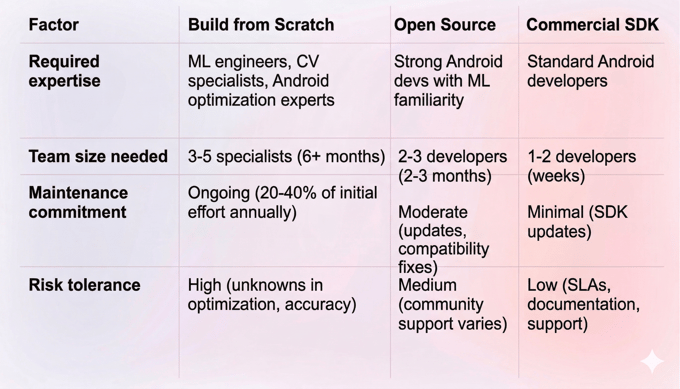
Build Paths: From Scratch vs SDK
A. Building from Scratch (DIY)
Building your own face detection system gives complete control over every component but demands significant resources.
Typical tech stack
- Camera integration: Camera2 API or CameraX
- ML framework: TensorFlow Lite, PyTorch Mobile, or ONNX Runtime
- Face detection models: BlazeFace, MTCNN, RetinaFace, or custom-trained networks
- Rendering: OpenGL ES for overlay effects
- Threading: Kotlin Coroutines or Java ExecutorService
Development phases
- Camera pipeline setup and permission handling
- ML model selection, training, or fine-tuning
- Detection algorithm integration
- Landmark extraction implementation
- Cross-device testing and optimization
- Performance tuning and battery optimization
Risks and challenges
Building a face-tracking app for Android from scratch demands significant time (4 to 7 months), budget (to accommodate advanced development tools and testing across devices), and expertise in machine learning, computer vision, and Android development.
Device fragmentation creates ongoing headaches. Android operates on a highly fragmented ecosystem, spanning thousands of devices with diverse hardware capabilities, screen sizes, and camera specifications. Ensuring consistent performance across all models can be overwhelming.
Pros:
- Full control over algorithms and optimization
- No licensing costs
- Complete customization freedom
Cons:
- 4 to 7 months development time
- Requires ML and computer vision expertise
- Ongoing maintenance burden
- Cross-device testing complexity
- Higher total cost of ownership
B. Using an SDK (Recommended Path)
An SDK packages face detection functionality into a ready-to-use component. Instead of building detection algorithms, you integrate tested code and focus on your app's unique features.
Think of it like choosing between manufacturing your own engine versus buying one from a specialized supplier. Both get you a working vehicle, but one approach lets you focus on what makes your car unique.
Teams that benefit most:
- Startups racing to market
- Product teams without dedicated ML engineers
- Companies prioritizing core business logic over infrastructure
- Projects with tight deadlines
Pros:
- Weeks instead of months to implement
- Pre-optimized for device fragmentation
- Tested across edge cases (lighting, angles, occlusion)
- Ongoing updates and maintenance handled by the SDK provider
- Documentation and support available
Cons:
- Licensing costs
- Less control over underlying algorithms
- Potential dependency on third-party updates
Build vs. Face Detection SDK Comparison
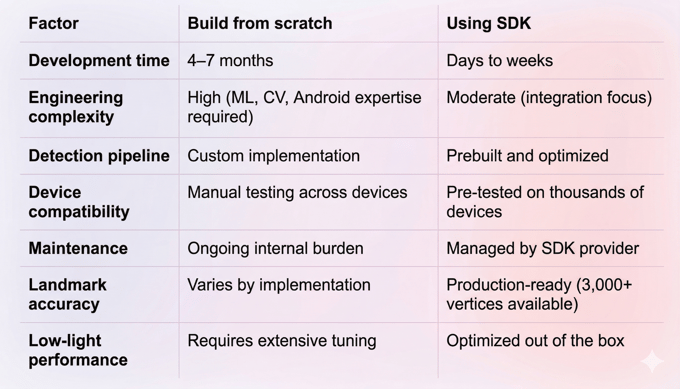
SDK-Focused Implementation: Banuba Face Detection API for Android
About Banuba Face Detection API
Banuba Face Detection API for Android provides face detection, tracking, and recognition capabilities. It’s cross-platform and can work on mobile, web, and desktop. It serves as part of the larger Banuba Face AR SDK ecosystem, offering modular access to specific features without requiring the full AR toolkit.
What it replaces:
- Custom ML model training and integration
- Camera frame processing pipelines
- Cross-device optimization work
- Landmark detection algorithms
- Real-time tracking systems
Key technical capabilities:
- 3,308 facial vertices for precise landmark mapping
- Multi-face detection (scalable based on hardware)
- Stable tracking at up to 7 meters from camera
- Functions with up to 70% face occlusion
- Works at angles from -90° to +90°
- Low-light performance without special tuning
- Offline operation (no cloud dependency)
Platforms supported:
- Android 8.0+ (API level 26+)
- iOS 13+
- Web (WebGL 2.0+)
- Windows, macOS, Ubuntu
- Cross-platform: Flutter, React Native, Unity
Integration Overview
Banuba's Android Face Detection API integrates through standard package managers and build tools.
Android distribution:
- Maven repository integration
- AAR packages for direct inclusion
Cross-platform options:
- CocoaPods for iOS
- npm packages for React Native
- pub.dev for Flutter
Integration flow:
- Request a trial token from Banuba
- Add SDK dependency to your project's build configuration
- Initialize the Face API with your token
- Connect camera input to the SDK
- Receive face detection callbacks with landmark data
- Build your app's features on top of the detection results
For complete implementation guides, code samples, and API reference, visit the official resources:
When Banuba Face API Fits Best
The SDK works well for teams building:
- Social apps with face filters or AR effects
- Video conferencing tools needing background blur or beauty filters
- E-commerce apps with virtual try-on features
- Security applications requiring liveness detection
- Healthcare apps with facial analysis features
- Entertainment apps with face-triggered interactions
Companies like Samsung and Gucci have integrated Banuba's technology into their products. Banuba has over 9 years in the face detection market and maintains an in-house R&D team focused on continuous improvement.
Conclusion
Building Android face detection from scratch is technically possible but expensive in time, talent, and ongoing maintenance. For most teams, an SDK like Banuba Face API offers a faster, more reliable path to production.
The decision comes down to your specific situation. If you have 6+ months, dedicated ML engineers, and need complete algorithmic control, building in-house might make sense. For everyone else, an SDK handles the complex infrastructure so you can focus on what makes your app valuable.
Ready to test face detection in your Android app? Request a free trial and start building.
-
With an SDK, no. Integrating Banuba Face API requires standard Android development skills (Java or Kotlin). The SDK handles the ML complexity. Building from scratch, however, requires expertise in machine learning, computer vision, and low-level Android optimization.
-
Banuba Face API supports Android 8.0+ (API level 26+), iOS 13+, web browsers with WebGL 2.0+, and desktop platforms (Windows 8.1+, macOS 10.13+, Ubuntu 18.04+). Cross-platform frameworks include Flutter, React Native, and Unity.
-
Basic integration can be completed in days. A full implementation with custom UI and business logic typically takes a few weeks, depending on project complexity. This compares to 4 to 7 months for a from-scratch build.
