

Face tracking used to be reserved for Snapchat, beauty brands, and a handful of game studios. Now it's a default feature in retail, fintech, social, automotive safety, telehealth, and education products.
The numbers explain why. The face tracking technology market reached $5.60 billion in 2025 and is projected to hit $49.80 billion by 2033 at a 15.80% CAGR, per HTF Market Insights. The broader facial recognition market moves from $10.69 billion in 2026 to roughly $36.75 billion by 2035, according to Precedence Research. Real-world deployments back the forecasts. Mastercard's tie-up with NEC for face-based payments in Brazil and Japan reduced average transaction time by 15 seconds and lifted basket conversion by 7%, per Mordor Intelligence.
What's changed:
- Mid-range phone hardware caught up with what real-time tracking needs.
- APIs replaced research projects. Teams no longer need an in-house ML group to ship face-aware features.
- Privacy regulations pushed processing on-device, which suits API-based architectures over cloud-only ones.
The product question changed, too. It's no longer "should we add face tracking?" It's "how do we ship it without spending a year on infrastructure?" That’s the question we are answering in this article.
[navigation]
A face-tracking API gives your app access to ready-made computer vision functions such as face detection, landmark tracking, head pose estimation, and expression analysis, instead of building the models yourself. You wire it into your camera pipeline, subscribe to the tracking output, and feed it into whatever feature you're shipping. Going the API route with service providers like Banuba’s Face Tracking API compresses what is normally a 12-month engineering program into a four-to-eight-week integration, with one engineer instead of a team.
TL;DR
- Real-time face tracking sits inside virtual try-on, video calls, biometric login, driver-monitoring systems, and live-streaming filters.
- Building it in-house means CNN training, 3D head-pose math, mobile GPU optimization, and a labeled dataset of hundreds of thousands of faces.
- A face tracking API hides all of that behind a clean integration. You get models, tracking logic, platform bindings, and ongoing updates as a license.
- Use an API when speed, cross-device accuracy, and GDPR compliance matter more than owning every layer of the pipeline.
- Banuba Face API tracks 68 facial points using a patented 3D Face Kernel™ math model, runs at 60 fps on roughly 90% of smartphones, and processes everything on-device.
- Banuba Face API cuts development time for face-tracking features, and the entire integration process takes days, not months of development from scratch.
Why Face Tracking Apps Succeeded: Lessons from Snapchat and Beauty Try-On
Snapchat and beauty try-on apps are the cleanest case studies for what face tracking has to deliver. Their growth wasn't about the novelty of seeing yourself with effects on. It was about getting the tracking layer good enough to disappear.
Snapchat: Tracking as the Foundation of a Content Engine
Snapchat Lenses launched in 2015 and crossed 200 million daily active users by the early 2020s, with face filters as a primary engagement driver. The product worked because the tracking quality stopped being noticeable.
UX patterns
- Real-time preview with no perceptible delay
- Stable placement during fast head movement, laughs, and exaggerated expressions
- One-tap activation, no calibration step
Performance expectations
- Consistent 30 fps on phones five years older than the current flagship
- Sub-50 ms response between facial movement and rendered effect
- Battery and thermal discipline so repeat sessions stay viable
User behavior drivers
- Shareable output that pulled non-users into the app
- Lens carousel that rewarded trying ten effects in a row
- Instant gratification, with no account-creation gate for the core experience
The lesson: tracking quality is the entry ticket, not the differentiator. If the filter slides or jitters, no amount of creative content compensates.
Boca Rosa: tracking as a conversion lever in beauty
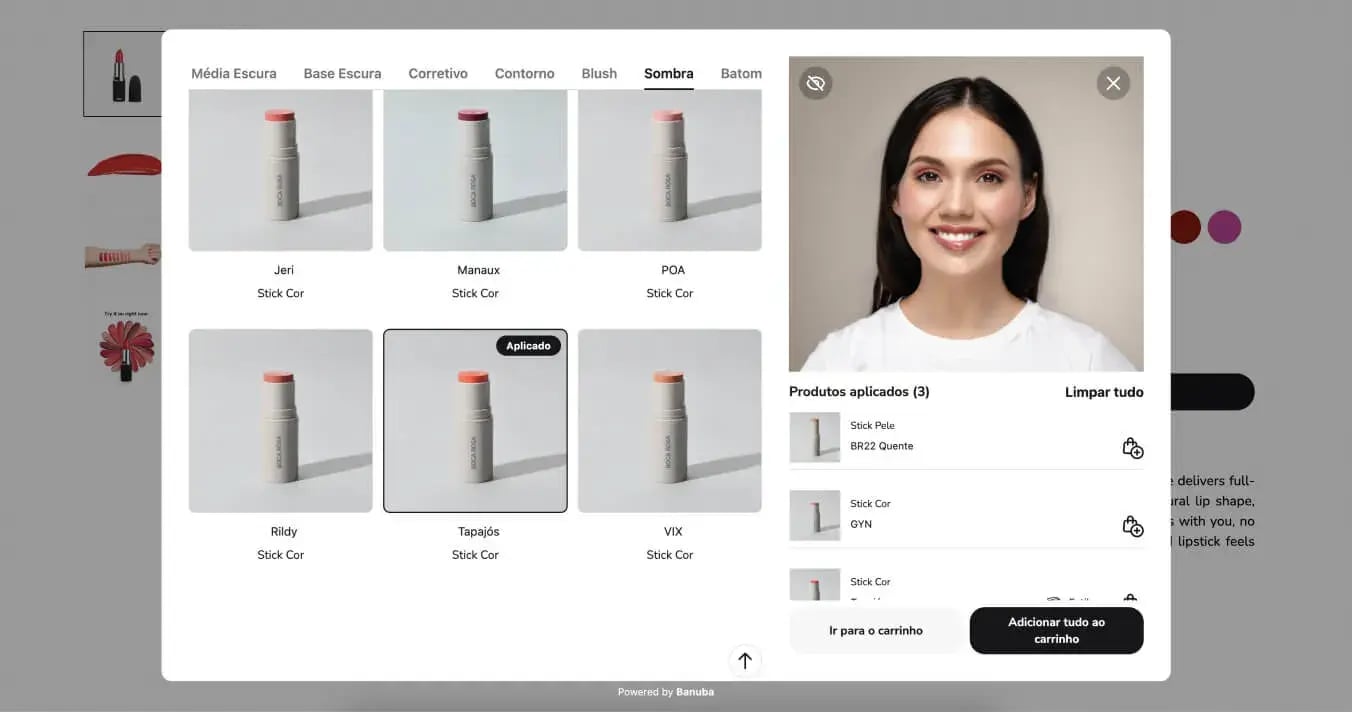
Boca Rosa, the Brazilian beauty brand founded by influencer Bianca Andrade, ran a four-hour pre-launch event with virtual try-on built on Banuba's TINT platform. The numbers from that single event:
- Roughly $900,000 in revenue, with the first $180,000 earned in 10 minutes
- 64,413 items sold, with some foundation shades sold out within 20 minutes
- 1.7 million try-on sessions and nearly 145,000 try-on launches
- An 18% add-to-cart rate against an industry average of 3%, per the Banuba case study
Six-times the industry add-to-cart rate is the headline, and it's worth pulling apart. Foundation shade selection is the highest-friction decision in beauty e-commerce because skin tone variation is massive and undertone matters. Boca Rosa offered 50 foundation shades to match Brazilian skin diversity. Without accurate tracking, the try-on wouldn't have helped; it would have hurt the conversion thesis.
UX patterns
- Foundation that follows the face shape across 50 shades and varied skin tones
- Stable tracking during a live event with mass concurrent usage
- Try-before-buy that worked at the moment of purchase intent, not as a separate detour
Performance expectations
- Sub-50 ms response so shoppers compared shades fluidly
- Color accuracy at the tracking-render boundary, so the rendered shade matched the SKU shipped
- Concurrent stability, supporting thousands of try-on users at once during the event
User behavior drivers
- Shade discovery that lifted basket size beyond what shoppers would request unaided
- Live-event format that compressed engagement and conversion into a four-hour window
- Social shareability that turned try-on screenshots into free reach across Brazilian social platforms
The lesson: face tracking in beauty isn't a fun feature, it's the conversion engine. The same logic carries to glasses, jewelry, and contact lens try-on across the virtual try-on category.
What This Means for Your Tracking Layer
- Sub-50 ms latency is the floor. Above it, the experience reads as broken.
- 3D mesh output, not just 2D landmarks, lets effects wrap the face contour during real head movement.
- Mid-range device coverage is where the audience actually lives.
- On-device processing is the only path that meets both UX expectations and GDPR obligations.
- Shareable, frictionless output turns users into a distribution channel.
A face-tracking API that misses any one of these will look fine in a demo but degrade in the wild.

Core Capabilities a Face Tracking API Has to Provide
A "face tracking API" can mean a few different things depending on the vendor. Before you pick one, check that it covers these capability groups.
Detection and tracking layer
- Face detection. Locating one or more faces in a frame.
- Multi-face tracking. Following several faces at once, useful for group selfies and shared screens.
- Recovery logic. Re-detecting cleanly when a face leaves the frame and returns.
3D geometry and pose
- Head pose. Pitch, yaw, and roll values for any feature that renders in 3D on the face.
- Face mesh output. A triangulated surface so effects respect facial contour, not just flat 2D points.
- Expression coefficients. Numeric signals for smiles, blinks, mouth open, brow raise.
Face analysis
- Demographics. Age range, gender estimation, where the use case allows it.
- Emotion. Recognition of basic emotional states from facial muscle patterns.
- Liveness signals. Blink, head turn, gaze direction. Important for any biometric or anti-spoofing flow.
Identity matching, where applicable
- Face recognition. Matching one face against a stored template or a database.
- Verification (1:1) vs identification (1:N). Two distinct workloads with different accuracy and privacy profiles.
Mobile runtime
- GPU inference. Metal on iOS, Vulkan or OpenGL on Android.
- Compressed models. So the tracker fits on mid-range chipsets and runs at 30+ fps.
- Camera integration. Handling rotation, color spaces, and front-camera mirroring across phone makers.
Privacy and compliance
- On-device processing for biometric handling.
- Consent and retention controls.
- Documentation for GDPR, CCPA, and emerging AI-act obligations.
A face tracking API that skips any of these forces you to fill the gap yourself, which defeats the point.
Build Paths: from Scratch vs Face Tracking API
Building it yourself
Going DIY means standing up your own ML and computer vision pipeline. Here's what that involves at a high level.
Required tech stack
- ML frameworks for training: PyTorch or TensorFlow.
- On-device runtimes: Core ML, TensorFlow Lite, or ONNX Runtime.
- Computer vision libraries: OpenCV for preprocessing, plus a baseline face detector.
- 3D math and rendering: GLM, custom shaders, or a morphable face model library.
- Native mobile work: Swift and Metal on iOS, Kotlin and Vulkan or OpenGL on Android, plus bindings for Flutter, React Native, or Unity.
- Annotation tooling: a labeling pipeline for hundreds of thousands of faces with consistent landmark conventions.
Infrastructure
- GPU clusters for model training and iteration.
- Dataset versioning, augmentation pipelines, and storage.
- A device lab with a representative spread of mid-range and high-end phones.
- Continuous integration that runs accuracy and performance regressions on every commit.
Development phases
- Dataset acquisition, licensing, and annotation: 3–6 months.
- Model architecture, training, and tuning: 2–4 months.
- Mobile porting and per-chipset optimization: 2–4 months.
- App integration and cross-device QA: 2–3 months.
- Ongoing retraining, regression fixes, and OS updates: continuous.
Risks
- Models that hit benchmark scores on demo data degrade on real users.
- A tracker that runs at 45 fps on a Pixel 8 may collapse to 12 fps on a $150 Android.
- Quarterly OS releases break camera integrations.
- Privacy law missteps cost more than the engineering investment.
Building from Scratch: Pros and Cons
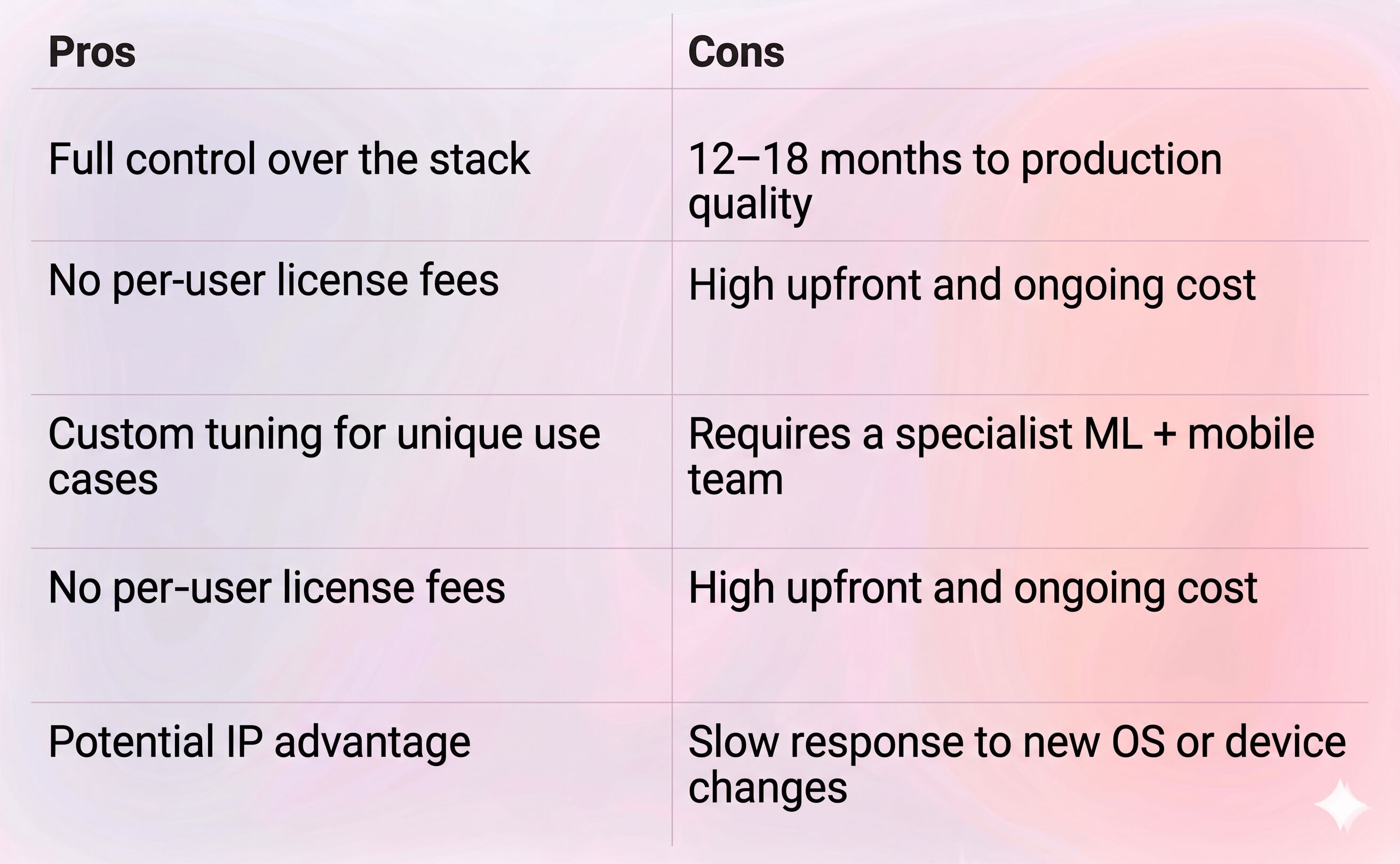
This path makes sense when face tracking itself is your product, not a feature inside it.
Using a Face Tracking API
A face-tracking API like Banuba is a prebuilt library that handles everything above. You add it to your project, initialize it with a license key, point it at the camera stream, and read tracking output through documented methods.
Why an API cuts the timeline
- Models are already trained on large, diverse datasets.
- Tracking, recovery, and smoothing logic are already solved.
- Per-chipset performance tuning is already done.
- Vendor releases ship through your normal dependency manager, not your engineering sprints.
Who this fits
- Startups validating a product before committing 12 months of engineering.
- Enterprise teams adding a face-aware feature to an existing app.
- Agencies building campaign-specific AR experiences.
- Cross-platform teams that need the same API surface across iOS, Android, Web, Unity, Flutter, and React Native.
Face Tracking API Integration: Pros and Cons
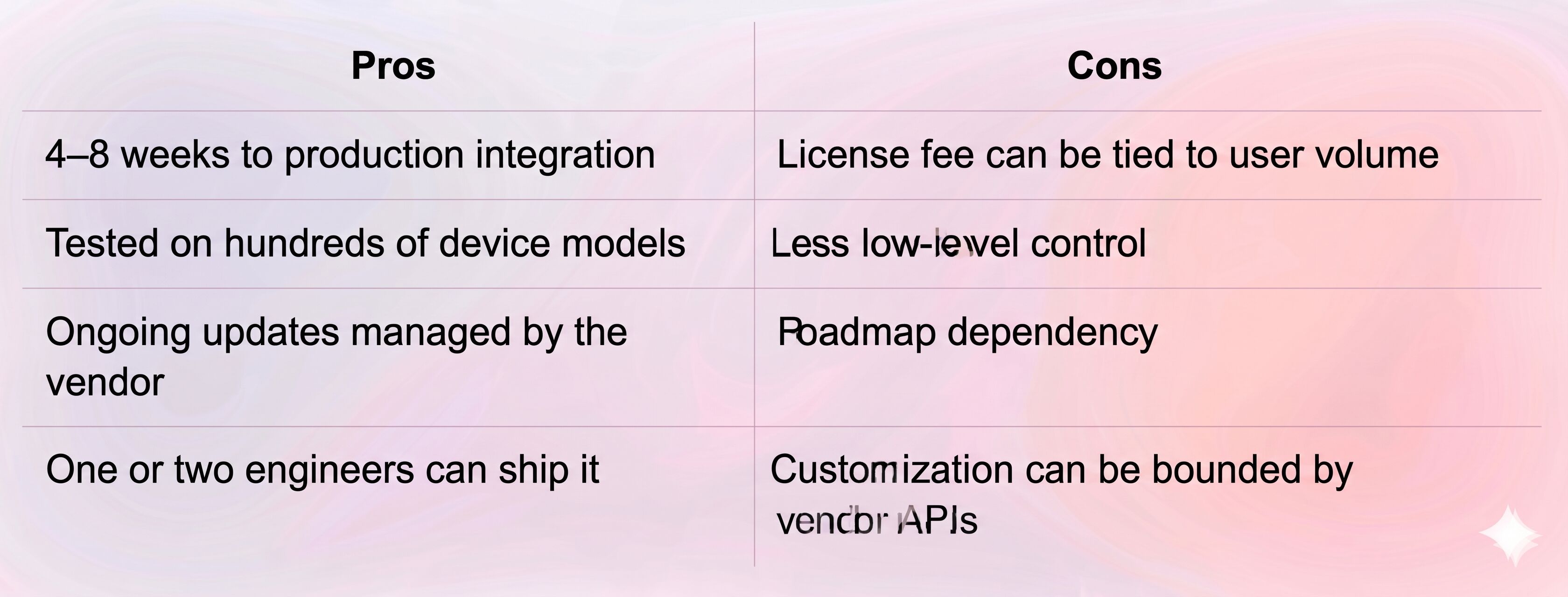
For most product teams, the trade is straightforward: less control in exchange for a year of calendar back.
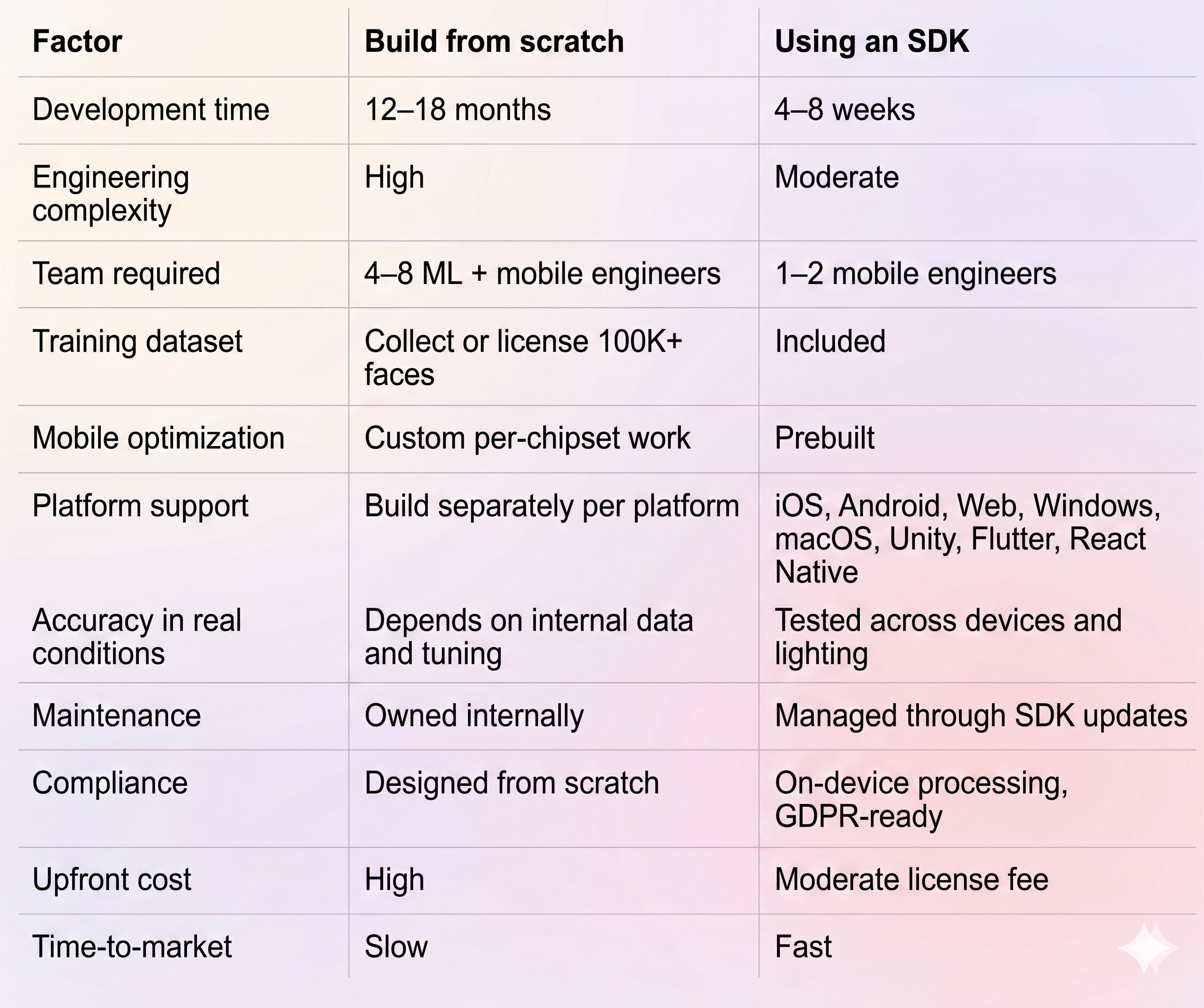
Comparison Table: Build from Scratch vs Face Tracking API
Implementing Face Tracking with the Banuba Face API
About the Banuba Face API
Banuba Face API gives developers a single integration point for face detection, multi-face tracking, face analysis, segmentation, and face recognition across mobile, web, and desktop. It's part of the broader Face AR SDK, so you can pull in only the modules you need.
The architectural choice sets it apart from other provider. Rather than detecting 2D landmarks and inferring 3D pose from them, Banuba's math model builds the 3D model of the head directly. The tracker then follows the mesh frame by frame. That ordering reduces compute load and improves accuracy under poor lighting and partial occlusion.
In practical terms, the Banuba Face API delivers:
- 68 tracked facial points covering eyes, brows, nose, lips, and jawline
- A 3D face mesh with up to 3,308 vertices when full geometry is needed
- 60 fps real-time performance on mobile
- Detection at head angles from –90° to +90°, with up to 70% facial occlusion
- Tracking distance up to 7 meters from the camera
- 360-degree camera rotation support
- Patented anti-jitter mechanism that runs filtering several times per frame
- Multi-face detection and tracking
- Face analysis: emotion, gender, age estimation, drowsiness, heart rate
- Opportunity to add AR filters and effects, virtual try-ons, etc.
- On-device processing with no server calls for raw biometric data
- Coverage of roughly 90% of smartphones currently in active use
- 9+ years of production deployments at Gucci, Samsung, and other consumer brands
What the API Replaces in Your Stack
- Face detection and landmark tracking models
- 3D head pose and morphable face mesh
- Mobile GPU inference and per-chipset optimization
- Multi-face tracking and recovery logic
- Face recognition and liveness detection pipeline
- Model update and distribution pipeline
Platforms Supported
iOS, Android, Web, Windows, macOS, Unity, Flutter, and React Native.
Integration Overview
The conceptual flow looks like this:
- Add the Banuba Face API to your project through the package manager you already use. CocoaPods or Swift Package Manager on iOS. Maven or Gradle on Android. npm for Web. Unity Package Manager for Unity.
- Initialize with your license key and connect the SDK to the camera stream.
- Subscribe to the API's tracking output: face position, 68-point landmarks, 3D mesh, head pose, expression and emotion data, recognition results.
- Pass that output into your feature. A try-on renderer, a video-call filter, a liveness check, an avatar driver, an attention-tracking analytics stream.
Full implementation guides, sample apps, and reference code live in the Face AR SDK documentation. For teams using AI coding assistants, LLM-ready docs are available. Working integration samples sit on Banuba's GitHub.
Conclusion
Face tracking is a layered problem. Detection, landmarks, head pose, expression, multi-face logic, mobile optimization, and privacy engineering all have to work together to ship a feature that survives real users on real phones. Building that stack in-house takes a year or more before the feature is stable across the long tail of devices, and it keeps consuming engineering time after launch.
A face tracking API skips most of that work. You add a library, subscribe to tracking output, and focus on the product on top.
Banuba Face API is worth a closer look when you need real-time performance, broad device coverage, GDPR-aligned on-device processing, and the kind of 3D mesh output that makes virtual try-on, beauty AR, video call effects, and biometric flows actually work. Start with the free trial and run it against your own camera footage before committing.
Reference List
Banuba. (2026a). Banuba technology. https://www.banuba.com/technology/
Banuba. (2024). Virtual try-on by Banuba helps beauty brand earn $900,000 in 4 hours. https://www.banuba.com/blog/virtual-try-on-helps-beauty-brand-earn-900.000-in-4-hours
Banuba. (2026b). Face API for face recognition, detection & tracking. https://www.banuba.com/face-api
Banuba. (2026c). Face AR SDK documentation. https://docs.banuba.com/far-sdk
Banuba. (2026d). GitHub samples. https://github.com/Banuba
Banuba. (2026e). Virtual try-on for e-commerce. https://www.banuba.com/solutions/e-commerce/virtual-try-on
HTF Market Insights. (2026). Face tracking technology market: Size, share & growth outlook. https://www.htfmarketinsights.com/report/4408796-face-tracking-technology-market
Mordor Intelligence. (2026). Facial recognition market size, trends, growth & share analysis 2026–2031. https://www.mordorintelligence.com/industry-reports/facial-recognition-market
Precedence Research. (2026). Facial recognition market size, share, and trends 2026 to 2035. https://www.precedenceresearch.com/facial-recognition-market
-
To integrate a face tracking API, no. With Banuba’s Face Tracking API, a mobile engineer who's comfortable with iOS or Android, or a web developer for browser-based use cases, can have a working prototype in a few days. Building face tracking from scratch is a different conversation. That path needs ML engineers, 3D geometry experience, mobile GPU expertise, and access to a labeled face dataset.
-
The Banuba Face API covers iOS 13+, Android 8.0+, Web (WebAR through WebAssembly), Windows 8.1+, macOS 10.13+, Unity, Flutter, and React Native. That spans essentially every mobile, desktop, and cross-platform target shipping today.
-
With Banuba, a working demo usually takes two to five days. A production-ready integration tuned to your camera handling, UI, business logic, and supported devices runs four to eight weeks for most teams. Mature mobile codebases land at the shorter end of that range.
