

[navigation]
TL;DR:
- Amazon Rekognition is a cloud service. Every documented image-analysis operation is an API call to AWS, so no frame stays on the user's phone.
- There is no general-purpose native Rekognition mobile SDK. The only native mobile components AWS documents are the Face Liveness UI parts of AWS Amplify for Swift and Android.
- Rekognition bills per API call against an image, and running several APIs on one image is charged as several images, so cost tracks call volume rather than user count.
- Banuba Face API is the on-device alternative: detection, tracking and segmentation run locally on 8 platforms, licensed on monthly active users with no per-request fee.
- Rekognition returns 30 named landmark types. Banuba builds a 3D mesh of up to 3,308 vertices, which is what AR-grade effects and precise segmentation need.
- Banuba tracks 68 facial anchor points under up to 70% occlusion and at distances up to 3.7 meters, across the full -80° to +80° head-angle range.
- Microsoft Azure AI Face is the closest cloud-for-cloud swap, but its recognition features sit behind an eligibility gate: access is limited to Microsoft-managed customers and partners.
- Google ML Kit Face Detection is free and on-device, and is the right answer when you need a bounding box and basic contours rather than a face you can render on.
- Keep Rekognition when you need identity search at AWS scale, its managed Face Liveness product, or content moderation. Those are not what an on-device face SDK is for.
How to choose an Amazon Rekognition alternative
Run these five checks before you look at any vendor list. They decide the project more often than accuracy benchmarks do.
- Where does the face data get processed? If your product promise or your legal review says user faces do not leave the device, every cloud API is out on the first question, however good its models are.
- Are you detecting a face, or drawing on it? Detection gives you a box, a pose, and a set of landmarks. Rendering makeup, filters, glasses or beauty effects needs a dense mesh and segmentation, which is a different class of product.
- Does the cost scale with users or with calls? Per-request billing is cheap in a pilot and expensive in a live camera feed, because a camera runs many frames per second.
- Which platforms must ship on day one? Wrapper coverage for Flutter, React Native, Unity and desktop is where most shortlists actually break.
- Do you need identity, or the inputs for it? A managed identity-search product and an SDK that hands you face data are both valid, and they are not substitutes.

Why teams move off Amazon Rekognition
Every point below comes from Amazon's own developer guide, API reference, and pricing page.
It is cloud-only by design. The docs define Rekognition as a cloud-based image and video analysis service, and every documented image-analysis operation is a cloud API call. There is no on-device mode to fall back to when the network is slow or the privacy review says no.
There is no general-purpose mobile SDK. AWS documents Face Liveness UI components in the AWS Amplify SDK for Swift and Android, and nothing else native. Mobile teams end up calling REST endpoints from a client they wrote themselves, or routing frames through their own backend.
Billing counts APIs, not images. AWS states plainly that running multiple APIs against a single image counts as processing multiple images. Pricing is tiered per-unit consumption billed monthly by volume, with rates that vary by AWS Region, so a global rollout does not have one price. Teams that need several attributes per frame feel this first.
The face model is built for analysis, not rendering. Rekognition returns named landmark types rather than a dense mesh: the API reference enumerates 30 valid landmark type values. Face AR, beauty, makeup, and try-on rendering are not part of the product at all, which is why a team that starts with detection and later wants effects has to add a second vendor.
Documented accuracy caveats. Amazon's own reference states that the face-detection algorithm is most effective on frontal faces, and that for non-frontal or obscured faces it might not detect the faces or might detect them with lower confidence. That matters for a live camera feed where people turn away and put hands near their faces.
Hard input ceilings. Input images are PNG and JPEG only, and image size, dimension, and collection-size limits are set quotas that cannot be raised, unlike throughput quotas.
If those are the reasons you are here, the on-device Amazon Rekognition alternative most teams land on is Banuba Face API. It is the face layer of Banuba Face AR SDK: detection, tracking, and segmentation, all executed locally, with no per-request charge as usage grows.

The alternatives, side by side
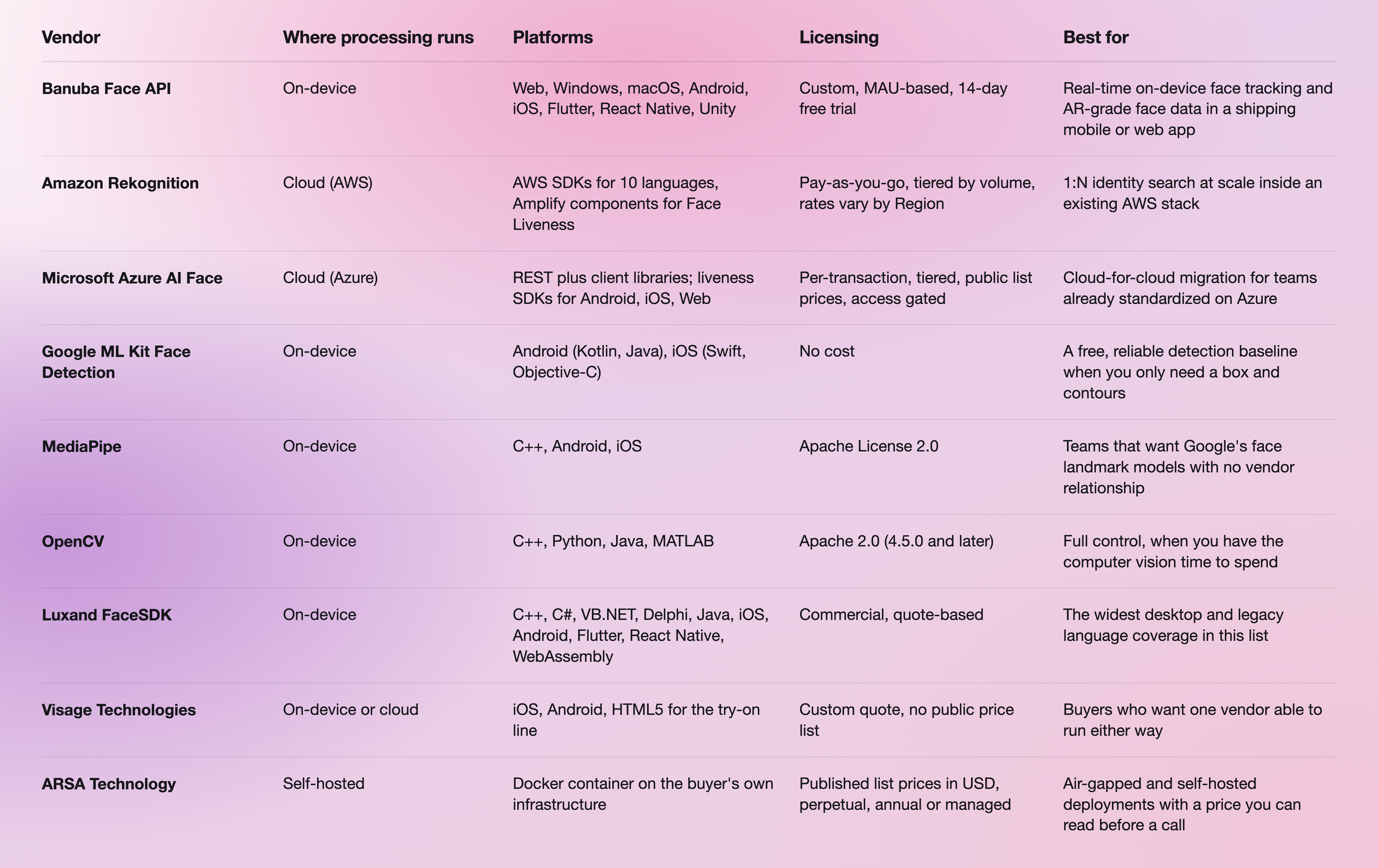
Two things are worth pulling out of that table. Azure AI Face is the obvious cloud-for-cloud swap, but Microsoft gates it: access is limited by eligibility and usage criteria, and the service is only available to Microsoft-managed customers and partners, who apply through an intake form. And Google ML Kit is genuinely free and runs entirely on-device, which makes it the honest recommendation for a team that needs a bounding box and facial contours and nothing more. Neither of those is a knock on Rekognition, and neither is a reason to pick Banuba.
One quirk that cuts the other way: Rekognition still exposes emotion and gender as requestable attributes on DetectFaces, while Azure has retired both. If your product depends on those, Rekognition is currently the stronger of the two clouds.
For a broader read on the recognition-focused end of this market, our team also published a comparison of nine face recognition APIs grouped by the job they are hired for.

Where Banuba Face API fits
Banuba Face API exposes the Face AR SDK's detection and tracking layer as separately licensable features. The practical differences against a cloud API are these:
- Nothing is uploaded. Detection, tracking, and segmentation execute locally, so there is no frame leaving the device and no per-request charge as usage grows.
- The face model is dense. Face tracking detects 68 facial anchor points, builds a 3D mesh of up to 3,308 vertices, and tracks 37 mesh morphs, which is what holds the shape of real-time structural changes to the nose, eyes, lips, and chin.
- It holds up in real conditions. Tracking stays locked under up to 70% occlusion and at distances up to 3.7 meters, across the full -80° to +80° head-angle range.
- Segmentation is per-part. Dedicated networks segment eyes down to the iris and pupil, plus lips, brows, skin, hair, neck, and the full body against the background.
- Cost tracks users, not calls. Licensing is custom and based on monthly active users, with three inputs to the quote: the platforms you ship on, the feature categories you activate, and your MAU. Billing is yearly, and a 14-day free trial covers every feature on every supported platform.
It is also proven at consumer scale. b.stage, the global fandom platform built by the Korean company bemyfriends, uses Banuba beauty effects and face filters in its live streaming and video chat, and passed 1 million monthly active users from 224 countries within two years.
Where Banuba is genuinely the best choice is narrow and worth stating plainly: real-time, on-device face tracking and AR-grade face data inside a shipping mobile or web app. For identity search across millions of enrolled faces, it is not the right tool, and Rekognition is.
 Banuba's face detection and tracking
When Amazon Rekognition is the better choice
Keep Rekognition, or pick it over everything in this list, when any of the following is true.
- You need identity search at scale. A single Rekognition face collection holds up to 20 million face vectors. No on-device SDK competes with that, and Banuba supplies face data rather than a managed search index.
- You need a finished liveness product. Rekognition Face Liveness detects printed photos, digital photos, and videos and 3D masks presented to the camera, plus pre-recorded or deepfake videos injected into the video capture subsystem. Banuba gives you head pose, eye openness, gaze, blink, and pulse, and your app defines the challenge.
- Compliance and stack fit already point at AWS. The docs describe Rekognition as a HIPAA-eligible service that integrates out of the box with S3 and Lambda and uses IAM for access control.
- The work is server-side batch analysis. Stored video analysis reads from S3 and handles files up to 10 GB and 6 hours, which is a job an on-device SDK is simply not built for.
- You need moderation, text detection, or celebrity recognition. Those are Rekognition product lines. They are not on any on-device face SDK's roadmap, including ours.

Migrating from Rekognition to an on-device SDK
The migration is less about swapping an API client than about moving work from your backend into the app. A realistic order:
- Separate the calls you make per frame from the calls you make per event. Per-frame work (detection, tracking, landmarks, segmentation) is what moves on-device and is where the cost saving sits. Per-event work (enrolment, search, moderation) can stay in the cloud.
- Request the trial token from the Banuba Face API page and start the 14-day free trial, which gives full SDK access on every supported platform.
- Run the platform sample before you write integration code. Banuba publishes a runnable sample per platform, including quickstart-android and the fuller Android sample set. Getting the camera pipeline running first tells you more than any spec sheet.
- Map your attribute list onto the SDK. Build against the Face AR SDK documentation and confirm each attribute you were reading from Rekognition has an on-device equivalent, or a decision to drop it.
- Let your coding assistant do the wiring. Banuba maintains Agent skills that give coding AIs structured knowledge of the SDK and its integration workflow.
- Keep a cloud path for what genuinely belongs there. Startup time is under an hour, and a production integration takes about a week with your own team, so a hybrid split is usually faster to ship than a full rewrite.
If your starting point is Android specifically, our walkthrough on how to build Android face detection using an SDK covers the same ground in code, and how to implement face tracking using an API covers the tracking layer.
-
For mobile apps, yes, with one condition: Banuba Face API replaces the detection, tracking, and segmentation half of Rekognition, not the identity-search half. It runs on the device across Web, Windows, macOS, Android, iOS, Flutter, React Native, and Unity, so faces never leave the phone and there is no per-request fee. Full feature details are on the Banuba Face API page.
-
They are priced on different things. Rekognition charges tiered per-unit consumption billed monthly by volume, with rates that vary by AWS Region, and running several APIs on one image counts as several images. Banuba Face API is licensed as part of Banuba Face AR SDK on monthly active users, with no per-request or per-image fee once integrated, so cost tracks your user base rather than your call volume. The Banuba Face AR SDK pricing guide explains how the MAU bands work.
-
Most of them do, but the coverage differs. Google ML Kit documents Android and iOS only. Luxand FaceSDK and Banuba both go wider: Banuba Face API supports Web, Windows, macOS, Android, iOS, Flutter, React Native, and Unity from one integration, which is usually the deciding factor for teams shipping a cross-platform app. The same coverage applies to the Banuba face filters SDK built on the same engine.
-
There are free options for face detection rather than recognition: Google ML Kit is offered at no cost and runs on-device, and MediaPipe and OpenCV are distributed under Apache 2.0. Banuba does not have a permanently free tier, but it does offer a 14-day free trial with full SDK access on every supported platform. If you need more than a bounding box, Banuba's AI face detection SDK page sets out what the on-device engine returns.
-
Cheaper depends on the shape of your usage. For low volumes, Rekognition's pay-as-you-go model is hard to beat, and ML Kit at no cost is cheaper still. For a live camera feed processing many frames per second, per-request pricing is the expensive option, and an on-device license is usually the cheaper one, which is where Banuba Face API and its face tracking technology fit. ARSA Technology is worth a look if you want published list prices you can compare before speaking to anyone.
