
[navigation]
TL;DR:
- Banuba's web build runs in any browser that supports WebGL 2.0, which covers current Chrome, Safari, and Firefox on both mobile and desktop.
- Banuba's heavy asset is BanubaSDK.wasm at 12 Mb uncompressed, which drops to 3.5 Mb with gzip and 2.5 Mb with Brotli, so compression at the hosting layer is the single biggest page-load lever.
- Banuba's Face AR SDK is tree-shakable and distributed on npm as @banuba/webar, so an app that only needs the webcam and one effect does not ship the whole library.
- Banuba ships a SIMD build alongside the standard one and detects support at runtime, loading the faster file automatically when the browser can run it.
- Banuba's tracking is mesh-based rather than landmark-only: a patented 3,308-vertex face mesh drives effect placement, which is what keeps makeup and 3D masks anchored when the head turns.
- Real-time lip coloring measured in Banuba's own lab conditions runs at 30 FPS in Chrome and 26 FPS in Safari, so plan the visual design around 30 FPS on the web rather than the mobile-native figure.
- Browser delivery removes the app-store review cycle and the install step entirely, which is why retail campaigns route users through a QR code straight into a web page.
- Building the same stack in-house means training and maintaining tracking and segmentation models, hand-tuning WebGL render passes, and re-testing on every browser release.
What Is a WebAR SDK, and What Does It Actually Cover?
A WebAR SDK is a packaged face-AR runtime you drop into a web application. On the user's side, it needs a camera and a browser, nothing else, which puts the same experience on phones, tablets, and desktops without separate builds.
Practically, the SDK owns four jobs your team would otherwise own: capturing the camera stream, running the neural networks that find and track the face, applying the effect assets, and rendering the composited frame through WebGL. Banuba distributes these as separate importable modules (Webcam, Player, Effect, Dom), so the parts you do not call are stripped out at build time.
The requirement to check before anything else is graphics support. Banuba's Face AR SDK web build works in any browser with WebGL 2.0 or higher, and the current versions of Chrome, Safari, and Firefox all qualify on both mobile and desktop. If you need to confirm coverage for a specific device fleet, the WebGL 2.0 support table is the reference.

How Does Face AR Work Inside a Browser?
The flow is short, and it is worth knowing because it explains where the performance costs sit.
- The camera captures a frame.
- The browser hands that frame to the web app.
- The SDK, already loaded in the page, preloads the effect assets it needs.
- The SDK detects the face, applies the effect, and passes the result back.
- The browser draws the composited frame with WebGL.
All of it happens client-side, in real time. The tracking and segmentation networks are compiled to WebAssembly and execute in the browser process, so the video never leaves the device. That matters for two different audiences: privacy reviewers, who want a written statement that frames are not sent anywhere, and engineers, who do not have to budget for inference servers.
If you want the underlying approach in more depth, we wrote it up in JavaScript + WebGL Face Detection and Tracking to Bring Augmented Reality to the Web. For a step-by-step walkthrough of the tracking layer specifically, see how to build Web AR face tracking using a Web AR SDK.
Banuba Web-Based Augmented Reality Face Filters
Should You Build Web Face AR From Scratch or Integrate an SDK?
Both paths are real. They differ mostly in what you commit to maintaining after launch.
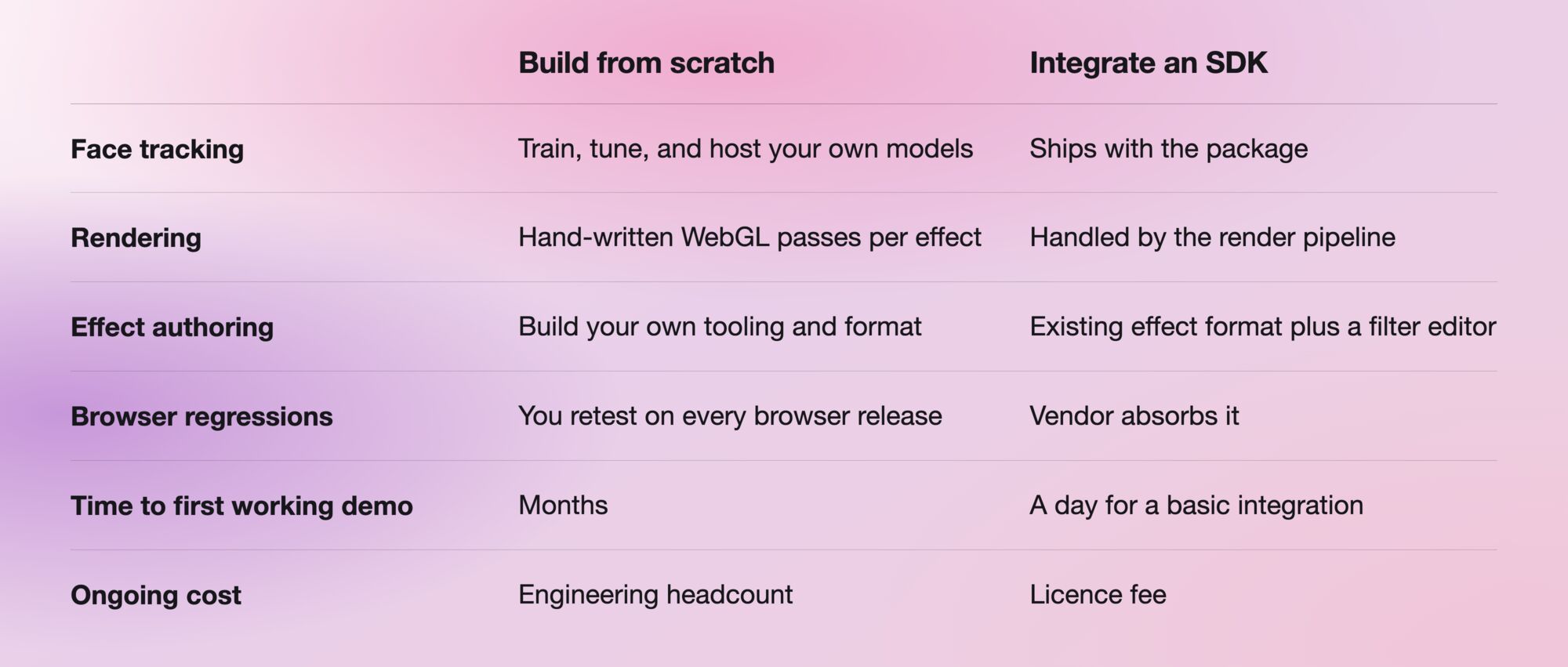
The honest case for building it yourself is control: if face tracking is the product rather than a feature of the product, owning the model is defensible. For everyone else, the calculation is simpler. Face tracking is a commodity capability that has to keep working across browser updates you do not control, and that maintenance never ends. One engineer wrote up why he abandoned a from-scratch Web AR build after hitting exactly that wall.
Banuba's AR Web Beautification
How Do You Integrate the SDK Into a Web App?
Banuba's Face AR SDK is published on npm as @banuba/webar and initialized with a client token. The web integration overview covers setup, and the Face AR SDK documentation covers effects, configuration, and the full API surface.
Rather than reading setup prose, most engineers start from a working project. There are four quickstarts, one per common front-end stack:
Two integration details cause most of the early friction. First, the SDK loads BanubaSDK.wasm and BanubaSDK.data as separate files, so if your bundler moves assets, you have to point the SDK at their real location. Second, bundler configuration differs: Webpack, Vite, and Rollup each need the wasm and data files treated as assets rather than modules, and the docs list the config for each.
What Should You Do About Page Weight and Performance?
This is where a browser integration lives or dies, and the numbers are published rather than hidden.
The dominant asset is BanubaSDK.wasm, 12 Mb uncompressed. Because of the file's internal format, it compresses unusually well: 3.5 Mb with gzip, 2.5 Mb with Brotli. The SIMD variant is 13 Mb, 3.8 Mb, and 2.7 Mb, respectively. Some hosts precompress automatically, but if yours does not, compressing the assets folder yourself is the highest-return change you can make.
Three further levers are worth knowing before launch:
- SIMD. Banuba ships a SIMD-enabled build that is several times faster at processing, and the SDK detects browser support and loads the right file on its own. You do not choose; you only make sure both files are reachable.
- Device pixel ratio. On HiDPI screens, the SDK renders at the device ratio for detail, which scales the processed frame area geometrically. Overriding the ratio to 1 cuts CPU and GPU load noticeably where mask detail is not the point.
- Capture resolution. Requesting a 640x480 webcam frame instead of the default 1280x720 is the blunt-force option when a low-end device struggles.
For expectations, Banuba's lab measurements for real-time lip coloring on the web are 30 FPS in Chrome and 26 FPS in Safari. Those are fixed-condition numbers, and a real device fleet will vary, so treat 30 FPS as the design target for browser effects rather than the mobile-native figure.
What Can You Actually Build With It?
The capability set is the same one the native SDK exposes, delivered through the page.
- Virtual try-on. Makeup, hair color, glasses, jewelry, and other accessories rendered on the live camera feed. Cosmetics brands were the early adopters here. How e-commerce sites add browser-based AR try-on covers a real storefront deployment in detail.
- Video calls and conferencing. Beautification, 3D masks and background replacement inside browser-based meeting products.
- AR advertising. Interactive branded experiences that a user reaches from a link or a QR code, with no install step in the way.
- Online learning. Attention-holding effects and interactive teaching aids for younger learners.
- 3D object placement. Furniture, art and household objects previewed in the user's own space.
- In-browser video editing. Trimming, cutting, and effects applied to clips without a desktop tool.
Scale is not a theoretical question for this stack. A SaaS fandom platform running on Banuba Face AR reached 1 million monthly active users in two years, across users from 224 countries, using beauty effects and 3D masks in its live streaming and chat features.
Banuba's Background subtraction
What Does a Browser-First Deployment Look Like in Retail?
The clearest pattern is the QR-to-web flow, and there is a shipped example. Romanian hair dye producer Loncolor asked Bucharest software company Scorpion Technology for a try-on experience, and the solution they built runs entirely in the browser: a shopper scans the QR code on the product package, a web page opens, and once their face is on camera, the page shows the chosen hair color applied in real time.
What makes that pattern work is the absence of an install. Every store that stocks the product becomes a try-on point with no additional deployment. Scorpion Technology also licensed only the hair recoloring feature rather than the full SDK, which is worth knowing at the budgeting stage: features are licensed individually.
A second example, Looké in Indonesia, shows the same technology at mid-market scale. The niche halal and vegan cosmetics brand launched virtual try-on and passed 55,000 installs, most of them rated five stars on Google Play.
Where Do the Effects Come From?
Getting the runtime working is half of it. Effects and masks are the other half, and there are three routes.
- From the vendor. Banuba maintains an asset store where you can license ready-made filters and effects, and custom masks can be commissioned. That is what we did for Chingari, an Indian short-video platform.
- A vendor studio. Several AR solution companies provide software for authoring effects compatible with their SDK, usually with customizable templates.
- In-house or third party. Vendors typically expose a filter editor that imports effects built in 3D modeling software such as Maya. It works, but effect authoring has its own conventions, so factor in either the skill set or an agency.
What Are the Real Trade-offs Against a Native App?
Web delivery buys reach and costs performance headroom. Both halves are true.
Where the web wins. It runs on effectively any device with a camera, a screen, and a connection, including hardware too weak for a demanding native app. Larger screens work better for anything involving manipulation of virtual objects. There is no app-store review, which removes both the publication delay and the category restrictions some stores enforce. And there is no download, so the drop-off between intent and first use largely disappears.
Background subtraction with Banuba Face AR SDK
Where it costs you. A page has less access to device resources than a native app, so peak performance is lower, which is exactly what the 30 FPS web figure reflects. Assets have to be fetched before anything runs, so a first visit is bound by network speed in a way an installed app is not. Once loaded, processing itself is local.
We compared the two delivery models in more detail in WebAR for Chrome and Safari vs Mobile AR, and if you are still choosing between implementation categories, Web AR platforms and tools cover frameworks, SDKs, and full platforms side by side.
Conclusion
Web face AR is now a front-end integration problem rather than a computer-vision problem, provided you pick the SDK route. The technical checklist is short: confirm WebGL 2.0 across your target browsers, compress the wasm assets, import only the modules you use, and design for 30 FPS in the browser. Banuba's WebAR SDK comes with a 14-day free trial that needs no card, and per-feature licensing, so the sensible next step is to run one of the framework quickstarts against your own effect and measure it on your own devices.
-
Any browser with WebGL 2.0 or higher, which in practice means current Chrome, Safari, and Firefox on both mobile and desktop. Banuba publishes the full requirements in the Face AR SDK documentation, and you can check WebGL 2.0 coverage for a specific device list on caniuse.
-
The main file, BanubaSDK.wasm, is 12 Mb uncompressed but 3.5 Mb gzipped and 2.5 Mb with Brotli, so serving it compressed is the important step. Banuba's Face AR SDK is also tree-shakable, so importing only the modules you call keeps the JavaScript bundle down. The web integration overview covers asset handling.
-
No. Banuba's web build compiles the tracking and segmentation models to WebAssembly and runs them in the browser, so frames are processed on the user's device and are not sent anywhere. Banuba's Face AR SDK works the same way on native platforms.
-
On GitHub, one per front-end stack: vanilla JavaScript, React, Angular, and Vue. Each Banuba quickstart is a running project rather than a snippet, so you can measure performance before committing to the integration.
-
Banuba licenses the Face AR SDK in two ways. A flat annual license fee keeps the cost fixed and predictable no matter how far the app scales. An active-user-based license tracks how many active users you actually have, which starts significantly lower but grows with the user base and can pass the flat fee if the app takes off. Features are also licensed individually rather than as one bundle, which is how Scorpion Technology took only hair recoloring for the Loncolor build. The Face AR SDK pricing guide sets out what drives the number in each model.
-
Partly. Banuba publishes agent skills at github.com/Banuba/ai-skills that give an AI assistant the structured context it needs to scaffold an integration, which shortens the first pass. A developer still reviews the result.
-
A basic integration of one of Banuba's quickstarts is a same-day job, since the module is premade and the setup is documented. Building the effect design, the UI around it, and the device testing is the part that sets the real timeline, and that is true whichever AR SDK you choose.