

Augmented reality has stopped being a side feature. The mobile AR market was valued at USD 23.2 billion in 2024 and is projected to grow at a CAGR of more than 31.3% through 2034, with WebAR singled out as a key driver because it removes the app-install friction that once held back retail and marketing AR. Stores using AR virtual try-on saw 47% higher conversion rates and 35% lower return rates compared to traditional eCommerce, according to a 2024 retail industry analysis. The kicker is reach: over 3 billion devices worldwide can run WebAR experiences today.
The web side of AR is having its moment for a few reasons. WebXR is now stable in Chrome, Edge, and Samsung Internet, with growing support in Safari. WebAssembly closes most of the performance gap that once separated browser AR from native AR. And the open-sourcing of 8th Wall in February 2026 dropped the cost floor for a whole class of tracking tech that used to sit behind enterprise licenses.
For product teams, this changes the question to what is the fastest way to ship AR that actually converts? That is where the API decision lives.
[navigation]
Web AR experiences run inside a browser using a mix of camera access, computer vision, 3D rendering, and AR effect logic. Building all of that from scratch means stitching together WebRTC, WebAssembly, WebGL, neural networks, and effect tooling, which can take months. A Web AR API or SDK like Banuba collapses that work into a few JavaScript calls by shipping a precompiled engine, prebuilt modules for face tracking and segmentation, and a ready effect format. For most teams, this is the fastest safe path from prototype to production.
TL;DR:
- Browser-based AR is now a serious commerce and marketing channel, not a novelty. WebAR adoption keeps climbing because it removes the install barrier between a campaign and a customer.
- Building Web AR from scratch means owning the full pipeline: camera capture, face or scene tracking, ML inference, GPU rendering, and effect playback. That stack rarely takes weeks. It usually takes quarters.
- A Web AR API gives you a precompiled WebAssembly engine plus modules for the parts that hurt the most to build: face tracking, background segmentation, lip, and hair segmentation.
- Banuba's Web AR SDK runs in Chrome, Safari, and Firefox across iOS, Android, Windows, and macOS, with a JavaScript player that handles the webcam, effects, and DOM rendering for you.
- Picking a Web AR API is the right call when you need production-grade tracking, virtual try-on quality, or commerce-level conversion lifts on tight timelines.
Why Successful Web AR Experiences Work
Before scoping the build, it helps to understand why the Web AR experiences that win actually win. Strip away the marketing layer, and you are left with three things that matter: how it feels in the first three seconds, how it performs on average hardware, and what behavior it pulls out of the user.
UX Patterns that Drive Engagement
- Zero-friction entry. A QR code, link, or button opens the experience in a tab. Anything that breaks that promise costs you users.
- Real-time preview, not snapshot. Users expect the effect to track them while they move and talk. Static photo-based try-on feels dated next to live preview.
- One-tap variation. Swiping between makeup shades or eyewear options without leaving the camera view keeps users in flow.
- Native share and capture. Photo capture, video recording, and MediaStreamCapture turn a session into social proof and feed processed video into WebRTC connections.
Performance Expectations
- 30 fps minimum on mid-range Android. Anything below that reads as broken.
- Sub-second time-to-effect after camera permission is granted.
- Stable tracking under real conditions. Low light, occlusion, glasses, and head rotation are the norm.
- Small initial payload. Lazy-load the modules a given effect actually needs.
What Pulls Users In and Keeps Them There
The Web AR products that move commercial numbers turn browsing into playing, lower the cost of trying the wrong product, and produce shareable artifacts that become free distribution.
What This Looks Like in Practice
A few Banuba success stories show these patterns paying off. The implementations vary across web and mobile, but the engine and UX principles are the same.
- Boca Rosa pre-launch event. The four-hour event sold 64,413 items totaling more than $900,000, with 1.1 million attendees and 1.73 million try-on sessions. When try-on is one tap away, users run through dozens of variations in a single session.
- Océane. Add-to-cart rate jumped from 3% to 32%, a roughly 1000% lift. The try-on UX does the persuasion work that a static product photo cannot.
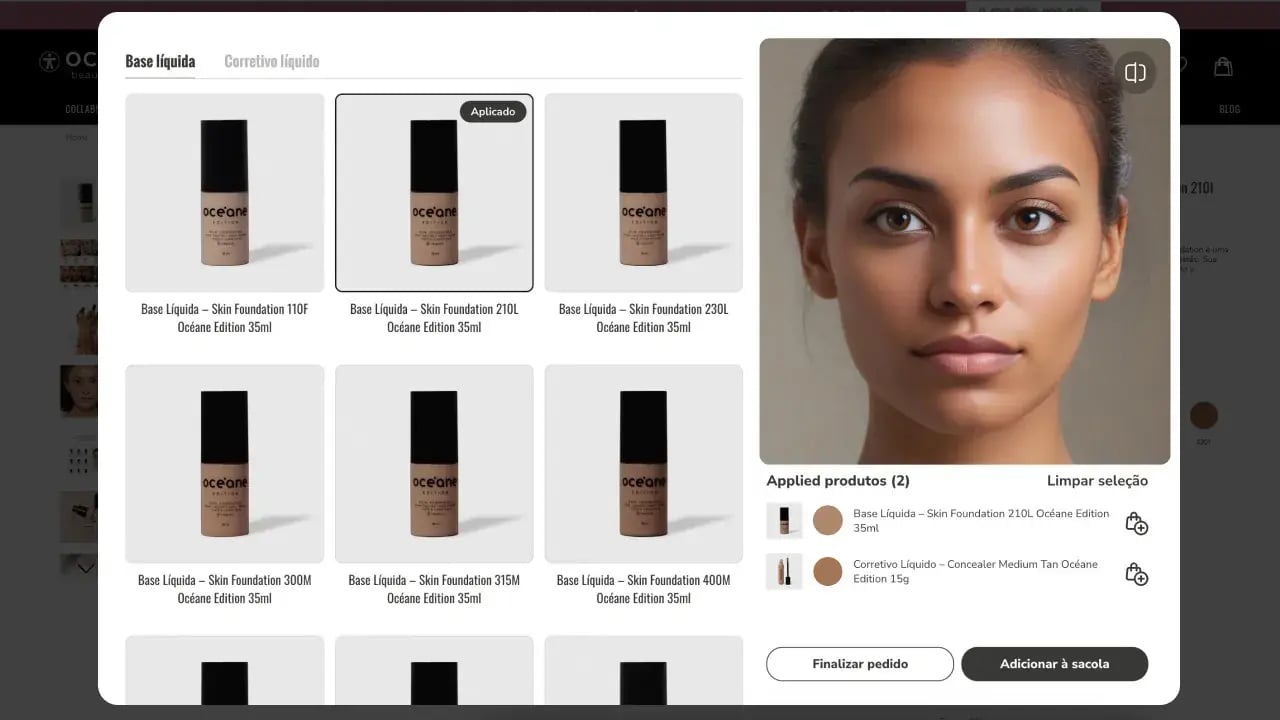
The tech is the floor, not the ceiling. What turns Web AR into revenue is fast load, tight tracking, low-friction interaction, and a reason to share.
Why Web AR is Hard to Build
A working Web AR experience hides a lot of moving parts. The reason teams underestimate the build is that the demo looks simple. Open a camera, slap an effect on a face, render it to a canvas. The hard part is everything that has to keep working when you scale that to real users on real devices.
Three failure modes show up over and over:
- Tracking jitter. Eyes drift, glasses slide off the nose, lipstick bleeds past the lip line. This is what kills conversion in virtual try-on.
- Performance collapse. A demo that ran at 30 fps on a flagship phone drops to 12 fps on a mid-range Android, and users bounce.
- Browser fragmentation. Safari handles MediaStream constraints differently than Chrome, iOS adjusts webcam orientation in ways desktop browsers do not, and WebAssembly SIMD support is uneven.
Each of those problems has a solution. Solving all of them in a single codebase, on a deadline, while shipping new effects on a content calendar, is what makes the build expensive.
What a Great Web AR Experience Needs
Below is a working capability map of what every production Web AR app actually relies on. Treat it as a checklist for either a build-from-scratch plan or a vendor evaluation.
Camera and Input Layer
- WebRTC-based webcam capture with permission handling
- Frame resize and crop logic that survives platform-specific webcam quirks
- Support for image, video file, and external MediaStream inputs (for WebRTC integrations)
Perception Layer
- Real-time face detection and landmark tracking
- 3D face mesh reconstruction for accurate effect anchoring
- Background segmentation for virtual backgrounds and replacement
- Hair, lips, and skin segmentation for beauty and try-on use cases
- Multi-face support if the app handles group selfies or photo booths
Rendering and Effects Layer
- A WebGL or WebGPU rendering pipeline
- An effect format that bundles 3D assets, shaders, scripts, and audio
- Lighting estimation so virtual objects sit naturally on the user
- Support for 3D models, face mesh masks, and overlay 2D layers
Output and Integration Layer
- DOM rendering into a target element
- Photo capture, video recording, and MediaStream output for WebRTC
- Camera lifecycle controls so the app stops the webcam when the user leaves the page
- Bundler support for Webpack, Rollup, Vite, and React, Vue, or Angular projects

Build Path A: Rolling Your Own Web AR Stack
Going DIY means assembling the layers above from open-source pieces and custom code. The typical stack looks like this:
- Vision and ML: TensorFlow.js or MediaPipe for face landmarks; custom or off-the-shelf models for segmentation
- Rendering: Three.js, Babylon.js, or raw WebGL for 3D effects
- Markerless tracking: WebXR Device API on Android Chrome, with fallbacks for iOS Safari, which still has limited WebXR coverage
- Glue code: WebAssembly modules, WebRTC handlers, and a custom effect format
The pros are real. You own the full IP, you can tune every neural net, and there are no licensing fees. The cons are the reason most teams move off this path within a quarter:
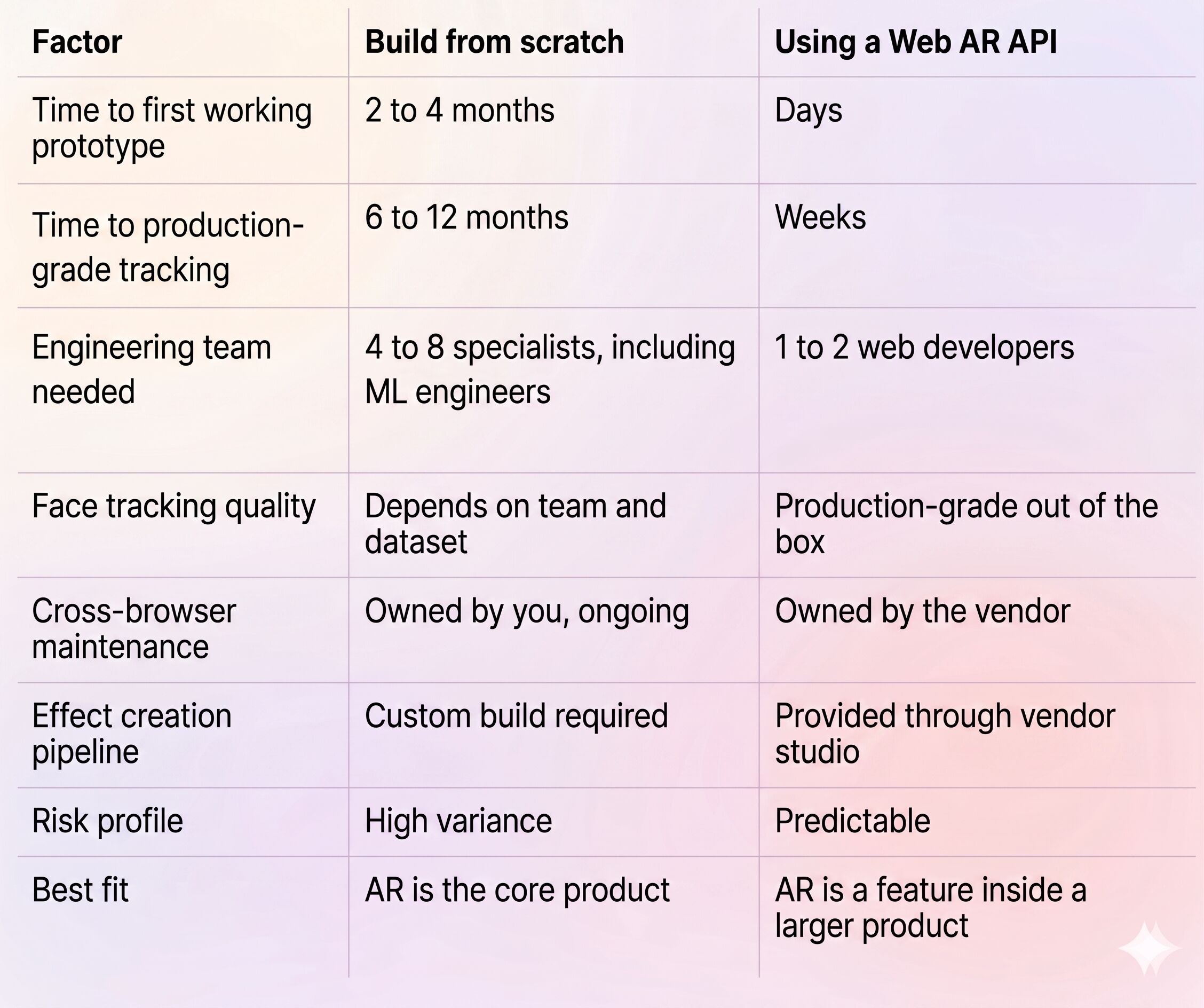
- Time. A serious in-house Web AR stack takes a senior team six to twelve months to reach feature parity with a commercial SDK, and that is before content tooling.
- Tracking quality. Off-the-shelf face landmark models lose stability under occlusion, harsh lighting, or low-end hardware. Beauty try-on and eyewear try-on need much tighter tracking than these models give out of the box.
- Cross-browser pain. iOS Safari, Android Chrome, and desktop Firefox each behave differently for camera access, codecs, and WebGL extensions. Maintenance becomes a permanent tax.
- Content tooling. You will need an in-house effect editor or you will burn engineering time on every new asset.
This path makes sense if AR is your core product and you have a research team. For everyone else, the math rarely works.
Build Path B: Using a Web AR API
A Web AR API ships the engine and the perception layer as a precompiled package. Your team writes JavaScript, points the player at a webcam, and applies an effect. The engine handles WebAssembly loading, GPU rendering, ML inference, and DOM output.
What you trade away:
- Some control over the internal rendering pipeline
- A licensing relationship with the vendor
- The ability to tune tracking models at the weights level
What you get back:
- Production-grade face and segmentation tracking on day one
- A documented effect format with editor tooling
- Cross-browser and cross-device coverage maintained by the vendor
- A faster path from prototype to revenue
Most product teams that are not running a computer vision lab end up on this path, especially when the timeline is measured in weeks.
Build from Scratch vs. Web AR API: Side-by-Side
How to Build Web AR Using Banuba Web AR SDK
The Web AR API from Banuba is a JavaScript and WebAssembly framework that runs entirely in the user's browser. It is delivered as the @banuba/webar npm package and ships with a Player API plus a set of modular tracking and segmentation modules. The SDK runs on HTML5 across Android, iOS, Windows, and Mac, in Chrome, Safari, and Firefox, with no app install required from the end user.
What it replaces inside your stack:
- Face perception: Banuba's Face AR SDK engine running in WebAssembly. The system tracks 68 facial points and reconstructs a 3D face mesh using 37 morphs, with neural networks that adapt to lighting and movement. According to Banuba's internal benchmarks, the engine maintains landmark stability under heavy facial occlusion and across full head rotation.
- Segmentation modules: Background, hair, and lips segmentation are loaded as separate WebAssembly modules, so you only ship the perception you actually use.
- Render and effect engine: A WebGL-based renderer plus an effect format produced in Banuba Studio, which lets non-engineers author filters, makeup, and 3D masks.
- Capture and output: Built-in helpers for photo capture, video recording, and MediaStream export for WebRTC. The SDK can pass the processed video to a WebRTC peer connection, which makes it usable inside video chat and live streaming products.
The SDK uses two flavors of the engine binary: BanubaSDK.wasm for broad compatibility and BanubaSDK.simd.wasm for browsers with WebAssembly SIMD support, which handles the heavier inference work faster.
Integration Overview
Conceptually, integration is a four-step flow:
- Get a client token from Banuba and place it in your build configuration.
- Install @banuba/webar from npm, or load it from a CDN for prototyping.
- Create a Player, attach the modules you need (face tracker, background, lips, hair), and pass it a webcam input.
- Apply effects using the Effect API and render the output into a target DOM node, with optional photo or video capture on top.
The package supports modern bundlers including Webpack, Rollup, and Vite, and integrates with React via the standard useEffect lifecycle. Full implementation guides, including a quickstart repo and React example, live in the Banuba documentation and on the Banuba GitHub organization. Vibe coder can get an LLM-ready documentation here.
API or Custom: How to Decide?
If you are weighing the call right now, run your project through these four questions:
- Is AR central to your product, or a feature? Central means consider the build path. Feature means consider the SDK path.
- What is your timeline? Anything under three months almost always points to an API.
- What tracking quality do you need? If users will do virtual try-on, eyewear, or makeup, you need 3D face mesh tracking that holds up under occlusion. That is hard to build and easy to license.
- Who maintains it next year? If you do not have a dedicated team to chase browser updates and ML model improvements, the vendor path lowers your risk.
If three of the four answers point to "use an API," you have your direction.
Conclusion
Web AR is no longer the experimental path. It is becoming the default for marketing campaigns, beauty commerce, and any product where the install step would kill the funnel. The build-from-scratch path still makes sense for a narrow set of teams with research budgets and deep computer vision benches. Everyone else is better served by a Web AR API that ships the perception engine, the rendering pipeline, and the cross-browser plumbing as a single package.
Banuba's Web AR SDK is built around that thesis. It compresses the parts that take quarters to get right, leaves you in control of the experience, and runs on the browsers your customers already use. If you are scoping a Web AR build, the Web AR SDK is a sensible place to start a 14-day evaluation.
Reference List
Banuba. (n.d.). AI face detection SDK API for business. https://www.banuba.com/ai-face-detection-sdk
Banuba. (n.d.). AR virtual try-on solution for ecommerce. https://www.banuba.com/solutions/e-commerce/virtual-try-on
Banuba. (n.d.). Banuba virtual try-on plugin: AR shopping for eCommerce. https://www.banuba.com/ar-virtual-try-on-plugin
Banuba. (n.d.). Face AR technology. https://www.banuba.com/technology/
Banuba. (n.d.). Web AR SDK platform demo. https://www.banuba.com/webar-sdk
Banuba. (n.d.). How does Banuba SDK enable accurate face landmarks detection for AR filters? https://www.banuba.com/faq/how-does-banuba-sdk-enable-accurate-face-landmarks-detection-for-ar-filters
Banuba. (2024, July 10). Banuba's virtual try-on technology boosts Boca Rosa's pre-launch event sales to over $900,000 [Press release]. Business Wire. https://www.businesswire.com/news/home/20240710823722/en/Banubas-Virtual-Try-On-Technology-Boosts-Boca-Rosas-Pre-Launch-Event-Sales-to-Over-$900000
Banuba. (n.d.). Banuba Web AR SDK common use-cases [Documentation]. https://docs.banuba.com/face-ar-sdk-v1/web/web_tutorials_basic/
Banuba. (n.d.). Banuba Web AR SDK overview [Documentation]. https://docs.banuba.com/face-ar-sdk-v1/web/web_overview/
Banuba. (n.d.). Best 4 face detection SDKs compared: Banuba, OpenCV & more. https://www.banuba.com/blog/best-face-detection-sdks-compared-banuba-opencv-more
Banuba. (n.d.). Case study: How beauty brands profit with virtual makeup try-on (Looké). https://www.banuba.com/blog/case-study-how-beauty-brands-profit-with-virtual-makeup-try-on
Bartlett, G. (2026, February). 8th Wall is now open source: What this means for Web AR in 2026. https://grant-bartlett.com/blog/8th-wall-is-now-open-source-what-this-means-for-web-ar
Fortune Business Insights. (2025). Augmented reality [AR] market size, share & trends report, 2025–2034. https://www.fortunebusinessinsights.com/augmented-reality-ar-market-102553
Global Market Insights. (2025). Mobile augmented reality market size & share report, 2025–2034. https://www.gminsights.com/industry-analysis/mobile-augmented-reality-market
Retail Technology Innovation Hub. (2024, July 11). Boca Rosa teams with Banuba to deliver immersive and interactive shopping experience for customers. https://retailtechinnovationhub.com/home/2024/7/11/boca-rosa-teams-with-banuba-to-deliver-immersive-and-interactive-shopping-experience-for-customers
Virtue Market Research. (2026). Augmented reality market: Size, share, growth, 2025–2030. https://virtuemarketresearch.com/report/augmented-reality-market
-
No. If your team is comfortable with modern JavaScript, npm, and a framework like React, with Banuba, you can stand up a working Web AR experience in days. The harder skill set, computer vision and ML model tuning, is exactly what the SDK absorbs.
-
The Banuba Web AR SDK runs in Chrome, Safari, and Firefox across iOS, Android, Windows, and macOS. It supports Webpack, Rollup, and Vite-based projects, and integrates cleanly with React, Vue, and Angular.
-
With Banuba, a working prototype usually takes a few days. A production deployment with custom effects, analytics, and storefront integration typically takes two to six weeks, depending on scope. Compare that with six to twelve months for a serious in-house Web AR stack.
