

Face tracking on the web used to be a science demo. In 2026, it’s a sales channel. The shift comes from two forces meeting at the same time: AR adoption finally hitting mainstream commerce, and browser technology catching up to what mobile apps could do five years ago.
The numbers tell the story. The global mobile AR market sat at USD 23.2 billion in 2024 and is projected to grow at a CAGR of over 31.3% through 2034, and a meaningful chunk of that growth is browser-based. WebAR is expanding because it lets users open AR content directly in mobile browsers with no install required. On the commerce side, retailers using AR virtual try-ons are seeing 47% higher conversion rates and 35% lower return rates compared to traditional e-commerce. That’s the reason your competitors are likely already piloting it.
Web-based face tracking is the engine behind most of the consumer-facing use cases here: virtual makeup, glasses try-on, photo booths, video conferencing filters, and branded campaigns. The friction is gone. A user clicks a link, grants camera permission, and the experience runs. Let’s explore how you can build it with a Web AR SDK.
[navigation]
Building web-based face tracking means rendering real-time AR effects on a user’s face directly inside a browser, with no app to download. From scratch, this involves training neural networks for face detection, compiling a WebAssembly inference pipeline, handling webcam input across browsers, and rendering effects through WebGL. That work usually takes six to twelve months for a small team. A Web AR SDK ships the full pipeline out of the box: face tracking, segmentation, rendering, and cross-browser support, so a working prototype is achievable in days and a production-grade feature in a few weeks.
TL;DR
- Web AR is one of the fastest-growing slices of AR adoption because it removes the install friction that mobile apps still struggle with.
- Browser-based face tracking is technically demanding. It needs neural network inference, WebAssembly, WebGL rendering, and stable performance across Chrome, Safari, and Firefox.
- Building from scratch typically takes six to twelve months and requires people who understand computer vision, GPU programming, and browser quirks.
- A Web AR SDK collapses that timeline to weeks, with prebuilt face tracking, segmentation modules, and a rendering engine already tuned for browsers.
- Banuba’s Web AR SDK uses 68-point face tracking, runs on WebAssembly with WebGL 2.0, processes everything on-device, and covers glasses, makeup, headwear, hair, and background effects through one JavaScript API.
Why the Web AR Face Tracking Works
The web AR features that actually convert share a few traits. They render in real time, they look believable, and they don’t ask the user to do anything beyond clicking “allow camera.” Two Banuba customers illustrate this well.
Boca Rosa, a Brazilian influencer-led beauty brand, used Banuba’s virtual try-on for a pre-launch event. The event earned over $900,000 in four hours, with 1.1 million viewers, 1.7 million try-on sessions, and 64,413 items sold. The try-on ran in-browser. No app, no download, no friction between curiosity and checkout.
Océane, a Brazilian cosmetics manufacturer, integrated the same web-based try-on for concealers and foundations. Their add-to-cart rate climbed from the 3% industry average to 32%, a tenfold increase, with a third of customers who tried products online sending them to the cart.
What both case studies have in common is the underlying experience pattern. A few specifics worth pulling out:
- Real-time preview. Users see the effect on their own face within a fraction of a second of granting camera access. Anything slower and they bounce.
- Lifelike rendering. Lipstick texture interacts with lighting. Glasses cast shadows. Hair color stays consistent across head movement. This is the difference between “fun gimmick” and “I trust this enough to buy.”
- Stable tracking under real-world conditions. People use webcams in dim apartments, in cars, with hair partly covering their faces. The tracker has to hold the lock anyway.
- Frictionless entry. No app store. No 200MB download. No onboarding. Click, allow camera, done.
- Shareable output. Photo capture and video recording let users post the result to social, which doubles as free marketing.
The technical implication is straightforward. To match this, you need on-device neural inference, a stable face tracker that handles partial occlusion, a renderer that can composite 3D effects at 30 to 60 FPS, and a cross-browser distribution path that works on the devices your users actually have.
Core Capabilities Required to Build Web-Based Face Tracking
A production-grade web face tracking feature is a stack, not a single component. Here’s what has to exist underneath, grouped by capability area.
Detection and tracking layer
- Face detection neural network, optimized for browser inference
- Facial landmark tracking. Banuba uses 68 anchor points for its face tracking model
- Head pose estimation (yaw, pitch, roll) for accurate effect placement
- Multi-face support if your use case includes group experiences or video calls
- Stable lock under occlusion, low light, and rapid head movement
Segmentation layer
- Hair segmentation for hair color and recolor effects
- Lips segmentation for matte and glossy lipstick rendering
- Background segmentation for virtual backgrounds and blur
- Skin segmentation for beauty filters and skin smoothing
Rendering layer
- WebGL 2.0 rendering pipeline for 3D effects
- Real-time shader support for lighting, shadows, and texture interaction
- 3D asset format support (typically glTF for cross-platform compatibility)
- Animation system for blend shapes and rigged effects
Browser and runtime infrastructure
- WebAssembly module for neural network inference
- SIMD acceleration where the browser supports it
- Webcam access through getUserMedia with permission handling
- Frame capture, output to canvas, and DOM rendering
- Photo and video recording APIs for shareable output
Cross-browser compatibility
- Chrome, Safari (desktop and iOS), Firefox, and Edge
- Graceful degradation when SIMD or WebGL 2.0 isn’t available
- Mobile-first performance tuning, since most traffic comes from phones
Privacy and compliance
- On-device processing, no video or biometric data leaving the browser
- GDPR and CCPA-compatible architecture
- Clear permission flows for camera access
That’s a lot of moving parts. Now, let’s look at the two paths to actually shipping it.

Building from Scratch vs Web AR SDK Integration
Now, let’s review and compare two approaches you can choose from while adding Web AR to your project.
Building from Scratch (DIY)
Building this stack yourself is technically possible, and a handful of large engineering organizations have done it. For most teams, the math doesn’t work.
What you’d need on the team
- One or two computer vision engineers with neural network training experience
- A WebAssembly and C++ engineer for the inference pipeline
- A WebGL or graphics engineer for the rendering layer
- A frontend engineer to handle browser quirks, camera permissions, and cross-platform testing
- Access to a labeled face dataset large enough to train a tracker that holds up in real conditions. Banuba’s training set, for context, contains roughly 300,000 faces
Typical phases
- Research and dataset prep (1 to 2 months)
- Model training and evaluation (2 to 3 months)
- Inference pipeline in WebAssembly (1 to 2 months)
- WebGL rendering engine and effect format (1 to 2 months)
- Browser integration, camera handling, and permissions (3 to 4 weeks)
- Cross-browser QA and mobile optimization (1 to 2 months, often longer)
- Ongoing maintenance: browser updates, new device support, model improvements
Risks worth naming
- Performance gaps on iOS Safari. Safari’s WebGL and WebAssembly behavior differs from Chrome. Tuning for one doesn’t guarantee the other works.
- Tracker stability under partial occlusion. Glasses, hair, hands, dim lighting. A model that hits 95% accuracy in a clean dataset can fall apart in production.
- Frame rate regressions. A new browser version or a new mid-range Android phone can drop your FPS by 30%, and you find out from a user complaint.
- Maintenance debt. Browsers ship updates roughly every six weeks. Mobile chipsets vary wildly. You’re now in the business of keeping a computer vision pipeline alive forever.
Pros
- Total control over architecture and effect format
- No external license fees
- Tracker can be tuned to a narrow use case if you only need one effect type
Cons
- Six to twelve months before you have something shippable
- Specialized hires that compete with FAANG salaries
- Long-term maintenance commitment that doesn’t shrink
Using a Web AR SDK
A Web AR SDK is a packaged version of everything in the previous section. The neural networks are already trained. The WebAssembly module is already compiled. The renderer already works in Chrome, Safari, and Firefox. You add a few lines of JavaScript, point it at your effect file, and the camera feed lights up.
Who benefits most from this path
- Product teams that need to ship a feature this quarter, not next year
- Beauty, eyewear, jewelry, and headwear retailers running virtual try-on
- Marketing teams running campaign-driven AR experiences
- Video conferencing and live streaming products adding filters or virtual backgrounds
- Any team without a dedicated computer vision specialist on staff
If you’re weighing which vendor’s SDK fits your tracking requirements, Best Web AR Face Tracking SDKs Compared lines them up side by side.
Tradeoffs to be honest about
- You don’t own the underlying model. If you need a niche capability the SDK doesn’t support, you depend on the vendor’s roadmap.
- Customization happens at the effect layer (which is usually fine), not at the tracker layer.
- License costs are real, though typically far lower than salary plus opportunity cost of building from scratch.
For most product teams, the tradeoff is favorable. You trade some architectural control for a working feature in weeks instead of a long engineering bet.
Build from Scratch vs. Web AR SDK
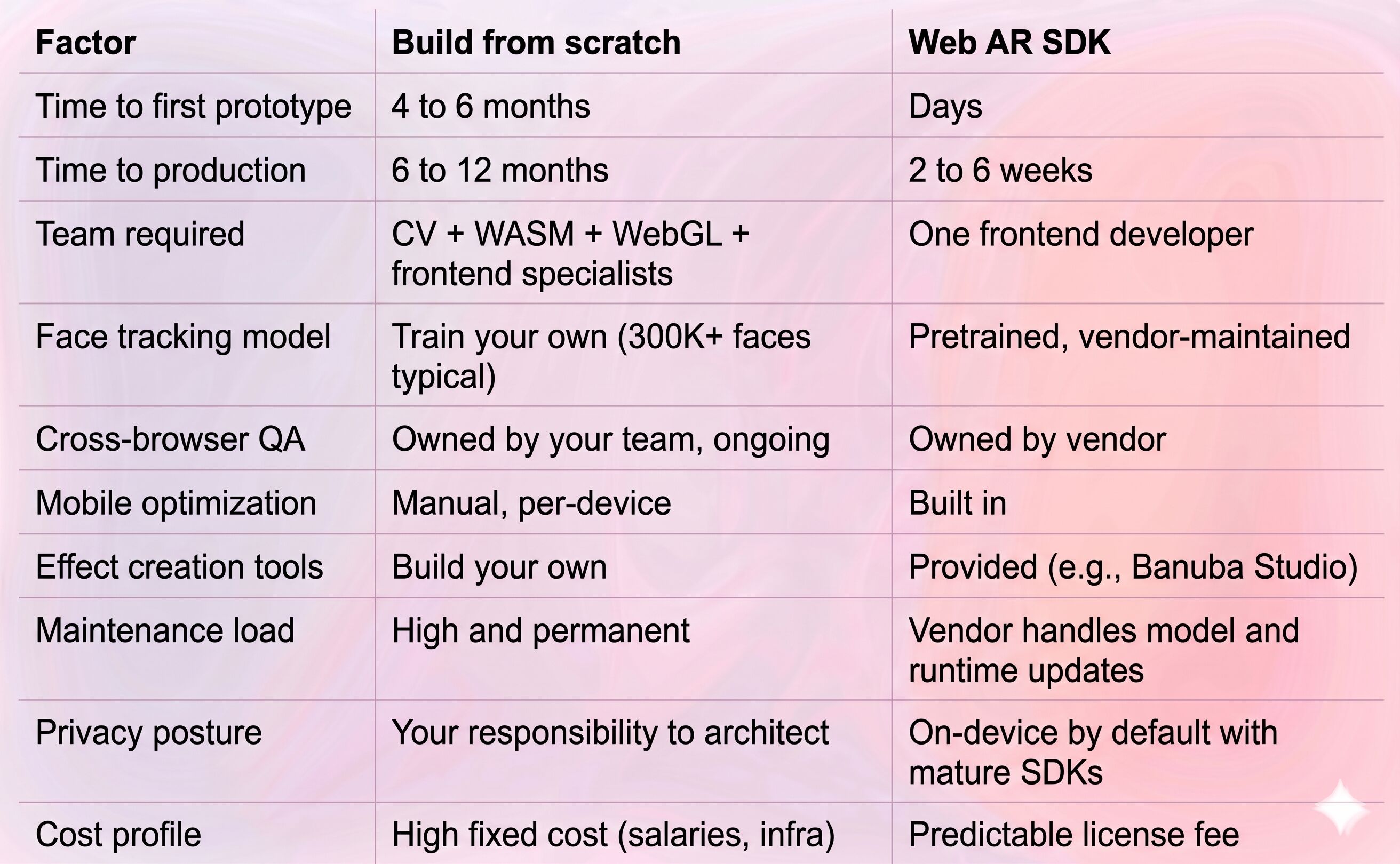
The pattern is consistent. Building from scratch makes sense when face tracking is your core product. For everyone else, every retailer, every video app, every campaign, the SDK path wins.
SDK-focused Implementation: Banuba Web AR SDK
The Web AR SDK from Banuba covers the full browser-based face tracking pipeline. Here’s what it actually includes and what infrastructure it replaces.
What it does
- 68-point face detection and tracking, stable under low light and partial occlusion
- Head pose estimation for accurate 3D effect placement
- Hair, lips, and background segmentation as optional modules
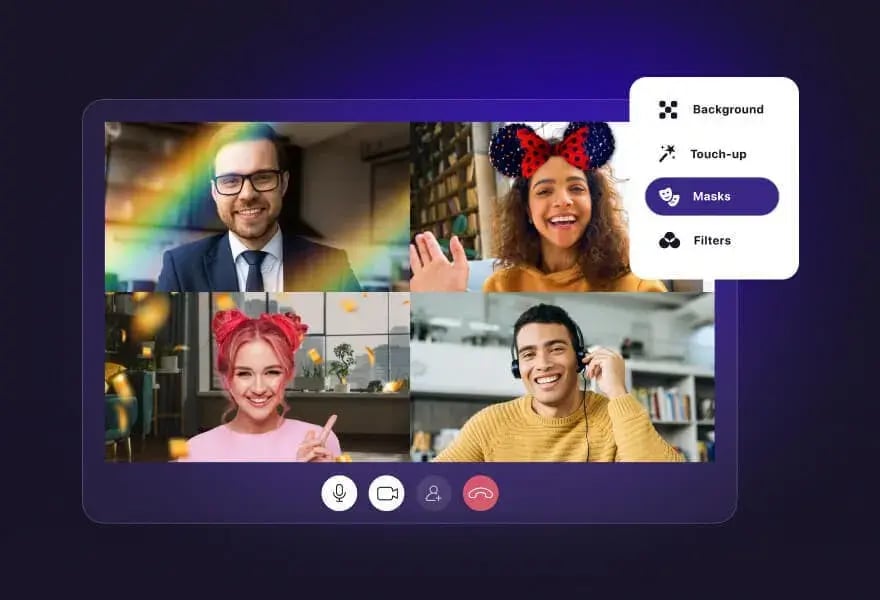
- Real-time rendering of 3D masks, AR makeup, virtual try-on items, and filters
- Photo and video capture from the camera feed
- Multi-face support for group experiences
What infrastructure it replaces
- Face detection and tracking neural networks (Banuba ships pretrained models)
- WebAssembly inference runtime (BanubaSDK.wasm and a SIMD variant for faster modern browsers)
- WebGL 2.0 rendering engine
- JavaScript wrapper handling camera input, DOM rendering, and effect loading
- Cross-browser compatibility layer
Browser and platform support
- Chrome, Firefox, Safari (desktop and iOS), Edge
- Any device with WebGL 2.0 support
- Runs on the user’s device, no server-side processing of video
Privacy architecture
This matters more every year. Banuba’s face tracking does not collect, store, or access user images or video. Processing happens on the user’s device, so no video data is sent to Banuba’s servers. For GDPR- and CCPA-bound projects, that’s the difference between a feature you can ship and one legal blocks.
Effect creation
Effects are built in Banuba Studio (a desktop tool) or imported as glTF assets, then packaged as .zip files, the SDK loads at runtime. This means designers can create new filters, try-on items, or campaign effects without touching the engineering team after initial integration.
No Code Integration Overview
The integration shape looks like this, at a conceptual level:
- Add the Banuba Web AR package to your project (npm or CDN)
- Initialize the Player with your client token
- Load the face tracker module (and any segmentation modules you need)
- Connect the webcam as input
- Apply an effect from your effect library
- Render the output to a DOM element on your page
Distribution is through standard JavaScript channels: npm for production builds, CDN links for prototyping. The SDK handles WebAssembly loading, model warmup, and frame processing internally.
Full implementation guides, sample projects, and platform-specific notes live in the Banuba documentation and on the Banuba GitHub, including a working video-calling sample for reference. For vibe coding enthusiasts, the LLM-focused instructions are available here.
Which Way to Choose: Custom or SDK
If you’re still weighing the two paths, here’s a five-question check that usually settles it.
- Is face tracking your core product, or a feature inside a larger product? Core product means build. Feature means SDK.
- Do you have a CV engineer on staff today? No means SDK, full stop.
- What’s your launch window? Anything under six months means SDK.
- How many effect types do you need? One narrow effect slightly favors a custom build. Multiple effect types (try-on plus filters plus backgrounds) heavily favors an SDK.
- What are your privacy and compliance requirements? A strong privacy posture is faster to achieve with an on-device SDK than to architect from scratch.
If three or more of these points toward the SDK, the path is decided.
Conclusion
Web AR face tracking is one of those features where the gap between “looks easy in a demo” and “works for a million users” is enormous. The neural networks have to be trained, the inference has to run in a browser sandbox, the rendering has to hold 30 to 60 FPS on a five-year-old Android phone, and all of it has to keep working as browsers ship new versions.
Building it yourself is a real engineering project: six to twelve months, a specialized team, and a permanent maintenance commitment. A Web AR SDK shifts that work onto a vendor whose entire product is keeping the pipeline alive. For most teams, that’s the right tradeoff: weeks instead of months and predictable cost instead of open-ended hiring.
The Banuba Web AR SDK is built specifically for this. 68-point face tracking, on-device processing, browser-native rendering, and a track record of powering commerce experiences that move the metrics that matter. If you’re scoping web AR face tracking for a product, it’s worth a closer look. The 14-day trial gets you a working integration before any commitment.
References
Banuba. (2025a). Boca Rosa: Virtual try-on by Banuba helps beauty brand earn $900,000 in 4 hours. https://www.banuba.com/blog/virtual-try-on-helps-beauty-brand-earn-900.000-in-4-hours
Banuba. (2025c). Océane case study: Over 600% of average add-to-cart rate for a Brazilian beauty brand. https://www.banuba.com/blog/oceane-success-story
Banuba. (2025d). TINT helped Océane, a Brazilian cosmetics brand, achieve a record 32% add-to-cart rate. https://www.banuba.com/blog/banuba-helped-oceane-achieve-a-record
Banuba. (2025e). Web AR SDK platform demo. https://www.banuba.com/webar-sdk
Banuba. (2025f). Webcam face tracking: JavaScript and WebGL to power your web app. https://www.banuba.com/blog/javascript-and-webgl-face-tracking-to-bring-augmented-reality-to-the-web
Banuba. (2026a). Banuba SDK Web AR documentation v1.14.1. https://docs.banuba.com/face-ar-sdk-v1/web/web_overview/
Banuba. (2026b). Best Web AR SDKs in 2026. https://www.banuba.com/blog/best-web-ar-sdks
Banuba. (2026c). Face AR technology. https://www.banuba.com/technology/
Global Market Insights. (2025). Mobile augmented reality market size & share report, 2025–2034. https://www.gminsights.com/industry-analysis/mobile-augmented-reality-market
Virtue Market Research. (2024). Augmented reality market: Size, share, growth 2025–2030. https://virtuemarketresearch.com/report/augmented-reality-market
-
If you’re integrating Banuba’s Web AR SDK, no. A front-end developer comfortable with JavaScript and basic WebGL concepts can get a working face tracking integration running in a few days. Building face tracking from scratch is a different conversation, which requires a computer vision specialist and a graphics engineer at minimum.
-
Banuba’s Web AR SDK runs on any browser with WebGL 2.0: Chrome, Firefox, Safari (desktop and iOS), and Edge. It works inside any frontend stack, React, Vue, Svelte, plain HTML, because it’s distributed as a standard JavaScript package via npm or CDN. No native build steps, no platform-specific code.
-
With Banuba, a working prototype usually takes a few days. A production-ready integration with custom effects, your branding, and proper QA across browsers typically takes two to six weeks. Most of that time goes into effect design and frontend polish, not into the face tracking itself.
