

Let's be honest: picking a face detection SDK in 2026 feels a lot like gambling with your product’s performance. Most developers get stuck in a classic "pick your poison" scenario: you either tether your app to a cloud giant and pray for a stable connection, or you wrestle with open-source libraries that eat up months of dev time just to avoid turning a smartphone into a hand-warmer.
Most developers we talk to are hitting the same walls:
- The Lag Factor: Cloud APIs add a half-second "round-trip" delay that kills real-time AR or UI interaction.
- Platform Fragmentation: What works on iOS often lags on mid-range Android or breaks entirely in a Web browser.
- Battery & Heat: Unoptimized SDKs can drain a user's battery in minutes.
- Privacy Debt: Moving biometric data to a server is a potential compliance nightmare.
We’re putting four of the biggest players under the microscope:
- Banuba Face Detection SDK
- OpenCV
- Amazon Rekognition
- Microsoft Azure Face API
If you’re currently shortlisting vendors and don't want to get stuck with a tool that doesn't scale, this breakdown is for you.
[navigation]
TL;DR:
- This article is for senior engineers, technical founders, and product managers choosing a face detection SDK for high-performance mobile or web apps.
- It compares Banuba (on-device specialized SDK), OpenCV (open-source library), and the cloud-based Amazon Rekognition and Microsoft Azure Face API.
- The core tradeoff is between on-device processing with zero latency, offline support, and strong privacy, and cloud intelligence with massive scaling but higher latency and pay-per-call pricing.
- Banuba’s Face Detection SDK is best suited to performance-critical use cases like social media filters, virtual try-ons, and secure fintech onboarding that require 60 FPS tracking, accurate 3D facial mesh, and strict GDPR compliance.
Сomparison Matrix
To truly understand how these tools fit into a production environment, we’ve broken the comparison down into six core pillars. We didn't just look at who has the best math; we looked at who makes your life easiest on a Tuesday afternoon when a build is due.
- Platform Support: In 2026, "mobile-first" isn't enough. We analyzed native support for iOS and Android alongside the stability of wrappers for Flutter and React Native, and how well the engine translates to WebAssembly for browser-based use.
- Performance & Latency: This is the "feel" of your app. We measured frame rates (FPS) and processing time per frame across a range of hardware, from flagship iPhones to budget Android devices, to see where the bottleneck really lies.
- Feature Set: Basic bounding boxes are table stakes now. We looked for "extras" that define modern apps: active/passive liveness checks, emotion and sentiment analysis, age/gender estimation, and the ability to track multiple faces without a performance nosedive.
- Integration Complexity: We estimated the "time-to-hello-world." This covers whether you’re looking at a 15-minute "drag-and-drop" SDK integration or a two-week deep dive into C++ header files and manual memory management.
- Developer Experience & Support: A great tool is useless if the documentation is out of date. We evaluated the quality of guides, the responsiveness of tech support, and whether there’s a living community to help when you hit a fringe-case bug.
- Privacy & Compliance: We analyzed whether each solution operates entirely on-device to eliminate biometric data transit risks or relies on cloud processing, which introduces significant legal and data residency overhead.
- Pricing & Licensing: We stripped back the "Contact Sales" buttons to compare real-world costs: from open-source "free" (which still costs engineering hours) to tiered SaaS models and flat-fee enterprise licenses.
Top 4 Face Detection SDKs: Side-by-Side Overview
We’ve narrowed the field to the four most significant players, Banuba, OpenCV, Amazon Rekognition, and Microsoft Azure, each representing a fundamentally different philosophy toward face detection.
The following breakdown will help you spot the dealbreakers early so you can choose a vendor that actually aligns with your performance needs and scaling costs.
Banuba Face Detection SDK
Banuba Face Detection SDK is a full-scale computer vision laboratory compressed into a 15MB file. While cloud providers treat the face as a static data point, Banuba treats it as a dynamic 3D object. This is a high-performance face detection SDK designed to live on the edge, doing the heavy lifting locally on the user's device without ever needing a server handshake.
Banuba’s secret sauce is its proprietary 3D Face Mesh technology. Unlike standard libraries that track 2D landmarks, Banuba’s engine uses patented 3D math models to track 3,308 facial vertices.
- Extreme Robustness: The SDK is famous for "hanging on" when others fail. It maintains stable tracking at extreme angles (-90° to +90°), in low-light environments, and even with 70% facial occlusion (think masks, heavy glasses, or hands covering the face).
- Segmentations Galore: It goes far beyond the face. It features patented neural networks for body, skin, hair, and even eye segmentation (separating the pupil, iris, and sclera).
- Long-Range Detection: It can detect and track faces at a distance of up to 7 meters, making it viable for "smart mirror" retail setups or security kiosks.
- AI Analytics: Built-in modules for real-time emotion recognition (detecting 6 basic states), age/gender estimation, and even physiological signals like heart rate or tiredness monitoring.
SDK-Level Advantages
- Battery-First Engineering: Because it’s optimized for mobile GPUs, it avoids the "hand-warmer" effect common with unoptimized open-source software.
- Privacy by Design: Since all processing happens on-device, zero biometric data leaves the phone. This makes GDPR compliance a non-issue compared to cloud APIs.
- Cross-Platform Parity: You get the same high-fidelity tracking on iOS, Android, Web (Wasm), Flutter, and React Native.
Developer Experience (DX) & Support
Banuba is built for speed, both in the app and in the dev cycle. It follows a low-code approach where most teams get a working prototype in under 10 minutes and a production-ready feature in about a week.
- Documentation: High-quality, searchable technical guides with clear sample projects on GitHub for every major framework (Native, Flutter, React Native, Unity).
- Support: Unlike open-source tools, you get access to a 24/7 technical support alongside with an active developers community.
- Studio Tools: Developers can use Banuba Studio to create or modify AR assets without writing fresh shaders or complex math from scratch.
Ideal Use Cases & Success Stories
eCommerce and Retail: The goal here is to "wow" customers with ultra-realistic virtual try-ons for makeup, eyewear, headwear, and jewelry. Banuba’s high-precision tracking ensures that a virtual lipstick or pair of glasses stays pinned to the face even when the user moves. A prime example is Boca Rosa Beauty, a Brazilian brand that integrated Banuba’s Virtual Try-On SDK and generated $900,000 in sales in just 4 hours during a single product launch.
Entertainment & Social Media: For apps that rely on engagement, Banuba provides the foundation for viral face filters, background removal, and touchless trigger effects. Chingari, one of the world's fastest-growing short-video apps, integrated the SDK to offer high-end beautification and AR effects, helping them scale to over 30 million downloads while maintaining a highly engaged user base.
Security: When it comes to biometric authentication, accuracy and "liveness" are everything. Banuba’s passive and active liveness checks are used by fintech and KYC platforms to prevent spoofing (like someone holding up a photo or video to the camera), ensuring that the person accessing the account is a live human.
Automotive: Safety in modern vehicles relies on advanced driver monitoring systems (DMS). Banuba’s ability to track gaze, head position, and even pulse in low-light conditions allows auto manufacturers to build features that detect driver fatigue or distraction, even when the driver is wearing sunglasses or moving their head significantly.
Banuba uses a commercial licensing model tailored to the scale of your business. They offer a 14-day full-feature free trial so you can benchmark it against your own hardware before committing.
If you only need to process static images in a backend batch (e.g., sorting a million archival photos) and don't care about real-time interaction or privacy-on-the-edge, you might consider other options.
OpenCV
OpenCV is the industry’s "Swiss Army Knife." It’s an open-source library that provides the raw building blocks for computer vision. Unlike managed SDKs, OpenCV gives you the code, but the responsibility for optimization, platform porting, and feature assembly rests entirely on your shoulders.
Technical Overview & Feature Set
OpenCV isn't a single "tool" but a collection of modules. For face detection, it primarily offers Haar Cascades (lightning-fast but notoriously inaccurate) and the DNN (Deep Neural Network) module, which allows you to run pre-trained models like ResNet-10 or SSD.
- Core Features: Robust face detection, basic recognition, and landmark detection (via the facemark API).
- Extended Analytics: You won't find age, gender, or emotion recognition "out of the box." You must manually source, load, and optimize separate Caffe or TensorFlow models to handle these tasks.
- Liveness: There is no native liveness detection. You have to build your own "blink detection" or "head movement" logic from scratch.
Platform & Performance
- Platform Support: Native C++ core means it runs everywhere (Windows, Linux, Android, iOS). However, for Flutter and React Native, you’ll be writing custom JNI or Native Module wrappers, as there is no official "plug-and-play" plugin.
- Performance: On a desktop, it’s a beast. On mobile, it’s a gamble. Without heavy manual optimization (like using OpenCL or Halide), running a modern DNN model can drop your frame rate to 10–15 FPS and significantly drain the battery.
Developer Experience & Integration
- Integration Complexity: High. Expect a "Lego set" experience. You’ll need to handle camera frame conversions, memory management, and multi-threading yourself. A basic production-ready implementation usually takes weeks, not days.
- Support: No helpdesk. You rely on documentation that is often fragmented across versions (OpenCV 3 vs. 4) and a massive but purely community-driven ecosystem on Stack Overflow.
Pricing & Licensing
- Model: Completely Free (Apache 2 License for version 4.5+).
- The "Hidden" Cost: While the software is $0, the engineering hours required for maintenance, bug fixing, and hardware optimization often make it more expensive than a commercial SDK in the long run.
It’s a perfect choice for academic research, low-budget MVPs where performance isn't critical, or server-side batch processing where you have unlimited CPU power and time. If you need 60 FPS, reliable liveness detection, or a quick time-to-market, the DIY nature of OpenCV will likely become a bottleneck.
Amazon Rekognition
Amazon Rekognition is the heavyweight champion of cloud-based computer vision. It is built for massive scale and "big picture" intelligence, offloading all the heavy lifting to AWS servers. If your goal is to analyze millions of stored images or search through a celebrity database, this is your primary contender.
Technical Overview & Feature Set
Rekognition isn't a traditional SDK that sits on your device; it’s a fully managed API. You send an image or video to the cloud, and it returns a JSON response with high-level metadata.
- Beyond Detection: It offers a vast feature set including sentiment detection (8 emotions), age range estimation, and celebrity recognition.
- Liveness: It features a managed Face Liveness tool that detects presentation attacks (printed photos, masks) and sophisticated digital injection (deepfakes).
- Massive Scaling: Its "Face Collections" feature allows you to index and search millions of faces with near-instant matching across an entire database.
Platform & Performance
- Platform Support: Technically any platform with internet access. AWS provides official SDKs for iOS, Android, and Web, plus comprehensive support for Flutter and React Native via AWS Amplify.
- Performance & Latency: This is Rekognition’s "Achilles' heel." Since it’s cloud-bound, latency is entirely dependent on network speed. You are looking at hundreds of milliseconds per frame. It is not suitable for 60 FPS real-time AR or smooth face tracking in a camera preview.
Developer Experience & Integration
- Integration Complexity: Low to Moderate. For developers already in the AWS ecosystem (using S3 or Lambda), integration is seamless. The pre-built UI components for Liveness significantly speed up implementation.
- Support: Top-tier. You get enterprise-grade documentation, 24/7 technical support (on paid tiers), and a massive global developer community.
Pricing & Licensing
- Model: Pay-as-you-go. You pay per image analyzed ($1.00 per 1,000 images for most tasks) and per minute of video.
- Free Tier: 12-month free trial allowing 5,000 image analyses per month.
- The Catch: Costs can skyrocket if you are processing high-frequency video streams or live camera feeds, as every "frame" sent to the cloud is a billable transaction.
It’s ideal use cases include user onboarding (KYC), searchable media libraries, digital asset management, and "smart home" alerts where a 1–2 second delay is acceptable. If your app must work offline or requires real-time interaction, Rekognition is an immediate "no."
Microsoft Azure Face API
Microsoft Azure Face API is the "enterprise-first" choice for organizations already deep within the Microsoft ecosystem. It prioritizes compliance, responsible AI, and seamless integration with other Azure Cognitive Services. Like Amazon, it is primarily a cloud-driven solution, though it offers more flexibility for hybrid deployments through Docker containers.
Technical Overview & Feature Set
Azure provides a sophisticated suite of algorithms that go beyond simple detection to offer high-level identity management.
- Feature Scope: It handles face verification (1:1), identification (1:N), and grouping similar faces. It excels at detecting accessories (glasses, masks, headwear) and occlusions.
- Responsible AI & Limitations: In 2026, Microsoft remains strict about its "Responsible AI" policy. Features like emotion, gender, and age detection are gated or retired for most users to prevent bias, requiring special application and approval for use.
- Liveness: Azure offers a dedicated Face Liveness feature specifically designed for secure onboarding (KYC). It’s highly rated for its ability to distinguish between a real person and a high-resolution spoof or 3D mask.
Platform & Performance
- Platform Support: Strong native SDKs for iOS, Android, and Web (JavaScript). While it lacks the "plug-and-play" variety of mobile-specific wrappers found in niche SDKs, it is easily accessible via REST APIs for Flutter and React Native.
- Performance & Latency: As a cloud service, it faces the same hurdles as AWS: latency is dictated by the user's internet connection. However, Azure is unique in offering Docker containers, allowing you to run the Face API on-premises or at the "edge" to reduce latency, provided you have the infrastructure to host it.
Developer Experience & Integration
- Integration Complexity: Low for cloud-only calls; high for containerized deployments. The Azure Vision Studio allows developers to test features in a "no-code" sandbox before writing a single line of implementation.
- Support: Exceptional. Microsoft’s documentation is frequently cited as the gold standard for clarity. Managed customers get direct access to engineering teams, and the compliance documentation (GDPR, HIPAA, ISO) is the most comprehensive in the industry.
Pricing & Licensing
- Model: Tiered per 1,000 transactions.
- Free Tier: Generous "F0" tier offering 30,000 transactions per month (limited to 20 transactions per minute).
- Standard Tier: Starts around $1 per 1,000 transactions, with costs dropping significantly as you hit higher volumes (e.g., $0.40 for 100M+ transactions). Liveness detection is priced separately (around $15 per 1,000 sessions).
Azure is a top choice for enterprise security, touchless access control in corporate offices, and identity verification for highly regulated industries like banking and healthcare. This solution is not suitable for startups that require “fun” features such as emotion or gender detection, or for developers building real-time social applications that require latency below 50 ms.
Best Face Detection SDKs at Glance
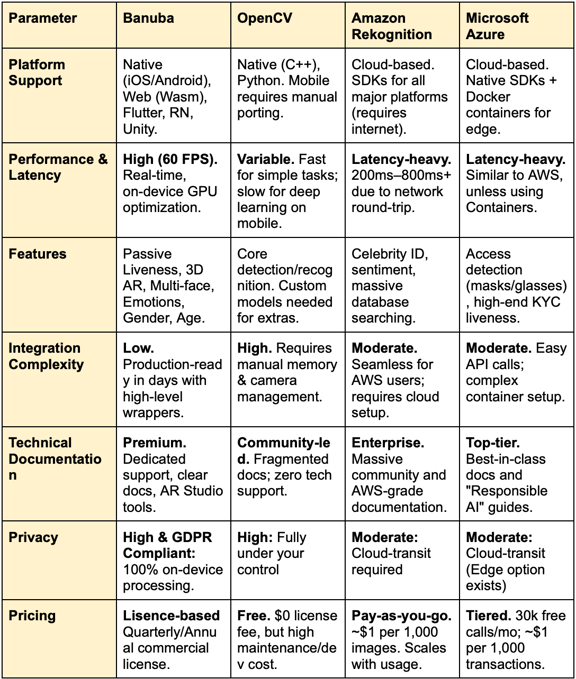
To wrap things up, here is how the four solutions stack up across the seven core pillars. This comparison table highlights the fundamental divide between specialized on-device performance and general-purpose cloud intelligence.
Summary
OpenCV remains the go-to for cash-strapped research teams with heavy C++ expertise who don't mind long development cycles, while the cloud giants, Amazon Rekognition and Azure Face API, are best suited for enterprise-scale back-office processing where a 500ms network delay won't break the user experience.
For teams prioritizing user experience, Banuba is the definitive choice. It is a versatile, enterprise-grade powerhouse that scales from agile startups to global brands like Gucci and Samsung. By processing everything on-device, it eliminates the "lag" that kills engagement and bypasses the massive compliance headaches of moving biometric data to a server. If your roadmap includes real-time AR, 60 FPS tracking, or secure mobile liveness, Banuba offers the most robust, performance-ready solution available.

-
The official technical documentation for Banuba Face AR SDK is available online and includes requirements, setup instructions, and configuration details:
- Banuba Face AR SDK iOS documentation
- Banuba Face AR SDK Android documentation
- Banuba Face AR SDK Flutter documentation
- Banuba Face AR SDK React Native documentation
- Banuba Face AR SDK Web documentation
- Banuba Face AR SDK Unity documentation
- Banuba Face AR SDK Desktop documentation
This Banuba Face AR SDK documentation should be your primary reference during integration.
-
You can access official integration code samples for the Banuba Face AR SDK on GitHub. Banuba provides platform-specific examples to help you integrate faster:
- Banuba Face AR SDK iOS integration code sample
- Banuba Face AR SDK Android integration code sample
- Banuba Face AR SDK Flutter integration code sample
- Banuba Face AR SDK React Native integration code sample
- Banuba Face AR SDK Desktop integration code sample
- Banuba Face AR SDK Web integration code sample
- Banuba Face AR SDK Unity integration code sample
These Banuba Face AR SDK repositories include setup instructions and minimal working examples for quick deployment.
-
Yes. The Banuba Face AR SDK includes an LLM-friendly documentation file designed for AI-assisted development and internal knowledge systems:
This structured Banuba Face AR SDK text file can be used with AI tools to streamline onboarding and developer workflows.
-
The Banuba Face AR SDK provides official cross-platform plugins to simplify integration into hybrid applications:
These Banuba Face AR SDK plugins are maintained by Banuba and support faster implementation for cross-platform apps.
-
The primary decision is between on-device and cloud-based processing. For real-time features like AR filters or instant UI feedback, prioritize on-device SDKs that offer 30–60 FPS on mobile hardware. Key technical benchmarks include occlusion tolerance (the ability to track faces behind masks or glasses), landmark accuracy (3D mesh vs. 2D points), and cross-platform parity to ensure a consistent experience across iOS, Android, and Web.
-
Pricing generally follows three models:
- Commercial Subscriptions (SaaS). Often used for on-device SDKs, where you pay an annual or monthly fee based on feature sets and Monthly Active Users (MAU).
- Pay-per-Transaction. Common for cloud APIs (AWS/Azure), where you are billed per 1,000 images or video minutes processed.
- Open Source. No licensing fees (e.g., OpenCV), but high "hidden costs" in the form of engineering hours for maintenance and hardware optimization. -
Scalability depends on your architecture. If you need to scale user engagement (filters, live effects), an on-device SDK like Banuba is best because it offloads all compute costs to the user's device, keeping your server costs at zero as you grow.
