

Flutter went from cross-platform underdog to mainstream production stack in five years. By 2026, more than 26,000 companies were running Flutter in their application development pipelines, with the United States, India, and Brazil leading adoption. Roughly 46% of mobile developers reach for Flutter as their cross-platform framework of choice. Google Pay rebuilt itself on Flutter, BMW shipped its My BMW app on Flutter across 30+ markets, and Toyota selected Flutter for the in-car infotainment system in the 2026 RAV4.
That momentum collides with a separate curve. AR is no longer a side feature. Fortune Business Insights values the combined AR/VR market at $40.76 billion in 2026, climbing toward $441.51 billion by 2034 at a 34.69% CAGR. Mobile AR alone is projected at roughly $36 billion in 2026. Gaming pulls a big share, but social, eCommerce try-on, and live-chat apps are catching up fast.
For a Flutter team, the pressure is simple: users now expect AR filters, virtual makeup, and background replacement in any camera-driven app. Building those features twice (once for iOS, once for Android) defeats the whole reason you picked Flutter. That is why first-party Flutter SDKs for AR became a real category rather than just a workaround.
Keep reading to figure out how to build Flutter AR features with an SDK and which way to choose.
[navigation]
Building Flutter AR features means wiring face tracking, real-time rendering, neural networks, and a media pipeline into a Dart codebase that runs cleanly on both iOS and Android. Coding that stack from zero usually burns six to twelve months of senior engineering time. A Flutter AR SDK like Banuba ships those layers as a ready-to-plug package, so teams can launch face filters, virtual try-on, AR backgrounds, and beauty effects in days rather than quarters.
TL;DR
- Flutter is now the most popular cross-platform framework, used by 46% of mobile developers worldwide and adopted by giants like BMW, Google Pay, Nubank, and Alibaba's Xianyu.
- The global AR market is projected at $40.76 billion in 2026 and on track to $441 billion by 2034.
- Building Flutter AR from scratch means juggling platform channels, native plugins, ML models, GPU rendering, and lighting edge cases. Most teams underestimate the engineering load.
- An AR SDK with a first-party Flutter plugin handles the heavy lifting: face tracking, segmentation, effect rendering, and asset management, all behind a Dart API.
- Banuba's Face AR SDK ships an official banuba_sdk plugin on pub.dev, supports 97% of iOS and 80% of Android devices, and powers production apps with tens of millions of users.
- Building Flutter AR features with Banuba’s SDK can reduce development time by at least 50%.
Why Apps with AR Work?
Picking apart winning AR experiences reveals the same pattern: the AR layer must feel native, respond instantly, and withstand poor lighting. Three Banuba success stories give a clear look at why these apps keep users engaged.
Bermuda — random video chat with 20M+ installs
Bermuda is a global random chat app where strangers connect by video. The team integrated Banuba's Face AR SDK to add face filters, beauty touch-up, background replacement, and color LUTs. The results: over 4 billion conversations, 20 million installs, and roughly 15 million Banuba feature launches every month. Tracking stays stable on the low-end Android phones common in their global markets, which is why session lengths held up at scale.
Chingari — 30M downloads in 90 days
When TikTok was banned in India, Chingari moved fast to fill the gap. Banuba's Video Editor and Face AR tooling powered the app's content creation, including Indianized AR filters, beautification, and AR masks tuned for the local audience. Chingari hit 550,000 downloads in ten days, 30 million in three months, raised $88M+ in funding, and held a 4.5/5 rating across both stores.
Vroom — video conferencing with 30% MAU lift
A video conferencing app called Vroom added Banuba face filters and beauty touch-up. After the launch, the platform reported 30% more monthly active users and 54% more total active users. The takeaway: AR is no longer just for entertainment apps. Even professional video tools now benefit from filters that hide camera anxiety and lift engagement.
What ties these examples together?
- Real-time response. Filters lock onto the face with no visible lag, even when the user moves or rotates.
- Lighting tolerance. The tracker holds up indoors, outdoors, and in poor light, where most lightweight libraries break down.
- Cross-platform parity. iOS and Android users get the same effect quality.
- Low battery cost. Users can record or chat for long sessions without watching their battery die.
- Rich asset libraries. None of these teams built every effect from scratch; they pulled from a library of pre-built filters and customized what they needed.
Core features needed to build Flutter AR
If you want to ship something that holds up against Snapchat, TikTok, or YouCam, your Flutter app needs every layer below to work in sync.
Foundation capabilities
- Camera control: open, close, flip, flashlight, photo capture
- Real-time video pipeline with stable 30 FPS minimum
- 3D rendering engine (typically OpenGL ES or Metal)
- Neural network runtime for on-device inference
Face and body intelligence
- Face detection that survives partial occlusion and head rotation
- Face tracking with anchor points for precise effect placement
- Multi-face support for group filters
- Background segmentation for virtual environments
- Hand tracking for jewelry try-on or touchless interfaces
Creative tools
- 3D and 2D filter rendering
- Beautification and skin smoothing
- Virtual makeup with realistic blending
- Background replacement (still image, video loop, or "weatherman" overlay mode)
- Color LUTs and stylistic filters
- Triggered animations (smile, blink, mouth open)
UX and integration patterns
- Real-time preview that does not stutter
- Effect switching with no visible reload
- Asset hot-loading from local files or cloud delivery
- Export pipelines for video and still images

Ways to Add Flutter AR Features
There are two ways to add AR features to your Flutter application. Let’s dive into these two paths.
Building Flutter AR from scratch
Going DIY means treating Flutter as the UI shell and dropping into native land for everything that touches the camera or GPU.
Typical stack
- Native modules in Swift/Objective-C and Kotlin/Java to access camera, GPU, and ML runtimes
- Method channels and platform views to bridge Flutter and native code
- ARKit (iOS) and ARCore (Android) for foundational tracking, plus custom face mesh logic
- TensorFlow Lite or Core ML for neural network inference
- Custom OpenGL or Metal shaders for effect rendering
- Asset pipelines for 3D models, textures, and animations
What you actually have to solve
- Face detection that works at extreme angles and in low light
- Tracker stability when the user moves quickly or partially covers their face
- Memory and GPU budget tuning for mid-range Android devices
- Background segmentation accurate enough that hair edges do not flicker
- Performance parity between iOS and Android renders
- A way to update effects without shipping a new build
Pros and cons of building from scratch
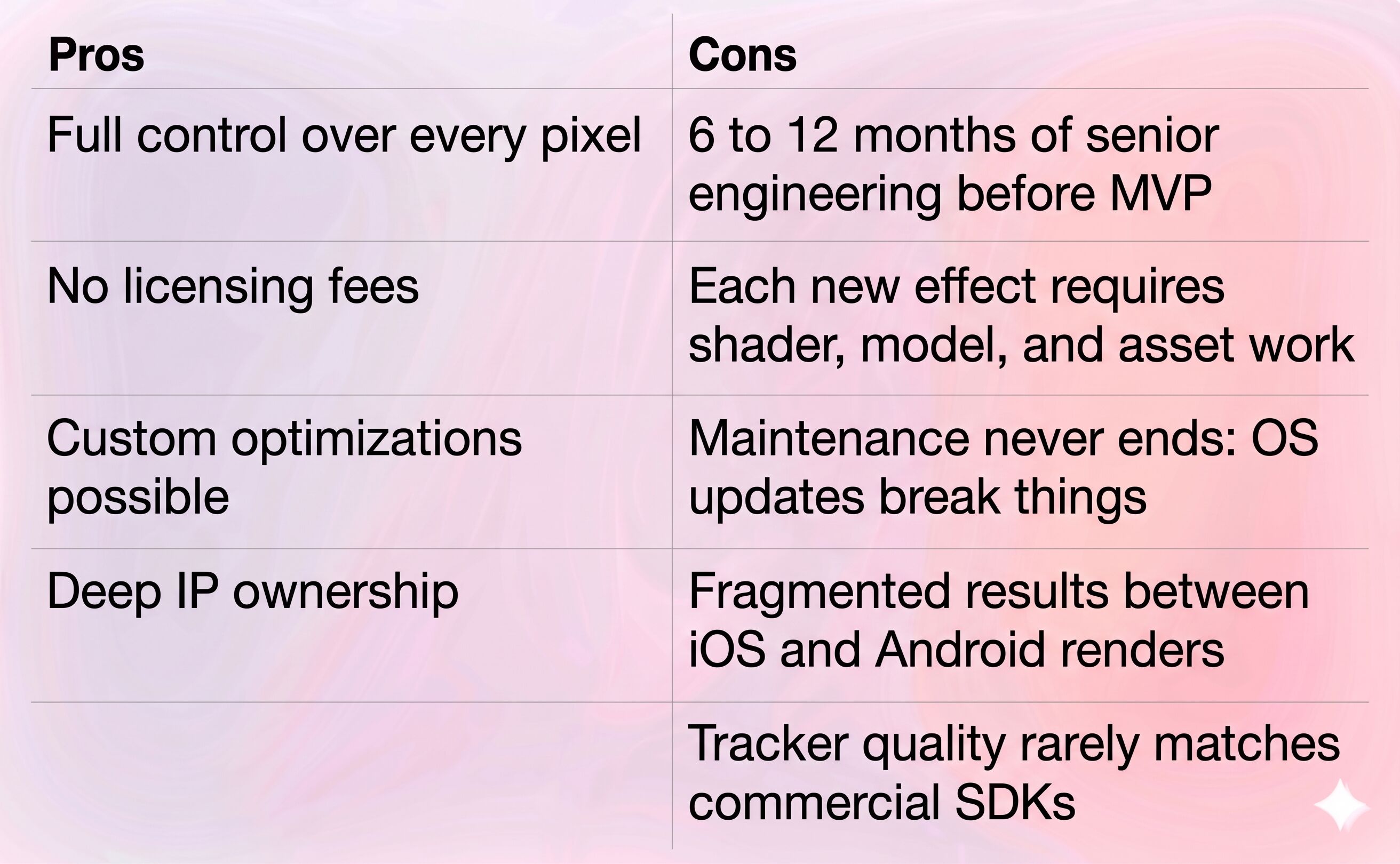
This path makes sense only if AR is your core IP and you have the engineering depth to staff a dedicated team for years. For most product teams, the cost-benefit math does not work.
Using a Flutter AR SDK
An SDK is a packaged toolkit. For Flutter AR, that means a plugin you pull from pub.dev (or a private repo) that exposes camera control, face tracking, effect loading, and rendering through a clean Dart API. The native heavy lifting happens behind the plugin boundary, so your Flutter team writes Dart, not Swift or Kotlin.
Why teams pick this path
- A single integration unlocks face tracking, segmentation, beauty, AR backgrounds, and effects.
- The SDK vendor handles tracker accuracy, neural network optimization, and OS compatibility.
- New effects can be hot-loaded as asset bundles without an app update.
- Cross-platform parity is built in: same plugin, same effect, same look on iOS and Android.
Tradeoffs to be honest about
- You depend on the vendor's roadmap. Choose one with strong cross-platform commitment.
- Licensing has a cost. For commercial use, expect a per-platform or per-feature pricing model.
- Deep custom tracking logic may need cooperation from the vendor.
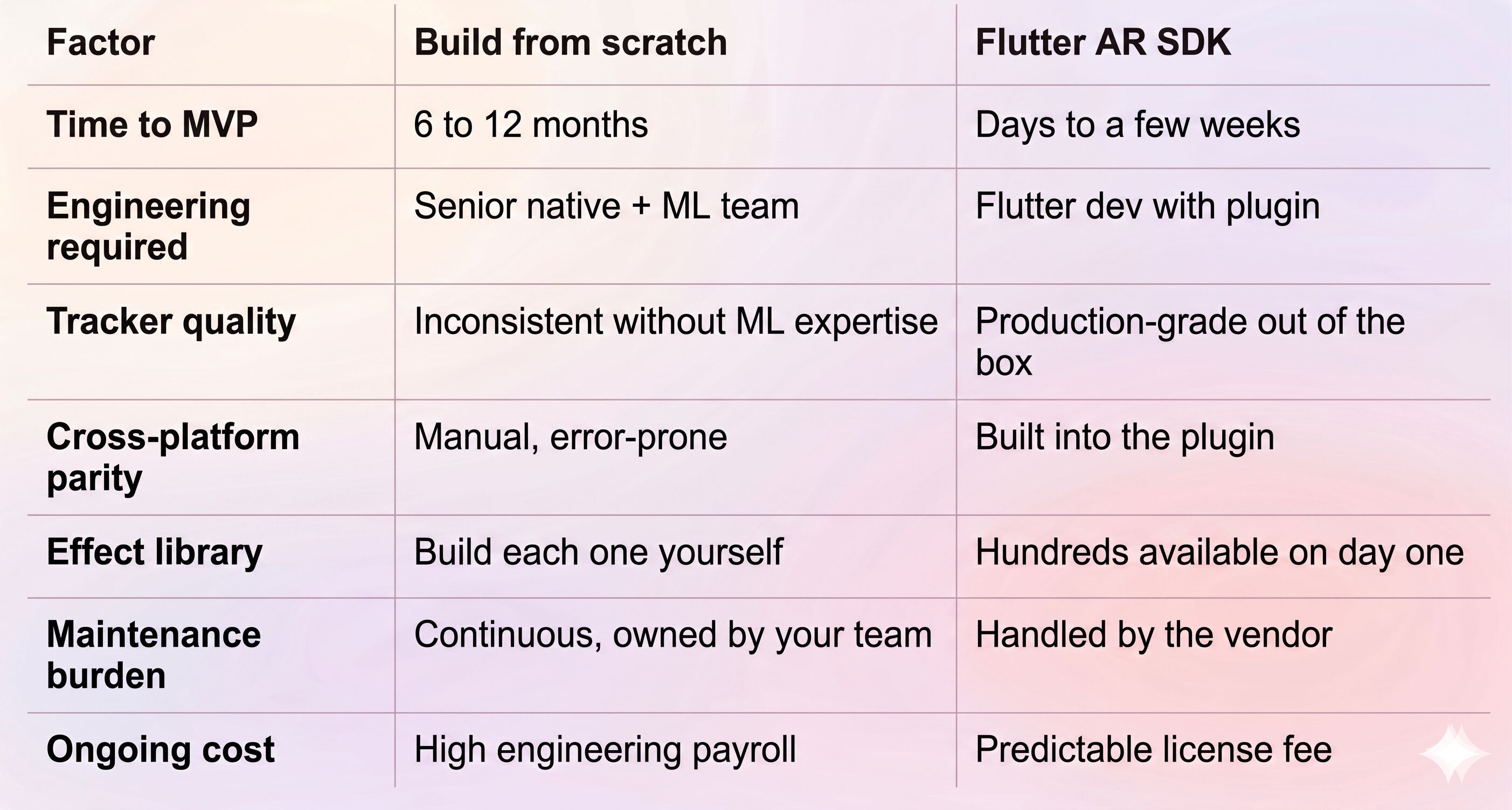
Custom vs. Flutter AR SDK at a Glance
Flutter AR Features Implementation with Banuba
Banuba is a computer vision company that has been building face AR technology since 2016, with cross-platform compatibility baked into the product line from day one. Banuba’s Flutter AR plugin sits on top of the same Face AR engine that powers its native iOS, Android, Web, and Unity SDKs, so Flutter teams get the full feature set rather than a stripped-down wrapper. The engine itself runs on patented Face Kernel technology, which constructs a 3D head model directly from the camera feed instead of first inferring 2D landmarks and lifting them to 3D. Skipping that intermediate step is what holds the tracker steady under poor lighting, extreme angles, and partial occlusion.
Hard numbers, not slogans
- Tracks 68 facial anchor points and reconstructs a 3D face mesh with up to 3,308 vertices using 37 morphs.
- Holds tracking under 70% facial occlusion, at distances up to 7 meters, and through full 360-degree camera rotation, per Banuba's 2025 internal benchmarks.
- Supports iOS 13+ and Android 8.0+, covering 97% of iOS devices and 80% of Android devices in the field.
- Includes 1,000+ ready-made effects in the Asset Store, plus Banuba Studio for building custom filters.
- Trusted by Samsung, Gucci, and 100+ companies across eCommerce, social, gaming, and conferencing.
"Banuba's Face AR SDK provides developers with high-fidelity face tracking and AI-driven effects optimized for Flutter. It's designed to streamline AR app development, letting you focus on crafting interactive, expressive, and socially engaging applications without worrying about the underlying complexity." — Dmitry Ogievich, CEO, Banuba
What the Banuba Flutter Plugin Replaces
Pulling the official banuba_sdk Flutter plugin onto your project replaces a long shopping list of components you would otherwise build:
- Native iOS and Android camera modules
- Face detection and tracking ML pipelines
- Background segmentation models
- Real-time GPU rendering layer for 3D effects
- Multi-face logic
- Effect loading, switching, and hot-update infrastructure
- Beauty processing, virtual makeup, and color grading
- Asset format and packaging (effects ship as .zip resources)
No Code Integration Overview
Conceptually, hooking up Banuba on Flutter is a four-step flow:
- Request a 14-day trial token from Banuba.
- Add the plugin to your Flutter project, or start from Banuba's sample project on GitHub.
- Drop in your token and connect the plugin to your app.
- Launch on a device and start building.
Distribution channels:
- iOS: CocoaPods (the plugin handles the pod automatically)
- Android: Maven via the Banuba custom repo
- Flutter: banuba_sdk package on pub.dev
- Source samples: Banuba's GitHub organization, including the quickstart-flutter-plugin repo and the broader Banuba GitHub collection
Full integration guides, API reference, and effect format docs live at https://docs.banuba.com. Treat that as the source of truth for the implementation steps. For vibe coders, there’s an LLM-adapted guide available.
A Simple Flutter AR Decision Framework
When teams ask whether they should write Flutter AR themselves or pull in a Flutter AR SDK, the answer usually comes down to four questions:
- Is AR your core IP, or a feature? Core IP justifies a custom build. A feature does not.
- What is your time-to-market window? Under six months pushes you toward an SDK. Open-ended timelines allow custom work.
- Do you have ML and graphics engineers in-house? Without them, custom face tracking is a multi-year effort.
- How important is cross-platform parity? If iOS and Android users must see identical results, an SDK with first-party Flutter support gets you there faster.
Three "yes-to-SDK" answers out of four usually settle the call.
Conclusion
Flutter AR is no longer experimental. It is what users expect from any modern camera-driven app: filters that lock on instantly, backgrounds that swap cleanly, and beauty that looks natural. Building that stack from zero pulls senior engineers off product work for a year or more. A first-party Flutter SDK collapses that effort into days of integration plus the time you actually spend on creative direction.
Banuba's Face AR SDK fits this brief tightly. It ships an official Flutter plugin, runs on patented Face Kernel tracking, supports the devices your users actually own, and has production credibility from apps with tens of millions of installs. If you are weighing the build-versus-SDK call for your Flutter app, the trial token is the cheapest way to settle it: pull the plugin, ship a working face filter to a real device, and decide from there.
References
ABI Research. (2026, February 3). Augmented reality (AR) market breakdown: Four big trends from 1Q 2026 forecasts. https://www.abiresearch.com/blog/augmented-reality-market-trends
Banuba. (n.d.). Augmented reality (AR) SDK software for Android & iOS. https://www.banuba.com/augmented-reality-sdk
Banuba. (n.d.). Face AR technology. https://www.banuba.com/technology/
Banuba. (2022, May 26). 15 million AR engagements: How Face AR SDK helped Bermuda thrive. https://www.banuba.com/blog/bermuda-face-ar-sdk-case
Banuba. (2025, January 13). How Indian social network got 30M downloads with Video Editor SDK. https://www.banuba.com/blog/video-editor-with-animation-effects-for-chingari-app-case-study
Banuba. (n.d.). banuba_sdk Flutter package. https://pub.dev/packages/banuba_sdk
Banuba. (n.d.). quickstart-flutter-plugin [GitHub repository]. https://github.com/Banuba/quickstart-flutter-plugin
Fortune Business Insights. (2026). Augmented reality and virtual reality market size, share & industry analysis report. https://www.fortunebusinessinsights.com/industry-reports/augmented-reality-and-virtual-reality-market-100117
Imagine.io. (2025, September 30). Augmented reality (AR) trends and future outlook: Key statistics you can't ignore. https://resources.imagine.io/blog/2025-ar-trends
Stack Overflow. (2023). Cross-platform mobile frameworks used by software developers worldwide [Statista dataset]. https://www.statista.com/statistics/869224/worldwide-software-developer-working-hours/
Very Good Ventures. (2026, February 24). Top companies using Flutter in 2026 — Enterprise examples & case studies. https://verygood.ventures/blog/top-companies-using-flutter/
6sense. (2026). Flutter — Market share, competitor insights in application development. https://6sense.com/tech/application-development/flutter-market-share
-
Not with a first-party plugin. A mid-level Flutter developer can integrate the banuba_sdk package, initialize it with a client token, and render a working face filter without touching ARKit or ARCore. Deeper customization (custom shaders, branded effect bundles) is where AR experience pays off, but it is not required for an MVP.
-
The plugin runs on iOS 13+ and Android 8.0+, which covers 97% of iOS and 80% of Android devices. The same Banuba Face AR engine is also available natively for iOS, Android, Web (HTML5/WebGL 2.0+), Windows, macOS, Unity, and React Native. Same effects, same tracker, same look across all of them.
-
For a basic face filter app, integration time runs from a few hours for a proof of concept to one or two weeks for a polished feature with custom UI, asset switching, and recording. Banuba's own benchmarks for the Camera SDK come in under one hour for the core integration. Compare that to six to twelve months of native development for an equivalent custom build.
