
Key takeaways
- VROOM is a professional video conferencing app
- It used Banuba's virtual backgrounds and face touch-up to improve user experience
- VROOM gained 30% more MAUs and 54% more sign-ups after integrating Banuba's technologies.
Client
True Digital Group is a Bangkok-based multinational corporation on the cutting edge of technology. Its interests range from e-learning and telehealth to internet of things and cybersecurity. However, for their mobile video conferencing app True Digital needed know-how they didn’t have: augmented reality. The company’s executives started looking for a reliable technology vendor that could provide it. They chose Banuba.
Challenge
Camera enablement matters.
The COVID-19 pandemic reshaped the working environment, as millions of people switched to remote work. But it also showcased privacy concerns, as no one wanted to become the hero of a latest viral video with something inappropriate happening in the background. This meant that every video conferencing app has to include certain features that helped users protect themselves from accidental embarrassment. Otherwise, they would just turn the camera off.
In addition, many people are self-conscious about their appearance, which also means they are likely to remain on voice-only mode.
 VROOM
VROOM
Meanwhile, in professional settings people often want to see their interlocutors to make conversation more personal and natural.
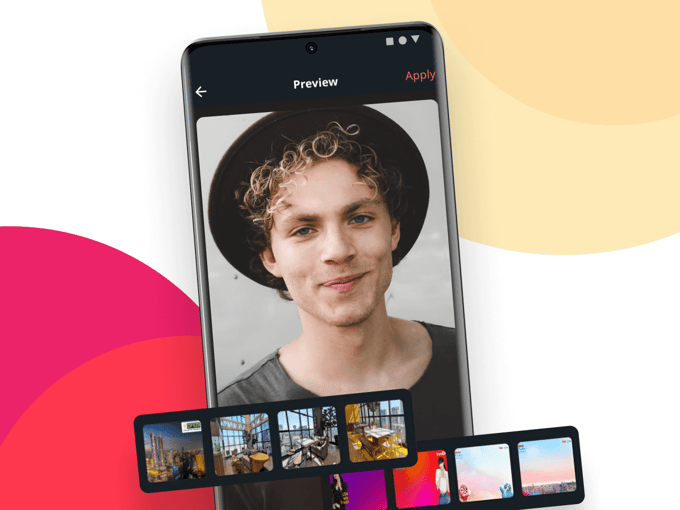
Features like virtual backgrounds and face touch-up can reconcile these contradictions. They help protect users’ privacy and let them feel better about themselves, thus removing the reasons for shutting the camera down. This boost in user experience translates into better engagement and sales.
As True Digital were working on a video conferencing app, they also decided to include these functionalities.
Product
VROOM is a business-oriented video calling app available for Android, iOS, and Web. It is designed to make meetings comfortable and productive, and includes features like:
- Secured Instant meetings
- Password protected events
- Customizable meeting views
- Automated screen share handling
- Live translations with dual audio
- Cloud recording
- Virtual background
- Face touch-up
VROOM is defined by its stability, low bandwidth consumption, ease of use, cost-efficiency, and dedicated local support. All of these aspects make it a serious player on a professional video calling market.
 VROOM
VROOM
Solution
VROOM uses two major technologies from Banuba.
The first is virtual backgrounds – the core privacy protection option. Banuba’s technology allows replacing the existing environment with static pictures, blur, videos, or even 3D room with 360-degree view. Using it not only helps people hide anything they don’t want to share, but also lets them add a degree of levity to the conversation.
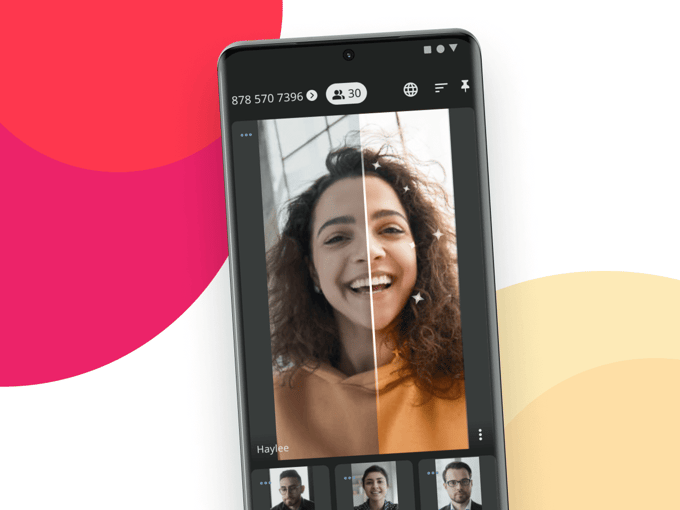
The second is face touch-up. It almost imperceptibly eliminates camera distortions, smoothes the skin and removes blemishes to ensure that every user looks their best.
Together, they help ensure that people on VROOM are confident, comfortable, and able to focus on their jobs.
“With Banuba SDK, we can accelerate our development time and quickly deliver value to our users”
Tharawit Disyawongs, Head of Product & Technology, True Digital Group
Results
Implementing Banuba’s technology boosted VROOM’s monthly active user (MAU) growth by 30% compared to the similar period before introducing them. In addition, the number of registered users grew by 54% and the feedback from them became more positive.

-
The official technical documentation for Banuba Face AR SDK is available online and includes requirements, setup instructions, and configuration details:
- Banuba Face AR SDK iOS documentation
- Banuba Face AR SDK Android documentation
- Banuba Face AR SDK Flutter documentation
- Banuba Face AR SDK React Native documentation
- Banuba Face AR SDK Web documentation
- Banuba Face AR SDK Unity documentation
- Banuba Face AR SDK Desktop documentation
This Banuba Face AR SDK documentation should be your primary reference during integration.
-
You can access official integration code samples for the Banuba Face AR SDK on GitHub. Banuba provides platform-specific examples to help you integrate faster:
- Banuba Face AR SDK iOS integration code sample
- Banuba Face AR SDK Android integration code sample
- Banuba Face AR SDK Flutter integration code sample
- Banuba Face AR SDK React Native integration code sample
- Banuba Face AR SDK Desktop integration code sample
- Banuba Face AR SDK Web integration code sample
- Banuba Face AR SDK Unity integration code sample
These Banuba Face AR SDK repositories include setup instructions and minimal working examples for quick deployment.
-
Yes. The Banuba Face AR SDK includes an LLM-friendly documentation file designed for AI-assisted development and internal knowledge systems:
This structured Banuba Face AR SDK text file can be used with AI tools to streamline onboarding and developer workflows.
-
The Banuba Face AR SDK provides official cross-platform plugins to simplify integration into hybrid applications:
These Banuba Face AR SDK plugins are maintained by Banuba and support faster implementation for cross-platform apps.