
The global facial recognition market is valued at $10.13 billion in 2026 and projected to reach $30.52 billion by 2034, growing at 14.8% annually. On the AR side, the total market is expected to hit $210.96 billion in 2026, with roughly 1.1 billion AR users worldwide. About 71% of consumers report they would shop more if they could preview through AR first.
These figures are not abstract projections for developers working with face mask SDKs. They represent the apps your users already interact with: Snapchat lenses, TikTok effects, Instagram AR stories, beauty try-on features inside retail apps, and virtual backgrounds in conferencing tools. The SDK underneath those features determines whether the mask sticks to a face during a head turn, whether it runs smoothly on a $150 phone, and whether your costs stay sane when your user base doubles.
We looked at both SDKs, Banuba Face Mask SDK and DeepAR, through the lens of what happens after the demo, when real users on real hardware push the limits of your face mask experience.
[navigation]
A face mask SDK handles the heavy lifting of detecting human faces on camera and rendering 3D masks, filters, and AR overlays in real time. Banuba and DeepAR both do this, but their engineering approaches differ enough to produce very different outcomes in production. Banuba is the stronger option for teams that plan to ship globally on diverse hardware and grow without unpredictable costs. DeepAR suits early experiments and browser-based AR activations where user counts stay modest.
TL;DR
- We evaluated Banuba and DeepAR as face mask SDK options, focusing on how each handles 3D mask placement, hardware reach, per-feature segmentation, long-term costs, and vendor risk.
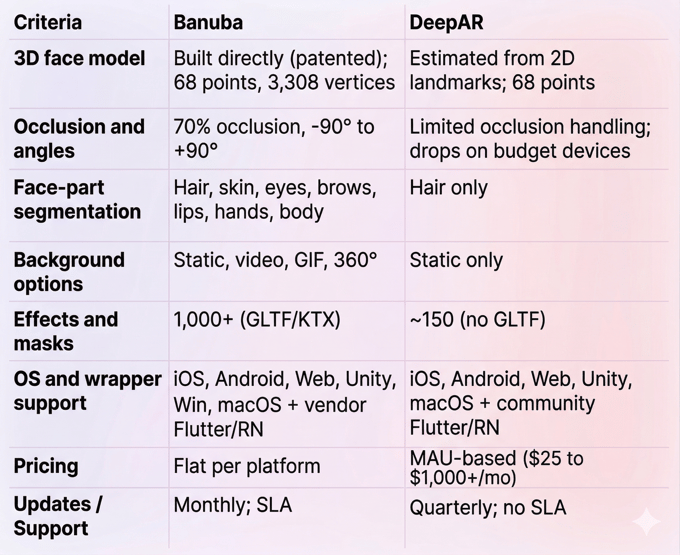
- Banuba's patented engine skips 2D landmark detection and builds a 3D head model directly. It maps 68 anchor points and holds steady when 70% of a face is blocked.
- DeepAR uses a standard 2D-to-3D pipeline with 68 anchor points. Segmentation is limited to hair. Pricing scales with every new user.
- Banuba’s Face Mask SDK remains a top choice for companies aiming to reach global markets, serving over 120 international customers with precise face-tracking solutions.
What We Measured and Why
Rather than listing spec sheets side by side, we organized our evaluation around the questions product teams actually face during SDK selection.
Can the mask survive a bad camera angle? This comes down to the SDK's face detection architecture: how it builds a 3D model, how many reference points it uses, and whether tracking degrades in poor lighting or when the face is partially covered.
How granular is the segmentation? A face mask SDK that only segments hair cannot support lipstick try-on, eyebrow reshaping, or targeted skin retouching. We checked which individual face regions each SDK can isolate.
Where does it actually run? Platform lists on a website do not tell you whether the vendor maintains cross-platform wrappers or leaves that to community contributors who may abandon the project.
What does growth cost you? We modeled pricing at 10,000, 100,000, and 500,000 monthly active users to see where each pricing model breaks.
Who decides what gets built next? Corporate acquisitions redirect product development. We looked at ownership structure and its practical implications.

Banuba Face Mask SDK: The Technical Deep Dive
Banuba has been building AR and face detection technology since 2016. Its customer list reads like a cross-section of the tech industry: Samsung and Gucci in consumer electronics and luxury, Vidyo in video conferencing, dating and social, haircare, healthcare, and retail.
Why does client diversity matter for a face mask SDK? Because it shapes what the engineering team prioritizes. A vendor serving only fashion e-commerce will optimize for product try-on on recent iPhones. A vendor serving conferencing, dating, beauty, gaming, fintech, and healthcare has to make the SDK perform everywhere, on budget Androids, in low light, with partial occlusion, at arm's length, and at seven meters.
The 3D-First Approach to Face Detection
Here is where Banuba's face mask SDK makes its most consequential engineering choice.
The standard pipeline in face detection goes like this: detect 2D points on a face (eyes, nose, mouth corners), then run nonlinear equations to estimate a 3D head pose from those flat coordinates. Most SDKs, including DeepAR, follow this path.
Banuba takes a different route. Its patented Face Kernel technology infers a 3D head model directly from the camera feed. No intermediate 2D step. The engine reduces all possible head transformations to 37 facial morphs, which is a compact mathematical representation that keeps processing fast.
What does this mean in practice?
It means the SDK can run noise-detection passes multiple times within a single frame, because tracking 37 parameters consumes far less CPU than tracking hundreds of static landmarks. That is Banuba's patented anti-jitter technique: the system has enough spare processing power to clean up noise before the frame even renders.
The resulting performance numbers 68 facial anchor points mapped with sub-pixel accuracy. A full mesh of up to 3,308 vertices. Stable tracking across head rotations from -90° to +90°, reliable results in dim environments, and continued face detection even when 70% of the face is blocked by a hand, mask, or microphone. The detection range reaches up to 7 meters from the camera.
All processing stays on the device. Zero cloud dependency. Zero latency from network calls. Zero biometric data leaving the phone.
What You Can Segment
Banuba provides individual neural networks for each face region: hair, skin, eyes (including pupil, iris, and sclera separately), eyebrows, lips, hands, and full body. Background segmentation runs as a separate model.
This granularity is the dividing line between a face mask SDK that lets you build a full beauty or virtual try-on platform and one that limits you to simple overlays. If your product roadmap includes any of the following, per-part segmentation is not optional: virtual lipstick, eye shadow, or foundation matching across skin tones. Eyebrow tinting or reshaping. Iris color change for contact lens try-on. Targeted skin retouching that preserves texture. Nail color try-on. Hair color experiments with gradient support.
Background replacement accepts video, GIFs, 360-degree environments, and static images. Edge handling around hair, which is one of the trickiest problems in background separation, avoids the flickering artifacts that plague weaker segmentation models.
Rendering, Effects, and Creation Tools
Over 1,000 ready-made AR masks and effects sit in the Banuba Asset Store. For custom work, Banuba Studio is a browser-based editor that accepts GLTF models and uses KTX format for faster loading.
Multi-face tracking is capped by hardware, not software. The recommended limits are 4 faces on mobile at 60 FPS, 6 on desktop. Interactive triggers respond to facial gestures: opening the mouth, smiling, raising or lowering eyebrows.
Beauty tools include 28 face morphing options, skin smoothing that keeps natural texture visible (no plastic-looking blur), acne removal, eye bag correction, teeth whitening, and 16 makeup product types that adapt to different skin tones. The eyebrow module detects actual brow shape rather than applying a one-size-fits-all template.
Where It Runs
Banuba’s Face Mask SDK runs on:
- iOS (from 13.0);
- Android (from 8.0, Camera 2 API, OpenGL ES 3.0);
- Web;
- Unity;
- Windows;
- macOS.
That covers 97% of active iOS devices and about 80% of the Android market. The SDK footprint is approximately 25 MB.
React Native and Flutter wrappers are maintained by Banuba's own team and ship alongside SDK updates. This is a practical advantage that shows up during crunch time: when a new Android version breaks something, you are waiting on the vendor's engineering team, not a volunteer contributor.
Integration Documentation is thorough and includes an LLM-ready guide for teams using AI coding assistants.
Real-Device Performance
Banuba compresses neural networks and dynamically distributes work between CPU and GPU depending on what each phone can handle. On a mid-range Android from 2019, expect 35 to 40 FPS for makeup overlays and 30+ FPS for complex 3D masks. Power management is baked in, keeping battery drain manageable during 10-minute-plus AR sessions.
How Pricing Works
Flat subscription, billed per platform. Payment options include yearly (discounted), half-yearly, and quarterly. No monthly billing.
The core advantage: your bill does not change as your user base grows. Whether you have 10,000 or 10 million MAUs, the license stays flat. A 14-day free trial gives full access to integration docs and features.
Where It Falls Short
Building elaborate custom masks in Banuba Studio requires time and design investment. The basic integration is fast, with most teams reporting a working demo in under 8 minutes. But crafting complex interactive AR experiences takes iteration and may require support conversations.
Recommended For
- Social video and creator apps needing rich 3D face masks at a global scale;
- E-commerce platforms and beauty brands doing virtual try-on across multiple product categories;
- Video conferencing and live streaming apps with virtual backgrounds and camera touch-up;
- Dating and social apps shipping AR masks to diverse hardware;
- Fintech apps that need liveness detection as part of identity verification.
Not Ideal For
Solo developers on a zero budget looking for disposable 2D stickers. For that narrow use case, open-source options like Google ML Kit or MediaPipe can cover the basics.

DeepAR: What It Offers and Where It Stops
DeepAR is a London-based AR SDK provider that was acquired by Zalando in April 2025. It technically remains a separate entity, yet may shift towards the parent company’s priorities. If your app is a dating product, a conferencing tool, or a social game, those priorities may not line up with yours.
On the technical side, DeepAR also tracks 68 facial anchor points using a conventional 2D-to-3D estimation pipeline, supports up to 4 simultaneous faces, and detects 5 emotional states. This approach works well on flagship phones. On budget or older Android devices, tracking weakens during fast head movement and partial occlusion.
The most significant limitation is segmentation. Only hair is covered. There is no per-part isolation for eyes, lips, eyebrows, or skin, which means virtual lipstick, foundation matching, iris color changes, and targeted skin retouching are off the table. Background removal is available but inconsistent: long hair gets clipped, hands often vanish, and unseparated patches show up in complex scenes. Only static image backgrounds are supported.
The Beauty API is still in beta. Skin smoothing blurs texture rather than preserving it, producing a noticeably artificial look. DeepAR offers 11 face morphing options, 10 makeup types, and a library of roughly 150 AR masks (no GLTF support). DeepAR Studio, a visual editor for creating effects without code, is a genuine strength for design-led teams.
Platform support covers iOS, Android, macOS, Web (HTML5), and Unity. No Windows or Linux. React Native and Flutter wrappers are community-maintained, not vendor-supported.
Pricing is MAU-based: free up to 10 users (with watermark), $25/month at 1,000 MAU and growing. Above that, it is custom pricing. The free tier is useful for prototyping, but costs scale directly with your audience. Effects built in DeepAR Studio carry no additional charge.
Technical support has no public SLA, with reported response times stretching into days. SDK updates ship quarterly, not monthly.
Best for: browser-based AR campaigns with short run times, prototyping before committing to a production SDK, small-scale apps at low MAU counts, and fashion or retail projects where Zalando ecosystem alignment helps.
Skip if: you need per-part face segmentation, your audience uses budget Android hardware, your product plan extends 3+ years and requires vendor independence, or you need Windows support and SLA-backed response times.
Banuba’s Face Mask SDK vs DeepAR: Overview
Making the Call
If your app is heading to production and growth is the goal, go with Banuba. The 3D-native detection engine delivers more anchor points, better occlusion handling, and smoother performance on the kind of mid-range phones that make up most of the global market. Full face-part segmentation means your feature roadmap will not hit a wall when the product asks for lipstick try-on or iris color change. Flat pricing means your costs do not spike alongside your success. Monthly updates and SLA-backed support give you a safety net after launch. Brands like RingCentral, Samsung, and Gucci already depend on it.
For beauty and cosmetics use cases specifically, there is no realistic comparison. Banuba's 16 makeup types, texture-aware skin smoothing, eyebrow shape detection, and nail try-on create a foundation that DeepAR's hair-only segmentation simply cannot replicate.
If you need a quick proof-of-concept or a short web AR campaign, consider DeepAR. The free tier removes financial barriers for testing ideas, and DeepAR Studio makes it easy for designers to create masks without developer support. For a browser-based activation that runs for three weeks and targets a few thousand users, it can do the job. Just run the numbers before scaling.
Start your evaluation with a 14-day free trial of Banuba's face mask SDK.
References
Banuba. (n.d.). AI Face Detection SDK. https://www.banuba.com/ai-face-detection-sdk
Banuba. (n.d.). Face AR technology. https://www.banuba.com/technology/
Banuba. (n.d.). Face tracking software. https://www.banuba.com/technology/face-tracking-software
Banuba. (n.d.). Face AR SDK documentation. https://docs.banuba.com/far-sdk
DeepAR. (n.d.). Documentation. https://docs.deepar.ai/
DeepAR. (n.d.). Pricing. https://docs.deepar.ai/deepar-sdk/pricing/
Drapers. (2025, April 7). Zalando acquires tech firm DeepAR. https://www.drapersonline.com/news/zalando-acquires-tech-firm-deepar
Fortune Business Insights. (2026). Facial recognition market size, share & trends. https://www.fortunebusinessinsights.com/industry-reports/facial-recognition-market-101061
BayelsaWatch. (2026). Augmented reality statistics by market size and facts. https://bayelsawatch.com/augmented-reality-statistics/
-
Test on the cheapest phone your audience actually uses. If the mask jitters on a mid-range Android that shipped three years ago, the SDK is not production-ready regardless of what the spec sheet says. After tracking quality, check segmentation coverage against your 12-month product plan, not just what you need today. Finally, project your costs at 10x your current user base and compare flat-fee and per-user models to see which one protects your margins.
-
The two main approaches are per-user billing and flat subscriptions. Per-user models charge based on monthly active users, keeping entry costs low but creating a direct link between user growth and expenses. Flat subscriptions set a fixed fee per platform, so costs do not move with audience size. Most vendors offer free tiers with watermarks or development-only restrictions. The meaningful comparison happens when you model costs at your expected 12- and 36-month scale, not at launch numbers.
-
Banuba's face mask SDK is built for growth scenarios. Its tracking engine maintains performance on inexpensive hardware that many global users carry. Its subscription stays flat regardless of MAU count. And its update cycle (monthly) and SLA-backed support keep pace with production demands. The full segmentation stack also means you will not need to switch SDKs when your product requirements expand beyond basic masks.