

The mobile AR market is forecast to grow from $13.8 billion in 2025 to over $21 billion by 2028, and Flutter has become a default choice for teams that want to ship to iOS and Android from one codebase. The catch: the AR plugin landscape on pub.dev is uneven. Some vendors ship and maintain their own Flutter package. Others publish a sample app and call it a day. A few have quietly stopped updating their plugin altogether.
That gap matters. A Flutter AR app rendering camera frames at 60 FPS depends on a healthy native bridge between Dart and the iOS or Android SDK underneath. When the plugin lags behind a Flutter or platform release, frame drops and black screens follow. So we focused this review on which SDKs actually treat Flutter as a first-class target in 2026, rather than which ones ship the prettiest demo.
[navigation]
The best Flutter AR SDK depends on whether you need face AR, spatial AR, or a branded Lens ecosystem. For production face and body AR apps, Banuba ships the only commercial SDK with a first-party, vendor-maintained Flutter package on pub.dev. DeepAR offers strong creative effects, but its Flutter plugin is community-maintained. Snap Camera Kit relies on a third-party wrapper, while AR Flutter Plugin is the open-source pick for spatial AR on top of ARCore and ARKit.
TL;DR
- This guide is for Flutter engineers, technical founders, and product managers picking an AR SDK for a real production app, not a prototype.
- We reviewed four options: Banuba (face and body AR), DeepAR (creative filters), Snap Camera Kit (Lens platform), and AR Flutter Plugin (open-source spatial AR).
- Banuba is the strongest pick when face tracking quality, virtual try-on, official Flutter support, and predictable enterprise pricing matter.
- DeepAR fits campaign-led apps where filter creativity outweighs long-term plugin stability concerns.
- Snap Camera Kit suits teams that want access to the Lens Studio creator network and don't mind integrating through a third-party Flutter wrapper.
- AR Flutter Plugin is the budget-zero choice for placing 3D objects in a room, but it does not handle face AR well.
How we reviewed each SDK
We picked criteria that map to the questions Flutter teams ask before signing a license:
- Flutter plugin status on pub.dev. Is the package maintained by the vendor or by the community? When was it last updated?
- Native bridge architecture. How are camera frames passed between Dart and native code?
- Tracking and rendering quality. Face landmark accuracy, segmentation cleanliness, plane detection, and shader pipeline.
- Time to working demo. Hours from flutter pub add to a real face filter on a real device.
- Documentation depth. API reference, integration guides, sample repos, and how recently they were updated.
- Pricing predictability. License model, MAU caps, and how cost behaves as the app scales.
A Quick Framework: the Flutter AR Maintenance Tier
To make the comparison concrete, we sorted each SDK into one of four maintenance tiers. This is the original framework we use throughout the article:
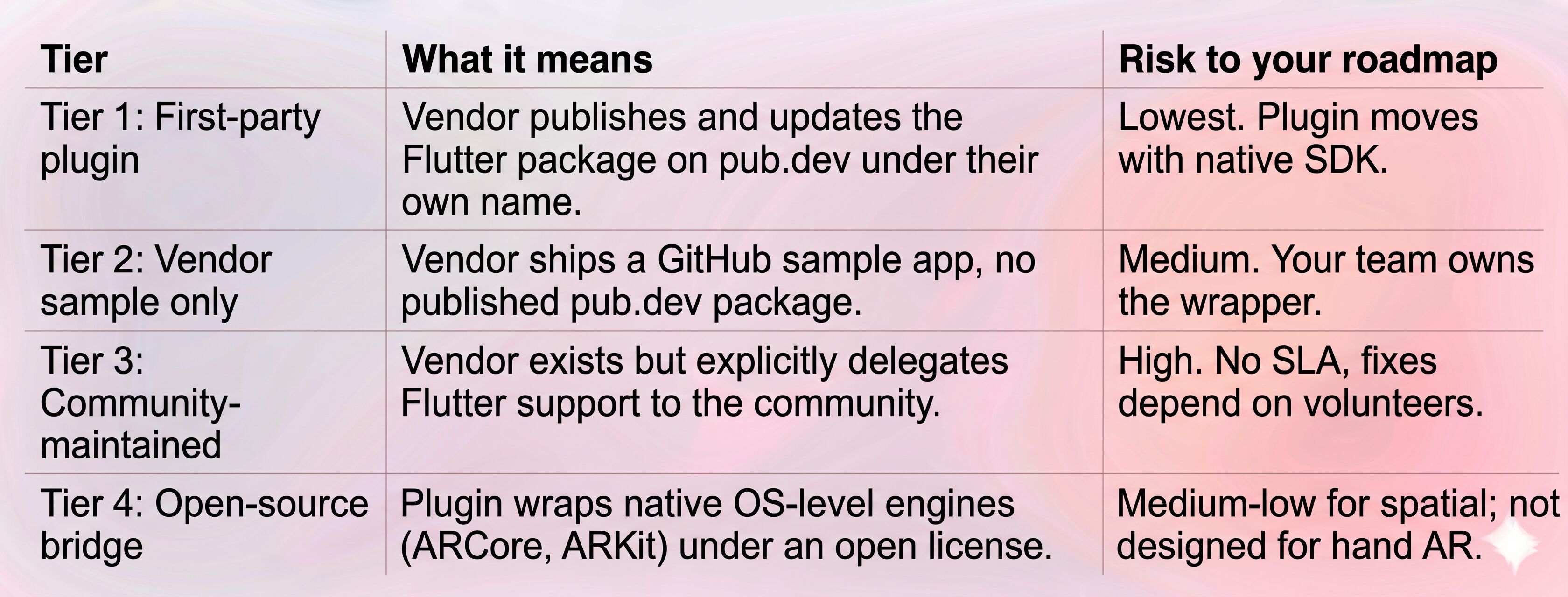
We'll reference these tiers in each product review below.
The 4 best Flutter AR SDKs reviewed
1. Banuba Face AR SDK (Tier 1: first-party Flutter plugin)
Banuba is a computer vision company that builds AR SDKs for face, body, and hand tracking, with strong adoption across social, beauty commerce, and video communication apps. Among the four SDKs reviewed here, it's the only one that publishes its own Flutter package, banuba_sdk, directly to pub.dev under the vendor's name and keeps it in sync with the native iOS and Android cores.
How the Flutter integration actually works
The banuba_sdk package wraps Banuba's native Face AR SDK and exposes a Dart API for camera control, effect loading, and rendering. Frames flow through a dedicated EffectPlayerWidget rather than the default Flutter camera pipeline, which avoids the byte-stream marshaling overhead that slows down naive platform-channel integrations.
The plugin handles permission flow, lifecycle events, and effect swapping in Dart, and the heavy compute runs natively. Banuba also ships a quickstart-flutter-plugin repo with a working example and an integration sample that maps directly to the published package.
Underlying technology
Banuba's AR engine is built on a patented 3D Face Kernel that constructs a 3D head model directly instead of inferring 3D from 2D landmarks. Banuba's tracker handles up to 70% facial occlusion and stays stable across extreme head angles, which is why virtual glasses, masks, and makeup don't drift when a user turns their head 90 degrees or covers part of their face. The same engine drives:
- 68-point facial landmark tracking with sub-pixel precision.
- Pixel-accurate segmentation for face, hair, skin, and full body, trained for front-camera selfie use.
- Multi-face tracking (up to four faces simultaneously on mobile, six on desktop).
- A PBR (physically based rendering) shader pipeline used for virtual try-on, so reflections on a watch or glasses respond to real ambient lighting instead of looking pasted on.
- Emotion and gesture recognition.
All processing runs on-device. No camera frames leave the phone, which keeps the integration GDPR-friendly and removes cloud latency from the loop.
Key strengths for Flutter teams
- First-party banuba_sdk package on pub.dev, updated in step with the native SDKs.
- Stable performance on older hardware. Banuba's SDK maintains 35-60 FPS on budget Android devices from 2019, which matters when your addressable market includes mid-tier phones.
- Banuba Studio + Asset Store. Designers build effects in Banuba Studio and export .bnb files the Flutter plugin loads at runtime. The Asset Store carries 1,000+ ready-made effects and 22,000+ digitized beauty SKUs for try-on use cases.
- Cross-platform parity. The same effect file runs on iOS, Android, Web, Unity, React Native, and Flutter without re-export.
- Enterprise SLA and direct engineering support, plus an LLM-friendly documentation file for teams using AI coding assistants.
Real-world deployments
- Boca Rosa, the Brazilian beauty brand, used Banuba's virtual try-on for a launch event and sold out $900,000 worth of product in four hours.
- Océane added makeup try-on and reached a 32% add-to-cart rate.
- Bermuda, a video chat app, integrated Banuba's Face AR SDK and recorded over 15 million AR engagements.
Limitations
- Commercial license, not a free-tier product. Teams that just need to place a 3D chair on a floor will find Banuba over-spec'd.
- Plane detection and world tracking are not the focus. Banuba is built for face and body.
Pricing
Banuba uses a license-based model. Pricing scales with platforms supported and Monthly Active Users, billed quarterly or yearly for predictable enterprise budgeting. A 14-day free trial is available with no credit card required.
Ideal use cases
Beauty and AR commerce apps with virtual try-on, social and video chat apps, AI skin analysis, AR live streaming, gesture-driven games, and creator tools where visual fidelity is part of the product.
Who should not pick it
Teams whose only AR need is placing 3D objects on detected planes, and hobbyists or solo developers without a budget for a commercial license.

2. DeepAR (Tier 3: community-maintained Flutter plugin)
DeepAR is a Croatian face-AR SDK best known for its filter library and Studio tool. Its native iOS and Android SDKs are mature, but the Flutter story is less stable than the brand recognition suggests.
Flutter plugin status
This is the headline issue: DeepAR's official documentation states that the DeepAR Flutter plugin is an open-source project developed and maintained by the DeepAR community, and that DeepAR does not actively maintain or provide customer support for it. The original deepar_flutter package on pub.dev was last published roughly two years ago, and a thread on the DeepAR community forum from early 2024 questioned whether Flutter support had been dropped after the repo was removed from GitHub.
Several community forks now exist — deepar_flutter_plus and deepar_flutter_perfect are the most active — which provide more recent compatibility fixes but also force teams to commit to a fork rather than a vendor-supported package. DeepAR was acquired by Zalando in April 2025, which pulls the company's roadmap further toward Zalando's e-commerce priorities and away from third-party plugin maintenance.
Strengths
- DeepAR Studio is a polished, free-to-use desktop tool for designers that can produce complex 3D effects without engineering involvement.
- Filter quality on the native cores is genuinely strong — light 3D masks render sharply with low GPU pressure.
- Emotion and basic gesture detection are available out of the box, useful for game-style triggers.
- Asset library is large and helps creative teams ship campaign content quickly.
Limitations
- Flutter plugin is community-maintained per DeepAR's own FAQ.
- No vendor SLA on Flutter integrations.
- Roadmap uncertainty under Zalando ownership.
- Documentation centers on iOS, Android, and Web; Flutter-specific guides are thin.
Pricing
Free tier covers up to 10 MAU with a watermark. Paid tiers start around $25/month for 1,000 MAU and scale into enterprise pricing for 100k+ users.
Ideal use cases
Short-lived marketing apps and brand campaigns, AR mini-games that lean on facial expression triggers, and prototypes where the team is comfortable maintaining a community plugin themselves.
Who should not pick it
Teams building a long-term core product around face AR in Flutter, anyone who needs an enterprise SLA, and companies that view plugin maintenance as a vendor responsibility rather than an internal one.
Banuba's AR Flutter filter overlay example
3. Snap Camera Kit (Tier 2: vendor sample, third-party plugin)
Snap's Camera Kit is the SDK behind Snapchat's Lenses, opened up so that other apps can run the same effects. It carries massive brand recognition and access to the Lens Studio creator ecosystem. The Flutter situation is more nuanced.
Flutter plugin status
Snap does not ship its own pub.dev package. Instead, Snap publishes an open-source sample app on GitHub that shows how to integrate Camera Kit in a Flutter project using MethodChannel to invoke native APIs on Android and iOS. Snap's official position is that Camera Kit responds to community demand for Flutter support through this sample, rather than a fully wrapped SDK.
The most-used pub.dev option is the third-party camerakit_flutter package, originally open-sourced by DevCrewIO in 2023. It exposes Camera Kit configuration, lens groups, and media capture from Dart, but every team that adopts it is committing to a non-Snap maintenance dependency.
This puts Camera Kit in an unusual position: a top-tier native SDK with a Tier 2 / community-hybrid Flutter integration story.
Strengths
- Lens Studio ecosystem. Teams can tap into Lenses built by Snap's enormous creator community.
- High-quality face tracking at the native level.
- Long-Term Support releases. Snap introduced LTS SDK versions that commit to one year of bug fixes and security patches per initial release, which helps reduce the upgrade churn that hurts AR apps.
- Brand pull. "Powered by Snap Camera Kit" is a marketing line some apps want.
Limitations
- No vendor-maintained pub.dev package.
- Flutter integration uses platform views and method channels, which adds latency under high-resolution video unless tuned carefully.
- iOS and Android setup involves Info.plist keys, AppCompat theming, and CocoaPods configuration that can trip up first-time integrators.
- Production API tokens require app review through Snap's developer portal.
Pricing
Camera Kit's commercial model is MAU-based with custom enterprise pricing for high-volume apps. A staging tier is available with a watermark for testing.
Ideal use cases
Apps that want Snap-style Lenses without building a creator pipeline from scratch, and teams comfortable owning a third-party Flutter wrapper.
Who should not pick it
Teams that need a vendor SLA on the Flutter layer specifically, apps with thin engineering bandwidth for native bridge debugging, and projects that don't need access to the Lens creator network.
4. ar_flutter_plugin (Tier 4: open-source spatial AR bridge)
ar_flutter_plugin is the de facto open-source choice for Flutter teams that want spatial AR, placing virtual objects in the physical world rather than tracking faces. It bridges Flutter to ARKit on iOS and ARCore on Android, building on earlier community plugins by Olexale and Gian Marco Di Francesco.
This is a different product category from the three above. It belongs in the comparison because Flutter teams searching for "Flutter AR SDK" routinely encounter it, and it's important to set expectations about what it does and doesn't do.
What it does well
- True world tracking and SLAM through the underlying OS engines.
- Plane detection and anchors for placing 3D models on floors, walls, and tables.
- Gesture support for rotating, scaling, and translating objects.
- GLTF and GLB model loading from local assets or remote URLs.
- MIT-licensed and free, with no MAU caps or watermarks.
What it does not do
- No real face AR. Face tracking falls back to ARKit and ARCore's Augmented Faces, which is well below what Banuba, DeepAR, or Snap deliver.
- No virtual try-on, no segmentation, no beauty effects, no Lens-style triggers.
- No vendor support. Issues are filed on GitHub and resolved by community maintainers when bandwidth allows.
Pricing
Free under the MIT license. Your only cost is internal engineering time.
Ideal use cases
Furniture and decor try-in-room apps, education tools that visualize 3D models, location-based AR, and any MVP where the AR job is "place a thing on the floor."
Who should not pick it
Anyone building a beauty try-on, a face filter app, a video chat with AR backgrounds, or a creator tool. The mismatch in capability will become obvious within the first sprint.

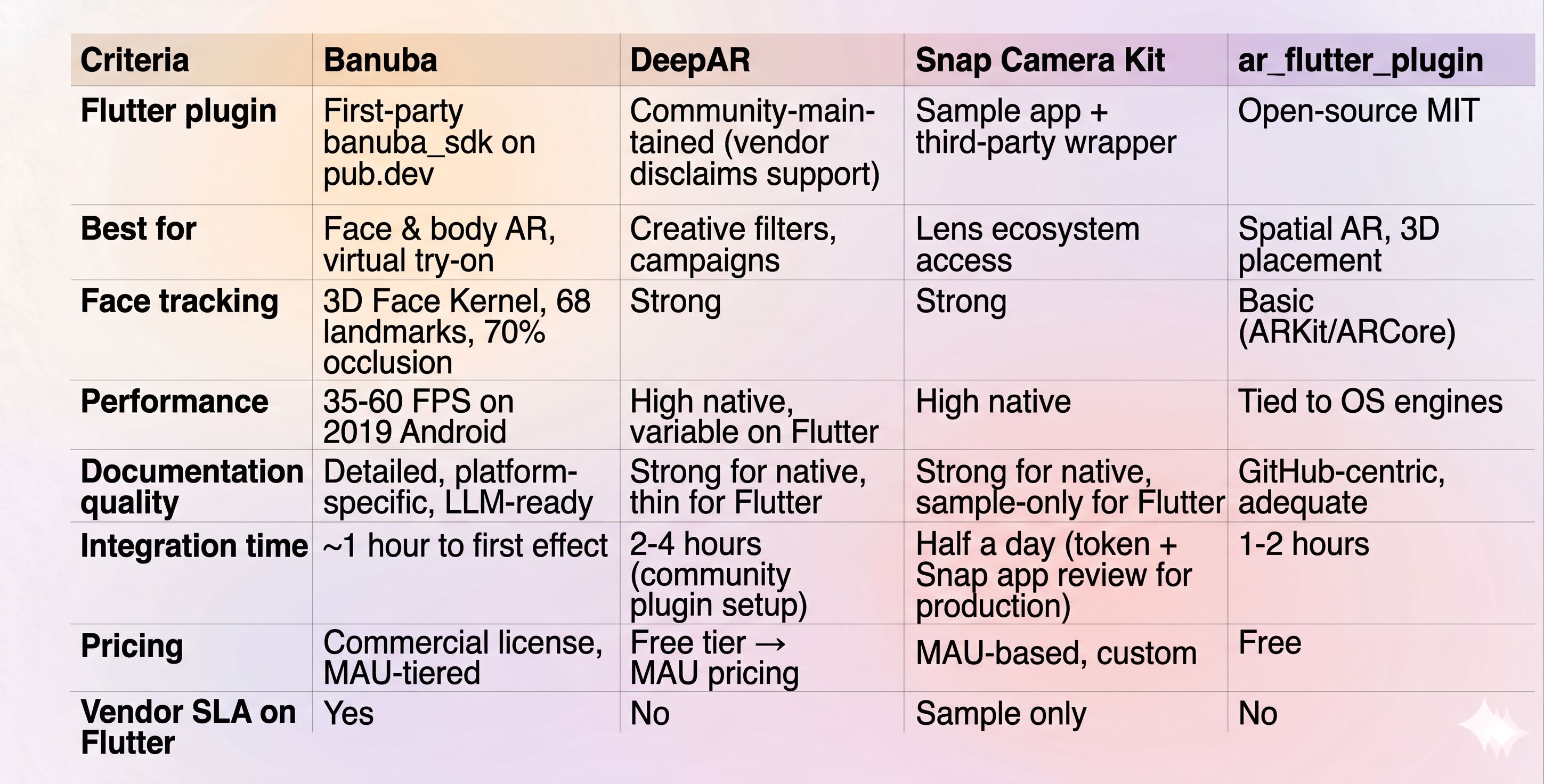
Best Flutter AR SDKs Compared
Decision guidance
If you're a startup shipping a face-AR MVP on a tight budget, start with DeepAR's or Banuba’s free tier or, if face quality isn't critical, ar_flutter_plugin. They let you validate before paying.
If you're building a Flutter app where AR is a core, long-term feature, Banuba is the safer bet. The first-party banuba_sdk package, the 3D Face Kernel, and the enterprise SLA combine into a stack that doesn't quietly turn into technical debt. And it lets you test before committing with its 14-day trial.
If your product depends on Snap's Lens ecosystem or you want the brand association, Camera Kit is the only answer, but plan for the third-party Flutter wrapper as part of your architecture.
If your AR job is spatial: a chair in a room, a 3D molecule for an education app, a piece of art on a wall, ar_flutter_plugin will get you there for free, with no MAU caps.
The decision usually comes down to two factors: whether you need face AR or spatial AR, and whether your team has the bandwidth to maintain a community plugin. The honest answer for most production teams shipping face AR features in Flutter is: pick the SDK that ships its own pub.dev package, because that's where most of the long-term cost lives.
References
Banuba. (n.d.). Augmented reality (AR) SDK software for Android & iOS. Retrieved May 4, 2026, from https://www.banuba.com/augmented-reality-sdk
Banuba. (n.d.). banuba_sdk [Computer software]. pub.dev. Retrieved May 4, 2026, from https://pub.dev/packages/banuba_sdk
Banuba. (n.d.). Banuba Face AR SDK Flutter integration documentation. Retrieved May 4, 2026, from https://docs.banuba.com/far-sdk/tutorials/development/basic_integration/?platform=flutter
Banuba. (n.d.). quickstart-flutter-plugin [Source code repository]. GitHub. Retrieved May 4, 2026, from https://github.com/Banuba/quickstart-flutter-plugin
Aulas, C. (2025, August 20). Build augmented reality apps with Flutter – 2025 guide. Banuba Blog. https://www.banuba.com/blog/flutter-ar-guide
Carius, L. (n.d.). ar_flutter_plugin [Source code repository]. GitHub. Retrieved May 4, 2026, from https://github.com/CariusLars/ar_flutter_plugin
DeepAR. (n.d.). FAQ: Flutter and React Native plugin maintenance. Retrieved May 4, 2026, from https://docs.deepar.ai/faq/
Snap Inc. (n.d.). camera-kit-flutter-sample [Source code repository]. GitHub. Retrieved May 4, 2026, from https://github.com/Snapchat/camera-kit-flutter-sample
Snap Inc. (2024). Camera Kit platform updates and enhancements. Snap AR. https://ar.snap.com/camera-kit-updates
ARtillery Intelligence. (2024, March 1). Mobile augmented reality (AR) market revenue worldwide from 2023 to 2028 (in million U.S. dollars) [Data set]. Statista. https://www.statista.com/statistics/282453/mobile-augmented-reality-market-size/
-
Start with plugin ownership: confirm the SDK publishes a vendor-maintained package on pub.dev, not a community wrapper. That alone determines whether platform updates are a quick fix or a multi-week debugging job. Then prioritize face tracking accuracy (3D mesh, not just 2D landmarks), stable 60 FPS on mid-tier Android, and how the plugin passes camera frames between native code and Flutter. Finally, verify that the vendor SLA covers the Flutter layer specifically, not just the native iOS and Android cores.
-
Three patterns dominate: open-source plugins are free under permissive licenses but offer no vendor support. Freemium SDKs start cheap or watermarked, then scale into MAU-based subscriptions. Enterprise licenses cost more upfront, usually by platform and MAU, but include direct engineering support, predictable budgeting, and less maintenance as your app grows.
-
Banuba is the best Flutter AR SDK for scaling production apps because it combines a vendor-maintained Flutter plugin, enterprise support, and predictable MAU-based pricing. That makes it more reliable than community-backed options for keeping face and body AR stable as your app grows.
