
Beauty filter apps and video editors with face filters are growing and help brands increase user engagement, drive user-generated content, improve promotion, and boost sales.
The bar has been moved. Thanks to the "Big Three" of Snapchat, TikTok, and Instagram, real-time beauty tech is now a core requirement for social apps. Users expect a certain level of polish in every video they create. It’s no longer about whether you want to include filters but about meeting the industry standard that these platforms have established. If you don't offer that instant enhancement, you're competing against a user's own vanity, and that's a losing battle.
Still, many brands are wondering if beauty app filters are worth the investment.
In this post, we'll cover this topic featuring:
- What beauty effects are and their use cases
- Key benefits of video editors with face filters
- How AI and AR power real-time beauty enhancement
- How to add a beauty filter to video editing apps: Android and iOS.
[navigation]
Beauty App Filters in a Nutshell
Beauty AR is an umbrella term for all effects that aren’t flashy and obvious like AR masks, but subtly make people look better on camera. It can include the following filters:
- Skin smoothing. Removing wrinkles and evening out the skin tone.
- Teeth whitening.
- Acne removal.
- Eye bag removal.
- Face morphing. Adjusting the size and shape of the face and its features to make the person more attractive.
- Expressive eyes. Adds glare that makes the eyes look more emotional.
- Virtual makeup. Applying AR effects that mimic real cosmetic products. Check out this article for details.
Most beauty video editors offer both one-tap enhancements and manual controls. One-tap modes instantly apply a set of balanced improvements for quick results. Sliders and fine-tuning options let users adjust intensity, modify individual features, and create a personalized look. This combination ensures that filters are easy for beginners while still flexible for advanced users.
Video Editor with Face Filters by Banuba
How AI and AR Power Real-Time Beauty Enhancement
The secret to a filter that doesn't look fake is precision.
- The AI scan: AI identifies the face and accounts for the environment. It sees the shadows and the skin texture.
- The AR layer: The changes are then applied with AR. Instead of a blanket blur, the app selectively corrects tones or reshapes features while keeping the movement realistic.
- The result: It’s all about tracking. When you smile or blink, the virtual makeup has to stay glued to your features. That instant feedback is what makes a beauty app addictive: if there was a delay, it wouldn't be a filter, it would just be an edit.
Beauty Video Editor Use Cases
There are certain situations where the use of video editor retouch is most common.
- Social media. Instagram, TikTok, and Snapchat have normalized that polished look to the point where it’s just the default. Users just expect the app to handle the bad lighting and skin blemishes for them. If your platform leaves them looking average while every other app makes them look great, they’re going to switch.
- eCommerce. Using videos for user training, ads, or reviews is the new norm. Beautification allows producing more content in less time and improves the quality of it to boot.
- Dating apps. Apps like Loko and Lolly are examples of effective use of video messaging in their niche. The use of this functionality rises because it helps both users and developers.
- Virtual try-on. Helping people look better with your product will increase sales.
- Video conferencing. Enhancing appearances during meetings, webinars, and calls helps users feel confident and presentable online.
This doesn’t mean that beauty filters can’t be applied in other niches. As with any tool, the limit of its use is your imagination. For example, the developers of FaceYoga (a face building app) integrated beautification to show the projected training results and attract more users.
Dedicated solutions like Banuba Face AR SDK offer versatile AR and beautification features that can be applied across social media, eCommerce, dating, and virtual try-on apps, as well as live video conferencing, making them a reliable benchmark for new projects.

Key Benefits of a Video Editor with Face Filters
The main benefit of a video editor with face filters is improved user experience. People won’t have to spend time editing out every minor skin imperfection - the app will do it for them. However, this brings a group of other benefits in tow.
One such advantage is incentivizing users to create. The easier it is to create cool clips, the more people will do so. Apps with social network elements (e.g. short video and karaoke apps) will benefit from the increased amount of user-generated content.
Another is increasing engagement. It’s well known that AR features work wonders for this metric. Beautification takes this a step further by helping users feel more comfortable with being on camera. This is especially meaningful for teens and young adults who are often insecure about their looks. Help them, and you will help yourself.
Finally, there is a matter of increased sales. Since the pandemic began, many beauty brands turned to virtual try-on as a way to let their customers test and buy their products. This showed that orders made in this way are three times more likely to be completed and are about 20% higher.
This is not reserved just for big names like Sephora, Ulta, or Benefit, as the technology is affordable to mid-sized companies as well. Solutions such as Banuba Face AR SDK make professional-level AR makeup accessible to mid-sized companies as well, and their live appearance-enhancement tools serve as a benchmark for integrating beautification in video conferencing and streaming apps. Check out how Looke, a niche brand from Indonesia, successfully launched its own AR try-on app with beauty filters.
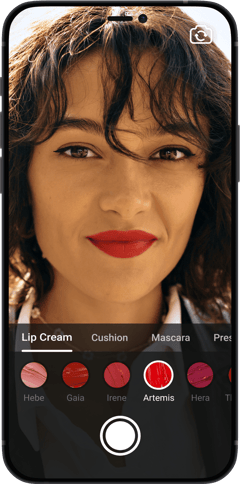 Makeup try-on from Looke
How to Add Beauty Filters to Video Editing Apps
AI beauty is a rather complicated technology. Building it from scratch could take months or even years. And that’s assuming you can put together a team that knows neural networks, computer vision, and machine learning - the underlying basis.
So in most cases, it is much more cost-effective to purchase an existing AR SDK - a premade set of modules that can be quickly integrated into your app to perform the necessary functions.
For advanced functionality, developers often look to solutions like Banuba Video Editor SDK and AR Face Filters SDK, which combine beautification, core video editing, AR masks, LUTs, and other complementary features into a single package.

Technical requirements
This is what you’ll need to turn your app into a beauty video editor:
Android:
- The latest Banuba VE and Face AR SDK releases
- Java 17 or Kotlin 2.1
- Android OS 8.0 or higher with Camera 2 API
- OpenGL ES 3.0 (3.1 for Neural networks on GPU)
- ✅ arm64-v8a , ✅ armv7, ❗ x86-64 limited support, ❌ x86 - no support
iOS:
- Swift 5.9 or newer,
- Xcode 16.0 or newer,
- iOS 15.0 or newer.
- ✅ arm64, ✅ arm64e, ❗ x86-64 limited support
To get the releases, just send us a message through a contact form.
How to Integrate Filters into a Video Editing App
The instructions below will give you everything you need to know about getting video editing and beauty effects. No additional work will be required.
Native iOS:
The step-by-step instruction and code samples can be found on our GitHub page. There you will also see the list of dependencies, technical details, customization options, etc. We also have an FAQ that will answer any questions you may have.
Native Android:
To get beauty filters on Android, go to the relevant GitHub page. As with iOS, there are also dependencies, supported media formats, recording quality parameters, and customization options. And this is the FAQ for Android.
Hybrid:
Banuba Video Editor SDK supports Flutter and React Native. Click the framework you are interested in to see the guide.
Conclusion
A beauty filter app is an effective and highly popular trend. And now you have an instruction that will help you integrate them with your app. Go ahead and start by requesting a trial - free to use for 14 days!
Reference List
900x900_leopard_filter. (2025, December 15). [Video]. Banuba. https://www.banuba.com/facear-sdk/face-filters
Banuba. (n.d.-a). GitHub - Banuba/ve-sdk-android-integration-sample: Integrating Banuba Video Editor SDK with an Android app. Code samples, dependencies, customization options, etc. GitHub. https://github.com/Banuba/ve-sdk-android-integration-sample
Banuba. (n.d.-b). GitHub - Banuba/ve-sdk-flutter-integration-sample: How to integrate Banuba Video Editor with a Flutter app - for iOS and Android. GitHub. https://github.com/Banuba/ve-sdk-flutter-integration-sample
Banuba. (n.d.-c). GitHub - Banuba/ve-sdk-ios-integration-sample: Integrating Banuba Video Editor SDK with an iOS app. Code samples, dependencies, customization options, etc. GitHub. https://github.com/Banuba/ve-sdk-ios-integration-sample
Banuba. (n.d.-d). ve-sdk-ios-integration-sample/mdDocs/faq.md at main · Banuba/ve-sdk-ios-integration-sample. GitHub. https://github.com/Banuba/ve-sdk-ios-integration-sample/blob/main/mdDocs/faq.md
Ehmke, R. (2024, November 4). What selfies are doing to Self-Esteem. Child Mind Institute. https://childmind.org/article/what-selfies-are-doing-to-girls-self-esteem/
hero_beauty_ginger-4-1. (2025, August 18). [Video]. https://www.banuba.com/facear-sdk/beauty-ar
Kovalev, A. (2025, November 13). How much does it cost to build a Face Filter App? https://www.banuba.com/blog/how-much-does-it-cost-to-build-a-face-filter-app
Krasko, A. (2023a, February 24). Hands-Free video recording for Android, IOS, React Native, Flutter. https://www.banuba.com/blog/implementing-hands-free-recording-android-ios-react-native-flutter
Krasko, A. (2023b, June 10). Webcam makeup: Adding AR-Based browser makeup. https://www.banuba.com/blog/webcam-makeup-adding-ar-based-browser-makeup
Krasko, A. (2025a, March 6). How to develop a virtual makeup app. https://www.banuba.com/blog/how-to-develop-a-virtual-makeup-try-on-app
Krasko, A. (2025b, September 12). AI in Beauty Cosmetics Makeup Industry. https://www.banuba.com/blog/ai-for-beauty-and-cosmetics-retail
Krasko, A. (2025c, September 12). How augmented reality filters empower dating Apps. https://www.banuba.com/blog/how-augmented-reality-filters-empower-dating-apps
Krasko, A. (2025d, November 5). Banuba helped a wellness company get 20,000+ downloads. https://www.banuba.com/blog/faceyoga-by-mental-growth-a-success-story
Krasko, A. (2026, January 20). Banuba helped a beauty brand get 50K downloads. https://www.banuba.com/blog/case-study-how-beauty-brands-profit-with-virtual-makeup-try-on
Krasko, A., & Liskevich, A. (2025, December 4). We tried the leading video editors for social media in 2025. https://www.banuba.com/blog/top-social-media-video-editors
Parkin, H. G., & Parkin, H. G. (2022, April 27). From virtual try-ons to customer reviews: How product pages are becoming the new sales floor. Glossy. https://www.glossy.co/fashion/from-virtual-try-ons-to-customer-reviews-how-product-pages-are-becoming-the-new-sales-floor/
Team, B. (2025a, November 25). VE_PIP_5S_360x720. https://www.banuba.com/video-editor-sdk
Team, B. (2025b, November 25). VE_PIP_5S_360x720. https://www.banuba.com/video-editor-sdk#form
-
The complete technical documentation for the Banuba Video Editor SDK is available online and includes requirements, setup instructions, and configuration details:
- Banuba Video Editor SDK iOS documentation
- Banuba Video Editor SDK Android documentation
- Banuba Video Editor SDK Flutter documentation
- Banuba Video Editor SDK React Native documentation
This Banuba Video Editor SDK documentation is regularly updated and should be your primary reference during integration.
-
You can access official integration code samples for the Banuba Video Editor SDK on GitHub. Banuba provides platform-specific examples to help you integrate faster:
- Banuba Video Editor SDK iOS integration code sample
- Banuba Video Editor SDK Android integration code sample
- Banuba Video Editor SDK Flutter integration code sample
- Banuba Video Editor SDK React Native integration code sample
These Banuba Video Editor SDK repositories include setup instructions and minimal working examples for quick deployment.
-
Yes. The Banuba Video Editor SDK includes an LLM-friendly documentation file designed for AI-assisted development and internal knowledge systems:
This structured Banuba Video Editor SDK text file can be used with AI tools to streamline onboarding and developer workflows.
-
The Banuba Video Editor SDK provides official cross-platform plugins to simplify integration into hybrid applications:
These Banuba Video Editor SDK plugins are maintained by Banuba and support faster implementation for cross-platform apps.
-
Yes, Banuba Video Editor SDK includes agent skills for Claude Code, Codex, and Qwen Code. You can install them with a single command. See the Banuba Agent Skills documentation page.