

React Native teams are building more video-heavy apps than a few years ago: social feeds, creator tools, UGC workflows. At the same time, expectations regarding editing quality and export speed continue to rise. That has made the choice of a React Native video editor SDK more consequential than it used to be.
The main issue is not the features on paper. It’s integration reality. Video editing sits deep in native code, and many SDKs either offer limited React Native bindings or rely heavily on custom bridges. That leads to common problems: extra native maintenance, performance bottlenecks during export, limited UI control, or SDKs that work fine in demos but struggle in production.
In this article, we compare the three best React Native video editor SDKs on the market:
- Banuba Video Editor SDK
- IMG.LY Video Editor SDK
- Meishe SDK
We focus on real-world use cases, social video, UGC, creator flows, and compare how these SDKs differ in integration depth, editing capabilities, performance, pricing, and long-term viability in production.
[navigation]
TL;DR:
- This article is for React Native teams evaluating a video editor SDK for production apps, including social platforms, creator tools, and UGC workflows.
- We compare three SDKs: Banuba Video Editor SDK, IMG.LY Video Editor SDK, and Meishe SDK, across features, performance, integration effort, customization, and licensing.
- The largest differences appear in export speed, next-generation feature set, level of automation, and the amount of native work teams must maintain over time.
- Banuba is the best fit for apps that need fast exports, AI-driven editing features, diverse editing opportunities, real-time effects, and a quicker time-to-market in React Native.
- IMG.LY and Meishe are viable alternatives for more specific needs, such as branded editors or professional-grade editing workflows, but come with different trade-offs.
Comparison Criteria
We evaluated each SDK using the same practical criteria. The focus is on how these tools hold up in real apps, not in demos.
Editing Features and Effects
What editing tools are available: trimming, timelines, transitions, filters, overlays, text, audio, and, where relevant, more advanced features like AR and AI effects.
Performance and Rendering Behavior
How well the SDK handles previews, processing, and exports, particularly when working with longer videos or multiple effects.
Integration and Developer Experience
How easy the SDK is to integrate into a mobile app, based on setup effort, API clarity, documentation, and available examples.
Customization and UI flexibility
The degree to which the editor UI and editing flow can be adjusted to match an app’s design and user experience.
Pricing and Licensing
How pricing is structured, how transparent the licensing terms are, and which types of teams or products the model is best suited for as usage scales.
Best React Native Video Editor SDKs Comparison
Now, let’s review how we analyzed these criteria for the top three video editor React Native SDKs: Banuba, Imgly, and Meishe.
Banuba Video Editor SDK
The Banuba Video Editor SDK is designed for cross-platform app development where video creation is part of the user experience. Its common use cases include social, creator, and UGC products that need fast editing, real-time effects, and consistent performance in production.
Editing Features and Effects
Banuba covers the full set of core editing tools: trimming, multi-clip editing, transitions, filters, text, stickers, audio, and overlays, for both camera-recorded and imported videos.
Beyond the basics, Banuba’s video editor SDK for React Native focuses on automation and effects. It includes AI-powered features such as automatic clipping, caption generation, photo-to-video creation, and lip-sync workflows. There’s also a strong AR and effects library with 1000+ effects: real-time beautification, Face AR, LUTs, time effects, and animated templates. An integrated royalty-free music browser supports quick, camera-first content flows.
Performance and Rendering Behavior
Banuba is optimized for real-time editing. Previews remain responsive even when effects are applied during recording or editing.
In benchmark tests with an 8-second, near-4K video and one overlaid effect, export time is approximately 3 seconds, which aligns with short-form and UGC use cases where speed directly affects completion rates.
Integration and Developer Experience
The SDK includes ready-to-use editor flows, detailed documentation, and sample codes, enabling teams to avoid building an editor from low-level components. Whether you're building natively or exploring a video editing development kit for rapid prototyping, Banuba provides the tooling to ship faster. In practice, startups such as Weat demonstrate that integrating Banuba can cut development time by up to 50%, particularly compared with custom implementations.
The SDK is updated monthly, which helps teams keep the editor stable as the app evolves. Developers can leverage a 14-day trial to validate the SDK in their solution.
Customization and UI Flexibility
Banuba’s editor is designed with mobile-first usage in mind. Layouts, tool sets, and editing workflows can be adjusted to align with lightweight mobile apps and social workflows, rather than imposing a fixed editor UI. Teams building a branded video editor can fully tailor the interface (from icons and color schemes to feature sets) to match their product identity.
Pricing and Licensing
Banuba targets commercial and enterprise products. Pricing is flexible and based on supported platforms, enabled features, and monthly active users (MAUs), which helps teams scale usage without large upfront commitments. For products requiring scalable infrastructure, cloud video editing via Banuba's API offers an alternative deployment path without the overhead of on-device processing.

IMG.LY SDK
The IMG.LY Video Editor SDK is part of IMG.LY’s creative toolset and is used in apps where video editing sits alongside other content-creation features. For React Native teams, it offers an official integration and a configurable editor that can be adapted to different product needs.
Editing Features and Effects
The SDK provides the standard video editing toolkit: trimming, transitions, filters, text, stickers, and audio. It’s designed around structured editing and supports custom assets such as fonts, stickers, and media, rather than heavy automation or real-time visual effects. Recently, it has added native AI features, allowing video generation as well as captions and thumbnails creation.
Performance and Rendering Behavior
Editing and export are handled by the SDK’s underlying engine, with React Native acting as the integration layer. Previews and exports are generally stable for typical editing flows. According to our tests using the same video parameters, its export time is 17 seconds, compared to 3 seconds for Banuba.
Integration and Developer Experience
IMG.LY offers an official React Native module with documentation and sample projects. A trial version is available for evaluation, with watermarked exports.
Customization and UI Flexibility
The editor can be tailored by controlling available tools, layout, and theming, making it suitable for apps that need a branded editor rather than a fixed UI.
Pricing and Licensing
IMG.LY uses a commercial MAU- and export-based model with custom pricing. The cost depends on selected features and usage scale and is typically discussed directly with the vendor.
Meishe SDK
Meishe (also known as Meicam) offers a video editing SDK built on its own cross-platform media engine. It’s often used in apps with heavier video requirements and more complex editing workflows. For React Native teams, Meishe is typically integrated into a broader native-first setup rather than as a lightweight editor layer.
Editing Features and Effects
Meishe offers a wide range of traditional video-editing tools, including trimming, multi-track timelines, transitions, filters, text, stickers, and audio controls. The SDK also includes advanced options such as animated filters, time effects, and detailed adjustment controls, which are closer to professional video editing workflows than the quick, camera-first creation.
Performance and Rendering Behavior
The SDK is designed for complex processing and supports effect-heavy projects. Export performance is generally reliable, but tends to favor flexibility over speed. In benchmark scenarios with effect-applied videos, export times are typically approximately 5 seconds.
Integration and Developer Experience
Meishe supports React Native as part of its multi-platform offering, but integration usually involves deeper native configuration. The API surface is broad, and the learning curve can be steeper than that of Banuba and IMG.LY SDKs. Documentation is available, but onboarding often requires more setup time and experimentation.
Customization and UI Flexibility
Meishe offers extensive control over editing behavior and effects. This level of flexibility works well for custom or professional-grade editors, but it also means that teams are responsible for designing and maintaining the editing experience themselves.
Pricing and licensing
Meishe targets commercial and enterprise users. Pricing details are not publicly transparent and are typically discussed directly with the vendor. The licensing model is better suited to teams that already expect a higher integration and maintenance cost.
Best React Native Video Editor SDKs Comparison Summary
Summary
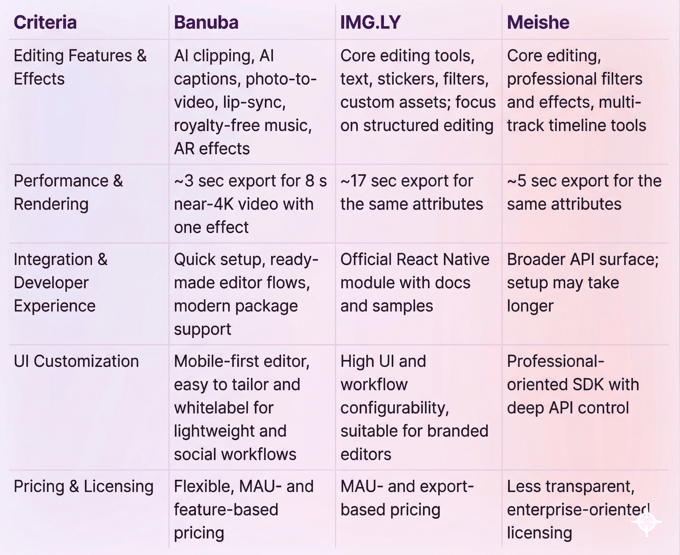
Banuba Video Editor SDK is the most balanced option for React Native apps that need modern video creation: it combines AI-driven tools, real-time effects, faster exports, and quicker integration, which makes it well-suited for social, UGC, and short-form video workflows. IMG.LY focuses on customization and structured editing, making it well-suited for teams that prioritize branding and editor flexibility over automation. Meishe offers deep, professional-grade editing control, but usually comes with a heavier setup and is less optimized for fast, mobile-first creation.
-
The complete technical documentation for the Banuba Video Editor SDK is available online and includes requirements, setup instructions, and configuration details:
- Banuba Video Editor SDK iOS documentation
- Banuba Video Editor SDK Android documentation
- Banuba Video Editor SDK Flutter documentation
- Banuba Video Editor SDK React Native documentation
This Banuba Video Editor SDK documentation is regularly updated and should be your primary reference during integration.
-
You can access official integration code samples for the Banuba Video Editor SDK on GitHub. Banuba provides platform-specific examples to help you integrate faster:
- Banuba Video Editor SDK iOS integration code sample
- Banuba Video Editor SDK Android integration code sample
- Banuba Video Editor SDK Flutter integration code sample
- Banuba Video Editor SDK React Native integration code sample
These Banuba Video Editor SDK repositories include setup instructions and minimal working examples for quick deployment.
-
Yes. The Banuba Video Editor SDK includes an LLM-friendly documentation file designed for AI-assisted development and internal knowledge systems:
This structured Banuba Video Editor SDK text file can be used with AI tools to streamline onboarding and developer workflows.
-
The Banuba Video Editor SDK provides official cross-platform plugins to simplify integration into hybrid applications:
These Banuba Video Editor SDK plugins are maintained by Banuba and support faster implementation for cross-platform apps.
-
Yes, Banuba Video Editor SDK includes agent skills for Claude Code, Codex, and Qwen Code. You can install them with a single command. See the Banuba Agent Skills documentation page.
-
Developers should focus on whether the SDK supports their required editing workflows and performs reliably on real devices. Preview smoothness, export speed, integration effort, documentation quality, and UI customization options are usually more important than the total number of features.
-
Most video editor SDKs use commercial licenses rather than one-time fees. Pricing is commonly based on factors such as monthly active users, enabled features, export volume, and supported platforms. Trial versions are typically limited and not intended for production use.
-
SDKs that offer stable performance, modular feature sets, and usage-based licensing tend to scale more predictably in production. Solutions like Banuba Video Editor SDK are often used in production environments because pricing scales with MAUs and the SDK supports advanced editing and real-time processing, though the best choice depends on the app’s complexity and growth plans.