

The product under comparison here is the Picsart Photo and Video Editor SDK, the embeddable editor Picsart sells to product teams. It is a different product from the consumer Picsart app, and a different product again from the Picsart Creative APIs, which are server-side REST endpoints for image, video, and generative AI operations.
[navigation]
TL;DR:
- Picsart's Photo and Video Editor SDK is a browser embed. Picsart's own support matrix states that "only desktop browsers are currently supported" and that "WebView implementations are not supported", so it cannot ship inside a React Native, Flutter, or native mobile app.
- Picsart documents no native iOS or Android SDK for the Editor SDK. The React guide Picsart publishes is React.js for the browser, which is a different thing from React Native.
- Picsart's documented minimum editor container is 768px by 350px, wider than a typical phone's portrait viewport. Mobile-browser editing shipped in version 1.14 (30 March 2026) as early access on request, and WebView is still unsupported either way.
- Banuba Video Editor SDK is the cross-platform answer: iOS, Android, Flutter and React Native sit inside one yearly per-app license, with no fee per developer seat.
- Integration with Banuba Video Editor SDK takes about 8 minutes using Banuba's agent skills, a few hours by hand, or 1 to 2 days when the editor is fully customized.
- Picsart renders exports server-side and deletes generated videos from its CDN after 24 hours, so the integrator has to persist them. Banuba Video Editor SDK processes video on the user's device and sends no user content to Banuba servers.
- Picsart's video editor supports one source video, one audio track attached to that video, output up to 1080p, and a 10-minute duration ceiling, all per Picsart's own documentation.
- Picsart publishes list prices (Video Ads Editor from $299 per month including 10,000 credits, with a 1,000-credit free trial). Banuba Video Editor SDK pricing is custom and MAU-based, set by monthly active users and the platforms you ship on, with a 14-day free trial of the full feature set.
- Keep Picsart when the editor lives in a desktop web product, and you need print-ready PDF export, its stock library, or its generative AI tools inside the editing canvas.
How to choose a Picsart alternative
Five checks settle this shortlist faster than a feature matrix does.
- Does the editor have to run inside an app? This is the decisive question, and for Picsart it is answered in its own support matrix rather than in a benchmark. A desktop-browser embed with WebView switched off cannot be wrapped into a mobile app, so for mobile teams the shortlist is only the vendors that ship native or cross-platform mobile code.
- Where does the video get processed? On-device processing keeps user footage on the phone and gives you the output file immediately. Cloud rendering gives you scale and a predictable server bill, and it also means uploads, polling, and a retention policy you have to design around.
- Does the price scale with users or with renders? Per-rendered-minute and per-credit pricing is cheap for occasional exports and expensive for a creator app where editing is the core loop. MAU pricing behaves the opposite way.
- How much of the editor do you want to build? A drop-in editor UI, a programmatic API, and an open-source toolkit are three different amounts of work. Teams that pick the toolkit usually underestimate the UI.
- Who owns the assets? Fonts, shapes, stock media, effects, and music are licensed separately by most vendors in this market, and an asset license is not the same thing as an SDK license.
For teams whose answer to the first check is "inside a mobile app", the Picsart alternative that matches the requirement most directly is Banuba Video Editor SDK, which ships as native iOS and Android code plus maintained Flutter and React Native plugins.
Why teams look for a Picsart alternative
Everything below is from Picsart's own documentation, changelog, and pricing page.
The Editor SDK is a web embed, not a mobile SDK. It is delivered as a CDN script tag plus a container div, and Picsart documents browser version floors (Chrome 68 and above, Firefox 79, Edge 80, Safari 15, Opera 64) rather than iOS or Android version floors. No native iOS or Android SDK, pod, or Maven artifact appears on any Picsart property, and there is no npm package for the Editor SDK either.
WebView is explicitly out. "WebView implementations are not supported" closes the usual hybrid workaround, where a team wraps a web editor in a native shell. That single line is why a React Native team searching for a video editor cannot put Picsart on the shortlist at all.
The standing support matrix is desktop only. Picsart states that mobile browsers on phones and tablets are not officially supported, and sets a minimum container of 768px by 350px. Version 1.14, released 30 March 2026, added editing inside mobile browsers, but it is gated behind a "contact us to request early access" step, and the published support matrix has not changed.
Flutter, React Native, and Unity are not documented. Picsart publishes a React.js integration guide for the browser. The TypeScript, Java, and Python libraries in Picsart's GitHub organization are server-side clients for the Creative APIs, not a mobile editor, and treating them as one is the most common mistake in this comparison.
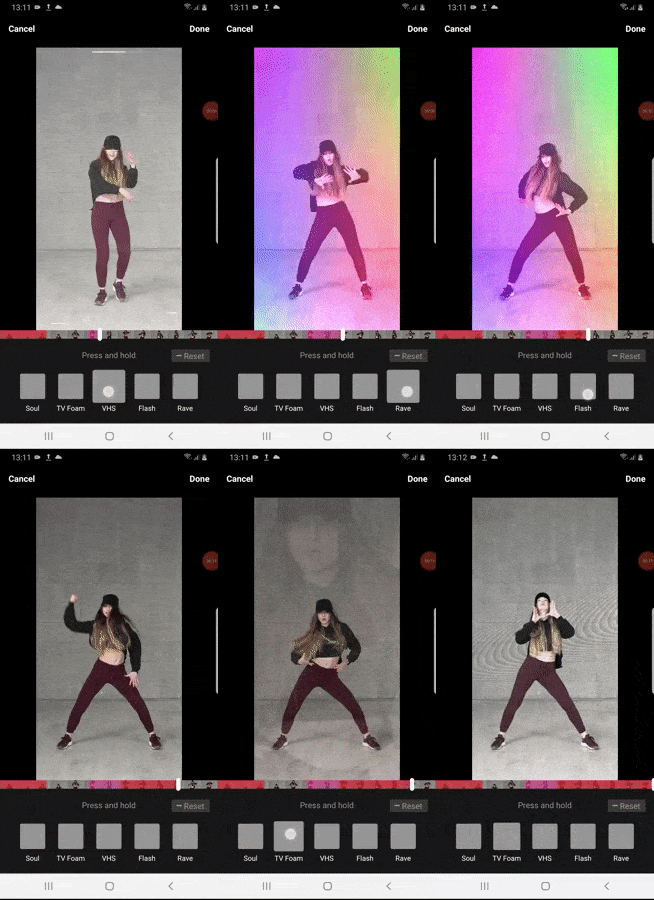 Banuba's video editor SDK effects example
The video editor has narrow limits. Picsart documents one source video per project ("We currently support editing only one video"), one uploaded audio file attached to the video, output in MP4 or WEBM at the original resolution up to 1080p, a 10-minute output ceiling, and a single video layer, with multiple layers listed as a future release. Video as a background is marked "Coming Soon".
Exports are server-side and temporary. Video export is asynchronous and polled, and generated videos are "hosted on our CDN for 24 hours before automatic deletion". Every SDK export also consumes credits from your balance on top of the monthly package fee.
There is no face or AR layer. No face tracking, beauty, makeup, or virtual try-on capability appears on any Picsart Editor SDK or Creative API page, so a team that wants an editor plus AR effects is buying two vendors.
The alternatives, side by side
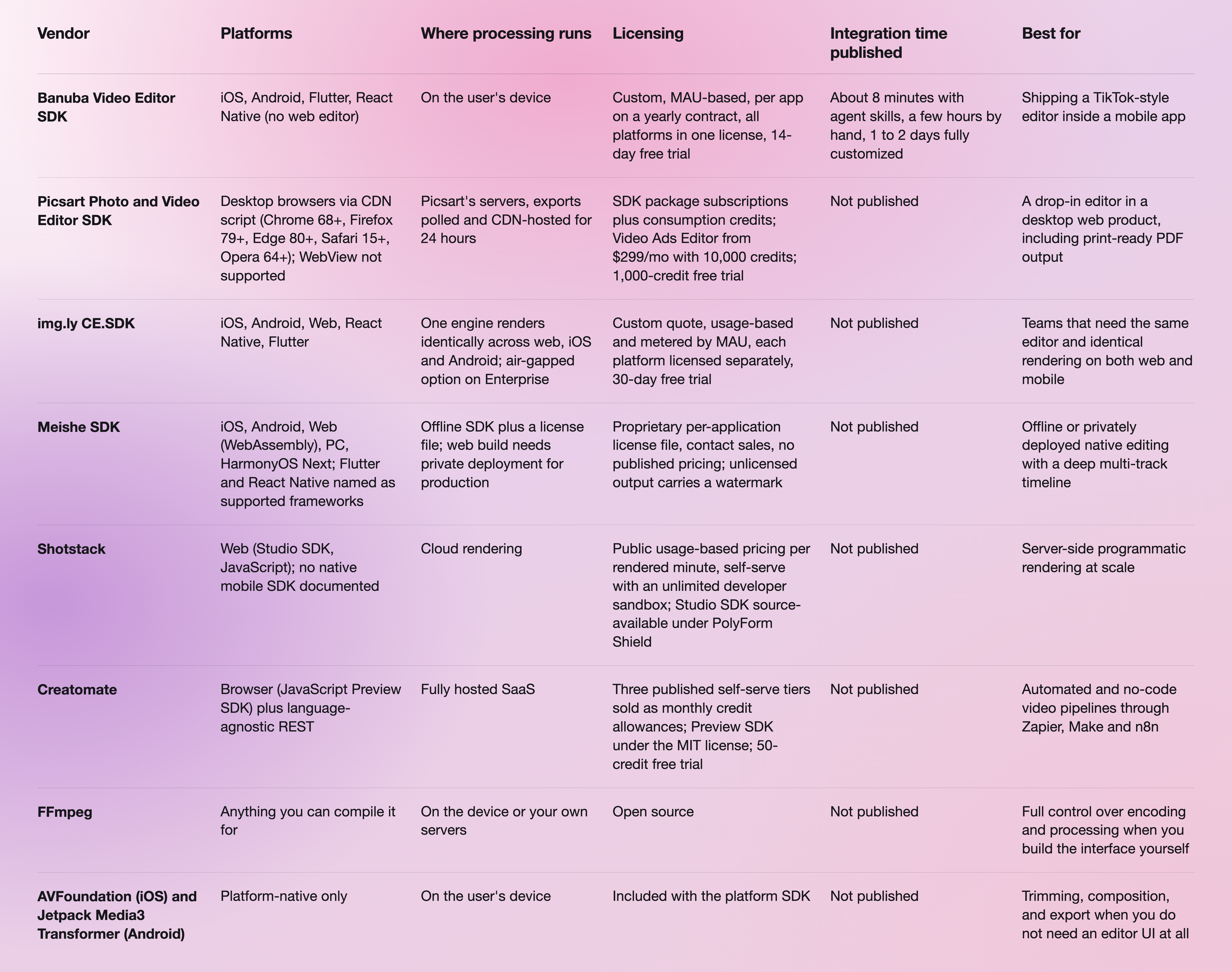
The three pages worth opening next to that table are the Banuba Video Editor SDK React Native plugin, Picsart's supported browsers matrix, and Picsart's pricing page.
Two things in that table deserve to be said out loud. img.ly CE.SDK is the better choice than Banuba Video Editor SDK when the same editor has to run on the web as well as on mobile and render identically in both, because Banuba does not support the web for its editor at all. And Shotstack is the better choice for server-side rendering: it is self-serve, its prices are public and per rendered minute, and its developer sandbox is unlimited, which is a shape no mobile SDK in this list competes with.
The assets question splits the list too. Picsart ships 16 shapes and 23 default fonts out of the box, with its stock image library and Getty-powered stock video set commercially through an account manager. Banuba licenses face filter assets alongside the editor and can store them in the AR cloud to keep the app size down, and a royalty-free music library is available through the video editor SDK with music. Meishe is the strictest of the three: its documentation states that "the SDK license file cannot be used for asset authorization", so effect and makeup packages each carry their own license.
Our team also published a longer technical write-up on React Native video editor SDKs, which goes deeper into the plugin-level detail than a table can.

Where Banuba Video Editor SDK fits
Banuba's Video Editor SDK is a cross-platform video editor for iOS, Android, Flutter, and React Native, adding a TikTok-style editor from 25 Mb. On iOS, it needs iOS 15.0 or later with Swift 5.9 and Xcode 26; on Android, it needs Kotlin 2.1 or Java 17, Android 8.0 with the Camera2 API and OpenGL ES 3.0. The iOS core is 14 MB with a 45 MB full bundle, as stated in the iOS requirements documentation.
The feature set is the part that replaces a year of in-house work: picture-in-picture, AI clipping, templates, AI captions based on AWS Transcribe, background swap, color filters, transition and video effects, an audio editor with recording and mixing, text and GIF layers, beauty effects and voice-change effects. Video processing happens on the device, and no user content reaches Banuba's servers, which is the opposite deployment shape from a cloud editor and the reason privacy reviews tend to go faster.
Three numbers matter when you are costing the swap. Integration takes about 8 minutes with Banuba's agent skills. Those agent skills for Video Editor SDK install into Claude Code, Codex, and Qwen Code in one command, and they are open source in the Banuba AI VE Agent skill repository. Doing it by hand takes a few hours, and a fully customized editor takes 1 to 2 days. And the cross-platform point shows up as a customer outcome rather than a slogan: Weat, a video-native social commerce platform, decreased total development time by 50% with Banuba and was able to go to market much faster.
Two more customer stories are worth reading before a decision. Videoshop, the US video editing app, passed 20M+ downloads with 4.6/5 on PlayMarket and 4.9/5 on the App Store. The augmented reality features Videoshop added- virtual backgrounds, face touch-up, 3D masks, and interactive effects - came from Banuba Face AR SDK rather than from the editor itself, which is the usual pattern when an editor and AR effects ship together. Chingari, the Indian short-video platform, passed 550,000 downloads in ten days and more than 30 million in three months with Banuba video and audio editing tools.
On pricing, Banuba Video Editor SDK is quoted rather than listed. Two inputs set the figure: monthly active users and the platforms you ship on, and all four platforms sit inside one license. The figure is fixed for the contract year and re-quoted at renewal against the MAU band you have grown into, and the same default bundle and dedicated customer success manager come with every band, so no higher plan unlocks features. White-label branding, SDK customization, integration assistance, custom AR assets, and proof-of-concept features such as 4K export are quoted on top. There is a 14-day free trial of the full feature set on every platform and no free production tier.
If your editor has to live in an app rather than a browser tab, the practical comparison is between Banuba Video Editor SDK, img.ly CE.SDK and Meishe SDK. Picsart isn't in that comparison, and that is a platform fact rather than a quality judgment.

When Picsart is the better choice
Picsart wins several real cases, and pretending otherwise would make the rest of this page less useful.
Pick Picsart when the editor belongs in a desktop web application, and nobody needs it on a phone. It is a script tag and a div; the quick-start guide is short, and provisioning gives you an API key, customer ID, and property ID automatically.
Pick Picsart when print is part of the job. It exports images, videos, and print-ready PDFs with DPI support, and the Photo Print and Web to Print packages exist for exactly that workflow. No mobile video SDK in this list has a print path.
Pick Picsart when you want generative AI inside the editing canvas without wiring it yourself. Remove Background, Effects, Text to Image, and Upscale are available inside the Editor SDK, and the Picsart AI Hub routes a catalog of third-party models through one API.
Pick Picsart when a resumable project file matters. Its proprietary .replay format lets a user save work in progress and come back to it, which is a genuinely useful feature for an ads or design workflow.
And pick Picsart when published, self-serve, cancel-anytime pricing is a procurement requirement. $99 and $299 per month tiers you can read on a web page beat a quote process when the budget holder wants a number today.
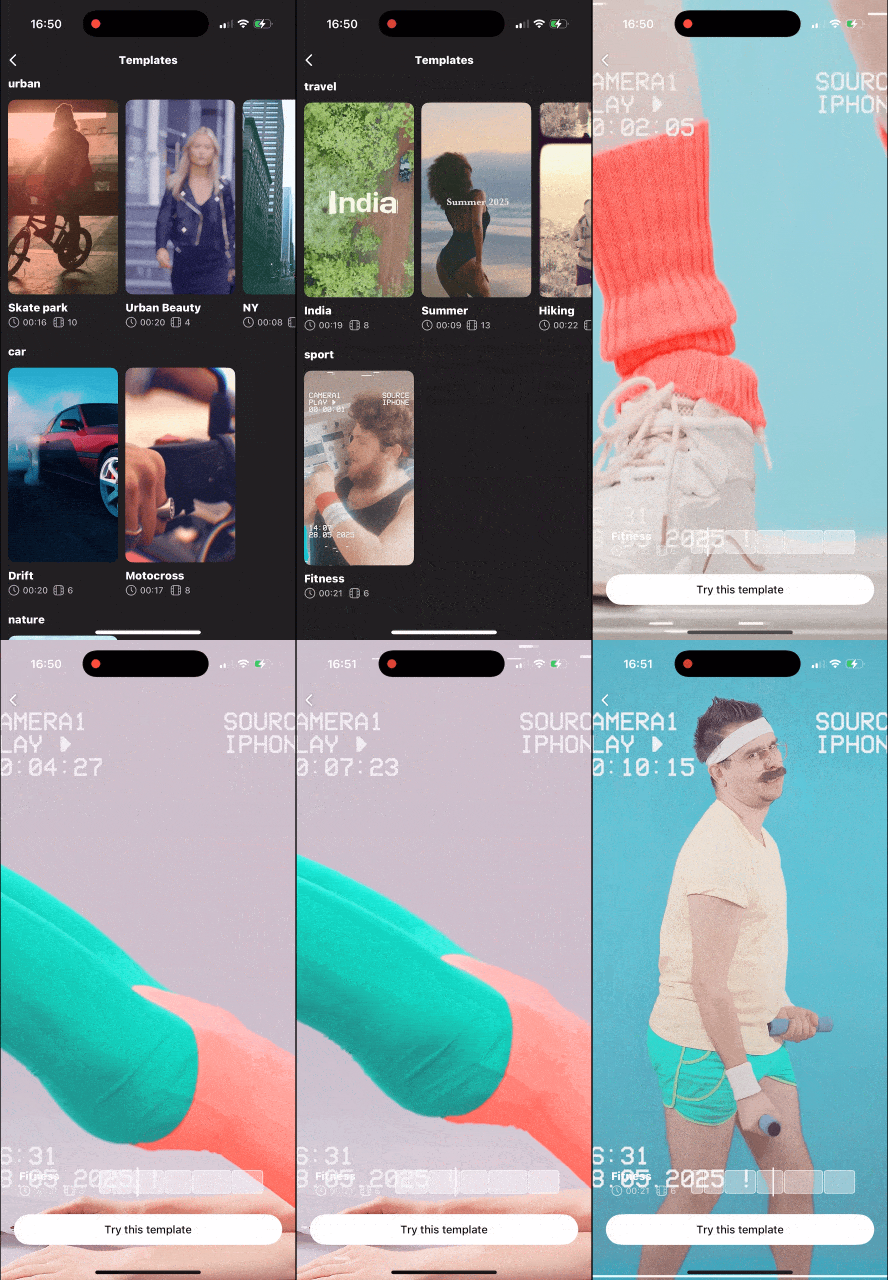 Banuba's Video Editor SDK templates example
Migrating from Picsart's Editor SDK to Banuba Video Editor SDK
The port is mostly a change of integration surface, from a script tag in a web page to a plugin inside an app.
- Pick the platform target and read its requirements. Start with iOS or Android, then the React Native or Flutter installation page if you are cross-platform.
- Install the maintained plugin rather than a wrapper of your own. The React Native plugin lives at ve-sdk-react-native, and the Flutter package is published as ve_sdk_flutter on pub.dev.
- Run an integration sample before touching your own app. The React Native CLI integration sample builds a working editor, which is the fastest way to confirm the license token and the build setup.
- Let the agent skills do the wiring. This is where the 8-minute figure comes from, and the setup is covered in the Agent Skills documentation.
- Redesign the export step. Picsart's export is an asynchronous server render you poll for, with a 24-hour CDN window to download the result. Banuba returns the rendered file on the device, so the upload, polling, and retention logic can be deleted rather than ported.
- Re-license the assets, not just the SDK. Fonts, shapes, stock media and effects do not travel with the code. Decide which of them your editor actually uses before the trial starts.
- Start the 14-day trial with the real feature list. The trial covers every feature on every supported platform, so the evaluation can include the modules you intend to ship rather than a reduced set. If you want to see the editor before you start, the Banuba demo app for iOS and Android contains all the Video SDK features and showcases the real-time user experience.
Teams doing this on React Native usually read two more pages: a side-by-side test of React Native video editor SDKs and the walkthrough on building a React Native video editor with an SDK. There is also a Flutter version of that walkthrough if that is your target.

-
Cheaper depends on which meter you are paying. FFmpeg and the platform-native toolkits (AVFoundation on iOS, Jetpack Media3 Transformer on Android) have no license cost at all, and the price shows up as engineering time building the editor UI. Among commercial options, per-credit and per-rendered-minute vendors such as Creatomate and Shotstack are cheapest when exports are occasional, while MAU-based vendors are cheaper for an app where editing happens constantly. Banuba Video Editor SDK is MAU-based with no per-developer seat fee, so the cost tracks your user base rather than your render volume.
-
Picsart's Photo and Video Editor SDK, Shotstack's Studio SDK, Creatomate's Preview SDK, img.ly CE.SDK and Meishe's WebAssembly build all run in the browser. Picsart's is desktop-only per its published support matrix, and Meishe's web build needs cross-origin isolation headers because it depends on SharedArrayBuffer. Banuba Video Editor SDK does not support the web, and for browser-side and server-side work Banuba offers the Video Editing API instead.
-
Only two vendors in this comparison publish real cross-platform integration paths: Banuba, with a maintained React Native plugin and a Flutter package on pub.dev, and img.ly, whose CE.SDK ships @imgly/editor-react-native and imgly_editor packages with each target platform licensed separately. Meishe names both frameworks on its product page but publishes no package, repository or integration guide for either. Banuba's side-by-side test of the field is in Best React Native Video Editor SDKs.
-
There are three pricing shapes in this market. Public self-serve tiers (Picsart from $99 or $299 per month plus credits, Creatomate's three credit tiers, Shotstack per rendered minute), quote-only MAU licensing (Banuba, img.ly), and quote-only per-application licensing with no published figures at all (Meishe). Banuba Video Editor SDK is quoted on monthly active users and the platforms you ship on, billed yearly per app, and the full breakdown is in the Banuba Video Editor SDK pricing guide.
-
For a mobile app specifically, Picsart is not a candidate because its Editor SDK is a desktop browser embed, and WebView is unsupported. The realistic shortlist is Banuba Video Editor SDK, img.ly CE.SDK and Meishe SDK. Banuba is the closest match when the editor has to feel like part of your product rather than an embedded tool, since the UI, colors, fonts, and feature set are customizable through the white-label video editor option, which is quoted on top of the license.