

[navigation]
TL;DR:
- Banuba Video Editor SDK is best for iOS apps needing editing plus real-time Banuba Face AR in one SDK; integration is documented in as little as 8 minutes, and its agent skills let an AI coding agent do the integration.
- IMG.LY is best-in-category for one engine across web, iOS, Android, desktop, and a Node.js server-side renderer, but each platform is licensed separately.
- Meishe is best-in-category for editing depth: nestable multi-track timelines, 4K editing, 8K image processing and HDR export with HLG or ST2084 curves.
- Meishe publishes no price, tier, or MAU figure anywhere, gates downloads behind a login, and watermarks unlicensed output, so budget for a sales cycle before you can prototype.
- Banuba Video Editor SDK is priced on MAU with no per-developer-seat fees and has a public pricing guide; IMG.LY is a custom quote with no public tier.
- Trials differ more than features: Banuba 14 days with all SDK features, IMG.LY 30 days with full feature access, Meishe trial authorization with watermarked output.
- AVFoundation gives you primitives, not a shipped editor UI, and no face AR, beauty, background removal, or AI captions.
- Picsart's Editor SDK is not an iOS option: web embed, desktop browsers only, WebView explicitly unsupported.
How we compared them
Anyone shopping for a video editor SDK iOS runs into the same five questions, and those are the questions this comparison answers.
-
iOS integration path and requirements. CocoaPods or Swift Package Manager, the Swift and Xcode versions assumed, and whether you can build a sample today or need a sales call first.
-
Feature depth out of the box. Whether transitions, an audio editor, text, color filters, templates, and captions come with the license or as separate packages.
-
Face AR and real-time capability. Editing a file and processing a live camera frame are different problems, and needing masks, beauty, or background replacement while recording narrows the list fast.
-
Licensing and pricing transparency. Per-platform licenses, per-app license files, separately licensed modules, and metered MAU all change the total differently, and a vendor that publishes nothing signals the procurement effort ahead.
-
What the trial gives you. A trial that watermarks output or hides modules behind separate authorizations is not a trial with full feature access.
Then decide which numbers you will measure once the SDK is inside your app. Helen Fedulova's rundown of the numbers worth measuring in your own app is a reasonable starting checklist.
The 4 best iOS video editor SDKs
1. Banuba Video Editor SDK: best for iOS apps that need editing plus real-time Face AR in one SDK
Banuba Video Editor SDK is a native iOS editor that ships with its own UI and combines a full editing stack with Banuba's Face AR engine. It targets iOS 15.0+, Swift 5.9+, and Xcode 26+, and installs through either CocoaPods or Swift Package Manager.
Key strengths
The feature set is broad without add-on purchases: picture-in-picture, transitions, video effects, an audio editor with recording, mixing, and timing control, text and GIFs, color filters with custom LUT upload, beauty effects, Templates, Background Swap, AI Clipping (neural nets pick the core parts of clips, match them to the music beat, and auto-insert transitions), and AI Captions in English, Mandarin, Spanish, and Portuguese by default.
Real-time capability is where the single-SDK argument holds up. The iOS-documented modules include Face AR with AR Cloud, face filters with 2D and 3D stickers, morphing and expression triggers, Green Screen real-time background subtraction, Weatherman mode, finger drawing, video recording, and video templates.
Two things speed up the first week. Banuba documents integration in as little as 8 minutes, and its agent skills let an AI coding agent do the integration: one command installs them into Claude Code, Codex, or Qwen Code, and the vibe-coding documentation states: "In about an hour, you'll have a working Banuba Video or Photo Editor running in a local demo app on your laptop." Pricing is MAU-based with no per-developer-seat fees, the trial is 14 days with all SDK features, and no user data is collected: algorithms run offline, on the user's device.
Сompetitors do not disclose binary file sizes. Banuba makes this information publicly available. The main video editor is 14 MB, and the full package is 45 MB.
Videoshop, a US video editing app by Jajijuejo, integrated Banuba's Face AR SDK features (virtual backgrounds, face touch-up, 3D masks and interactive effects) and has passed 20M+ downloads across iOS and Android, with 4.9/5 on the App Store and 4.6/5 on Play Market. The Videoshop success story is about adding Face AR to an editor that already existed, not building the editor itself.
Limitations
Banuba is not the deepest professional editing toolchain here. If your users need nestable sub-timelines, per-clip property automation, or HDR export with specific transfer curves, Meishe is further along. Banuba is also not a single engine for web plus server-side rendering: it covers native iOS and Android plus React Native, Flutter and NativeScript, but a browser-based editor or a headless render farm is not what it is for.
Best for
iOS teams shipping a consumer or social video feature where camera-time effects matter as much as the timeline, and where the integration has to land in days rather than a quarter.

2. IMG.LY (CE.SDK) Video Editor SDK: best for one engine across web, mobile, and server-side rendering
IMG.LY's Video Editor SDK is built on the CreativeEditor SDK engine and is the strongest option here for teams whose editing experience cannot live on iOS alone. The IMG.LY video SDK covers native iOS and Android, web, React Native, Flutter, desktop via Electron, macOS and Mac Catalyst, and a Node.js headless renderer on the server.
Key strengths
One engine renders video identically across web, iOS, and Android, which removes an entire class of "it looks different on the other platform" bugs. On iOS, you integrate through CocoaPods with pod 'IMGLYUI'. The editor imports and exports MP4, WebM and MOV, with timeline trim, split and reorder, keyframe animations, motion effects and a storage-agnostic media library. AI plugins for captions, background removal, video and image generation, and text-to-speech voiceover come with the license.
Governance is a real strength: editing is client-side, no image, video or personal data is sent to IMG.LY, and the product is GDPR-compliant and SOC 2 Type II certified. Enterprise plans add SSO, custom terms, SLAs, onboarding of up to six weeks, and an air-gapped option. White-labeling is complete, and the 30-day trial with full feature access is the most generous window here.
Limitations
Each platform is licensed separately (web, iOS, Android, and desktop), and React Native or Flutter projects need a license per target platform, so cross-platform breadth is also a cost multiplier. One license does cover multiple app identifiers for staging, beta, and production. Pricing is a custom quote with no public tier, metered by MAU, and generative model usage inside the AI plugins is billed separately by the providers (Anthropic, fal.ai, ElevenLabs). Face AR, beauty and expression-triggered effects are not part of the documented feature set.
Banuba's video editor SDK text overlay feature example
Best for
Product teams whose editor has to exist on the web and in the app, or who need server-side rendering of the same project files, and who have procurement capacity for a multi-platform license.
3. Meishe SDK: best for professional multi-track and HDR editing depth
Beijing Meishe Network Technology Co., Ltd. was founded in 2014, is independent, and claims more than 70 patents. Meishe splits its offering into StreamingSDK for shooting, editing, and effects rendering, and EffectSDK. iOS integration is documented in Objective-C against NvsStreamingContext; Android, web via WebAssembly, Windows, macOS, HarmonyOS Next, Flutter, and React Native are also covered.
Key strengths
This is the deepest editing model in the comparison: a multi-track timeline for video and audio, nestable sub-timelines, keyframes and per-clip property effects, 4K shooting and editing, 8K image processing, and real-time effects without preprocessing. HDR handling is genuinely differentiated: Meishe mixes HDR and SDR material and exports HDR with HLG or ST2084 curves. Audio goes down to volume adjustment across 30 frequency bands with per-clip effects. On the face side, there are 106- and 240-point landmark models, gesture detection across six types, 11 beauty adjustments, and makeup packages from lipstick to eyeliner and blush.
Limitations
Commercially, this is the highest-friction option. Pricing is contact-sales, with no price, tier, or MAU figure published anywhere, and SDK downloads are gated behind an account login. The license is a proprietary per-application file bound to your bundle ID, issued after a sales conversation. Unlicensed StreamingSDK output carries a watermark until authorization passes, and EffectSDK needs both SDK trial authorization and separate asset authorizations, or effects simply do not render. 4K editing is separately licensed, and the face module is a separate SDK package; having the module does not mean you have the license for it.
There is also a pipeline constraint: each media item must be transcoded to Meishe's proprietary m3u8 format through Meishe's own transcoding service before it can go on the track, and that m3u8 is not a standard streaming file. There are no built-in stickers either, and entry and exit animations need a separate effects package.
Best for
Teams building a pro or broadcast-grade editing product where multi-track depth, 4K and 8K handling, and HDR export justify a longer procurement process.

4. Apple AVFoundation: the native baseline
AVFoundation is not a vendor. It is Apple's first-party framework, already in the iOS SDK, free, with no license to negotiate. AVFoundation gives you primitives: compositions, tracks, and export sessions.
Key strengths
Zero license cost, zero vendor dependency, no MAU meter, and no sales call. For simple trim, merge, and export, it is often the right answer, and every SDK here competes against it.
Limitations
You get building blocks, not a shipped editor UI. There is no face AR, no beauty, no background removal, and no AI captions. Those you build or license. The interface, the effect pipeline, and the asset management become your team's ongoing work rather than a supplier's.
Best for
Apps where video editing is a supporting feature rather than the product, and where the requirement is unlikely to grow into effects, captions, or camera-time processing.
Banuba's video editor SDK features in action
One to rule out: Picsart Editor SDK
Picsart comes up in these searches, so it is worth saving you the evaluation. There is no native iOS SDK documented: the Editor SDK is a web embed installed via a CDN script tag, supporting desktop browsers only. Mobile browsers are not officially supported, and WebView implementations are not supported either, which rules out wrapping the web editor inside an iOS app. It also does not support real-time editing, allows one source video per project, and caps output at 1080p and 10 minutes. The Video Ads Editor package starts at $299 per month, which is fine for a desktop web workflow, not an iOS option.
iOS video editor SDKs: comparison table
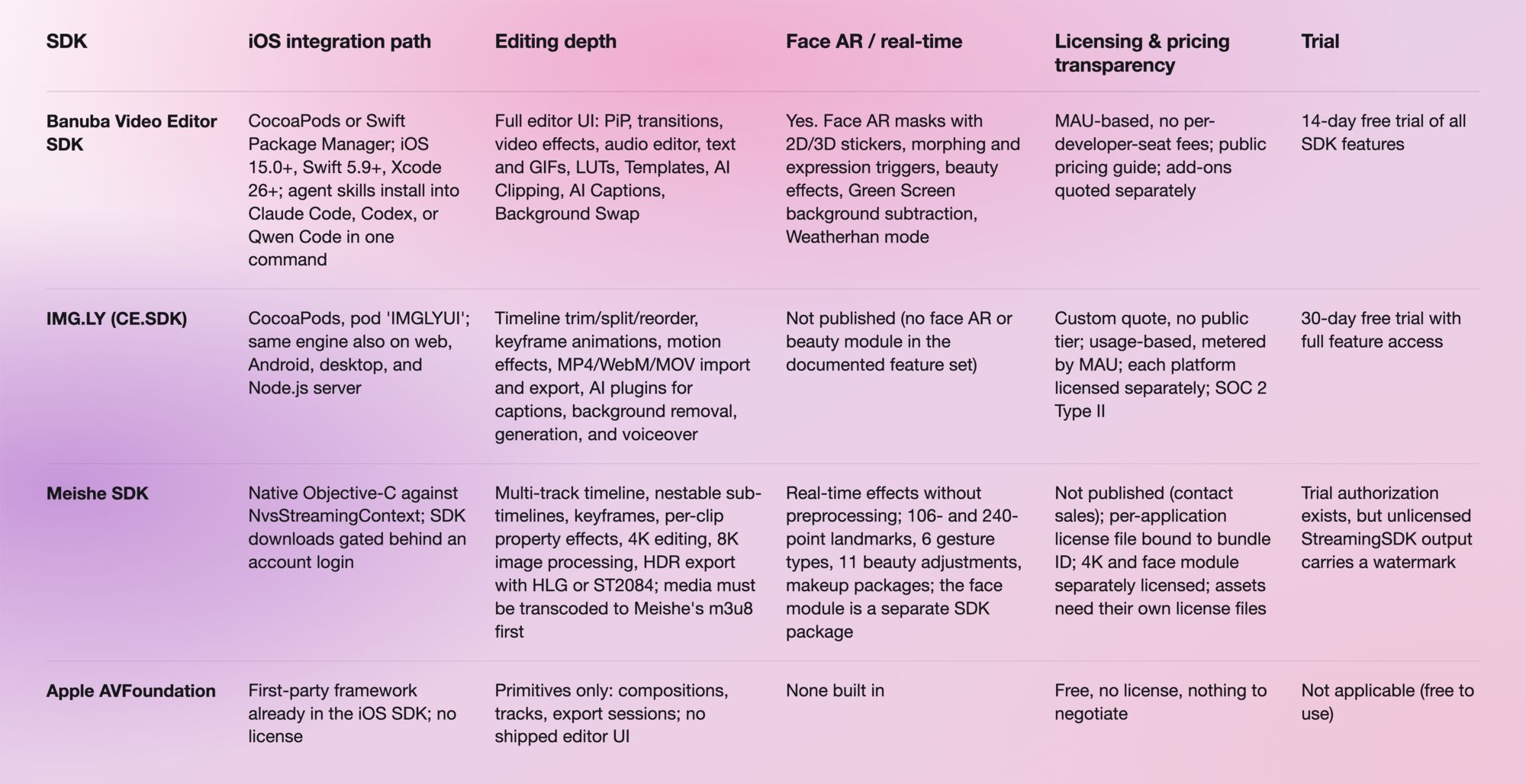
Which one should you choose?
If your app needs a full editor and real-time face effects in one dependency, pick Banuba Video Editor SDK. That is the narrow case it is built for, and the 8-minute integration path plus agent skills make it the fastest of the four to get into a build.
If the same editing experience has to run on the web and render server-side, pick IMG.LY. Just price it as several licenses rather than one.
If you need multi-track depth, 4K editing or HDR export, pick Meishe. Start the sales conversation early, because nothing ships without the per-app license file.
If the feature is trim, merge, and export, stay on AVFoundation. A licensed SDK only pays off once you need effects, captions, or camera-time processing you would otherwise build yourself.

-
Yes. AVFoundation gives you compositions, tracks, and export sessions, which is enough for trimming, merging, and exporting. What it does not give you is a finished editor UI or any face AR, beauty, background removal, or AI captions. Those are your build. To compare the two routes, Banuba publishes an iOS integration sample on GitHub that you can run against your own prototype.
-
iOS 15.0 or newer, Swift 5.9 or newer, and Xcode 26 or newer, with installation through either CocoaPods or Swift Package Manager. Devices covered by the SLA are tested, and the SLA device list is provided. The current specifics live in Banuba's iOS requirements documentation.
-
Yes. Banuba publishes agent skills that install into Claude Code, Codex, and Qwen Code in a single command, so an AI coding agent can carry out the integration instead of a developer doing it by hand. They are open in the Banuba ai-skills repository, and the vibe-coding documentation states that in about an hour you will have a working Banuba Video or Photo Editor running in a local demo app on your laptop.
-
Almost always by monthly active users, negotiated per customer. IMG.LY and Meishe both route you to sales, and Meishe publishes no price, tier, or MAU figure at all. Banuba also prices on MAU, charges no per-developer-seat fees, and explains the model in its Video Editor SDK pricing guide, with integration assistance and custom development quoted separately.
-
Yes, though captions are usually a distinct module rather than part of the core timeline. IMG.LY includes automatic captions as an AI plugin, with generative usage billed by the model provider. Banuba's AI Captions are built on AWS Transcribe and support English, Mandarin, Spanish, and Portuguese by default, with the language set expandable.