

The strongest Creatomate alternatives split into two shapes: other cloud rendering APIs such as Shotstack, and in-app editing SDKs such as Banuba's Video Editing API, IMG.LY and Meishe. Banuba's Video Editing API is an on-device mobile video editing engine for iOS, Android, Flutter, and React Native that integrates in 1 to 2 days and exports up to 4K UHD. Banuba wrote this comparison, and every Creatomate fact in it comes from Creatomate's own documentation and pricing pages. Which shape you need comes down to one question: does the finished video get assembled on your server, or on the user's phone?
[navigation]
TL;DR:
- Creatomate renders server-side. Its own docs describe it as an API for video and image rendering in the cloud, and its browser Preview SDK cannot produce the final MP4, so every export round-trips to Creatomate's infrastructure.
- Creatomate's Preview SDK is desktop-only by design. The minimum-requirements page says it should not be used on mobile devices and cannot be used on less powerful hardware such as older devices or smartphones.
- No native iOS or Android SDK is publicly documented on Creatomate's site, docs, or GitHub organization, so mobile editing means a REST round trip rather than an in-app timeline.
- Banuba's Video Editing API is the in-app alternative: recording, editing, and export all run on the device, and one license covers iOS, Android, Flutter, and React Native.
- Shotstack is the closest like-for-like swap for a cloud renderer and meters by rendered minute rather than by credit: $0.30 per minute pay-as-you-go, or $0.20 per minute on subscription from $39 a month.
- Creatomate's credits expire, and its output is temporary. One credit equals 100 million pixels, monthly credits do not carry over, and finished renders are deleted after 30 days.
- Creatomate caps throughput at 30 API requests per 10-second window, and about 20% of a monthly quota is spendable in any 24 hours, which is the constraint that bites on a launch-day spike.
- Banuba licenses its Video Editing API by Monthly Active Users with no per-developer-seat fee, so cost tracks your audience size rather than the number of minutes you render.
- Weat, a US social app, launched on iOS having saved 50% of its product development time with Banuba's Video Editor SDK.
- Creatomate is still the better tool for spreadsheet-driven bulk generation and no-code automation, which Banuba's mobile SDK line does not do at all.
What Creatomate is, and what it is not
Creatomate is a cloud rendering API with a browser preview layer. Its documentation describes the product as an API for video and image rendering in the cloud, and its developer page shows the production flow plainly: you POST a composition to a REST endpoint with a Bearer key, Creatomate renders the output on its own servers, and you get a download URL back.
That shape is the reason most teams go looking for something else. A cloud renderer is excellent at producing finished files from templates and data. It is not an editor that a user touches. If your product needs a person to trim, caption, and export a clip inside your app, you are not looking for a cheaper Creatomate; you are looking for a different category of tool.
This is where a Creatomate alternative built as a mobile SDK changes the architecture rather than the invoice. Recording, editing, and export all run on the device, so there is no upload, no render queue, and no per-minute meter between the user pressing export and getting their video.
Creatomate's own comparison pages name Shotstack and Bannerbear, and nothing else. That is a useful signal about how Creatomate sees its market: it competes with other cloud renderers, not with in-app editors.

Why teams look for a Creatomate alternative
Every limitation below is documented by Creatomate itself, not inferred from testing.
The browser SDK will not export. The Preview SDK gives a real-time preview in the browser, but Creatomate states it cannot generate the final MP4 in the browser due to hardware limitations on users' devices. Final export always goes back to the cloud API. If you wanted a self-contained client-side editor, this is the wall you hit.
It is desktop-only, and says so. The minimum requirements page states the Preview SDK is designed exclusively for desktop devices and should not be used on mobile devices. It also performs best on Chromium browsers, with Safari and Firefox supported but less smooth. For a mobile-first product, that rules the preview layer out entirely.
Renders are deleted after 30 days. Creatomate hosts each render for up to 30 days, after which the download URL stops working, and the entry disappears from the dashboard and the API. The documented workaround is to copy every finished file to your own storage immediately via webhook or an automation step, which is real engineering work that is easy to miss when scoping.
Credits expire monthly and burn fast. Credits do not carry over to the next month. Video credits are a function of resolution, frame rate, and duration, priced at 1 credit per 100 million pixels, so a minute of 720p at 25 fps costs about 14 credits. Usage that spikes and then goes quiet pays for the peak every month.
Throughput has a hard ceiling. The API allows 30 requests per 10-second window and returns HTTP 429 above it, and roughly 20% of a monthly quota is usable within any 24 hours. With a queue and a webhook that still supports more than 10,000 requests an hour, but a burst beyond the daily ceiling is not something you can buy your way out of mid-month.
Mobile is a REST round trip. Creatomate publishes no native iOS or Android SDK on its site, its docs, or its GitHub organization, and no Flutter, React Native, or Unity wrapper appears there either. Its own client libraries are Node.js and PHP, and other languages are REST-only. None of that is a criticism of the product; it is simply what a cloud-first design looks like from a mobile team's chair.
 Banuba's video editor API feature example
How to choose between them
Five criteria decide this shortlist, and the first one decides most of it.
- Where the render happens. Server-side means a queue, a per-minute or per-credit meter, and an upload for every clip. On-device means the export finishes where the user already is. This is an architecture decision, not a pricing one, and reversing it later is expensive.
- Platform coverage you actually ship to. A web embed is useless if your product is an iOS app, and a native mobile SDK is overkill if your editor lives in a back office. Count the platforms you ship to today, then the ones on next year's roadmap.
- What the meter counts. Rendered minutes, credits, monthly active users, and custom quotes all behave differently as you scale. Per-minute pricing is kind to low volume and punishing to heavy users; MAU pricing does the opposite.
- Who owns the output. Cloud renderers hand back a file that may expire, so someone has to move it into your storage. On-device processing never produces that problem, but it also never gives you a server-side copy for free.
- Who is doing the integration. Marketers wiring up an automation need no-code connectors. Mobile engineers need samples, documented platform floors and a license that does not restrict what they build.
One option is missing from the table below on purpose: building it yourself on an open-source encoder such as FFmpeg. It is a real choice, and it is how several vendors here produce their own output, but it puts the encoding pipeline, the device matrix, and the maintenance on your team rather than a supplier's.

The five alternatives, by what they are actually good at
Shotstack: best for programmatic cloud rendering with predictable per-minute cost
The closest like-for-like replacement. Shotstack is a cloud video editing API that renders on hosted infrastructure and returns a file location, and it is the only vendor here that prices in plain rendered minutes: $0.30 per minute pay as you go, or $0.20 per minute on subscription starting at $39 a month for 200 credits, where one credit equals one minute of video regardless of resolution. It also ships a browser Studio SDK that, unlike Creatomate's, does export in the browser using FFmpeg. The catch is the license: the Studio SDK is PolyForm Shield, which in Shotstack's own words means you can use the code for any application as long as it does not directly compete with Shotstack. We publish a longer head-to-head in Banuba Video Editing API vs Shotstack.
Banuba: best for in-app mobile editing that runs on the device
This is the one category where we would claim the top spot, and it is deliberately narrow. Banuba's Video Editing API exposes the recording, trimming, effects, and export pipeline to your own interface, so your screens stay yours, and integration takes 1 to 2 days on a supported platform. It covers native iOS and Android plus Flutter and React Native from one license, runs smoothly on 90% of mobile phones, and exports up to 4K UHD. AI clipping takes three or more raw clips, picks the strongest moments, joins them, places the transitions, and matches the cut to the beat of the music. Because processing happens locally, user media is not uploaded to Banuba at all. Licensing is by Monthly Active Users with no per-developer-seat fee.
IMG.LY: best for one editor across mobile, web, desktop and server
IMG.LY's CreativeEditor SDK has the broadest platform footprint in this list: native iOS and Android SDKs, a browser build for JavaScript, React, Angular, Vue, Svelte and Next.js, plus React Native, Flutter, Electron and a headless Node.js renderer. If a single editing experience has to appear in a phone app, a web app, and a back-office tool, that breadth is hard to match. Pricing is custom quote only, metered by monthly active users, with a 30-day full-feature trial after you download a trial key.
Meishe: best for native mobile plus a WebAssembly web build from one vendor
Meishe ships native iOS and Android SDKs built around the same NvsStreamingContext entry class, and a web build delivered as WebAssembly from a CDN script rather than an npm package. Browser floors are documented down to the version: Chrome 75 and above, Firefox 58 and above, Safari 15.4 minimum. Pricing is not published anywhere on its properties, so budgeting means a sales conversation.
Picsart: best for dropping a full editor into a web page quickly
Picsart Enterprise's Photo and Video Editor SDK is a web embed: a CDN script tag and a container div, and you have an editor. Its pricing is public, packaged as monthly SDK subscriptions plus credit packs, with 1,000 free trial credits on the SDK packages. The constraint is the delivery model. Picsart's docs describe the Editor SDK as a web embed with no native iOS or Android SDK documented, and state that WebView implementations are not supported, which closes the usual shortcut for getting a web editor into a mobile app.

Side-by-side comparison
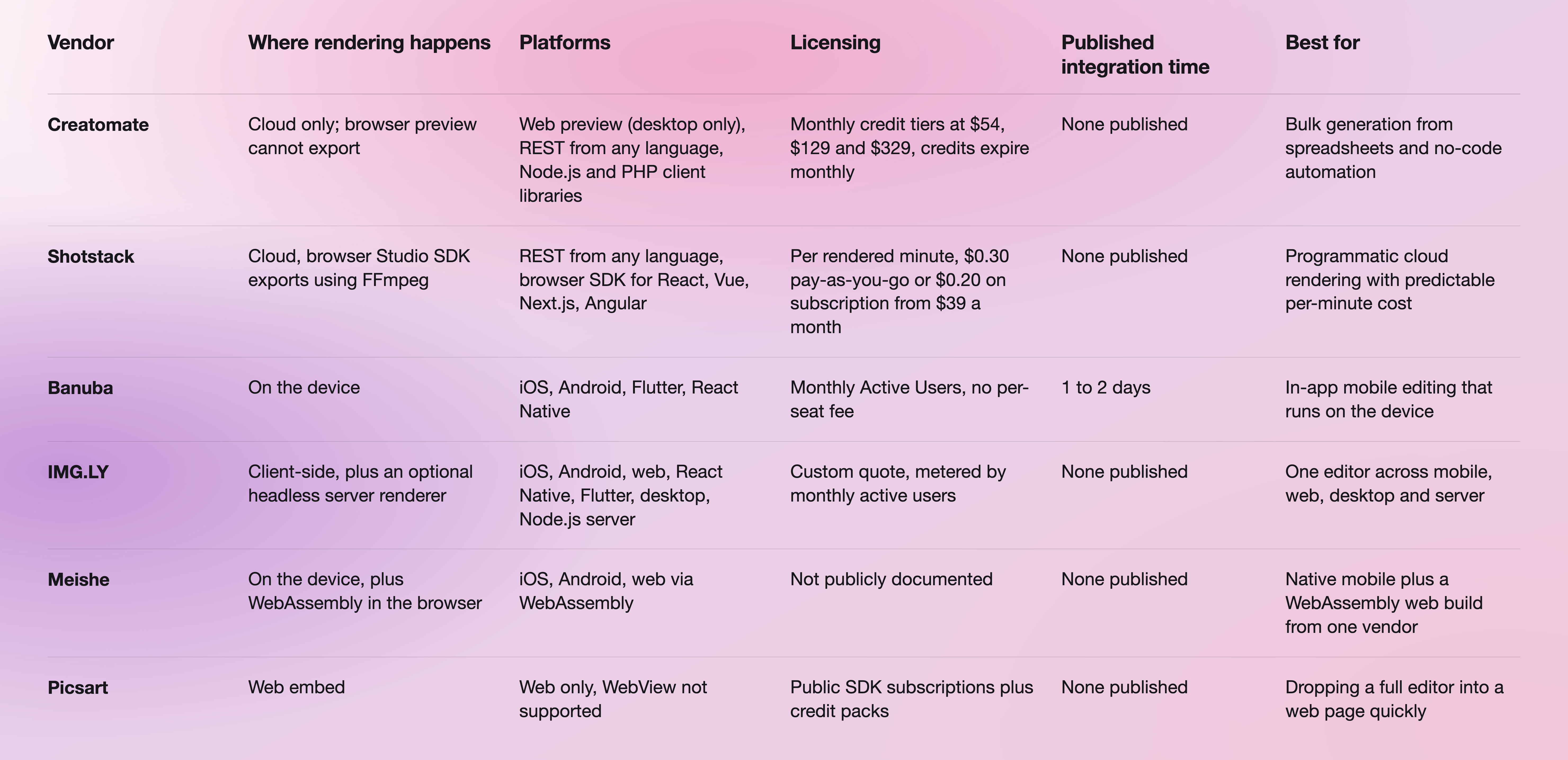
Sources for the table, in order: Creatomate pricing, Shotstack pricing, the Banuba Video Editor SDK product page, IMG.LY video SDK, Meishe and Picsart pricing. Creatomate's monthly figures for the two lower tiers are corroborated in its own pricing documentation.
One detail on Creatomate's entry tier that we will not guess at: its pricing page lists the JS Preview SDK inside the Essential plan's feature list, while the FAQ on that same page says the feature starts with the Growth plans. The two statements contradict each other, and Creatomate's docs do not settle it, so confirm the Preview SDK's entry tier with Creatomate directly before you budget around it.
When Creatomate is the better choice
Three cases, and none of them are edge cases.
You are generating thousands of videos from a spreadsheet. Creatomate's feeds handle bulk generation with mass-replace of images, videos, and captions and CSV import and export, scaling to 100,000 feed rows on the top tier. Nothing in Banuba's mobile line competes with that, because it is not the same job.
Your workflow lives in Zapier, Make, or n8n. Creatomate publishes tutorials for those platforms and for Pabbly, and maintains an official n8n community node in its GitHub organization. If the people building your video automation are marketers rather than mobile engineers, that matters more than any SDK spec.
The video never touches a user's device. Server-side ad variants, personalized email video, automated social posts: the render belongs on a server, the output is a file, and paying per rendered minute is the honest way to buy it. In that world, adding a mobile SDK would be solving a problem you do not have.
A useful way to sanity-check which side you are on is to look at how other teams scoped it. Our write-up of how content platforms automate editing at scale with a video editing API walks through where the work sits in a real pipeline, and we keep a wider feature-by-feature comparison of mobile video editing SDKs for teams already sure they need an on-device editor.
Moving from Creatomate to an in-app editor
If the audit lands on in-app editing, the migration is smaller than it looks, because the two systems overlap less than you would expect.
- Separate the two jobs. List which of your renders are user-initiated and which are automated. The automated ones can stay on a cloud renderer indefinitely. Only the user-initiated ones need to move.
- Start from a running sample. Banuba publishes runnable integration samples for iOS and Android, so the first build is a clone rather than a scaffold.
- Check the platform floors early. iOS 15 and above with Swift 5.9 and Xcode 26, Android 8.0 and above with Camera 2 API, Kotlin 2.1 or Java 17, and OpenGL ES 3.0. The full matrix is in the Video Editor SDK requirements.
- Let an AI assistant do the scaffolding. Banuba ships AI VE Agent skills, open-source knowledge packs that install into Claude Code, Codex and Qwen Code in one command and give the assistant offline access to the Video Editor documentation plus autonomous scaffolding for a new project.
- Rebuild the screens, not the pipeline. The API exposes capture, timeline, effects, and export while your team owns the interface, icons, colors, and localization, so the design system you already have stays intact.
- Keep the cloud renderer for what it is good at. Most teams that make this move end up running both: an in-app editor for creators, and a rendering API for the automated batch work.
For a sense of what the on-device route delivers in production, Videoshop added virtual backgrounds, face touch-up, 3D masks, and interactive effects with Banuba's Face AR SDK, and the app passed 20 million downloads with ratings of 4.9/5 on the App Store and 4.6/5 on Google Play. On the editor side, Weat saved 50% of its product development time against building the same feature set in-house.

-
Cheaper depends on what you are metering. Shotstack's pay-as-you-go rate of $0.30 per rendered minute is the cheapest published entry point if your volume is genuinely low and occasional, because you buy credits instead of a monthly plan. If volume is steady, a per-minute meter stops being the cheap option. Banuba prices its Video Editing API by Monthly Active Users rather than by render, which caps the bill when usage per user is high, and the model is explained in the Banuba Video Editor SDK pricing guide. Picsart publishes SDK subscription tiers, while IMG.LY and Meishe are quote-only.
-
Banuba, IMG.LY and Meishe all publish native SDKs for both platforms. Banuba's Video Editor SDK adds Flutter and React Native under the same license, which is usually the deciding factor for teams shipping one codebase to both stores. Creatomate publishes no native mobile SDK on its own properties, so on iOS and Android you would be calling its REST API rather than embedding an editor.
-
Picsart's Editor SDK is a pure web embed, IMG.LY's CreativeEditor SDK has a full browser build, and Meishe ships a WebAssembly build loaded from a CDN. Creatomate's Preview SDK runs in the browser but is desktop-only and cannot produce the final file there. Banuba's video editing line is mobile-first rather than browser-first, and the platform requirements for each target are listed in the Banuba Video Editor SDK documentation.
-
Published pricing in this category splits three ways. Credit-metered plans: Creatomate at $54, $129, and $329 a month, with credits that expire monthly, on top of a full-featured trial of 50 credits with no credit card. Per-minute metering: Shotstack at $0.30 pay-as-you-go or $0.20 on subscription from $39 a month, after 10 free credits valid for 30 days. Seat-free MAU licensing: Banuba's Video Editing API is priced on Monthly Active Users, with integration assistance and custom feature development quoted separately, and a 14-day trial in which every feature is available and no credit card is required. IMG.LY and Meishe publish no figures at all.