

Choosing the right video editor SDK can make or break a video-driven Android app. Banuba and Meishe are two popular options, each offering powerful tools for editing, effects, and real-time processing, but they’re built with different priorities in mind.
In this article, we compare the Banuba Android Video Editor SDK vs Meishe by looking closely at their features and performance. We’ll break down what each SDK does well, where it falls short, and which one makes more sense depending on your app’s goals, whether that’s social video, user-generated content, or advanced visual effects.
[navigation]
TL;DR:
- Banuba and Meishe are both capable Android video editor SDKs, but they target slightly different use cases.
- Banuba stands out with modern AI features, AR effects, and faster export performance (~3s vs ~5s for an 8s near-4K video).
- Integration with Banuba is quicker (< 8 minutes) and more mobile-first, while Meishe has a steeper learning curve.
- Both SDKs use commercial licensing, but Banuba offers more flexible, MAU-based pricing with clearer scaling paths.
- For social media, UGC, and creator apps that need speed, customization, and scalability, Banuba is generally the stronger choice.
Comparison Criteria
To fairly compare Banuba and Meishe, we evaluated both SDKs using the following parameters:
- Editing Features and Effects
The range of tools available for video editing, including trimming, transitions, filters, overlays, effects, and support for advanced features like beauty filters or AR effects. - Performance and Rendering Speed
How efficiently each SDK handles real-time previews, video processing, and export times on Android devices, especially with longer or effect-heavy videos. - Integration and Developer Experience
The ease of integrating the SDK into an Android app, quality of documentation, sample projects, and overall setup complexity. - Customization and UI Control
How much freedom developers have to customize the editor UI, workflows, and editing logic to match their app’s design and user experience. - Pricing and Licensing
Cost structure, licensing flexibility, and whether the pricing model is better suited for startups, growing products, or enterprise-scale apps.
Banuba Android Video Editor SDK vs Meishe: Feature & Performance Comparison
Based on the criteria above, here’s how Banuba and Meishe compare.
Editing Features & Effects
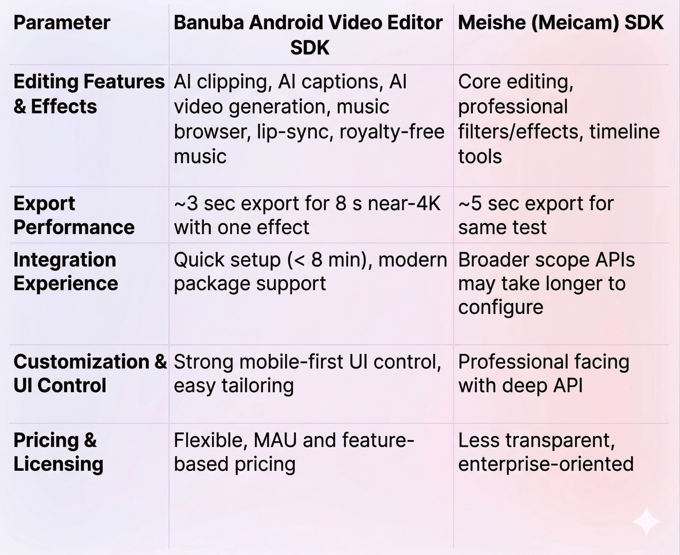
Banuba comes with a larger and more modern feature set targeted at social and creator-focused apps. It includes AI-powered tools like AI clipping, AI captions, video generation from photos, and automated lip-sync creation, as well as a royalty-free music browser and rich set of AR effects that help users create polished content quickly.
Meishe also supports traditional editing tools like filters, transitions, and effects, and offers professional video processing capabilities. However, its effects suite is generally more conventional and less geared toward next-gen automated workflows.
Performance & Export Speed
In benchmark tests for an 8-second, near-4K video with one effect:
- Banuba exports in ~3 seconds
- Meishe exports in ~5 seconds
This shows Banuba’s export performance is around 40% faster in that scenario, which can improve user experience for quick edits.
Integration & Developer Experience
Banuba emphasizes a fast setup with modern package managers (e.g., Maven for Android) and often takes less than 8 minutes to integrate. It also offers documentation, examples, and a trial that covers most features.
Meishe supports a wide range of platforms, but its documentation and API depth can lead to a steeper initial learning curve.
Customization & UI Control
Both SDKs allow UI customization, but Banuba’s editor is built with mobile-first experiences in mind and tends to be easier to tailor for lightweight mobile apps and social workflows. Meishe’s architecture is often geared toward broadcast or cross-platform professional tooling.
Pricing & Licensing
Banuba and Meishe are positioned similarly in terms of cost — both target commercial and enterprise users. Banuba’s pricing is flexible, influenced by platforms, feature sets, and monthly active users (MAUs), which can help teams scale without upfront surprises. In practice, it is affordable even to small startups like Weat, who leveraged Banuba’s SDK to cut their development time in half.
Meishe’s pricing is less transparent publicly.
Comparison Table: Banuba vs Meishe
Summary
Banuba Android Video Editor SDK excels in modern creator experiences with advanced AI tools, faster exports, and quick integration, making it a strong choice for social and short-form video apps. Meishe remains capable with professional editing fundamentals and broad platform support but may require more setup and lacks some newer automation features.

-
The complete technical documentation for the Banuba Video Editor SDK is available online and includes requirements, setup instructions, and configuration details:
- Banuba Video Editor SDK iOS documentation
- Banuba Video Editor SDK Android documentation
- Banuba Video Editor SDK Flutter documentation
- Banuba Video Editor SDK React Native documentation
This Banuba Video Editor SDK documentation is regularly updated and should be your primary reference during integration.
-
You can access official integration code samples for the Banuba Video Editor SDK on GitHub. Banuba provides platform-specific examples to help you integrate faster:
- Banuba Video Editor SDK iOS integration code sample
- Banuba Video Editor SDK Android integration code sample
- Banuba Video Editor SDK Flutter integration code sample
- Banuba Video Editor SDK React Native integration code sample
These Banuba Video Editor SDK repositories include setup instructions and minimal working examples for quick deployment.
-
Yes. The Banuba Video Editor SDK includes an LLM-friendly documentation file designed for AI-assisted development and internal knowledge systems:
This structured Banuba Video Editor SDK text file can be used with AI tools to streamline onboarding and developer workflows.
-
The Banuba Video Editor SDK provides official cross-platform plugins to simplify integration into hybrid applications:
These Banuba Video Editor SDK plugins are maintained by Banuba and support faster implementation for cross-platform apps.
-
Yes, Banuba Video Editor SDK includes agent skills for Claude Code, Codex, and Qwen Code. You can install them with a single command. See the Banuba Agent Skills documentation page.
-
Developers should focus on feature fit first and only choose tools their app actually needs. Performance is critical, especially preview smoothness and export speed on mid-range devices. Easy integration, clear docs, and UI customization can save significant development time. Long-term scalability should also be considered from the start.
-
Most SDKs use commercial licenses rather than one-time fees. Pricing is commonly based on monthly active users, enabled features, and supported platforms. Free trials are often limited and not suitable for production. It’s important to understand how costs scale as your user base grows.
-
SDKs that offer strong performance, modular features, and flexible licensing tend to scale best. Real-time processing and fast exports become more important as usage increases. Solutions like Banuba Video Editor SDK are often chosen for production apps because they scale with MAUs and support advanced features. The best option still depends on your app’s editing complexity and growth plans.