

If you’re building a mobile app in 2026 and users can’t trim clips, add music, tweak speed, or drop in effects, they notice it immediately. TikTok, Reels, Shorts... They’ve trained people to expect powerful editing tools inside the app, not as a separate step. For mobile developers, that means one thing: choosing the right video editor SDK for mobile is now a product decision, not just a technical one. Research shows that video quality and editing polish now impact brand trust for 89% of consumers
This guide breaks down the leading mobile video editor SDKs with a practical lens, without fluff or marketing bingo. Just features that matter if you’re trying to ship TikTok-style editing at scale.
What TikTok-Style Editing Really Means
Before moving to comparing SDKs, it’s worth defining the bar. A TikTok-like editor isn’t just filters and trimming. Developers usually need:
- Real-time effects that don’t tank performance
- Pre-built templates users can apply in seconds
- Speed ramps, transitions, and multi-clip timelines
- AR effects that feel native, not bolted on
- Deep UI customization to match the host app
That last point matters more than most SDK pages admit. Users don’t want to feel like they’ve been kicked into a third-party editor.
Feature Comparison: Top Mobile Video Editor SDKs
We’ve analyzed the heavy hitters to see which actually delivers the specialized tools needed for short-form, high-engagement video creation. Here’s a feature comparison of the top contenders:
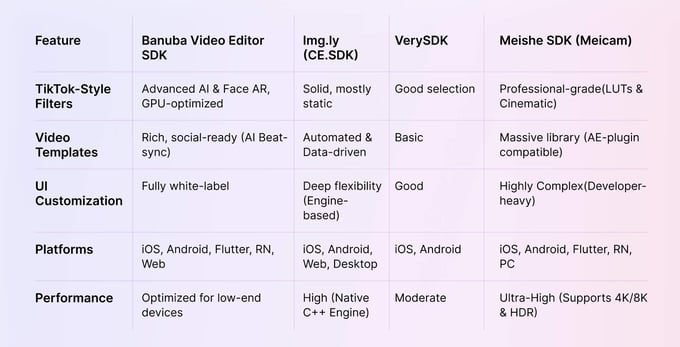
Banuba vs Img.ly vs VerySDK vs MeisheSDK: The Real Differences
1. AR: A Clear Divider
If your roadmap includes face effects, AR masks, or interactive filters, the comparison gets short very quickly.
Banuba ships with its own mature AR engine. That means face tracking, segmentation, and effects that run in real time without external dependencies. Img.ly supports basic overlays but doesn’t position AR as a primary feature. VerySDK doesn’t compete here. Meishe SDK offers partial AR functionality, often via integrations, but it lacks the depth and polish needed for TikTok-level effects.
If AR filters are part of your engagement strategy, Banuba stands apart quickly.
2. Templates Save Product Teams Months
Templates are underrated until you ship without them.
Banuba’s video templates allow users to drop in content and get a polished result instantly—timing, transitions, and effects included. This mirrors how TikTok and CapCut lower the barrier to creation. Img.ly supports templates, but they tend to be simpler and more rigid. Meishe SDK includes templates as well, though customization often requires more manual setup. VerySDK doesn’t offer native template support.
From a product standpoint, templates shorten the path from “open editor” to “publish.”
3. Performance on Real Devices
SDK demos always run smoothly on flagship phones. Production apps don’t live there.
Banuba’s editor is optimized for mid-range Android devices as well as iOS, using GPU acceleration and efficient rendering pipelines. This is especially noticeable with AR effects and multi-layer timelines. Img.ly performs reliably for standard editing, but complexity adds overhead. VerySDK stays lightweight but caps out fast. Meishe SDK is powerful but heavier, which can be noticeable on lower-end hardware.
For apps targeting global markets, consistency matters more than raw feature count.
4. Cross-Platform Support
Most teams don’t want to maintain separate editors per platform anymore.
Banuba supports iOS, Android, and Flutter with near-feature parity. That’s a practical advantage for teams building cross-platform products without compromising editor quality.
Img.ly focuses on native iOS and Android. VerySDK is primarily native as well. Meishe SDK supports mobile platforms broadly but often requires more platform-specific work to reach the same UX.
If Flutter is part of your stack, Banuba has a clear edge.

Conclusion: Which SDK Fits TikTok-Like Editing Best?
All four SDKs can power a video editor. The difference is what kind of editor they’re built for.
If the app needs basic trimming and filters, several options work. But if the goal is a TikTok-style editor inside a mobile app, with templates, AR effects, and cross-platform performance, Banuba consistently leads in the areas that matter most.
For teams evaluating a TikTok editor SDK comparison, the fastest way to decide is to see it in action. You can get the free trial of the Banuba Video Editor SDK to test the templates, push AR effects on a real device, and measure how quickly something shippable comes together. Plus, you can click “SEE IT IN ACTION” to watch a live demo and judge for yourself how close it gets to a TikTok-level editing experience.
-
The complete technical documentation for the Banuba Video Editor SDK is available online and includes requirements, setup instructions, and configuration details:
- Banuba Video Editor SDK iOS documentation
- Banuba Video Editor SDK Android documentation
- Banuba Video Editor SDK Flutter documentation
- Banuba Video Editor SDK React Native documentation
This Banuba Video Editor SDK documentation is regularly updated and should be your primary reference during integration.
-
You can access official integration code samples for the Banuba Video Editor SDK on GitHub. Banuba provides platform-specific examples to help you integrate faster:
- Banuba Video Editor SDK iOS integration code sample
- Banuba Video Editor SDK Android integration code sample
- Banuba Video Editor SDK Flutter integration code sample
- Banuba Video Editor SDK React Native integration code sample
These Banuba Video Editor SDK repositories include setup instructions and minimal working examples for quick deployment.
-
Yes. The Banuba Video Editor SDK includes an LLM-friendly documentation file designed for AI-assisted development and internal knowledge systems:
This structured Banuba Video Editor SDK text file can be used with AI tools to streamline onboarding and developer workflows.
-
The Banuba Video Editor SDK provides official cross-platform plugins to simplify integration into hybrid applications:
These Banuba Video Editor SDK plugins are maintained by Banuba and support faster implementation for cross-platform apps.
-
Yes, Banuba Video Editor SDK includes agent skills for Claude Code, Codex, and Qwen Code. You can install them with a single command. See the Banuba Agent Skills documentation page.