

Scroll behavior has changed. People don’t watch videos. Instead, they skim them at lightning speed. The first 3 seconds may decide everything. That’s exactly why TikTok-style effects and templates work so well. Fast transitions. Bold overlays. Smart pacing. They do the heavy lifting before the content even has a chance to speak. For developers building social or video apps, the question isn’t whether to add these features, but it’s how to do it without rebuilding TikTok from scratch or locking the product into a closed platform. This is where a dedicated TikTok style effects SDK becomes essential.
In this guide, we break down how to add TikTok-style effects programmatically using the Banuba Video Editor SDK, with a clear focus on Banuba Video Editor integration. Nothing hidden or vague. Just a clean, reliable path from integration to production.
[navigation]
What the TikTok Open SDK Actually Does
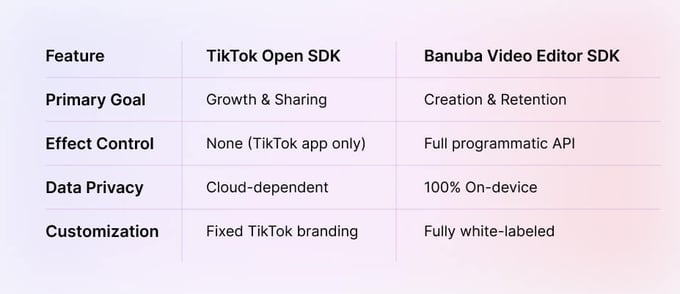
Let’s clear this up early, because it trips up a lot of teams: the TikTok Open SDK is not a video editor. It’s a sharing SDK.
With it, users can:
- Log in with TikTok
- Share already-created videos to TikTok
- Deep-link into TikTok’s camera
What it cannot do:
- Add effects or templates inside your app
- Apply transitions, AR masks, or text styles
- Programmatically control video editing logic
So if the goal is to build a TikTok-like content creation flow inside your own app, the Open SDK won’t get you there. You need a separate video editing layer, and that’s where Banuba comes in.
Why Banuba Fits TikTok-Style Workflows
Banuba Video Editor SDK is designed for apps that want control, not some “take it or leave it” UI.
With Banuba, developers can:
- Build template-based video flows programmatically
- Add transitions, filters, stickers, and AR effects with ease
- Control the full editing experience through APIs
- Ship one experience across iOS, Android, Flutter, and Web
Best of all, everything runs in real time on-device without cloud delays. This makes Banuba video editor integration practical even for high-scale consumer apps.
TikTok Open SDK vs Banuba Video Editor SDK
Practical Integration: Adding Effects Programmatically
Step 1: Add Banuba Video Editor SDK to Your App
Getting started is straightforward thanks to clear documentation. Here’s the integration flow most teams follow:
- Choose your platform (Android, iOS, Flutter, React Native)
- Install the SDK via a dependency manager
- Initialize the editor with your license token
- Launch the editor with a configuration object
For Android (Kotlin):
[code]
// Initialize with NPU acceleration enabled for 2026 devices
val config = VideoEditorConfig.Builder()
.setExportVideoResolution(VideoResolution.FULL_HD)
.setEnableNeuralAcceleration(true) // Leverage modern AI chips
.build()
VideoEditorSDK.init(this, "YOUR_LICENSE_TOKEN")
VideoEditorSDK.openEditor(this, config)
[/code]
For Flutter:
[code]
await BanubaVideoEditor.openEditor(
config: VideoEditorConfig(
exportVideoResolution: VideoResolution.fullHd,
enableSmartStorage: true, // Optimized for 2026 storage speeds
),
);
[/code]
At this point, you already have a functional video editor. But the real value starts when you stop thinking in terms of UI screens and start thinking in templates and effects as code.
Step 2: Add Video Templates Programmatically
Templates are the backbone of TikTok-style creation. They define:
- Clip count
- Timing
- Transitions
- Text placeholders
- Music sync
With Banuba, templates can be prebuilt or generated dynamically.
Example: applying a template automatically after video selection.
[code]
editor.applyTemplate(
Template(
id = "fast_cuts_v1",
transition = TransitionType.FLASH,
clipDuration = 1.2f
)
)
[/code]
This lets you do things TikTok itself doesn’t enable:
- Auto-apply different templates based on video length
- Run A/B tests on transitions
- Personalize templates per user segment
Step 3: Build TikTok-Style Transitions and Effects
Short videos live and die by transitions. Jump cuts, flashes, motion blur… All these are small details that make content feel native.
Banuba exposes these effects via an API.
[code]
editor.addTransition(
Transition(
type = TransitionType.MOTION_BLUR,
duration = 300
)
)
[/code]
Want to stack effects? That works too.
[code]
editor.addEffect(FilterEffect.VINTAGE)
editor.addEffect(OverlayEffect.FILM_GRAIN)
[/code]
This is where this SDK shines: everything is composable. Effects aren’t locked behind presets. They’re building blocks.
Step 4: Add AR Overlays and Face Effects
TikTok-style creation isn’t just about cuts but about personality. AR masks, face filters, animated stickers.
Banuba’s AR engine used in its Video Editor SD) supports:
- Face tracking
- 2D/3D masks
- Dynamic stickers reacting to movement
Example:
[code]
editor.addAREffect("effects/face_mask_sparkle")
[/code]
These effects run fully on-device, which means:
- No network delay
- No server costs
- Better privacy
You can browse ready-made effects or create custom ones using Banuba’s AR tools, then load them dynamically.
Step 5: Control the Flow Like TikTok (But Your Way)
A key difference between clones and serious products is flow control.
With Banuba, developers can:
- Skip editing steps entirely
- Lock or unlock tools per screen
- Launch the editor in “template-first” mode
That means you can:
- Auto-generate videos in one tap
- Offer “remix” flows
- Build creator tools TikTok doesn’t allow
This flexibility is impossible with TikTok’s Open SDK alone.
Performance Benchmarks and Device Compatibility
All the features above would be useless if they stuttered on mid-range devices. That’s not the case here.
In production benchmarks, Banuba:
- Runs smoothly on devices with 2–3 GB RAM: By using efficient on-device processing, the SDK maintains a stable 30 FPS even on low-end hardware.
- Exports Full HD videos in near real time: On modern devices, an 8-second video can export in as little as 3 seconds, significantly outperforming cloud-based alternatives.
- Supports a wide range of GPUs: The SDK is compatible with a massive range of hardware by supporting OpenGL ES 3.0 (and 3.1 for neural acceleration) on both Android and iOS.
Everything happens on-device, which avoids:
- Upload delays
- Server bottlenecks
- Quality loss
For global apps, this matters. Especially in markets where top-tier hardware isn’t the default.
Why Teams Choose Banuba Over DIY or TikTok SDKs
Building a TikTok-style editor from scratch takes months. Maintaining it takes years.
Banuba offers:
- Production-ready SDKs
- Cross-platform consistency
- Full control over templates and effects
- Freedom from TikTok’s platform limits
You get TikTok-style creation without TikTok’s constraints.
Conclusion
If your app depends on short-form video, templates and effects are core infrastructure.
The TikTok Open SDK helps users share content, while Banuba helps you create it.
If the goal is to add video templates programmatically, control effects through code, and ship a fast, modern editor across platforms, Banuba Video Editor SDK is built for exactly that.
Ready to integrate TikTok-style effects without the limits? Explore Banuba’s Video Editor SDK and start building with production-ready tools today.

Reference List
Android Requirements and Installation Guide | Video Editor SDK Documentation. (n.d.). https://docs.banuba.com/ve-pe-sdk/docs/android/requirements-ve/
Aulas, C., & Harytonau, A. (2025, November 19). Build a Video Editor in Flutter – 2025 Guide with Banuba SDK. https://www.banuba.com/blog/build-video-editor-in-flutter
Aulas, C., & Harytonau, A. (2026, January 6). How to build a video editor in React Native. https://www.banuba.com/blog/build-video-editor-in-react-native
Banuba. (2022, June 21). How to integrate Banuba Video Editor SDK into an iOS application [Video]. YouTube. https://www.youtube.com/watch?v=2FsEm_W01to
Banuba. (2024a, February 23). TikTok-like video editor — Banuba Video Editor SDK integration (Android) [Video]. YouTube. https://www.youtube.com/watch?v=leFi3m_AG-I
Banuba. (2024b, July 1). Video Editor SDK by Banuba [Video]. YouTube. https://www.youtube.com/watch?v=H4GbHy-7KPY
Insider. (2023, July 14). Creators obsess over the first three seconds of their videos: This webinar will teach you how they do it. Business Insider. https://www.businessinsider.com/how-to-get-a-million-views-session-5-2023-7
Krasko, A. (2025, December 13). Video Editor SDK performance Benchmark: Top SDKs compared for 2025. https://www.banuba.com/blog/ve-sdk-performance-benchmark-compared
Team, B. (2025, November 25). VE_PIP_5S_360x720. https://www.banuba.com/video-editor-sdk