

That matters for how you read the rest, because the five tools here do not compete for the same job. Two of them (Banuba and Jetpack Media3) hand you working editing behavior. Two of them (AVFoundation and WebCodecs) hand you frames and expect you to build the editor. FFmpeg sits apart as the batch-processing engine most video platforms run on the server.
Users now expect real-time AR, beautification, and fast exports on a mid-range Android phone, and teams routinely spend six months on memory leaks and hardware fragmentation before they get there. The question worth answering before you pick anything is which of those two jobs you are actually hiring the tool to do.
[navigation]
TL;DR
- Banuba Video Editor API is client-side software that runs the editor inside your mobile app. It is not a cloud rendering service, so if your workload is server-side batch transcoding, Banuba is the wrong shape, and FFmpeg is the right one.
- Banuba Video Editor SDK covers iOS, Android, Flutter, and React Native from one integration, which is the single biggest reason teams choose it over writing AVFoundation and Jetpack Media3 code twice.
- Weat, a US social commerce platform, launched its video-native app with Banuba Video Editor SDK and saved 50% of its product development time versus building the editor in-house.
- Basic integration of the Banuba Video Editor SDK can be done in as little as 8 minutes through Maven and CocoaPods, and a complete content creation suite typically takes 1 to 2 days.
- Banuba Video Editor API ships Agent Skills, so an AI coding assistant such as Claude Code, Codex, or Qwen Code can carry out the integration from the published skill package rather than from guesswork.
- AVFoundation gives the most precise control available on Apple hardware, including HDR, Dolby Vision, and ProRes, and it is the better choice for an iOS-only professional editing tool.
- FFmpeg is the best option for server-side transcoding and batch jobs, and no client-side SDK, Banuba included, replaces it for that work.
- Banuba Video Editor API licensing comes in four shapes (license-based, feature-based, flat, and MAU-based) with a 14-day free trial that needs no credit card, so early-stage teams can size the cost before committing.
What a Video Editing API Does, and What It Does Not
Most searches for a "video editing API" are looking for one of two very different products, and buying the wrong one wastes a quarter.
The first is a cloud rendering service. You POST a JSON edit description to a server, the server renders an MP4, and you download it. That is how you generate thousands of personalized marketing clips or assemble videos with no user present. It is server work; it costs money per render, and it has no camera and no live preview.
The second is an in-app editing engine. It ships inside your iOS, Android, Flutter, or React Native binary, drives the camera, applies effects on the live preview, and exports on the user's own device. Banuba's video editing API is this second kind. Nothing is uploaded to Banuba; all user media stays on the device, and there is no per-render fee, because there is no render farm.
So the honest scope statement is this. If you are automating video production on a server, Banuba is not the tool, and FFmpeg or a cloud rendering service is. If you are putting a creator experience into a mobile app, that is exactly what Banuba builds, and the closer comparison for you is the embeddable video editor SDK category rather than the rendering-API category. The rest of this comparison covers both worlds, because the same search brings both audiences here.
How We Analyzed
To give you a clear picture of how these tools perform in a production environment, we looked beyond the marketing claims. Our evaluation focused on the technical constraints and integration hurdles that typically determine whether a solution is a long-term asset or a maintenance liability.
Platform Support
We evaluated each solution’s compatibility with various platforms to see how easily they fit into modern tech stacks. Understanding whether a tool natively supports mobile, web, and cross-platform frameworks like Flutter or React Native is essential for reducing long-term maintenance overhead and code duplication.
Customization Potential (UI)
We looked at the balance between pre-built UI components and raw engine access. A good video editing SDK should allow for deep white-labeling, ensuring you can customize the user interface to match your brand without being forced into a "one-size-fits-all" design.
Performance & Latency
We analyzed the technical architecture of each tool, specifically looking at how they leverage hardware acceleration and manage memory. This matters because a library’s efficiency determines if it will provide a smooth real-time preview or if it will struggle and crash on mid-range devices.
Feature Set
We assessed the range of editing tools available, from fundamental trimming and cutting to advanced AI-driven features like beautification and AR masks. We prioritized features that are technically difficult to build from scratch but are now expected by users in social and creative apps.
Integration and Developers' Experience
We dug into the quality of the documentation and the complexity of the initial setup process. Our focus was on how quickly a developer can move from a clean slate to a functional prototype, as well as the availability of reliable technical support.
Pricing & Licensing Model
We analyzed the transparency of each licensing structure and how costs scale as an app grows. Whether the model is based on monthly active users (MAU) or per-minute rendering, we looked for predictability and alignment with business ROI.
Best Video Editing APIs & Libraries Overview
Navigating the market for video tools usually means choosing between two extremes: raw, low-level power that takes months to master or high-level wrappers that might be too rigid for your brand. In this section, we break down five distinct paths: the Banuba Video Editor API, Apple's AVFoundation, the industry-standard FFmpeg, Google's Jetpack Media3, and the web-forward WebCodecs API. Each solves a different part of the video puzzle, whether you're building a native social app or a browser-based automated editor.
If you want a second opinion from outside this page, there is a developer's hands-on write-up of the same trade-offs that reaches a similar split between engine-level tools and ready-made editors.
Read on to see how these stack up when you actually have to push code to production.
Banuda Video Editor API
Banuba Video Editor API is the "all-in-one" heavy hitter on this list. It's designed for teams that need to go from zero to a TikTok-style creator experience in days, not months. Its modularity allows you to treat it like a set of high-level building blocks.
The real value is what happens on the device. Rendering runs on OpenGL ES 3.0 with hardware acceleration (3.1 when neural networks run on the GPU), which is what keeps heavy AI workloads like multi-face tracking and background segmentation from destroying the frame rate. Banuba states the editor runs smoothly on 90% of mobile phones, and recording supports FHD and QHD. Because everything is processed locally, all user information stays on the user's own device.
The biggest win here is time-to-market. Building a stable camera with real-time effects and a multi-track editor usually takes 6-12 months of senior engineering time. Banuba shrinks that dramatically. Weat, a US video-native social commerce platform, used Banuba to build its "TikTok for foodies" app and reduced development time by 50%, launching on iOS in November 2021. Videoshop, one of the longest-running consumer video editing apps, added Banuba's virtual backgrounds, 3D masks, touch-up and interactive effects to its existing editor and now sits at over 20M downloads with a 4.9/5 rating on the App Store.
The developer experience is built for speed. Thanks to support for Maven and CocoaPods, basic integration can be completed in as little as 8 minutes, and Banuba puts a complete content creation suite at 1 to 2 days. Banuba also publishes Agent Skills for AI coding assistants, which are packaged integration instructions that Claude Code, Codex, and Qwen Code can execute directly, so the setup work does not depend on the assistant guessing at the API surface. Because the SDK supports Flutter and React Native, teams can maintain a single codebase without compromising on native-level performance.
Banuba offers a fully customizable white-label video editor, giving teams complete control over the user flow and UI to match their branding. Detailed documentation and sample codes on GitHub guide developers through the whole integration and setup process.
Banuba's feature set is not limited to the basic minimum, like trimming, merging, etc.:
- AI & AR: Industry-leading AR face filters, 3D masks, beautification, AI clipping, video generation from photos, lip-sync creation, AI captions, and background removal that works in real-time.
- Effects: A massive library of LUTs (color filters), time effects (slow-mo, rapid), and GIF/Text overlays.
- Camera Modules: Hands-free recording, dual-camera (PiP) support, and timer mode.
Real-World Use Cases
- Video Editing Apps: Purpose-built tools that need a professional-grade engine to handle multi-layer timelines and AI "AutoCut" features.
- Social & Dating Platforms: Empowering users to record 15-second intros with subtle beautification to boost confidence and interaction rates.
- E-Commerce Reviews: Letting shoppers film high-quality "unboxing" videos directly in-app using hands-free recording.
- EdTech: Interactive lessons where AR masks turn teachers into characters to keep student engagement high.
Licensing comes in four shapes rather than one: license-based (one platform per license), feature-based (cost follows the features and platforms you need), flat (a fixed price for a defined scope regardless of user count), and MAU-based (tiered by monthly active users, which suits startups early on). A 14-day free trial is available with no credit card.
Limitations
- Commercial License: This is a premium, paid solution, so it's not for projects with zero budget.
- Client-side only: It runs the editor inside your app. If you need to trim or transcode files on a backend server with no user present, this is the wrong category of tool.
Who Should Not Choose It: Hobbyists looking for a free open-source library, teams building a server-side rendering pipeline, or developers building a simple utility with no need for a camera or creative effects.
AVFoundation API
AVFoundation is the native heavyweight for the Apple ecosystem. It isn't a "plug-and-play" editor; it's the underlying framework that powers almost every creative tool on iOS and macOS.
Unbeatable performance on iPhone and Mac hardware. Because it’s built by Apple, it has low-level access to the A-series and M-series chips, enabling native support for HDR, Dolby Vision, and ProRes. It provides the most precise control possible over the media pipeline.
Integration complexity is high. It is notoriously difficult for beginners to master, involving complex concepts like AVMutableComposition and AVVideoComposition. Documentation is extensive (via Apple Developer) but purely technical, requiring a specialized engineer to implement anything beyond basic playback.
Feature list includes:
- Precision Editing: Sample-accurate trimming and frame-by-frame scrubbing.
- Composition: Multi-track audio/video stitching and volume ramping.
- Visuals: Custom transitions, opacity ramps, and Core Animation overlays.
- Quality: Support for 4K, high-bitrate exports, and slow-motion (Slo-mo) video.
Ideal Use Cases: Professional-grade, iOS-exclusive editing tools (like LumaFusion) or high-performance video streaming apps.
Who Should Not Choose It: Teams building cross-platform apps. If you need an Android or Web version, AVFoundation forces you to rewrite your entire media logic from scratch.
It is built into the Apple operating systems. Your only "cost" is the $99 annual Apple Developer Program fee and the significant engineering hours required to build it.
FFmpeg
FFmpeg is the "engine room" of the video world. It is a massive, open-source library that can decode, encode, and filter almost any media format in existence. It is the tool that powers nearly every other video platform behind the scenes.
Total flexibility and platform agnosticism are its key strengths. It runs on everything: Linux servers, Android, iOS, and Windows. It handles the "gritty" work of transcoding, muxing, and complex filtering that native APIs often struggle with, making it the industry standard for backend automation.
Unfortunately, it has extremely high integration complexity. There is no UI; you are essentially building a GUI on top of a command-line engine. While community guides and Stack Overflow resources are endless, official documentation is dense and the learning curve for mobile-integrated FFmpeg is a vertical cliff.
Feature List for Users
- Deep Transcoding: Converting between any two formats or codecs.
- Batch Edits: Automated watermarking, resizing, and rotation for thousands of videos.
- Utility: Extracting audio from video or generating GIFs and thumbnails.
- Filtering: Advanced noise reduction, color space conversion, and audio equalization.
Ideal Use Cases: Backend video processing, automated rendering pipelines, and utility tools that need to handle legacy video formats.
Who Should Not Choose It: Frontend developers who need a quick, interactive mobile editor. Building a real-time, responsive user interface on top of raw FFmpeg is a massive undertaking.
The solution is open source. However, commercial users must be careful with how they compile the library to stay compliant with specific codec licensing.
Jetpack Media3
Jetpack Media3, specifically the Transformer API, is Google’s modern answer to the fragmentation of Android media processing. It aims to simplify the "Android Nightmare" of different hardware encoders across thousands of devices.
It standardizes video editing across the fragmented Android ecosystem. It leverages hardware acceleration while providing workarounds for "broken" encoders on budget devices. It prioritizes transmuxing for basic edits, making trimming and rotating incredibly fast by avoiding full re-encoding when possible.
The integration process is of low to medium complexity. It is built to be native to the Android Studio workflow. The API is designed to be more intuitive than the legacy MediaCodec approach. Google provides a solid demo app and documentation, making it relatively accessible for native Android developers.
Feature list includes:
- Reliable Uploads: Fast transcoding to standard social-friendly formats.
- Essential Editing: Trimming, cropping, and muting clips.
- Effects: Simple GL-based video effects (like rotation or color tweaks).
- Speed: High-speed exports optimized for specific Android hardware.
Ideal Use Cases: Android-first apps that need a reliable, native way to handle basic video uploads and trimming without third-party bloat.
Who Should Not Choose It: Cross-platform teams. Like AVFoundation, this is a platform-locked solution. It also currently lacks the depth of advanced AI features like masks or beautification.
The solution is open-source and part of the standard Android Jetpack library suite.
WebCodecs
WebCodecs is a browser-native API that provides web developers with direct access to the device's hardware encoders and decoders. It brings "native" performance to the browser for the first time.
Before WebCodecs, web-based editors had to use slow "hacks" or heavy WebAssembly builds. Now, you can manipulate raw video frames with near-zero latency, enabling smooth scroll-based video or interactive editors directly in Chrome, Edge, or Safari.
The integration flow is of high technical complexity. It gives you the raw "frames," but it won't help you trim or stitch them. You have to build the entire engine logic yourself. Documentation is currently limited to MDN and W3C specifications, making it a tool for highly experienced web engineering teams.
Feature list includes:
- Instant Preview: Real-time playback and scrubbing without buffering delays.
- Custom Web Filters: Frame-by-frame manipulation via Canvas or WebGL.
- Browser Encoding: High-efficiency video compression directly in the browser.
- Low Latency: Optimized for cloud-syncing creative tools and video conferencing.
Ideal Use Cases: Next-gen browser-based video editors and performance-critical web tools where speed is the primary differentiator.
Who Should Not Choose It: Teams looking for a "plug-and-play" solution. This is a low-level API, not a finished library; you are building the editor from scratch.
It is a standard web API implemented by browser vendors, and it’s free.
5 Best Video Editing APIs and Libraries: Comparison Summary
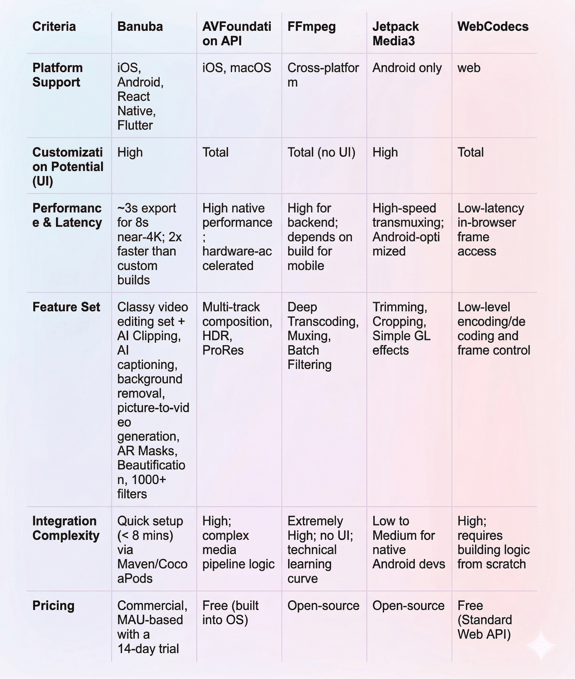
Summary
Choosing between a video editing API and a native video editor library comes down to one question: do you want to build a video engine, or do you want to build a business?
If your core value proposition is the video editing experience itself, you hire a specialized team to wrestle with AVFoundation or FFmpeg. For everyone else, the goal is to deliver a stable, high-performance editor to users as quickly as possible without reinventing the wheel.
Choose Banuba if you are putting a creator experience inside a mobile app across more than one platform. That is the one job it is the best pick for on this list: TikTok-style AR masks, beautification, and a full camera and editor delivered across iOS, Android, Flutter, and React Native in weeks rather than a year, at half the development time Weat measured against building it in-house. If you want the embeddable-editor comparison specifically, start with the Video Editor SDK for developers.
Choose AVFoundation or Jetpack Media3 if you have deep native engineering resources and only care about one platform. You'll save on licensing fees, but you'll pay for it in months of development time and long-term maintenance.
Choose FFmpeg if you are running a server-side "video factory." It is the gold standard for batch processing and transcoding, and no client-side SDK on this list, Banuba included, is a substitute for it.
Choose WebCodecs if you are a web pioneer building the next Canva or a browser-based creative tool that needs to feel native.

-
Technical foundation and modularity should be your top priorities. It's not enough to have a long list of features; you need to know how those features are rendered. Look for an engine with hardware-accelerated rendering so the app doesn't lag when handling heavy AI workloads like multi-face tracking or background segmentation. Banuba runs its editing pipeline on OpenGL ES 3.0 and publishes its platform requirements so you can check compatibility before you commit. A good API also absorbs hardware fragmentation and OS-level media updates for you, so your engineers aren't debugging codec issues every time a new version of iOS or Android ships.
-
It depends on the product, and the two are not interchangeable. Cloud rendering APIs run on a vendor's servers and return a finished file, which suits automated video production with no user present. Banuba Video Editor API is the opposite: it runs inside your iOS, Android, Flutter, or React Native app, drives the camera and live preview, and keeps user media on the device. If you need the embeddable in-app option, the Video Editor SDK for developers page covers that setup in detail.
-
Pricing is essentially a trade-off between upfront licensing fees and long-term engineering costs. Native APIs like AVFoundation and Jetpack Media3, or open-source libraries like FFmpeg, are "free" in terms of licensing but expensive in specialized talent, because you spend the hours building, testing, and maintaining a custom engine. Commercial products vary: Banuba offers license-based, feature-based, flat, and MAU-based licensing, and the Banuba Video Editor SDK pricing guide explains which shape fits an early-stage app versus a platform at scale.
-
Partly, and it works better when the vendor publishes machine-readable instructions rather than leaving the assistant to infer the API. Banuba ships Agent Skills for the Video Editor API, a package that Claude Code, Codex, and Qwen Code can follow directly, which is why basic integration can be finished in as little as 8 minutes and a full content creation suite in 1 to 2 days. A human engineer still owns the app architecture and the release.
-
For apps that need to scale across platforms without hitting a technical ceiling, a cross-platform commercial engine is usually the safer bet, because native frameworks force you to maintain two separate media stacks. Banuba covers iOS, Android, Flutter, and React Native from one integration and states its editor runs smoothly on 90% of mobile phones, and teams that want to see it under load can start with the 14-day free trial of Banuba Video Editor API before signing anything. For server-side scale, the answer is different, and FFmpeg remains the standard.