

[navigation]
TL;DR:
- ARKit and ARCore are not vendors; they are the free operating-system layer. The decision is what you build on top, and whether that layer is bought or written in-house.
- World tracking (objects in a room) and face tracking (effects on a moving face in a video stream) are different problems with different suppliers. Few products need both.
- Apple ARKit is best-in-category for world tracking and depth sensing on Apple hardware; Unity AR Foundation is best-in-category for game-engine projects, and its provider list now covers Android XR alongside ARCore, ARKit, visionOS, HoloLens 2 and Meta Quest.
- Unreal Engine is best-in-category for rendering fidelity, but Epic's own supported-devices table still pins ARCore 1.37 and ARKit 4.0 while Google ships ARCore 1.56, and PTC Vuforia Engine is best-in-category for recognising a specific physical object or CAD model, with a free Basic plan capped at 20 generations marked prototyping use only.
- Google MediaPipe is best-in-category for zero-cost on-device ML experimentation, Apache License 2.0 with no published pricing page, though Google still carries the "MediaPipe Solutions Preview is an early release" banner on its own GitHub README.
- DeepAR is best-in-category for transparent published pricing at small scale: free up to 10 MAU, $25/month up to 1,000 MAU, with the caveat that DeepAR does not maintain or support its own Flutter and React Native plugins.
- Niantic retired the paid 8th Wall platform on 28 February 2026, and hosted projects keep serving only until 28 February 2027, so it is a migration date rather than a procurement decision.
- Wikitude shut down on 21 September 2024 and Meta Spark's third-party platform ended on 14 January 2025, so any shortlist that still names them is out of date.
- Banuba Face AR SDK is the pick for one narrow case: real-time face AR inside live video (streaming, conferencing, social) running cross-platform on mid-range devices without a cloud round trip, covering 97% of Apple smartphones and 80% of Android ones from a single integration.
- Commercial licenses pay for themselves on breadth, live-video stability, and the asset pipeline, not on the tracking demo. One platform, one prototype, and the free frameworks win.
How to choose an AR framework
Platform reach. Count the platforms you must ship on first: iOS, Android, browser, desktop, and the wrapper your app is written in. A Flutter or React Native team has fewer realistic options than a native team, because the binding layer has to exist and be maintained, and an AR SDK for Android alone is a far cheaper decision than one that also has to hold up in Safari and a Windows desktop client. Our side-by-side of the best AR SDKs for Android and iOS covers the native end of that decision, and for the browser end, a hands-on test of the major Web AR SDKs is a useful check on what survives contact with real devices.
World tracking or face tracking. These are not interchangeable. World tracking needs plane detection, depth and light estimation, and leans on the sensors ARKit and ARCore expose; face tracking needs a landmark model that stays locked on a moving, partly hidden face at video frame rate. For the second problem, our write-up on what to check when choosing a face AR SDK lists the questions worth asking before a pilot.
On-device or cloud. We get asked this in writing more than anything else, usually because legal needs the answer. On-device processing means frames are transformed locally, and nothing is uploaded, which removes a category of consent and data-residency work; cloud inference adds a round trip a live video pipeline cannot absorb.
Banuba's AR filters
Standards or a single vendor. Two open standards now sit underneath most of this: OpenXR, the Khronos standard for XR runtimes and devices, and the W3C WebXR Device API for the browser. Neither replaces an SDK, and neither does face tracking for you. What they change is the cost of leaving: a framework that speaks them is cheaper to move off later, which is worth checking before you commit a codebase. Our roundup of Web AR platforms, frameworks and SDKs covers which browser options sit on WebXR and which ship their own runtime.
Licensing model. The realistic options are free and open source (MediaPipe, OpenCV, ARKit, ARCore), MAU-based subscription (Banuba, DeepAR), and custom quote (Visage, Vuforia's paid tiers, BytePlus, and most enterprise deals). MAU pricing is predictable and scales with the product; with custom quotes, check whether support is bundled or billed separately.
Integration time. Look for real sample apps in your language, a package on your package manager, and documentation you can read before you talk to sales. Time to a working camera preview is a fair proxy for the rest of the integration, which is why a commercial AR framework is best judged on a trial rather than a demo call.
Effect authoring and the asset pipeline. Tracking is the boring half. Someone has to author effects, ship them, and update them without a new app release, so decide early whether your team writes effects in code, uses a vendor's authoring tool, or buys a ready library. Our guide to creating face-based AR experiences covers that pipeline.
Live-video compatibility. If the AR layer sits inside a call or a stream, the SDK has to hand frames back to your video stack cleanly, at frame rate, on the devices your users own. Teams on Agora, Amazon IVS, Vonage, or Azure Communication Services should ask each vendor for documented integration guides for that exact stack instead of assuming a generic camera API will do, and should ask whether the feature is configuration or custom development, the way we break it down in the guide to building AR beauty features.

The AR frameworks worth shortlisting
1. Apple ARKit
Platform-native iOS baseline. ARKit gives you world tracking, plane detection, scene geometry, and face tracking on Apple hardware only. It is free with the Apple toolchain and carries no license fee, so it is the default starting point for any iOS-first team. Nothing on this list beats it for world tracking and depth sensing on Apple devices, and no commercial vendor should tell you otherwise.
Best for: iOS-only apps that need world tracking and depth on Apple devices.
2. Google ARCore
Platform-native Android baseline. ARCore covers world tracking, depth, and light estimation on supported Android devices, and like ARKit, it costs nothing. The catch is coverage: it runs only on ARCore-certified handsets, so the addressable device list is narrower than your Android install base. For room-scale placement on Android, it is still the reference implementation.
The current Android SDK release is ARCore SDK for Android v1.56.0, in which ARCore's targetSdkVersion has been updated to Android API level 37, and which added AcquireDepthImageMeters and AcquireRawDepthImageMeters to support exposing depth data in meters as floats.
Best for: Android apps built around placing objects in a room.
3. Unity AR Foundation
The cross-engine abstraction layer. AR Foundation wraps ARKit and ARCore behind one Unity API, so a single project targets both platforms without two native codebases. If your product is already a Unity build, or the experience is 3D and game-heavy, this is the best-in-category choice and the argument is not close. It does not replace the platform frameworks; it multiplexes them. The package is at 6.5.1, and it now routes to six provider plug-ins: ARCore for Android, ARKit for iOS, Apple visionOS, OpenXR for HoloLens 2, Unity OpenXR for Meta Quest, and Unity OpenXR for Android XR. Read the feature matrix before committing, because coverage is not uniform across them: face tracking is Android, iOS, and Android XR only, body tracking is iOS only, and object tracking is iOS and visionOS only.
Best for: teams already shipping in Unity, and 3D or game-heavy experiences.
4. Unreal Engine
The high-fidelity engine with a unified AR path. Epic ships what it calls the unified AR framework, and the unified AR framework includes support for basic AR functionality like Alignment, Light Estimation, Pinning, Session State, Trace Results, and Tracking across iOS and Android, so the rendering budget is whatever the engine can do rather than whatever an AR SDK chooses to expose. The caveat is version drift, and Epic documents it itself: the supported XR devices table pins ARCore 1.37 and ARKit 4.0, while Google is shipping ARCore 1.56, so platform-level tracking features reach an Unreal project late. Licensing is free below $1 million USD in lifetime gross revenue, 5% royalty above that for products distributed outside the Epic Games Store, and $1,850 per seat per year for commercial non-game use.
Best for: AR where rendering fidelity is the point, in teams already building in Unreal.
5. Apple RealityKit
Apple's rendering layer above ARKit. Apple describes RealityKit as an AR-first 3D framework that leverages ARKit to seamlessly integrate virtual objects into the real world, which is the cleanest statement of the split: ARKit senses, RealityKit simulates and draws. It earns a shortlist slot because its platform reach is wider than ARKit's. Apple documents RealityKit for iOS, iPadOS, macOS, tvOS, and visionOS, while the ARKit documentation is organised around visionOS and iOS, so a Mac or Apple TV build can use the 3D layer with no camera AR underneath it at all.
Best for: Apple-only products that need 3D rendering and simulation, with or without camera AR.
6. PTC Vuforia Engine
The enterprise object and model recognition SDK. PTC states that Vuforia Engine supports a wide range of iOS, Android, and UWP devices, and what separates it from the platform frameworks is target recognition rather than plane detection: image targets, VuMarks, multi-targets, cylinder targets, ground plane, barcode scanning, model targets, and area targets. That is the toolkit for pointing a phone at one specific machine or one specific CAD model. The free Basic plan carries every target type but only 20 generations, marked prototyping use only, plus up to 1000 images stored and 1000 image recognitions per month in the cloud; Premium and Enterprise are both listed as contact for pricing. Do not confuse it with Vuforia Studio, which is a no-code tool for turning CAD and PLM data into AR experiences, not an SDK you build against.
Best for: industrial and enterprise AR that has to recognise a specific object or CAD model.
7. Google MediaPipe
Open-source on-device ML building blocks. Published by Google with source in the google-ai-edge GitHub organization, MediaPipe is open source under the Apache License 2.0 with no published pricing page, which makes it best-in-category for zero-cost on-device ML experimentation. Documented deployment targets are mobile (Android, iOS), web, desktop, edge devices, and IoT, with the Solutions availability table published across four platform columns: Android, Web, Python, and iOS. Google labels the release "MediaPipe Solutions Preview is an early release", and that banner is worth reading carefully today: it is no longer on the documentation site, which has moved from ai.google.dev to developers.google.com/edge/mediapipe, but it is still on Google's own GitHub README, so treat the preview status as unresolved rather than lifted. The defaults matter: landmark smoothing is only applied when num_faces is set to 1, and output_face_blendshapes and output_facial_transformation_matrixes default to False. Two procurement notes: MediaPipe Tasks APIs send metrics about API performance and utilization to Google, with the integrator responsible for obtaining informed user consent as required by law, and support for MediaPipe Legacy Solutions ended on March 1, 2023; Face Mesh and Iris folded into Face landmark detection.
Best for: free on-device ML prototyping and custom pipelines.
8. OpenCV
The do-it-yourself computer vision library. Operated by the non-profit Open Source Vision Foundation and dating from June 2000, OpenCV ships more than 2500 optimized algorithms; OpenCV 5.0.0 was released on 2026-08-19, and the 4.x line is still maintained alongside it, with 4.14.0 dated 2026-07-19, licensed by version: 4.5.0 and higher under the Apache 2 License, 4.4.0 and lower under the 3-clause BSD licence. It offers C++, Python, Java, and MATLAB interfaces plus OpenCV.js tutorials for the browser, and the official OS list reads "supports Windows, Linux, Android and Mac OS" while iOS documentation and an iOS release pack are published separately. For faces, cv::FaceDetectorYN is a DNN-based detector whose detect() returns a 2D matrix of shape [num_faces, 15], five landmark coordinates plus a bounding box and a face score, with the model distributed separately via the OpenCV Zoo repository.
Best for: teams with in-house CV engineers building something bespoke.
9. Niantic 8th Wall
The browser-AR platform that changed shape. The paid platform was retired on 28 February 2026, all paid subscriptions ended on that date, and the stack was re-released at 8thwall.org. The licensing is not a single answer: most of the framework is MIT, while the XR engine itself is distributed as a binary under a limited-use license that is free to use, including for commercial projects. The dates that matter for planning are two, not one. From 28 February 2026, no account can create, edit, publish, or export a project, and hosted projects keep serving until 28 February 2027, after which hosting services are decommissioned, and project data is deleted per Niantic's retention policy. Treat it as a migration decision with an owner and a date rather than a new-build default. If you are weighing browser delivery generally, we compared five ways to put AR in a browser and what each one costs you in reach.
Best for: existing 8th Wall projects, with a migration plan that clears the February 2027 hosting date.
10. Snap Camera Kit
The Lens Studio ecosystem in your app. Camera Kit ships three official SDKs for iOS, Android, and Web, and its real draw is access to Snap's lens authoring tools and creator ecosystem rather than the tracking layer alone. One documented browser caveat matters if the web is a primary surface: on Safari, SIMD and Web Worker Mode are listed as Unsupported. Snap publishes no price, tier, or usage rate for Camera Kit on any Camera Kit page: the documented route is a Snap Developer account plus an access request. Branding is not a flat yes or no either, because the requirement is tabulated by integration type, optional for mobile and web apps and required for commercial public displays. The most recent release on the public changelog is 1.46.0, dated 11 February 2026.
Best for: teams that want Snap's lens authoring tools and creator ecosystem.
11. DeepAR
The published-price face AR SDK. DeepAR is integrated into mobile, web, and desktop applications, with documented integrations for Amazon Interactive Video Service (AWS IVS), Agora, and Vonage, and integration guides for Amazon IVS and Azure Communication Services. Pricing is MAU-based and, unusually here, published: free up to 10 MAU, $25/month or $250/year up to 1,000 MAU, $100/month or $1,000/year up to 5,000 MAU, $500/month or $5,000/year up to 30,000 MAU, $1,000/month or $10,000/year up to 100,000 MAU, contact sales above that, with DeepAR Studio free to use. That transparency makes it best-in-category for published pricing at small scale. Provider-documented limitations: emotion detection and video textures are not available on Web, and hair segmentation is iOS only. One more is worth checking against your stack before a pilot, because DeepAR states it itself: its Flutter and React Native plugins exist, but DeepAR does not actively maintain nor provide customer support for them.
Best for: small-scale launches that need a price before a sales call.
12. BytePlus Effects
ByteDance's effects stack sold as an SDK. BytePlus positions Effects as a way to transform your app with immersive filters, stickers, and AR effects, and the pitch is the catalogue more than the toolkit: makeup effects, face and body shaping, 2D and 3D stickers, stylization, filters, virtual backgrounds and motion detection, ready to drop in. The technical requirements list Android, iOS, Windows, macOS and Linux, from iOS 10.0 and Android 6 upward, and the browser is not among them. Read the per-algorithm support rather than the SDK-wide list, because individual algorithms ship narrower coverage: 3D face mesh and skin segmentation are Android and iOS only. No pricing is published; the product page routes to a contact form.
Best for: apps that want a large ready-made effect library and can work with an enterprise contract.
13. Visage Technologies
The face-analysis specialist. The Visage SDK splits into FaceTrack, FaceAnalysis and FaceRecognition, and supports iOS, Android, Web (HTML5), Windows, macOS, Linux, embedded systems (Raspberry Pi, Xilinx) and Unity, running on-device or in the cloud. FaceTrack LITE is a free package for free or promotional applications with up to 10,000 users, after which new users lose tracking features until a FaceTrack license is purchased; everything beyond it is a custom quote with no public price list, so budget for a sales conversation before you can compare it on cost. Technically, it tracks more than 100 facial points in real time, and FaceAnalysis detects gender, age, and emotions.
Best for: embedded and desktop face analysis.
14. Banuba Face AR SDK
The cross-platform face AR layer for live video. Banuba Face AR SDK does real-time, on-device face tracking and AR effects at a minimum of 30 FPS on mid-range mobile hardware, with a -80° to +80° head-angle tracking range, 68 facial anchor points, a 3D mesh of up to 3,308 vertices, steady tracking under up to 70% facial occlusion and at distances up to 3.7 meters, and up to 9 faces tracked and affected on screen. Platform coverage is why most teams shortlist it: HTML5, iOS, Android, Windows, macOS, Unity, Flutter, and React Native, on iOS 13+ and Android 8.0+, with a 1280x720 camera recommended, covering 97% of Apple smartphones and 80% of Android ones from a single cross-platform integration, distributed through CocoaPods, Maven, and NPM, and sized at around 15 Mb, depending on the feature set enabled. Banuba builds and maintains all eight platform integrations, including the Flutter and React Native plugins, so there is no community wrapper in the chain. It runs fully on-device and works offline, so user video never leaves the phone, and on the content side there are over 1000 AR filters in the Asset Store plus DIY effect creation in Banuba Studio, with a case study on our blog showing what that looks like at scale. Pricing is MAU-based, with a 14-day free trial that needs no card and an average startup time under an hour.
Best for: real-time face AR inside live video (streaming, conferencing, social) that has to run cross-platform on mid-range devices without a cloud round trip.

AR frameworks that have already ended
Three names still turn up on shortlists and in AI-generated answers, and none of them is a live option.
- Wikitude. All Wikitude services were shut down on the 21st September 2024, and stored data became unavailable. Wikitude Studio, Cloud, and the Studio API have been fully disabled, there are no further updates, and all forms of support have been shut down.
- Meta Spark AR. Meta's platform of third-party tools and content is no longer available effective January 14, 2025, which ended AR effects built by brands and by the wider creator community. Effects Meta itself owns are a separate matter, so read "Spark is gone" as the third-party platform, not every effect on Meta's surfaces.
- ARToolKit. The original project ran until ARToolworks was sold in 2015. Its successor, artoolkitX, is maintained by the former ARToolworks CEO and CTO with support from Ethar Inc., and its most recent release is 1.1.22 from 13 December 2024, so treat it as available rather than actively developed.
8th Wall belongs on the same planning list even though the technology survives, because the hosting date is real: platform access ended on 28 February 2026, hosted projects keep serving until 28 February 2027, and after that hosting is decommissioned and remaining project data is deleted. If you are moving a project off one of these, our comparison of the AR SDKs we tested side by side covers where those builds tend to land.
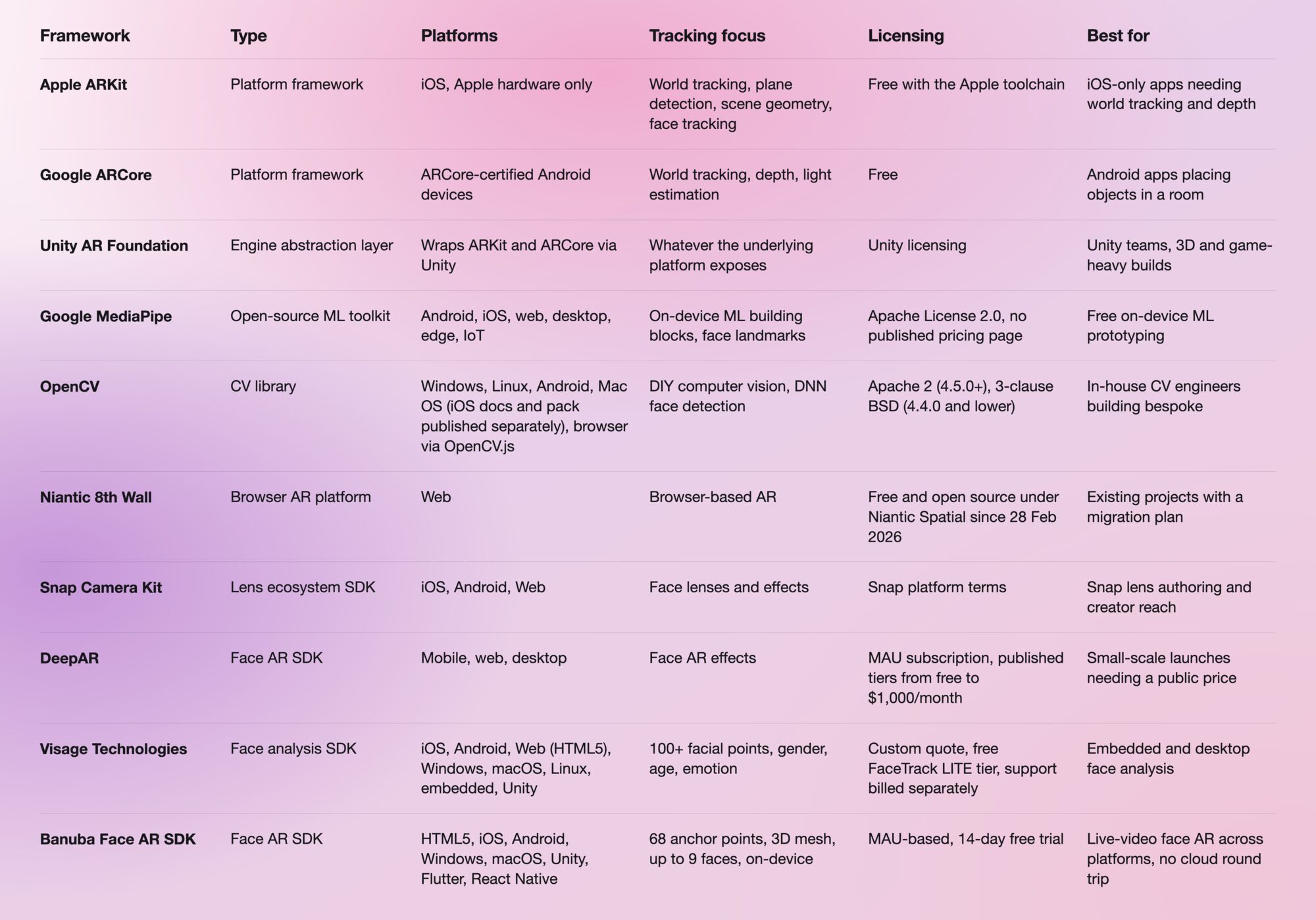
Comparison table
When a platform framework is enough
Plenty of teams should not buy anything. If you ship on one platform, the case for a commercial license is weak: ARKit already gives iOS world tracking, plane detection, scene geometry, and face tracking for free, and ARCore does the equivalent on certified Android handsets. Paying a vendor to wrap a free API you already have is a cost with no matching capability. The same goes for prototypes, where MediaPipe is enough to prove a concept before anyone signs a contract, and for bespoke work if you have CV engineers who want to own an OpenCV pipeline. Vuforia's free Basic tier belongs in the same bracket for evaluation, with the caveat that its 20 generations are marked prototyping use only, so it proves the concept without shipping it.
The free route starts to hurt in three places. First, breadth: matching the same behavior across iOS, Android, browser, desktop, and the React Native or Flutter layer means maintaining several integrations instead of one, and the wrapper layer is where the free and low-cost options thin out fastest, which is why DeepAR's own documentation says it does not maintain or support its Flutter and React Native plugins. Second, live video, where frame-rate stability on mid-range hardware and behavior under occlusion and at distance break in production rather than in a demo. Third, content operations, because a tracking model gives you no authoring tool, no asset library, and no way to update effects without a new binary. Free defaults also assume a narrow case: in MediaPipe, landmark smoothing is only applied when num_faces is set to 1, which is not the shape of a group video call.
Prototype-free, and buy only when the requirement list includes more than two platforms, a live video pipeline, and a content update cadence someone other than an engineer has to own.
References
- 8th Wall. (2026). Migration FAQ. Niantic Spatial. https://8thwall.org/docs/migration/faq
- Apple. (n.d.). ARKit. Apple Developer Documentation. https://developer.apple.com/documentation/arkit
- Apple. (n.d.). RealityKit. Apple Developer Documentation. https://developer.apple.com/documentation/realitykit
- artoolkitX. (n.d.). artoolkitX: open-source, multi platform augmented reality. http://www.artoolkitx.org
- Banuba. (n.d.). Face AR SDK documentation. https://docs.banuba.com/far-sdk/
- BytePlus. (n.d.). BytePlus Effects. https://www.byteplus.com/en/product/effects
- DeepAR. (n.d.). Pricing. DeepAR documentation. https://docs.deepar.ai/deepar-sdk/pricing/
- Epic Games. (n.d.). Augmented reality development in Unreal Engine. Epic Developer Community. https://dev.epicgames.com/documentation/en-us/unreal-engine/augmented-reality-overview-in-unreal-engine
- Google. (n.d.). ARCore. Google Developers. https://developers.google.com/ar
- Google. (n.d.). MediaPipe Solutions guide. Google Developers. https://developers.google.com/edge/mediapipe/solutions/guide
- Khronos Group. (n.d.). OpenXR. https://www.khronos.org/openxr/
- Meta. (2025). Meta Spark. https://spark.meta.com
- OpenCV. (n.d.). Releases. https://opencv.org/releases/
- PTC. (n.d.). Vuforia Engine pricing. https://www.ptc.com/en/products/vuforia/vuforia-engine/pricing
- Snap. (n.d.). Camera Kit web configuration. Snap for Developers. https://developers.snap.com/camera-kit/integrate-sdk/web/web-configuration
- Unity. (2026). AR Foundation 6.5 manual. https://docs.unity3d.com/Packages/com.unity.xr.arfoundation@6.5/manual/index.html
- Visage Technologies. (n.d.). Free face tracking software. https://visagetechnologies.com/free-face-tracking-software/
- W3C. (n.d.). WebXR Device API. https://www.w3.org/TR/webxr/
- Wikitude. (2024). Wikitude. https://www.wikitude.com
-
Unity AR Foundation covers both by wrapping ARKit and ARCore, and for face tracking, Banuba Face AR SDK, DeepAR, Snap Camera Kit, and Visage all ship iOS and Android SDKs. Banuba Face AR SDK runs on iOS 13+ and Android 8.0+ and covers 97% of Apple smartphones and 80% of Android ones from one cross-platform integration, which is the figure to hold other vendors against. The per-vendor detail is in our side-by-side comparison of the best AR SDKs for Android and iOS.
-
Pick one with a maintained binding rather than a native SDK you would bridge yourself. Banuba Face AR SDK supports both, with React Native and Flutter among its eight supported platforms and packages on the usual registries, including the banuba_sdk package on pub.dev for Flutter and an NPM package for React Native, with setup steps for both in the Banuba Face AR SDK documentation. Most other options here expect native or Unity integration, so the wrapper layer is where the shortlist narrows fastest, and it is worth reading the small print: DeepAR publishes Flutter and React Native plugins but states that it does not actively maintain or support them.
-
Browser AR is covered by Snap Camera Kit's Web SDK (with SIMD and Web Worker Mode listed as Unsupported on Safari), the now open-source Niantic 8th Wall technology, MediaPipe's web target, OpenCV.js, and Banuba Face AR SDK via HTML5. Banuba Face AR SDK keeps processing on-device in the browser too, so the camera stream never needs a server. Our overview of AR for web sets out what browser delivery gains in reach and costs in device support.
-
It ranges from nothing to a custom enterprise quote. Banuba Face AR SDK pricing is MAU-based, with a 14-day free trial that needs no card, and what drives the tiers is explained in the Banuba Face AR SDK pricing guide. DeepAR publishes its MAU tiers openly (free up to 10 MAU, $25/month up to 1,000 MAU, rising to $1,000/month up to 100,000 MAU), PTC Vuforia Engine publishes a free Basic tier and lists Premium and Enterprise as contact for pricing, Snap and BytePlus publish no figures at all, Visage quotes custom, and MediaPipe and OpenCV are free open source with no license cost.
-
For one project across iOS and Android, Unity AR Foundation and Unreal Engine both give a single code path over the native frameworks, and Unity now adds Android XR, visionOS, HoloLens 2 and Meta Quest to that list. For face AR specifically, where the app also has to run in a browser or inside a Flutter or React Native shell, Banuba Face AR SDK ships eight platform integrations from one SDK and maintains all of them in-house, so no step in the chain is a community wrapper. Which one is right turns on whether you need a 3D engine or a face tracking layer, and our guide to face tracking software sets out where the line falls.
-
Banuba Face AR SDK runs at a minimum of 30 FPS on mid-range mobile hardware, tracking 68 facial anchor points across a -80° to +80° head-angle range, under up to 70% facial occlusion and at distances up to 3.7 meters, with up to 9 faces tracked and affected on screen. Everything is processed on the device, so there is no network round trip to absorb, and the supported baseline is iOS 13+ and Android 8.0+ with a 1280x720 camera recommended. The full specification sits on the Banuba face tracking software page.
-
Wikitude shut down all services on 21 September 2024, Meta Spark's third-party platform ended on 14 January 2025, and the original ARToolKit has not had a corporate owner since 2015. Niantic's 8th Wall is the live migration deadline rather than a closure: hosted projects keep serving until 28 February 2027 and then stop. Where a project lands depends on what it was doing, so world tracking usually goes to ARKit, ARCore or Unity AR Foundation, and face AR usually goes to a dedicated SDK such as Banuba Face AR SDK, DeepAR or Snap Camera Kit. Our hands-on comparison of the AR SDKs we tested side by side covers how those options behave once the code is running.
