

Augmented reality on mobile has matured fast, but choosing the right AR SDK is still one of the biggest make-or-break decisions for product teams. The best option depends on what you are building:
-
Camera-first AR (face effects, try-on, real-time segmentation)
-
World tracking AR (planes, anchors, depth, occlusion)
-
Cross-platform AR apps (single codebase for iOS + Android)
-
Target-based AR (image/object recognition for enterprise workflows)
This guide compares the leading AR SDKs and frameworks for Android and iOS, with a practical decision framework, feature checklist, and clear recommendations for real products.
[navigation]
TL;DR
-
Banuba SR SDK is the best overall AR SDK for Android and iOS if you’re building camera-first experiences like face AR, virtual try-on, real-time effects, and segmentation at production scale.
-
ARKit is the strongest choice for iOS-first world-tracking AR, offering deep Apple ecosystem integration, high performance, and advanced scene understanding.
-
ARCore is the go-to option for Android-first AR apps, especially when motion tracking, depth, and location-based AR are core requirements.
-
Unity AR Foundation is ideal when you need a single cross-platform workflow that abstracts ARKit and ARCore under one codebase.
-
Vuforia remains relevant mainly for enterprise and target-based AR scenarios such as image and object recognition, not consumer camera AR.
What is an AR SDK?
An AR SDK (augmented reality software development kit) is a set of libraries, APIs, and tools that helps developers build AR experiences such as:
-
Real-time tracking and scene understanding
-
Face AR and camera effects
-
Image/object recognition and tracking
-
Occlusion, segmentation, and background effects
-
3D model rendering and compositing
-
Cross-platform development (Android and iOS)
Not all AR SDKs are built for the same job. Some function as an AR beautification SDK or face filter SDK, specializing in facial effects, virtual makeup, beauty enhancement, and background segmentation, others focus on world tracking features such as plane detection, anchors, and depth sensing, and others focus on cross-platform development workflows.
The best AR SDKs and frameworks for Android and iOS (ranked)
1. Banuba AR SDK (best overall for camera-first AR on Android and iOS)
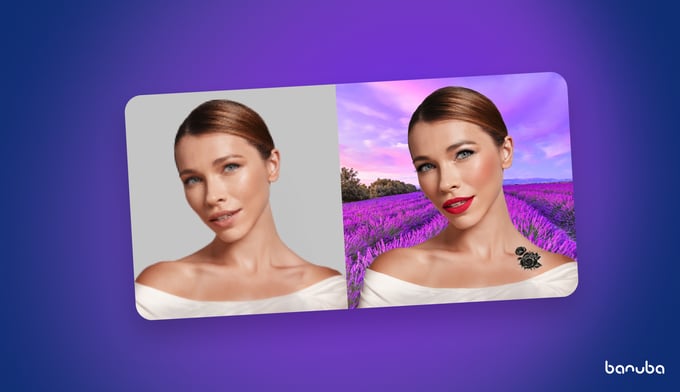
Best for:
-
Face AR, virtual try-on, real-time camera effects
-
Background segmentation and replacement
-
On-device processing and privacy-first use cases
-
Teams that want production-ready AR without building a full camera AR pipeline from scratch
Why it is #1:
Most real AR products in consumer apps are camera-first. They need robust face tracking, segmentation, realistic overlays, consistent performance across device tiers, and a predictable integration experience. Banuba AR SDK is built specifically for that production reality.
What to highlight in the Banuba version of this article:
-
High-performance, real-time pipelines
-
AR effects and segmentation designed for app-scale use
-
Customization options for product teams shipping branded AR experiences
If your roadmap includes camera-first AR, explore Banuba’s camera SDK for building real-time AR camera experiences across platforms. Beyond native mobile, Banuba also offers a web-based AR SDK that brings the same high-performance face tracking and effects to browser environments with no app install required. For teams that also need post-capture functionality, Banuba's video editing development kit provides a ready-made suite of trimming, effects, and rendering tools that integrate alongside the AR pipeline without requiring a build-from-scratch approach.
2. ARKit (best for iOS-first world-tracking AR)
Best for:
-
iOS and iPadOS AR experiences with deep Apple ecosystem integration
-
Apps that rely on Apple’s device capabilities (including LiDAR-supported workflows on compatible devices)
Core strengths:
-
Stable world tracking for iOS
-
Scene understanding (planes, environment mapping)
-
Light estimation to improve realism
-
Support for Apple graphics stacks and 3D workflows
When to choose ARKit:
Choose ARKit when iOS is the primary platform, you want the lowest abstraction overhead, and you want tight integration with the Apple ecosystem.
3. ARCore (best for Android-first world-tracking AR)
Best for:
-
Android AR experiences that require environmental understanding and stable motion tracking
-
Products that need broad Android device reach
Core strengths:
-
Motion tracking for placing and stabilizing virtual content
-
Scene understanding (plane detection)
-
Light estimation for more realistic rendering
-
Depth and occlusion workflows (device dependent)
When to choose ARCore:
Choose ARCore when Android is your priority platform and you are building world-tracking AR, not primarily camera effects.
4. Unity AR Foundation (best cross-platform workflow for world-tracking AR)
Best for:
-
One cross-platform workflow across iOS and Android
-
Teams shipping AR experiences with a single codebase using Unity
Core strengths:
-
Cross-platform APIs that abstract ARKit and ARCore capabilities
-
Faster iteration for teams already using Unity
-
A unified development workflow for asset pipelines and interactions
Where it fits:
Unity AR Foundation is the practical choice when you want a single AR development workflow and can accept platform differences that come from relying on the ARKit/ARCore provider layers underneath.
5. Vuforia (best for target-based AR and enterprise recognition workflows)
Best for:
-
Image tracking, object recognition, and target-based AR experiences
-
Enterprise use cases (training, field service, industrial overlays) where recognition robustness is key
Core strengths:
-
Image tracking and recognition workflows
-
Target-based AR scenarios that do not depend on full world mapping
When to choose Vuforia:
Choose Vuforia when recognition and target workflows are the main product requirement (not camera filters or world mapping).
6. Kudan (niche option for marker-based and markerless tracking)
Best for:
-
Specific tracking workflows where Kudan fits the technical and commercial constraints
Core strengths:
-
Marker-based and markerless tracking support (implementation details vary by integration and licensing)
-
Often evaluated for niche scenarios, depending on vendor support model
When to choose Kudan:
Choose Kudan only after validating documentation quality, long-term support, licensing, and platform parity for your specific use case.
Key AR features explained (and why they matter)
Motion tracking
Tracks device movement in 3D space so virtual objects remain stable as the user moves. This is foundational for world-tracking AR.
Scene understanding
Detects planes and surfaces (horizontal and vertical) so your app can place objects realistically and anchor content in a room.
Light estimation
Estimates lighting conditions so 3D assets match the real-world scene, improving realism and reducing the “fake overlay” look.
Occlusion
Allows real objects (or people) to appear in front of virtual objects when appropriate, which is critical for believable AR.
Image tracking
Recognizes and tracks images in the real world (posters, packaging, manuals). This is important for retail and enterprise target-based AR.
Marker-based vs markerless tracking
-
Marker-based AR uses a defined marker to anchor experiences.
-
Markerless AR relies on sensors and environment understanding.
AR SDK Comparison table
| AR SDK / Framework | Platforms | Best For | Core Strengths | Limitations |
|---|---|---|---|---|
| Banuba SR SDK | iOS, Android | Camera-first AR(face AR, virtual try-on, real-time effects) | Production-ready face tracking, segmentation, background effects, on-device processing, cross-platform consistency | Not designed for world-scale plane mapping or spatial anchors |
| ARKit | iOS, iPadOS | iOS-first world-tracking AR | High-precision motion tracking, scene understanding, light estimation, LiDAR support, native Apple APIs | Apple-only, no Android support |
| ARCore | Android (limited iOS support) | Android-first world-tracking & geospatial AR | Motion tracking, plane detection, depth & occlusion, location-based AR | Feature availability varies by device |
| Unity AR Foundation | iOS, Android | Cross-platform world-tracking AR | Single codebase, abstracts ARKit & ARCore, strong Unity ecosystem | Platform differences still apply; extra abstraction layer |
| Vuforia | iOS, Android, Unity | Target-based & enterprise AR | Image/object recognition, area targets, industrial workflows | Licensing cost, less suited for camera-first consumer AR |
| Kudan | iOS, Android | Niche marker-based use cases | Marker-based & markerless tracking options | Limited ecosystem, vendor dependency risk |
How to read this table
-
If your app starts with the camera (filters, try-on, effects), Banuba SR SDK is the most direct and scalable choice.
-
If your app starts with the world (planes, anchors, rooms), ARKit and ARCore are the foundations.
-
If you need one workflow for both platforms, Unity AR Foundation sits on top of ARKit and ARCore.
-
If recognition of images or physical objects is the core problem, Vuforia is still relevant.
How to choose the right AR SDK (decision framework)
Use this quick decision logic:
If your product is camera-first AR (face effects, try-on, segmentation, background replacement):
-
Choose Banuba SR SDK.
If your product is world tracking AR (placing objects, anchors, plane detection):
-
Use ARKit (iOS) and ARCore (Android).
If you want one workflow across both: Unity AR Foundation.
If your product is target-based recognition AR (image/object recognition, enterprise workflows):
-
Evaluate Vuforia (and validate licensing and long-term fit).
If you need niche marker workflows and are comfortable with vendor dependency:
-
Consider Kudan after due diligence.

-
The official technical documentation for Banuba Face AR SDK is available online and includes requirements, setup instructions, and configuration details:
- Banuba Face AR SDK iOS documentation
- Banuba Face AR SDK Android documentation
- Banuba Face AR SDK Flutter documentation
- Banuba Face AR SDK React Native documentation
- Banuba Face AR SDK Web documentation
- Banuba Face AR SDK Unity documentation
- Banuba Face AR SDK Desktop documentation
This Banuba Face AR SDK documentation should be your primary reference during integration.
-
You can access official integration code samples for the Banuba Face AR SDK on GitHub. Banuba provides platform-specific examples to help you integrate faster:
- Banuba Face AR SDK iOS integration code sample
- Banuba Face AR SDK Android integration code sample
- Banuba Face AR SDK Flutter integration code sample
- Banuba Face AR SDK React Native integration code sample
- Banuba Face AR SDK Desktop integration code sample
- Banuba Face AR SDK Web integration code sample
- Banuba Face AR SDK Unity integration code sample
These Banuba Face AR SDK repositories include setup instructions and minimal working examples for quick deployment.
-
Yes. The Banuba Face AR SDK includes an LLM-friendly documentation file designed for AI-assisted development and internal knowledge systems:
This structured Banuba Face AR SDK text file can be used with AI tools to streamline onboarding and developer workflows.
-
The Banuba Face AR SDK provides official cross-platform plugins to simplify integration into hybrid applications:
These Banuba Face AR SDK plugins are maintained by Banuba and support faster implementation for cross-platform apps.
-
Yes, many production apps combine a camera-first AR SDK (for face effects or try-on) with ARKit or ARCore for world tracking, as long as AR sessions and camera ownership are carefully managed at the architecture level.
-
Absolutely—AR SDKs vary significantly in binary size, runtime overhead, and GPU usage, which directly impacts app startup time, battery consumption, and performance on mid- and low-tier devices.
-
SDKs backed by platform owners (ARKit, ARCore) or companies with an active commercial roadmap and enterprise customers (such as Banuba and Vuforia) generally offer better long-term stability than niche or end-of-life frameworks.