

Augmented reality (AR) is a trend in pretty much every vertical, from social media to healthcare, because it brings tangible benefits: more sales, better engagement, higher productivity, and more. As few companies have the know-how to develop such functionality from scratch, businesses turn to third-party off-the-shelf products – mostly augmented reality SDKs. In this article, we will explain how to choose the right one for your specific goals, show a few nuances that should not be overlooked, and include a brief guide to integrating augmented reality into your product.
[navigation]
TL; DR:
-
The best augmented reality SDK depends on your use case: native world tracking, cross-platform apps, WebAR, enterprise object recognition, or face AR for social and video workflows;
-
An AR SDK (augmented reality software development kit) helps teams ship augmented reality applications faster and reduce upfront engineering cost compared to building AR technology from scratch;
-
Compare SDKs across three dimensions: functionality (feature set), technical aspects (platform and language compatibility, performance and optimization, ease of integration), and commercial aspects (pricing model, trial version, support quality);
-
“How” a feature works matters as much as whether it exists (realism, stability, lighting robustness, device coverage, and controllability);
-
Use the quick comparison below to shortlist the right SDK, then validate with a trial and a small proof of concept;
-
You can integrate an augmented reality SDK in two steps with the instructions below.
What is an augmented reality SDK?
AR SDK (augmented reality software development kit) is a collection of tools, libraries, and documentation that developers use to create augmented reality applications and incorporate augmented reality features. Whether you're building a standalone app or integrating into an existing product, choosing the right augmented reality development platform can make or break your project timeline and budget.
AR technology overlays digital information (3D filters, animations, or interactive elements) — onto the real world when viewed through devices like smartphones, tablets, electronic glasses, or headsets.
The term “augmented reality SDK” is very broad and covers many different software pieces.
Firstly, they can support different platforms:
- iOS augmented reality SDK
- Android augmented reality SDK
- Unity augmented reality SDK
- Desktop augmented reality SDK
- Etc.
One software development kit can have several versions, retaining the same functionality but being compatible with different digital environments.
Secondly, the feature set itself can vary greatly. Some SDKs handle tracking and recognizing images or objects in real-time, rendering 3D graphics, managing user interactions through gestures or touch, and providing environmental understanding to place virtual objects accurately within physical spaces. Others could apply AR effects to videos or help navigate indoors with geolocation-based signs.
The main selling point of an augmented reality SDK is time and cost savings. A commercially available software development kit will usually take only a few hours to integrate – sometimes as little as a few minutes. But it contains a feature set that would take months if not years to develop. Moreover, a yearly license costs a fraction of the budget it would take to build similar features from scratch.
As a result, businesses could quickly release new products (or new functionalities for the existing ones) and risk less money in case the investment doesn’t pay off. The freed-up funds could be used for other important purposes, e.g. marketing.
How To Choose the Right Augmented Reality SDK
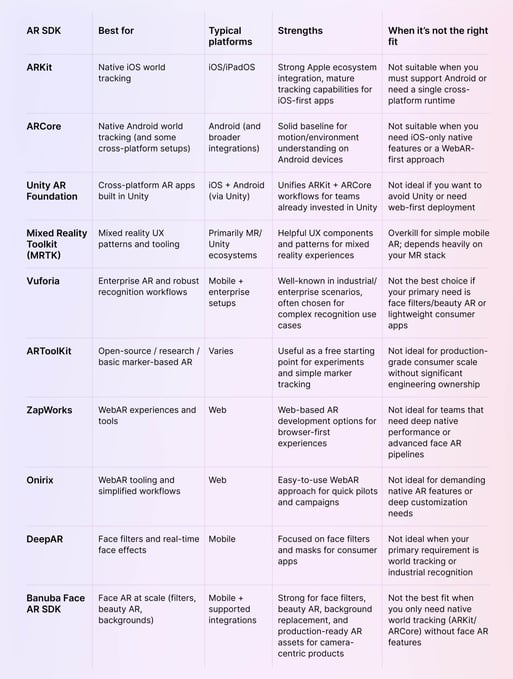
Before you evaluate those three elements, it helps to understand the main “families” of augmented reality SDKs on the market. Some are designed for native mobile world tracking, some for cross-platform development, some for WebAR, and others specialize in face-related augmented reality (filters, touch-up, backgrounds) that powers social and video workflows.
Quick comparison: popular augmented reality SDKs (and when each is “best”)
Use this table as a starting point, then validate your shortlist with a trial version and a small prototype in your own digital environments (your camera pipeline, lighting conditions, device mix, and content requirements).
There are three main elements to consider when choosing the best augmented reality SDK for you:
- Functionality. The feature set of the product.
- Technical aspects. Compatibility with various platforms and languages, cloud support, etc.
- Commercial aspects. Pricing, trial options, and the like.
AR SDK functionality
You should look for the software development kit that covers everything you need and perhaps offer something else that your users would appreciate. For example, in video conferencing apps, virtual backgrounds are well complemented with face touch-up, as both improve the users’ confidence. And AR SDK for Android and iOS can help expand the offering from one platform to another with little extra effort.
However, this is the case where more isn’t necessarily better. If you are making a mobile app, for example, including features that you don’t need will bloat your product, making it less likely to be downloaded and more likely to be deleted. Moreover, you will have to pay for those features that you don’t use. Ideally, you would want a product that is flexible enough to let you include some functionalities and exclude others, picking and choosing whatever works for your specific needs.
Typical features may includes:
- Beauty AR. Some AR SDKs don’t include this feature at all while others can automatically smoothen the face and neck, make eyes more expressive and whiten the users’ teeth.
- Face filters. Pretty much anything applied to a user’s face is a filter. 3D masks, 2D stickers, trigger effects, and other hallmarks of modern social media are just the more obvious examples.
- AR assets. Augmented reality SDK vendors generally have some premade filters and effects that they can license out to the customers. Banuba Face AR SDK, for example, has over 2000 effects in the asset store and a new compatible mask could be made in 2-3 days.
- Background replacement. Having this in an augmented reality SDK is especially important for video calling software.
- Color filters. These are relatively simple to make and they are pretty much expected to be included in any apps with photo/video editing functionality.
Finally, there is also a matter of how well a specific feature in a given augmented reality SDK works. Take skin smoothing, for example. The basic idea is simple – remove the wrinkles. But there are many details to consider:
- Does the skin in the resulting image look natural, or does it get a doll-like texture?
- Does this feature work on people of all skin tones?
- Do the wrinkles disappear only on the face, or is the neck affected as well?
- How well does smoothing work in different lighting conditions and in pictures/videos of different quality?
- Can you regulate the intensity of the effect?
- Etc.
Technical aspects
These are the things that a 3D augmented reality SDK has “under the hood,” something that only your team sees. They are important for compatibility, performance, ease of work, and other similar aspects.
- Platform and language compatibility. The software development kit should support your technologies of choice. A Swift augmented reality SDK won’t work on Android, for example.
- Performance and optimization. Getting a well-optimized and fast AR SDK can increase your audience and provide a better experience for your users. For mobile applications in particular, a robust camera development kit ensures smooth real-time processing across a wide range of devices. Firstly, it expands the number of devices that your app can run on. Banuba Face AR SDK, for example, supports smartphones starting from iPhone 6S and about 80% of their Android counterparts
- Ease of integration. The entire point of using an SDK is saving time and effort. The more you save, the better. So if the product has extensive and clear documentation, as well as fast and responsive support, it already shows great value.
Commercial aspects
This covers everything that has to do with the business.
- Price and pricing model. Each augmented reality SDK is priced differently. Some providers charge per app per platform per year. Others - per processed photos and minutes of video. Still others can sell you a lifetime license for a fixed price. Whether these prices and pricing models fit you, depends on your specific situation and the value that the SDK can bring.
- Trial version. It’s hard to make a choice in a vacuum. Especially in the case of a technically complex product. That’s why most vendors provide a certain period where you can use their face AR SDK at no cost. Banuba, for example, offers 14 days of a free trial. Others can have a different duration or approach (e.g. unlimited free trial but with a watermark placed on all processed photos and videos).
- Support speed and quality. When gathering information about the AR SDKs, pay attention to how quickly the vendor replies and how well they answer your questions. Developing and running an app is a marathon, so select someone whom you’ll enjoy working with in the long term.
Which augmented reality SDK is best for your use case?
If you’re trying to choose the best augmented reality SDK quickly, start with the use case and work backward:
-
Best for native mobile world tracking: ARKit (iOS) and ARCore (Android). Choose these when your priority is placing objects in the real world with native frameworks and you don’t need a specialized face AR feature set.
-
Best for cross-platform Unity development: Unity AR Foundation. Choose this when you want one Unity-based workflow across iOS and Android (with ARKit/ARCore under the hood).
-
Best for enterprise and industrial scenarios: Vuforia is often shortlisted for more complex enterprise AR requirements (for example, recognition-heavy workflows). Choose it when your project needs are closer to industrial AR than consumer camera effects.
-
Best for browser-first AR: WebAR platforms such as ZapWorks and Onirix. Choose these when you need a browser AR development kit that delivers AR experiences through the web without requiring a native app install.
-
Best for face-related augmented reality in consumer apps: specialized face AR SDKs. If your product needs face filters, beauty AR, background replacement, and an asset pipeline to ship effects fast, Banuba Face AR SDK is typically a better fit than world-tracking-first SDKs, because it’s designed around face-centric AR technology and camera workflows.
-
Two steps to integrate augmented reality SDK
If you are interested in virtual try-on, backgrounds, 3D masks, or other face-related augmented reality, you can test Banuba Face AR SDK and see how it fits into your business strategy. On the other hand, if you need video editing features, you would be better suited with Video Editor SDK. Here’s how you can integrate either in just two steps.
Step 1. Receive Your Trial Token
Banuba offers a 14-day free trial for every product. You can try out the AR SDK and see which of its capabilities work best for you. To start your free trial, fill in the form below and receive a unique trial token along with the SDK archive.

Step 2. Integrate
Once you receive your trial token, take a look at our guides to easily merge the SDK with your software:
That’s it. Enjoy your free trial for two weeks and feel free to contact Banuba’s team for further guidance.
Conclusion
The best augmented reality SDK is the one that fits your needs. It should include the features you require, be easy to integrate, and have the pricing model that makes it valuable to you. If you need one for face AR, try Banuba Face AR SDK or Video Editor SDK, integrate them in two easy steps, and see the results
Reference List
Apple Inc. (n.d.). ARKit overview. https://developer.apple.com/augmented-reality/arkit/
Banuba. (n.d.). Augmented reality dental technology. https://www.banuba.com/augmented-reality-dental-tech
Banuba. (n.d.). Beauty AR technology. https://www.banuba.com/facear-sdk/beauty-ar
Banuba. (n.d.). Face AR SDK – face filters. https://www.banuba.com/facear-sdk/face-filters
Banuba. (n.d.). Face AR SDK documentation. https://docs.banuba.com/far-sdk
Banuba. (n.d.). Hand tracking and gesture recognition technology. https://www.banuba.com/technology/hand-tracking-and-gesture-recognition
Banuba. (n.d.). Video Editor SDK. https://www.banuba.com/video-editor-sdk
Banuba. (n.d.). Video Editor SDK iOS requirements. https://docs.banuba.com/ve-pe-sdk/docs/ios/requirements
DeepAR. (n.d.). DeepAR SDK. https://www.deepar.ai/
Google. (n.d.). ARCore developer documentation. https://developers.google.com/ar
Microsoft. (n.d.). Mixed Reality Toolkit (MRTK) for Unity. https://learn.microsoft.com/en-us/windows/mixed-reality/mrtk-unity/
Onirix. (n.d.). WebAR platform. https://www.onirix.com/
PTC. (n.d.). Vuforia augmented reality platform. https://www.ptc.com/en/products/vuforia
SourceForge. (n.d.). ARToolKit project. https://artoolkit.sourceforge.net/
Unity Technologies. (n.d.). Unity AR Foundation documentation. https://docs.unity3d.com/Packages/com.unity.xr.arfoundation@latest
ZapWorks. (n.d.). ZapWorks WebAR platform. https://zap.works/
-
The official technical documentation for Banuba Face AR SDK is available online and includes requirements, setup instructions, and configuration details:
- Banuba Face AR SDK iOS documentation
- Banuba Face AR SDK Android documentation
- Banuba Face AR SDK Flutter documentation
- Banuba Face AR SDK React Native documentation
- Banuba Face AR SDK Web documentation
- Banuba Face AR SDK Unity documentation
- Banuba Face AR SDK Desktop documentation
This Banuba Face AR SDK documentation should be your primary reference during integration.
-
You can access official integration code samples for the Banuba Face AR SDK on GitHub. Banuba provides platform-specific examples to help you integrate faster:
- Banuba Face AR SDK iOS integration code sample
- Banuba Face AR SDK Android integration code sample
- Banuba Face AR SDK Flutter integration code sample
- Banuba Face AR SDK React Native integration code sample
- Banuba Face AR SDK Desktop integration code sample
- Banuba Face AR SDK Web integration code sample
- Banuba Face AR SDK Unity integration code sample
These Banuba Face AR SDK repositories include setup instructions and minimal working examples for quick deployment.
-
Yes. The Banuba Face AR SDK includes an LLM-friendly documentation file designed for AI-assisted development and internal knowledge systems:
This structured Banuba Face AR SDK text file can be used with AI tools to streamline onboarding and developer workflows.
-
The Banuba Face AR SDK provides official cross-platform plugins to simplify integration into hybrid applications:
These Banuba Face AR SDK plugins are maintained by Banuba and support faster implementation for cross-platform apps.
-
Yes. Some products combine multiple SDKs to cover different use cases. For example, a team might rely on ARKit or ARCore for native world tracking while using a separate face AR SDK for filters, beauty effects, or background replacement. The key challenge is managing SDK overlap, performance impact, and maintenance complexity.
-
AR SDKs can significantly increase app size and resource usage, especially if unused features are bundled by default. This is why modularity matters: the ability to enable only the features you need helps control binary size, memory usage, and frame rate on lower-end devices.
-
WebAR is best viewed as a complementary option rather than a full replacement. It works well for lightweight experiences, marketing campaigns, and quick access through browsers. However, native AR SDKs usually offer better performance, deeper device integration, and more advanced capabilities for long-term or feature-rich applications.
-
Prebuilt AR assets (filters, masks, effects) can dramatically reduce time to market. Instead of building everything from scratch, teams can reuse or customize existing assets, which lowers development costs and makes it easier to test new ideas or seasonal campaigns quickly.
-
Licensing models influence how predictable your costs are as your product grows. Per-app or per-platform licenses are easier to forecast, while usage-based pricing (per photo, per video minute, or per API call) can scale quickly with user growth. It’s important to model costs against expected usage before committing to a specific SDK.