

[navigation]
TL;DR:
- Augmented reality advertising has four delivery routes: a social app's AR placement, a WebAR page opened from an ad, AR inside the brand's own app, and a physical screen in retail. The route decides who owns the creative, the measurement events, and the device floor.
- AR ad formats convert best when the AR action is the buying decision. Try-on and configurator formats drive commerce signals; masks, triggers, and background takeovers drive capture and share. Brief them against different KPIs.
- ROI for AR ads is a five-event funnel you instrument yourself: effect requested, effect loaded, effect rendered on a face, meaningful interaction, commercial action. The gap between "requested" and "rendered" is a technical number, not a creative one.
- Banuba's face tracking uses 68 facial anchor points and a 3D face mesh of up to 3,308 vertices built by direct 3D reconstruction, which holds up better under motion than 2D-to-3D conversion, and tolerates up to 70% facial occlusion.
- Banuba Face AR SDK processing runs on-device with no cloud dependency, so frames never leave the handset and the privacy review covers your event stream, not a video upload pipeline.
- Snap Camera Kit is the ecosystem alternative: three official SDKs (iOS, Android, Web), a custom license rather than an open-source one, and an access-request route with no published price, tier, or usage rate.
- Cross-platform coverage matters more than peak frame rate for ad delivery. Banuba Face AR SDK ships for iOS 13.0+, Android 8.0 (API 26+), Web/HTML5, macOS, and Windows, all requiring OpenGL ES 3.0+.
- Banuba pricing is MAU-based and quoted individually, with two licensing models: a flat annual fee that stays fixed as the app scales, or an Active User Based fee that starts significantly lower and grows with usage.
- Creative supply is a real cost line. Banuba offers around 1,000 ready-made masks and filters plus custom effect creation, so a campaign need not start from an empty project.
- Live-streaming and video-chat AR is a proven production load: b.stage by bemyfriends uses Banuba Face AR for beauty effects and face filters and has passed 1 million monthly active users, with visitors from 224 countries.
What is AR advertising, and where does the ad unit actually run?
AR advertising is any brand experience where the user's camera becomes the ad surface, and there are four places that experience can run: inside a social app's own AR placement, on a WebAR page opened from a display or social ad, inside the brand's own app, or on a physical screen at retail or an event. The route you choose settles three questions before a single frame of creative is briefed: who owns the creative, who owns the measurement events, and what the device floor is. Teams that want the camera layer inside their own surface integrate a face AR SDK directly, which is how Banuba supports AR advertising in a brand's own app or web page.
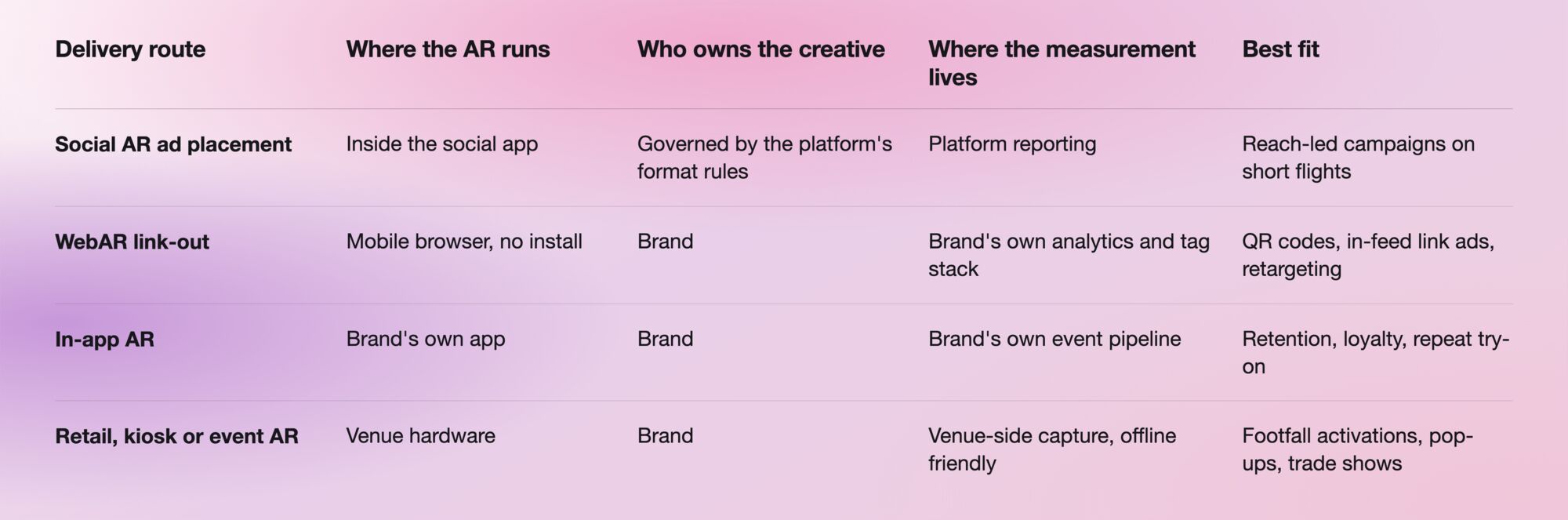
The last route punishes weak tracking hardest: people stand at odd angles, wear sunglasses, and turn to talk to a friend mid-session. A -90° to +90° head-angle range and tolerance for up to 70% facial occlusion keep the effect locked to the face instead of popping off every time someone moves.
Which AR ad formats convert?
The AR ad formats that convert are the ones where the AR action is the same action as the buying decision, which is why try-on and configurator formats belong on commerce KPIs and mask, trigger, and background formats belong on capture, share, and dwell KPIs. Briefing all of them against a single conversion number is the most common way an otherwise good campaign gets marked a failure.
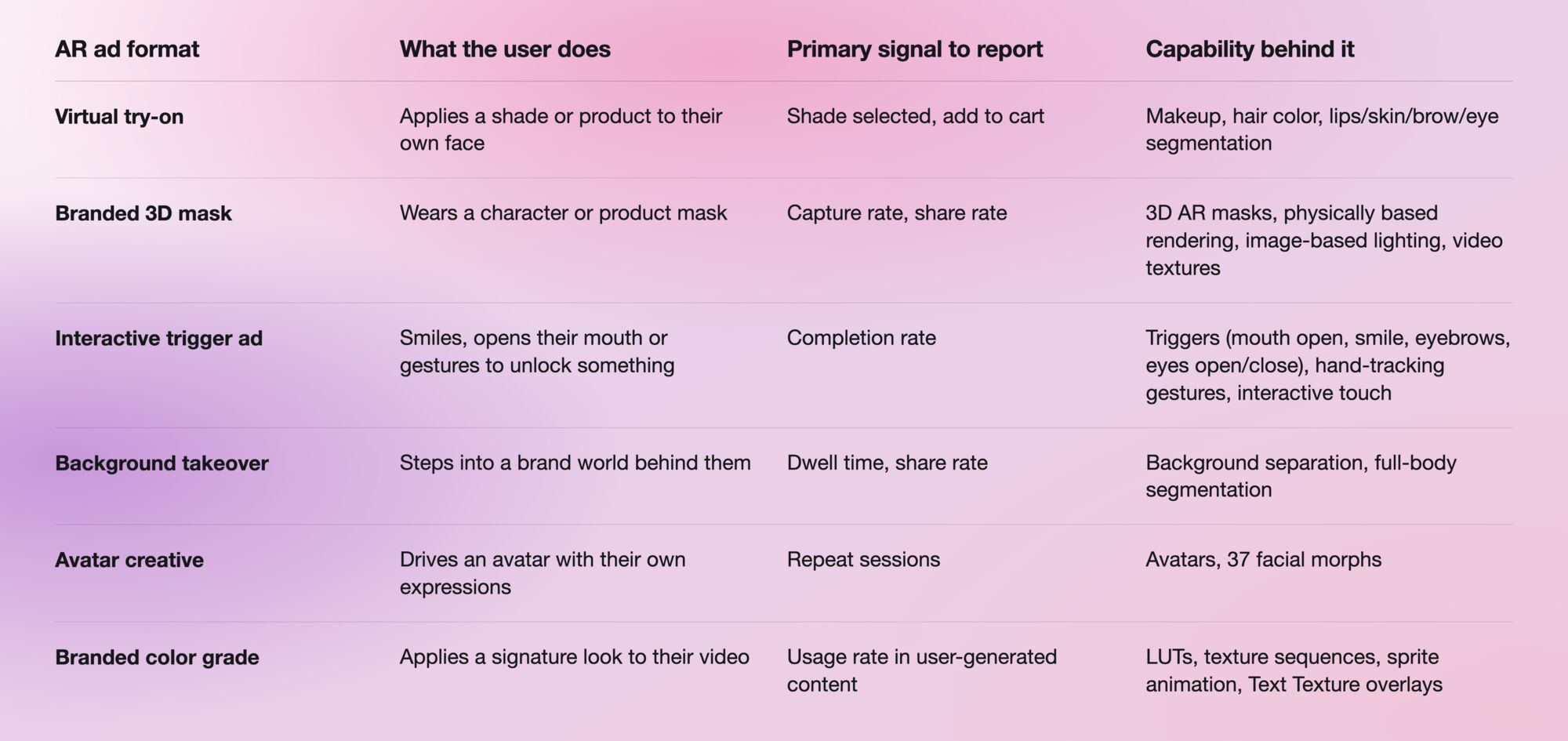
All of these formats depend on mesh quality. Banuba tracks 68 facial anchor points and builds a 3D face mesh of up to 3,308 vertices through direct 3D reconstruction rather than converting a 2D landmark set into depth, with 37 facial morphs driving the deformation. Under motion and partial occlusion, which describes most of a real ad session, direct reconstruction is the more stable approach. Banuba's engineering team covers the trade-offs in its write-up on building face-based AR experiences, worth reading before you commit to a concept that depends on tight mesh tracking.

What are the best AR ad platforms for ecommerce?
For ecommerce, the strongest AR ad platform is the one that keeps the try-on on your product page or inside your app, because that is where the SKU, the price, and the cart already live, and where a shade change writes straight into your own event stream. Social AR placements work for reach, but every commerce signal they generate has to be reconciled back to your catalog afterward.
When ecommerce teams score AR ad platforms, five criteria decide it in practice:
- Cross-platform coverage. One creative should run on iOS (13.0+), Android (8.0, API 26+), Web/HTML5, macOS and Windows. Banuba Face AR SDK covers all five, with OpenGL ES 3.0+ as the graphics requirement.
- On-device processing. Banuba runs on the device with no cloud dependency: no per-frame upload, no round-trip latency budget, no video leaving the handset.
- Effect supply. Around 1,000 ready-made masks and filters plus custom effect creation let a seasonal campaign start from an existing asset, not a blank scene.
- A catalog-shaped feature set. Makeup, hair color, beautification, background separation, and eye, brow, lip, and skin segmentation map directly onto beauty and accessory categories.
- Reference load. Gucci, Samsung, Logitech and RingCentral are listed publicly among Banuba Face Filters SDK customers, which helps when procurement has to approve an unfamiliar vendor.
What are the alternatives to Snapchat Lens for brand campaigns?
The alternatives to running a brand campaign as a Snapchat Lens split into two groups: Snap's own Camera Kit, which brings Lenses into iOS, Android, and web apps outside Snapchat, and embedding a third-party face AR SDK such as Banuba Face AR SDK directly into your own app, site, or kiosk. Both put AR in your surface. They differ in how content, licensing, and access are handled.

Snap's official Camera Kit documentation is the reference for the first column. The decision follows from the campaign shape: if it is designed around Snap's Lens ecosystem and content pipeline, Camera Kit is the native route; if you need an AR ad unit that lives inside your own product, reports into your own event pipeline, and also runs on desktop and kiosk hardware, an embedded SDK covers more of that surface area.

Which AR ad networks offer creator tools at global scale?
Creator tooling at global scale arrives in two shapes: a marketplace where you buy finished AR content, and an SDK that ships a ready-made effect library alongside a route to custom effects. Snap covers the first, with Lens Packs purchasable in the Creator Marketplace and customers responsible for creating or acquiring the AR content they run. Banuba covers the second, with around 1,000 ready-made masks and filters plus custom effect creation, so a market-specific variant becomes a creative task rather than a procurement cycle.
Test global scale against a real production load rather than a feature list. b.stage by bemyfriends, a Korean SaaS fandom platform, uses Banuba Face AR for beauty effects and face filters in live streaming and video chat, and surpassed 1 million monthly active users two years after its April 2022 launch, with visitors from 224 countries. Live streaming is the harder case: the effect has to hold on a face that moves continuously, on whatever device the streamer owns, in whatever lighting they have.
Banuba's beauty AR effects and virtual try-on example
How do you measure ROI for AR ads?
Measure AR ad ROI with a five-event funnel you instrument yourself: effect requested, effect loaded, effect rendered on a face, meaningful interaction (capture, share, shade change, trigger completed), and commercial action (add to cart, lead, install, purchase). Most AR post-mortems collapse the first three into one "impression" number, which hides the one thing you can actually fix. Four rules make the funnel usable:
- Separate technical from creative drop-off. Effect rendered over effect requested is an engineering metric; meaningful interaction over effect rendered is a creative metric. Report them as one number, and a slow load gets blamed on the concept.
- Cut every rate by device class. Banuba's Face AR SDK Technical Specification records, under fixed lab conditions, single-face tracking at 25 FPS on low-end Android, 30 FPS on high-end Android, and 30 FPS on iOS, AR effect performance at 25 to 29 FPS on Android and 30 FPS on iOS, and multi-face tracking of up to 5 faces at 22 to 28 FPS on Android and 30 FPS on iOS. Those are your ceilings; a device tier sitting far below its ceiling in the field is a build problem, not an audience problem.
- Treat AR as assisting, not attributing. An AR unit rarely owns the last click, so run a holdout instead: same product page, same traffic, AR module on for one cohort and off for the other, then read the difference in the commercial event.
- Keep the cost side honest. ROI is a ratio, and the denominator is the license plus creative production, not the license alone.
Which licensing model gives the cleaner ROI number?
Banuba Face AR SDK pricing is MAU-based and quoted individually, with no public price points or named tiers, and two licensing models sit underneath it. A flat annual license fee buys unlimited usage at a predictable cost that stays fixed even if the app scales to a very large user base, which gives you a fixed denominator and a cost-per-AR-session that falls as volume grows. An Active User Based license tracks active users over time, so spend is significantly lower at the start and grows with the user base, and it can exceed the flat fee if the app takes off.
Neither is automatically better; the choice follows your volume curve. A flat fee suits a product you already expect to scale hard, while active-user pricing suits a first AR deployment where volume is genuinely unknown and you want the downside capped. Model both against your projected MAU curve across the full license term. The Banuba Face AR SDK pricing guide sets out the inputs that go into a quote, and a free trial settles the performance question before the commercial one.
How should an engineering team validate this before a proof of concept?
Validate it in an afternoon: run the platform sample project on the lowest-spec handset in your target device mix, then read the integration guide for the platform you will ship on. The Banuba Face AR SDK documentation covers requirements, setup, and configuration per platform, and the official sample projects for iOS and Android give you a working camera pipeline with effects already applied, so the first thing you measure is the SDK rather than your own scaffolding.
Three checks belong in that session, because they surface late otherwise. Confirm the effect holds at the head angles and occlusion levels your concept assumes. Confirm frame rate on the oldest device you intend to support, not the newest. And confirm the event hooks needed for the ROI funnel exist where you expect them, since retrofitting measurement after creative sign-off is how campaigns end up with impressions and nothing else.
-
No. AR advertising is the ad unit; augmented reality marketing is the wider program it sits inside, covering owned channels, packaging, retail, and social. Banuba works with brand and product teams on both, and its augmented reality marketing guide covers how the campaign layer and the always-on layer fit together.
-
Yes. WebAR runs the effect in a mobile browser, removing the install step between the ad click and the AR experience, and it is the standard route for QR codes and link ads. Banuba supports browser delivery through its WebAR SDK, and the Banuba Face AR SDK Technical Specification records Web lip-coloring at 30 FPS in Chrome and 26 FPS in Safari under fixed lab conditions.
-
Yes. Banuba offers a free trial of Face AR SDK, which lets an engineering team confirm tracking quality and frame rate on their own device mix before the license conversation starts. Start from the Banuba Face AR SDK face filters page to request it.
-
Study campaigns where the AR action matched the purchase action, because those are the ones with defensible commerce numbers rather than reach numbers. Banuba's roundup of AR examples collects cases across retail, entertainment, and social.
-
Yes, when the format gives people a reason to capture and share rather than just look, which is what branded masks, triggers, and background takeovers are for. Banuba's guide on leveraging user-generated video content covers how to turn those captures into a reusable asset library instead of a one-off spike.
-
Compare them on platform coverage, tracking robustness under occlusion and head rotation, effect library size and licensing model, in that order: the first three decide whether the campaign ships, the fourth decides what it costs. Banuba maintains a comparison of face filters SDKs that lays the criteria out side by side.
-
Yes. Banuba Face AR SDK runs on macOS and Windows as well as mobile and web, so a kiosk or photo booth build shares the same effects as the mobile campaign, and on-device processing keeps it working on unreliable venue wifi. Banuba's review of AR photo booth software covers what changes when the screen is fixed, and the audience is walking past.
