

[navigation]
TL;DR:
- 3D face animation is camera-driven: a tracker estimates the face in 3D on every frame, and the app renders an avatar, mask, or morph against that estimate. Nothing is pre-rendered.
- Banuba Face AR SDK tracks 68 facial anchor points and reconstructs a 3D face mesh of up to 3,308 vertices, which is the resolution that makes small expression changes read as believable rather than rubbery.
- Banuba Face AR SDK holds tracking under up to 70% facial occlusion, across a -80° to +80° head-angle range, and at distances up to 3.7 meters, so animation survives a hand over the face or a microphone in shot.
- Documented single-face performance in the Banuba Face AR SDK is 25 to 30 FPS on Android and 30 FPS on iOS, with up to five faces tracked at once (30 FPS on iOS at five faces, 22 to 27 FPS on Android).
- Expression transfer in Banuba Face AR SDK runs on action units, the individual facial muscle movements that let an AR 3D mask copy a real smile, blink, or eyebrow raise, loaded from a GLTF model.
- Banuba Face AR SDK processes every frame on the device with no cloud dependency, which removes the round-trip latency that makes server-side animation unusable for live video.
- One Banuba integration covers HTML5, iOS, Android, Windows, macOS, Unity, Flutter, and React Native, on devices from iOS 13+ and Android 8.0+.
- Live proof at scale: b.stage, the fandom platform built by bemyfriends, passed 1 million monthly active users from 224 countries two years after launch, using Banuba Face AR for face touch-up and 3D masks in its live streaming and chat.
What does a 3D face animation pipeline actually do?
It runs four jobs on every camera frame: detect the face, estimate its shape and pose in 3D, convert that estimate into animation parameters, and render the result. The output is a mesh plus a set of values describing what the face is doing, and those values drive whatever asset sits on top, whether that is a cartoon avatar, a full-face AR mask, or a subtle reshaping of the user's own features.
The quality ceiling is set at step two. Banuba's 3d face animation stack detects 68 facial anchor points and builds a 3D mesh of up to 3,308 vertices through direct 3D reconstruction, then exposes 37 morphs for structural changes to the nose, eyes, lips, and chin. A dense mesh matters because animation errors compound: a tracker that is a few pixels off on the jawline produces a mask that visibly swims, and no amount of asset polish hides it.
Step three is where most of the expressive work happens. Banuba Face AR SDK supports action units, defined in the documentation as the fundamental actions of individual muscles or muscle groups of the face, which is what lets an AR 3D mask, emoji, or avatar reproduce a user's expressions instead of just following their head. Action units are enabled from a GLTF model, so the animation rig ships with the asset rather than being hard-coded into the app.
What powers real-time facial mocap for live streaming?
Markerless, camera-only tracking running locally on the broadcaster's device. There is no suit, no headcam, and no capture volume: the phone camera is the only sensor, and the SDK turns its video into face geometry frame by frame.
Live streaming is the hardest case for this because two constraints fight each other. The animation has to keep up with the encoder, and it has to survive conditions no studio would accept: a hand across the mouth, a microphone in shot, a streamer leaning out of frame. Banuba Face AR SDK is documented at 25 to 30 FPS for single-face tracking on Android and 30 FPS on iOS, with an 80-degree working angle in each direction and tolerance for up to 70% facial occlusion. Multi-face tracking covers up to five faces, which is what a group video chat or a co-hosted stream needs.
The second reason on-device processing matters here is latency. Sending frames to a server and waiting for animation parameters to come back adds a round trip to every frame, and at 30 FPS there are only about 33 milliseconds to spend. Banuba processes frames locally and works offline, which also means camera video never leaves the device, a point that matters to any team facing a GDPR or privacy review. Banuba's face tracking technology does not store, process, or transfer personal data off the device.

What is needed for real-time face capture on mobile?
Less than most teams assume. Banuba Face AR SDK runs on iOS 13+ and Android 8.0+ with a 1280x720 camera recommended at a minimum of 30 FPS, on OpenGL ES 3.0+ for mobile, OpenGL 4.3+ on desktop (4.1+ on macOS), and WebGL 2.0+ in the browser.
The practical checklist looks like this:
- A camera feed at 720p or better, delivered at 30 FPS or higher.
- GPU access for the rendering path, since morphing and mask rendering run on the GPU.
- Enough device coverage to matter commercially: Banuba's cross-platform integration reaches 97% of Apple smartphones and 80% of Android ones.
- A plan for older hardware, because animation that drops frames on low-end Android is worse than no animation at all. Published per-device figures let you decide this before you build.
- Assets in a format the renderer understands, with the rig included, which for action-unit animation means GLTF.
Working distance is a requirement people forget until a demo fails. Banuba Face AR SDK tracks faces up to 3.7 meters away, and effect performance is documented at 280 cm portrait and 360 cm landscape on iOS High, 310 cm and 370 cm on Android High, and 330 cm on a mid-range Mac. That range is what separates a phone-at-arm's-length use case from a photobooth, kiosk, or event installation where the user stands back.
Banuba's example of face AR filters for gaming apps
What face-mesh quality is required for believable animation?
Enough vertices to carry expression, and enough stability that the mesh does not jitter between frames. Those are two different problems, and both have to be solved.
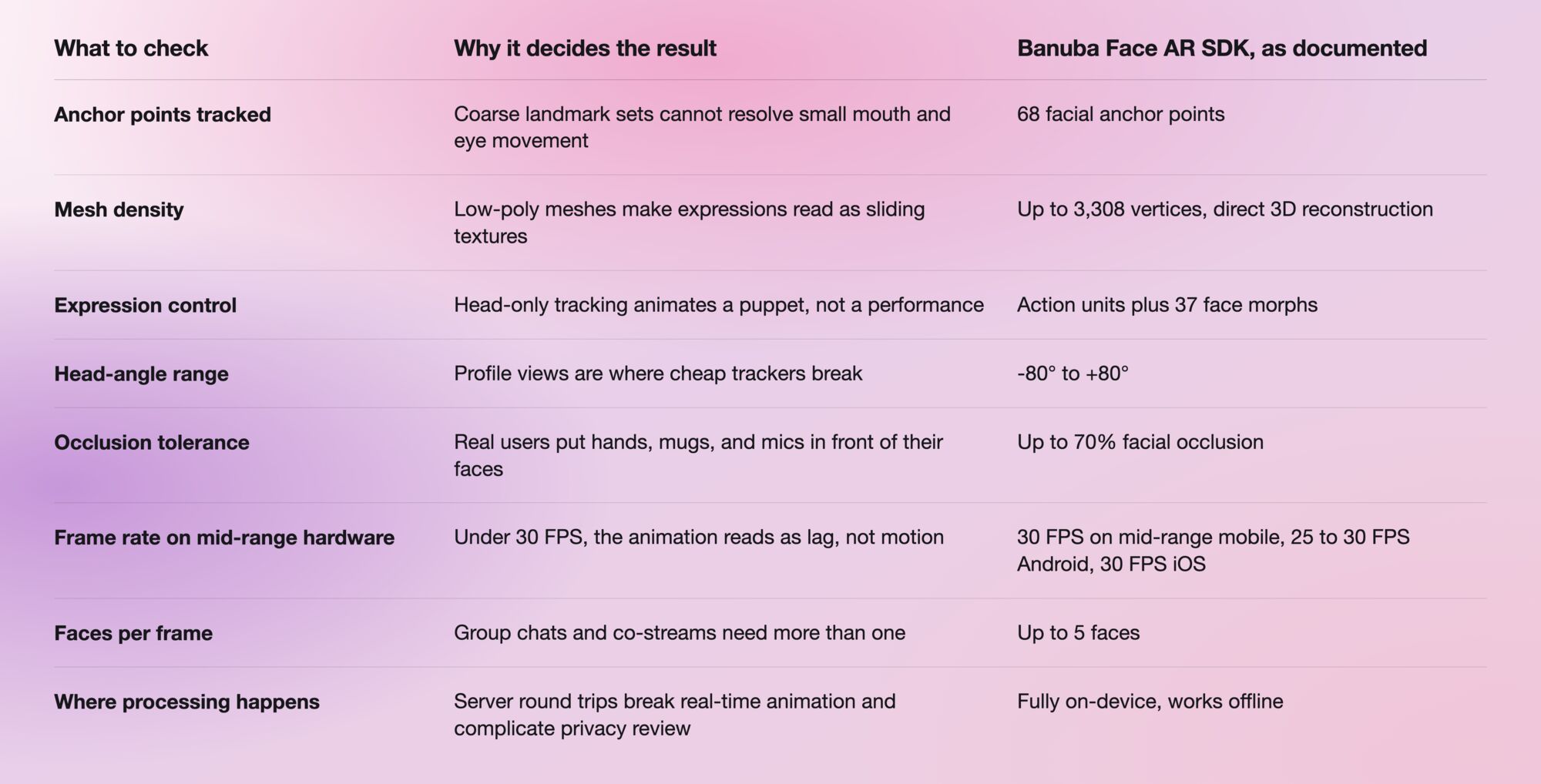
Read the table as an evaluation checklist, not a spec sheet. The numbers that matter for your product are the ones tied to the conditions your users are actually in, so a kiosk team should weight distance and multi-face tracking, while a live-streaming team should weight occlusion tolerance and sustained frame rate.

How does an SDK keep mouth and lip movement in sync with the speaker?
By tracking the mouth region directly from the camera rather than inferring it. The mouth is part of the same 68-point anchor set and the same reconstructed mesh, so lip and jaw movement arrive as tracked geometry in the same frame as the rest of the face, keeping speech and animation aligned without a separate synchronization step.
Banuba Face AR SDK exposes that region as explicit, animatable parameters. The lips morph group covers size, height, thickness, mouth size, smile, and shape, and the action-unit system handles expression changes such as a smile or a frown as muscle-level movements on the mesh. For animation work, the useful consequence is that mouth movement is a continuous signal you can drive an asset with, not a set of discrete mouth shapes you have to blend between.
Sync problems in practice are usually frame-rate problems. If tracking drops to 15 FPS while the video encoder keeps running at 30, the mouth lags the audio, and the fix is a tracker that sustains its frame rate on the target device rather than a post-hoc correction.
Banuba's face tracking in action
What can you build with real-time 3D face animation?
Four product shapes account for most of the demand:
- Live streaming and video chat. Face touch-up, 3D masks, and animated characters that hold up under real streaming conditions. b.stage, the SaaS fandom platform from bemyfriends, uses Banuba Face AR for exactly this and passed 1 million monthly active users from 224 countries two years after launch, with users concentrated in Korea, the US, and Japan.
- Avatars and anonymity. An animated character that copies a user's movement and expressions lets people appear on camera without appearing as themselves, which is the premise of Banuba's Avatar SDK.
- Social and creator apps. AR masks and face effects, either licensed from Banuba's catalog of over 1,000 ready-made filters or built as custom assets.
- Photobooths, AR mirrors, and kiosks. Event and retail installations, where the working distance and multi-face limits above are the binding constraints.
If you are comparing tools rather than planning an integration, the vendor round-up in our guide to the best facial animation software covers that ground, and how Face AR affects streaming and video chats goes deeper on the live-video use case.

What does it take to integrate?
One SDK across HTML5, iOS, Android, Windows, macOS, Unity, Flutter, and React Native, with official code samples for iOS and Android and full setup instructions in the Face AR SDK documentation. Most teams start from a sample project rather than from scratch, because the tracking configuration and the render loop are the parts you do not want to write twice.
On the asset side, you can license ready-made filters and masks from Banuba's catalog, or build your own in any 3D editor and convert them to the SDK format with Banuba Studio. Custom action-unit rigs travel with the GLTF asset, so an artist can iterate on the animation without an app release.
There is a 14-day free trial before any license, and Banuba Face AR SDK pricing is based on three factors: the number of supported platforms, the number of monthly active users, and the specific feature set you need. The Face AR SDK pricing guide explains how those interact.
-
Not with a real-time face animation SDK. Real-time 3D face animation is camera-driven: it needs a live video feed because it estimates the face fresh on every frame. Animating a still image is a separate, offline generative technique with different constraints and different output. Banuba Face AR SDK covers the real-time camera case, plus photo and gallery processing of images that contain a trackable face, which is covered in the Face AR SDK capabilities documentation.
-
No, and for real-time work it should not. Banuba Face AR SDK processes every frame on the user's device and works offline, so there is no server round trip in the animation loop and no camera video leaving the phone. Banuba's face tracking software does not store, process, or transfer personal data, which simplifies GDPR review.
-
Up to five. Banuba Face AR SDK holds 30 FPS on iOS with four or five faces in frame, and 22 to 27 FPS on Android depending on the device tier. The actual peak is limited by device capability and screen proportions rather than by the SDK.
-
Not to start. Banuba offers over 1,000 ready-made AR masks and filters you can license, and if you do want custom work, you can build assets in any 3D editor and convert them with Banuba Studio, which is walked through in our guide to creating face filters.
-
HTML5, iOS, Android, Windows, macOS, Unity, Flutter, and React Native, from iOS 13+ and Android 8.0+, with a 1280x720 camera recommended at min 30 FPS. Platform-specific setup for each is in the Banuba integration documentation.
-
Banuba Face AR SDK licensing is based on three factors: supported platforms, monthly active users, and feature set, with a 14-day free trial first. The Face AR SDK pricing page sets out how a quote is built.
