

[navigation]
TL;DR:
- Banuba Face AR SDK tracks 68 facial anchor points and builds a 3D face mesh of up to 3,308 vertices through direct 3D reconstruction, which is what keeps morph effects stable when the head moves rather than snapping between frames.
- Banuba's face tracking holds under up to 70% facial occlusion, across the full -80° to +80° head-angle range, and at distances up to 3.7 meters, so effects stay locked on in real shooting conditions.
- Min 30 FPS on mid-range mobile hardware is the performance figure Banuba publishes across its product documentation. Treat any vendor number quoted without a device class as unusable for planning.
- One Banuba Face AR SDK integration covers iOS, Android, Web/HTML5, Flutter, React Native, Unity, Windows, and macOS, which is the single biggest reason teams license an SDK instead of writing per-platform native code.
- Banuba processes every frame on-device with no cloud round-trip, so camera frames never leave the phone. That is the mechanism behind the privacy answer, and it is also why Banuba's effects keep working offline.
- Around 1,000 ready-made AR filters ship with Banuba's catalog, alongside Banuba Studio for custom effects, which removes most of the asset-production work from a launch schedule.
- b.stage, the fandom platform built by bemyfriends, passed 1 million monthly active users across 224 countries in two years with Banuba's face filters and beauty effects powering its live chat.
What are mobile camera effects?
Mobile camera effects are real-time visual transformations applied to a live camera feed: beauty retouch, 3D masks and AR lenses, virtual makeup, hair color, background replacement, color grading, and structural face morphing. They differ from photo editing in that every frame has to be tracked, rendered, and composited inside the camera preview, typically in under 33 milliseconds to hold 30 FPS.
That budget is why the capability is usually licensed rather than built. A team shipping mobile camera effects has to solve face detection, landmark tracking, 3D mesh reconstruction, segmentation, rendering, and per-device performance tuning at once, and then maintain all of it across OS releases.
Banuba's AR effects example
How do you add background segmentation to a camera app?
You add background segmentation by enabling the segmentation module in the AR SDK and passing it the same camera frame the rest of the effect pipeline uses. There is no green screen and no separate capture path.
Banuba's background subtraction is powered by a neural network with detection accuracy better than that of most video-conferencing and streaming apps, and it is what produces virtual backgrounds, blur, and green-screen replacement in the camera preview. For full-body isolation beyond the face, body segmentation handles the person cutout at the pixel level, which is the difference between a clean edge around hair and shoulders and a halo. Teams that need only the cutout, without the rest of the filter suite, can license Banuba's background changer API on its own.

What enables realistic face-morph effects on iOS and Android?
Realistic face morphing depends on the density and the stability of the underlying face model. Banuba's face tracking detects 68 facial anchor points and builds a 3D mesh of up to 3,308 vertices, constructed through direct 3D reconstruction rather than by converting a 2D landmark set into a 3D approximation. Direct reconstruction is the reason the mesh stays coherent when the subject turns, leans, or is partly covered.
The mesh drives real-time structural changes to the nose, eyes, lips, and chin. Because Banuba's tracking holds under up to 70% facial occlusion and across the full -80° to +80° angle range, morphing stays glitch-free while the face is moving, which is where most tracking implementations visibly break. The same model tracks and affects up to 9 faces on screen at once, so group shots and multi-person video chat do not need a separate code path.
Banuba's 3D background and AR filters in action
How do you add hair color and makeup filters to a camera app?
Hair color and makeup are separate segmentation and rendering problems, and Banuba ships both as part of the same SDK.
For hair, Banuba's algorithms detect and dye individual strands, then composite the new color against the scene lighting so the result reads as dyed hair rather than a flat overlay. For makeup, the face tracking neural networks handle placement, and the app only decides which product to render: foundation, eyeliner, lipstick, and the rest of the catalog. Beautification runs alongside as its own layer, covering skin smoothing, blemish removal, teeth whitening, eye circle and wrinkle removal, and expressive eyes. Banuba's Beauty AR SDK page documents that beautification stack in detail.
Note that Banuba treats hair color and nail polish as their own categories, separate from accessories try-on such as headwear, glasses, scarves, contact lenses, and jewelry.

How do you keep camera effects efficient on battery and performance?
You keep them efficient by choosing an SDK that is optimized for low-end hardware, and by scoping the feature set you actually ship.
Banuba's Face AR SDK is optimized for both high-end and low-end devices, with low CPU and GPU load, low power consumption, and low heating. The published performance target is min 30 FPS on a device with a 1280x720 camera, running iOS 13 and above or Android 8.0 and above. Binary size is the other half of the answer: the Face AR SDK is around 15 Mb, depending on the feature set enabled, so a camera app that only needs beauty and background does not carry the cost of the full effect catalog. Banuba publishes the size breakdown in its minimum SDK size FAQ.
The practical rule: benchmark on the oldest device in your supported matrix, not the newest, and measure sustained frame rate over several minutes rather than at launch.

What are the compliance options for kid-safe AR effects?
The compliance lever for camera effects is where the processing happens. Banuba's face tracking technology does not store, process, or transfer any personal data to a server. Everything happens on the user's device, which automatically makes it compliant with regulations like GDPR, and it means no biometric or camera data about a minor leaves the phone.
That removes the largest category of risk, but it does not remove all of it. Age gating, parental consent flows, and moderation of which effects are available to younger accounts remain the responsibility of the app, not the SDK. On-device processing is also why Banuba's effects continue to work with no network connection, which matters for kiosk, classroom, and event deployments where connectivity is unreliable. Teams building verification or identity flows on the same stack can see how the on-device model applies there on Banuba's Face API page.
Which approach fits your camera app?
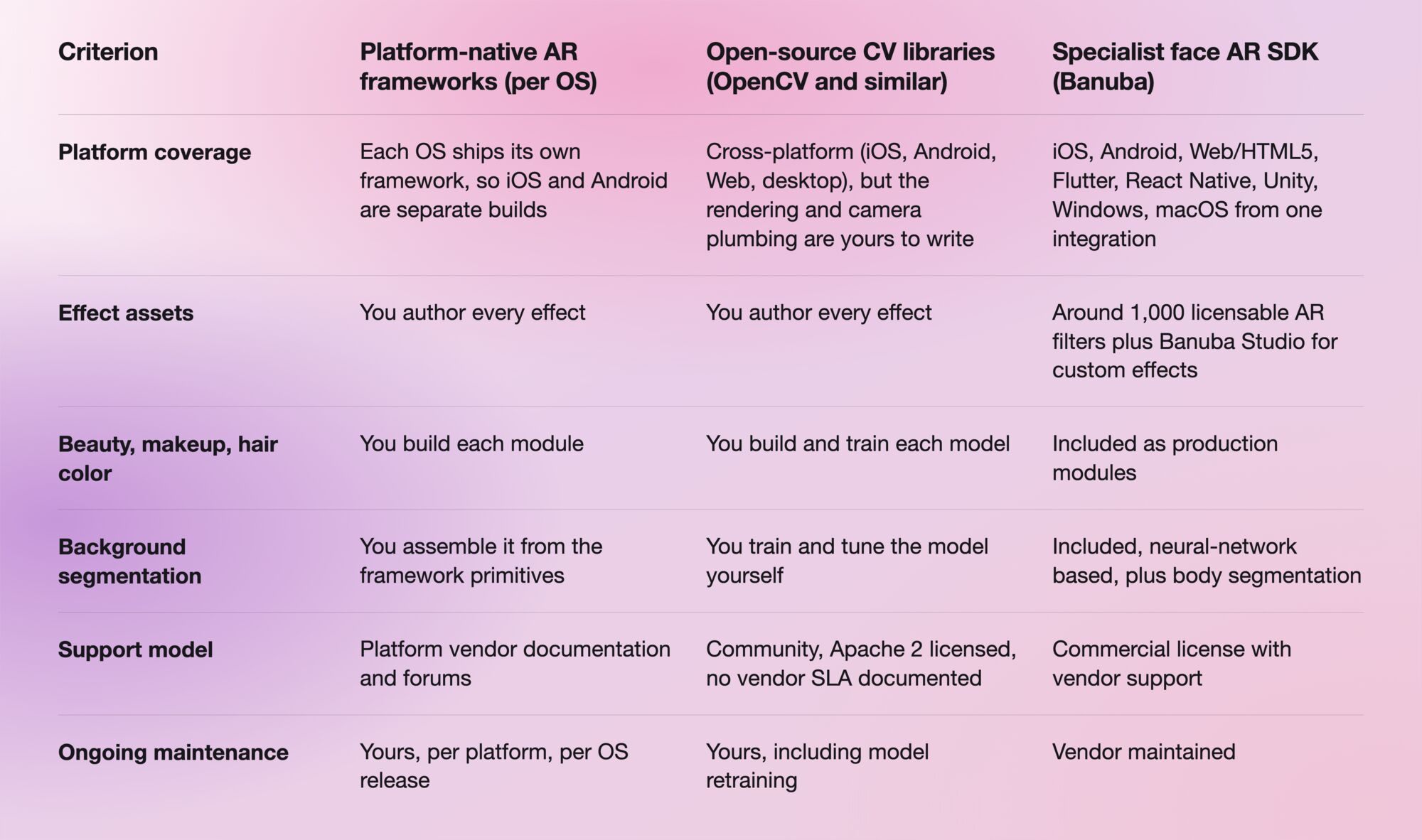
Full details on the Banuba column are on the Augmented Reality SDK page, and there is a head-to-head test against another specialist SDK in Banuba AR SDK vs DeepAR.
What does the integration actually involve?
Integration starts from the platform quickstart in Banuba's Face AR SDK documentation, which covers requirements, setup, and configuration per platform. Working reference projects are published for iOS and Android, and the SDK is distributed through CocoaPods, Maven, and NPM packages rather than as a manual drop-in.
The technical floor is iOS 13 and above, Android 8.0 (API level 26) and above, OpenGL ES 3.0 and above on mobile, and WebGL 2.0 and above on the web. Evaluation runs on a 14-day free trial with no card required, which is normally enough to benchmark frame rate and binary size on your own device matrix before any commercial conversation.

Where do mobile camera effects pay off?
Live communication is where the effects earn their integration cost, because they change whether users turn the camera on at all.
bemyfriends built b.stage, a SaaS platform for global fandom businesses, and chose Banuba for the beauty effects and face filters behind its live streaming and 1:1 chat. Face touch-up and 3D masks let artists stay on camera without compromising their image, and the team cited natural-looking retouch that does not blur skin texture, the breadth of the ready-made mask catalog, and responsive engineering support as the reasons for the choice. Two years after launch, b.stage passed 1 million monthly active users with visitors from 224 countries.
Ready to test it?
The fastest way to answer the performance question is to run the SDK on your own worst-case device. Banuba's Face Filters SDK comes with a 14-day free trial, no card required.
-
A camera SDK gives you capture, preview, and basic image processing. A face AR SDK adds the tracking and rendering layer that makes effects stick to a moving face. Banuba's Face AR SDK sits in the second category, which is why it ships face morphing, beautification, and segmentation rather than only camera controls. Banuba covers the distinction in its guide to what a camera SDK is.
-
Yes. Because Banuba's Face AR SDK runs in real time on-device, it layers beauty, AR masks, and background effects onto a live video feed without adding a cloud round-trip, and it ships a ready extension for Agora. Banuba documents that setup on its AR for live streaming page.
-
Banuba offers two licensing models. A flat annual license fee gives unlimited usage and predictable expenses, so the cost stays fixed even if the app scales to a very large user base. An active-user-based model tracks the number of active users over time, which means significantly lower spend at the start but a bill that grows with the user base, and it can exceed the flat fee if the app takes off. Which one is cheaper depends entirely on your growth curve. Banuba's Face AR SDK pricing page covers both.
-
Around 15 Mb, depending on the feature set you enable, so the figure moves with how many effect modules you ship. Banuba publishes the details in its Face AR SDK pricing guide, and it is worth measuring on your own build before committing to a feature list.
-
HTML5, iOS, Android, Windows, macOS, Unity, Flutter, and React Native, from one integration. Banuba's coverage reaches 97% of Apple smartphones and 80% of Android ones, and the browser path is documented separately on the Web AR SDK page.
-
It depends on what you are optimizing for. Banuba's strongest position is breadth of production-ready effects from a single cross-platform integration, while other vendors lead on narrower criteria such as minimum binary size. Banuba maintains a side-by-side comparison of the main options in Best Face Filter SDKs.
