
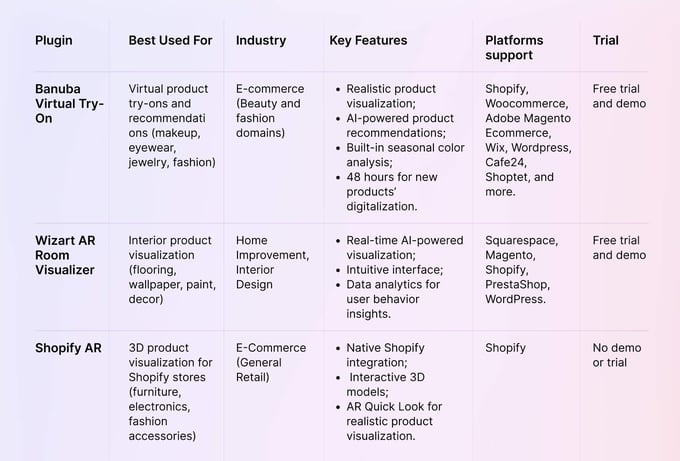
The best augmented reality plugins for websites in 2026 are Banuba's Virtual Try-On Plugin for beauty and fashion e-commerce, Wizart Visualizer for home improvement, and Shopify AR for 3D product visualization. Banuba TINT is a web-based guided virtual try-on solution that lets shoppers try on makeup, glasses, and jewelry in real time. Each one suits a different catalog, and the comparison below sets out what they do, how much integration work they take, and which industries they fit.
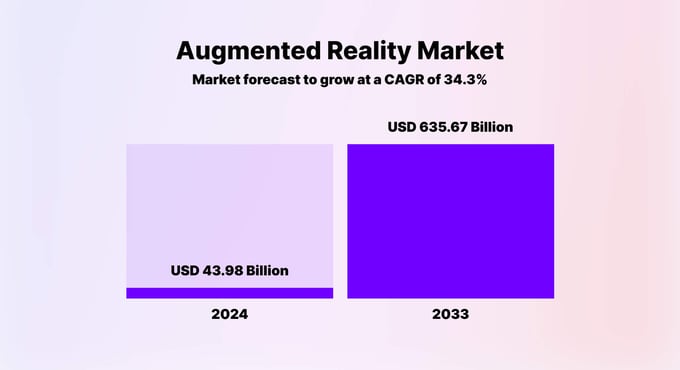
The augmented reality (AR) market is valued at $140.23 billion in 2026 and is forecast to reach $560.23 billion by 2030, growing at a CAGR of 41.4%. This skyrocketing growth is triggered by consumers' preferences and businesses trying to fulfill their needs and expectations.
Augmented reality (AR) plugins have become essential digital tools, dramatically reshaping customer interactions in e-commerce, education, marketing, gaming, and entertainment. Over 90% of Gen Z consumers prefer AR-powered shopping over traditional.
An augmented reality plugin simplifies integrating advanced AR capabilities without extensive development, saving resources while boosting customer engagement and ROI.
[navigation]
TL;DR:
- An AR plugin adds augmented reality to a website or app without building computer vision in-house, which is what puts the technology within reach of a mid-size e-commerce team;
- Banuba's Virtual Try-On Plugin (TINT) covers makeup, eyewear, jewelry, and apparel, runs in the browser, and installs on major CMS platforms without code;
- Banuba TINT customers see up to 300% higher sales and up to 60% lower return rates; Brazilian beauty brand Océane lifted its add-to-cart rate from the 3% industry average to 32%;
- Wizart Visualizer is the stronger fit for flooring, wallpaper, paint, tiles, and other home improvement products, with WordPress, Shopify, and Magento plugins;
- Shopify AR is native and free for Shopify merchants, but it needs your own GLB or USDZ 3D assets and works only on that platform;
- Products presented through AR convert 94% better than standard product pages, and 71% of shoppers now expect an interactive try-before-you-buy experience;
- Choose on-platform compatibility, real-time rendering quality, integration effort, customization, and industry-specific features.
What is an Augmented Reality Plugin?
An augmented reality plugin is a piece of software designed to integrate AR functionality into websites and mobile applications seamlessly. It allows digital content to interact in real time with the user's physical environment, creating engaging experiences that drive consumer engagement and improve sales performance.
AR technology has significantly evolved over the past decade. It has shifted from simple marker-based experiences (specific visual cues) to advanced markerless solutions utilizing complex AI-driven algorithms. Earlier, AR implementation relied heavily on QR codes or printed markers to trigger content. This led to limited interactivity and adoption. The same shift is visible in retail, where try-on moved from webcam filters to zero-code widgets that a merchant can switch on without a development project.
Modern solutions, like Banuba’s Virtual Try-On Plugin, represent a high-end advancement. They leverage sophisticated AI and neural networks to instantly recognize and track faces and objects. This allows realistic and personalized interactions even under challenging conditions (low device performance or poor lighting).
According to a Shopify study, products presented through AR achieve a 94% higher conversion rate than traditional e-commerce methods, demonstrating AR's powerful impact on consumer purchasing behavior.
Furthermore, the Harvard Business Review reports that 61% of online shoppers prefer retailers offering AR experiences, highlighting apparent consumer demand for immersive content.
By integrating AR plugins, businesses meet growing consumer expectations and benefit from statistically proven increases in engagement and sales.
Key Features to Look for in an AR Plugin
Selecting the ideal AR plugin requires careful consideration of several critical factors that directly impact the effectiveness and user experience of your AR implementation.
- Platform compatibility. The AR plugin must support the platform you use ( e.g., WordPress, Shopify, Magento, etc.) or custom web environments;
- Real-time rendering and performance. The chosen AR plugin should offer smooth, lag-free, and realistic real-time interactions;
- Integration simplicity. Ideally, plugins should provide intuitive, low-code, or no-code integration options;
- Customization capabilities. Flexibility in customization helps businesses tailor the AR experience to match their unique branding and functional requirements, boosting relevance and user engagement;
- Industry-specific features. Look for AR plugins specifically designed with functionalities tailored to your industry. These include virtual try-on for fashion and beauty, 3D object placement for furniture and home decor, interactive advertisements and AR filters for marketing, and educational enhancements for learning platforms.
Best Augmented Reality Plugins for Websites
We’ve prepared a comparison of the best augmented reality plugins for websites and applications in 2026 based on their features, ease of use, and industry relevance.
Banuba Virtual Try-On Plugin - The Best AR Plugin for E-Commerce
Banuba's Virtual Try-On Plugin (distributed under the name TINT) lets users try on products such as:
- Beauty products (makeup, skincare, nail polishes);
- Eyewear (lenses, sunglasses, glasses);
- Accessories (jewelry, watches);
- Apparel (scarves, headwear, etc.).
This functionality enhances the online shopping experience by allowing customers to visualize products in real time before purchasing. It is web-based, so it runs on almost any connected device with a browser and a camera, and Banuba reports up to 60% lower return rates for stores that use it.
Retailers can follow a simple, no-code integration, add digital items from their inventories, and test before launching. Banuba's Virtual Try-On Plugin ships with a catalog of more than 22,000 digitized products, and new collections can be added in under 48 hours.
Banuba's Virtual Try-On Plugin is an AI-powered beauty AR solution. In addition to core features (product overlaying), it provides a personalized shopping assistant recommending the best-matching products based on the user's features and smart seasonal color analysis.
The hyper-personalized approach has been shown to deliver up to 200% better conversions and up to 300% higher sales. The algorithm offers individually picked products for up- and cross-selling.
Unlike its competitors, Banuba's solutions are based on its patented face tracking technology. In our tests, we saw better performance and no jittering compared to other similar solutions.
Real-time rendering offers instantaneous AR interactions, ensuring a seamless and engaging user experience even on low-end devices and in poor lighting. The augmented reality plugin is compatible with major CMS platforms and supports all major web browsers, allowing for a consistent experience across devices.
Pros:
- Highly realistic virtual try-on experiences.
- Personalized product recommendations enhance user satisfaction.
- Proven track record of increasing sales and reducing returns.
Cons:
- Customization may be required to cater to industries outside of beauty and fashion.

Wizart Visualizer - AR Room Visualizer Plugin for Home Improvement
Wizart's room visualizer, listed on WordPress.org as Wizart Visualizer, caters specifically to interior design and home improvement businesses. It allows users to visualize home decor items, including flooring, wallpaper, paint colors, murals, tiles, and rugs within their actual spaces.
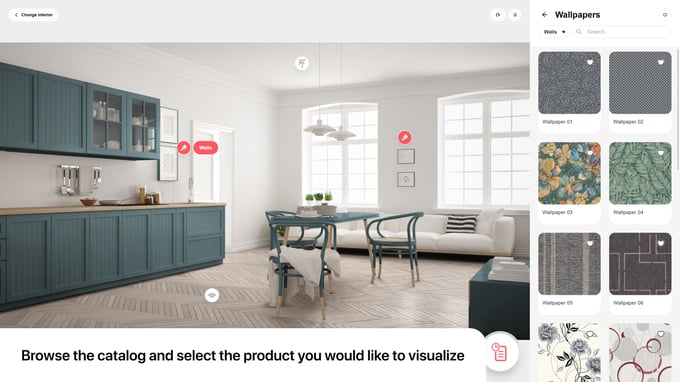
Wizart. Source
With Wizart, customers easily upload photos of their rooms, select various design products, and instantly see realistic visualizations. Dutch wallpaper retailer Be Inhouse reports 23.75% average session duration growth and more than 8,000 design projects created in the visualizer, with shoppers buying directly from it.
Based on our experience, the solution quickly and effortlessly recognized doors, windows, and furniture before seamlessly applying wallpapers or other wall products in specific areas. All we had to do was point and click.
When we implemented this solution, we appreciated the simple, no-code integration for major CMSs and the custom API integration. Alongside the WordPress plugin, Wizart now ships a Shopify app and a Magento module, so most storefronts can switch it on without a build. Wizart's intuitive design ensures a user-friendly experience, helping customers overcome purchasing hesitation and reduce returns.
Pros:
- Simple, intuitive, and quick to integrate;
- Provides realistic AR visualizations that increase customer confidence;
- Proven effectiveness in boosting engagement and conversions.
Cons:
- Primarily targeted toward interior decor and renovation, limiting cross-industry versatility;
- May require additional content creation (e.g., detailed 3D models) for maximum effectiveness.
Shopify AR — AR Plugin for 3D Product Visualization for Shopify
Shopify AR is a native augmented reality plugin explicitly designed for e-commerce stores on the same CMS. It enables customers to interact with realistic 3D models of products, such as furniture, electronics, fashion accessories, and home goods.
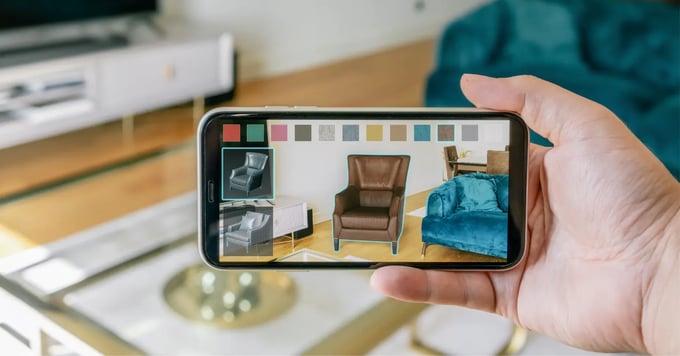
Shopify AR. Source
Using the built-in AR Quick Look feature, customers can effortlessly visualize how products fit into their space, directly enhancing confidence and reducing uncertainty during online shopping. Shopify serves USDZ models to iOS devices for AR Quick Look and GLB models to the web viewer on Android and desktop, so a single product listing covers every visitor.
Based on our experience, the integration is streamlined and requires minimal merchant setup effort. Simply upload your 3D product models into your existing Shopify product listings. Shopify AR significantly boosts customer engagement, increasing the likelihood of purchasing after interacting with a 3D object by 30%.
Simultaneously, eliminating hesitations through AR visualization boosts conversion rates and decreases returns. For example, a dog kennel manufacturer stated that they received a 40% conversion boost and a 5% cut in return rates.
Pros:
- Native Shopify integration simplifies the setup process;
- High-quality, realistic 3D product visualizations improve customer satisfaction;
- Proven improvement in conversion and customer interaction metrics.
Cons:
- Only available for Shopify platform users, limiting its applicability;
- Requires high-quality 3D assets, which may involve additional upfront costs.
Augmented Reality Plugin Use Cases & Examples
Let’s review the key augmented reality examples illustrating the transformative impact of AR plugins across various industries.
E-commerce
Augmented reality significantly transforms online shopping by allowing customers to virtually "try before they buy," reducing uncertainty and boosting conversions. 71% of shoppers now say they want an interactive, try-before-you-buy experience when shopping online.
For beauty and fashion merchants, an AR try-on plugin is the most direct way to close that gap. Banuba's TINT lets users realistically test makeup, eyewear, jewelry, and apparel directly on their smartphone or browser with no app download required. Brands using Banuba's AR report a 1000% increase in add-to-cart rates.
IKEA's AR application allowed shoppers to visualize furniture pieces accurately in their homes, addressing spatial fit and aesthetic concerns. It was an in-house solution for the brand's consumers, and it has since been folded into IKEA Kreativ, which scans a room and lets shoppers remove existing furniture before placing new pieces. IKEA reports that accurate AR visualization increased customer engagement and significantly reduced product returns.
Education
Educational institutions leverage AR plugins to make learning interactive, engaging, and memorable. By visualizing complex concepts, AR deepens students' understanding and retention.
Vossle offers no-code, drag-and-drop WebAR that runs from a QR code in the browser, with no app install, which is what makes it practical for a classroom. Teachers and students can build and share their own AR modules, and the platform has since added a ChatGPT integration for generating experience content.
Marketing
Brands integrate AR into marketing campaigns to create memorable, interactive experiences that outperform traditional ads.
Pepsi Max’s AR-powered bus shelter ads in London generated stunning interactive experiences for passersby. The ads featured lifelike AR visuals and engaging scenarios.
This AR campaign resulted in more than 8 million YouTube views, increased brand recognition, and a reported 35% boost in YoY sales while the campaign was live.
Brands regularly use Snapchat AR lenses and filters for product promotions and branding. Taco Bell’s AR lens famously turned users’ faces into tacos, driving over 224 million interactions within a single day.
Gaming & Entertainment
AR plugins have revolutionized gaming and entertainment by providing immersive, interactive experiences that captivate vast audiences.
Pokémon GO’s AR gameplay introduced millions to augmented reality, turning real-world locations into interactive gaming spaces. By its tenth anniversary in July 2026, the game had generated more than $9 billion in player spending, surpassed 1 billion downloads, and significantly raised public awareness and adoption of AR technologies.
Today, any app can add gaming and interactive elements to increase user engagement. Banuba's Face AR SDK helps integrate real-time face filters, effects, and interactive AR experiences. It helped the Bermuda app reach 20 million installs, and its AR features are used 15 million times monthly.
How to Choose the Right AR Plugin for Your Business
Selecting the right AR plugin depends on your business needs, goals, and expectations. We’ve prepared six steps to help you find a perfect match.
1. Clearly Define Your Business Goals and Needs
Identify the challenges or opportunities your business aims to address with AR plugins. Examples include:
- Increasing customer engagement;
- Improving conversion rates and reducing returns;
- Enhancing educational effectiveness;
- Boosting marketing campaign performance;
- Increasing the average order value and add-to-cart rate, etc.
2. Determine Platform Compatibility
Ensure your chosen AR plugin integrates smoothly with your current platforms:
- Content Management Systems (WordPress, Joomla, Drupal, etc.);
- E-commerce platforms (Shopify, Magento, WooCommerce, etc.);
- Custom solutions (Evaluate API availability and flexibility for tailored integrations).
3. Assess Your Budget and ROI Expectations
Understand the full financial implications:
- Licensing fees (monthly or annual subscription);
- Setup and customization costs;
- Ongoing maintenance and updates;
- Expected ROI based on industry benchmarks (e.g., increased conversions, reduced returns).
4. Evaluate Plugin Integration and User-Friendliness
Ease of integration can drastically affect implementation timelines and cost:
- Look for plugins offering no-code or low-code installation options;
- Review support resources, such as documentation and technical assistance provided by the plugin vendor.
5. Test Real-Life Performance and Reliability
Whenever possible, test plugin demos or trial versions to evaluate real-life metrics like:
- Load and rendering speeds;
- Accuracy and realism of AR experiences;
- Stability across multiple devices and platforms.
6. Analyze User Reviews and Case Studies
Explore reviews and case studies from businesses similar to yours:
- Identify real-world outcomes and challenges faced by users;
- Pay attention to customer support responsiveness and reliability.
Final Thoughts — The Future of Augmented Reality Plugins
Early adopters of AR plugins stand to gain a competitive advantage by attracting more customers, reducing return rates, and establishing stronger brand loyalty. As the AR market grows, the question isn't whether businesses should adopt AR solutions but how quickly they can integrate them to stay ahead.
Integrating augmented reality into your business can start without a significant investment.
Banuba's Virtual Try-On Plugin is web-based and needs no code to launch, so a store can test it on a live catalog before committing to a wider rollout.
Reference List
Adweek. (2016, May 6). Taco Bell's Cinco de Mayo Snapchat Lens was viewed 224 million times. https://www.adweek.com/performance-marketing/taco-bells-cinco-de-mayo-snapchat-lens-was-viewed-224-million-times-171390/
BrandXR. (2025). 2025 augmented reality in retail and e-commerce research report. https://www.brandxr.io/2025-augmented-reality-in-retail-e-commerce-research-report
Grand Visual. (n.d.). Pepsi Max bus shelter. https://grandvisual.com/work/pepsi-max-bus-shelter/
Harvard Business Review. (2022, March 2). How augmented reality can, and can't, help your brand. https://hbr.org/2022/03/how-augmented-reality-can-and-cant-help-your-brand
PocketGamer.biz. (2026, July). Pokemon Go celebrates 10th anniversary with over $9bn in revenue. https://www.pocketgamer.biz/pokemon-go-celebrates-10th-anniversary-with-over-9bn-in-revenue/
Research and Markets. (2026). Augmented reality market report 2026. https://www.researchandmarkets.com/reports/6226653/augmented-reality-market-report
Shopify. (n.d.). 3D ecommerce. https://www.shopify.com/blog/3d-ecommerce
Shopify. (n.d.). Gunner Kennels case study. https://www.shopify.com/case-studies/gunner-kennels
Shopify. (n.d.). Introducing Shopify AR: augmented reality shopping for your store. https://www.shopify.com/blog/shopify-ar
Shopify. (n.d.). Rebecca Minkoff case study. https://www.shopify.com/ca/case-studies/rebecca-minkoff
Statista. (n.d.). Interest in augmented reality shopping, by generation. https://www.statista.com/statistics/1308187/augmented-reality-interest-shopping-generation/
Wizart. (n.d.). Wizart and Be Inhouse case study. https://wizart.ai/case-study-be-inhouse
WordPress.org. (n.d.). Wizart Visualizer, AI-powered room visualization. https://wordpress.org/plugins/wizart-home-interior-design-solutions/
-
Not for most of them. Shopify AR needs no code once you have 3D models, and the WordPress and Shopify room visualizers install from their respective app stores. Banuba's virtual try-on plugin is also no-code: you add products through an admin panel and embed the widget, which is why a store can go live without a development sprint.
-
That depends on the vendor. Room visualizers cover wall and floor materials; Shopify AR covers anything you can model in 3D. Banuba's try-on covers makeup, skincare, nail polish, eyewear and contact lenses, jewelry and watches, hats, scarves, and hair colour, so a mixed beauty and accessories catalogue can sit behind one integration. The makeup try-on categories are the deepest, with skin-tone-aware application across 16 product types.
-
Pricing is usually subscription-based and scales with catalogue size and traffic. Shopify AR is included with a Shopify plan if you supply your own 3D assets, while dedicated try-on and visualizer platforms quote per store. Banuba prices its virtual try-on differently depending on whether you take the Shopify plug-in, the no-code hosted widget, or a fully customisable deployment, so it is worth stating your catalogue size and platform when you request a quote.
-
Both exist on the market, and they behave very differently. Photo-based try-on renders a product onto a still image, while real-time try-on tracks the face or scene through the camera as the shopper moves. Banuba's AI makeup recommendations run on real-time tracking, which is what keeps a lipstick shade sitting on the lips when the shopper turns their head.
-
For a native option like Shopify AR, as long as it takes to produce and upload the 3D models. For a hosted try-on widget, the work is mostly catalogue preparation rather than engineering: Banuba's guided try-on widget is designed to go live on a store in under two weeks, and new collections are digitized in under 48 hours. The same applies to adjacent formats such as an in-store AR mirror, which reuses the catalogue you have already prepared.