

[navigation]
TL;DR:
- We compared Banuba, Google ML Kit, MediaPipe, OpenCV, and Luxand FaceSDK across platform coverage, language surface, licensing, deployment, and pricing for on-device face detection, based on each vendor's own published documentation.
- Google ML Kit states plainly that "the API detects faces; it does not recognize people", so identity matching and liveness are outside its documented scope.
- Banuba Face API is the detection, tracking, and segmentation layer of Banuba Face AR SDK, and it ships to eight platforms from one integration: iOS, Android, Web, Windows, macOS, Unity, Flutter, and React Native.
- Google ML Kit publishes no web SDK and no first-party Flutter, React Native, or Unity wrapper on its developer portal. Luxand ships official Flutter and React Native wrappers; Banuba builds and maintains all eight of its platform targets in-house.
- ML Kit's contour mode is capped at one face, the most prominent in the frame, and Google advises against enabling contours and face tracking together.
- ML Kit Face Mesh Detection is offered in beta with no SLA and no deprecation policy, and Google states changes may break backward compatibility.
- Banuba tracks 68 facial anchor points under up to 70% occlusion and at distances up to 3.7 meters, across a -80° to +80° head-angle range. ML Kit's smiling and eyes-open classifications only work on frontal faces between -18° and 18° Euler Y.
- Cost splits the field cleanly: ML Kit, MediaPipe and OpenCV are free to use, Banuba licenses per active users or per flat annual fee with no per-request billing; and Luxand quotes per project.
- ML Kit is the smaller binary. Google documents a 6.9 MB app-size increase for the bundled face detection model, where Banuba Face AR SDK is around 15 Mb depending on the feature set enabled.
- Banuba is the right pick in one narrow case: when face detection has to feed real-time AR rendering in the same on-device pipeline, on more than two platforms. For everything else on this list, one of the other four is a better fit.
How we compared these five options
Every value below comes from the vendor's own documentation, not from third-party roundups. We held all five to the same five constraint dimensions, because these are the ones that end an evaluation early: platform coverage, language and SDK surface, license, deployment model, and pricing. On top of those, we compared the face-specific output each product returns, since a bounding box and a 3D mesh are not interchangeable inputs to the same feature.
One distinction shapes the whole comparison. Detection finds a face and tells you where its parts are. Recognition decides whose face it is. Rendering draws something on it. ML Kit, MediaPipe, and OpenCV are detection tools. Luxand is a detection and biometric matching tool. Banuba's Android face detection API is a detection layer inside an AR rendering engine. Picking the wrong category costs more time than picking the wrong vendor inside the right one.
We also kept device class in mind rather than benchmark hardware. Published frame rates are usually measured on a flagship phone, which is not where most apps struggle; an independent test that stress-tested four Android face AR SDKs on non-flagship devices makes the same point. Read every FPS number in this article as hardware-specific, because no two vendors here measure on the same device at the same resolution.
Banuba Face AR SDK
Banuba Face API is the face layer of Banuba Face AR SDK: detection, tracking, and segmentation, with the data a 1:1 face match needs exposed for the app to process. Nothing leaves the device, and there is no per-request billing.
The tracking output is the differentiator. Banuba detects 68 facial anchor points, builds a 3D mesh of up to 3,308 vertices, and tracks 37 mesh morphs, which is what lets an effect hold its shape when the user changes expression. Tracking stays locked across the full -80° to +80° head-angle range, under up to 70% facial occlusion, and at distances up to 3.7 meters. Mesh vertices and landmark counts are not the same measurement, so the 3,308 figure should not be read against another vendor's landmark number.
Face analysis reads face shape, skin tone, hair and facial-hair style, eyewear detection, gender identification and pupillary distance in real time, and measures heart rate from facial color variation. For verification flows, the SDK exposes the signals a liveness check needs, including head pose, eye openness, mouth movement, gaze, blink and head-turn triggers, and pulse. Banuba supplies the signals; the app defines the challenge. Segmentation runs per face part: eyes down to iris and pupil, lips, brows, skin, hair, neck, and the full body against the background.
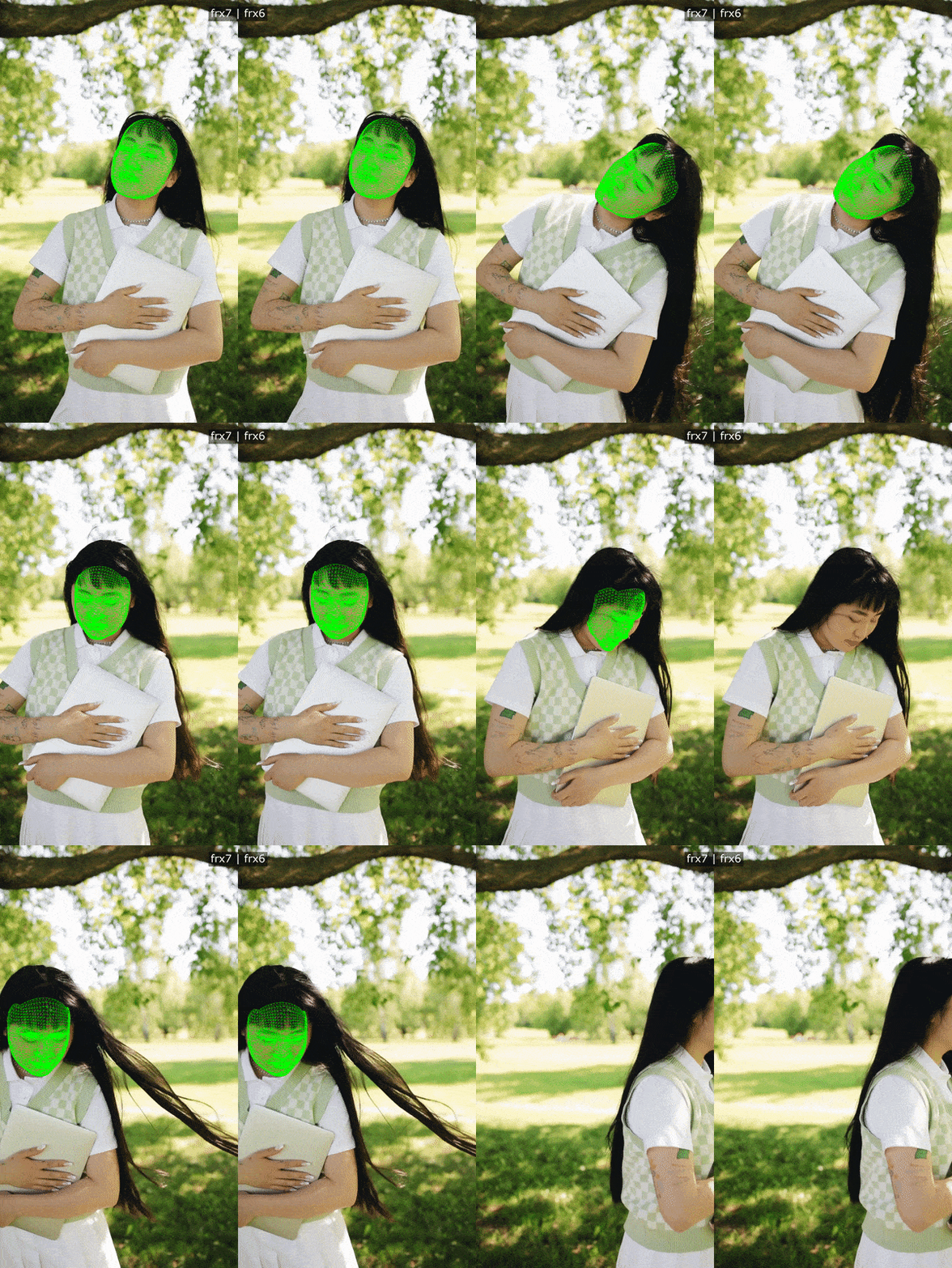 Banuba's face detection and tracking in action
Platform coverage is eight targets from one integration: iOS, Android, Web, Windows, macOS, Unity, Flutter, and React Native, with Banuba building and maintaining the Flutter and React Native plugins itself rather than relying on a community wrapper. It runs from iOS 13+ and Android 8.0 (API level 26+) with a 1280x720 camera recommended, at min 30 FPS, and covers 97% of Apple smartphones and 80% of Android ones. Multi-face detection is supported, with up to three faces at once recommended on mobile, where the limit is device compute rather than the algorithm.
Licensing is commercial, in two models: a flat annual license fee, where usage is unlimited and cost stays fixed even if the app scales to a very large user base, or Active User Based, where cost tracks active users over time, starts significantly lower and grows with the user base, and can exceed the flat fee if the app takes off. Neither carries a per-request fee, and you license only the features you ship. There is a 14-day free trial. Binary size is around 15 Mb depending on the feature set enabled.
In production, Banuba Face AR powers the beauty effects and face filters in the live streaming and video chat of b.stage, the fandom platform by bemyfriends, which passed 1 million monthly active users from 224 countries in two years.
Best for: apps where face detection feeds real-time AR rendering in the same on-device pipeline, across more than two platforms.

Google ML Kit
ML Kit is Google's on-device machine learning SDK for Android and iOS, and its face work ships as two separate APIs: Face Detection, which is generally available, and Face Mesh Detection, which is in beta. They are not interchangeable, and their numbers should never be blended.
Face Detection locates eyes, ears, cheeks, nose, and mouth, returns contours, classifies smiling and eyes-open, and tracks faces across video frames in real time. Requesting all contours returns 133 2D points: 36 for the face oval, 16 per eye, 5 top and 5 bottom per eyebrow, 11 and 9 for the upper lip, 9 and 9 for the lower lip, 2 for the nose bridge, 3 for the nose bottom and 1 per cheek center. There are exactly two classifications: eyes open and smiling, both returned as certainty values and both dependent on landmark detection. Latency is medium, about 60 ms on a Pixel 3 with fast mode on.
Face Mesh Detection returns 468 3D points plus triangle information per face, at about 14 ms on a Pixel 3, which Google recommends for real-time. It is scoped tightly: faces should be within about 2 meters of the camera, mesh mode returns a maximum of two faces, and it returns no tracking ID, no face orientation, and no classification. Google labels it beta, not subject to any SLA or deprecation policy, and warns that changes may break backward compatibility.
Google is explicit that "the API detects faces; it does not recognize people", and that the tracking ID it assigns is not a form of face recognition. Nothing on the ML Kit portal documents makeup rendering, virtual try-on, or beauty effects, so ML Kit is not competing on those and should not be judged on them.
The documented constraints matter more than the feature list for anyone planning a camera feature. Contours are detected for the most prominent face only, so contour mode caps at one face, and Google advises against combining contour detection with face tracking because tracking then has nothing useful to do. For best frame rates, Google says to use either contour detection or classification plus landmark detection, not both. Smiling and eyes-open work only on frontal faces, with an Euler Y angle between -18° and 18°. Landmark availability more generally depends on Euler Y, documented in five bands from under -36° to over 36°. Input images need to be at least 480x360 overall, with each face at least 100x100 pixels, rising to 200x200 pixels per face for contour detection.
Platform support is Android at API level 23 or higher and iOS on 64-bit devices only, with Xcode 12.4 or greater. Kotlin and Java samples are published for Android, Swift and Objective-C for iOS. The Face Mesh docs publish an Android guide only. No web or browser SDK and no first-party Flutter, React Native, or Unity wrapper is documented on the ML Kit developer portal. Dependencies are com.google.mlkit:face-detection:16.1.7 bundled, com.google.android.gms:play-services-mlkit-face-detection:17.1.0 unbundled, and pod 'GoogleMLKit/FaceDetection', '8.0.0' on iOS.
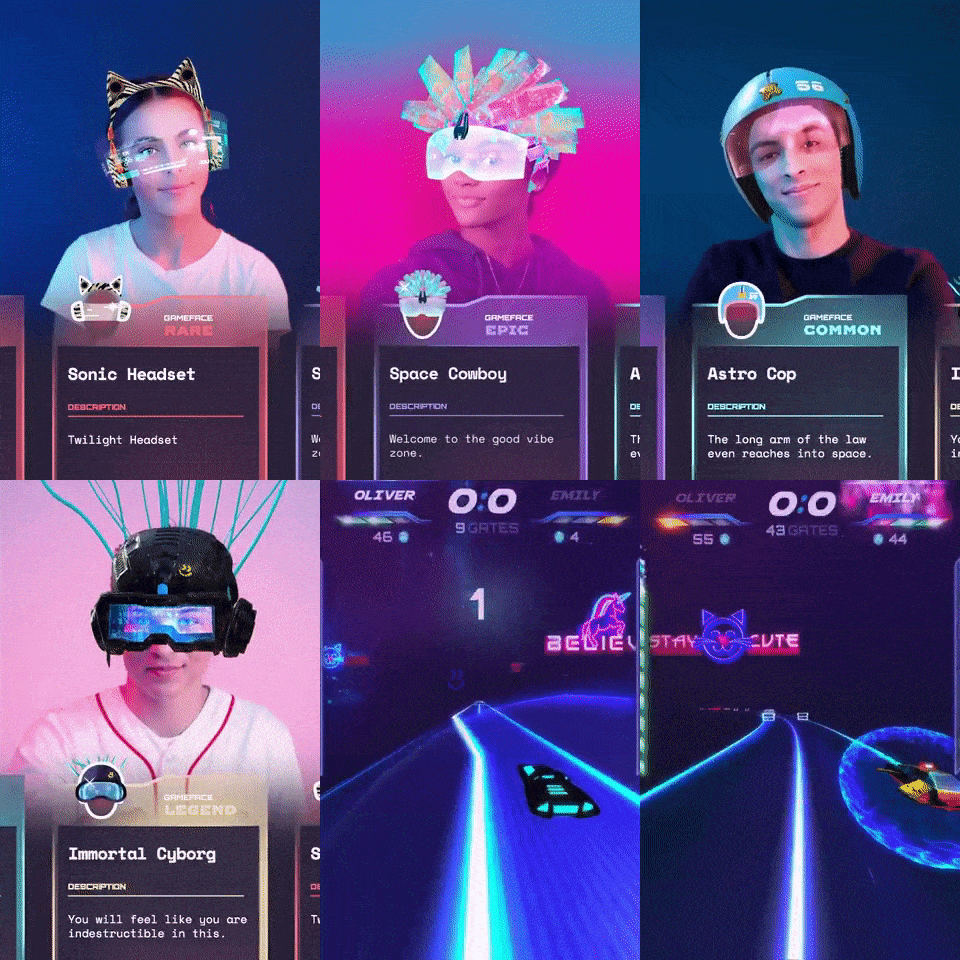 Banuba's face detection and tracking algorithm for AR game creation
Everything runs on-device, so the functionality works offline, and Google states that input images, video, and text are processed on-device and not sent to Google servers. The APIs do send performance and utilization metrics to Google, and the integrator is responsible for telling users about that where the law requires it. That is a disclosure obligation, not a data leak. Bundled, the face detection model is statically linked at build time and available immediately, at about a 6.9 MB app-size increase. Unbundled, the model downloads through Google Play Services, and without an install-time or explicit download it arrives on the first detector run, with earlier requests returning no results. Face Mesh is bundled only, about 6.4 MB, with unbundled listed as not available yet.
Cost is the simplest line in this comparison: Google documents the ML Kit APIs as "offered to you at no cost", with no pricing page and no paid tier. The ML Kit Terms of Service, last modified May 14, 2025, prohibit reverse engineering, and machine learning models count as related software under those terms.
Best for: an Android-first app that needs a zero-cost, generally available face detection baseline and does not need recognition, rendering, or a web build.

MediaPipe
MediaPipe is Google's open-source on-device ML suite, published under the Apache License 2.0 in the google-ai-edge repository, with developers.google.com as its primary documentation site since April 3, 2023. For faces, the relevant task is Face Landmarker.
Face Landmarker bundles three models: a BlazeFace short-range detection model described as lightweight and optimized for mobile GPU inference, a face mesh model that outputs an estimate of 478 3-dimensional face landmarks, and a blendshape model that predicts 52 blendshape scores representing facial expressions. Outputs include a complete face mesh per detected face with landmark coordinates and facial transformation matrices for effects rendering. Three running modes are documented: IMAGE, VIDEO, and LIVE_STREAM, the last returning results asynchronously through a result listener.
The defaults are worth reading before committing. num_faces defaults to 1, landmark smoothing is only applied when num_faces is 1, and both output_face_blendshapes and output_facial_transformation_matrixes default to False and must be enabled explicitly. The confidence thresholds each default to 0.5.
Solutions availability is published across Android, Web, Python, and iOS columns, but the Face Landmarker page's own implementation guides cover Android, Python, and Web only, and iOS support for that specific task requires fact-checking. Google labels the release "MediaPipe Solutions Preview is an early release". Support ended for the MediaPipe Legacy Solutions as of March 1, 2023, with the old Face Mesh and Iris solutions folded into Face landmark detection. Like ML Kit, MediaPipe Tasks processes input on-device without sending it to Google, while sending API performance and utilization metrics to Google, with the integrator responsible for obtaining informed consent where the law requires it. There is no pricing page and no documented vendor SLA; support is a Slack community, GitHub issues, and Stack Overflow. No makeup or virtual try-on solution appears in the published list.
Best for: dense landmark and blendshape work on Web or Python, and teams happy to own the pipeline around the models.
OpenCV
OpenCV is a general computer vision library operated by the non-profit Open Source Vision Foundation, dating from June 2000, with more than 2500 optimized algorithms. Version 4.5.0 and higher is licensed under Apache 2, and 4.4.0 and lower under the 3-clause BSD license. The latest release on the official releases page is 4.12.0, dated 2025-07-09.
Face detection is one module among many. The objdetect module documents a Cascade Classifier, a HOG descriptor and detector, barcode and QR code detection, DNN-based face detection and recognition, and ArUco markers. The modern entry point is cv::FaceDetectorYN, a DNN-based detector whose detect() returns a 2D matrix of shape [num_faces, 15]: bounding box x, y, width and height, five landmark coordinates (right eye, left eye, nose tip, right mouth corner, left mouth corner) and a face score. Score threshold, NMS threshold, and top-K are configurable, defaulting to 0.9, 0.3, and 5000. The detector model is distributed separately through the OpenCV Zoo repository rather than bundled with the class.
Five landmarks is the ceiling on that path, which rules out expression-driven or effect-driven features without additional models of your own. Platform reach is wide: Windows, Linux, Android and macOS, an iOS tutorial and prebuilt iOS pack, OpenCV.js for the browser, and a documented CUDA module for GPU acceleration. Language interfaces are C++, Python, Java, and MATLAB, with no Flutter, React Native, or Unity bindings in the official list. The library leans towards real-time vision and uses MMX and SSE instructions where available. There is no documented commercial SLA or support contract, and no published face detector accuracy or FPS benchmarks.
Best for: teams that already own a computer vision pipeline and need face detection as one step inside it, on desktop, server, or browser as well as mobile.

Luxand FaceSDK
Luxand FaceSDK is a commercial cross-platform face detection, recognition, and facial-feature library from Luxand, Inc. in Alexandria, Virginia. Version 8.3 shipped on 15 December 2025. It is a self-contained library that can be statically linked and distributed with the application, with no internet connection required, and Luxand separately offers hosted Web APIs.
It returns 70 facial feature points across eyes, eyebrows, mouth, nose, and face contour. Head rotation is the tighter constraint: -30° to 30° in-plane and -20° to 20° out-of-plane for landmarks, and -30° to 30° on both axes for face detection. Luxand publishes detailed speed figures, including real-time detection at webcam resolution within -15° to 15° of 649 FPS on an AMD Ryzen 5 1600X, 116 FPS on an iPhone X and 71 FPS on a Pixel 2. Those are the vendor's own benchmarks on named hardware, and they are not comparable to any other figure in this article.
Recognition is where it separates from the Google options. Face templates are 1040 bytes, matching runs at millions of templates per second on desktop, and age (within about 5 years), gender, and smile or eyes-open expression detection are documented. Luxand passed iBeta Presentation Attack Detection testing to ISO/IEC 30107-3 with 0% APCER across roughly 1,000 presentation attacks, shipped as a certified liveness add-on. A Tracker API assigns a unique ID per subject in video without posed enrolment, and thermal and mask-on detection models are documented.
Platform coverage is broad: iOS 12+, Android 5.0+, WebAssembly, Windows, Linux, macOS, with official Flutter and React Native wrappers and samples, though Unity is not an official wrapper. Language and environment coverage runs from C++ and C# through Delphi, Java, Flutter, React Native, and WebAssembly, with a .NET wrapper added in 8.3. Redistributables do not exceed 160 MB per platform, which is the largest footprint here by a wide margin. Licensing is commercial and quote-based, with fees varying by how the SDK is used and a free trial available; no public price list, tiers, or user bands are published. The SDK is protected by US Patents 8,842,889 and 8,879,804. AR and visual effects are explicitly out of scope: Luxand's own FAQ answers "Does FaceSDK support visual effects? No", and directs that work to its separate Mirror Reality SDK.
Best for: on-premises biometric identification and verification with certified presentation attack detection, especially on desktop, kiosk, or thermal-camera hardware.
Comparison table
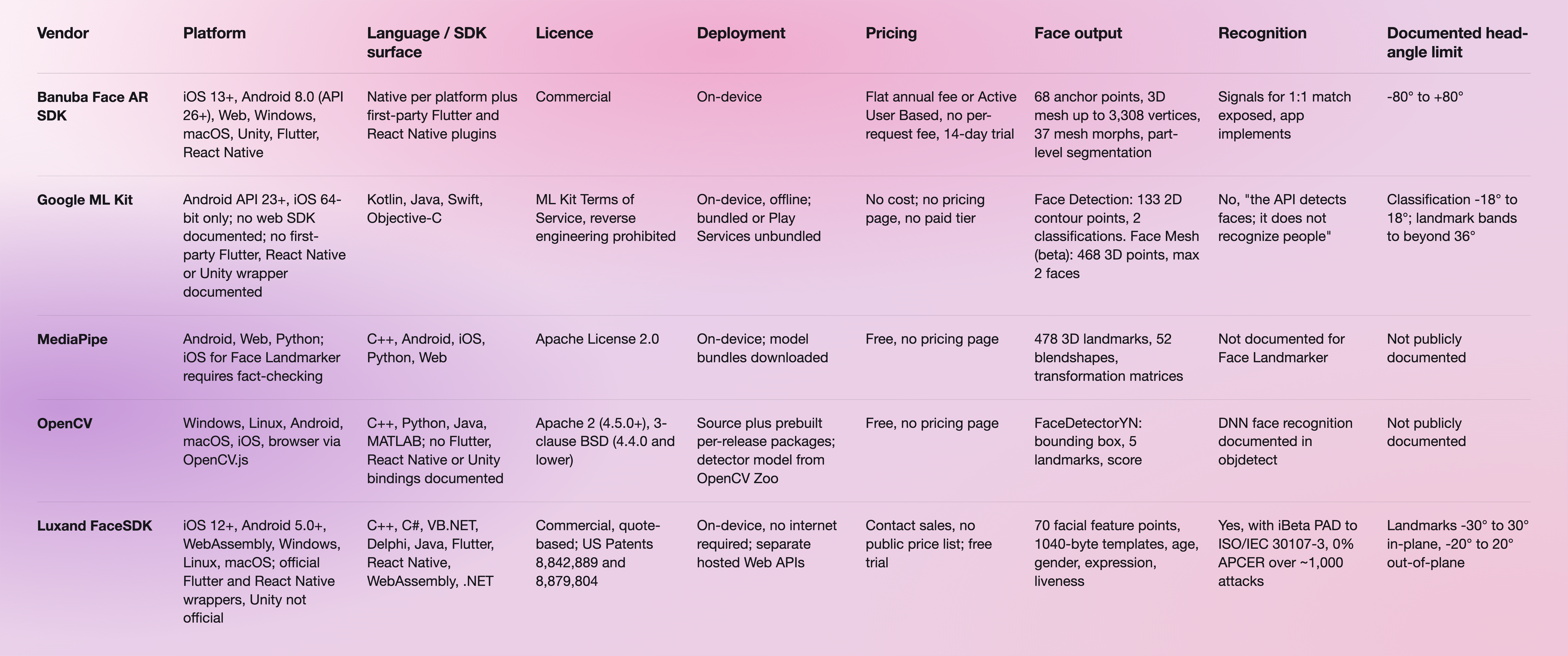
The license and documentation links for every vendor above are in the References section at the end of this article.
Which one to choose
If face detection is the whole requirement on Android, Google ML Kit is the sensible default, and the rest of this comparison is academic. It is generally available, it costs nothing, it runs offline, and 133 contour points with smiling and eyes-open detection cover most camera features that do not draw anything. Its documented limits, one face in contour mode and frontal-only classification, are the constraints to check against your feature spec before you commit.
Banuba is the narrower recommendation. It is the pick when face detection has to feed real-time AR rendering in the same on-device pipeline, across more than two platforms. The 37 mesh morphs on a mesh of up to 3,308 vertices, part-level segmentation down to iris and pupil, and a -80° to +80° tracking range exist to keep a rendered effect attached to a moving face, which is a different job from returning coordinates. If your app will never draw on the face, that machinery is not worth licensing.
By scenario:
- Zero budget, Android only, detection only: Google ML Kit.
- Dense landmarks and blendshapes on Web or Python, with the surrounding pipeline in your hands: MediaPipe.
- Face detection as one step in a CV pipeline you already maintain, including desktop and server: OpenCV.
- Identity matching or certified liveness, especially on-premises, kiosk, or thermal hardware: Luxand FaceSDK.
- Real-time AR effects driven by face tracking, on mobile plus web from one integration: Banuba Android face detection api.
Two paths deserve a warning. ML Kit Face Mesh is in beta with no SLA and no deprecation policy, per Google's own statement, so building a shipped feature on its 468 points carries a backward-compatibility risk the GA Face Detection API does not. And if you need recognition, none of the three free options is a complete answer: ML Kit explicitly does not recognize people, MediaPipe does not document it for Face Landmarker, and OpenCV gives you the algorithms but not a supported product.
For a wider field than the five here, we also maintain a comparison of Android face detection SDKs and a broader roundup of face detection APIs. If you have already chosen and want the integration steps, start with building Android face detection with an SDK.
References and further reading
- Google ML Kit Face Detection documentation: https://developers.google.com/ml-kit/vision/face-detection
- Google ML Kit Face Mesh Detection documentation: https://developers.google.com/ml-kit/vision/face-mesh-detection
- Google ML Kit Terms of Service: https://developers.google.com/ml-kit/terms
- MediaPipe Face Landmarker task guide: https://developers.google.com/edge/mediapipe/solutions/vision/face_landmarker
- MediaPipe repository and license: https://github.com/google-ai-edge/mediapipe
- OpenCV source and license: https://github.com/opencv/opencv
- Luxand FaceSDK specifications: https://www.luxand.com/facesdk/documentation/specifications.php
- Luxand FaceSDK requirements: https://www.luxand.com/facesdk/documentation/requirements.php
- Banuba Face AR SDK documentation: https://docs.banuba.com/far-sdk/
- Banuba Android quickstart and samples: https://github.com/Banuba/banuba-sdk-android-samples
- Banuba Face AR SDK minimum size: https://www.banuba.com/faq/minimum-face-ar-sdk-size
-
No mainstream free API on this list does face recognition. Google ML Kit states that it detects faces but does not recognize people, and MediaPipe does not document recognition for Face Landmarker. Banuba does not sell a free recognition API either: Banuba Face API exposes the detection, tracking, and segmentation data a 1:1 face match needs, and the app decides how to process it, which keeps the biometric decision inside your own code. OpenCV is the free route to recognition algorithms, though without a vendor SLA. See our roundup of face detection APIs for the wider field.
-
It splits into three shapes. Google ML Kit, MediaPipe, and OpenCV are free, with no pricing page and no paid tier. Luxand quotes per project with no public price list. Banuba licenses commercially in two models: a flat annual license fee, where usage is unlimited and the cost stays fixed even if the app scales to a very large user base, or Active User Based, where the cost tracks active users, starts significantly lower, and grows with the user base. Neither adds a per-request fee, and a 14-day free trial is available. Banuba's Face AR SDK pricing page has the current details.
-
Yes, and on six more targets. Banuba Face AR SDK ships to iOS 13+, Android 8.0 (API level 26+), Web, Windows, macOS, Unity, Flutter, and React Native from one integration, and it covers 97% of Apple smartphones and 80% of Android ones. Google ML Kit covers Android API 23+ and iOS on 64-bit devices only. More detail is on Banuba's face detection SDK page.
-
Banuba and Luxand are the two options here, with first-party wrappers for both. Banuba builds and maintains its Flutter and React Native plugins in-house, so no community wrapper sits between your app and the SDK; Luxand ships official Flutter and React Native wrappers and samples. Google ML Kit documents no first-party Flutter, React Native, or Unity wrapper on its developer portal, and OpenCV lists no Flutter or React Native bindings. Banuba's per-platform integration guides are in the Face AR SDK documentation.
-
Banuba runs in the browser on WebGL 2.0+ in Chrome, Firefox, and Safari, as one of its eight platform targets. MediaPipe publishes a Web implementation guide for Face Landmarker, OpenCV has OpenCV.js, and Luxand added a WebAssembly build in FaceSDK 8.1. Google ML Kit documents no web or browser SDK on its developer portal, so a browser build rules it out. Banuba's comparison of face tracking APIs covers how browser support differs across vendors.
-
The cheapest credible alternatives are the free ones: Google ML Kit for on-device Android and iOS detection, MediaPipe under Apache 2.0 for landmarks and blendshapes, and OpenCV under Apache 2 for detection inside a custom pipeline. All three shift cost from license fees to engineering time, since none ships rendering, recognition, or a support SLA. Banuba sits above them as a commercial license that bundles tracking, segmentation, and AR rendering with per-active-user or flat-fee pricing and no per-request charge, which is why it tends to win when a team has counted the cost of building the rendering layer itself. One example of that scale: Banuba Face AR runs the effects behind b.stage, which reached 1 million monthly active users in two years.
