

The global video conferencing market was valued at roughly USD 13.92 billion in 2024 and is projected to reach USD 31.76 billion by 2033, growing at a CAGR of 9.6%. Microsoft's own data shows that since February 2020, the average Teams user is now in 192% more meetings and calls per week, and 98% of all organizational meetings now include at least one remote participant. The live camera feed is now the surface on which most professionals first make impressions.
Background subtraction sits at the center of that surface. It protects privacy when someone is dialing in from a hotel, a kitchen, or a co-working space. It lifts production quality for streamers and creators. It cuts visual noise out of telehealth, edtech, and customer onboarding flows. By 2026, over 70% of remote teams are expected to use AI-powered collaboration tools, and clean background segmentation is one of the load-bearing features under that trend.
The technical bar has also moved. The current version of background subtraction using deep learning isn't about cropping a silhouette. It's about handling messy hair, transparent eyewear, hands waving in front of the face, and a lighting source coming from behind the person without producing the "ladder effect" along the edge.
Most engineering leads we hear from are stuck on the same questions:
- Cloud APIs introduce a 200–500ms round-trip that breaks live video.
- Open-source ML primitives are free, but the team owns every edge case.
- Enterprise SDKs are priced by usage, so a viral moment turns into a budget problem.
- Cross-platform wrappers vary wildly in maintenance quality.
This article is a direct answer to those four pain points. It compares the four background subtraction SDKs that consistently appear on real shortlists in 2026 and shows where each one fits.
[navigation]
A background subtraction SDK is an installable module that lets a developer separate a person from whatever sits behind them in a picture or a video (including live feed) and replace, blur, or augment that background in real time. In 2026, the four serious options for production apps are Banuba, DeepAR, BytePlus Effects, and Google MediaPipe Selfie Segmentation. Banuba stands out for teams that need on-device background subtraction using deep learning, predictable flat-fee licensing, and a segmentation engine that holds up on mid-range Android phones during a live call.
TL;DR
- This guide is written for senior engineers, technical founders, and product managers picking a background subtraction SDK for video conferencing, live streaming, dating, fitness, or social apps in 2026.
- We evaluate four production-ready options: Banuba's Background Subtraction SDK, DeepAR, BytePlus Effects, and Google MediaPipe Selfie Segmentation.
- The decision hinges on three things: independence from a parent retailer's roadmap, pricing model, and how clean the segmentation edge looks on hair, hands, and dynamic lighting.
- Banuba is the strongest fit for teams shipping production apps that need patented background subtraction using deep learning, on-device privacy, native React Native and Flutter wrappers, and a flat-fee license that doesn't punish viral growth.
How We Evaluated the SDKs: The BLEND Framework
Most comparison pieces use a generic "platform support, performance, features, pricing" rubric. That misses what actually breaks in production. To keep this evaluation honest, we built a five-criterion framework called BLEND, scoped specifically to background subtraction:
B — Boundary realism. How clean is the edge? This is where most SDKs fail in real conditions: hair strands, transparent glasses, a hand crossing the face, a lamp behind the speaker. We checked for jitter, the "ladder effect," and stability under occlusion.
L — Latency budget. A live video pipeline has a hard ceiling at 16ms per frame for 60 FPS, or 33ms for 30 FPS. We looked at on-device vs. cloud processing and what that does to glass-to-glass latency.
E — Edge processing and privacy. Does the SDK process frames on the user's device, or does it ship biometric video to a server? On-device execution is the difference between a clean GDPR posture and a compliance review that drags on for two quarters.
N — Network independence. Will the feature still work in a low-bandwidth region or on a flaky hotel Wi-Fi? Cloud-based segmentation collapses the moment the connection blinks. On-device segmentation doesn't care.
D — Deployment surface. Native iOS, native Android, Web (WebAssembly), Unity, plus first-party React Native and Flutter wrappers. Community plugins shift maintenance debt onto your team, so we flagged where wrappers are official versus community-maintained.
These five criteria map to where production teams actually lose time, money, or users. We use the same five lenses across every product below.
Top 4 Background Subtraction SDKs in 2026
Banuba Background Subtraction SDK
Banuba ships a dedicated Background Subtraction SDK that runs entirely on-device, built on its broader Face AR engine. The technology has been in development for over nine years, and the company recently rolled out a major AI upgrade. In October 2025, Banuba announced a significant enhancement to its Virtual Background SDK, leveraging advanced AI to deliver a smoother edge between the user and the digital background and eliminate the jagged edges and pixelation that plague video calls.
Architecture and Segmentation Quality
Banuba's background subtraction using deep learning is built on a proprietary convolutional neural network. The model takes color images as input and outputs a probability mask that classifies each pixel as either "person" or "background". The training dataset covers over 200,000 photos of men and women across all skin tones, in low light, in flared light, and on both budget and high-end cameras, so the network reliably separates people from the background even when the source is dim or overexposed.
The newest model handles the cases where competitors fall apart. The enhanced virtual background feature delivers a dramatically cleaner segmentation result by eliminating jitter and pixelization at the edges of a person, plus more accurate separation when background objects share colors with the person's clothing. Anton Liskevich, Banuba's CPO and co-founder, noted that the new AI model "doesn't just cut a person out; it intelligently blends them into a new environment".
For developers, the boundary quality on hair and hands is the headline. The model holds the edge through head turns up to 90 degrees and remains stable even when 70% of the face is covered by a hand, mask, or accessory. The same engine tracks 68 facial anchor points, keeping facial AR effects locked to the user even as the background behind them is replaced.
Latency, Performance, and Privacy
On hardware as old as an iPhone 7, the system holds 30 FPS for an hour of continuous use without lag or overheating, and on modern devices, it can reach 300 FPS while loading the hardware at less than 10% of capacity. On the web, the SDK delivers 50–60 FPS in Chrome, 40–45 FPS in Firefox, and around 40 FPS in Safari for the background model.
Privacy is built into the architecture rather than bolted on. Effects are applied on the end-user's device with no data sent to Banuba servers, ensuring an added layer of privacy and aligning the SDK with GDPR requirements. For fintech, healthtech, and any industry where biometric video can't leave the device, that on-device posture is the difference between a 14-day pilot and a 6-month security review.
What's Included
- Real-time virtual backgrounds: blur, solid colors, static images, animated videos, GIFs, 3D environments
- Patented Weatherman Mode: lets users drag and drop themselves to any position on the screen, opening up new options for presentations and dynamic content
- Anti-jitter algorithms: keep the cutout stable even when the user's hand shakes
- Hair segmentation: separate handling for hair edges so the background doesn't bleed through
- Compatibility with face filters: virtual backgrounds combine cleanly with Face AR effects, beautification, and AR makeup in the same frame
- 3D environment support: 3D backgrounds use environment textures (.ktx) so a user sees a 360-degree environment when rotating the device
Deployment Surface
Banuba is one of the few commercial background replacement SDKs that runs inside the web browser without an extra download. It also supports native iOS and Android, popular cross-platform frameworks like Flutter and React Native, plus Mac, Windows, and Unity. The React Native and Flutter wrappers are first-party, which matters because community plugins on this kind of SDK age fast and break during OS upgrades.
The Background Subtraction plus Face Tracking neural network ships at 12.8 MB with SIMD support and 11.6 MB without, keeping the initial app download size manageable.
Real-World Results
- Vroom: After integrating Banuba, the dating app saw a 30% increase in MAU and a 54% jump in new users. Background subtraction lowered the friction of turning on the camera, which in this category drives platform growth directly.
- Bermuda: Hit over 15 million AR interactions per month after deploying Banuba's Face AR with virtual backgrounds. The cutout stayed stable on the low-end Androids common in their global markets, which kept session lengths up.
- Used by Gucci, Samsung, RingCentral, and other international companies across video conferencing, dating, beauty, and creator-tool deployments.
Pricing
Banuba uses a flat per-platform license, billed quarterly or annually. The pricing is decoupled from MAU, so a viral moment doesn't trigger a budget review. A 14-day full-feature trial is available with no watermark, which is enough time to benchmark the segmentation against a real production camera feed.
Where Banuba Fits Best
Choose Banuba if your roadmap includes background subtraction in a production app at scale, you need on-device privacy for compliance reasons, you're building cross-platform with React Native or Flutter, and you want predictable cost as user count grows. The integration with Agora and other live video infrastructure is straightforward, and the SDK reliably works under the messy real-world conditions (low light, mid-range Android phones, hands in frame, etc.) that break lighter engines.
Where It May Not Fit
If you're a solo developer prototyping a weekend project on a $0 budget and don't need production stability, a free open-source library will get you to a demo faster. The commercial license is built for teams shipping to real users.
Banuba's background subtraction in action
DeepAR
DeepAR is a cross-platform AR SDK that includes background segmentation alongside its broader suite of face filters and effects. It's frequently chosen for prototyping and for teams that want a visual studio for designing effects without writing shaders.
Architecture and Segmentation Quality
DeepAR's background separation runs on-device, which is the right architectural choice for live video. The quality on a clean, well-lit shot is acceptable. The trade-off shows up in harder conditions. Our internal tests show that DeepAR's separation is lower quality, with large background regions often left unseparated, hair edges often cut out on long-haired users, and hands or fingers frequently clipped from the foreground. Lighting conditions amplify the issue: intense or backlit sources can cause the cutout to flicker or break.
The studio-driven workflow is genuinely useful for designers. The DeepAR Studio lets a creative team prototype effects in a visual environment, decoupled from the engineering pipeline. For teams whose bottleneck is creative iteration, this matters.
Latency, Performance, and Privacy
DeepAR runs on-device, so there's no network round-trip. Frame rates land in the 30–60 FPS range, depending on hardware. The performance gap shows up on mid-range Androids, where heavier scenes cause the SDK to throttle quality.
For privacy, on-device processing means biometric video stays local, which is the right baseline. DeepAR was acquired by Zalando in April 2025, which is worth flagging for teams considering long-term roadmap independence.
What's Included
- Background segmentation with static image replacement
- Face filters and 3D effects
- Multi-face tracking up to four faces
- Emotion detection (happiness, sadness, anger, etc.)
- DeepAR Studio for visual effect creation
- 28 face morphings and 10 makeup product types
Notably, DeepAR's background subtraction supports static images only. Video, GIF, and 360-degree backgrounds available in Banuba are not part of the standard DeepAR pipeline.
Deployment Surface
DeepAR ships native SDKs for iOS, Android, Web (WebAssembly and WebGL), macOS, and Unity. React Native and Flutter support exists but is largely community-maintained, and the wrappers don't always update in lockstep with the native SDKs. For teams whose primary deployment is Flutter or React Native, this creates ongoing maintenance friction.
The library is smaller than Banuba's: 150 ready-made AR filters versus Banuba's 1,000+, which limits creative range out of the box.
Pricing
DeepAR uses an MAU-based pricing model:
- 0–10 MAU: free, watermarked
- 10–1,000 MAU: $25/month
- 1,000–5,000 MAU: $100/month
- 5,000–30,000 MAU: $500/month
- 50,000–100,000 MAU: $1,000/month
- 100,000+ MAU: custom pricing
This model is friendly at the prototype stage, but scales linearly. A consumer app that crosses 100K MAU enters a custom-pricing conversation, and the bill grows with each new user. For a viral moment, that's a budget problem.
Roadmap Independence
The Zalando acquisition is a structural consideration, not a feature gap. DeepAR's product priorities now sit inside Zalando's commercial roadmap, and Zalando is a fashion ecommerce company with its own try-on agenda. Brands that compete with Zalando, or apps that need a vendor with no parallel commercial interests, will want to weigh that.
Where It May Not Fit
If your app is targeting viral growth, the MAU pricing creates a "success tax" that can easily exceed server costs. If your background subtraction needs include video, GIF, or 3D environment replacements, DeepAR's static-image-only model is a hard limit. And if you're building primarily in Flutter or React Native, the community-maintained wrappers add maintenance risk.

BytePlus Effects
BytePlus is the enterprise-facing SDK from ByteDance, sharing engineering DNA with TikTok and Douyin. It's positioned for large-scale platforms seeking a TikTok-style aesthetic and massive asset libraries.
Architecture and Segmentation Quality
BytePlus's segmentation pipeline can do clean cuts on a flagship phone with good lighting. In harder conditions, the gap shows up. Our tests note that BytePlus is very imprecise in tracking and often cuts off body and hand parts significantly, while sometimes failing to recognize background regions at all. Skin texture in beautification effects gets blurred rather than preserved, producing an unnatural smoothing effect that's visible on close-ups.
For background work specifically, BytePlus offers segmentation but doesn't expose individual virtual background products with the same depth as Banuba. The makeup pipeline, for instance, is implemented as a 3D mask effect with no real product segmentation, which is a weaker model than what Banuba ships.
Latency, Performance, and Privacy
Background processing typically lands under 50ms per frame on flagship devices, which is fast enough for live video. On mid-range and older Android devices, quality declines rather than maintaining a consistent edge, resulting in an uneven experience across a global user base.
The privacy posture is the structural concern. BytePlus offers on-device processing but also runs backend infrastructure based in China, which creates compliance and data residency considerations for apps deployed in regulated geographies.
What's Included
- Background segmentation with blur and replacement
- Access to TikTok-heritage asset library (80,000+ effects)
- 20+ gesture triggers
- Body motion tracking
- Lite Games and interactive AR features
Deployment Surface
BytePlus supports iOS, Android, Web, and Unity. Web support is limited, and React Native and Flutter integration is more manual than Banuba's first-party wrappers, with teams typically building their own native bridges or going through REST API patterns. The integration time is longer: typically 1–2 weeks for a basic prototype, compared with about a week for Banuba.
Pricing
BytePlus uses an enterprise "Contact Sales" model with no published pricing. Annual commitments are common, and the procurement cycle typically adds 2–6 weeks of negotiation on top of the integration timeline. Tech support quality varies, with multiple delays in response times measured in days rather than hours.
Where It May Not Fit
For apps with users in regulated geographies, the data residency considerations are a compliance lift. For startups and mid-market teams, the procurement cycle and the lack of pricing transparency add weeks to the timeline. And for use cases where edge quality matters more than asset volume, the segmentation pipeline doesn't match what Banuba ships.

Google MediaPipe Selfie Segmentation
MediaPipe is Google's open-source framework for building perception pipelines, and Selfie Segmentation is one of its most widely used tasks. Selfie Segmentation detects prominent humans in the scene and runs in real time on both smartphones and laptops, with intended use cases including selfie effects and video conferencing when the person is close to the camera (under 2 meters). A variant of the model has powered background replacement in Google Meet.
Architecture and Segmentation Quality
The model predicts a binary segmentation mask separating foreground humans from the background. The pipeline runs entirely on the GPU, from image acquisition through neural network inference to rendering, avoiding slow CPU-GPU syncs and maximizing performance. The two model variants, general and landscape, let teams tune for different camera framings.
The segmentation quality is solid for the close-range, well-lit case it was built for. The limits show up in the same places they show up for any model not specifically tuned for production AR: edge quality on long hair, transparent glasses, dynamic lighting, and complex occlusions. There's no patented anti-jitter layer, no specialized hair segmentation network, and no AR effect compositing built in. Whatever a team needs beyond a binary mask, they build themselves.
Latency, Performance, and Privacy
GPU-resident inference keeps the model fast. On a flagship phone, real-time performance is achievable. The fragmentation issue is what happens off the flagship: budget Androids, older iOS devices, and webview-based deployments all need their own optimization passes. The framework gives a team the building blocks, but not the production-grade tuning.
Privacy is straightforward: it's an on-device library, so there's no inherent cloud dependency. The team owns the data handling end-to-end, which is both an advantage (full control) and a responsibility (full liability).
What's Included
MediaPipe ships a suite of ready-to-use tasks, including Selfie Segmentation for person-background separation, plus Pose Landmarker, Hand Landmarker, Face Landmarker with blendshapes, and Holistic Landmarker. For background subtraction specifically:
- Two segmentation models (general and landscape)
- GPU-accelerated inference
- Cross-platform Tasks API (Python, JavaScript, Android, iOS, C++)
- Source code and model weights freely available
What's not included, and what a production team will end up building:
- Anti-jitter post-processing
- Hair-specific segmentation refinement
- Asset pipeline for backgrounds (images, videos, 3D environments)
- AR effect compositing with face filters
- React Native and Flutter wrappers
- Commercial support and SLA
- Documentation tuned for production deployment vs. research
Deployment Surface
MediaPipe Solutions provides cross-platform APIs and libraries for deployment. Native support exists for Android, iOS, Web (JavaScript), Python, and C++. React Native and Flutter integration is community-maintained and varies in quality. Unity support is also community-driven.
Pricing
MediaPipe is free and open-source under Apache 2.0. There's no license fee, no MAU tier, no sales conversation. The hidden cost is engineering hours: a production-grade integration with anti-jitter, asset pipeline, AR effect compositing, and cross-platform parity typically takes 2–4 engineering months for a competent team. After that, ongoing maintenance lands on the team's roadmap forever.
Where It May Not Fit
If your team's bottleneck is shipping a feature, not exploring a model, the open-source path adds months. If you need commercial SLA, dedicated support, and a clean compliance story, MediaPipe doesn't ship those. If your roadmap includes AR effects layered on top of background subtraction, you're building the integration yourself. And if cross-platform parity (React Native, Flutter) is critical, the community wrapper landscape is uneven.
Best Background Subtraction SDK Compared
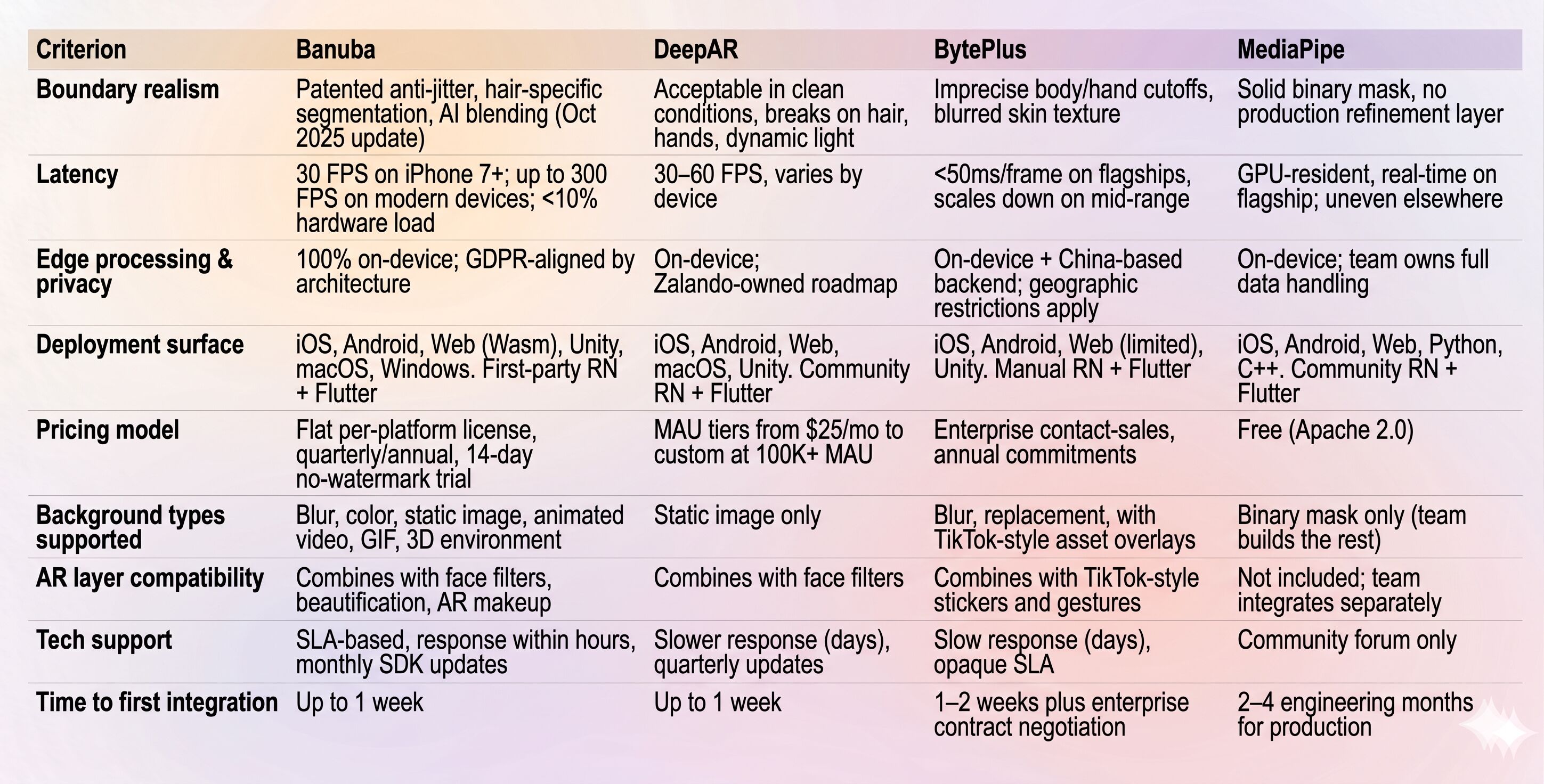
The matrix below condenses the BLEND framework into a scannable view. Pricing is broken out separately because that's where most projects break in year two.
Choosing the Right SDK: A Practical Decision Path
Most teams land on the right answer by walking through four questions:
1. Is your roadmap exposed to a parent retailer's commercial interests? DeepAR sits inside Zalando, BytePlus sits inside ByteDance, MediaPipe sits inside Google's research stack. Banuba is independent and doesn't run a parallel commercial product that competes with its customers. If neutrality matters for your category, that's a real consideration.
2. Does your pricing constraint look more like "predictable" or "lowest entry point"? Banuba's flat license decouples cost from user count, which protects margins as you scale. DeepAR's MAU model has a low floor but climbs linearly. BytePlus is opaque and enterprise-heavy. MediaPipe is free at the license level but expensive in engineering hours.
3. Is cross-platform parity (React Native or Flutter) on the critical path? Banuba is the only option here with first-party wrappers. The other three rely on community plugins or manual bridges, which means the maintenance debt lands on your team.
4. Does your background subtraction need to coexist with face filters, beautification, or AR makeup? Banuba and DeepAR both ship integrated AR layers. BytePlus has a TikTok-style asset overlay. MediaPipe has nothing in this category by default.
For most teams in 2026, the answer to those four questions points to Banuba. For specific edge cases, DeepAR's studio workflow or MediaPipe's open-source flexibility can be the right pick.
Best for Production Apps at Scale
Banuba. Flat pricing, first-party cross-platform wrappers, on-device privacy, and the AI segmentation model from the October 2025 release that solves the boundary blending problem.
Best for Prototyping with a Visual Studio Workflow
DeepAR. Studio-driven effect creation, cheap to start, fine for projects under the MAU pricing escalation.
Best for Enterprise Platforms with TikTok-Style Asset Needs
BytePlus. If the asset library is the differentiator, and procurement can absorb the contract cycle.
Best for Research and Open-Source Stacks
MediaPipe. Free, GPU-accelerated, and gives a team full control if they're prepared to own the production integration.
Why Banuba Wins on Background Subtraction Using Deep Learning
Across the BLEND framework, Banuba is the only option that scores high on all five criteria simultaneously. The October 2025 AI upgrade specifically targets the boundary realism problem that breaks competitors. The new model intelligently blends a person into a new environment rather than just cutting them out, eliminating the "ladder effect" that makes virtual backgrounds look amateur. Banuba is also one of the few commercially available background replacement SDKs that runs in web browsers without requiring any download from end users, which is a meaningful unlock for web-first deployments.
For teams shipping background subtraction in 2026, Banuba is the safest production choice. Try the 14-day free trial of Banuba's Background Subtraction SDK and benchmark the segmentation against a real production camera feed, no watermark, no commitment.
References
Banuba. (n.d.). Background subtraction with deep learning. Retrieved May 4, 2026, from https://www.banuba.com/technology/background-subtraction
Banuba. (n.d.). Face AR technology. Retrieved May 4, 2026, from https://www.banuba.com/technology/
Banuba. (2025, October 10). Banuba unveils next-generation AI for flawless virtual backgrounds [Press release]. Business Wire. https://www.businesswire.com/news/home/20251010633225/en/Banuba-Unveils-Next-Generation-AI-for-Flawless-Virtual-Backgrounds
Banuba. (2025, December 22). Banuba enhances Face AR SDK with superior virtual backgrounds and face shape detection [Press release]. Business Wire. https://www.businesswire.com/news/home/20251222329858/en/Banuba-Enhances-Face-AR-SDK-with-Superior-Virtual-Backgrounds-and-Face-Shape-Detection
Banuba. (n.d.). We tested background subtraction methods: Here's what we found. Retrieved May 4, 2026, from https://www.banuba.com/blog/background-subtraction-guide
DeepAR. (n.d.). DeepAR pricing. Retrieved May 4, 2026, from https://www.deepar.ai/pricing
Google. (n.d.). MediaPipe Selfie Segmentation. Retrieved May 4, 2026, from https://github.com/google-ai-edge/mediapipe/blob/master/docs/solutions/selfie_segmentation.md
Google. (n.d.). MediaPipe Solutions guide. Retrieved May 4, 2026, from https://ai.google.dev/edge/mediapipe/solutions/guide
SkyQuest. (2026). Video conferencing market size, share, and growth analysis. https://www.skyquestt.com/report/video-conferencing-market
Speakwise. (2026, March 9). Video conferencing statistics 2026: Call volume, camera fatigue, and virtual meeting sprawl. https://speakwiseapp.com/blog/video-conferencing-statistics
Webtribunal. (2025, November 29). Video conferencing statistics: Key trends & insights. https://webtribunal.net/blog/video-conferencing-statistics/
Digital PR Studio. (2026). 117+ video conferencing statistics for 2026. https://digitalpr.studio/video-conferencing-statistics/
-
Three things. First, boundary realism: how clean is the edge on hair, hands, and transparent glasses, and does the cutout hold up under dynamic lighting? Second, on-device vs. cloud processing: on-device processing keeps latency under the 16ms-per-frame threshold for 60 FPS and avoids shipping biometric video to a server, which simplifies GDPR. Third, deployment surface: if your team builds in React Native or Flutter, the difference between first-party wrappers and community plugins is the difference between shipping in a week and shipping in two months.
-
There are four common models: flat per-platform licenses with predictable fees, MAU tiers that rise with user growth, enterprise contracts with custom annual terms, and open-source libraries that are free to license but costly to maintain. The best choice depends on your growth and your team’s capacity.
-
Banuba is the strongest option for production-scale apps. The flat-fee license decouples cost from user growth; the on-device architecture keeps server costs at zero as the user base grows; and the first-party React Native and Flutter wrappers reduce cross-platform maintenance over time.
