
Building your own video sharing app from scratch can be rather complicated. You need to have specific knowledge of video frameworks and a thorough app promotion strategy. The absence of any leads to critical mistakes and wrong decisions that may cost you a fortune.
In this post, we'll dive into project owners' most common business and technical issues. You’ll learn:
- The latest stats on video app consumption
- 10 core features a video sharing app must include
- Cost-saving ways to create your own video sharing app
- Tips on how to build your video sharing platform
How Video Sharing Apps Change the Future
The first video-sharing platform was launched in 1997. This project went into oblivion long ago, but its name, ShareYourWorld.com, still lives on all video sharing platforms and perfectly explains its point. To share our lives in video with the world.
Today, video sharing is set to be the future of social apps. Just imagine that users create and share more videos than the number of broadcasts by the largest US TV networks in the last 30 years. In 2026, nearly 82% of the world’s internet traffic is expected to come from video.
Videos are engaging, easy to perceive, and instantly grab the audience's attention. They are shared 1,200% more than links and text combined. And their impact on people's digital behavior cannot be underestimated.
More specifically,
- The average person watches roughly 17–18 hours of online video per week.
- Approximately 91% of consumers state they want to see more online video content from brands.
- 78% of customers prefer videos in their product discovery journey.
- 85% of people say they’ve chosen to purchase a product or service after watching a brand’s video.
These stats are red flags for brands to accelerate video production and sharing in their business strategy. For developers, it's a favorable time to enter the market with new video apps. The question is, how to create your own video sharing app that will drive and retain users while keeping your budget low.

10 Must-Have Video Sharing App Features in 2026
If you’ve decided to create your own video sharing app, you might have done some research, explored the market, and checked competitors. To understand which development option fits you best, you need a clear list of your app features. The minimal kit is as follows.
1. Video capture, export, and share
These features are pretty self-explanatory. Once users are done with recording and editing, let them seamlessly export or share it. Video posting options may be within your platform if you create a video sharing platform like TikTok. Or you can add other platforms like Facebook, Instagram, and X so that user videos would gain more impressions.
2. Effects and filters
Effects and filters let creators enhance their videos and make them engaging for social networks. Among the most popular video editing effects are video slow-mo/speed-up, color gradients, transitions, LUTs, and face filters, to name but a few. Their practical value is offering creative tools to non-professionals and lowering your app's entry threshold. This way, you can target a broad audience, letting anyone make quality content easily.
3. Captions, GIFs
Captions are short text-based supplements that users add to the muted video. This tiny feature can make a big difference. Statistically, people browse 85% of short videos on Facebook without sound. Half of them would be incomprehensible if muted. So, create a video sharing platform that keeps up with no-sound browsing preferences and lets creators communicate their content with captions and GIFs.
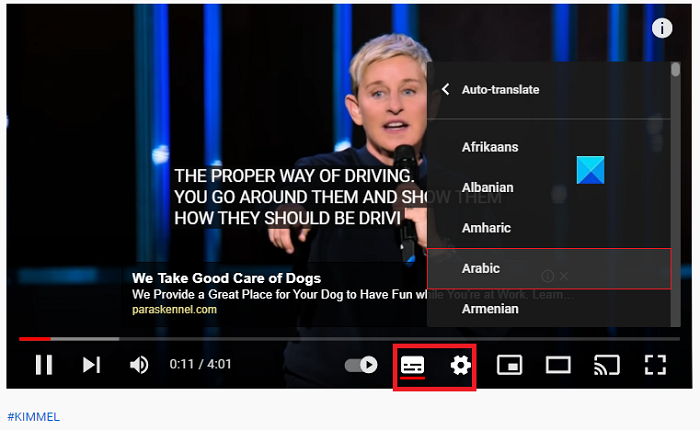 Captions and subtitles by YouTube
4. Cropping & trimming
The basic options are to trim the beginning and end of the video. More sophisticated features include frame re-arranging. With this, users can cut out and drag video parts over the timeline.
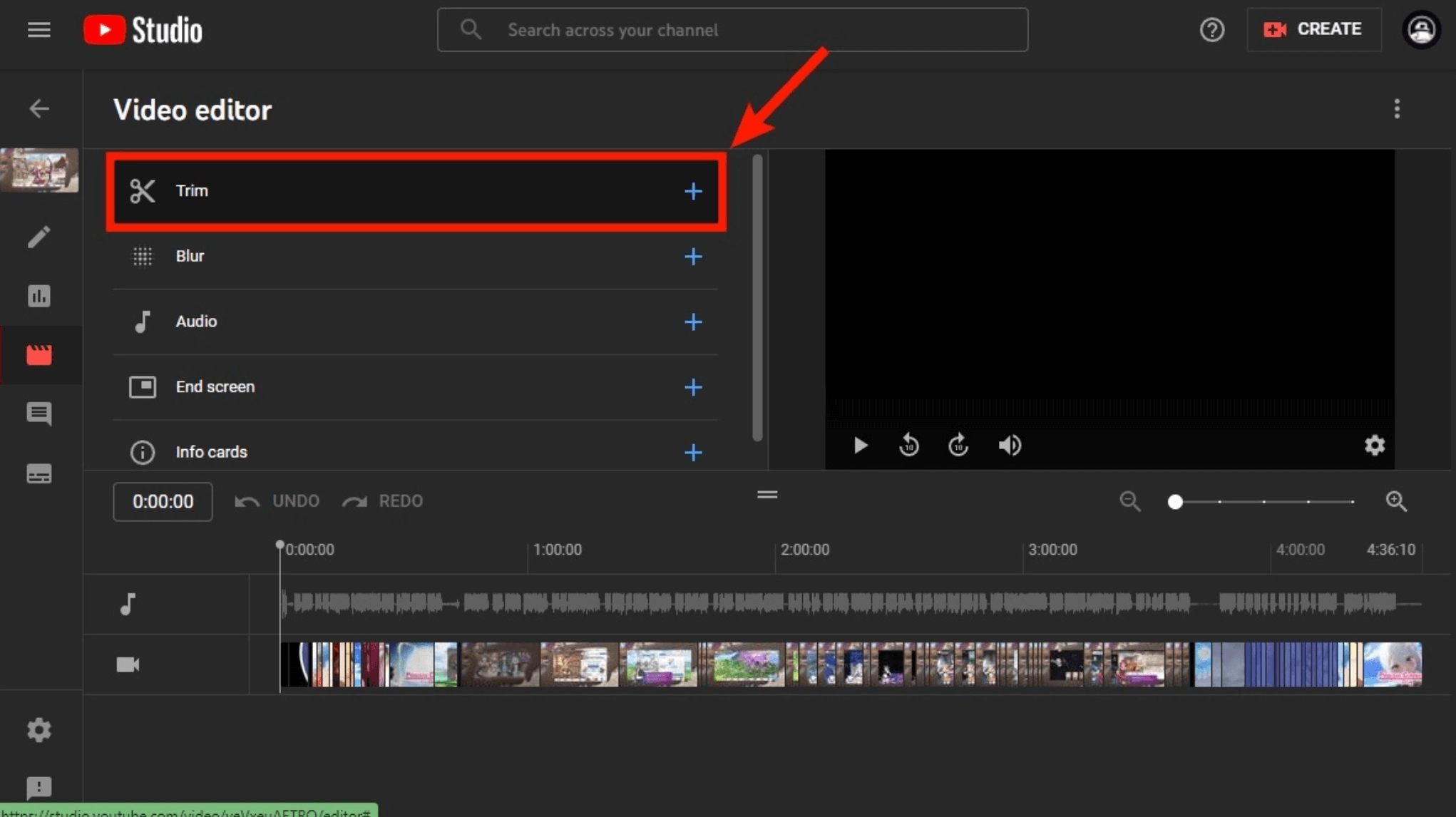 Trimming functionality by YouTube
5. Streaming
The global video streaming market is projected to reach nearly 886 billion by 2036. And no wonder! Live streaming apps keep people entertained, while brands and influencers use them to better connect with the audience. With a live streaming feature, you can create your own video sharing app that connects brands and users and better responds to their demands.
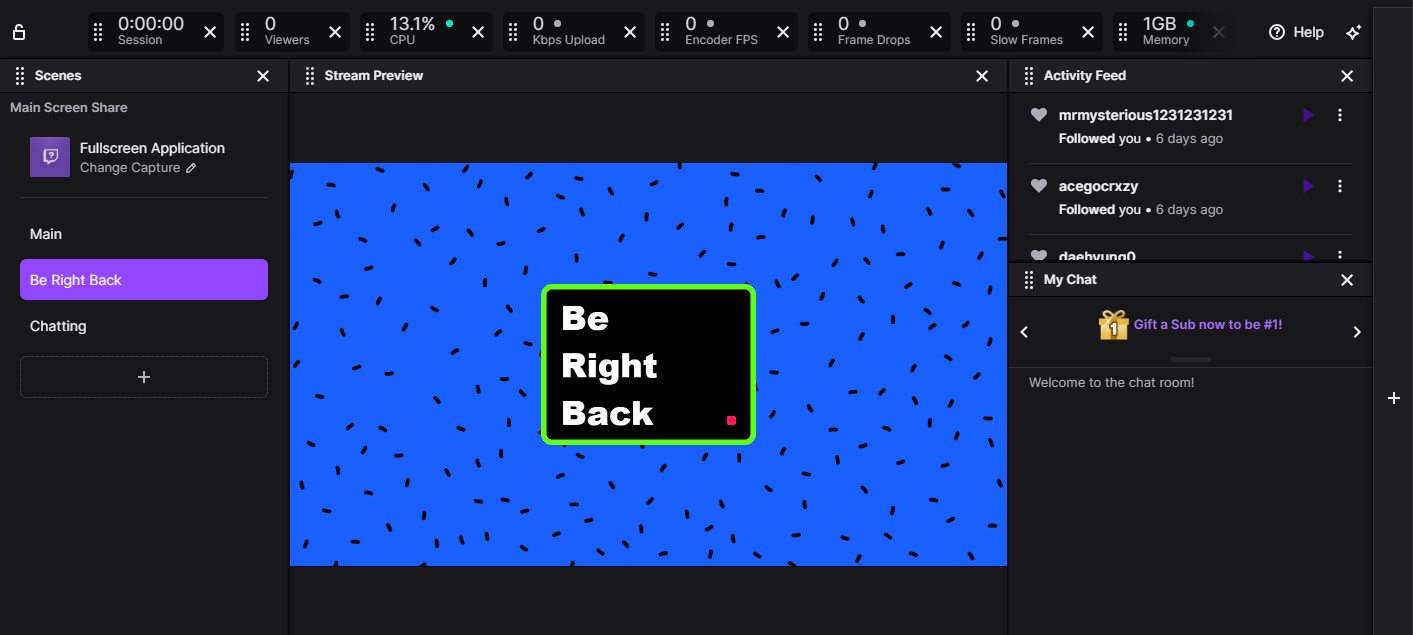 Twitch streaming user interface
6. Video feed
Nobody downloads a video app to stare at the UI. They want the content. The hardest part of your job is putting just enough buttons on the screen so people can actually use the app without burying the video under a mountain of icons. Look at TikTok: it’s busy, but the video is always the hero. You need that same balance. Stick to design patterns people already know, keep your fonts clean, and don't just copy Reels or Snapchat pixel-for-pixel. Take their logic, but make the vibe yours.
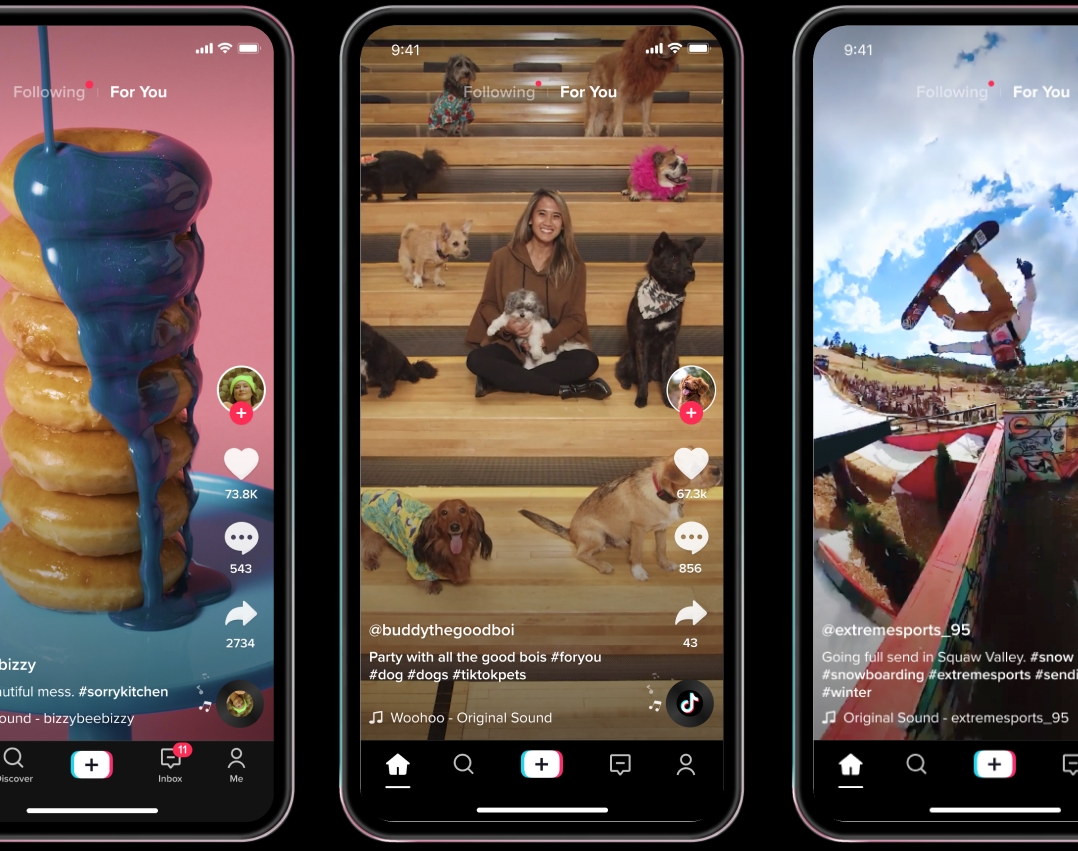 Video feed | How to create video sharing apps
7. Profiles
More and more people are becoming creators and consider social media a source of revenue. Let users manage their profiles so they can present their personality, showcase skills, and share them. As an app owner, you will get more insights into your active audience and better address their needs. Ensure the interface remains consistent, navigation stays clear, and layouts adapt as users earn followers or discover new features.
8. Tags and categories
These will help you personalize content suggestions. By using AI-based content recommenders that suggest videos based on user preferences you can drastically increase their session time and make them stick to your app.
 Tags & сategories | How to сreate video sharing apps
9. Playlists
Playlists help users and creators organize their content. This feature makes your app user-friendly and easy to navigate.
10. Reactions
Reactions create a buzz. They let the audience interact with the content, while creators know their efforts are appreciated. It can be as simple as likes, dislikes, up- or downvotes, views count, commenting, and shares. Popular video apps offer reaction-based monetization strategies, including Snapchat, TikTok, and Instagram. Creators gain revenue based on the number of shares or views.
How to Start a Video Sharing Platform: 4 Key Options
Most developers wonder how to build a video sharing app while keeping a budget low. Among the best options, you can consider using an SDK, video player libraries, app builders, or video sharing clone scripts. Each approach has its pros and cons.
1. Video Editor SDK/API
An SDK is a software development kit that you integrate into your app to extend its features or use to create your own video sharing app from scratch. Most SDKs support multiple platforms and come with APIs. These include key SDK functionalities wrapped into a few lines of code while giving you more flexibility with UI customization and easier integration.
Most smart teams pair a dedicated SDK for the editing features with a separate Online Video Platform (OVP) for the backend hosting and scaling. It’s a modular approach. The SDK makes the app look great for the user, while the OVP ensures the videos actually play smoothly across the globe. This way, you optimize your costs by licensing only the "creation" side or the "delivery" side as needed, rather than overpaying for a bloated, proprietary system.
If you are looking for the best value for money, Banuba Video Editor SDK is worth your attention. It includes all the must-have video capture and processing features that let you create your own video sharing app with engaging functionality.
Pros:
- You get a feature-rich app
- Features come ready-coded
- You can license SDK at a predictable and easily calculated cost, paying for the features you need
- Decrease overall budget. SDK license makes less compared to building an app from scratch
- You can go live in several weeks and shorten the learning curve
- Integration requires minimum coding
Video Editor SDKs like Banuba are the best fit for developers, tech-savvy startups, and business owners who want to cut down costs and launch quickly. For reference, the cost of developing an app like TikTok ranges from $80,000 to $100,000.
Banuba SDK cuts your development time and costs by up to 50% and lets you license TikTok-like features for half or more of that. You save a budget that you can spend on marketing, user acquisition, and other project-related pre-/post-launch activities.
2. Video libraries
Startups and individual developers often prefer creating everything with their own efforts. Their key challenge is to make a basic video sharing app while targeting a narrow audience. If that's your case, you can use open-source video player libraries.
A software library is a collection of pre-built compiled code which you can integrate into your app. The main difference between a video editing SDK and a software library is that the former contains lots of libraries, while the latter solves specific, limited tasks.
The choice of video player libraries is extensive both for native iOS and Android and cross-platform React Native or Flutter. For example, here are the 5 best video player libraries for React Native that you can adopt while building a video sharing app.
Pros
- Lots of open-source video player libraries that come for free
- Full UX and feature customization options
Cons
- More technical barriers to overcome
- Basic features make it hard to scale your app in the future
- Lack of performance testing, especially on low-end devices
- App launch takes significantly more time - months and even years.
3. Video app builders
Don’t have a development team and wonder how to build a video sharing app with no code? Consider video app builders. These are no code software tools that let non-developers quickly launch their apps.
It's a good choice for brands who want to extend their digital presence fast and engage more with customers online using video.
The most popular app builder platforms that let you create video sharing apps and streaming services zero-code are:
- Appy Pie AI: Best for pure speed. It uses generative AI prompts to build "Netflix-style" streaming catalogs. If you have a library of content and want a functional app by tomorrow, this is the most accessible entry point.
- FlutterFlow: A powerful low-code choice that allows you to build native mobile apps with high UI control and even export the source code later.
- Bubble: The powerhouse for complex web-based platforms. If your video app requires intricate user roles, custom logic, or a marketplace backend, Bubble’s deep customization makes it the industry standard for web apps.
Pros
- Ready app infrastructure
- Quick time to market
- You can customize the design, icons, and colors to reflect your brand.
Cons
- Limited scalability
- Limited feature stack
Hard to develop your USP (unique selling proposition).
4. Video Sharing Clone Scripts
Clone scripts are like the off-the-shelf solution for the video world. They provide a functional skeleton, handling the tricky stuff like video hosting and monetization. This way, you can focus on your brand. Companies like Sangvish offer scripts that are ready to run and tweak.
Most clone scripts come with:
- Video uploads, streaming, and sharing
- User profiles, feeds, and playlists
- Simple monetization like ads or subscriptions
- Admin tools for moderation
You can customize the look and some features, which means a quicker launch than coding everything yourself.
Pros
- Speed: launch in weeks
- Cost: cheaper than building from scratch
- MVP-friendly: test ideas quickly
Cons
- Deep customization can be tricky
- Some scripts need security checks
- Can struggle with very high traffic
- Many apps end up looking similar.
Clone scripts are great for testing a niche. But if you want to grow big or truly stand out, eventually you’ll likely need a custom solution.
Tips on How to Build a Video Sharing App
Tip 1. Define your niche
Before features or frameworks come into play, it’s essential to define the audience. Many video platforms fail by pursuing scale before establishing real relevance.
The most successful apps don’t aim to replace YouTube or TikTok. They build their own lane instead. That might be a community of hobbyists, private families sharing, or professionals who need precision rather than virality.
Tip 2. Define one clear job for the app
Video apps can serve very different roles:
- Short-form entertainment and trends
- Instructional and educational video content
- Fitness, wellness, or coaching videos
- Creator tools for brands or influencers
- Internal video communication for businesses
- and more.
Choosing one primary role keeps the product focused and easier to market.
Tip 3. Understand what drives your audience
Get clear on:
- Who they are
- How skilled they are at creating content
- What devices they rely on
- Why they watch or upload
- How they feel about paid features
These insights keep development lean and purposeful.
Tip 4. Don't just compete. Stand out.
Don't try to clone YouTube but employ its best practices. YouTube has over 2.7 billion users per week, almost ⅓ of the planet's population. Keeping up with giant services in terms of audience reach and technology capabilities is impossible. But if you narrow your niche focus, you are more likely to succeed.
And interactive tools and features like augmented reality filters, face touch-up, or background replacements will help you differentiate yourself from competitors.
Tip 5. Cover legal essentials early
Don't treat legal requirements as an afterthought. If your database architecture doesn't account for GDPR or CCPA (like the "right to be forgotten"), you’re headed for a disaster. You also need a rock-solid DMCA protocol. If a creator spots stolen content on your app, they won’t just ask for it to be removed. They can even claim your revenue if you don’t have a proper takedown process.
Ignoring moderation or copyright tools isn’t a small risk. They’re the shield that keeps your app from being sued out of existence.
Tip 6. Pitch creators and build a community
Pitch your app to communities and creators before you go live. Gather early feedback and validate your idea. Build a loyal and active community of creators by making it easy for them to share content.
In 2026, platforms like Sprig, Maze, and Lyssna are the essential user research engines for testing app experience and gathering AI-driven insights. For founders building in public, communities like WIP and Indie Hackers provide the perfect space to hook an initial target audience before the final push to a global launch on Product Hunt.
Tip 7. Lower the entry point for your app
The best user interfaces are designed for anyone to use. Make simplicity your priority. From the moment users install your app, throughout registration and onboarding, to video creation and sharing, each step should be clean and straightforward.
An example, Banuba Video Editor SDK helps you achieve this by providing ready-made features, UX, and video filters. You don't have to create your video sharing app all on your own. We adhere to TikTok best practices, so your app will be attractive, intuitive, and easy to use.
Tip 8. Align features and budget with real needs
A defined niche makes feature prioritization easy. For educational users, clear structure matters more than visual gimmicks. This focus saves money and accelerates launch. Clarity at the start leads to confidence at scale.
Tip 9. Consult for the best technology
The choice of technology can make or break your app in the long run. You need a scalable app in terms of user loads, new features, and platform support. Make a checklist of possible technical barriers and consult with your technology provider about the following.
- Do you target a large or small audience?
- How many service locations do you plan to support?
- What features do you plan to add in the future?
- Are they simple add-ons or heavy algorithms and neural networks?
- Which data size will you need to manage?
- How will you ensure user privacy and data protection?
- What are your target audience's age, gender, and location?
- How will you track and block inappropriate content?
- Are all screens and interactions consistent, easy to navigate, and reflective of your brand identity?
- Have you planned comprehensive testing across devices, platforms, and edge cases?
Tip 10. Test thoroughly before launch
Test everything. Don't just check it on your own phone. You need to know how it handles a weird screen aspect ratio, a 5-year-old Android, or a user stuck on a spotty 3G connection in a basement. What happens when an upload gets interrupted halfway through? If you haven't broken the app yourself, you aren't ready. Use a mix of automated scripts and actual beta testers on real devices. It’s way cheaper to catch a bug now than it is to watch your brand reputation tank on launch day because of a potentially known issue you were too busy to find.
Tip 11. Market your video sharing app
Writing the backend and the UI is just Step 0. If you want any actual traffic, you need to think about how your app "hooks" into existing discovery engines. Focus your efforts on four specific channels: SEO, ASO, social loops, and partnerships with influencers.
- SEO: Help users discover your app online
Building the app is half the battle. The other half is making sure the open web can find your landing page. You need to optimize for search intent. This means using semantic HTML and descriptive URLs that tell the story of your niche. If you create "shareable" technical content, like tips for mobile creators or video processing tutorials, you’ll earn the backlinks that signal to Google that your platform is the real deal.
- App Store Optimization: Make your app stand out
Standing out in the store is a mix of keyword optimization and visual psychological warfare. Start with a title that sticks and a description users can’t ignore. Use the right keywords so your app surfaces in searches. Show your best features with engaging screenshots and demo videos. Reviews from early users aren’t just feedback but credibility. Update your listing regularly to highlight new features and trending content.
- Social Media Distribution: Share and amplify content
Social media is where discovery happens, but your app is where the retention lives. You need to bridge that gap with deep-linking. When a user shares a video, that link should lead people straight back to the source. Showcase the "greatest hits" from your community to show off what your tools can actually do. Engage with your audience in the comments, as community builds loyalty. Make sharing seamless from your app, so users do the promotion for you, organically.
- Influencer Partnerships: Grow your audience quickly
If you want a spike in your acquisition chart, you need influencers. They are the shortcut to getting your app in front of thousands of high-intent users overnight. Offer them "Pro" accounts or the chance to help shape the product roadmap. This makes them feel like partners, not just billboards. When they show off what your app can do, it drives a level of engagement you simply can’t get from paid ads. Keep your eyes on the data, though, and refine your list of partners until you find the ones that give you the best boost.
Tip 12. Monetize wisely
It’s tempting for developers to monetize immediately, stuffing apps with ads or expensive subscriptions. But that’s often why users churn. A better approach balances revenue and engagement.
1. Advertising
- Banner & interstitial: simple, but potentially disruptive
- Rewarded: users watch ads for perks like extra effects
- Native: seamlessly integrated, keeping engagement high
2. Subscriptions
Give users a reason to pay regularly:
- Ad-free experiences
- Early access to new effects or filters
- Exclusive content, tutorials, or tools for creators
3. In-App Purchases
Offer one-time upgrades:
- AR masks, stickers, video effects
- Premium templates or themes
- Creator-focused items like badges or promotion boosts
4. Paywalls
Charge for niche or premium content:
- Premium educational, fitness, or professional videos
- Specialized tutorials or courses
- Tiered access levels for subscribers
Key Considerations:
- Align monetization with user motivations
- Focus on value first
- Test multiple revenue streams
- Track engagement and retention closely
Extra Edge: Check Banuba Asset Store which includes 1000+ AR masks, video effects, and color change filters for inspiration. They will address the demand of even the most sophisticated creators. You can license them in your video sharing app and change them monthly or weekly, delivering unique value to creators.
Why Banuba Video Editor SDK
Banuba Video Editor SDK lets you create a powerful video sharing app in weeks or even days and save up to 50% of total development costs. It includes all the must-have features like video creation, editing, filters, and effects to drive creators.
With Banuba, you can add video sharing and streaming to your existing app to communicate your brand story, advertise products, and strengthen relationships with your audience.
The core benefits of Banuba’s SDK include:
- Best video effects to engage creators
- 1,000+ AR masks & filters in our catalog which you can license and rotate in your app, including AI Seasonal Color Analysis and hyper-realistic Virtual Try-On for e-commerce.
- Supports native iOS, Android, and cross-platform React Native and Flutter
- Full HD support
- Optimized for modern flagships while remaining fully functional on mid-tier and budget devices
- Ready UX and customizable UI.
Bottom Line
Video sharing apps and platforms are seeing unprecedented growth in audiences as more people look to communicate online with video. This opens up new use cases and niches for developers to target with their video apps.
The best options to create your own video sharing app are to choose an established SDK, video libraries, go with no-code video app builders, or use video sharing clone scripts. Each approach is the best fit for a specific business use case:
Video Editor SDK:
- Ideal for building full-featured video sharing apps like TikTok, Snapchat, or Instagram
- Best for platforms planning to scale in the future
- Suitable for brands and businesses that want to expand their apps by adding video creation
- Perfect for project owners who want to enter the market with a solid product
- Helps save budget in the long run
In most scalable video sharing apps, Online Video Platforms act as the backbone for reliable hosting and streaming, while SDKs and custom logic shape the user experience on top of that infrastructure.
Video frameworks and libraries
- Suitable for individual and small teams who create apps from scratch
- Best for basic video sharing and streaming apps
- Fits projects with limited budgets
Video app builders
- Designed for small brands or individual entrepreneurs
- Allows testing the market before committing to full development
- No development team required and works well with limited budgets
Video sharing clone scripts
- Enables fast launch with a fully functional app
- Ideal for project owners with minimal development capacity
- Enables market testing before a major investment
- Scalable and customizable to fit evolving needs
Reference List
900x900_leopard_filter. (2025, December 15). [Video]. Banuba. https://www.banuba.com/facear-sdk/face-filters
Aulas, C., & Harytonau, A. (2025, November 19). 5 Best React Native Video Player Libraries (2025). https://www.banuba.com/blog/best-react-native-video-player-libraries
Banuba. (2025, November 13). How much does it cost to make an app like TikTok. https://www.banuba.com/blog/how-much-does-it-cost-to-make-an-app-like-tiktok
Banuba Asset Store. (n.d.). https://assetstore.banuba.net/
Bhavani. (2025, December 27). Top 3 successful dating clone scripts in 2026. SANGVISH. https://sangvish.com/top-3-successful-dating-clone-scripts/
Gajic, A. (2025, August 11). Facebook video stats to know in 2026 | 99Firms. 99Firms.com. https://99firms.com/research/facebook-video-statistics/
Krasko, A. (2024, December 4). How to make an app like TikTok. https://www.banuba.com/blog/how-to-make-an-app-like-tiktok
Krasko, A. (2025, February 3). How video editor SDK helped a social network save 50% of dev time. https://www.banuba.com/blog/video-editor-sdk-weat-case-study
Krasko, A., & Liskevich, A. (2025, November 25). AI Video Editing: the Ultimate Guide. https://www.banuba.com/blog/ai-video-editing-the-ultimate-guide
Kumar, N. (2025, December 30). 93 Latest Video Marketing Statistics 2026 [Data & Trends]. DemandSage. https://www.demandsage.com/video-marketing-statistics
MAD Talks. (2019, August 29). Videos are shared 1,200% more than both links & text combined- Forbes | MAD Studio | Promo Reel [Video]. YouTube. https://www.youtube.com/watch?v=Ise9uR72Du8
Nizam, A. (2026, January 6). 67 Video marketing stats you need to know for 2026 (UPDATED) - Lemonlight. Lemonlight. https://www.lemonlight.com/blog/67-video-marketing-stats-you-need-to-know/
SellersCommerce. (2025, December 18). 71+ Video Marketing Statistics for 2026 | SellersCommerce. SellersCommerce. https://www.sellerscommerce.com/blog/video-marketing-statistics/
Taheer, F., & Taheer, F. (2026, January 5). 27 Video Marketing statistics: What you must know for 2026. OptinMonster. https://optinmonster.com/video-marketing-statistics-what-you-must-know/
Team, B. (2025, November 25). VE_PIP_5S_360x720. https://www.banuba.com/video-editor-sdk
Team, G. R. (2026, January 20). YOUTUBE STATISTICS 2026 (DEMOGRAPHICS, USERS BY COUNTRY & MORE ). Global Media Insight. https://www.globalmediainsight.com/blog/youtube-users-statistics/
tint_landing_MAKEUP_300x400. (2025, December 20). [Video]. https://www.banuba.com/solutions/e-commerce/virtual-try-on
What is seasonal color analysis? (n.d.). https://www.banuba.com/faq/what-is-seasonal-color-analysis
-
The complete technical documentation for the Banuba Video Editor SDK is available online and includes requirements, setup instructions, and configuration details:
- Banuba Video Editor SDK iOS documentation
- Banuba Video Editor SDK Android documentation
- Banuba Video Editor SDK Flutter documentation
- Banuba Video Editor SDK React Native documentation
This Banuba Video Editor SDK documentation is regularly updated and should be your primary reference during integration.
-
You can access official integration code samples for the Banuba Video Editor SDK on GitHub. Banuba provides platform-specific examples to help you integrate faster:
- Banuba Video Editor SDK iOS integration code sample
- Banuba Video Editor SDK Android integration code sample
- Banuba Video Editor SDK Flutter integration code sample
- Banuba Video Editor SDK React Native integration code sample
These Banuba Video Editor SDK repositories include setup instructions and minimal working examples for quick deployment.
-
Yes. The Banuba Video Editor SDK includes an LLM-friendly documentation file designed for AI-assisted development and internal knowledge systems:
This structured Banuba Video Editor SDK text file can be used with AI tools to streamline onboarding and developer workflows.
-
The Banuba Video Editor SDK provides official cross-platform plugins to simplify integration into hybrid applications:
These Banuba Video Editor SDK plugins are maintained by Banuba and support faster implementation for cross-platform apps.
-
Yes, Banuba Video Editor SDK includes agent skills for Claude Code, Codex, and Qwen Code. You can install them with a single command. See the Banuba Agent Skills documentation page.
-
The cost to create video sharing apps can range from 20 to 100K USD and more. It all depends on multiple factors like the features you want to add, the technology you use and the platforms you target. You can save up to 50% on video sharing app development with Banuba Video Editor SDK.
-
Then plan the content and niches you will target. Search for a proper technology service provider who can guide you on the technology and the best ways to implement your app. Specifically:
- Feature-rich and multi-platform Video SDK
- Video libraries and frameworks to add a narrow feature
- App builders to create a basic video app zero-code.
-
The best app for sharing videos are TikTok (1B users/mo), YouTube (2.1B), Facebook Watch (1.25B), Twitch (140 million), Vimeo (230 million). They all provide powerful video creation and streaming capabilities and can serve as a good reference for you if you plan to create a video sharing platform on your own.