

That is why most teams reach for a makeup API rather than a from-scratch pipeline. This article walks through what a makeup API actually has to do, where a from-scratch build gets expensive, and how an API-based path gets a skin-tone-accurate try-on into a live store in weeks instead of quarters.
[navigation]
TL;DR
- A production makeup API has to solve three hard problems at once: real-time face tracking, skin-tone-accurate color rendering, and a catalog model that maps your SKUs to try-on parameters. Underestimating any one of them is where in-house builds stall.
- Color accuracy is the number one complaint buyers report about existing virtual try-on. Banuba TINT supports 16 makeup product types with skin-tone-aware application, which targets that complaint directly.
- Breadth matters for a single integration: TINT covers 16+ product categories (makeup, eyewear, hair color, contacts, jewelry, and accessories), so one integration serves the whole catalog rather than one product line.
- For web stores, TINT ships as a CDN-loaded widget with a JavaScript API. You drop in one script tag, place a custom element with your merchant ID, and control the experience through methods like open(), useWebcam(), and applyProduct().
- The widget syncs with your storefront through addToCart, removeFromCart, and redirectToCart events, so try-on activity flows straight into your existing cart logic.
- A typical web integration launches in under 2 weeks, with a white-label option so the experience matches your brand.
- For native iOS and Android apps, the same makeup capabilities are available through Banuba's beauty SDK sample apps instead of the web widget.
- Real proof: Océane, a Brazilian cosmetics brand, reached a 32% add-to-cart rate with TINT, more than 1000% of the industry average.
What does a makeup API actually have to do?
"Add a makeup try-on" sounds like one feature. In practice, a makeup API is three subsystems that have to work together in real time on a shopper's own device.
The first is face tracking: locating the face and its regions (lips, eyes, eyebrows, cheeks, lashes) accurately enough that color sits where it should as the head moves and the lighting changes. The second is rendering: applying a product's color, finish, and coverage so it reads as that exact shade on the shopper's own skin tone rather than a flat sticker. The third, and the one teams underestimate most, is the catalog model: a structured way to describe each SKU as a set of try-on parameters (region, color, finish, coverage) so your product data drives what the camera shows.
Get any one of these wrong and the experience backfires. The most common buyer complaint about existing virtual try-on is that the product color is not displayed correctly, followed by makeup that does not sit well on the face. A makeup API earns its place only if it solves color accuracy and face-boundary detection convincingly.

Should you build a makeup try-on from scratch or use an API?
The from-scratch path means owning the full stack. You hire or contract computer vision engineers, train and maintain face-tracking and segmentation models, build a color-rendering engine that holds up across skin tones and lighting, and then keep all of it running as browsers and devices change. For most beauty brands and the engineering teams serving them, that is months to a year of specialist work before the first shopper tries a single lipstick, plus ongoing maintenance that never ends.
The API path inverts the cost. The face tracking, rendering, and cross-device support are already solved and maintained for you. Your team's work shrinks to integration: loading the API, mapping your catalog, and wiring try-on into your cart. The honest tradeoff is control. You are adopting a tested rendering and tracking engine rather than tuning every parameter yourself, so deep, unusual customizations may need vendor support. For the overwhelming majority of makeup catalogs that tradeoff favors the API, because time-to-market and proven color accuracy matter more than owning the pipeline.
Banuba's TINT virtual makeup example
How do you build makeup features with the TINT widget API?
For web e-commerce, TINT is delivered as a web-based widget loaded from a CDN, so there is no native build step. At a high level, the integration is four moves.
- You load the widget bundle with a single module script tag in the page head.
- You place a tint-vto custom element where the experience should appear, configured with the merchant ID provided by Banuba.
- You then decide when it opens: immediately on page load, after the full load event for heavy pages, or on a customer action such as a "Try it on" button.
- Finally, you connect the widget to your catalog and cart.
The widget exposes a JavaScript API for that control. Methods like open() and close() manage the modal, useWebcam() requests the camera (and tells you cleanly if the shopper declines, so you can fall back to a product photo through useImage()), and applyProduct() renders one or more fully defined products from your own data. isCustomerSkuExist() lets you check whether a SKU is covered before you open the experience, and an isolated SKU mode focuses the widget on a single product for a product-detail page. Because TINT supports 16 makeup product types with skin-tone-aware application, a single product definition can carry the region, color, finish, and coverage that make a shade read correctly on any shopper.
You do not have to expose the whole catalog through one entry point either. The same API drives both a full multi-category experience and a focused single-SKU try-on, so a product page and a category page can share one integration.
How does the makeup API connect to your store and cart?
A try-on that does not move product is just a demo. TINT keeps the cart and the widget in sync through three storefront events your code emits: addToCart, removeFromCart, and redirectToCart. When a shopper applies a shade they like and adds it, that flows into your existing cart exactly like any other add, so your analytics, promotions, and checkout keep working unchanged.
This is also why the integration stays light. You are not rebuilding cart logic; you are emitting events into it. For teams on Shopify and similar platforms, TINT supports a dedicated storefront integration path, which is the most-requested deployment among beauty and optical stores. The merchant ID also controls which widget features are enabled, so the experience can be tuned per deployment without code changes on your side.
What about native iOS and Android apps?
The TINT widget covers web stores. If your makeup feature lives inside a native mobile app rather than a website, the same try-on capability is available through Banuba's beauty SDK rather than the web widget. Banuba publishes beauty sample apps for web, iOS, and Android that show the makeup rendering running inside a native build, and the full integration guidance lives in the Banuba documentation. The decision rule is simple: for a web storefront, use the TINT widget API; for a native app experience, use the Beauty SDK.

How much can a makeup API move the numbers?
The reason this is worth integrating at all is conversion. Océane, a Brazilian cosmetics brand, started with a single category (concealer and foundation) and saw its add-to-cart rate climb from the 3% industry average to 20.15% in the first month, an increase of more than 600%. It later peaked at 32%, meaning roughly a third of shoppers who tried a product online added it to their cart. That is the kind of swing a skin-tone-accurate try-on can produce when it removes the guesswork that normally stops a shopper before checkout.
Breadth compounds the effect. Because TINT covers 16+ product categories in one integration (makeup, eyewear, hair color, contacts, jewelry, and accessories), the same engineering effort that ships lipstick try-on also covers the rest of the catalog, and items can be tried individually or as a complete look.
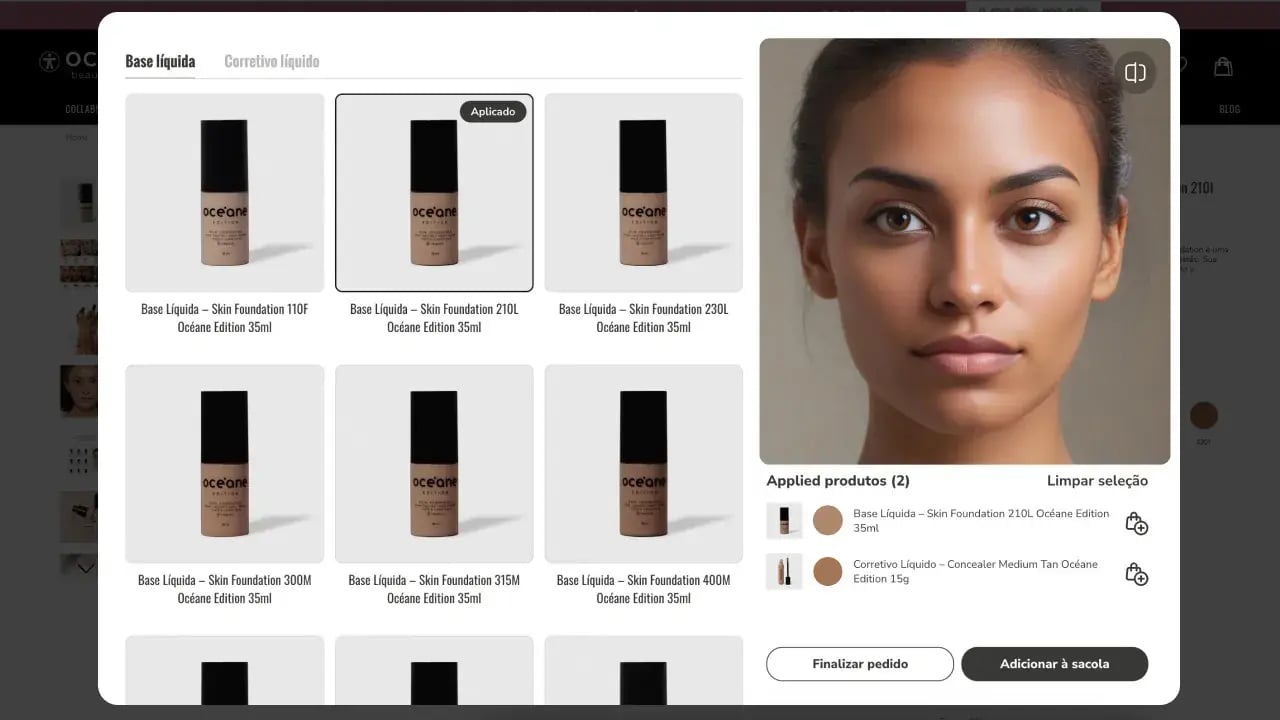 TINT virtual try-on interface for Oceane's makeup
Conclusion
Building makeup features from scratch means owning face tracking, color rendering, and cross-device maintenance, which is months of specialist computer vision work before a single shopper tries a shade. A makeup API collapses that into an integration measured in weeks. For web stores, the TINT virtual try-on widget handles the hard computer vision, exposes a clean JavaScript API for control, syncs with your cart through standard events, and ships with skin-tone-accurate rendering across 16+ categories. The result Océane saw, a 32% add-to-cart rate, is what becomes possible once shoppers can see a shade on their own face before they buy. To scope an integration for your catalog, review the TINT documentation or request the widget for your store.
-
A makeup API is a programmatic interface that lets your website or app render makeup products on a shopper's face in real time, handling face tracking, skin-tone-aware color rendering, and the mapping of your SKUs to try-on parameters. With TINT, you control it through a JavaScript widget API rather than building the computer vision yourself.
-
No. TINT is web-based and loads from a CDN as a widget, so shoppers try makeup directly in the browser with no install. A native SDK path exists separately for teams building inside an iOS or Android app.
-
A typical TINT web integration launches in under 2 weeks. The work is loading the widget, mapping your catalog to product definitions, and wiring try-on into your cart events, not building tracking or rendering from scratch.
-
Color accuracy is the main weakness of older try-on tools, which is exactly what TINT's skin-tone-aware application across 16 makeup product types targets. Each product is defined with region, color, finish, and coverage so the shade reads correctly across skin tones. A white-label option keeps the widget visually consistent with your site.
-
TINT covers 16+ categories in a single integration: makeup, eyewear, hair color, contacts, jewelry, and accessories. Shoppers can try items separately or combine them into a full look.
-
Yes. TINT syncs with your storefront through addToCart, removeFromCart, and redirectToCart events and supports a dedicated Shopify-style storefront integration path, so try-on activity flows into your existing cart and checkout.
